
Pytest is an open-source testing framework that has redefined simplicity and efficiency in Python testing. Its popularity hinges on its ability to support simple unit tests and complex functional testing for applications. What sets Pytest apart is its minimalistic syntax and the ability to write test codes using Python's assert statement, making tests readable and maintainable.
Install Pytest using the following command in the terminal:
pip install pytest
Basic Pytest Test
Pytest automatically discovers and runs test functions written in a specific format.
- Pytest searches for test files that start with test_ or end with _test.py.
- A function reverse_text() is created to take a string input and return its reversed value.
- Another function test_reverse_test() tests this function using assert, verifying that reverse_text("python") returns "nohtyp". If the condition is true the test passes, otherwise Pytest marks it as failed.
# test_reversal.py

def reverse_text(text):
    return text[::-1]

def test_reverse_text():
    assert reverse_text('python') == 'nohtyp'
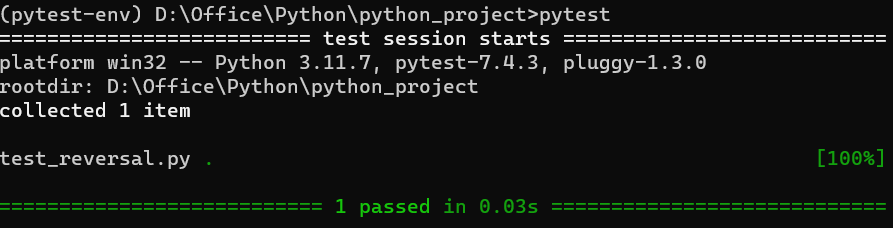
Output: To run the above test we have to execute "pytest" in the terminal and we will get the below output.
When to Create Fixtures?
Fixtures in pytest are used to provide a fixed baseline upon which tests can reliably and repeatedly execute. Fixtures are reusable components that are used to set up a base state for tests. They are particularly useful for setting up complex objects, connecting to databases or doing any setup that might be needed before your tests can run. They are ideal for:
- Setting up external resources: like databases or network connections.
- Initializing data: that is required across multiple test functions.
- Configuring environment: such as setting up paths or external variables.
Example: In below example, we create a fixture named "sample_data" using the "@pytest.fixture" decorator. This fixture function returns a list [1, 2, 3], which is then used in the test function test_sum() to verify that the sum is correct.
import pytest

@pytest.fixture
def sample_data():
    return [1, 2, 3]

def test_sum(sample_data):
    assert sum(sample_data) == 6
When to Avoid Fixtures?
In Pytest, while knowing about the importance of creating fixtures it also crucial to know that where to avoid fixtures for the smooth testing.
- For overly simple setups: where the setup is just one or two lines of code.
- When they reduce test readability: if the fixture is used only once or its purpose is not clear.
- If they introduce unnecessary dependencies between tests, reducing the ability to run tests in isolation.
How to use Fixtures at Large Scale?
When dealing with extensive test suites, it's crucial to manage fixtures efficiently:
- Use "conftest.py": Place common fixtures in a "conftest.py" file at the root of your test directory, making them accessible across multiple test files.
- Fixture Scoping: Apply proper scoping ('function', 'class', 'module', 'session') to optimize setup and teardown operations.
- Fixture Parametrization: Reuse fixtures with different inputs using params in the fixture decorator.
Enhancing Functionality and Tests with Pytest
Consider a scenario where a user enter non-string input in "reverse_text()" function. Now, we refine the above function to raise an exception in such cases and test this behaviour.
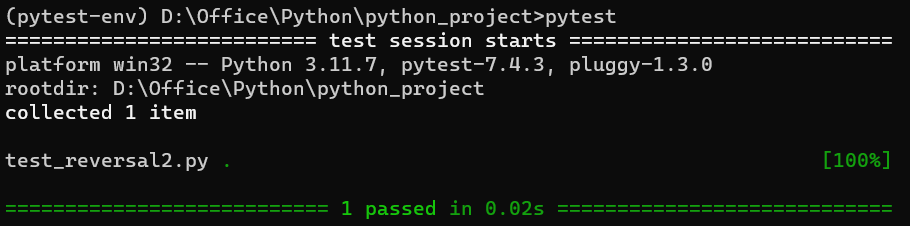
In the below code, Pytest runs the test function "test_reverse_text_not_string()". This test function calls 'reverse_text(1234)'. As '1234' is a number not a string so, 'reverse_text()' raises a "ValueError". The "with pytest.raises(ValueError)" in the test function is expecting this "ValueError", that's why the test passes.
# test_reversal2.py
import pytest

def reverse_text(text):
    if not isinstance(text, str):
        raise ValueError('Expected a string')
    return text[::-1]

def test_reverse_text_non_string():
    with pytest.raises(ValueError):
        reverse_text(1234)
Output:
Deep Dive with Pytest Fixtures
For a more complex example, let's create a Calculator class with methods to add, subtract, multiplication and division. We’ll explore how fixtures can manage setup and teardown in testing such scenarios.
# calculator.py
class Calculator:
    def add(self, a, b):
        """Return the addition of two numbers."""
        return a + b

    def subtract(self, a, b):
        """Return the subtraction of two numbers."""
        return a - b

    def multiply(self, a, b):
        """Return the multiplication of two numbers."""
        return a * b

    def divide(self, a, b):
        """Return the division of two numbers."""
        if b == 0:
            raise ValueError("Cannot divide by zero.")
        return a / b
Next, we create the test script using Pytest. In this script we will include tests for each arithmetic operation as written in the below code.
# test_calculator.py
import pytest
from calculator import Calculator

@pytest.fixture
def calc():
    """Provides a Calculator instance."""
    return Calculator()

def test_addition(calc):
    """Test addition method."""
    assert calc.add(2, 3) == 5

def test_subtraction(calc):
    """Test subtraction method."""
    assert calc.subtract(5, 3) == 2

def test_multiplication(calc):
    """Test multiplication method."""
    assert calc.multiply(3, 4) == 12

def test_division(calc):
    """Test division method."""
    assert calc.divide(8, 2) == 4

def test_division_by_zero(calc):
    """Test division by zero raises ValueError."""
    with pytest.raises(ValueError):
        calc.divide(10, 0)
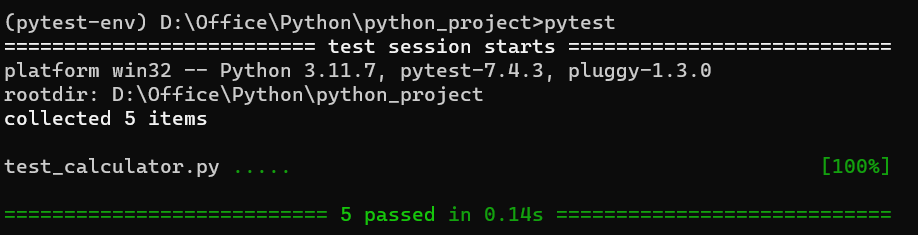
Output:
Code Explanation:
- The code imports pytest and the Calculator class, which has four basic arithmetic methods: add(), subtract(), multiply(), divide() (raises a ValueError if the divisor is zero).
- A pytest fixture (calc) creates a new Calculator instance before each test.
- This ensures each test runs independently without affecting others.
- Each test function (e.g., test_addition(), test_subtraction()) receives the calc fixture as an argument.
- These functions use the Calculator instance to verify if the methods work correctly.
- Example: test_addition() checks if add() returns the correct sum.
