Skip to content

Welcome to Planet KDE

This is a feed aggregator that collects what the contributors to the KDE community are writing on their respective blogs, in different languages

Sunday, 3 May 2026

Screenshot
Screenshot

This is Drawy, KDE’s first infinite whiteboard app written entirely in C++ and Qt. It is inspired by the popular web-based Excalidraw. Its main focus is simplicity, ease of use, and performance. You get all the usual essential features, such as drawing tablet and touchscreen support, basic shapes like rectangles, ellipses, arrows with different arrowheads, lines, etc., text and image support, as well as many other features such as groups, reordering elements, alignment, etc.

Why?

There’s a short story behind this. A few years back, I got myself an XP-Pen Deco Mini 7, which is a drawing tablet for brainstorming and studying digitally. I’ve been a Linux user for many years, so it was natural that I looked for writing apps made for Linux. I stumbled upon Xournal++, which is an awesome FOSS note-taking app. I should mention that I wanted something for brainstorming and not for note-taking. I used it for a good number of days until I realized that I wanted an infinite canvas, as I hated navigating back and forth between pages whenever I ran out of space. I then discovered Lorien, which is a FOSS whiteboard app that features an infinite canvas. While it did the job, it lacked basic features such as resizing items, and its stroke smoothing felt average. I later tried RNote. It felt like the best app out there and worked flawlessly. The main issue that I found was that its interface required more clicks than necessary to perform certain actions. For example, if you wanted to create an ellipse, you’d need to click on the shapes button -> shape menu -> ellipse. That’s three clicks. This may sound like a small issue, but when you want to brainstorm quickly, it gets annoying. It also doesn’t allow you to customize the keybindings. I then stumbled upon Excalidraw. It was a dream come true. It was simple, fast, infinite, and had plenty of features. However, it being a web-based app was its biggest downside for me. First, it lags a lot on Firefox. If you are a Firefox user, you will notice that Excalidraw does not offer the same performance as it does on Chromium-based browsers. For some weird reason, this problem is even worse in dark mode. Second, with web-based apps, you lose the ability to save files on your desktop and open them by double-clicking. I’m also a computer science student in my pre-final year, so I was naturally looking for project ideas to work on to strengthen my skills. So I decided that I would make a whiteboard app in C++ because I enjoy working with C++. Qt felt like the natural choice, given that I wanted to work with C++.

Development

I began developing Drawy in January 2025. I had just learned the basics of Qt and went all in. The first prototype had a finite canvas with basic tools like a pen, some shapes, and an eraser. The code was a mess, but it worked. Later, I learned about low-level design and SOLID principles, so I studied more and refactored the entire codebase around those concepts. This made the code much more maintainable and open to expansion. Development was quite slow, as I only worked on weekends due to college. Many weekends went by without any progress for various reasons, but I never abandoned the project. A fun fact: I’m in a coding club at my college called “Hash Define,” where it is a practice for us to teach junior students in the same club. It goes like this: you’ll be taught by your seniors, then when you become a senior, you teach your juniors. So I used to teach them concepts related to algorithms, data structures, and object-oriented programming. Since I already had a drawing tablet and my own prototype of Drawy, I used Drawy to teach them. This helped me discover bugs, performance issues, and missing features. I spent my weekends implementing new features that I wanted and fixing bugs and performance issues.

Challenge 1: Making it infinite

So the first challenge that I faced was making the entire canvas infinite. The first question was, “Where do I even store the items?” My first thought was a list (vector). It is pretty straightforward to store items in a list. When you want to render stuff on the screen, you just traverse through all of them and render. That was a bad idea. Soon, I discovered spatial data structures. There were a lot of them, but I chose the quadtree. It is an awesome data structure that is used heavily in game development and graphics-intensive programs. The main advantage of using a quadtree over a vector is that you can query items in any region in logarithmic time. That sounded really cool to me, so I stuck with it. To make it infinite, I wrote a simple recursive algorithm that replaces the current node with a bigger node if the query region lies outside the current region. It worked flawlessly.

Challenge 2: Performance

I made some very poor decisions in the beginning. One of them was rendering content on a QPixmap using the software-based QPainter. I realized this was a problem much later in development, so reverting it was not an option. I decided to keep the current approach and implement algorithms to improve performance. The canvas was infinite, and you could easily add thousands of items to the screen. This was a problem. Adding thousands of items means rendering thousands of items. Since QPainter runs entirely on the CPU, moving around the canvas was unusable. Even with fewer than a hundred items, the lag was unbearable. Almost all of it came from rendering items on every movement of the mouse. The solution was simple: introduce a tile-based cache for the canvas. Items would be rendered once in the cache (which I call the CacheGrid). Now, instead of rendering all the items when moving the canvas, only the cache tiles would be rendered. Since our quadtree allows us to query items by region, we can query items that are visible and render only those on the CacheGrid. Tiles that go outside the viewport are discarded, which keeps memory usage under control. This one change made it go from being barely usable to being smooth as butter. Much later, when I implemented transformations (resize, rotate, and scale), I faced the same problem again. When you transform an item, you cannot reuse its cached version since it has changed. This means that as you transform it, you have to render it again and again. I was devastated. I thought I could not solve this problem at all. I tried switching to a hardware-accelerated backend for QPainter, but it had its own issues, and I did not understand it very well. I then spent a lot of time brainstorming and finally realized that I could use the CacheGrid once again. This time, each item could have its own cache grid. Resizing, rotating, and scaling it would just mean manipulating the cached tiles of that specific item. It involved a lot of math and trial and error, but it worked. Everything was smooth again. Caching was my new love. I implemented similar strategies in more places in the code and made it perform much better, all on the CPU. Performance is not a big issue anymore, at least for now.

Becoming a Part of KDE

When the alpha version was released, Drawy was still a personal project. It gained 800 stars in the first month of its release. However, there was a lot of stuff I had to implement on my own. For example, a config manager, a keybinding manager, a theme manager, figuring out i18n, distributing packages for different operating systems and architectures, and more. Even with the help of contributors, most of the work had to be handled by me, which would be extremely time-consuming, given that I’m still a student. A few people on Reddit and GitHub suggested that, due to the similar technologies, I should try to make Drawy a part of KDE. KDE has mature infrastructure for distribution and i18n, and KDE frameworks provide convenient functionalities for most of what I needed, so it was an excellent choice. I had also been a KDE user for a long time and had several other projects like Konsave and KDE Control Centre that were built for KDE users, so it felt natural for me to get more involved with KDE. After the incubation of Drawy into KDE, Laurent Montel, who is a senior developer at KDAB and has been with KDE since its very beginning, began contributing to Drawy. He has made a large number of contributions to Drawy, and I’ve learned a lot from him. Drawy would not be what it is right now without his contributions. His contributions include adding the ability to customize keyboard shortcuts, aligning items, implementing a plugin system, adding a color scheme menu, adding infrastructure to configure Drawy, and more. Another contributor who is very much involved with the development is Nikolay Kochulin. He has contributed many features with excellent code quality, such as exporting to images, drag-and-drop functionality, a MIME manager, and support for stylus erasers. His contributions have been very valuable as well. There have also been many other contributors who have helped improve Drawy in different ways. I think it was a really good decision for Drawy to become a part of KDE because I could not have done it alone.

Conclusion

Developing Drawy has been one of the most instructive and demanding experiences I have taken on. What started as a small personal project gradually evolved into a system that forced me to think beyond just writing code. I had to deal with architecture, performance bottlenecks, maintainability, usability, and long-term scalability, often all at the same time. Each stage of development exposed gaps in my understanding and pushed me to learn concepts more deeply, whether it was low-level design, rendering optimizations, or managing growing complexity.

One of the most important takeaways from this journey is that real-world software development is fundamentally about trade-offs. Early decisions can have long-term consequences, and not every problem has a clean or ideal solution. In many cases, progress comes from working within constraints rather than avoiding them. The transition from a naive implementation to a more structured and optimized system taught me how to reason about systems, not just features.

Becoming a part of KDE significantly changed the trajectory of the project. It reduced the burden of handling infrastructure from scratch and allowed me to focus more on the core product. At the same time, it introduced me to experienced developers and higher standards of code quality, both of which had a direct impact on how Drawy evolved. Collaboration played a key role in shaping the project into something more robust than what I could have built alone.

Short Note on Problem Solving

I must mention that I have spent a lot of my time solving problems on LeetCode, CSES, and HackerRank to improve my problem-solving skills. Even after spending thousands of hours on it, I used to think this was only to “clear interviews,” but developing Drawy has made me realize that this was not the case. Working on your problem-solving skills is extremely important, and these platforms do an excellent job of helping you improve them. I was able to think like an engineer because I had practiced solving these problems before. Being able to write efficient algorithms, focus on maintainability, and make software user-friendly at the same time is challenging and lies at the core of software engineering.

Note: No AI was used to write this article. All words are my own.

I have 30 years of documented history on the web and in my personal recordings. That defines very well who I am, what I do, how I see the world, and how people see me. I worked on that. Sometimes consciously, sometimes as a side effect of my job, my side projects, my community work. Now that AI agents make it easy to use this kind of material, I have a base to anchor them, to build on what I did before and accelerate what I do, still staying me.

If you are starting now, you won't have this body of material to anchor your agents. So do spend some time building this corpus of what is genuinely you. Don't let an AI generate what you are. Write yourself, publish, think through your thoughts, give presentations. Small things are fine. They will accumulate over time.

Of course, tools will shape part of your identity. I used to do my presentations with xfig, printed on overhead projector slides. This was painful, but it shaped quite a bit how I worked and how the result looked. So it is part of my identity. The technical constraints did influence how I spoke, how I presented. It also shaped what I presented, because there was a bias toward what I could show with the tools available to me.

This won't be different with AI. It will shape who you are. But be aware, and make sure that there is a signal from the human in there. It's ok if it's imperfect, if it's a bit weird. It's ok if it's different. But make sure it's yours.

Shape that signal. That's you. That's your identity.

This is part 3 in my series about email management, with the prior one being about using email client apps. This one is about trying to use email filtering to handle email overload.


You’re getting too much email

It’s a flood — no, a deluge! Hundreds of messages a day. Overwhelming. Demoralizing. Soul-crushing. The thought of even looking at your email provokes anxiety.

What to do?

Email filtering to the rescue! Use sieve (KMail even includes an app for it!) to implement a bevy of server-side filtering rules that send emails to different folders. So neat and tidy. So clean. So organized. So much better… not!

Filtering doesn’t work

You started with the problem of “I get too much email to comfortably handle”. With filtering, you’ve split up the “too much email” into multiple folders, but all those folders put together are still impossible to comfortably handle.

You may have told yourself that this system helps you prioritize, because the most important emails go to your inbox.

But it’s not true; an email’s importance can have much more to do with its content than the characteristics you’re probably using for filtering (sender, mailing list ID, subject line, etc).

For example:

You commented on a bug report, and then someone else replied to your comment with a question. The email notifying you about their reply got filtered into oblivion, so you missed it, and now that person thinks you’re rudely ignoring them, or negligent, or incompetent. That’s damage both to your reputation, and to KDE’s. This is what leads people to whine “KDE doesn’t care!” on social media.

Also, the properties you filter against change over time, which means mail filtering requires maintenance to keep the important emails in your inbox — maintenance that you’ll eventually tire of doing and neglect.

Which means some important emails will still be shunted away to folders you aren’t checking regularly. Which means you’re still missing them. Which means filtering hasn’t solved the problem of missing emails and being perceived as unreliable or rude.

I get it. Filtering is tempting. But it’s just covering up the actual problem. There are only three real solutions to “too much email”:

1. Spend more time processing emails

For a busy professional like you, email is a task list that other people can add items too.

This is terrible, but it’s also a professional obligation, so you need to block out time to handle those tasks somehow. Yet spending tons of time on it will burn you out!

So minimize this to only what’s absolutely necessary to avoid your inbox becoming more full over time. Make the “number of emails in the inbox” trend-line negative. Which means you need to…

2. Get fewer emails

Every minute you put into reducing emails will pay you back 100x over the next few years.

  • The project you’re regularly working on or monitoring via a website? Turn off email notifications; you’ll see stuff on the website.
  • That mailing list for a project you haven’t had any involvement with in years? Unsubscribe.
  • Merge requests for a project you’re only tangentially interested in? Un-watch in your notification preferences.
  • Notifications about things happening in real-time? Switch to a daily digest in your email preferences, or unsubscribe and set aside a time to check that thing manually.
  • Marketing emails for literally everything? Unsubscribe.
  • News? Unsubscribe unsubscribe unsubscribe! You’ll learn about anything important in another way.
  • Emails about bills and payments you have to make? Put them on auto-pay, then delete the “payment submitted” emails without even looking at them.

And so on. In the “email as task list” model, you have to reduce the number of people, groups, and companies who can assign you email-tasks, or you’ll go mad. Do it, do it now!

Image
C’mon, kill those emails!

3. Increase speed of processing emails

A key part of this is using an email client, which I wrote about earlier. Learn your tools! Use keyboard shortcuts. Aggressively delete and archive emails after you handle them. I like automatic color tagging, which I wrote about back in 2024. There are lots of techniques to process emails faster, and I’ll write about some of them later.

But focus on solving the problem, rather than hiding it.


The important part is to see email as a job skill you can commit to getting better at, just like programming, debugging, or source management using git. Don’t accept that you suck at email, give up, and hide the problem under the rug. Get better! Filtering is a tool that holds you back and prevents you from learning stronger email management skills.

Ditch the filtering habit. It’ll be hard at first, but you can push through that and solve the real problems of too much email, un-optimized workflows, and fear of managing email due to lack of the first two.

You can do it! I believe in you!

KDE's Mega Sprint 2026 in Graz brought a group of about 20 KDE contributors together in early April, to discuss technical challenges, make decisions, and get stuff done. With travel support from KDE e.V. (thanks to your donations), I was able to join the group there.

Other blogs have reported on their experiences of what happened in Graz: Kieryn Darkwater, Albert Astals Cid, Kristen McWilliam, Volker Krause, and Raresh Rus. A large variety of topics were on the agenda, people were wearing multiple hats to help each other out.

I, on the other hand, went to Graz with one sole purpose: figure out the best way to merge gesture customization.

Dude, what's taking you so long

Quick recap. Since NLnet approved a grant last year, we've published requirements, designed settings UIs, proposed config file formats, ported my earlier mouse gesture prototype to KWin, and presented at Akademy 2025. Then I got injured for a while, hit a slump through the fall and winter, and didn't make much progress until more recently.

Meanwhile, as an actual Plasma user, you have benefited from exactly none of this prep work. For example, a representative sentiment from the comment section of Brodie Robertson's recent Plasma 6.7 upcoming features video:

Yet again it looks like configurable touchpad gestures have slipped....

To be fair, we haven't actually promised any particular Plasma release for this to land in. But I get it. It's been weighing on me probably harder than it's been weighing on you. So I finally emerged from the slump with a set of experimental patches that allowed real-time ("one to one") gestures like Overview to be reassigned to a different gesture via config file options.

Quick architectural primer

There are several KDE components that work together to handle keyboard shortcuts:

KGlobalAccel: This KDE Framework is used by an app or desktop component to register actions and their preferred global shortcuts. KGlobalAccel doesn't actually do much by itself, it just sends requests to a background service (via D-Bus) and tells the app what shortcut actually got assigned for each action. Then it just waits for a signal from the background service that the shortcut was pressed and the action should be performed.

KGlobalAccelD: This is the background service! Part of any Plasma desktop. It listens for global shortcut requests from apps, looks for additional shortcuts in *.desktop files, and reads from and writes to ~/.config/kglobalshortcutsrc to manage shortcut assignments. It can check if a given key combination will trigger a registered action. If it does, it tells the corresponding app to perform the action. On Wayland, KGlobalAccelD is embedded into KWin, giving KWin access to functionality that isn't available over D-Bus.

KWin: Plasma's compositor which we all know and love. It manages windows and puts their contents on screen, but it also has exclusive access to libinput on Wayland. So any key presses, mouse clicks, touch taps, and pointer movement will go through KWin. Most of these just get relayed to the current app. But some of them are intercepted. For global shortcuts, KWin asks its KGlobalAccelD service to check if it should eat up the shortcut and fire a global shortcut instead of sending it to the currently focused app.

System Settings / "Shortcuts" page: An independent app that asks the KGlobalAccelD service for all components with registered shortcut actions. If the user changes a shortcut assignment, it tells the KGlobalAccelD service about it. As a result, KGlobalAccelD notifies the app that its shortcut has changed.

XDG Desktop Portal KDE: Only tangentially involved. It implements the Global Shortcuts portal, so that any app can register global shortcuts, even if they aren't using KDE Frameworks. All it does is to translate an app's portal requests to requests for KGlobalAccelD.

The consensus is that gestures are much like keyboard shortcuts, so gesture configuration should be implemented in similar ways, using the same components. There are important differences of course. How to deal with those isn't quite trivial. That's where sprint discussions come in.

Back to Graz

Having a functional prototype is a good start, but it's still a couple of steps removed from getting it merged into Plasma. I arrived with a number of technical questions to hash out the exact plan and get agreement. All the minutious details can be found in the sprint notes wiki page, but the short version is that the implementation plans became very clear. There were three breakthroughs in particular:

  • We don't need to expose gesture details through KGlobalAccel: System Settings can link against KGlobalAccelD directly, so we can put the new trigger class in there without worrying about backwards compatiblility for apps.
  • Natalie, Nate, Kristen and I sat down for a long UX design session, improving on our previous UX proposal together.
  • Nicolas Fella provided wise advice on config syntax, leading to a better trade-off between readability, clean code, and migration concerns.

Xaver Hugl deserves a special mention, he was generous with all the other technical questions that I kept pestering him about.

Of course I also got involved in a few other discussions, as well as daily dinner outings. It's a good group. But you've read about this on other blogs already, so I won't bore you except with a few more pictures.

Proof I was there Proof I was there
I bought an amigurumi Konqi I bought an amigurumi Konqi
One of many food outings One of many food outings
Walking to a rustic restaurant on a hill Walking to a rustic restaurant on a hill
Snackies Snackies
Konqi at Linuxtage Graz Konqi at Linuxtage Graz

I spent the remainder of April improving my previous patches. The result is a series of MRs that are finally ready for code review by KWin and KF6 maintainers (1, 2, 3, 4, 5). This will allow assigning touchpad and touchscreen gestures for global actions by editing the kglobalshortcutsrc config file. Schedules were tight, so this didn't make the cut for Plasma 6.7 anymore. Let's see if we can get it into 6.8 though.

Based on this work, my work-in-progress changes to support mouse gestures stroke gestures line shape gestures have been improved as well (1, 2). Autotests and more code polish are needed before this can go into code review, but it's now quite functional: path simplification, shape recognition, action configuration, and a neat little visualization effect are all in place.

Other recent input highlights

Plasma Keyboard was also heavily discussed in Graz, spearheaded by Kristen who put some serious polishing work into it. Kristen introduced a long-press diacritic selection pop-up for Plasma 6.7, a killer feature in my opinion. Meanwhile, on a different continent, Devin Lin has been hard at work to prepare an architectural overhaul of Plasma Keyboard, which would facilitate much-requested improvements to the on-screen keyboard experience (this won't make it into 6.7 though).

Quinten Kock's changes to make touchpad pinch zoom gestures work in Okular are now available with the recent KDE Gear 26.04 release. This bug was pointed out in the discussion on our Input Goal proposal, all the way back in 2024, so it's great to see it fixed. If you're a developer, have a look at the commit and use QNativeGesture events to support touchpad pinch. Shout-out also to Taufeeque Sifat, who's been improving Okular's text selection behavior including triple-click line selection.

Kai Uwe Broulik modernized the code for mouse and touchpad settings pages. This is not a user-visible change, but future changes to these settings become easier thanks to Kai Uwe's work. I'm excited because it paves the way to a unified Mouse & Touchpad settings page in future releases. Alexander Wilms tweaked System Settings to hide Mouse, Touchpad, and Game Controller settings pages when no such devices are connected. Also notable is work on a custom pointer acceleration curve editor, which is not ready to ship yet but hopefully can get there eventually.

Joshua Goins added an option for the stylus cursor to stay in sync with the mouse pointer. David Redondo fixed the stylus button assignment lines looking weird in the Drawing Tablet page in System Settings.

Vlad Zahorodnii added support for libinput plugins to KWin, allowing technical users to work around otherwise unfixable input hardware quirks. Xuetian Weng and Nicolas Fella improved the behavior of key repeats for input methods and screen readers. David Edmundson fixed an issue with pointer positions for mirrored touchscreen displays.

Thanks to everyone who has worked on KDE's Input Goal in the past! At this year's Akademy in Graz, we should see a new set of goals elected, so we're in the final stretch for this one.

Onward to Germany

I wrote this blog post while riding a long-distance train, on the way to another gesture customization mini-sprint with Natalie. The plan is to focus on implementing the new settings pages that will let regular users reassign (or unassign) gestures. Thanks again to KDE e.V. for travel support for another week of in-person collaboration. Let's see how much stuff we can get squared away - it's not just settings forms, but more infrastructure on the KWin and KGlobalAccelD side is also still needed to make everything fit together.

There will be another blog post to follow up on this later. Until then!

I want to highlight a few changes that came to Dolphin 26.04 and add some nuance to the release announcement.

The the KDE Gear 26.04 release announcement mentions:

In version 26.04, Dolphin lets you add keyboard shortcuts to nearly any option in any menu, plugin or extension.

This refers to this MR: Add keyboard shortcut support for service menu actions. This change made it possible to add shortcuts to the beloved service menus and closed a highly-requested feature.

In other words, this allows you to add shortcuts to custom actions that can be run on currently-selected files or folders in Dolphin.

Shortcut edition for context menu custom actions

This was implemented by a new contributor Albert Mkhitaryan, who also did the necessary library work with my assistance. Kudos to Albert.

Most of Dolphin's UI could already benefit from shortcuts with some caveats and the new feature does not apply to context menu plugins, such as Ark's "Extract here" or Dolphin's "Set Folder Icon".

Additionally, context menus options are reloaded as they are modified thanks to Pan Zhang.

xi ota added an option to pick the tab width.

There was an important fix for split view users by Māris Nartišs.

I made a small improvement to the layout of the Settings dialog.

Rafał Lichwała improved dragging and dropping from the Places panel.

Of course a few bugfixes (not exhaustive list):

  • 514209 preventted flickrering when holding F5 key, by Ritchie Frodomar,
  • 510829 improved the rendering of gif/animated images in hidpi context, by me.
  • 453262 refreshing the image preview in the information panel after a file is renamed, by me.

And we reverted a dreaded change to the Create New Folder shortcut.

Another thing worth mentioning is the memory leak detection effort started by Nicolas Fella, as this allowed me to find a couple of uncommon mem leaks. The work is not complete as KIO CI tests don't pass under LSAN scrutiny yet. I have been working on it and only a couple of hard cases remain to be solved - help welcome.

Next will be activating LSAN for Dolphin tests and CI for further stability but that is already fruitfull.

Having stopped my personal blog, I am now using kde-blogs.
That's all, folks.

Saturday, 2 May 2026

Firstly, thank you to the entire community and mentors for selecting my proposal for GSOC. Congratulations to all others 🎉

Goals for GSOC

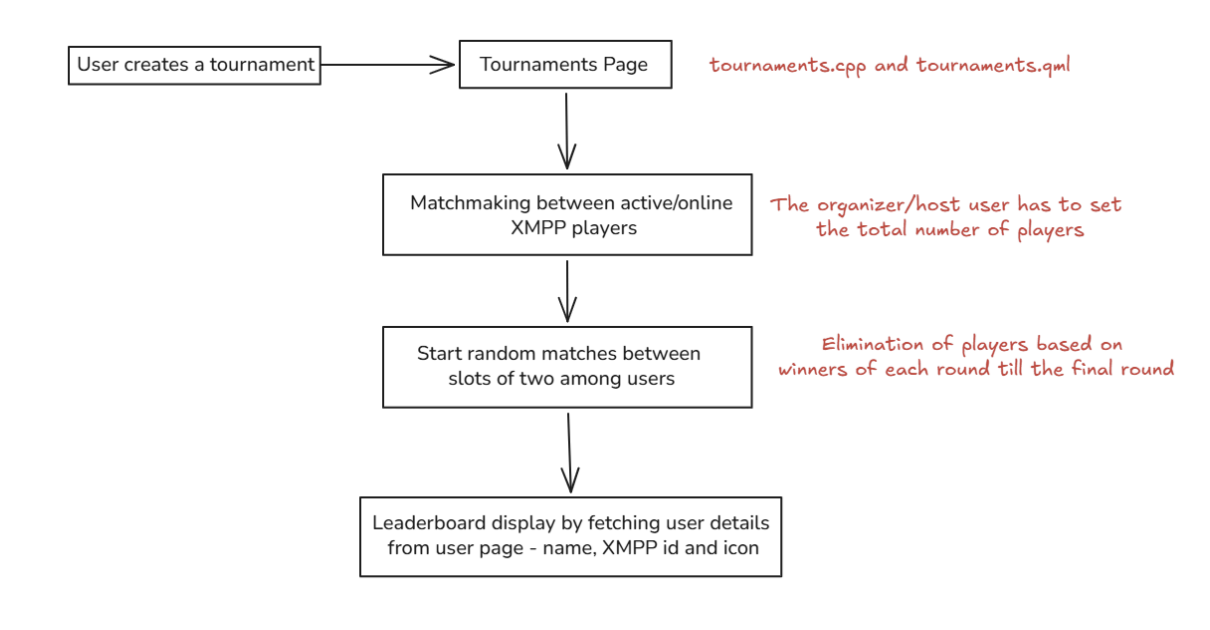
Starting with the goals for ManakalaNextGen, the GUI of Mankala Engine, the main goal is to implement a tournament system for the game. I plan to start with improving the user registrations by giving users the option to create an XMPP account directly from within the game. We can have a minimum of 3 servers, which the game can support. Based on this, we can also have possible player icons and in-game names for the players, which would be displayed in matches.

Now, coming to the important part for tournaments, my aim is to create a new page for the tournament host and the participants. In that host specifies the game variant like Bohnenspiel, Oware, etc., and also the amount of time each game should run. The participants need to join the game using the room code given by the host. At last, we implement the logic for player elimination and create a leaderboard ranking the players based on their position.

workflow

Our main concern?

Yes, the game data might get lost. We need to come up with suitable solutions to export it and make sure that even if a player leaves the game, the game data is not lost and isn't declared invalid.

So, to summarize this, here are the main goals:

  1. Add XMPP server registration option for players and update the registration page.
  2. Create tournaments and logic for player elimination and ranking.
  3. Make other necessary changes based on feedback.

Thanks for reading. Looking forward to a productive summer 🌞

Image

Welcome to another edition of “This month in KDE Linux”!

Infrastructure remained a major focus this month, with multiple outages and bugs in Arch’s package archive leading to Harald Sitter creating a local mirror for KDE Linux. This substantially increased build delivery reliability.

Harald also worked on improving the speed of delta updates. This is experimental and in-progress, so you have to opt in; See the bottom of https://community.kde.org/KDE_Linux/Delta#Status

Beyond that, a number of features are under development but did not quite complete yet, so expect to hear about them next month.

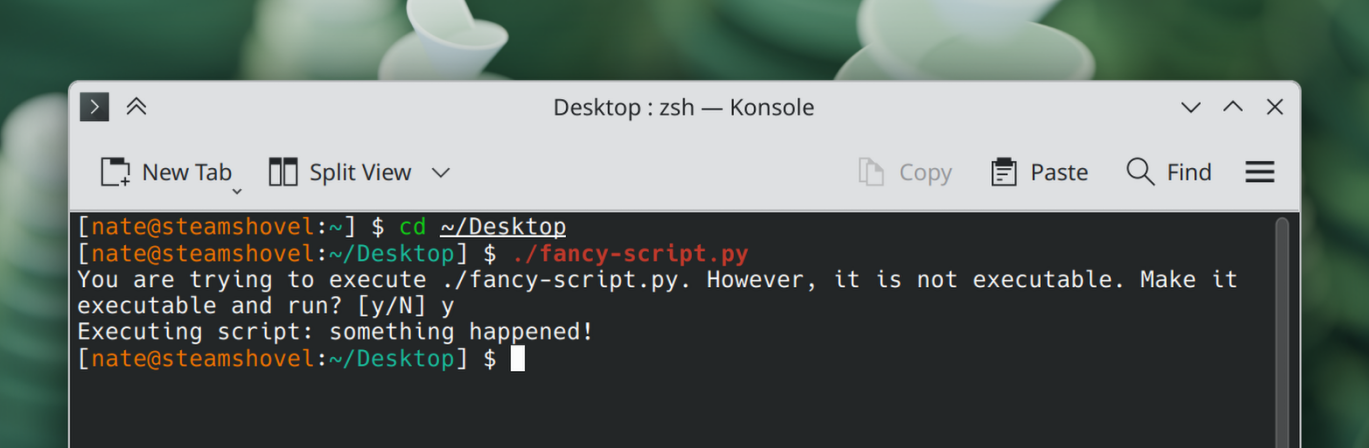
This month, Hadi introduced a terminal handler to prompt you to add execute permissions to scripts lacking it when you try to run them:

Image

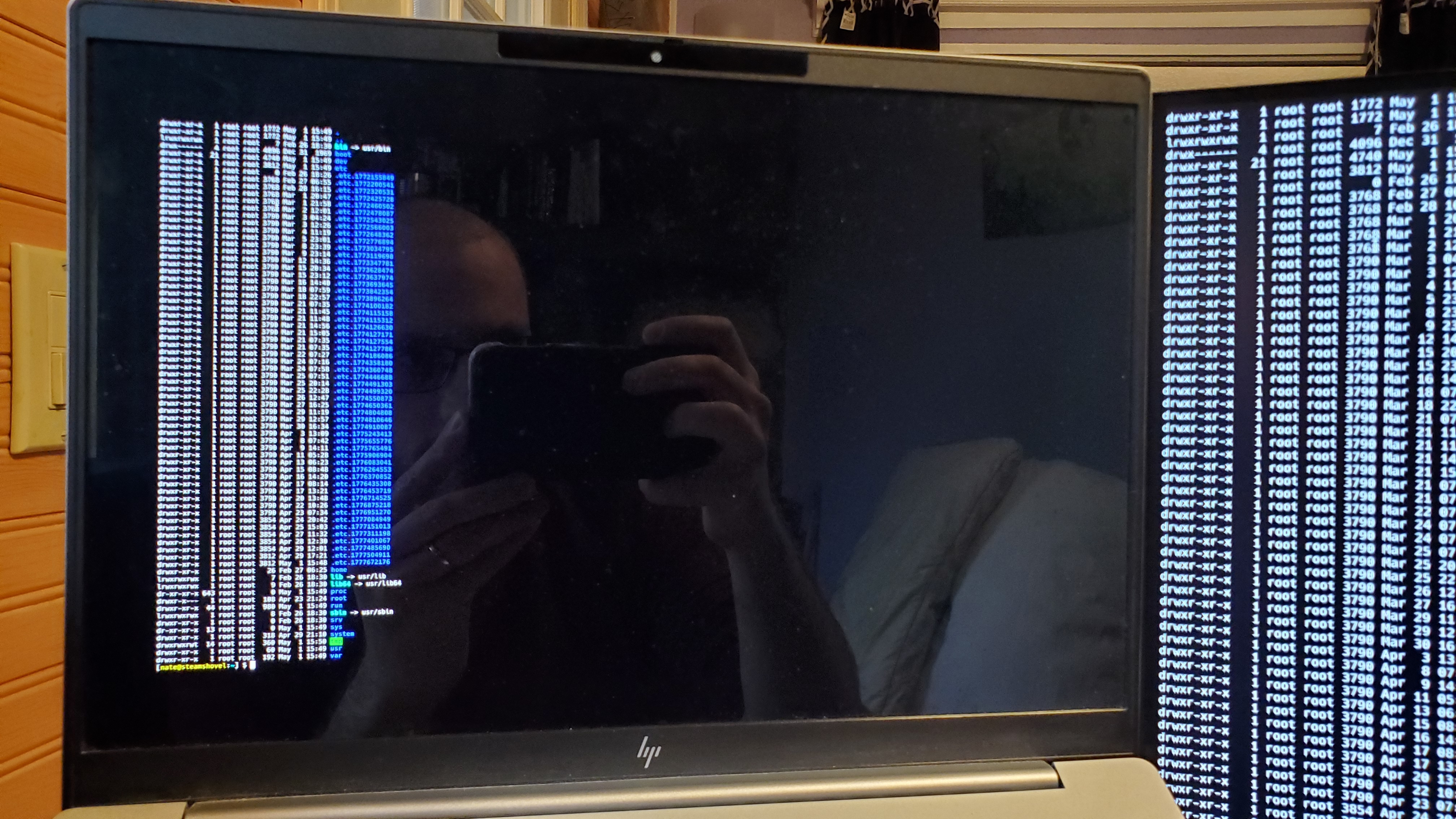
Hadi also moved our console handling to the newer userspace Kmscon software, which we’re using in place of the built-in console from the Linux kernel. Text looks way better now!

Image

Thomas Duckworth implemented screen reader support for the installer.

Jonas Harer and Daniele Me made the default zsh config even better. It really is a joy to use now!

Aidan turned on IPv6 privacy addressing by default, improving privacy a bit when using IPv6 connections.

I made KDE’s ksshaskpass dialog be the thing that prompts you for the password to unlock your encrypted ssh keys, which also allows you to have it save them in the system’s password storage system if you’d like. I also simplified the process of setting up an ssh agent to automatically add your keys, and documented how to flip the final switch to turn it all on.

I also documented how to persistently change kernel parameters, in case you need some extra ones (for example, turning on the experimental Xe driver for your newer Intel GPU).

Finally, I flipped the switch to have KDE Linux use the new Union theming system by default for QML apps. If the results in non-Flatpak QML apps like Discover, System Settings, Info Center, and Emoji Picker look no different… that’s perfect!


That’s all for April, folks! I’ll see everyone for the May report, or ideally, sooner. Because, as you can see, while KDE Linux is being developed by multiple people (good for project health), the number of changes is a bit low (bad for project velocity). There’s plenty to do, so if you’re a fan of the project, please help out:

And if you’re already using KDE Linux, let us know how your experience has been! Is it good? What can we do better?

Welcome to a new issue of This Week in Plasma!

This week Plasma 6.7 entered its “soft feature freeze” where we stop merging newly-written features and focus on finishing up and merging the ones that were already in flight.

As such, some nice new features that have been in development for quite some time were merged this week!

In addition, Plasma got a number of nice quality-of-life UI improvements and some accessibility fixes, among other changes. A good haul this week:

Notable new features

Plasma 6.7

Implemented support for the “Background apps” portal. This allows apps (especially newer GNOME apps) that use this portal to put themselves in the background and appear as icons in the System Tray, alongside the similar icons for other apps that use the existing System Tray icon functionality. (David Redondo, plasma-workspace MR #5703)

Implemented an up-scaling feature for screen content when using KWin’s Zoom effect. The filter does its best to sharpen and upscale content, resulting in a smoother and less blocky appearance, especially at relatively high zoom levels. If this effect isn’t for you, you can turn it off. (Ritchie Frodomar, KDE Bugzilla #509770)

Medium magnification Medium magnification
High magnification High magnification
Massive magnification Massive magnification

The Printers widget is now badged with the number of active and queued print jobs. (Mike Noe, print-manager MR #323)

Printers widget in the System Tray showing a badge with the number “2” in it, indicating that many print jobs are in the queue

Notable UI improvements

Plasma 6.7

XWayland-using software that asks to be able to send synthetic keyboard and mouse events (such as xdotool, which it turns out a bunch of apps invoke) is now identified by name so you know what’s asking. In addition, you can see a list of apps you’ve given this permission to, and revoke it later. (David Redondo, kwin MR #9123)

Security dialog asking if <code>xdotool</code> can control the pointer and keyboard, and warning about the potential for other apps to impersonate it

Implemented some KDE styling to the generic MessageDialog component from Qt, which resolves the issue of these dialogs looking really ugly and out of place in various pieces of software, including the Sticky Note widget’s deletion confirmation dialog. (Tobias Fella, KDE Bugzilla #499562)

After After
Before Before

Improved how Discover handles being launched with no internet connection. (Tobias Fella, KDE Bugzilla #511002)

Dialog in Discover warning about not being able to do anything due to lack of an active network connection

Improved how Discover communicates that a firmware update has been queued for installation after the next restart. (Tobias Fella, KDE Bugzilla #422498)

Removed the “double back button” effect visible in the Networks widget when showing a network’s QR code. (Tobias Fella, plasma-nm MR #541)

Made the automatic screen brightness feature take into account more data points, hopefully making it more responsive to your desires and less swingy when in an environment where the background lighting is changing a lot. (Prajna Sariputra, kwin MR #9145)

Made the buttons at the top of the Widget Explorer sidebar respect Fitts’ Law, allowing you to activate them by jamming the pointer against the adjacent screen edge and clicking. (Tobias Fella, plasma-desktop MR #3511 and libplasma MR #1479)

Button being hovered at a screen edge despite the pointer not technically being right over it

Streamlined the presentation of the notification about your KDE-Connect-connected phone being low on battery power. (Kai Uwe Broulik, powerdevil MR #619)

You now have more than 25 seconds to pick a color once you’ve invoked this from the Color Picker widget. Now you can take as long as you like. (Kai Uwe Broulik, kdeplasma-addons MR #1013)

Frameworks 6.26

Improved the appearance of the cross-fade transition when moving between pages in many Kirigami-based apps. (HeCheng Yu, kirigami MR #2079)

Notable bug fixes

Plasma 6.6.5

Fixed an issue that made Plasma Login Manager fail to launch properly on certain devices with certain graphics hardware — in particular Apple silicon laptops. (Matthias Kurz, plasma-login-manager MR #130)

Fixed an issue that made touches on a touchscreen stop applying to the correct part of the screen when the touchscreen was mirrored to another screen with different geometry. (David Edmundson, KDE Bugzilla #514688)

Made it possible to select a sound theme using the keyboard. (Nicolas Fella, KDE Bugzilla #519194)

Fixed a visual glitch on System Settings’ Drawing Tablet page that made the lines indicating mappings for stylus buttons fly off the top-left corner of the window with certain tablets. (David Redondo, KDE Bugzilla #519600)

Plasma 6.7

Fixed a case where KWin could crash when activating an item on a hidden panel while using the in-development Vulkan rendering backend. (Vlad Zahorodnii, KDE Bugzilla #518721)

Fixed two cases of controls on System Settings’ Quick Settings page not being read by the Orca screen reader. (Nicolas Fella, KDE Bugzilla #519433)

Disabling KRunner plugins globally now turns them off in the Kicker Application Menu widget, too. (Christoph Wolk, KDE Bugzilla #501200)

Notable in performance & technical

Plasma 6.6.5

Fixed some performance issues experienced on a variety of NVIDIA GPUs that were introduced by version 595 of the proprietary NVIDIA driver. (Xaver Hugl, KDE Bugzilla #517987)

Plasma 6.7

Implemented support for renaming or relocating the new cross-desktop standard “Projects” folder that’s started to appear in people’s home folders. (Jakob Dev, plasma-desktop MR #3657)

Locations page in System Settings showing the option to configure the name or location of the new cross-desktop “Projects” folder

Implemented version 2 of the “Input Capture” portal. (David Redondo, xdg-desktop-portal-kde MR #493)

How you can help

KDE has become important in the world, and your time and contributions have helped us get there. As we grow, we need your support to keep KDE sustainable.

Would you like to help put together this weekly report? Introduce yourself in the Matrix room and join the team!

Beyond that, you can help KDE by directly getting involved in any other projects. Donating time is actually more impactful than donating money. Each contributor makes a huge difference in KDE — you are not a number or a cog in a machine! You don’t have to be a programmer, either; many other opportunities exist.

You can also help out by making a donation! This helps cover operational costs, salaries, travel expenses for contributors, and in general just keeps KDE bringing Free Software to the world.

To get a new Plasma feature or a bug fix mentioned here

Push a commit to the relevant merge request on invent.kde.org.

Thursday, 30 April 2026

Recently a new submodule has landed in Kirigami: “Forms”.

Until this point, Kirigami had only offered the classic “FormLayout” component. which is used for configuration pages throughoug systemsettings, Plasma, and some apps. It’s the classical form used in desktop toolkits for decades:

Image

This is a fairly clean layout which however is starting to slowly become outdated, as modern toolkits are starting to use a different layout nowdays, based on “cards”

Image
Image
Image

Unfortunately FormLayout very bound to the classic layout, and it wasn’t really possible to adapt it to the new look in a compatible way which didn’t break existing applications in unexpected ways.

This is also the reason a new approach was done provided by kirigami addons: “FormCard”, which is used by a lot of applications; for instance here in NeoChat:

Image

We wanted to have this new style of forms in the base Kirigami API, so after a review of the existing FormCard, we decided to make several changes, for two main reasons: First, FormCard is bound to the card style of form as much as FormLayout was bound to the classic flat style. Also, it tried to provide ready-made components for every kind of control; so it had its own TextField, its own RadioButton and so on — effectively becoming its own separate toolkit.

So we opted instead to go down the route of having a more generic API, so the Forms module includes containers that define a semantic structure of a form, which contains all the normal controls — such as textfields, checkboxes and radiobuttons.

This is a code example of the new API:

  import QtQuick.Controls as QQC
  import org.kde.kirigami as Kirigami

  Kirigami.Form {
    Kirigami.FormGroup {
        title: "Global Settings"
        Kirigami.FormEntry {
            contentItem: QQC.CheckBox {
                text: "Show Sidebar"
            }
        }
        Kirigami.FormEntry {
            contentItem: QQC.CheckBox {
                text: "Auto Save"
            }
        }
    }
    Kirigami.FormGroup {
        title: "Theme Options"
        Kirigami.FormEntry {
            title: "Colors:"
            contentItem: QQC.CheckBox {
                text: "Dark Theme"
            }
        }
        Kirigami.FormSeparator {}
        Kirigami.FormEntry {
            contentItem: QQC.CheckBox {
                text: "High Contrast"
            }
        }
        ...
    }
  }

which will look like this:

Image

Or, in mobile mode:

Image

Semantically, a Form will contain one or more FormGroup objects, each of which will contain one or more FormEntry objects. Then a FormEntry will contain the control which represents the configuration of the particular thing. It can be a single control (like a button or a checkbox) or it can be any layout with completely custom contents.

I already ported 4 modules of systemsettings to the new system: the landing page, the “workspace options” kcm, the mouse settings and the touchpad settings.

Image

But wait… this page looks exactly the same as before; why?

A key was to do an API that was as much as separated from any appearance as possible, as we don’t know how UI design trends will evolve in the future. But this also allows us another thing: to have two separate implementations: the new one “card based” and a legacy one which looks exactly like the current FormLayout components. This is used only in systemsettings, so we can port all the kcms without introducing glaring visual inconsistencies, and when we are done, flick the switch and convert the look of everything all in one go.

Since most of KDE’s QML applications already use the existing card-style kirigamiaddons FormCard components, the new look will be used there.

And then in the future, when trends change again, we can re-style all the settings pages in one go.

A call to action

We ideally want the whole set of systemsettings kcms to be ported as soon as possible to the new system, so we can have soon a nice visual overhaul in the whole systemsettings.

In order for this to happen, we need the help of everyone, so… patches welcome 🙂

As an example, this is the merge request that ported the first four kcms.

When porting, it’s also possible to see how the kcm will look with the new system as well, to make sure it works well for when we flick the switch. If we run in a terminal:

KDE_KIRIGAMI_FORMS_STYLE=cards systemsettings

We get systemsettings using the new style for pages already ported:

Image
Image

Porting from FormLayout to the new Form/FormGroup/FormEntry system should be really straightforward; it should be possible to make good progress in little time.

With your help, soon KDE’s settings will benefit from greater consistency, a more modern style, and easier adaptation to future designs.