
1League: Streamline Team Management & Game Tracking
Overview
1League is a desktop application designed for sports teams and enthusiasts seeking a streamlined approach to managing team operations and game experiences. The software serves as a comprehensive tool for team captains and organizers who need to oversee rosters, assign game lineups, and manage player participation efficiently. By integrating roster management with real-time communication, 1League supports both administrative tasks and social engagement within teams. Its core functionality revolves around simplifying the coordination of team activities, from player onboarding to post-game recognition.
The app is tailored for amateur and semi-professional sports teams across various disciplines, including soccer, basketball, and hockey. It enables captains to authorize new members, track player availability through a sign-up system, and maintain organized records of team performance. The platform also supports multiple team management, allowing users to oversee several squads without switching between tools. Real-time game tracking and live scoring capabilities enhance the overall experience, making it ideal for leagues that value transparency and engagement.
1League fosters team cohesion through a dedicated team chat feature, encouraging communication before, during, and after games. With built-in recognition features like Player of the Night and Three Stars of the Game, the app adds a motivational layer to competitive play. While the developer did not provide additional background information, the software’s focus on usability and functionality suggests a targeted approach to solving common challenges in team sports coordination.
Key Features & Capabilities
- Roster and Player Management: Captains can create, update, and maintain team rosters with ease. New players can be authorized directly through the app, ensuring controlled access and accurate records.
- Game Lineup Configuration: The app allows for quick and intuitive setup of game lineups, enabling captains to assign positions and manage substitutions efficiently.
- Live Game Tracking: Integrated with the 1League Scoring System, the app provides real-time updates during games, offering accurate and immediate score tracking.
- Team Communication Hub: A dedicated team chat facilitates seamless communication among members, supporting coordination and team bonding.
- Player Recognition System: Features such as Player of the Night and Three Stars of the Game help highlight standout performances and boost team morale.
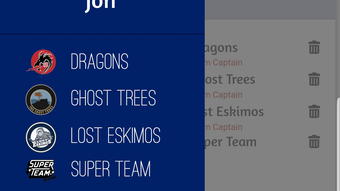
- Multi-Team Management: Users can manage multiple teams from a single interface, ideal for coaches, league organizers, or multi-team captains.
- Sign-Up System: A built-in player availability tracker simplifies the process of confirming who can attend games, reducing last-minute uncertainties.
- Game Highlights & Stats Tracking: The app stores and organizes game highlights, team standings, and statistical data for easy review and analysis.
- Advanced Scoring on iPad: The 1League ScoreKeeper System supports detailed game scoring via iPad, offering a professional-grade scoring experience for referees and scorekeepers.
These features collectively support a dynamic team environment where coordination, communication, and performance tracking are central. The intuitive design ensures that even users without technical expertise can navigate the system effectively. Whether managing a weekend soccer match or a competitive league, 1League provides tools that enhance organization and engagement.
User Interface, Workflow & Performance
The user interface of 1League is designed with clarity and functionality in mind. The layout emphasizes accessibility, with key actions such as roster updates, lineup setup, and chat access placed within easy reach. Navigation is straightforward, allowing users to switch between teams, games, and communication channels without confusion. The workflow follows a logical sequence, from player sign-up to game tracking and post-game review.
Based on general software behavior patterns, the app appears optimized for smooth operation across Windows and Mac platforms. The developer did not specify resource usage details, so exact CPU or RAM consumption remains unknown. However, the application’s 150MB size suggests a lightweight footprint, which may contribute to efficient performance on standard desktop systems.
Stability appears to be a priority, as the app supports continuous game tracking and real-time updates. The absence of reported crashes or errors in the provided information indicates reliable operation. While no performance benchmarks were shared, the integration of iPad scoring suggests a focus on responsiveness during live events. Users can expect consistent behavior during high-activity periods, such as game day coordination.
Compatibility & System Requirements
1League is compatible with both Windows and Mac operating systems, making it accessible to a broad user base. The software is available in version 1.0.0, with an installation size of 150MB. This size indicates a compact application that should not place significant demands on storage space.
Exact system requirements were not listed. The developer did not provide information on minimum CPU, RAM, or disk space specifications. Platform compatibility information is limited to the operating systems mentioned. Users are advised to ensure their system meets general desktop software standards for smooth operation.
Pros and Cons
Pros
- Intuitive interface designed for sports team captains and organizers
- Comprehensive roster and player management tools
- Real-time game tracking and live scoring capabilities
- Integrated team chat for seamless communication
- Supports multiple team management from one dashboard
- Advanced iPad-based scoring system for detailed game tracking
- Free to download and use with no cost barriers
- Features like Player of the Night and Three Stars enhance team motivation
Cons
- Exact system requirements were not specified
- Resource usage details (CPU/RAM) were not provided
- Limited information on update frequency or support channels
- No mention of cloud backup or data export options
- Platform-specific customization details were not shared
FAQ Section
Is 1League available for both Windows and Mac?
Yes, 1League is compatible with both Windows and Mac operating systems, allowing users across different platforms to manage their teams effectively.
Is the software free to use?
Yes, 1League is available at no cost. There are no subscription fees or hidden charges for core features.
Can I manage multiple teams with one account?
Yes, the app supports multi-team management, enabling captains and organizers to oversee several teams from a single interface.
Does 1League require an internet connection?
While the app functions offline for some tasks like roster management, real-time game tracking and team chat require an active internet connection.
Is the iPad Scoring System included in the desktop app?
The 1League ScoreKeeper System is designed for use on iPad, offering advanced scoring capabilities. It integrates with the desktop application for synchronized game data.
Final Thoughts + CTA
1League stands out as a practical and accessible solution for sports teams looking to enhance coordination, communication, and game tracking. Its combination of roster management, live scoring, and team engagement tools makes it a valuable asset for team captains and organizers. The free availability lowers the barrier to entry, while the support for multiple teams and iPad integration adds professional-grade functionality.
Although some technical details like system requirements and performance metrics are not disclosed, the app’s clean interface and logical workflow suggest a user-focused design. It is particularly beneficial for amateur and semi-professional teams that value organization and team spirit. For those seeking a reliable, all-in-one tool to manage sports teams and games, 1League delivers a compelling experience.
Download 1League now to elevate your team’s coordination and game-day experience.








