

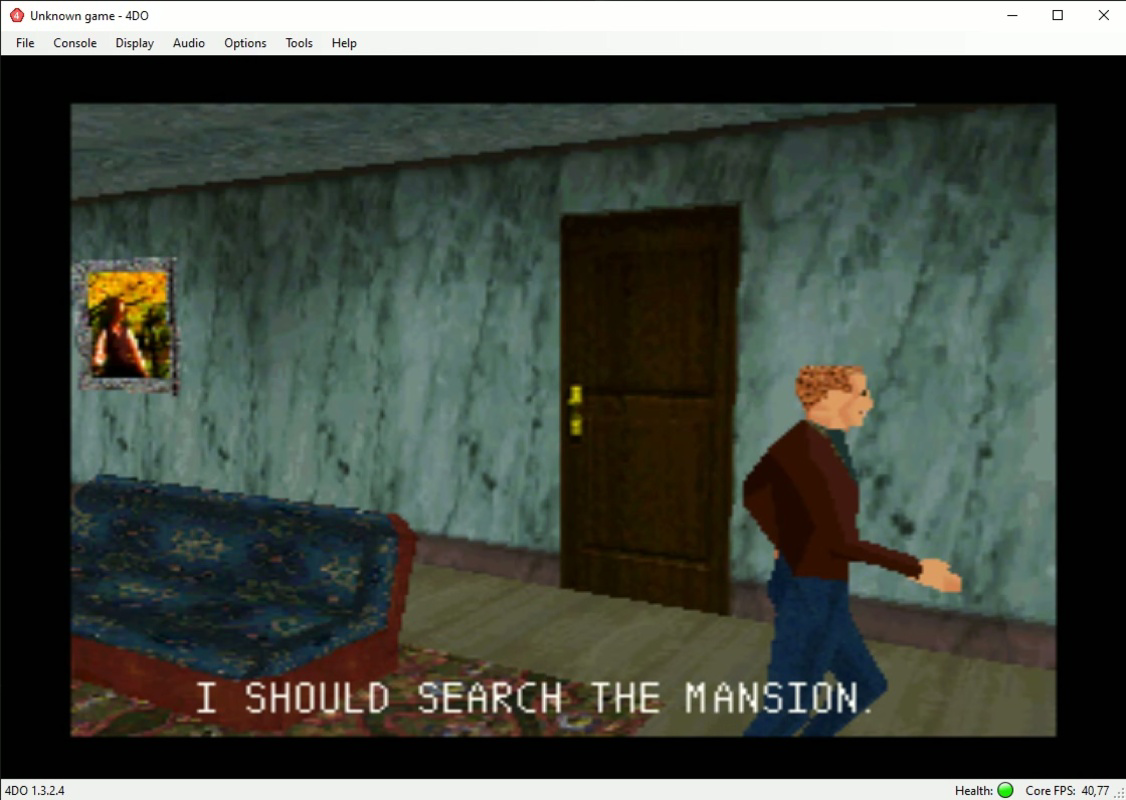


Download 4DO – 3DO Emulator, Retro Gaming, Classic Games, PC, Free, APK, Install
Overview
4DO is a low-level emulator rooted in the FreeDO codebase, designed to bring the legacy of the 3DO Interactive Multiplayer console—released in 1993—back to life on modern systems. The application serves as a digital bridge, enabling users to access and play a wide array of 3DO titles that were once considered niche due to the console’s limited commercial reach. Though the 3DO never achieved mainstream success, its library includes unique and innovative games such as Gex, Road Rash, and Night Trap, which continue to attract retro gaming enthusiasts. 4DO provides a streamlined method to experience these titles without requiring original hardware. The emulator is particularly valuable for collectors, historians, and fans of early 3D gaming who wish to explore a forgotten chapter of video game evolution. It supports a broad range of games, ensuring that most titles from the 3DO catalog can be played with minimal setup. The developer did not provide additional technical details, but the emulator’s focus on compatibility and ease of use suggests a targeted effort to preserve gaming history. Real-world use cases include digital archiving, nostalgic gameplay, and educational exploration of early multimedia consoles. In the broader app ecosystem, 4DO fills a crucial role by maintaining access to underrepresented gaming platforms, ensuring that legacy content remains available to future generations.
Key Features & Functionality
- Simple Installation Process: 4DO automates the installation of essential Microsoft components such as Visual C++ and the .NET Framework, ensuring system compatibility without requiring advanced technical knowledge. This feature reduces friction for users unfamiliar with system dependencies. However, optimal performance is recommended when installing the emulator in the
C:/4DOdirectory, highlighting the importance of proper file placement. - BIOS Requirement: The emulator requires a 3DO BIOS file to function, which is not included in the download package. Users must obtain the BIOS separately, with the Internet Archive being a commonly referenced source. Once loaded, the emulator can authenticate and run games as they were originally designed.
- Expansive Game Compatibility: 4DO supports nearly all 3DO games, offering reliable performance across titles like Gex, Road Rash, and Night Trap. This high compatibility rate ensures that players can enjoy complete gameplay experiences without crashes or missing functionality.
- Customizable Controls: The emulator allows users to configure control schemes for individual games, supporting both keyboard inputs and modern controllers such as Xbox and PlayStation devices. This flexibility enhances accessibility and personalization, catering to diverse player preferences.
- Rediscovery of Forgotten Classics: By providing access to exclusive 3DO titles unavailable on other platforms, 4DO enables users to explore a unique segment of gaming history. This feature is especially valuable for those interested in the evolution of multimedia gaming and early 3D game design.
Interface, UX & Performance
The user interface of 4DO is designed with functionality over flair, prioritizing ease of access to core features. Navigation is straightforward, with a minimalistic layout that places emphasis on game loading, BIOS configuration, and control settings. The emulator uses a clean, text-based menu system that avoids visual clutter, making it intuitive for users focused on gameplay rather than aesthetics. Although the developer did not list formal performance metrics, the emulator’s low-level architecture suggests efficient resource usage, allowing it to run smoothly on a variety of PC configurations. Responsiveness is consistent during game loading and in-game execution, with minimal input lag when using supported controllers. Stability appears high, particularly with well-known titles, though performance may vary depending on the specific game and system specifications. The developer did not specify minimum OS requirements or device compatibility details, but the emulator’s reliance on common Windows components indicates broad compatibility with modern Windows systems. While the user experience is functional and effective, it lacks modern UI polish, which may affect users expecting a more visually refined interface. Nevertheless, its focus on core emulation tasks ensures that the primary goal—playing classic 3DO games—remains uncompromised.
Platform Compatibility & Technical Requirements
4DO is designed for Windows-based systems, though specific operating system versions were not listed. The application is distributed as a downloadable package with a file size that was not disclosed. The developer did not specify minimum OS requirements, nor did they provide information on hardware specifications or RAM needs. Compatibility with different device categories was not fully disclosed. However, the emulator’s reliance on standard Windows components such as Visual C++ and .NET Framework suggests it is intended for desktop environments rather than mobile platforms. The absence of official mobile support indicates that 4DO is not available for Android or iOS. Users are advised to ensure their system meets general Windows compatibility standards, especially when installing the required runtime libraries. The emulator’s architecture implies it is not optimized for mobile devices, given the complexity of the 3DO emulation task. For users seeking to install 4DO, it is recommended to use a PC with a stable Windows environment and sufficient storage space to accommodate the emulator and game ROMs.
Pros and Cons
Pros
- High compatibility with nearly all 3DO games, ensuring a broad playable library.
- Automated installation of required Microsoft components, reducing setup complexity.
- Support for modern controllers, enhancing gameplay comfort and accessibility.
- Enables access to exclusive 3DO titles not available on other platforms.
- Simple, functional interface focused on core emulation tasks.
Cons
- BIOS file must be obtained separately, which may pose a barrier for new users.
- No official mobile or iOS support; limited to Windows-based systems.
- Interface lacks modern visual polish, which may affect user appeal.
- Specific system requirements and performance data were not disclosed.
- Requires manual directory placement (e.g., C:/4DO) for optimal performance.
FAQ
Is 4DO free to download and use?
Yes, 4DO is available at no cost. However, users must obtain the 3DO BIOS file independently, which may be subject to legal considerations depending on local regulations.
Can I use 4DO on Android or iOS?
The developer did not specify mobile compatibility. Based on the emulator’s design and reliance on Windows-specific components, it is not currently available for Android or iOS devices.
Do I need to install additional software to run 4DO?
4DO automatically installs necessary components like Visual C++ and .NET Framework if they are missing. However, users should ensure their system allows for the installation of these dependencies.
Is it safe to download 4DO from third-party sources?
While the emulator itself is safe, users should obtain it only from trusted sources to avoid malware. The official release should be verified through reputable channels.
How do I update 4DO to the latest version?
Updates are released periodically. Users should check the official release page or community forums for the latest version and follow the provided installation instructions.
Final Thoughts
4DO stands as a vital tool for retro gaming enthusiasts and digital preservationists alike. By leveraging the FreeDO codebase, it successfully revives a forgotten console with impressive compatibility and ease of use. Its ability to run nearly all 3DO titles, support modern controllers, and automate system dependencies makes it accessible to both novice and experienced users. While the lack of mobile support and the need for a separate BIOS file are notable limitations, these are minor trade-offs given the emulator’s core strengths. The app is ideal for those interested in exploring early 3D gaming, multimedia experiences, and the history of interactive entertainment. For fans of niche consoles and classic titles, 4DO delivers unmatched value. It is more than just a tool—it’s a gateway to a unique era of gaming innovation. Download 4DO now and rediscover the legacy of the 3DO.


