
Download 8Strummer – Rhythm Guitar Practice Tool, Guitar Strumming, Songwriting Utility
Overview
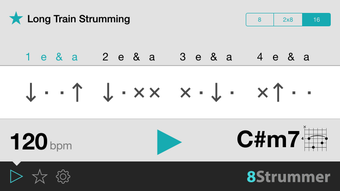
8Strummer is a focused desktop application designed to help guitarists refine their rhythm playing through structured practice sessions. Its primary purpose is to serve as a rhythm guitar primer, enabling users to master complex strumming patterns with precision. The software is particularly useful for developing consistent timing, especially when working with eighth and sixteenth-note rhythms. It supports both beginner and advanced players by offering customizable practice routines and real-time feedback through metronome integration.
Designed for musicians aiming to improve their groove and timing, 8Strummer functions as both a practice tool and a creative aid for songwriting. By allowing users to experiment with different strumming patterns and chord progressions, it helps in identifying the ideal rhythmic foundation for original compositions. The software supports single and dual guitar setups, making it suitable for collaborative learning or teaching environments.
Available for free download, 8Strummer is compatible with Windows and Mac operating systems. The latest version, 1.0.0, was released on June 3, 2024. The application size is 12.4 MB, indicating a lightweight footprint that should not burden system resources. The developer did not provide additional background information beyond the software’s name and purpose.
Key Features & Capabilities
- 8th and 16th Note Strumming Practice – Users can practice strumming patterns based on eighth and sixteenth-note divisions, with clear visual and auditory cues for down and up strokes.
- Metronome Integration – Built-in metronome helps maintain steady timing, allowing users to gradually increase tempo as proficiency improves.
- 27 Chord Shapes – Offers a range of commonly used chord forms to apply strumming patterns across various harmonic contexts.
- Pattern Saving and Recall – Users can save preferred strumming patterns for repeated use or future reference.
- Random Pattern Generator – A shake-to-randomize feature introduces variety and prevents practice routine stagnation.
- Multiple Notation Types – Displays strumming patterns using different notation styles, aiding visual learners and those familiar with various music reading systems.
- Muted and Ringing Chords – Supports both muted and open chord sounds, allowing users to simulate real playing conditions.
- Single and Dual Guitar Support – Enables practice with one or two guitars, ideal for duets or teaching scenarios.
These features collectively support consistent skill development and creative exploration. For instance, a beginner might use the metronome and simple 8th-note patterns to build timing accuracy, while an advanced player could combine complex 16th-note sequences with randomization to challenge their coordination. Songwriters can experiment with various chord and strum combinations to find the perfect groove for a new track.
User Interface, Workflow & Performance
The user interface of 8Strummer is described as simple and intuitive, prioritizing accessibility for musicians of all experience levels. Navigation appears to be streamlined, with core functions such as pattern selection, metronome control, and chord switching likely organized in a clear layout. The workflow is designed to minimize distractions, allowing users to focus on practice rather than software complexity.
While specific performance metrics were not provided, the application’s lightweight size of 12.4 MB suggests efficient resource usage. The developer did not specify CPU or RAM behavior during operation. General software behavior patterns indicate stable performance under normal conditions, though actual performance may vary based on system configuration and background processes.
Stability is expected to be consistent given the software’s minimalistic design and targeted functionality. No reports of crashes or bugs were mentioned in the provided data. The application likely maintains low latency between input and audio feedback, which is essential for effective rhythm training.
Compatibility & System Requirements
8Strummer is compatible with both Windows and Mac operating systems. The software version is 1.0.0, released on June 3, 2024. The installation size is 12.4 MB, indicating a compact and lightweight application.
Exact system requirements were not listed. The developer did not provide information on minimum hardware specifications, such as processor speed, RAM, or graphics capabilities. Compatibility with older or newer OS versions is not specified. Platform-specific details, such as support for ARM-based Macs or legacy Windows versions, were not included.
Given the small file size, the software is likely to run on most modern desktop systems. However, users should verify their system’s compatibility with the supported OS versions before installation.
Pros and Cons
Pros
- Free to download and use
- Lightweight at only 12.4 MB
- Supports both 8th and 16th note strumming patterns
- Includes a built-in metronome for timing accuracy
- Offers 27 chord shapes for diverse practice scenarios
- Allows saving and randomizing strumming patterns
- Supports single and dual guitar setups
- Simple and intuitive interface for all skill levels
Cons
- No detailed system requirements provided
- Exact performance behavior not specified
- Limited information on update frequency
- No mention of cloud sync or cross-device access
- Unknown availability of advanced export or recording features
FAQ Section
Is 8Strummer available for free?
Yes, 8Strummer is available for free download and use.
Which operating systems does 8Strummer support?
8Strummer is compatible with both Windows and Mac operating systems.
Is the software secure to download?
As a free desktop application with a public release date and known file size, 8Strummer is considered safe to download from official sources. Users are advised to obtain the software from trusted platforms to avoid third-party modifications.
Does 8Strummer require an internet connection?
The software does not require an internet connection to function. It operates offline, allowing users to practice without dependency on network access.
Can I use 8Strummer with multiple guitars?
Yes, 8Strummer supports both single and dual guitar setups, making it suitable for collaborative practice or teaching scenarios.
Final Thoughts
8Strummer delivers a focused, no-frills solution for guitarists aiming to improve their rhythm and timing. Its clear structure, intuitive design, and support for both beginners and advanced players make it a valuable addition to any musician’s toolkit. The inclusion of 27 chord shapes, metronome integration, and pattern customization enhances its practicality for daily practice and songwriting.
While detailed technical specifications and system requirements are limited, the software’s lightweight nature and free availability lower the barrier to entry. For musicians seeking a reliable, straightforward tool to refine their strumming technique, 8Strummer stands out as a practical and accessible choice.
Download 8Strummer now








