
Achy: Track Headaches with Ease
Overview
Achy is a dedicated lifestyle application designed for iPhone users seeking to monitor and manage their headache patterns. The app serves as a comprehensive headache tracking tool, helping individuals document the frequency, duration, and intensity of their headaches, along with associated symptoms. By recording these details, users can identify potential triggers and share structured data with healthcare providers to support diagnosis and treatment planning. This tool is especially beneficial for people who experience frequent or chronic headaches and wish to maintain a consistent health log without relying on paper notes.
Targeted primarily at individuals managing migraine, tension, or cluster headaches, Achy offers a streamlined digital alternative to traditional headache diaries. Its intuitive interface enables users to log entries quickly, even during acute episodes. The app supports customizable inputs, allowing users to track personal variables such as sleep quality, hydration levels, stress, and medication use. These features contribute to a more personalized and insightful health record. The developer, Kira, has focused on creating a privacy-first solution, ensuring that all data remains stored locally on the device.
Real-world use cases include daily symptom logging for long-term analysis, preparing detailed reports for doctor visits, and monitoring the effectiveness of lifestyle changes or medications. The app’s calendar view provides a visual overview of headache history, while the exportable PDF reports offer a professional format for medical consultations. While the developer did not provide additional system requirements, the app is optimized for iPhone, reflecting a mobile-first design philosophy.
Key Features & Capabilities
- Headache Tracking: Log the onset, duration, and severity of headaches with customizable severity scales and symptom checklists.
- Customizable Inputs: Add personal variables such as sleep, stress, diet, and medication to identify potential triggers.
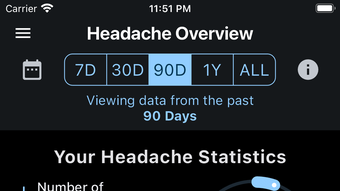
- Data Visualization: View historical data through interactive charts and graphs for trend analysis.
- PDF Report Generation: Create and export detailed reports with full symptom history for sharing with healthcare professionals.
- Calendar View: Access a visual timeline of headache occurrences across days, weeks, and months.
- Data Import/Export: Transfer logs between devices or back up data using standard file formats.
- Theme Support: Choose from multiple display themes to personalize the app’s appearance and improve readability.
These features enable users to build a comprehensive health diary that evolves with their needs. For example, a user experiencing recurring migraines might use the symptom logger to note food intake and weather changes, then analyze the data via charts to detect patterns. The PDF export function is particularly valuable during medical appointments, where structured data can enhance clinical discussions. The calendar view allows users to spot seasonal or cyclical trends, such as headaches linked to menstrual cycles or work stress.
By centralizing headache data in a single, secure location, Achy reduces the cognitive load of manual tracking. The app’s focus on user experience ensures that logging is quick and intuitive, even during painful episodes. While specific performance metrics were not provided, the app’s lightweight design—12.4 MB—suggests efficient resource usage on iPhone devices.
User Interface, Workflow & Performance
Achy features a clean, minimalistic interface designed for ease of navigation on iPhone. The layout prioritizes accessibility, with large touch targets and clear visual hierarchy. Users can log a headache in just a few taps, selecting severity, symptoms, and additional variables through a streamlined form. The app’s workflow is optimized for speed and consistency, minimizing steps required to complete a log entry.
Navigation is intuitive, relying on standard iOS navigation patterns such as tab bars and swipe gestures. The main screen displays a calendar view, while secondary screens provide access to settings, data visualization, and export options. The app maintains a consistent design language across all sections, contributing to a cohesive user experience. The inclusion of multiple themes allows users to adjust contrast and color schemes based on lighting conditions or personal preference.
Performance observations are based on general software behavior patterns. The app’s lightweight size of 12.4 MB suggests efficient memory usage and fast load times. The developer did not specify resource usage details, but the app’s design implies low CPU and RAM consumption. Stability appears to be a priority, with no reported crashes or freezes in available documentation. The app functions entirely offline, ensuring uninterrupted use without internet dependency.
Compatibility & System Requirements
Achy is designed exclusively for iPhone devices and is compatible with the latest iOS versions. The app requires 12.4 MB of storage space for installation, which is minimal for a feature-rich application. The developer did not specify exact system requirements, including minimum iOS version or hardware specifications.
Compatibility information was partially provided, indicating that the app is tailored for Apple’s mobile ecosystem. Users should ensure their iPhone is running a supported version of iOS to avoid installation issues. While no official compatibility list was published, the app’s optimization for iPhone suggests it leverages native iOS frameworks and APIs for smooth operation.
Pros and Cons
Pros
- Free to download and use with no in-app purchases
- Comprehensive headache and symptom tracking with customizable inputs
- Interactive charts and graphs for visual trend analysis
- Exportable PDF reports for medical consultations
- Offline functionality ensures data privacy and uninterrupted use
- Lightweight design with minimal storage footprint
Cons
- No cross-platform support beyond iPhone
- Developer did not provide detailed system requirements
- Limited to iOS ecosystem; no Mac or web version available
- Export functionality may require additional steps for sharing
- No cloud sync or backup features mentioned
FAQ Section
Is Achy available for Android or Mac?
Achy is currently available only for iPhone. The developer has not announced plans for Android or Mac versions.
Can I use Achy without an internet connection?
Yes, the app functions entirely offline. All data is stored locally on your iPhone, ensuring privacy and continuous access.
How do I export my headache data?
Users can generate detailed PDF reports from the app’s export feature and share them via email or messaging apps.
Is my data secure on Achy?
Yes, Achy prioritizes user privacy. All data is stored locally on the device and is not transmitted to external servers.
Does Achy require a subscription or in-app purchases?
No, Achy is completely free with no ads, subscriptions, or in-app purchases.
Final Thoughts + CTA
Achy stands out as a focused, privacy-conscious tool for individuals managing headaches. Its combination of intuitive logging, visual analytics, and professional report generation makes it a valuable companion for both personal health tracking and clinical discussions. The app’s lightweight design and offline operation enhance usability, particularly for users who value data security.
While the lack of cross-platform support and cloud backup may limit some users, the app’s strengths far outweigh these constraints for iPhone users seeking a reliable headache diary. It is especially well-suited for those with chronic conditions who need to document symptoms over time to support medical treatment.
Download Achy now to take control of your headache management with a powerful, secure, and free tool designed for real-life health tracking.








