
Download ADmitMac – Secure Active Directory Access for Panther & Tiger
Overview & Why ADmitMac Matters
ADmitMac is a niche yet powerful utility that bridges the gap between legacy Mac OS X versions (Panther 10.3 and Tiger 10.4) and modern directory services such as Microsoft Active Directory, NT, and Apple’s Workgroup Manager. In mixed‑platform enterprises where older Macs still run mission‑critical applications—think Adobe Creative Suite or Final Cut Pro—ADmitMac provides the only viable method to authenticate, authorize, and share resources securely across Windows and macOS environments. The software is built with a security‑first mindset; once the initial configuration is completed, communication between the Mac client and the directory server is encrypted, and group policy objects (GPO) are respected. This means administrators can enforce password complexity, login restrictions, and home‑directory mapping without sacrificing the familiar Mac workflow. While the setup process is not beginner‑friendly, the payoff is a stable, centrally managed identity layer that reduces duplicate account maintenance and eliminates “shadow” users. For organizations still running Panther or Tiger—often because of legacy hardware or licensed software that cannot be upgraded—ADmitMac is a cost‑effective alternative to a full OS refresh, enabling continued collaboration with Windows‑based colleagues while keeping data protection standards high. In short, ADmitMac transforms an outdated operating system into a secure, network‑aware workstation that respects modern authentication standards.
Key Features and Built‑In Tools
- Active Directory Integration: Full support for AD authentication, LDAP queries, and Kerberos tickets, allowing Mac users to log in with their Windows credentials.
- Workgroup Manager Compatibility: Seamlessly synchronizes Mac local accounts with AD, preserving home folder mappings and user preferences.
- AD Commander Plug‑in: An administrative console that lets you create, modify, and delete AD users and groups directly from the Mac.
- Microsoft Distributed File System (DFS) Support: Enables transparent access to DFS namespaces, a feature not natively available on older macOS releases.
- Volume Integration for Creative Apps: Optimized network volume mounting for Adobe Creative Suite, Apple Final Cut Pro, and other media‑intensive applications.
- Group Policy Object (GPO) Enforcement: Reads and applies Windows GPOs, ensuring compliance with corporate security policies.
- Secure Communication: All directory traffic is encrypted via SSL/TLS, protecting credentials from sniffing on unsecured networks.
- Multi‑User Sharing: Allows several Mac users on the same machine to authenticate against the same AD domain without conflict.
- Automatic Re‑Sync: Periodic background synchronization keeps local caches up‑to‑date, reducing login latency.
- Extensive Logging: Detailed event logs help administrators troubleshoot authentication failures and network issues.
These features make ADmitMac more than a simple connector; it becomes an integral part of the enterprise identity fabric. The inclusion of AD Commander, in particular, gives Mac‑based admins the same level of control they would expect on a Windows server, eliminating the need for a separate management console. Moreover, the support for DFS and GPO ensures that file sharing and security policies behave consistently across platforms, a crucial requirement for mixed‑OS environments.
Installation, Configuration, and Daily Use
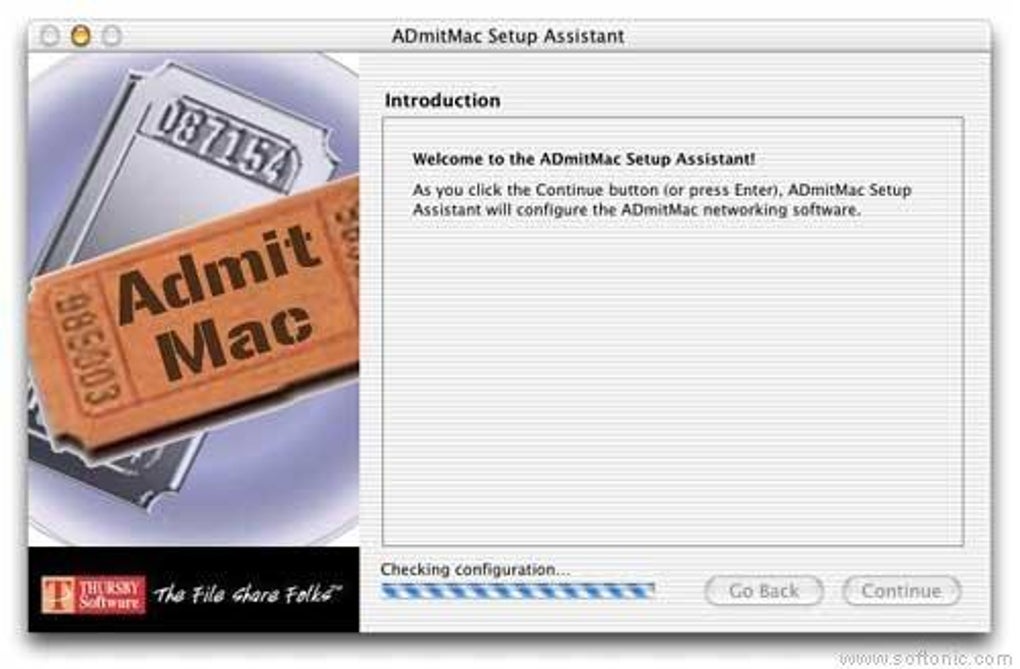
Installing ADmitMac begins with downloading the installer from the official website. The package is a standard .dmg file that, when opened, drops the application into the /Applications folder. Because the software must interact with system‑level authentication services, you will be prompted to enter an administrator password during the installation process. Once installed, launch ADmitMac and follow the wizard‑driven setup:
- Domain Specification: Enter the fully qualified domain name (FQDN) of your Active Directory forest. The wizard validates connectivity using LDAP over SSL (LDAPS) on port 636.
- Service Account Creation: Provide credentials for a service account with read‑only access to the directory. This account is used for ongoing queries and must have “Read” permissions on user and group objects.
- Mapping Options: Choose how home directories, login shells, and network shares are mapped. For creative professionals, enabling “Creative Suite Volume Integration” will automatically mount the correct network drives at login.
- Kerberos Configuration: If your environment uses Kerberos, the wizard will generate a
krb5.conffile and add the appropriate realm entries. - Policy Enforcement: Select which GPOs should be applied to Mac clients. Common choices include password complexity and account lockout policies.
After the wizard finishes, ADmitMac creates a background daemon that runs at system startup, ensuring the Mac remains bound to the AD domain. Users can now log in with their domain credentials, and the system will automatically apply the selected policies. For day‑to‑day administration, the AD Commander plug‑in offers a graphical interface: simply open the plug‑in, browse the directory tree, and perform user or group modifications with a few clicks. Logging is accessible via the “Logs” tab, where you can filter events by date, severity, or component. Although the initial setup requires careful attention to DNS settings, service‑account permissions, and SSL certificates, once configured the solution runs with minimal maintenance—only occasional updates to the daemon are needed to stay compatible with newer AD schema versions.
Compatibility, Pros & Cons, FAQ, and Final Verdict
ADmitMac is specifically engineered for macOS 10.3 (Panther) and macOS 10.4 (Tiger). It does not support later macOS releases, and attempting to install on newer versions will result in incompatibility errors. The software is compatible with Microsoft Windows Server 2003‑2019 as the AD source, and it works equally well with mixed environments that also use Apple Workgroup Manager for local Mac account provisioning.
Pros
- Provides secure, encrypted AD authentication for legacy Mac OS X versions.
- Includes AD Commander, a full‑featured AD management console for Mac admins.
- Supports Microsoft DFS and GPO enforcement, ensuring policy consistency.
- Optimized network volume mounting for high‑performance creative applications.
- Multi‑user sharing without credential conflicts on the same workstation.
Cons
- Installation and configuration are complex; not suited for beginners.
- Only works with Panther and Tiger—no support for macOS 10.5+.
- Requires a dedicated service‑account with appropriate AD permissions.
- Updates are infrequent, reflecting the niche user base.
- Limited official documentation; community forums are the primary support channel.
Frequently Asked Questions
Can ADmitMac be used on macOS 10.5 Leopard or later?
No. ADmitMac was designed specifically for Panther (10.3) and Tiger (10.4). For newer macOS versions, Apple’s built‑in Open Directory integration or third‑party tools like Jamf are recommended.
Is the connection to Active Directory encrypted?
Yes. ADmitMac uses LDAPS (LDAP over SSL) and Kerberos for authentication, ensuring that credentials are transmitted securely.
Do I need a separate AD service account for ADmitMac?
A dedicated service account with read‑only permissions is recommended. It isolates ADmitMac’s directory queries from regular user accounts and simplifies permission management.
Can ADmitMac manage Windows groups from the Mac?
Yes. The AD Commander plug‑in allows you to create, edit, and delete AD groups and assign users, providing full group management capabilities from the Mac interface.
What kind of support is available for ADmitMac?
Official support is limited; the vendor provides a knowledge base and email ticketing. Most users rely on community forums and archived documentation for troubleshooting.
Final Verdict & Call to Action
For organizations still running macOS Panther or Tiger, ADmitMac remains the most reliable bridge to Microsoft Active Directory and Windows‑based file services. Its security model, DFS integration, and the powerful AD Commander tool give IT departments the confidence to keep legacy Macs in production without compromising on policy enforcement. While the steep learning curve and narrow OS support may deter newcomers, the payoff is a stable, centrally managed authentication layer that can save years of manual account administration. If your environment matches the niche that ADmitMac targets—mixed‑platform offices, legacy creative workstations, or tightly regulated data‑sharing scenarios—downloading and configuring ADmitMac is a prudent investment.
Ready to secure your Panther or Tiger Macs? Click the button below to download the latest ADmitMac installer, review the setup guide, and start integrating your Macs with Active Directory today.
Download ADmitMac Now







