
Download Agentic – AI‑Powered Code Review & Collaboration Tool
Overview
In today’s fast‑paced development environment, manual code reviews often become the bottleneck that slows down delivery pipelines, especially for teams juggling dozens of pull requests (PRs) across multiple repositories. Agentic steps in as a web‑based AI assistant that automates the repetitive parts of the review process while preserving the essential human element of mentorship, architectural discussion, and strategic decision‑making. By automatically preparing PR descriptions, surfacing basic syntax and style issues, and performing an initial security scan, Agentic frees developers to concentrate on high‑impact tasks such as design reviews, performance tuning, and knowledge sharing. The platform also includes a powerful root‑cause analysis engine that can instantly trace bugs back to the exact commit that introduced them, dramatically shortening debugging cycles and reducing on‑call fatigue. Integration is a core strength: Agentic plugs directly into GitHub, GitLab, Jira, and Confluence, allowing teams to embed AI‑driven insights into the tools they already love. Whether you’re a solo engineer seeking a free, secure way to polish your code, or a large organization looking to elevate the overall security posture of its software supply chain, Agentic promises a seamless, low‑friction experience that scales with your needs. The solution is built on a secure, GDPR‑ and SOC‑2‑compliant backend, ensuring that proprietary code never leaves your trusted environment without encryption. Over time, the AI model continuously learns from your codebase, improving the relevance of its suggestions and reducing false positives. In short, Agentic combines productivity‑boosting automation with enterprise‑grade security, making it a compelling addition to any modern development workflow.
Key Features that Differentiate Agentic
- AI‑Assisted Pull Request Generation – Agentic automatically drafts PR descriptions, selects appropriate reviewers, and flags common issues before a human eyes the diff.
- Root‑Cause Analysis – By correlating error logs, test failures, and code changes, the tool pinpoints the exact commit that introduced a bug.
- Real‑Time Security Scanning – Integrated vulnerability detection scans dependencies for known CVEs and suggests safer alternatives.
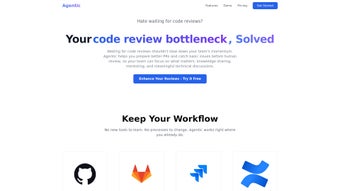
- Cross‑Platform Integration – Native connectors for GitHub, GitLab, Jira, and Confluence keep your workflow intact.
- Template & Documentation Generator – One‑click creation of boilerplate code, README files, and API docs ensures consistency across projects.
- Customizable Review Rules – Teams can define their own linting, style, and security policies that Agentic enforces automatically.
- Collaboration Dashboard – A visual board shows pending reviews, recent bugs, and security alerts in real time.
- Continuous Learning – The AI model adapts to your codebase, improving its suggestions as it processes more pull requests.
Each capability is designed to cut the manual overhead that traditionally plagues software delivery pipelines. For example, the AI‑assisted PR generation not only writes a concise summary but also includes a “what‑to‑watch” checklist based on recent changes, making the hand‑off to reviewers smoother and more informative. The root‑cause analysis works like a detective, scanning the commit graph and linking failures back to the exact line of code that introduced the regression, which can be a lifesaver during on‑call rotations. Security scanning goes beyond simple static analysis; it queries public vulnerability databases, matches them against the exact versions of libraries you’re using, and offers migration paths to patched releases. The collaboration dashboard aggregates all pending items into a single view, allowing managers to prioritize high‑risk PRs and developers to see the impact of their work at a glance. All of these features live inside a clean, web‑based UI that eliminates the need for separate tools, scripts, or manual checklists. In practice, teams report up to a 40 % reduction in review cycle time, while security teams appreciate the continuous, automated exposure of newly disclosed CVEs. The combination of automation, insight, and integration makes Agentic a true force multiplier for modern engineering organizations.
Installation, Usage & Compatibility
Getting Started in Minutes
Agentic is delivered as a SaaS platform, which means there is no traditional installer to download. To begin, visit the official website, click Sign Up, and create a free account using either your corporate email or a personal Google/GitHub login. After email verification, you are redirected to an onboarding wizard that guides you through connecting your version‑control and project‑management accounts. The wizard walks you through granting OAuth permissions for GitHub, GitLab, Jira, and Confluence, ensuring that Agentic can read and write PR metadata, create tickets, and update documentation automatically. The whole process typically takes less than ten minutes, even for large enterprises with multiple repositories.
Once the connections are established, the first step is to define your review ruleset. Agentic offers a library of pre‑built rule templates such as “Node.js Linting”, “Python Type Checking”, and “Dependency Vulnerability Alerts”. Choose the templates that match your technology stack, or craft custom rules using a simple YAML editor embedded directly in the dashboard. After saving the configuration, Agentic begins monitoring new branches and pull requests. When a developer opens a PR, the AI instantly runs its checks, injects a generated summary, and tags any security concerns directly in the PR comments. You can also invoke Agentic manually from the command line using a tiny CLI tool (npm i -g agentic-cli) that triggers the same analysis for local branches before they are pushed upstream, giving you the flexibility to catch issues early in the development cycle.
System Requirements & Operating System Support
Because Agentic runs entirely in the cloud, it is compatible with any operating system that can access a modern web browser—Windows 10/11, macOS Monterey or later, Linux distributions, as well as mobile platforms like Android and iOS for on‑the‑go review. The optional CLI works on Windows, macOS, and Linux, requiring Node.js 14+ or Python 3.8+. No additional server infrastructure is needed; all processing, including AI inference and security scanning, occurs on Agentic’s secure backend, which is GDPR‑ and SOC‑2‑compliant.
After the initial setup, daily usage is as simple as navigating to the Agentic dashboard, where you’ll see a list of open PRs, pending security alerts, and recent root‑cause analysis reports. You can drill down into any PR to view AI‑generated suggestions, accept or reject them, and add your own commentary. For teams that prefer tighter integration, webhooks can be configured to automatically post Agentic’s findings to Slack or Microsoft Teams channels, keeping the whole development crew in the loop without leaving their favorite communication tools. The platform also supports single sign‑on (SSO) via SAML or OpenID Connect, making it easy to align with existing corporate identity providers. In short, Agentic’s lightweight footprint and browser‑first design mean that you can start using it immediately, regardless of the operating system or device you prefer.
Pros and Cons
Pros
- Reduces manual review time by up to 40 % thanks to AI‑generated PR summaries and issue detection.
- Instant root‑cause analysis speeds up debugging, especially during incident response.
- Real‑time security scanning helps maintain a strong security posture without extra tools.
- Seamless integration with GitHub, GitLab, Jira, and Confluence keeps existing workflows intact.
- Customizable rule engine adapts to any language or framework.
- Web‑based UI works on all major operating systems; no heavy client install required.
- Free tier available for small teams and individual developers.
- CLI option enables pre‑push checks for developers who prefer command‑line workflows.
- Continuous learning model improves suggestions as it processes more PRs.
- Enterprise‑grade compliance (SOC‑2, GDPR) reassures security‑focused organizations.
Cons
- AI suggestions may occasionally miss context‑specific nuances, requiring manual override.
- Advanced security features (e.g., enterprise‑grade vulnerability management) are locked behind paid plans.
- Dependence on internet connectivity; offline usage is limited to the optional CLI.
- Learning curve for teams new to AI‑driven review processes.
- Custom rule creation, while powerful, can be complex for non‑technical stakeholders.
- Pricing for premium plans can be higher than some competing static analysis tools.
- Initial onboarding may require coordination across multiple tools (GitHub, Jira, Confluence).
Conclusion, FAQ & Call to Action
If you’re ready to cut down the time spent on mundane code‑review chores and empower your developers to focus on design, mentorship, and innovation, Agentic is the tool to bring that vision to life. Its AI‑assisted workflow, seamless integrations, and built‑in security checks create a unified experience that can be adopted by teams of any size. Start with the free tier today, connect your repositories, and watch the AI automatically enhance your pull requests. For larger enterprises, the paid plans unlock enterprise‑grade security scanning, on‑premise deployment, and dedicated support. Don’t let manual reviews slow you down—download Agentic now and experience a smarter, faster, and more secure development pipeline.
Frequently Asked Questions
Is Agentic free to use for open‑source projects?
Yes. Agentic offers a free tier that includes unlimited AI‑assisted PR generation, basic security scanning, and root‑cause analysis for public repositories. Private projects can also use the free tier, but advanced security alerts and premium integrations require a paid subscription.
How does Agentic handle sensitive code or proprietary data?
All code processed by Agentic is transmitted over TLS 1.3 and stored in encrypted form. The platform is SOC‑2 Type II compliant, and data is never used to train external models without explicit consent. Enterprises can also enable on‑premise processing for full data residency.
Can Agentic be integrated with CI/CD pipelines?
Absolutely. Agentic provides RESTful APIs and pre‑built GitHub Actions / GitLab CI jobs that can run AI checks as part of your build process, failing the pipeline if critical security issues are detected.
What programming languages does Agentic support?
Out of the box, Agentic supports JavaScript/Node.js, Python, Java, Go, Ruby, and TypeScript. Additional language packs can be added via custom rule templates, and the community contributes plugins for languages like Rust, PHP, and C#.
How often are vulnerability databases updated?
Agentic syncs with the National Vulnerability Database (NVD) and several vendor‑specific advisories every six hours, ensuring that the latest CVEs are reflected in its security scans.
Review Summary
Agentic delivers a compelling blend of AI‑driven automation and deep integration with the tools developers already use. Its ability to generate PR summaries, perform root‑cause analysis, and surface security risks in real time makes it a strong candidate for teams looking to accelerate delivery without sacrificing quality. While the free tier is generous, organizations with strict compliance requirements may need to consider the paid plans for advanced security features and on‑premise deployment. Overall, Agentic earns a solid rating for its usability, impact on productivity, and forward‑thinking approach to collaborative code review.



.png)




