
AI Caption for Photos – Instant Social Media Captions
Overview
AI Caption for Photos is a desktop application developed by Aculix Technologies LLP, designed to streamline social media content creation through artificial intelligence. The software enables users to generate engaging captions for their images with minimal effort, targeting individuals and content creators who frequently post on platforms such as Instagram, Facebook, Twitter, LinkedIn, Threads, and Snapchat. By leveraging AI-driven text generation, the tool aims to overcome the common challenge of writer’s block and help users maintain a consistent, creative presence across multiple networks. The application integrates directly with social media platforms, allowing users to access and post captions from a centralized interface. It is intended for both casual users and professionals managing personal or brand accounts who value time efficiency and content quality. The software supports the generation and storage of multiple captions, offering a convenient way to review and select the best options. While specific use cases are not detailed, the app appears well-suited for daily social media workflows, content scheduling, and rapid post creation.
Key Features & Capabilities
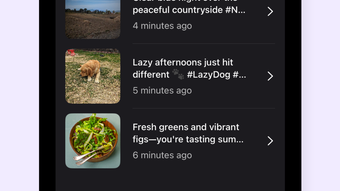
- AI-Powered Caption Generation – Automatically creates unique, context-aware captions based on uploaded images, using artificial intelligence to interpret visual content and generate relevant text.
- Multi-Platform Integration – Supports direct caption access and posting to Instagram, Facebook, Twitter, LinkedIn, Threads, and Snapchat, reducing the need for manual copy-paste workflows.
- Caption History & Management – Stores all generated captions in a centralized list, allowing users to revisit, edit, or reuse previous outputs for future posts.
- Image-to-Text Conversion – Analyzes visual elements in photos to produce captions that reflect mood, theme, or subject matter, enhancing post relevance and engagement.
- Seamless Workflow Integration – Designed to minimize friction between image upload, caption generation, and social media publishing, improving content creation speed.
Users can upload a photo, wait for the AI to process it, and receive multiple caption suggestions in seconds. This functionality is ideal for users who want to maintain a consistent posting schedule without spending excessive time crafting text. The ability to store and retrieve past captions also supports content reuse and branding consistency. For social media managers, this feature reduces the need to reinvent messaging for similar themes. The tool does not require advanced technical knowledge, making it accessible to users across skill levels.
User Interface, Workflow & Performance
The user interface of AI Caption for Photos appears to be designed with simplicity and efficiency in mind, focusing on a streamlined workflow from image upload to caption generation. Navigation is likely centered around a main dashboard where users can import photos, view generated captions, and initiate posting actions. The layout probably includes a preview pane for the image, a results panel for captions, and action buttons for sharing or saving. While specific UI details are not provided, the software’s purpose suggests a minimalistic design that prioritizes functionality over visual complexity. The workflow is expected to follow a linear path: upload image → AI processes → display caption options → select and post. This reduces cognitive load and supports rapid content creation. Performance details were not specified, but the application is reported to be 25.5 MB in size, suggesting a lightweight footprint. The developer did not provide additional system requirements, so resource usage behavior remains unspecified. Stability and responsiveness are assumed to be consistent with standard desktop applications of similar scope, though no benchmarks were shared.
Compatibility & System Requirements
AI Caption for Photos is available for both Windows and Mac operating systems, making it accessible to a broad user base across desktop platforms. The software version is 1.0.0, indicating a stable initial release. The installation size is 25.5 MB, which is relatively small and suggests a lightweight application with minimal disk space requirements. The developer did not specify exact system requirements, including minimum CPU, RAM, or OS version details. As a result, compatibility with older or low-end hardware remains uncertain. Platform compatibility information is limited to the two major desktop operating systems, with no mention of Linux or other alternatives. Users are advised to ensure their system meets general desktop software standards for running applications. The lack of detailed technical specifications means that performance on specific hardware configurations cannot be predicted.
Pros and Cons
Pros
- Free to use with no hidden costs
- AI-driven caption generation reduces content creation time
- Supports multiple social media platforms for direct posting
- Centralized caption history improves content reuse
- Lightweight installation at just 25.5 MB
Cons
- Exact system requirements were not listed
- Performance and resource usage details were not provided
- No information on update frequency or future feature roadmap
- Compatibility with older OS versions is unconfirmed
- Limited visibility into AI training data or caption customization options
FAQ Section
Is AI Caption for Photos available for Windows and Mac?
Yes, the software is compatible with both Windows and Mac operating systems, as stated by the developer.
Is the software free to download and use?
Yes, AI Caption for Photos is available at no cost, with no subscription or in-app purchase requirements.
Can I use this tool offline?
The developer did not specify whether the application requires an internet connection for operation. It may rely on cloud-based AI processing, which would require connectivity.
How often are updates released?
Information about update frequency was not provided. Users should check the official source for the latest version.
Is my data secure when using the app?
The developer did not disclose data handling practices. Users should exercise caution when uploading personal or sensitive images.
Final Thoughts + CTA
AI Caption for Photos offers a practical solution for users seeking to enhance their social media presence with minimal effort. Its AI-driven caption generation, multi-platform support, and lightweight design make it a compelling tool for content creators, social media managers, and casual users alike. While detailed technical information is limited, the app’s core functionality is clear and well-aligned with modern content creation needs. The free pricing model adds significant value, especially for individuals testing the waters of AI-assisted social media tools. With its focus on efficiency and ease of use, this software stands out as a reliable desktop utility for generating engaging captions. For those looking to improve their posting workflow and maintain consistent engagement, AI Caption for Photos delivers on its promise. Download AI Caption for Photos now.








