
Our engineers have been working hard in the background for months to bring you this exciting new feature in Aiode, it’s called “Layers”. Now you’ll have a full selection of virtual musicians in one tool!
What are Layers?
Layers act as your AI co-producer, intelligently generating multiple instruments that seamlessly complement your track. Instead of creating random sounds, each Layer analyzes the mood, tempo, and harmonic structure of your existing project. It listens to every element already in place, your melodies, vocals, or beats, and understands how they interact. With this awareness, it crafts additional parts that sound like they were performed by a band of real session musicians, ensuring every note and rhythm fits naturally into your mix.
Once the foundation is understood, Layers identify what’s missing and fills those spaces with purpose. Whether your song needs more rhythm, a touch of orchestral drama, or subtle ambient textures, it creates and blends them automatically. The result is a fuller, more dynamic production that feels organic and cohesive, capturing the richness of a full, diverse arrangement of instruments without manual layering. In a single take, your track evolves from a simple idea into a polished, studio-quality composition.
How Can You Use Them
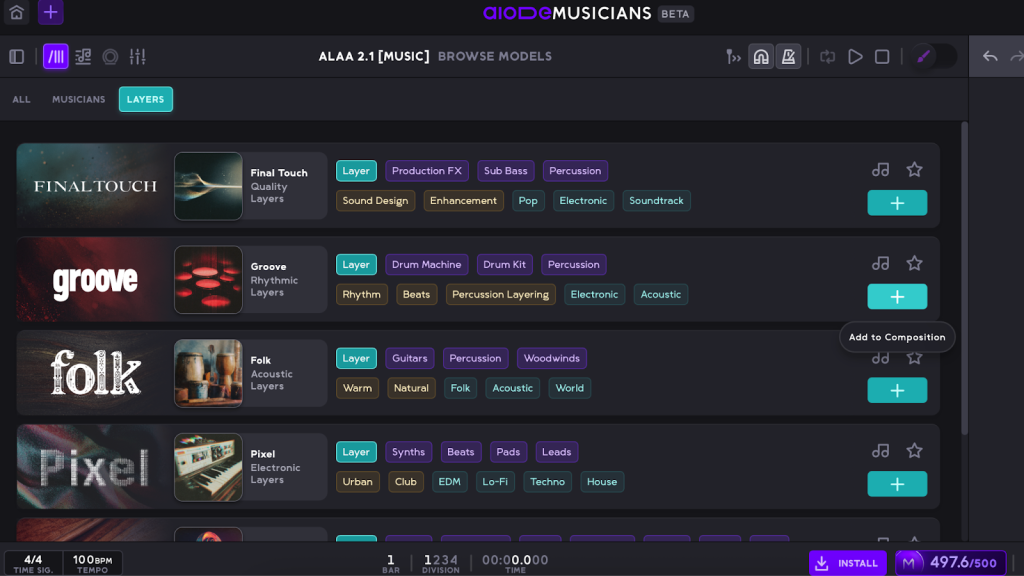
Layers are an upgrade to our virtual musicians. Each layer is like a full section of virtual musicians in one. You can add Layers to your compositions just like you add individual virtual musicians. Either click the Add Model button with the plus icon at the track header in the Composition page, or navigate to the Library page and add one.
On the Library page, you’ll find two tabs: Musicians and Layers. The Musicians tab lets you add individual virtual artists, each specializing in one or more instruments, allowing for precise creative control. The Layers tab introduces a powerful new feature: a multi-layered AI engine that generates cohesive instrumental sections designed to enhance and complete your composition. You can freely mix and match multiple Musicians and Layers, even adding duplicates of the same ones to build richer, more complex arrangements.
Layers In Action
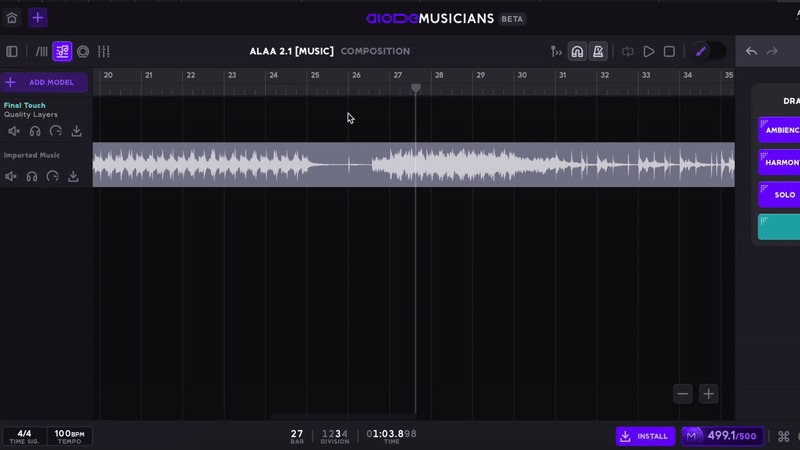
Creating a Layer take works the same way as generating a Musician take. Simply drag across the timeline to set the desired length, then click Generate. In just seconds, the AI engine listens to your composition, analyzes its structure and tone, and produces a rich, multi-layered musical performance that perfectly complements your track.
Layers In Detail
Layers work as your co-producer, intelligently adding depth, texture, and emotion to your music. Each Layer behaves like a specialized virtual musician, designed to enhance your composition with a unique stylistic voice. Just like human collaborators, every Layer has its own musical personality, from rich cinematic textures to rhythmic energy. Let’s explore the creative potential of each one:
✨Final Touch – Quality Layers

This Layer is designed to apply a professional polish and add impactful production elements to your tracks. Its purpose is to provide the final effects and production details necessary to refine a mix, including atmospheric sound design, critical low-end support, and specific rhythmic accents. It’s designed to enhance the overall quality, making a track feel complete and professionally mixed.
Use Cases
- Production Enhancement: Add professional polish and effects to tracks
- Sound Design: Creative FX elements for transitions and atmosphere
- Genre-Specific Production: Electronic vs acoustic percussion classification
- Mix Finishing: Sub bass and effects for final production touches
🥁 Groove – Rhythmic Layers
This layer’s purpose is to establish and strengthen the rhythmic foundation of any song. It provides the tools to create full drum and percussion tracks, both modern electronic beats and classic acoustic drumming styles. It’s used for beat programming, creating genre-specific rhythms, and layering diverse percussive elements.
Use Cases
- Rhythm Section Creation: Complete drum and percussion tracks
- Beat Programming: Electronic vs acoustic percussion selection
- Genre-Specific Rhythms: Electronic for EDM/Hip-Hop, Acoustic for Rock/Jazz
- Percussion Layering: Mix electronic and acoustic elements
🌍 Folk – Acoustic Layers

The Folk Layer is designed to infuse your music with rich melodies. Its purpose is to create traditional folk music elements, either focusing on melodic and harmonic instruments from various cultures or on ethnic percussion.
Use Cases
- World Music Production: Authentic traditional and ethnic instruments for global music creation
- Harmonic/Rhythmic Control: Separate control over melodic vs percussive world music elements
- Cultural Film/Game Scoring: Traditional world instruments for authentic media soundtracks
- World Music Fusion: Blend harmonic and rhythmic world elements with modern production
⚡ Pixel – Electronic Layers

The Pixel layer is designed for producing all core components of modern electronic music. Its purpose is to generate electronic rhythms, foundational bass lines, rich harmonic textures from synthesizers, and captivating lead melodies. It’s used to create complete, contemporary electronic soundscapes and track elements for genres like EDM, techno, and pop.
Use Cases
- Electronic Music Production: Complete EDM, techno, house production
- Beat Making: Electronic rhythm, bass, and harmony elements
- Dance Music Creation: Club-ready electronic elements
- Modern Pop Production: Electronic elements for contemporary tracks
🎻 Cinematic – Orchestral Layers
This layer’s purpose is to create grand, expressive, and dramatic musical scores using traditional orchestral instrumentation. It’s designed for film scoring, classical compositions, or any project that requires large-scale orchestral textures. It provides strings, woodwinds, horns, orchestral percussion, mallets, harps, and choral arrangements.
Use Cases
- Film Scoring: Complete orchestral sections for cinematic music
- Classical Composition: Traditional orchestral arrangement
- Hybrid Orchestral: Mix orchestral elements with modern genres
- Epic/Cinematic Production: Large-scale orchestral textures
You Can Try Them Now!
Now available as part of your plan, no extra upgrades or add-ons required! This feature is fully integrated into your existing Aiode subscription, giving you immediate access to its powerful capabilities. Whether you’re exploring new sounds, enhancing your workflow, or taking your productions to the next level, you can start using it right away without any additional costs or setup.
It’s designed to fit seamlessly into your creative process, offering the same intuitive experience you’re already familiar with. Simply open your project, explore the new tools, and see how effortlessly they elevate your music production.
Frequently Asked Questions
What are Layers in Aiode?
Layers are Aiode’s newest AI-powered feature that act as your AI co-producer. Each Layer intelligently generates multiple instruments that naturally complement your track. It listens to your composition—melody, rhythm, and harmony—and creates additional musical parts that sound like they were performed by real session musicians. The result is a fuller, more dynamic production that feels cohesive and professionally arranged.
How do I use Layers in my project?
Using Layers is simple and intuitive. You can add them to your project just like you add virtual Musicians:
- Click the Add Model (+) button at the head of your track in the composition page, or
- Go to the Library page and select the Layers tab.
From there, choose the Layer you want and generate a take by dragging across the timeline to define its length, then clicking Generate. The AI will instantly analyze your track and produce a multi-layered performance that fits perfectly into your mix.
What types of Layers are available and what does each one do?
Each Layer specializes in a specific style or musical purpose, much like different sections of a real band or orchestra:
- ✨ Final Touch: Adds professional polish and subtle effects, enhancing overall sound quality and mix cohesion.
- 🥁 Groove: Builds rhythmic foundations with electronic or acoustic percussion, perfect for creating solid beats and rhythmic movement.
- 🌍 Folk: Brings authentic acoustic and world instrument textures, ideal for folk, traditional, and cultural productions.
- ⚡ Pixel: Focuses on modern electronic elements such as synths, basslines, and digital rhythms for EDM, Techno, and Pop.
- 🎻 Cinematic: Provides orchestral richness for film scoring, classical pieces, or grand, dramatic compositions.
Can I mix Layers with individual Musicians?
Absolutely. Aiode gives you full creative freedom to combine Layers and Musicians in the same project. You can mix and match different Layers, duplicate them for more complex textures, or pair them with individual Musicians for greater precision and control. This hybrid approach lets you build rich, detailed arrangements tailored to your exact creative vision.
Do I need to upgrade my plan to access Layers?
No upgrades or add-ons are required, Layers are now fully included in your existing Aiode plan. You can start using them immediately without any additional setup or cost. Just open your project, explore the new options in the Library, and experience how Layers transform your workflow and elevate your music production.
