
Download Allyf – AI Accounting Automation, Secure Financial Management
Overview of Allyf AI Accounting Tool
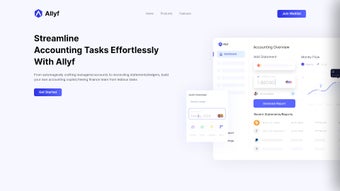
Allyf is a next‑generation, AI‑powered web application that redefines how finance teams handle day‑to‑day accounting tasks. Built on a foundation of advanced machine‑learning algorithms, Allyf acts as a virtual accounting copilot, automatically generating managerial accounts, reconciling statements, and spotting ledger discrepancies with remarkable speed and precision. The platform eliminates the repetitive, manual effort traditionally associated with bookkeeping, allowing accountants to redirect their expertise toward strategic analysis, forecasting, and decision‑making. By continuously learning from user interactions, Allyf adapts its workflows to match the unique preferences of each organization, delivering a personalized experience that grows smarter over time. Whether you are a small business seeking a cost‑effective solution or a large enterprise looking to scale its finance operations, Allyf offers a secure, cloud‑based environment that keeps financial data protected while providing real‑time visibility into the health of your organization. Its intuitive dashboard, comprehensive reporting tools, and seamless integration capabilities make it a compelling choice for anyone aiming to modernize their accounting processes without sacrificing accuracy or compliance. Moreover, Allyf’s subscription model includes regular updates that incorporate the latest regulatory changes, ensuring that your finance team always works with up‑to‑date compliance frameworks. In short, Allyf combines the power of artificial intelligence with a user‑friendly interface to turn tedious accounting chores into automated, error‑free operations that free up valuable human capital for higher‑order business insights.
Key Features That Set Allyf Apart
- AI‑Driven Account Creation: Generate managerial accounts instantly by feeding raw transaction data; the AI maps entries to the correct chart of accounts.
- Automated Reconciliation Engine: Real‑time matching of bank statements, credit‑card feeds, and general‑ledger entries, highlighting mismatches for quick resolution.
- Discrepancy Detection & Alerts: Advanced pattern recognition flags unusual transactions, potential fraud, or posting errors before they impact financial statements.
- Continuous Learning: The system refines its classification rules each time you approve or correct an entry, reducing manual adjustments over weeks.
- Customizable Dashboard: Drag‑and‑drop widgets let finance leaders build a view that surfaces KPIs, cash‑flow trends, and budget variances at a glance.
- Secure Cloud Architecture: End‑to‑end encryption, role‑based access control, and regular third‑party security audits keep sensitive data safe.
- Integration Hub: Native connectors for popular ERP systems, payroll platforms, and banking APIs enable bi‑directional data flow without duplicate entry.
- Regulatory Compliance Support: Built‑in audit trails, SOX‑ready reporting, and multi‑currency handling simplify compliance for global organizations.
- Scalable Pricing Model: Tiered subscription plans accommodate startups to Fortune‑500 companies, with a free trial to evaluate the AI capabilities.
Each feature is designed to reduce the time finance professionals spend on routine chores. For example, the automated reconciliation engine can process thousands of line items in minutes, a task that would normally require hours of manual cross‑checking. The AI‑driven account creation tool learns the nuances of your chart of accounts, meaning the more you use it, the fewer manual corrections you’ll need. The discrepancy detection module continuously monitors transaction streams, instantly alerting users to anomalies that could indicate fraud or data entry errors, thereby strengthening internal controls. Integration Hub connectors simplify the often‑painful data migration process, allowing you to pull historical data from legacy systems while pushing real‑time updates back to ERP platforms. The customizable dashboard lets senior executives tailor visualizations to their strategic priorities, whether that’s cash‑flow forecasting, expense tracking, or profitability analysis. Security is baked into every layer of the solution: data at rest is encrypted with AES‑256, data in transit uses TLS 1.3, and multi‑factor authentication can be enforced for all privileged accounts. Finally, Allyf’s scalable pricing ensures that growing companies can add users and modules without facing unexpected cost spikes, and the 14‑day free trial provides a risk‑free way to experience the platform’s AI capabilities first‑hand.
Installation, Usage, and Compatibility
Simple Web‑Based Deployment
Allyf is delivered as a fully hosted web application, which means there is no traditional “installation” process on the end‑user’s machine. To get started, simply visit the official Allyf website, click the “Sign Up” button, and follow the on‑screen wizard to create an administrator account. After confirming your email address, you’ll be prompted to configure your organization’s basic settings—company name, fiscal year, default currency, and chart of accounts template. Once the initial setup is complete, you can invite team members, assign roles, and begin importing historical data through CSV uploads or direct API connections. The onboarding wizard also includes a guided tour that highlights key UI elements, explains how to trigger AI suggestions, and demonstrates how to generate the first set of financial statements. Because the platform is cloud‑native, all configuration changes are saved instantly and are instantly available to every authorized user, eliminating the need for manual version control or local file synchronization.
Step‑by‑Step Usage Guide
- Data Import: Use the “Import” module to bring in bank statements, credit‑card feeds, and legacy ledger files. Allyf’s AI parser automatically maps columns to the appropriate fields, and you can preview the mapping before confirming the upload.
- Account Creation: Navigate to the “Accounts” tab and click “Generate Managerial Accounts.” The AI suggests account structures based on the imported data, which you can accept, rename, or merge with existing accounts.
- Reconciliation: Open the “Reconcile” dashboard. The system presents matched pairs and flags unmatched items for review. Resolve discrepancies with a single click, add notes for audit trails, or set up automated rules for recurring mismatches.
- Reporting: Choose from pre‑built financial statements—Balance Sheet, Income Statement, Cash Flow—or build custom reports using the drag‑and‑drop report builder. Export options include PDF, Excel, and XBRL for regulatory filing.
- Continuous Learning: As you approve AI suggestions, the system updates its models, improving accuracy for future cycles. You can also fine‑tune classification thresholds via the “Settings” panel to align with specific accounting policies.
- Collaboration & Approval: Assign review tasks to senior accountants or auditors. The platform tracks who approved each entry, timestamps every change, and generates an immutable audit log for compliance purposes.
Compatibility and System Requirements
Because Allyf runs entirely in the browser, it is compatible with any modern operating system that supports HTML5 and JavaScript. Officially supported platforms include:
- Windows 10 and later (Microsoft Edge, Chrome, Firefox)
- macOS 11 (Big Sur) and later (Safari, Chrome, Firefox)
- Linux distributions with recent Chromium‑based browsers
- iOS 13+ and Android 9+ for mobile access via responsive web design
Minimum hardware recommendations are modest: a dual‑core CPU, 4 GB RAM, and a stable broadband connection (≥5 Mbps) are sufficient for most small‑to‑medium enterprises. Larger organizations handling high‑volume transaction streams may benefit from a dedicated VPN tunnel and higher bandwidth to ensure optimal performance during peak reconciliation periods. Allyf also offers a mobile‑optimized interface, allowing CFOs and finance managers to review dashboards, approve entries, and receive real‑time alerts while on the go. Because the application is cloud‑first, updates are rolled out automatically, meaning you always work with the latest features and security patches without needing to schedule downtime or perform manual upgrades.
Pros, Cons, and Frequently Asked Questions
Pros
- Significant time savings through automated account creation and reconciliation.
- AI continuously improves accuracy, reducing manual corrections over time.
- Cloud‑based platform ensures accessibility from any device and location.
- Robust security measures, including end‑to‑end encryption and role‑based access.
- Seamless integration with existing ERP, payroll, and banking systems.
- Scalable pricing model with a free trial for risk‑free evaluation.
- Comprehensive audit trails and compliance‑ready reporting.
- Responsive mobile UI for on‑the‑go approvals and monitoring.
Cons
- Relies on internet connectivity; offline access is limited to read‑only mode.
- Initial AI training period may require some manual adjustments.
- Advanced customization of AI rules may need assistance from Allyf support.
- Feature set is extensive, which could present a learning curve for non‑technical users.
- Subscription costs, while scalable, may be higher than legacy on‑premise tools for very small teams.
FAQ – Your Questions Answered
Is Allyf suitable for small businesses?
Absolutely. Allyf offers a tiered pricing plan that starts at a low monthly rate, and its automation features can reduce accounting labor costs for small teams, making it a cost‑effective solution for startups and SMBs.
How does Allyf ensure data security?
Allyf uses AES‑256 encryption for data at rest and TLS 1.3 for data in transit. Access is controlled through role‑based permissions, and regular third‑party security audits verify compliance with industry standards such as SOC 2 and GDPR.
Can Allyf integrate with my existing ERP system?
Yes. Allyf provides native connectors for major ERP platforms like SAP, Oracle NetSuite, and Microsoft Dynamics, as well as open APIs that allow custom integration with virtually any financial system.
What kind of support does Allyf offer?
Customers receive 24/7 email support, a dedicated account manager for enterprise plans, and access to an online knowledge base, video tutorials, and community forums. Premium plans also include live chat and phone support.
Is there a free trial or demo available?
Allyf offers a 14‑day free trial with full feature access, allowing finance teams to evaluate the AI capabilities and integration options before committing to a subscription.
Can I export data for external audits?
Yes. Allyf provides export options in CSV, Excel, PDF, and XBRL formats. Exported files retain the full audit trail, ensuring that external auditors can verify the integrity of the data without additional manual reconciliation.
Reviewer’s Verdict: Allyf delivers a powerful blend of AI automation and user‑friendly design that can dramatically improve accounting efficiency. While the initial learning curve and reliance on internet connectivity are considerations, the overall value proposition makes it a standout tool for modern finance departments.
Conclusion – Is Allyf the Right Choice for Your Finance Team?
In today’s fast‑paced business environment, the ability to process financial data quickly, accurately, and securely is no longer a luxury—it’s a necessity. Allyf addresses this demand by combining sophisticated AI algorithms with a clean, cloud‑native interface that removes the friction traditionally associated with accounting software. The platform’s core strengths lie in its automated account creation, real‑time reconciliation, and continuous learning engine, all of which translate into measurable time savings and reduced error rates. Moreover, the robust security framework and seamless integration capabilities ensure that organizations can adopt Allyf without disrupting existing workflows or compromising compliance. If you are looking to empower your finance professionals to focus on strategic analysis rather than repetitive data entry, Allyf offers a compelling solution that scales from small businesses to large enterprises.
The 14‑day free trial provides an excellent low‑risk opportunity to experience the AI‑driven efficiencies first‑hand. During the trial, you can test the import wizard, evaluate the accuracy of the automated reconciliation engine, and explore how the customizable dashboard fits into your reporting cadence. Ready to modernize your accounting operations? Download Allyf today and start transforming the way your finance team works, delivering faster insights, tighter controls, and a stronger foundation for growth.



.png)




