
Download AmazonWatcher – Price‑track, Deal Alerts & Automatic Ordering Tool
Overview – Why AmazonWatcher Is the Smart Shopper’s Companion
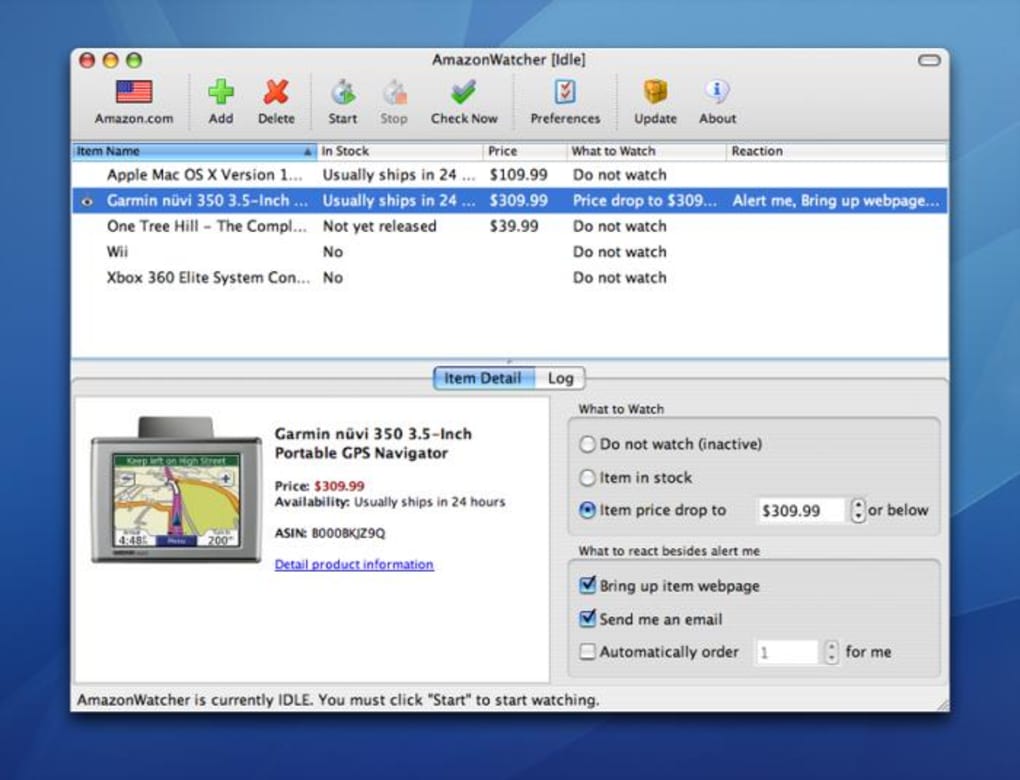
AmazonWatcher is a dedicated price‑monitoring utility designed for anyone who wants to stay ahead of Amazon’s constantly shifting deals. By letting you watch products across the six major international Amazon sites, the app ensures you never miss a price drop on the items you love—or the items you’ve already purchased. Simply paste a product URL, ISBN, or ASIN and AmazonWatcher instantly pulls a preview image, title, and current price into its clean interface. From there you can set a personal price threshold, choose how you’d like to be notified (sound, pop‑up, or email), and even enable the daring “auto‑order” feature that places a purchase the moment your target price is hit—provided you have a 1‑Click‑enabled Amazon account with saved payment details. While the sound alert is intentionally loud (some users call it “horrendous”), the visual and email notifications are subtle and effective. Recent updates have fixed long‑standing bugs where price data would stagnate after prolonged monitoring, added an option to hide the Mac menu‑bar icon, and sped up checks on items flagged as “too low to display.” In short, AmazonWatcher is a focused, secure, and free‑to‑try tool that transforms casual browsing into a disciplined deal‑hunting strategy.
Key Features – What Sets AmazonWatcher Apart
- Multi‑region support – Monitor products on Amazon.com, Amazon.co.uk, Amazon.de, Amazon.fr, Amazon.it, and Amazon.es.
- Flexible product entry – Add items via direct URL, ISBN, or ASIN for books, electronics, toys, and more.
- Real‑time preview – See product image, title, and current price instantly after adding to your watch list.
- Custom price alerts – Define the exact price point at which you want to be notified.
- Multiple notification channels – Choose from audible alerts, desktop pop‑ups, or email messages.
- Automatic ordering – Enable 1‑Click purchasing so the app can place orders the moment a price matches your target.
- Update reminders – Optional prompts to keep the app current, ensuring the latest price data and security patches.
- Mac‑specific tweaks – Hide the menu‑bar icon, improve low‑price item handling, and streamline UI for macOS users.
- Lightweight design – Low CPU usage and quick price‑checking cycles keep your system responsive.
- Free core version – No subscription required for basic monitoring; premium features are optional upgrades.
Installation & Usage Guide – Getting Started Quickly and Securely
Installing AmazonWatcher is straightforward on both Windows and macOS platforms. Begin by downloading the installer from the official website – the link is clearly marked “Free Download for Windows” or “Free Download for macOS.” After the download completes, run the executable (Windows) or drag the app icon into your Applications folder (macOS). The installer verifies your system’s integrity, then prompts you to allow the app to access the internet – a necessary permission for price checks and email notifications. Once installed, launch AmazonWatcher and you’ll be greeted by a clean dashboard. To add a product, paste the Amazon URL, ISBN, or ASIN into the “Add Item” field and click “Watch.” The app immediately pulls the product’s thumbnail, name, and current price, displaying them in a scrollable list.
Next, set your desired price threshold by clicking the pencil icon next to the product entry. Enter the amount you’re willing to pay, and select your preferred alert method. For sound alerts, you can choose between three built‑in tones; however, many users prefer the less intrusive pop‑up or email options. If you enable automatic ordering, make sure your Amazon account is linked via the Settings → Amazon Login page. Here you’ll also confirm your 1‑Click payment method and shipping address. Remember, the auto‑order feature only triggers when the live price drops to or below your set threshold, and you’ll receive a final confirmation pop‑up before the purchase is submitted. Finally, use the “Preferences” tab to adjust update intervals, enable or disable the update reminder, and hide the Mac menu‑bar icon if you prefer a cleaner desktop. Regularly check for updates – the developers release patches that improve speed, fix bugs, and tighten security, ensuring a reliable shopping assistant.
Pros & Cons – A Balanced Look at AmazonWatcher
Pros
- Supports six major Amazon locales, making it ideal for international shoppers.
- Instant visual feedback with product images and current prices.
- Customizable alerts let you choose the notification method that fits your workflow.
- Auto‑order capability can secure hard‑to‑get deals without manual checkout.
- Free core functionality keeps the barrier to entry low.
- Recent updates improve price‑checking speed and resolve long‑standing bugs.
- Mac‑specific options like hiding the menu‑bar icon enhance user experience.
Cons
- The default sound alert is extremely loud, which can be disruptive in quiet environments.
- Notification timing is limited to seconds or minutes; there’s no “hourly” option.
- Auto‑order requires full Amazon account integration, raising privacy concerns for some users.
- Occasional UI glitches where unrelated items appear in the watch list (e.g., a Wii console).
- Updates must be manually installed; the app does not support silent background upgrades.
Conclusion & FAQ – Should You Download AmazonWatcher?
If you’re a deal‑driven shopper who spends significant time on Amazon, AmazonWatcher offers a powerful, low‑cost way to stay informed about price changes across multiple regions. Its blend of real‑time previews, customizable alerts, and optional auto‑ordering makes it a versatile tool for both casual buyers and power shoppers. While the sound alert may need a volume tweak and the auto‑order feature demands careful account management, the overall value—especially given the free core version—outweighs these minor drawbacks. Download AmazonWatcher today, set your price thresholds, and let the app do the watching while you focus on the things that matter.
FAQ – Frequently Asked Questions
Can I use AmazonWatcher on Linux?
Currently AmazonWatcher is officially supported only on Windows and macOS. Linux users can run the Windows version via Wine, but official support and updates are not guaranteed.
Is my Amazon account information safe?
Yes. AmazonWatcher stores your credentials only in encrypted form and never transmits them to third‑party servers. All communication with Amazon uses HTTPS.
How often does AmazonWatcher check for price updates?
By default the app checks every 15 minutes, but you can adjust the interval in the Preferences panel to as short as 1 minute.
What should I do if the app shows items I never added?
Occasionally a sync glitch can add unrelated items. Simply select the unwanted entry and click the “Remove” icon. The developers are aware of this bug and plan a fix in the next release.
Is there a premium version with more features?
Yes. The premium tier unlocks advanced filtering, unlimited watch‑list items, and priority support. A free trial is available for 14 days.








