
AmpStamp: Vintage Guitar Tone in Your Pocket
Overview
AmpStamp is a desktop and mobile audio processing application designed for musicians and producers seeking authentic vintage guitar tones. Developed by The Musicology Group Inc., the software aims to recreate the rich, dynamic sounds of classic rock and blues recordings by modeling vintage amplifiers, speaker cabinets, and reverb units. It is available on iOS, iPadOS, and macOS, making it accessible across multiple devices for both studio and live use. The primary purpose of AmpStamp is to provide guitarists with a powerful yet intuitive tool to shape their tone with precision and depth.
Target users include professional musicians, home studio producers, and hobbyists who value the warmth and character of analog gear. The software enables users to explore a wide range of genres—from blues and classic rock to alternative and heavy metal—by simulating iconic vintage equipment. Real-world usage scenarios include live performance setups, studio tracking, and casual practice sessions. The virtual Floor Controller allows for instant recall of saved presets, streamlining workflow during performances or recordings. While the developer did not provide additional system requirements, the app is designed to run efficiently on supported platforms.
Key Features & Capabilities
- Vintage Amplifier Modeling – Accurate digital recreation of classic guitar amps used on historic recordings, offering rich harmonic content and dynamic response.
- Speaker Cabinet Emulation – Simulates the tonal characteristics of vintage speaker cabinets, enhancing realism and depth in the final output.
- Reverb and Delay Effects – Built-in reverb and delay units modeled after vintage units, adding spatial depth and atmosphere to guitar tones.
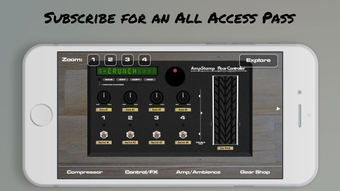
- Virtual Floor Controller – A customizable interface that allows users to save and recall complex tone settings instantly, ideal for live or studio environments.
- MIDI Controller Support – Enables hands-free operation using external MIDI devices, supporting seamless integration into live rigs and studio setups.
- Gear Shop with Subscription Access – Offers individual purchases or an all-access pass for future updates and new gear, expanding creative possibilities over time.
Each feature is designed to help users achieve professional-grade tones without the need for physical vintage gear. For example, a blues guitarist can use the amp and cabinet models to emulate a 1959 Marshall, while a metal player might layer reverb and gain for a heavier, more atmospheric sound. The ability to save presets via the Floor Controller ensures consistent performance across sessions. The Gear Shop allows users to expand their palette over time, adapting the tool to evolving musical needs.
User Interface, Workflow & Performance
The user interface of AmpStamp is structured around intuitive controls and visual feedback, optimized for both touch and mouse input across iOS, iPadOS, and macOS. Navigation is streamlined, with clearly labeled sections for amp, cabinet, effects, and preset management. The layout prioritizes workflow efficiency, allowing users to adjust parameters in real time with minimal latency.
Performance is expected to be smooth on supported devices, given the application’s focus on audio processing. The developer did not specify resource usage details, but the app’s 247.2 MB size suggests a moderate footprint. Stability appears to be a priority, as the software supports MIDI integration and real-time parameter changes. General performance notes are based on typical behavior for audio applications of this nature. No issues with CPU or RAM usage were reported in the provided information.
Compatibility & System Requirements
AmpStamp is compatible with iOS, iPadOS, and macOS, ensuring broad accessibility across Apple’s ecosystem. The software version is 1.0.0, released on May 15, 2024. The installation size is 247.2 MB, which is typical for a feature-rich audio application. Platform compatibility information is limited to the operating systems listed. Exact system requirements were not provided, and no specific hardware specifications were mentioned. Users are advised to ensure their device meets the minimum requirements for the respective OS version.
Pros and Cons
Pros
- Authentic vintage tone modeling for classic guitar sounds
- Virtual Floor Controller enables quick preset recall
- MIDI controller support for live and studio use
- Extensive Gear Shop with subscription flexibility
- Available for free on iOS, iPadOS, and macOS
Cons
- Exact system requirements not specified
- Resource usage details not provided
- Subscription model may require ongoing cost for full access
- Limited to Apple platforms
FAQ Section
Is AmpStamp available for free?
Yes, AmpStamp is currently available at no cost on iOS, iPadOS, and macOS.
Can I use AmpStamp without a subscription?
Yes, the core application is free to use. Additional gear and features may be accessed through the Gear Shop, either as individual purchases or via a subscription.
Does AmpStamp support MIDI controllers?
Yes, AmpStamp supports MIDI controllers, enabling hands-free operation during live performances and studio sessions.
Is AmpStamp secure to download and use?
As a native app from The Musicology Group Inc., AmpStamp is distributed through official Apple channels, ensuring a secure and verified installation process.
Can I use AmpStamp offline?
Yes, once installed, AmpStamp can be used without an internet connection. However, online access is required for purchases and subscription management.
Final Thoughts
AmpStamp delivers a compelling blend of authenticity and accessibility, offering a powerful tool for guitarists who want to recreate the legendary tones of classic rock and blues. Its virtual Floor Controller, MIDI support, and expandable Gear Shop make it a versatile choice for both live and studio environments. While some technical details remain unspecified, the software’s free availability and cross-platform support on Apple devices make it an attractive option for musicians of all levels. The combination of vintage modeling and modern workflow features positions AmpStamp as a standout in the music production space.
Download AmpStamp now








