
Download ANDRE – AI‑Powered Survey Data Analysis Tool
Overview
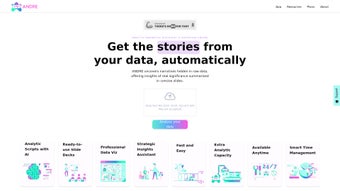
ANDRE is a web‑based AI productivity platform that turns raw survey data into clear, narrative‑driven reports with just a few clicks. Designed for anyone who works with questionnaires—whether you’re a small‑business owner, a market researcher, or an enterprise analyst—ANDRE automates the most time‑consuming parts of data analysis. The software reads multiple file formats, including CSV, XLSX, and SPSS (.sav), and connects directly to popular collection services such as Typeform, SurveyMonkey, and Google Drive. Once the data is uploaded, ANDRE’s machine‑learning engine extracts key trends, builds visual summaries, and writes concise narratives that highlight actionable insights. The tool also respects strict data‑privacy standards: all uploads are encrypted in transit, and the platform offers built‑in anonymization to protect personally identifiable information. By reducing the manual effort required to clean, code, and interpret survey results, ANDRE helps teams make faster, evidence‑based decisions while freeing analysts to focus on strategy rather than spreadsheet gymnastics.
Key Features & System Compatibility
- Automated data cleaning and coding for CSV, XLSX, and SAV files.
- AI‑generated narrative summaries that translate numbers into plain‑language insights.
- One‑click integration with Typeform, SurveyMonkey, Google Forms, and Google Drive.
- Customizable report templates for executive briefs, stakeholder decks, and full‑length analyses.
- Advanced data‑privacy controls, including end‑to‑end encryption and automatic anonymization.
- Real‑time collaboration – share draft reports with team members via secure links.
- Scheduled updates – set recurring imports to keep analyses current without manual effort.
- Multi‑language support for English, Spanish, French, and German.
ANDRE runs entirely in the browser, which means it works on any modern operating system that supports a recent version of Chrome, Edge, Firefox, or Safari. The platform is optimized for Windows 10/11, macOS 12 and later, as well as Linux distributions that can run a Chromium‑based browser. Because the service is cloud‑hosted, there are no heavyweight client installations; a stable internet connection is the only requirement. Mobile users can also access ANDRE on Android 8+ or iOS 13+ through a responsive web interface, making it easy to review results on the go.
Compatible Operating Systems: Windows 10/11, macOS 12+, Linux (any distro with Chromium), Android 8+, iOS 13+.
Installation, Usage Guide, and Pros & Cons
Getting Started in Three Simple Steps
- Sign up & verify: Visit the ANDRE homepage, create a free trial account, and confirm your email address. The platform uses OAuth for secure login and supports SSO via Google Workspace.
- Connect your data source: Choose “Import Data” and select either a local file (CSV, XLSX, SAV) or a linked service such as Typeform. ANDRE will automatically map survey fields and prompt you to confirm any custom variables.
- Generate the report: Click “Analyze”, and within seconds the AI engine produces a full narrative report, visual charts, and an executive summary. You can edit sections, add commentary, or export the document as PDF, Word, or PowerPoint.
The intuitive dashboard guides users through each phase with tooltips and video tutorials. For power users, an API key is available to embed ANDRE’s analysis engine into existing workflows, allowing automated report generation from CRM or data‑warehouse platforms.
Pros
- Drastically cuts analysis time—from hours to minutes.
- Eliminates spreadsheet errors through AI‑driven cleaning.
- Narrative output makes insights understandable for non‑technical stakeholders.
- Strong data‑privacy features meet GDPR and CCPA requirements.
- Cross‑platform access via any modern browser.
Cons
- Subscription cost may be high for very small teams.
- Limited offline capability; requires internet connectivity.
- Advanced statistical testing (e.g., regression) is not yet built‑in.
- Custom branding options are only available on enterprise plans.
Frequently Asked Questions & Final Thoughts
Is there a free version of ANDRE?
ANDRE offers a 14‑day free trial with full feature access. After the trial, you can choose a monthly or annual subscription; there is no permanently free tier.
How does ANDRE ensure data privacy?
All uploads are encrypted with TLS 1.3, stored in ISO‑27001‑certified data centers, and automatically anonymized to strip personal identifiers before analysis.
Can I integrate ANDRE with my existing BI tools?
Yes. ANDRE provides RESTful APIs and can push finalized reports directly into Tableau, Power BI, or Looker via webhooks.
What file formats are supported for import?
CSV, Microsoft Excel (XLSX), and SPSS (*.sav) files are natively supported. Future updates aim to add JSON and Google Sheets sync.
Is there customer support available?
Subscribers receive 24/7 email support, live chat during business hours, and access to an extensive knowledge base and community forum.
Conclusion – Should You Download ANDRE?
If you spend valuable time wrestling with spreadsheets, manual coding, and repetitive reporting, ANDRE is a game‑changer that delivers fast, reliable, and narrative‑rich insights. Its seamless integrations, robust privacy safeguards, and browser‑based accessibility make it a solid choice for teams that value speed without compromising data integrity. While the subscription price reflects its advanced AI capabilities, the time saved and the clarity of its reports often justify the investment. Ready to transform your survey analysis workflow? Download ANDRE today and experience AI‑driven reporting that lets you focus on strategic decisions instead of data wrangling.



.png)




