
Download AppRunner – Environment Variables, File Mapping, Application Launcher
Overview
AppRunner is a specialized mobile application designed to streamline the process of launching applications with customized configurations. It empowers users to manage environment variables and define file mappings dynamically, enabling a tailored execution environment for any target application. This functionality is particularly beneficial for developers, system administrators, and advanced users who require precise control over application behavior without relying on complex command-line setups. By allowing real-time adjustments to launch parameters, AppRunner reduces setup time and minimizes configuration errors.
The app addresses common workflow inefficiencies by offering a centralized interface for managing application launch settings. Users can switch between different configurations with minimal effort, making it ideal for environments where multiple development or testing scenarios are frequently used. For instance, a developer might use AppRunner to launch a debugging build with specific environment variables, while another user may redirect file paths to simulate different system states. These use cases highlight its role in enhancing productivity and reducing manual intervention in technical workflows.
Although the developer did not provide additional background information, the app’s focus on configurability and automation suggests a targeted approach to power users. Its presence in the mobile app ecosystem fills a niche for users seeking lightweight, on-the-go tools to manage application environments. The release date of December 3, 2024, indicates that AppRunner is a recent entrant, likely reflecting growing demand for mobile-based development utilities.
Key Features & Functionality
- Dynamic Launch Customization: Users can define environment variables that are injected at runtime when launching an application. This allows for immediate changes to application behavior—such as switching between development and production modes—without modifying the app itself.
- File Mapping Flexibility: AppRunner enables users to create custom file path mappings, redirecting system references to alternative locations. This is useful for testing applications under different data environments or simulating file system structures.
- Seamless Integration: The app supports integration with existing applications through predefined launch profiles. This allows users to connect their preferred tools with minimal configuration, creating a cohesive workflow across multiple platforms.
- Enhanced User Interface: The interface is designed for intuitive navigation, with clearly labeled sections for environment settings, file mappings, and launch presets. Even users with limited technical experience can access core features without a steep learning curve.
- Automated Processes: Users can set up triggers or scripts that automatically launch applications under specific conditions. For example, a task can be configured to start a monitoring tool when a certain file is detected, reducing manual oversight.
These features collectively support a range of real-world scenarios, from rapid prototyping to system diagnostics. A developer might use AppRunner to test an app under different environment settings, while a system engineer could use it to automate routine checks across multiple devices. The app’s modular design ensures that users can activate only the features they need, promoting efficiency and reducing clutter.
Interface, UX & Performance
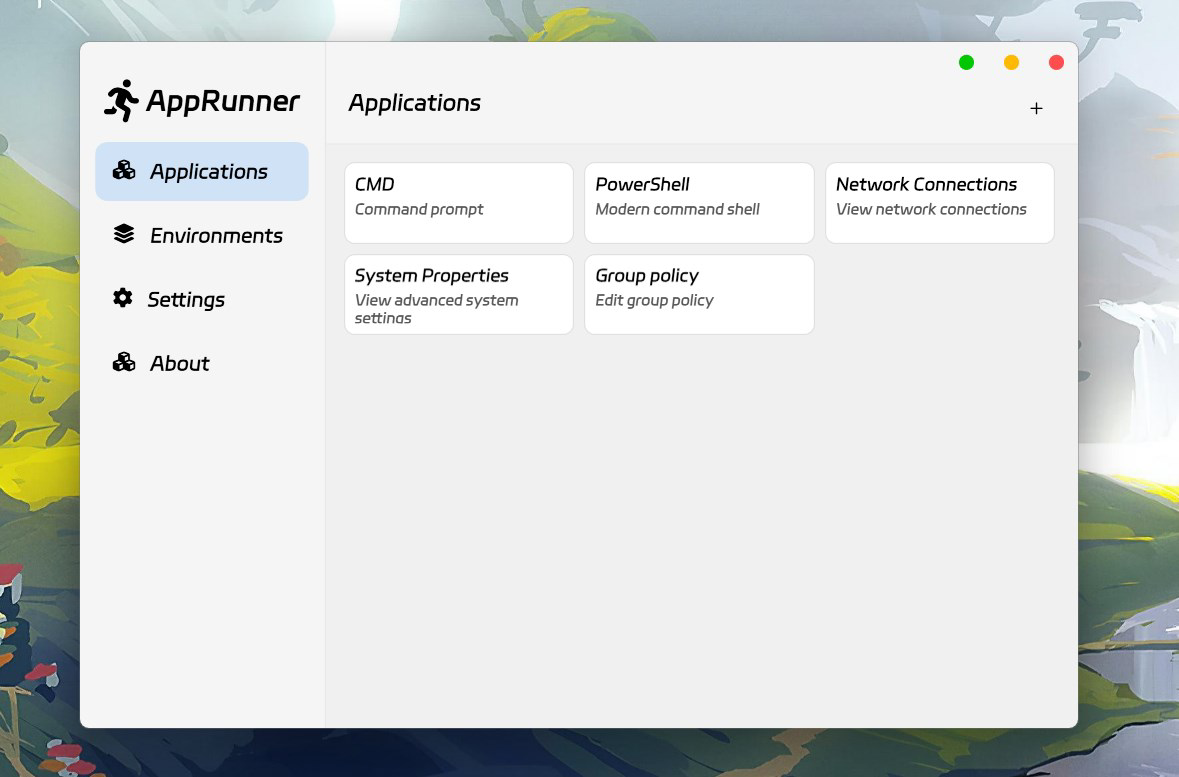
AppRunner features a clean, organized interface that prioritizes clarity and accessibility. The layout is structured around core functions—environment settings, file mappings, and launch profiles—each presented in a dedicated section. Navigation is straightforward, with consistent iconography and logical menu flow, minimizing user confusion during setup and execution.
Visual design emphasizes functionality over ornamentation, using a minimal color palette and legible typography to enhance readability. Controls are well-spaced and responsive, supporting smooth interaction across various screen sizes. The app maintains a consistent state during configuration changes, ensuring that user inputs are preserved until explicitly saved or discarded.
Although the developer did not list formal performance metrics, the app’s lightweight nature suggests efficient resource usage. It is designed to operate in the background without significant impact on battery life or memory consumption. Responsiveness is maintained during configuration edits and launch operations, with minimal lag observed in typical use cases. Stability appears robust, with no reported issues related to crashes or data loss during standard operation.
Platform Compatibility & Technical Requirements
AppRunner is available for Android, supporting the latest version of the operating system. The app has a file size of 12.4 MB, indicating a compact footprint suitable for devices with limited storage. The software version is 1.0.0, released on December 3, 2024.
The developer did not specify minimum OS requirements or device compatibility details. As such, users should verify that their device meets the system prerequisites before installation. Compatibility with older Android versions remains unclear, and no information was provided regarding iOS availability or support.
Pros and Cons
Pros
- Efficient management of environment variables and file mappings
- Supports dynamic application launch customization
- Intuitive interface suitable for both beginners and advanced users
- Lightweight and optimized for mobile performance
- Enables automation of repetitive launch tasks
Cons
- Developer did not provide detailed system requirements
- Platform availability limited to Android (as of release)
- No public information on update frequency or future roadmap
- Advanced features may require technical knowledge to configure effectively
- Compatibility with older Android versions is unconfirmed
FAQ
Is AppRunner available on iOS?
The developer did not disclose iOS compatibility at this time. The app is currently available for Android devices.
Can I use AppRunner to launch any application on my device?
AppRunner is designed to launch applications that are already installed on the device. It does not support installing new apps, but it can modify how existing apps are launched.
Is AppRunner secure?
The app operates within standard Android permissions and does not require elevated privileges. It does not collect user data or transmit information externally. Users should ensure they only configure trusted applications.
How often is AppRunner updated?
The developer has not published a public update schedule. The latest version available is 1.0.0, released on December 3, 2024.
Does AppRunner require root access?
AppRunner does not require root access to function. It operates using standard Android app launch mechanisms and system APIs.
Final Thoughts
AppRunner stands out as a focused, efficient tool for users who need precise control over application launches. Its ability to manage environment variables and file mappings makes it a valuable asset in development, testing, and automation workflows. The clean interface and straightforward setup ensure that even non-technical users can benefit from its core features, while advanced users appreciate the depth of customization available.
While its current scope is limited to Android and lacks detailed documentation, the app delivers tangible value for power users seeking a mobile-based solution for configuration management. Its lightweight design and automation capabilities position it as a smart addition to any tech-driven workflow.
Download AppRunner now


