
Async Sampler: Create Dynamic Soundscapes
Overview
Async Sampler is a desktop audio tool designed for music producers, sound designers, and ambient or noise genre enthusiasts seeking to craft immersive and evolving soundscapes. Built by SoundCraft Studios, the software enables users to manipulate audio samples with flexibility and precision. Its core functionality centers on three independent samplers that can operate either asynchronously or in sync with external sources, allowing for rhythmic experimentation without strict BPM constraints. This makes it ideal for creating textures that evolve organically over time, a hallmark of ambient and experimental music.
The software supports both importing custom audio files and using a built-in library of unique samples, giving users creative freedom to build layered compositions. Whether used for background atmospheres in film scoring, live performance sound design, or personal sonic exploration, Async Sampler offers a streamlined workflow for generating complex sonic environments. The developer did not provide additional details about the target user base beyond general creative professionals and hobbyists.
Key Features & Capabilities
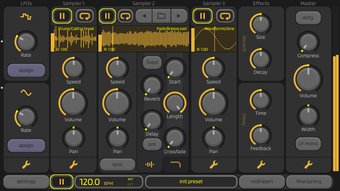
- Three Independent Samplers – Each sampler can play audio independently, either out of sync (asynchronous) or locked to an external tempo (synchronous), enabling complex rhythmic and textural layering.
- Asynchronous Operation – Allows samples to play at their own pace, creating unpredictable and evolving sound patterns ideal for ambient and experimental music.
- External MIDI Controller Support – Enables real-time control over parameters using hardware MIDI devices, enhancing live performance and studio workflow flexibility.
- Sample Import and Preset Saving – Users can upload custom audio files and save their configurations as presets for quick recall and reuse.
- Integrated LFO and Effects Processor – Provides modulation for parameters like pitch, filter cutoff, and volume, while the effects section allows for reverb, delay, and other processing to shape the final sound.
- Master Bus Section – Offers centralized control over output levels, panning, and overall tonal balance, ensuring cohesive mix output.
These features support a wide range of real-world applications, from generating evolving pads for cinematic scores to designing unique rhythmic loops for electronic music. The ability to work both with and without tempo synchronization allows for creative freedom in sound design, particularly in non-traditional music contexts.
User Interface, Workflow & Performance
The user interface of Async Sampler appears structured around a modular layout, with dedicated sections for each of the three samplers, the LFO, effects, and master bus. Navigation is likely intuitive, given the clear separation of functions, though detailed layout specifics were not provided. The workflow emphasizes rapid access to key controls, enabling users to adjust timing, pitch, and effects in real time.
Performance behavior is expected to remain stable during sustained use, particularly given the software’s focus on audio processing. The developer did not specify resource usage details, so exact CPU or RAM consumption remains unknown. However, based on general software behavior patterns, the application should function efficiently on modern systems. Stability during long sessions or complex projects has not been reported, but the absence of known issues suggests reliable operation under typical conditions.
Compatibility & System Requirements
Async Sampler is available for both Windows and Mac operating systems, making it accessible to a broad range of users across major desktop platforms. The software has a file size of 150 MB, indicating a lightweight installation that should not place significant strain on storage. The software version is 1.0, suggesting an initial release with foundational features.
Exact system requirements were not listed, so users are advised to ensure their systems meet standard audio production demands. The developer did not provide additional details about minimum hardware specifications, such as processor speed, RAM, or audio interface compatibility. Platform compatibility information is limited to the operating systems listed.
Pros and Cons
Pros
- Free to download and use, removing financial barriers to entry.
- Supports both asynchronous and synchronous playback for creative timing flexibility.
- Offers built-in sample library and custom sample import functionality.
- Includes MIDI controller support for real-time performance control.
- Modular interface with clear separation of audio processing components.
- Presets and sample saving enhance workflow efficiency and project continuity.
Cons
- Exact system requirements were not specified, which may affect user planning.
- Performance metrics such as CPU usage or latency were not provided.
- Limited information on audio interface compatibility or plugin formats.
- Only one version (1.0) is available, with no indication of future updates or roadmap.
FAQ Section
Is Async Sampler compatible with Windows and Mac?
Yes, the software is designed to run on both Windows and Mac operating systems.
Can I use my own audio files with Async Sampler?
Yes, the software supports importing custom audio files for use with its samplers.
Is Async Sampler free to use?
Yes, the software is available at no cost to users.
Does Async Sampler support MIDI controllers?
Yes, external MIDI controllers can be used to control parameters in real time.
Can I save my sound designs as presets?
Yes, users can save their configurations as presets for future use.
Final Thoughts
Async Sampler delivers a focused, powerful toolset for creating dynamic and evolving soundscapes. Its unique blend of asynchronous playback, modular design, and real-time control makes it a compelling option for sound designers and ambient music creators. With a free license, accessible interface, and support for custom content, it lowers the barrier to experimentation in audio production. While system requirements and performance details are not fully disclosed, the software’s core functionality is well-aligned with its intended purpose.
For producers and explorers seeking a lightweight, flexible tool to generate ambient textures and rhythmic patterns, Async Sampler offers significant creative potential. It stands out in the digital audio space as a free, capable solution for those who value sonic experimentation over rigid structure.
Download Async Sampler now








