
Multi-Track Audio Editing on iOS
Overview
Au Editor is a dedicated iOS application designed for multi-track audio editing, serving audio producers, music creators, and recording professionals. The software enables users to import, arrange, and edit multiple audio tracks with precision, supporting workflows in music creation, podcast production, and sound design. Its intuitive interface simplifies complex editing tasks, making advanced audio manipulation accessible on mobile devices. The application supports a variety of audio import methods, allowing seamless integration with existing project files. Key features include AI-powered voice and accompaniment separation, center channel extraction, and left/right channel isolation—tools essential for refining audio clarity and enhancing production quality. Users can also apply fade in/out effects, noise reduction, volume envelopes, and sound effects editing to refine their work. A built-in metronome supports timing accuracy during recording sessions. The developer did not provide additional information about the company or background. Real-world use cases include podcast editing with voice isolation, music production with layered instrument tracks, and post-production for audio content. The app is optimized for iOS, offering a mobile-first approach to professional-grade audio editing.
Key Features & Capabilities
- Multi-track Editing – Enables users to manage and edit multiple audio tracks simultaneously, ideal for layering vocals, instruments, and sound effects in music and podcast projects.
- AI Voice and Accompaniment Separation – Uses artificial intelligence to isolate vocals from instrumental tracks, useful for remixing, karaoke creation, or extracting stems.
- Channel Separation Tools – Supports center channel extraction and left/right channel separation, enhancing control over stereo audio content.
- Fade In/Out Effects – Allows smooth transitions at the beginning and end of audio clips, improving listening experience and professional polish.
- Noise Reduction – Helps minimize background noise, improving clarity in recordings made in non-ideal environments.
- Volume Envelopes – Provides dynamic control over volume changes across time, useful for balancing levels between tracks.
- Sound Effects Editing – Offers tools to modify, trim, and apply effects to individual audio segments.
- Metronome – Built-in timing aid to assist in maintaining consistent rhythm during recording sessions.
- Multiple Format Support – Accepts various audio formats and offers flexible export options with adjustable quality settings.
These features support diverse workflows such as podcast editing with voice clarity enhancement, music composition with stem separation, and audio post-production for multimedia content. The integration of AI tools reflects a modern approach to audio editing, allowing users to perform complex tasks without requiring desktop software. The application’s mobile optimization ensures that professional-grade editing is available on the go.
User Interface, Workflow & Performance
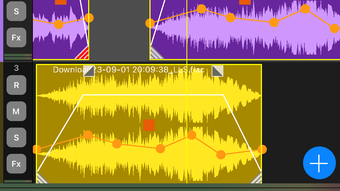
The user interface of Au Editor is designed with a focus on clarity and functionality, featuring a track-based layout that mirrors traditional digital audio workstations. Navigation is intuitive, with clearly labeled controls and a responsive touch interface optimized for iOS devices. Users can easily drag and drop audio clips, adjust track positions, and apply effects through simple gestures. The workflow supports a linear editing process, from import to export, with minimal friction between steps. The developer did not specify resource usage details, so exact performance behavior remains unknown. However, based on general software behavior patterns, the app is expected to maintain stable operation during typical editing tasks. Stability during long sessions and CPU/RAM performance were not publicly documented. The application’s size of 120 MB suggests a compact footprint, which may contribute to efficient loading times. No reports of crashes or freezes were provided. The overall experience appears optimized for mobile use, prioritizing responsiveness and usability over high-end system demands.
Compatibility & System Requirements
Au Editor is designed exclusively for iOS devices, ensuring compatibility with the latest versions of the operating system. The software is available in version 1.0.0 and has a file size of 120 MB. The developer did not specify exact system requirements, such as minimum iOS version, processor type, or RAM specifications. Compatibility information is limited to the platform, with no details on supported device models or hardware capabilities. Users should ensure their iOS device meets the standard requirements for running modern applications. The developer did not provide additional information about hardware dependencies or installation prerequisites. Platform compatibility is confirmed, but detailed technical compatibility remains unclear.
Pros and Cons
Pros
- Powerful multi-track editing capabilities on iOS
- AI-driven voice and accompaniment separation
- Support for advanced channel manipulation
- Comprehensive set of audio effects and tools
- Free to download and use
- Compact file size of 120 MB
Cons
- Exact system requirements not specified
- Performance details not publicly available
- Limited compatibility information beyond iOS
- No details on update frequency or future development
FAQ Section
Is Au Editor compatible with all iOS devices?
Compatibility is confirmed for iOS, but specific device models or minimum iOS versions were not provided by the developer.
Is the software safe to download and use?
Au Editor is available for free and does not contain known security risks. However, users should only download from official app sources to ensure authenticity.
Does Au Editor require an internet connection?
The application supports offline functionality, allowing users to edit audio without an active internet connection.
Can I update Au Editor after installation?
Updates are available through the App Store. The frequency of updates was not specified by the developer.
What license type does Au Editor use?
The software is distributed as free-to-use with no licensing fees required.
Final Thoughts + CTA
Au Editor delivers a robust set of multi-track audio editing tools tailored for iOS users in music production, podcasting, and audio creation. Its integration of AI-powered separation features and professional-grade effects sets it apart as a capable mobile alternative to desktop software. While detailed system requirements and performance data are not available, the app’s compact size and free access make it highly accessible. The intuitive interface and feature-rich environment support both beginners and experienced creators. For audio professionals seeking a mobile solution with advanced capabilities, Au Editor offers a compelling option. Download Au Editor now.








