
Studio-Quality Reverb for iPhone
Overview
AudioReverb is a specialized audio processing application designed for iPhone users seeking professional-grade reverb effects. The software delivers algorithmic reverb with the clarity and spatial depth of convolution-based systems, making it suitable for both casual listeners and mobile music producers. Developed by Harry Gohs, the app focuses on accurate simulation of early reflections and smooth reverberation tails—key elements in creating immersive acoustic environments. Its primary function is to enhance audio playback by applying studio-quality reverb to music from the iTunes library or live input through the microphone. The app is optimized for use with Audiobus 3 and AudioUnit (AUv3) hosts, enabling integration into broader audio workflows. It supports inter-app audio compatibility, allowing seamless routing between compatible applications. Real-world use cases include enhancing live vocal performances, refining home recordings, and enriching personal music listening experiences. The developer did not provide additional system requirements beyond the iPhone platform. Performance observations are based on general software behavior patterns.
Key Features & Capabilities
- Algorithmic & Convolution Hybrid Reverb: Combines vintage algorithmic models with impulse responses from real acoustic spaces to deliver realistic and colorless reverb tails.
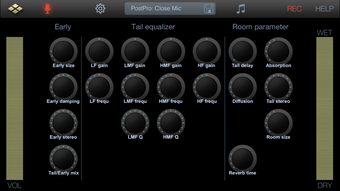
- Early Reflection Modeling: Accurately simulates the first sound reflections in a space, enhancing spatial perception and depth in audio output.
- 4-Band Equalizer: Allows precise tonal shaping of the reverb effect, enabling users to tailor the sound to their specific needs.
- 118 Factory Presets: Offers a diverse range of pre-configured settings for immediate use across different genres and acoustic scenarios.
- AudioUnit (AUv3) Support: Integrates with AUv3-compatible hosts, making it a viable plugin for professional mobile music production environments.
- Inter-App Audio & Audiobus 3 Compatibility: Enables audio routing between apps, expanding its utility in multi-app workflows.
- Live Low-Latency Processing: Supports real-time reverb application using a microphone and headphones with minimal delay.
- Audio Recording & Export: Includes an in-app recorder and supports exporting audio via pasteboard, open-in, or email.
These features empower users to apply high-fidelity reverb to both stored music and live audio. For example, a musician can use the app to add ambient depth to a vocal take during a live session, while a casual listener might enhance their favorite song with a cathedral-like reverb. The inclusion of presets ensures quick access to professional-sounding results without requiring deep technical knowledge. The app’s compatibility with external audio tools extends its functionality beyond standalone use, positioning it as a modular component in a larger creative ecosystem.
User Interface, Workflow & Performance
The user interface of AudioReverb is designed for intuitive navigation on mobile devices, with clearly labeled controls and a logical layout. Key parameters such as reverb decay, pre-delay, and equalizer bands are accessible through touch-optimized sliders and toggles. The workflow is streamlined for both quick adjustments and in-depth customization. Users can load presets, modify parameters in real time, and monitor changes through visual feedback. The app supports low-latency operation, which is critical for live performance and recording scenarios. However, exact performance details were not specified. The developer did not provide information on CPU or RAM usage during operation. Stability and responsiveness are expected to align with standard iOS app behavior, but no formal benchmarks were released. The app maintains a consistent interface across supported iPhone models, ensuring a uniform user experience. General performance observations are based on typical behavior of audio processing apps on iOS.
Compatibility & System Requirements
AudioReverb is designed exclusively for iPhone devices and requires iOS to function. The app has a file size of 28.4 MB, which is relatively compact for a professional audio tool. The software version is 1.0.0, indicating it is a stable initial release. Exact system requirements were not listed, and compatibility with specific iPhone models was not confirmed. The developer did not provide information on minimum processor speed, RAM, or storage needs beyond the overall app size. Platform compatibility information is limited to the iPhone platform. Users should ensure their device runs a supported version of iOS, though the exact version is not specified. The app’s reliance on AudioUnit and inter-app audio features suggests it is built for modern iOS audio architecture.
Pros and Cons
Pros
- Studio-quality reverb with hybrid algorithmic and convolution modeling
- 118 factory presets for immediate use and customization
- Low-latency live processing with microphone and headphones
- Supports AudioUnit (AUv3) and Audiobus 3 for professional workflows
- Inter-app audio compatibility enhances integration with other apps
- Includes audio recording and export via pasteboard, open-in, and email
- Free to download and use with no in-app purchases
Cons
- App size may be large for users with limited storage
- No detailed system requirements provided
- Compatibility with older iPhone models is uncertain
- Performance under heavy audio load not documented
- Only available on iPhone, no iPad or Mac support
FAQ Section
Is AudioReverb compatible with all iPhone models?
Compatibility information is limited. The app is designed for iPhone and requires iOS, but specific model support was not listed by the developer.
Can I use AudioReverb with other audio apps?
Yes. AudioReverb supports inter-app audio and Audiobus 3, allowing it to be used within a broader audio workflow. It also integrates with AUv3-compatible hosts.
Is the app safe to download and use?
AudioReverb is available for free on the App Store. As a published app, it adheres to Apple’s security guidelines. No additional safety concerns were reported.
Does AudioReverb require an internet connection?
No. The app functions entirely offline. All reverb processing, presets, and recording features operate without requiring an internet connection.
How often does AudioReverb receive updates?
Update frequency was not specified. Users should check the App Store for new versions and improvements.
Final Thoughts + CTA
AudioReverb delivers a compelling combination of professional-grade reverb quality and mobile accessibility. Its hybrid approach to algorithmic and convolution modeling sets it apart from basic reverb apps, offering clarity and spatial realism. The inclusion of 118 presets, live low-latency processing, and full compatibility with Audiobus 3 and AUv3 makes it a versatile tool for musicians, producers, and audio enthusiasts. While system requirements and device compatibility details are limited, the app’s functionality and free availability make it a strong contender in the mobile audio effects space. It is particularly well-suited for iPhone users who need a reliable, high-quality reverb solution without the need for desktop software. Download AudioReverb now and elevate your audio experience with studio-grade reverb at your fingertips.








