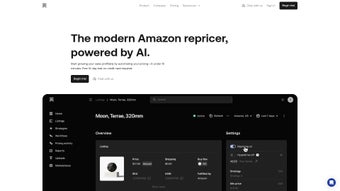

Download Aura – AI‑Powered Amazon Repricer for Sellers
Overview
Aura is a cloud‑based, AI‑driven repricing platform that was engineered from the ground up for Amazon marketplace sellers who need to stay competitive without sacrificing profitability. The core of Aura’s technology lies in a continuous monitoring engine that scans millions of Amazon listings every few minutes, evaluates sales velocity, inventory health, and market demand, and then automatically adjusts your product prices within the minimum‑maximum thresholds you set. This dynamic pricing model ensures that you never sell below your cost‑plus margin while still capturing sales that might be lost to slower competitors.
Beyond simple price changes, Aura offers a suite of advanced capabilities that turn raw pricing data into actionable business intelligence. For example, the built‑in financial KPI dashboard provides real‑time ROI, profit margin, and revenue forecasts per SKU, allowing you to identify high‑performing products and those that may need a clearance strategy. Bulk‑update functionality lets you upload price changes for thousands of SKUs via Excel or Google Sheets in seconds, eliminating the tedious manual entry that many sellers dread. Integration with popular inventory management tools such as InventoryLab means you can import existing product data with a single click, keeping your catalog synchronized across platforms.
Accessibility is another pillar of Aura’s design. The responsive web interface works flawlessly on desktop browsers, tablets, and smartphones, delivering push notifications for critical events like price drops, low‑stock alerts, or rule conflicts. A vibrant community forum and dedicated live‑chat support ensure that help is always at hand, whether you’re a seasoned seller fine‑tuning complex rule sets or a newcomer just getting started. In short, Aura is not merely a pricing tool; it’s a strategic partner that empowers Amazon sellers to automate routine tasks, gain deeper insight into profitability, and scale their businesses with confidence.
Key Features
- AI‑Driven Dynamic Pricing: Continuously monitors competitor prices, sales velocity, and market trends to auto‑adjust listings in near‑real‑time.
- User‑Defined Price Floors & Ceilings: Guarantees that prices never dip below your profit target or exceed competitive limits across all marketplaces.
- Advanced Rule Engine: Create custom repricing rules based on inventory age, sales velocity, ASIN groups, or even time‑of‑day schedules.
- Bulk Updates via Excel & Google Sheets: Upload large price‑change batches in minutes, saving hours of manual work for catalogs of any size.
- InventoryLab & Third‑Party Integration: Seamlessly import existing product data, eliminating duplicate entry and keeping inventory synchronized.
- Financial KPI Dashboard: Real‑time ROI, profit margin, revenue forecasts, and break‑even analysis for each SKU.
- Mobile‑Optimized Interface: Full‑featured access from any iOS or Android device, with push notifications for critical alerts.
- Comprehensive Change Log: Detailed audit trail that records every price adjustment, including timestamps, previous values, and trigger reasons.
- Community Forum & Live Support: Peer‑to‑peer advice, best‑practice guides, and 24/7 live chat with the Aura support team.
- Secure Cloud Hosting: End‑to‑end encryption (TLS 1.3, AES‑256) and compliance with GDPR, CCPA, and ISO 27001 standards.
- Multi‑Marketplace Support: Manage pricing strategies across Amazon.com, Amazon.co.uk, Amazon.de, and other regional Amazon sites from a single dashboard.
- Scheduled Reporting: Automated email reports that summarize daily pricing activity, profit performance, and inventory health.
Installation & Usage Instructions
Account Creation and Initial Setup
1. Visit Aura’s official website and click “Start Free Trial”. Fill in your name, business email, and Amazon Seller Central credentials. Aura leverages Amazon’s OAuth 2.0 protocol, ensuring that your login details are never stored on Aura’s servers.
2. Confirm your email via the link sent to your inbox. After verification, you’ll be redirected to the onboarding wizard, which walks you through connecting your Amazon marketplaces, setting currency preferences, and selecting the default time zone.
Configuring Your First Repricing Rule
3. In the “Rules” tab, click “Create New Rule”. Choose a template (e.g., “Stay Competitive”, “Maintain Minimum Margin”, “Clearance Sale”). Define the minimum and maximum price boundaries, set the adjustment frequency (typically every 5‑15 minutes), and optionally add inventory‑based conditions such as “If stock < 20 units, raise price by 5 %”. Save the rule, then assign it to the relevant ASINs using the bulk selector or manual entry.
4. Aura immediately begins applying the rule to the selected listings. You can monitor the live effect on the “Dashboard” where price changes appear in real‑time alongside profit metrics.
Bulk Upload via Spreadsheet
5. Prepare a CSV file with the columns: ASIN, Current Price, Min Price, Max Price, Rule ID. Ensure that every ASIN matches Amazon’s format and that numeric fields contain only numbers.
6. Navigate to “Bulk Upload”, drag the CSV into the upload zone, and map each column to Aura’s fields. The system validates the data, flags any missing ASINs or price inconsistencies, and then processes the batch. Within seconds, all SKUs are live with the new pricing logic applied.
Ongoing Monitoring and Optimization
7. The “Dashboard” provides a snapshot of price movements, profit margins, and inventory levels. Use the “Logs” tab to audit each adjustment; entries show the previous price, new price, timestamp, and the rule that triggered the change.
8. If a rule needs tweaking, click the “Edit” icon next to the ASIN or rule name. Adjust parameters such as price floors or frequency, then save. Changes propagate instantly across all Amazon marketplaces you’ve linked.
Mobile Access and Notifications
9. Open the Aura dashboard on any iOS or Android browser and select “Add to Home Screen” to create a native‑like shortcut. Enable push notifications in the settings to receive instant alerts for price drops, low‑stock warnings, or rule conflicts, ensuring you stay in control even when you’re away from your desk.
Compatibility, Pros & Cons, and Frequently Asked Questions
Compatibility
Aura is a SaaS solution that runs entirely in the cloud, making it compatible with any modern web browser—including Chrome, Firefox, Edge, and Safari—on Windows, macOS, Linux, as well as mobile browsers on iOS and Android. No additional software downloads or installations are required, and the responsive design adapts seamlessly to tablets, smartphones, and high‑resolution desktop monitors.
Pros
- AI‑driven pricing reduces manual effort and reacts faster than human monitoring.
- Highly customizable rule engine adapts to diverse product lifecycles and marketplace nuances.
- Bulk import/export streamlines large catalogs, saving countless hours for high‑volume sellers.
- Real‑time financial dashboards keep profit margins visible at all times.
- Secure, GDPR‑ and CCPA‑compliant cloud hosting protects sensitive seller data.
- Multi‑marketplace support enables unified pricing strategies across global Amazon sites.
- 24/7 live chat, email support, and an active community forum provide rapid assistance.
Cons
- Advanced rule configuration has a learning curve; beginners may need extra onboarding time.
- Dependence on a stable internet connection; no offline mode is available.
- Premium pricing tiers can be steep for brand‑new sellers with limited budgets.
- Feature‑rich interface may feel overwhelming until users become familiar with the layout.
FAQ
How does Aura’s AI determine the optimal price?
Aura’s algorithm analyzes competitor listings, sales velocity, historical performance, and seasonal trends. It then calculates a price that maximizes the likelihood of a sale while staying within the user‑defined minimum and maximum thresholds. The AI continuously learns from each transaction, refining its recommendations over time.
Can I set different price floors for different marketplaces?
Yes. Aura supports multi‑marketplace sellers. Within each rule you can specify separate minimum and maximum values for Amazon.com, Amazon.co.uk, Amazon.de, etc., ensuring compliance with local pricing strategies and currency differences.
Is there a free version of Aura?
Aura offers a 14‑day free trial with full feature access. After the trial, plans start at $49 /month for up to 500 SKUs, with higher tiers for larger inventories. No credit card is required to start the trial.
How secure is my Amazon seller data when connected to Aura?
Aura uses Amazon’s OAuth 2.0 protocol for authentication, meaning your credentials never touch Aura’s servers. All data in transit is encrypted with TLS 1.3, and data at rest is stored using AES‑256 encryption. Regular security audits are performed to maintain compliance with GDPR and CCPA.
What kind of customer support does Aura provide?
Aura offers 24/7 live chat, email support with a typical response time of under 2 hours, and a comprehensive knowledge base. Premium subscribers also receive a dedicated account manager and priority queue for urgent issues.
Conclusion & Call to Action
In the hyper‑competitive Amazon ecosystem, price agility can be the difference between a thriving brand and a stagnant listing. Aura equips sellers with an AI‑powered engine that not only automates repricing but also delivers actionable financial insights, bulk management tools, and a mobile‑first experience. While the platform demands a modest learning curve and a subscription investment, the payoff—higher sales velocity, protected margins, and reduced manual labor—justifies the cost for serious sellers.
Ready to supercharge your Amazon business? Start your free 14‑day trial today and let Aura’s smart pricing do the heavy lifting while you focus on product innovation and growth.
Pros: AI accuracy, bulk tools, real‑time KPIs, cross‑platform compatibility, multi‑marketplace support.
Cons: Initial setup time, no offline mode, premium pricing for large catalogs.



.png)




