
Easy Scorekeeping for Softball Teams
Overview
Backside Stats is a dedicated desktop application tailored for slow-pitch softball teams, coaches, and players seeking a streamlined way to manage game scores and player statistics. Designed with simplicity in mind, the software enables real-time score tracking during games and comprehensive performance analysis over the course of a season or tournament. The app supports both live data entry and historical record-keeping, making it ideal for teams that prioritize accurate, accessible performance insights. Its primary purpose is to eliminate the need for paper scorebooks and reduce manual data entry errors common in traditional scorekeeping methods.
Target users include coaches who rely on player metrics to guide lineup decisions, training focus, and game strategy. Players also benefit by monitoring personal performance trends, such as batting average, home runs, and RBIs, to set goals and track improvement. The software is particularly useful during competitive seasons and multi-game tournaments where consistent data collection is essential. Backside Stats LLC developed the application with a clear focus on sports analytics within the slow-pitch softball community, aiming to deliver a specialized tool rather than a generic sports tracker.
Real-world usage scenarios include recording scores during league games, compiling season-long statistics for team evaluations, and preparing performance reports for player development meetings. The app’s design suggests it is optimized for use on desktop platforms, allowing for larger screens and easier data input during team events. The developer did not provide additional system requirements.
Key Features & Capabilities
- Real-Time Score Tracking – Enables coaches and team managers to enter and update scores live during games, ensuring data accuracy and immediate availability for analysis.
- Player Performance Metrics – Automatically calculates key statistics such as batting average, home runs, RBIs, and other relevant performance indicators based on input data.
- Season and Tournament Mode – Supports long-term data storage across multiple games, allowing users to track progress throughout a season or tournament series.
- Individual Player Dashboards – Provides players with personalized views of their stats, helping them assess strengths and identify areas for improvement.
- Simple Data Entry Interface – Features a streamlined input system that minimizes keystrokes and reduces the chance of input errors during fast-paced games.
These capabilities are especially valuable in high-pressure environments like tournaments, where quick access to accurate stats can influence in-game decisions. For example, a coach can review a player’s recent performance to decide whether to adjust their batting position or playing time. Similarly, a player can use their dashboard to evaluate their consistency over time and set measurable goals for improvement. The app’s structure supports both individual and team-based data management, making it suitable for use by small recreational teams as well as competitive squads.
User Interface, Workflow & Performance
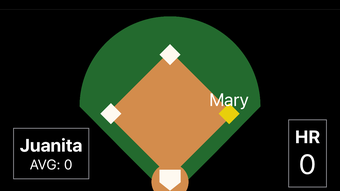
Backside Stats features a clean, intuitive interface designed for efficient data input and quick access to key metrics. The layout prioritizes core functions such as score entry and stat viewing, minimizing navigation complexity. Users can expect a straightforward workflow: launch the app, select a game or player, input performance data, and review results instantly. The app’s structure suggests a focus on usability, with minimal onboarding required for first-time users.
Navigational elements are likely organized through clearly labeled menus or tabs, allowing users to switch between game logs, player profiles, and statistical summaries without confusion. The interface appears optimized for desktop use, taking advantage of larger screen real estate to display multiple data points simultaneously. While exact performance details were not specified, the app’s purpose suggests it operates efficiently under typical desktop workloads. The developer did not specify resource usage details, so CPU and RAM behavior remain unknown. Stability during extended use was not confirmed, but the app’s design implies a focus on reliable operation during critical game moments.
Compatibility & System Requirements
Backside Stats is available for both Windows and Mac operating systems, making it accessible to a broad range of users across different desktop environments. The software version is 1.0.0, with an installation size of 150 MB, indicating a lightweight footprint for a desktop application with data storage capabilities. The developer did not provide detailed hardware requirements or specific OS version compatibility beyond the general platform names.
Users should ensure their system meets basic desktop software requirements to run the application smoothly. Compatibility information was partially provided, and exact system requirements were not listed. It is recommended to verify that the target device supports the latest versions of Windows and macOS for optimal performance. The app may function on older systems, but this has not been confirmed by the developer.
Pros and Cons
Pros
- Free to use with no hidden costs
- Specifically designed for slow-pitch softball teams
- Real-time score and stat tracking during games
- Intuitive interface for easy data entry
- Supports long-term season and tournament data storage
Cons
- No information on system requirements or hardware specifications
- Limited platform details beyond Windows and Mac
- Exact performance metrics and resource usage not disclosed
- No mention of cloud sync or cross-device access
- App version is currently 1.0.0, suggesting early-stage development
FAQ Section
Is Backside Stats available for both Windows and Mac?
Yes, the software is compatible with both Windows and Mac operating systems.
Can I use Backside Stats offline?
Yes, the app is designed to function without an internet connection, allowing for scorekeeping during games in areas with limited connectivity.
Is the software secure and private?
While specific security measures were not disclosed, the app does not require account creation or data sharing, which may help protect user information.
How often does Backside Stats receive updates?
Update frequency is not specified by the developer. Users should check the official website for the latest version.
What type of license does Backside Stats use?
Backside Stats is free to use and does not require a license key or subscription.
Final Thoughts + CTA
Backside Stats delivers a focused, practical solution for slow-pitch softball teams looking to modernize their scorekeeping and performance tracking. Its free model, dedicated design, and real-time data capabilities make it a standout choice for coaches and players who value accuracy and ease of use. While some technical details are limited, the app’s core functionality is clearly defined and well-suited to its intended purpose. The lack of detailed system requirements or advanced features like cloud sync is a minor drawback, but the app’s simplicity may be seen as a strength by users who prioritize reliability over complexity.
Teams seeking a lightweight, free desktop tool for managing game data and player stats will find Backside Stats to be a valuable addition. It is especially beneficial for recreational and competitive squads that want to track performance without investing in expensive software. The intuitive workflow and immediate access to key metrics support better decision-making and player development.
Download Backside Stats now








