
Download Balance – AI Anxiety Management Tool, Free Secure App
Overview
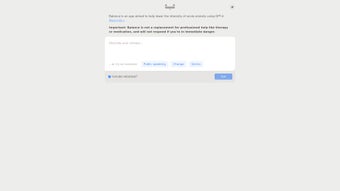
In today’s fast‑paced world, anxiety has become a common companion for many people. While professional therapy and medication remain essential pillars of mental‑health care, there is a growing demand for supplemental tools that can be accessed instantly, securely, and without cost. **Balance** steps into this niche as an AI‑powered web application specifically crafted to help users manage anxiety in the moment. Leveraging the advanced natural‑language capabilities of GPT‑4, Balance invites users to type in the thoughts that trigger their anxiety. The AI then responds with supportive, evidence‑based reframes, gentle challenges, and practical coping strategies designed to reduce the intensity of the anxious episode.
Beyond thought‑challenging, Balance offers a suite of interactive prompts: guided deep‑breathing exercises, uplifting affirmations, and concise mindfulness tips. These resources are presented in a clean, distraction‑free interface that can be accessed from any modern browser, making it a truly cross‑platform companion. The app is built with privacy in mind; all user inputs are processed anonymously, and no personal data is stored beyond the session unless the user explicitly opts to save a journal entry.
It is crucial to note that Balance is **not** a replacement for professional mental‑health treatment. Instead, it acts as a complementary tool—an “on‑the‑go” ally that can help users regain composure during spikes of anxiety, practice healthier thinking patterns, and reinforce coping habits introduced by therapists. Whether you are a college student battling exam stress, a remote worker navigating uncertainty, or anyone who experiences occasional panic, Balance provides a free, secure, and instantly available resource to help you regain mental balance.
Key Features
- AI‑Driven Thought Reframing – Input any anxious thought and receive a supportive, GPT‑4 generated response that challenges negativity and offers constructive perspectives.
- Guided Breathing Exercises – Interactive timers and visual cues walk you through diaphragmatic breathing, a proven technique to lower physiological arousal.
- Positive Affirmations Library – Choose from curated affirmations or let the AI suggest personalized statements based on your current mood.
- Quick‑Access Prompt Cards – One‑click cards deliver instant coping tips, such as “5‑4‑3‑2‑1 grounding” or “body scan meditation.”
- Anonymous Session Mode – No login required; data is processed in real time without being stored, ensuring privacy for sensitive thoughts.
- Progress Journal (Optional) – Save selected sessions to track patterns over time, exportable as a CSV for personal reflection or therapist review.
- Multi‑Language Support – Currently available in English, Spanish, and French, with plans to expand based on user demand.
- Responsive Design – Optimized for desktops, tablets, and smartphones, guaranteeing a seamless experience across devices.
- Regular Updates – The development team pushes monthly model refinements and new coping modules to keep the tool current with the latest research.
- Secure Cloud Processing – All AI calculations happen on encrypted servers complying with GDPR and CCPA standards.
Installation & Usage Instructions
Balance is a web‑based solution, which means there is **no traditional download or installation** required on most platforms. Follow these simple steps to start using the app instantly:
- Visit the Official Site – Open your preferred browser (Chrome, Firefox, Safari, Edge) and navigate to https://balance.ai. The homepage loads in under two seconds on a standard broadband connection.
- Create an Optional Account (Optional) – While you can use Balance anonymously, creating a free account lets you save journal entries, customize affirmation lists, and sync progress across devices. Click “Sign Up,” enter an email, and set a strong password. All data is encrypted at rest.
- Enter Your Anxious Thought – In the main input box, type the exact thought that is causing distress (e.g., “I’m going to fail my presentation”). Press “Submit” or hit Enter.
- Read the AI Response – Within seconds, the GPT‑4 engine returns a supportive reply. It may include a reframed statement, a breathing exercise prompt, or an affirmation suggestion.
- Engage with the Prompt – Click on any linked activity (e.g., “Start Breathing Exercise”). A modal window appears with a timer, visual breathing guide, and audio cue if desired.
- Save or Discard – If you find the session helpful, click “Save to Journal.” Otherwise, simply close the window; no data is retained.
- Review Your Journal – Access the “Journal” tab to view saved entries, filter by date, or export the data for offline analysis.
- Customize Settings – In the Settings menu, adjust language, enable dark mode, set reminder frequencies, or connect to third‑party health apps via OAuth (e.g., Apple Health, Google Fit).
- Stay Updated – The site notifies you of new features or security patches. You can enable push notifications for real‑time alerts.
For mobile users who prefer an app‑like experience, simply add the website to your home screen. On iOS, tap the Share icon and select “Add to Home Screen.” On Android, open the Chrome menu and choose “Install app.” This creates a progressive web app (PWA) shortcut that launches Balance in a full‑screen window, mimicking native app behavior without occupying storage space.
Compatibility, Pros & Cons
Because Balance runs in a browser, it is compatible with virtually any modern operating system that supports HTML5 and JavaScript. Officially supported platforms include:
- Windows 10/11 (Chrome, Edge, Firefox)
- macOS Monterey and later (Safari, Chrome, Firefox)
- Linux distributions with recent browsers (Ubuntu, Fedora, Mint)
- iOS 14+ (Safari, Chrome) – via PWA shortcut
- Android 8.0+ (Chrome, Firefox) – via PWA shortcut
Pros
- Instant, on‑demand anxiety support without waiting for appointments.
- Powered by GPT‑4, delivering nuanced, empathetic responses.
- Free to use, with optional account for journaling.
- Privacy‑first design—no mandatory data collection.
- Comprehensive coping toolkit (breathing, affirmations, grounding).
- Responsive, works on desktops, tablets, and smartphones.
- Regular updates incorporate the latest therapeutic research.
- Multi‑language support expands accessibility.
Cons
- Relies on internet connectivity; offline use is limited to saved journal entries.
- AI responses are generated, not therapist‑verified; occasional inaccuracies may occur.
- Advanced customization (e.g., personalized therapy plans) is not available.
- Limited integration with electronic health record (EHR) systems.
- May not replace the depth of human interaction for severe anxiety disorders.
FAQ & Conclusion
Is Balance completely free to use?
Yes, Balance offers all core features—including AI thought reframing, breathing exercises, and affirmation prompts—at no cost. An optional premium tier may be introduced in the future for advanced analytics, but the essential toolkit remains free.How does Balance protect my privacy?
Balance processes all user inputs on encrypted servers that comply with GDPR and CCPA. Anonymous sessions are not stored, and any saved journal entries are encrypted at rest. The app does not share personal data with third parties.Can I use Balance without an internet connection?
The AI engine requires an online connection to generate responses. However, you can still view previously saved journal entries offline, and the breathing/affirmation modules work without a network once loaded.Is Balance suitable for children or teenagers?
Balance is designed for adults and older adolescents. Parents should supervise younger users and consider professional guidance for children experiencing significant anxiety.How often should I use Balance for best results?
Regular, short sessions—especially during moments of heightened anxiety—are most effective. Pairing the app with a therapist’s plan or daily mindfulness practice can amplify long‑term benefits.Conclusion – Take Control of Your Anxiety Today
Balance bridges the gap between professional therapy and everyday self‑care, offering a secure, AI‑enhanced space where you can confront anxious thoughts, practice calming techniques, and build resilient coping habits—all for free. While it is not a substitute for qualified mental‑health professionals, its instant accessibility makes it an invaluable adjunct for anyone seeking to reduce anxiety intensity in real time.
Ready to experience calmer moments on demand? Visit Balance now, start a session, and empower yourself with the tools to reclaim mental balance. Remember, the best anxiety management strategy combines professional support, healthy lifestyle habits, and technology—Balance is the tech piece you’ve been waiting for.



.png)




