
Download Batch Uploader – YouTube batch upload tool, free & secure
Overview
Batch Uploader is a purpose‑built desktop application that lets creators, marketers, and agencies push multiple videos to YouTube in a single, streamlined operation. Instead of opening YouTube Studio for each clip, you simply drag a folder of finished videos into the program, map titles, descriptions, tags, and privacy settings, and let the software handle the rest. The tool is designed for reliability: if an upload is interrupted by a network hiccup or API limit, Batch Uploader automatically resumes from the last successful byte, sparing you the frustration of restarting a large upload from scratch. This “smart resume” capability is a major time‑saver, especially for high‑definition content that can take several minutes per file. The interface balances simplicity with power – a clean dashboard for beginners and advanced options such as custom thumbnail assignment, scheduled publishing, and batch‑level metadata inheritance for power users. Because the application communicates directly with YouTube’s official API, it respects quota limits and authentication best practices, keeping your channel secure while maximizing throughput. Whether you are uploading a weekly vlog series, a batch of product demos, or a library of educational lessons, Batch Uploader removes the repetitive manual steps, allowing you to focus on content creation rather than repetitive administration.
Key Features
- Multi‑video queue: Add unlimited videos to a single upload queue.
- Automatic resume: Interrupted uploads pick up where they left off without re‑uploading completed parts.
- Metadata templates: Save title, description, tags, and category presets for rapid reuse.
- Thumbnail batch assignment: Apply individual thumbnails or a default image to the whole batch.
- Scheduled publishing: Choose future dates for each video or apply a uniform schedule.
- Privacy controls: Set each video to Public, Unlisted, or Private in bulk or individually.
- Channel selection: Manage multiple YouTube channels from the same interface.
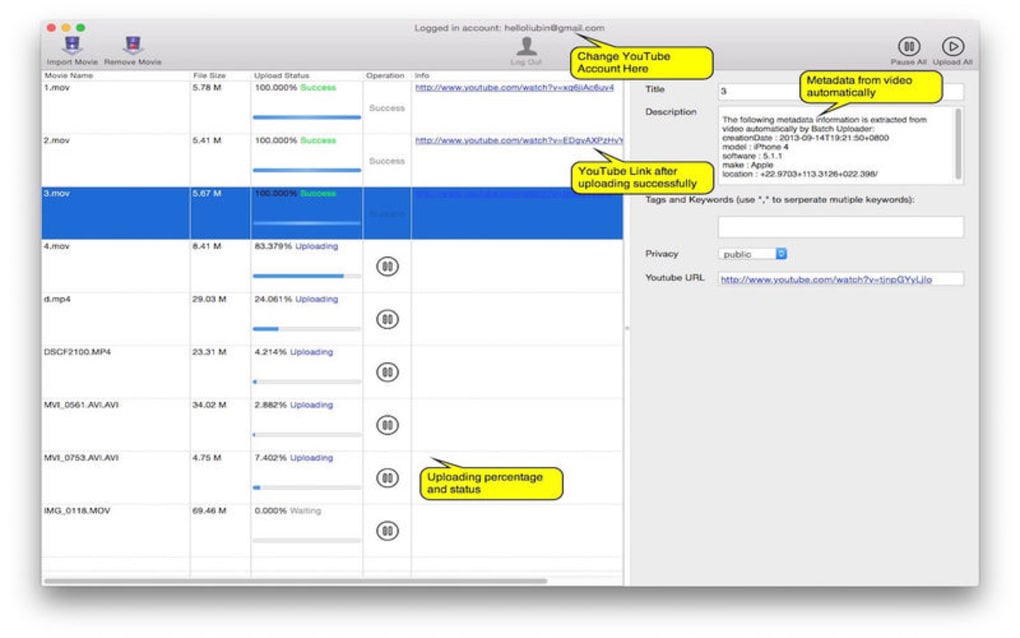
- Progress monitoring: Real‑time upload percentages, speed indicators, and log files.
- Error handling & logs: Detailed error messages and automatic retry logic.
- Secure OAuth2 authentication: No password storage, token‑based login directly with Google.
Installation, Compatibility & Pros / Cons
Installation & Usage Instructions
Getting started with Batch Uploader is straightforward. After downloading the installer from the official website, run the .exe (Windows) or .dmg (macOS) file and follow the on‑screen wizard. The installer checks for required .NET or Apple runtime components and offers to install them automatically if missing. Once installed, launch the application and sign in with your Google account using the built‑in OAuth flow. After authentication, you’ll be presented with the main dashboard where you can click “Add Videos” to select a folder or drag‑and‑drop files directly. Use the “Metadata” panel to either type in custom information or select a saved template. When ready, press “Start Upload”. The software will queue each video, upload them sequentially, and display live progress bars. If a network error occurs, the resume engine kicks in, and you’ll see a “Retrying…” status until the file finishes. For advanced users, the Settings menu provides options to limit upload bandwidth, set API quota thresholds, and enable silent mode for automated scripts.
System Compatibility
Batch Uploader runs natively on 64‑bit Windows 10, Windows 11, and macOS 10.15 (Catalina) or later. A Linux version is also available via a packaged AppImage and works through Wine for users who prefer a cross‑platform environment. Minimum hardware requirements are modest: a dual‑core CPU, 4 GB RAM, and at least 500 MB of free disk space for temporary upload buffers. An active internet connection is required for API communication, and a Google account with a verified YouTube channel is mandatory.
Pros and Cons
- Pros
- Massive time savings for bulk uploads.
- Automatic resume eliminates wasted bandwidth.
- Intuitive UI balances simplicity with advanced controls.
- Secure OAuth2 login, no password storage.
- Free version available with essential features; paid tier adds priority support.
- Cons
- Limited video editing; users must prepare files before import.
- Mac version currently lacks native dark‑mode support.
- API quota limits can affect very large batch uploads for new channels.
FAQ & Conclusion
Can I schedule videos to go live at different times?
Yes. Batch Uploader lets you assign a specific publish date and time to each video in the queue, or you can apply a uniform schedule to the entire batch.
What happens if my Google token expires?
The application detects an expired token and automatically prompts you to re‑authenticate. No upload data is lost; the queue simply pauses until you sign in again.
Is there a limit to the number of videos I can upload at once?
Practically, the limit is defined by your system’s RAM and disk space, as well as YouTube’s API quota. Most users successfully queue hundreds of videos without issue.
Does the free version include all core features?
The free tier provides unlimited batch uploads, automatic resume, and basic metadata templates. Premium features such as bulk thumbnail editing and advanced API quota management require a paid license.
Can I use Batch Uploader on Linux?
Yes. A Linux AppImage is available, and the program also runs through Wine on most distributions, offering comparable functionality to the Windows version.
Conclusion & Call to Action
Batch Uploader fills a clear gap in the YouTube creator toolkit by automating what used to be a tedious, manual process. Its combination of reliable resume logic, flexible metadata handling, and cross‑platform support makes it a strong contender for anyone who regularly publishes multiple videos. Whether you’re a solo creator looking to save minutes each week or an agency managing dozens of client channels, the software offers a secure, free‑to‑try solution that scales with your needs. Ready to accelerate your publishing workflow? Download Batch Uploader now, install in minutes, and start uploading your video library with confidence.
Pros: Time‑saving batch uploads, automatic resume, secure OAuth, free core version.
Cons: No built‑in video editor, macOS dark mode missing, API quota constraints for very large channels.








