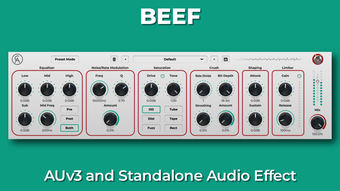

Beef: Powerful Audio Plugin for Bigger, Bolder Sounds
Overview
Beef is a multi-effect audio plugin developed by Caelum Audio Ltd., designed to enhance audio tracks with rich, full-bodied sound. The software targets music producers, sound designers, and audio engineers who seek to add depth, presence, and power to their mixes. Its primary purpose is to transform audio elements—whether basslines, drums, guitars, vocals, synths, or foley—into massive, impactful sounds. Originally crafted with a focus on crafting fat basses and hard-hitting drums, Beef expands its utility across a wide range of instruments and audio sources. The plugin is built as an AUv3, enabling seamless integration with iOS and iPadOS hosts such as GarageBand, Cubasis 3, AUM, and Beatmaker 3, making it a versatile tool for mobile and desktop workflows.
Designed for both beginners and experienced users, Beef offers a streamlined experience through its intuitive interface and a built-in Preset Mode. This mode simplifies the process by removing all parameters except the mix control, allowing users to instantly audition one of 124 presets. These presets include contributions from well-known content creators and artists such as Ali Ahmet, Ave Mcree, Gavinski’s Tutorials, Jamie Mallender, Nu-Trix The Synth Guy, The GarageBand Guide, The REAPER blog, and Venus Theory. Real-world usage scenarios include enhancing low-end frequencies in electronic music, thickening vocal tracks, or adding punch to percussive elements in a mix. The developer did not provide additional system requirements.
Key Features & Capabilities
- Multi-Effect Integration – Combines essential audio effects into a single interface, enabling users to shape sound with compression, saturation, EQ, and more without switching between plugins.
- Bass and Drum Enhancement – Specifically optimized for creating thick, powerful basslines and impactful drum sounds, ideal for genres like EDM, hip-hop, and dubstep.
- Universal Sound Sculpting – Capable of transforming a wide variety of audio sources, including guitars, synths, vocals, and foley, into fuller, more dynamic tracks.
- Preset Mode – Offers immediate results by simplifying the interface to only the mix control, allowing quick access to 124 curated presets from industry contributors.
- Artist-Designed Presets – Includes 85 presets from renowned creators, providing professional-grade starting points for producers at any skill level.
- Mobile Compatibility – Built as an AUv3 plugin, it works with iOS and iPadOS hosts such as GarageBand, Cubasis 3, AUM, and Beatmaker 3, supporting cross-platform workflows.
These features allow users to streamline their production process, reduce plugin clutter, and achieve professional-sounding results faster. For example, a producer working on a beat can load Beef on a kick drum track, select a preset from the artist collection, and immediately hear a more powerful low-end. Similarly, a sound designer working on a cinematic foley track can use the plugin to add weight and presence to a subtle sound effect. The plugin’s ability to enhance diverse audio sources makes it a valuable addition to any music production toolkit.
User Interface, Workflow & Performance
The user interface of Beef is designed to be efficient and visually intuitive, with a compact layout that consolidates multiple effects into a single window. Navigation is straightforward, allowing users to access core functions with minimal clicks. The interface supports both detailed parameter tweaking and quick preset selection through the Preset Mode, catering to different user preferences. Workflow efficiency is enhanced by the plugin’s streamlined design, reducing the need to manage multiple plugins during mixing or sound design.
Performance observations are based on general software behavior patterns. The plugin operates as a desktop and mobile audio tool, with a file size of 45 MB. The developer did not specify resource usage details. Stability is expected to be consistent with standard audio plugins, but exact CPU or RAM behavior was not provided. The plugin’s lightweight footprint suggests it should run efficiently on most modern systems. Users can expect smooth integration with supported DAWs and mobile hosts, though performance may vary depending on the host environment and project complexity.
Compatibility & System Requirements
Beef is compatible with Windows and Mac operating systems. It is designed as an AUv3 plugin, which allows it to function within iOS and iPadOS hosts such as GarageBand, Cubasis 3, AUM, and Beatmaker 3. This cross-platform capability supports both desktop and mobile music production workflows. The software version is 1.0.0, and the installation size is 45 MB. The developer did not specify exact system requirements, including minimum CPU, RAM, or storage specifications. Compatibility information was partially provided, with support confirmed for Windows, Mac, and select mobile hosts.
Pros and Cons
Pros
- Combines multiple essential audio effects in one efficient plugin
- Offers immediate results through Preset Mode and 124 curated presets
- Includes artist-designed presets from well-known content creators
- Designed for both bass and general sound enhancement across instruments
- Compatible with iOS and iPadOS hosts via AUv3 format
- Free to download and use, with no cost barrier for entry
Cons
- Exact system requirements were not listed
- Performance details such as CPU or RAM usage were not provided
- Limited customization in Preset Mode due to parameter removal
- May require additional plugins for advanced audio processing needs
- Mobile compatibility is limited to AUv3 hosts, not all iOS apps
FAQ Section
Is Beef available for free?
Yes, Beef is available at no cost. The software is offered as a free audio plugin, making it accessible to producers and musicians at all skill levels.
What operating systems does Beef support?
Beef is compatible with Windows and Mac operating systems. It also supports iOS and iPadOS hosts through its AUv3 plugin format.
Can I use Beef on my mobile device?
Yes, Beef can be used on iOS and iPadOS devices when integrated with compatible hosts such as GarageBand, Cubasis 3, AUM, and Beatmaker 3.
Does Beef require an internet connection to work?
Once installed, Beef does not require an internet connection to function. It operates as a standalone audio plugin within supported DAWs and mobile hosts.
How often are updates released for Beef?
Update frequency is not specified. Users should check the official developer site or plugin host for the latest version and improvements.
Final Thoughts + CTA
Beef stands out as a powerful, free audio plugin that delivers professional-grade sound enhancement with minimal setup. Its ability to transform a wide range of audio elements—from bass and drums to vocals and synths—makes it a versatile tool for music producers and sound designers. The inclusion of 124 presets, including 85 from respected industry creators, ensures immediate usability and high-quality starting points. While detailed system requirements and performance metrics are not provided, the plugin’s lightweight design and AUv3 compatibility suggest broad accessibility across desktop and mobile platforms. For producers seeking a bold, impactful sound without the complexity of multiple plugins, Beef offers a compelling solution. Its free availability further enhances its appeal.
Download Beef now and elevate your tracks with powerful, bolder sound.








