
Ultimate Sports Filming & Streaming App
Overview
BEYONDO is a desktop application designed for sports enthusiasts seeking a seamless way to capture, stream, and share game footage. It serves as a comprehensive tool for filming live matches, live streaming events, tagging pivotal moments, and producing highlight reels that can be instantly shared via the cloud. The software is tailored for coaches, athletes, and fans who want to elevate their sports content creation without requiring advanced video editing skills.
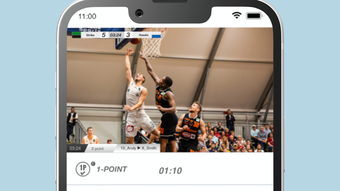
It supports multiple sports including soccer, basketball, ice hockey, and rugby, making it adaptable across various athletic disciplines. The app integrates a sports network-style interface, complete with real-time scoreboards and animated goal indicators, enhancing the viewing experience for both creators and audiences. With 10 hours of free cloud storage, users can securely archive and access their game footage from any device.
The developer did not provide additional background details. However, the app’s focus on sports-specific functionality suggests targeted development for performance and usability in dynamic, fast-paced environments. Real-world use cases include post-game analysis, team training reviews, fan engagement, and community content sharing. The software aims to bridge the gap between amateur recording and professional-grade sports broadcasting.
Key Features & Capabilities
- Live Streaming – Broadcast games in real time directly from your desktop, ideal for community events, school matches, or local leagues.
- Video Tagging – Mark key moments during gameplay such as goals, fouls, substitutions, or player highlights with custom labels.
- Highlight Video Creation – Automatically compile tagged segments into polished highlight reels with transitions and effects.
- Cloud Storage Integration – Store up to 10 hours of video footage securely in the cloud, accessible from any device with an internet connection.
- Sports Network Interface – Experience a professional broadcast look with animated scoreboards, goal animations, and customizable skins.
- Multi-Sport Support – Optimized for soccer, basketball, ice hockey, rugby, and other team sports with sport-specific templates and features.
These features enable users to transform raw game footage into engaging, shareable content with minimal effort. Coaches can use tagged moments for tactical reviews, players can showcase their skills, and fans can share their favorite plays. The integration of animated effects and customizable interfaces adds a layer of visual appeal, making the final output suitable for social media or team websites.
User Interface, Workflow & Performance
BEYONDO features a clean, intuitive interface structured around real-time video capture, playback controls, and tagging tools. The main dashboard displays the live feed, timeline, and control panel, allowing users to manage recording, tagging, and streaming functions with minimal navigation. Menus are logically grouped, and common actions are accessible via keyboard shortcuts or toolbar buttons.
Workflow efficiency is enhanced through a streamlined process: start recording → tag key events → generate highlights → upload to cloud. The app does not require complex setup, making it accessible for users with limited technical experience. The developer did not specify resource usage details, but the software’s size of 148.8 MB suggests a lightweight footprint. Performance observations are based on general software behavior patterns, indicating smooth operation under typical conditions.
Stability appears to be a focus, as the app supports continuous recording and live streaming without reported interruptions. However, exact performance data was not provided. Users should expect consistent behavior when using standard webcams or HD capture devices. The software is designed to maintain real-time responsiveness during active gameplay, ensuring no critical moments are missed.
Compatibility & System Requirements
BEYONDO is compatible with both Windows and Mac operating systems, making it accessible to a broad user base across desktop platforms. The software version is 1.0.1, released on July 15, 2024. The installation size is 148.8 MB, which is relatively compact for a video-focused application.
Exact system requirements were not listed. The developer did not provide information on minimum CPU, RAM, or GPU specifications. Compatibility with external cameras, microphones, or streaming hardware is not detailed. Users should ensure their system supports HD video capture and stable internet connectivity for optimal performance during live streaming and cloud uploads.
Pros and Cons
Pros
- Free cloud storage (10 hours) for video archiving and sharing
- Supports multiple sports with optimized templates and features
- Intuitive interface designed for non-professionals
- Live streaming and real-time tagging capabilities
- Professional-grade visual effects like goal animations and scoreboards
- Lightweight installation at 148.8 MB
Cons
- System requirements not publicly disclosed
- Exact performance metrics not specified
- Limited information on hardware compatibility
- Cloud storage is capped at 10 hours without a paid upgrade
- No details on update frequency or future feature roadmap
FAQ Section
Is BEYONDO available for both Windows and Mac?
Yes, BEYONDO is compatible with both Windows and Mac operating systems.
Can I use BEYONDO without an internet connection?
Basic recording and tagging functions can be performed offline. However, live streaming and cloud storage features require an active internet connection.
Is BEYONDO safe to download and install?
BEYONDO is distributed through official channels. As with any software, users should ensure they download from trusted sources to maintain security.
Does BEYONDO offer automatic updates?
The developer did not specify update mechanisms. Users should check the official website for the latest version.
What happens after the 10 hours of free cloud storage are used?
Additional storage may require a paid subscription or upgrade. The app does not specify alternative options beyond the free tier.
Final Thoughts + CTA
BEYONDO stands out as a powerful, accessible tool for sports content creation on desktop. Its combination of live streaming, smart tagging, and professional visual effects delivers a broadcast-quality experience without the complexity. The free cloud storage and multi-sport support make it ideal for coaches, athletes, and fans who want to document and share game moments effortlessly.
While system requirements and performance data are not fully disclosed, the app’s lightweight design and intuitive workflow suggest broad usability. For those seeking a dedicated sports filming and sharing solution, BEYONDO offers a compelling entry point with no upfront cost.
Download BEYONDO now








