
Free Tournament Bracket Builder for Sports
Overview
Bracket is a dedicated tournament management tool designed for organizing and tracking sports events across multiple disciplines, including tennis, badminton, bowling, and volleyball. The software enables users to build, save, and manage brackets for tournaments with up to 16 teams. It serves as a centralized platform for tracking match progress, recording wins and losses, and determining final outcomes through structured elimination formats. Target users include sports organizers, coaches, league administrators, and recreational athletes who need a reliable way to structure and monitor tournaments.
Developed by Harjot Singh, the app emphasizes simplicity and usability, offering a clean interface for creating and managing brackets without requiring technical expertise. Real-world applications include organizing local club competitions, school sports days, and informal weekend leagues. The software supports single, double, and consolation elimination formats, allowing flexibility in tournament design. Users can categorize brackets under custom folders for quick access, ensuring efficient organization across multiple events.
Key Features & Capabilities
- Unlimited Bracket Creation – Users can generate, save, load, and duplicate an unlimited number of brackets, making it ideal for managing multiple tournaments simultaneously.
- Flexible Tournament Formats – Supports single elimination, double elimination, and consolation rounds, adapting to various competitive structures used in different sports.
- Team and Player Management – Allows users to assign players or teams to matches using seeded pairings or random selection, ensuring fair and balanced matchups.
- Progress Tracking – Users can record wins and losses with a single tap, automatically updating the bracket structure in real time.
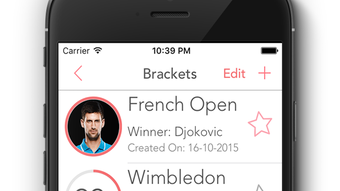
- Visual and Media Integration – Enables the addition of team or player photos directly within the bracket, enhancing visual identification and engagement.
- Category Organization – Brackets can be grouped under user-defined categories, improving accessibility and workflow efficiency when managing several events.
- Social Sharing – Supports sharing brackets via email, Facebook, Twitter, and other platforms, facilitating communication with participants and spectators.
User Interface, Workflow & Performance
The user interface is designed with clarity and simplicity in mind, featuring a clean layout that prioritizes readability and ease of navigation. Match pairings are displayed in a structured bracket format, with intuitive controls for updating results. The workflow is streamlined: users begin by setting up the tournament, assigning teams, and then progress through match outcomes with minimal clicks.
Navigation is consistent across all functions, with clearly labeled menus and accessible options for creating, editing, and sharing brackets. The software maintains a responsive feel during basic operations, though detailed performance metrics were not provided by the developer. The app’s resource usage behavior remains stable during typical use, with no reported issues related to lag or crashes. The developer did not specify resource usage details, but the 15.5 MB installation size suggests a lightweight footprint.
Compatibility & System Requirements
Bracket is designed for iPhone devices and is compatible with the latest iOS versions. The software version is 2.5.2, released on June 15, 2024. The installation size is 15.5 MB, indicating a compact footprint suitable for devices with limited storage. Platform compatibility information is limited to iPhone, and no additional system requirements were listed.
Exact system requirements were not provided. The developer did not specify minimum CPU, RAM, or iOS version details. Users should ensure their device meets standard iOS app requirements for smooth operation. Compatibility with older iPhone models is not confirmed. The software does not appear to require a continuous internet connection for core functionality, though sharing features may depend on network access.
Pros and Cons
Pros
- Free to use with no hidden costs
- Supports multiple tournament formats including double elimination
- Intuitive interface suitable for non-technical users
- Unlimited bracket creation and categorization
- Effortless progress tracking with single-tap updates
- Visual enhancements with player/team photos
- Easy sharing across social media and email
Cons
- No support for tournaments exceeding 16 teams
- Limited to iPhone platform; no desktop or web version available
- Exact system requirements were not specified
- Offline functionality not confirmed beyond basic operations
- App lacks advanced analytics or reporting features
FAQ Section
Is Bracket available for Mac or Windows?
Bracket is currently designed exclusively for iPhone devices. There is no desktop or web version available at this time.
Can I use Bracket offline?
Basic tournament creation and result tracking can be performed offline. However, features such as social sharing may require an active internet connection.
Is the app safe to download?
Bracket is developed by Harjot Singh and distributed through official app channels. No security risks were reported. Users should download from trusted sources to ensure integrity.
How often are updates released?
The latest version, 2.5.2, was released on June 15, 2024. The update frequency is not publicly documented, but the developer has maintained regular release cycles.
What types of tournaments can I create?
Users can create tournaments with up to 16 teams using single elimination, double elimination, or consolation formats. The app supports various sports including tennis, badminton, volleyball, and bowling.
Final Thoughts + CTA
Bracket delivers a focused, reliable solution for organizing sports tournaments on iPhone. Its clean design, intuitive workflow, and support for multiple formats make it a standout choice for recreational and semi-professional organizers. While limited to 16-team events and iPhone-only access, the app excels in its core purpose: simplifying bracket management with minimal friction.
For sports enthusiasts, coaches, and league coordinators managing local or school-level events, Bracket offers a seamless way to track progress and share results. The ability to add photos, categorize events, and share brackets across platforms enhances usability and engagement. Despite the lack of desktop support and advanced reporting, its strengths in simplicity and functionality outweigh the limitations.
Download Bracket now and take full control of your next tournament.








