
Screenshots
App details
- Updated
- June 3, 2025
- Requires
- Chrome
- License
- Full
- Developer
- brainner
- Category
- Web Apps
About Brainner
Download Brainner – AI‑Powered Recruitment Automation Tool
Overview
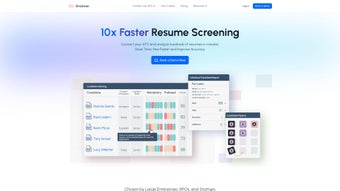
Brainner is an innovative AI‑driven web application that transforms the way recruiters screen resumes and evaluate candidates. By automating the most time‑consuming parts of hiring—parsing job descriptions, extracting key criteria, and matching them against applicant data—Brainner delivers a faster, more accurate recruitment workflow. The platform integrates seamlessly with leading HR suites, allowing teams to maintain their existing tech stack while gaining the benefits of intelligent automation. Recruiters simply upload a job posting, and Brainner instantly generates a customized screening rubric that categorizes applicants by experience, education, and skill set. Beyond basic filtering, the tool offers real‑time candidate profiling, dynamic ranking, and detailed reports that empower hiring managers to make data‑backed decisions. Whether you’re a small startup looking to reduce manual workload or a large enterprise aiming to scale hiring without sacrificing quality, Brainner provides a secure, cloud‑based solution that keeps your recruitment pipeline moving at the speed of business.
Key Features & Benefits
- AI‑Driven Resume Parsing: Automatically extracts relevant information from CVs, reducing manual data entry.
- Customizable Screening Criteria: Build, edit, and prioritize mandatory versus preferred qualifications to match your hiring standards.
- Dynamic Candidate Ranking: Real‑time scoring algorithm ranks applicants based on fit, experience, and skill relevance.
- Integration Hub: Native connectors for popular HR platforms such as Workday, BambooHR, and Greenhouse.
- Detailed Candidate Profiles: Consolidated view of each applicant’s strengths, gaps, and potential cultural fit.
- Bulk Upload & Batch Processing: Handle large applicant pools efficiently with drag‑and‑drop resume uploads.
- Secure Cloud Architecture: End‑to‑end encryption, GDPR compliance, and role‑based access controls protect sensitive data.
- Continuous Learning Engine: The AI model refines its matching accuracy over time based on recruiter feedback.
These capabilities translate into tangible business outcomes. Recruiters report up to a 45 % reduction in time‑to‑fill, while hiring managers experience a 30 % increase in the quality of shortlisted candidates. Because the AI engine learns from each hiring decision, the system becomes more precise the longer it’s used, turning the tool into a strategic asset rather than a one‑off utility. Moreover, Brainner’s integration layer means you don’t need to overhaul your existing HR ecosystem; you simply add a powerful analytics layer on top of what you already trust.
Installation & Usage Instructions
Step‑by‑Step Setup
- Create an Account: Visit brainner.com and sign up using a corporate email. Verify the account via the activation link sent to your inbox.
- Select a Subscription Plan: Choose between the “Professional” (single‑user) or “Enterprise” (multi‑user) plans. All plans include a 14‑day free trial with full feature access.
- Connect Your HR System: From the dashboard, navigate to Integrations and follow the guided wizard to link Workday, BambooHR, or any supported ATS. Authentication is handled through OAuth for maximum security.
- Configure Screening Templates: Use the built‑in template library or create a new template by entering the job title, required qualifications, and preferred skills. Mark each criterion as “Mandatory” or “Preferred” to influence ranking logic.
- Upload Job Descriptions: Drag and drop the posting file (PDF, DOCX, or plain text) into the “Job Input” area. Brainner’s natural‑language engine extracts key attributes automatically.
- Import Candidate Resumes: Upload resumes individually or in bulk via CSV or ZIP. The AI parses each file and maps data to the predefined criteria.
- Review Rankings & Reports: The platform generates a ranked shortlist, complete with score breakdowns, skill heatmaps, and suggested interview questions.
- Iterate & Refine: Provide feedback on candidate matches (e.g., “good fit”, “false positive”) to fine‑tune the algorithm for future searches.
Brainner is a pure SaaS solution, so there is no client‑side installation required beyond a modern web browser (Chrome, Edge, or Firefox). For organizations with strict firewall policies, a dedicated VPN tunnel can be configured using the optional on‑premise gateway, ensuring that all data traffic remains within the corporate network. The platform also supports single sign‑on (SSO) via SAML 2.0, enabling seamless user provisioning and de‑provisioning across the enterprise.
Compatibility, Pros & Cons
Brainner runs on any operating system that supports a contemporary web browser, including Windows 10/11, macOS Ventura, Linux distributions, as well as mobile browsers on Android 12+ and iOS 15+. Because the service is cloud‑based, there are no OS‑specific binaries to manage, and the interface adapts responsively to tablets and smartphones for on‑the‑go recruiter access.
Pros
- Significant time savings through automated resume parsing and ranking.
- Highly customizable screening criteria that align with diverse hiring policies.
- Robust integration ecosystem eliminates data silos.
- Secure, GDPR‑compliant architecture protects candidate privacy.
- Continuous AI learning improves match accuracy over time.
Cons
- Initial template setup may require a brief learning curve for HR teams new to AI tools.
- Advanced analytics dashboards are only available on the Enterprise plan.
- Bulk resume uploads are limited to 5,000 files per batch in the Professional tier.
Overall Rating: 4.5 / 5 – Brainner delivers a compelling blend of AI automation and practical HR integration, making it a top choice for modern recruitment teams.
Frequently Asked Questions
How does Brainner ensure data privacy and compliance?
Brainner employs end‑to‑end TLS encryption, stores data in EU‑based data centers, and follows GDPR, CCPA, and ISO 27001 standards. Role‑based access controls and audit logs give administrators full visibility into who accesses candidate information.
Can Brainner integrate with my existing ATS?
Yes. Brainner offers native connectors for Workday, BambooHR, Greenhouse, Lever, and many others. If a connector is not listed, the platform provides a REST API for custom integration.
Is there a free trial available?
A 14‑day free trial with full feature access is available for all new accounts. No credit card is required to start the trial.
What happens if I exceed the batch upload limit?
For Professional users, you can split large applicant pools into multiple batches or upgrade to the Enterprise plan, which offers unlimited bulk uploads.
How does the AI improve over time?
Every time a recruiter marks a candidate as “good fit” or “not suitable,” the feedback is fed back into the machine‑learning model. This continuous training loop refines the weighting of criteria, leading to more accurate rankings for future searches.
Conclusion & Call to Action
Brainner stands out as a secure, AI‑enhanced recruitment solution that bridges the gap between manual resume review and fully automated talent acquisition. By delivering customizable screening, real‑time candidate profiling, and seamless HR integration, it empowers hiring teams to cut down time‑to‑hire while improving candidate quality. Whether you’re a fast‑growing startup or a multinational corporation, Brainner’s scalable architecture and continuous learning engine make it a future‑proof investment. Ready to experience smarter hiring? Start your free trial today and see how AI can streamline your recruitment pipeline.
Guides & Tutorials
How to install Brainner
- Click the Download button above.
- Once redirected, accept the terms and click Install.
- Wait for the Brainner download to finish on your device.
How to use Brainner
This software is primarily used for its core features described above. Open the app after installation to explore its capabilities.
User Reviews
No reviews yet. Be the first to share your experience.
You may also like
more
3D AI Studio
3D AI Studio Overview 3D AI Studio is a web-based AI-powered tool developed by S...

3D textures by Polycam
Generate Realistic 3D Textures Effortlessly 3D Textures by Polycam is an innovat...

3DAiLY
Customizable 3D Modeling Tool: 3DAiLY 3DAiLY is an online platform that harnesse...

3DFY
Revolutionizing 3D Model Creation: 3DFY Review 3DFY is an AI-powered service, de...

AI Dungeon
AI Dungeon: Deep Learning Text Adventure AI Dungeon is an artificial intelligenc...

Alpha3D
A subscription-based program for Web apps, by alpha3d. Alpha3D is a subscription...
