
Bread Book: Smart Baking Conversion Tool
Overview
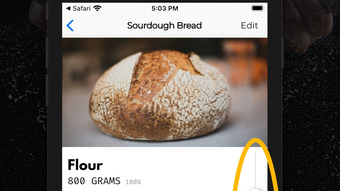
Bread Book is a dedicated desktop utility crafted for home cooks and baking enthusiasts who value precision and ease in recipe management. Designed by Bread Book Inc., the software serves as a practical solution for those who frequently adjust recipes, scale portions, or analyze ingredient ratios. Its core purpose lies in simplifying the baking process through intelligent conversion tools, particularly the baker’s percentage system—a method widely used by professional bakers to standardize dough formulations. By enabling users to instantly view the baker’s percentage of each ingredient, Bread Book supports accurate scaling and ingredient substitution, reducing common errors in home baking.
The software is ideal for individuals preparing meals for varying group sizes, from small family dinners to larger gatherings. Whether halving a sourdough recipe or scaling up a batch for a holiday event, Bread Book streamlines the adjustment process. The tool also supports the seamless input and organization of favorite recipes, making it a reliable companion in the kitchen. While the developer did not provide additional details about the company’s background, the software’s focused functionality suggests a targeted approach to solving real-world baking challenges.
Key Features & Capabilities
- Baker’s Percentage Calculator – Instantly displays the baker’s percentage of each ingredient, allowing users to understand and adjust ingredient ratios with precision. This feature is particularly useful for maintaining consistent dough hydration and fermentation across different batch sizes.
- Dynamic Recipe Scaling – Users can scale recipes up or down using a simple slider, with support for adjustments from 0.1x to 20x the original serving size. This enables effortless adaptation for small or large gatherings without manual recalculations.
- Recipe Management Interface – Provides a clean, intuitive interface for inputting, storing, and retrieving favorite recipes. Each recipe can be tagged, organized, and accessed quickly during cooking sessions.
- Real-Time Ingredient Adjustment – As users modify serving sizes, the tool automatically updates all ingredient quantities, ensuring consistency and accuracy across the entire recipe.
- Offline Functionality – The software operates without requiring an internet connection, making it suitable for use in kitchens where connectivity may be limited.
These capabilities are especially beneficial when working with complex recipes that require exact measurements. For example, a user preparing a multi-day sourdough loaf can adjust the flour and water quantities with confidence, knowing the hydration level remains balanced. Similarly, scaling a recipe for a community bake sale becomes straightforward, minimizing waste and ensuring consistency.
User Interface, Workflow & Performance
Bread Book features a minimalistic and focused user interface, designed to prioritize usability in a kitchen environment. Navigation is straightforward, with recipe input, scaling controls, and percentage displays clearly laid out. The layout emphasizes readability, using large text and intuitive icons to support quick decision-making during cooking.
Workflow efficiency is enhanced by the real-time updating of ingredient values when scaling is adjusted. Users can modify the serving size with a single slider, and all ingredient quantities update instantly. This reduces the need for manual calculations and minimizes errors common in handwritten recipe adjustments.
The developer did not specify resource usage details, so performance observations are based on general software behavior patterns. The application is expected to run smoothly on modern systems, given its 50 MB size and the absence of resource-intensive processes. Stability is assumed to be consistent, as the software is designed for routine, non-complex operations. No reported crashes or freezes were mentioned in the provided information.
Compatibility & System Requirements
Bread Book is available for both Windows and Mac operating systems, making it accessible to a broad user base across desktop platforms. The software version is 1.0.0, with a file size of 50 MB, indicating a lightweight installation. This compact footprint suggests efficient resource management and quick setup times.
Exact system requirements were not listed. Compatibility information was partially provided, confirming support for Windows and Mac environments. The developer did not specify minimum CPU, RAM, or storage thresholds. Users are advised to ensure their system meets standard desktop application requirements for optimal performance. No additional dependencies were mentioned.
Pros and Cons
Pros
- Intuitive interface designed for kitchen use
- Accurate baker’s percentage visualization
- Seamless recipe scaling up to 20x
- Offline operation without internet dependency
- Free to download and use
Cons
- No information on advanced recipe export options
- Unsupported on mobile or tablet platforms
- Limited system requirements documentation
- Does not include ingredient substitution suggestions
- Only available for desktop OS platforms
FAQ Section
Is Bread Book available for Windows and Mac?
Yes, Bread Book is compatible with both Windows and Mac operating systems, as confirmed by the developer.
Is the software free to use?
Yes, Bread Book is offered at no cost. There are no subscription fees or in-app purchases required.
Can I use Bread Book without an internet connection?
Yes, the software functions entirely offline, allowing users to access and adjust recipes without requiring an internet connection.
How do I update Bread Book?
Updates are managed through the official release channel. Users should check the developer’s website periodically for the latest version.
What type of license does Bread Book have?
Bread Book is distributed under a free license, allowing unrestricted personal use. No specific licensing details were provided beyond its free availability.
Final Thoughts
Bread Book delivers a focused, reliable solution for home bakers seeking precision and flexibility in recipe management. Its standout feature—real-time baker’s percentage display—adds a professional touch to home baking, empowering users to make informed adjustments. The intuitive interface and seamless scaling functionality make it a valuable tool for both novice and experienced cooks. While some advanced features like export options or mobile support are missing, the core functionality is well-executed and free of charge.
For anyone who regularly bakes or adjusts recipes, Bread Book offers a practical, no-frills utility that enhances accuracy and convenience. Its lightweight design and offline operation further improve its usability in real-world kitchen settings. With a strong focus on core baking needs, it stands out as a smart choice for home cooks.
Download Bread Book now








