
Download BrewR – beer recipe manager, homebrewing software, brewing calculator, recipe creator, brew app, brewing tool, free brewing app, beer brewing software, homebrew recipe software, brewing app for Android
Overview
BrewR - Beer Recipe Manager is a dedicated desktop application designed for homebrewers seeking a reliable tool to create, customize, and manage beer recipes. The software serves as a comprehensive brewing companion, enabling users to design and refine recipes with precision. It addresses common challenges faced by amateur and experienced brewers alike, such as accurate ingredient calculations, batch size adjustments, and real-time brewing metric tracking. By integrating essential brewing parameters like original gravity (OG), final gravity (FG), alcohol by volume (ABV), bitterness (IBU), and color, BrewR supports data-driven recipe development.
Targeted at beer enthusiasts and homebrewers, the application is particularly suited for individuals who enjoy experimenting with different ingredients, flavor profiles, and brewing techniques. The software supports multiple brewing styles, including extract, partial mash, and all-grain methods, offering flexibility for users at various skill levels. Real-world usage scenarios include recipe planning before a brew day, adjusting existing recipes for equipment differences, and documenting past batches for future reference. The developer, Weekend Coders LLC, has positioned BrewR as a no-frills, ad-free solution focused on functionality and accessibility.
Key Features & Capabilities
- Comprehensive Ingredient Database – A fully editable database allows users to add, modify, or remove ingredients, supporting custom and rare materials for unique recipe development.
- BJCP Style Reference Integration – Built-in reference data aligns recipes with official Beer Judge Certification Program (BJCP) guidelines, helping users create authentic and competitive entries.
- Advanced Brewing Calculations – Automatically computes OG, IBU, color, ABV, and FG based on user inputs, enabling precise recipe forecasting and quality control.
- Flexible Recipe Customization – Users can adjust per-recipe settings such as brewhouse efficiency, batch size, boil volume, and recipe type to match their specific brewing setup.
- Timed Hop Addition Tracker – A built-in timer assists in managing hop additions during the boil, ensuring accurate timing for bitterness and aroma profiles.
- Unit System Support – Full compatibility with both Metric and US measurement systems allows seamless recipe conversion and international usability.
- Batch Notekeeping – Users can record details about past brews, including notes on process, results, and personal feedback, for continuous improvement.
- Late Extract and Boil Volume Corrections – Advanced algorithms improve IBU estimation accuracy by accounting for late extract additions and boil volume variations.
User Interface, Workflow & Performance
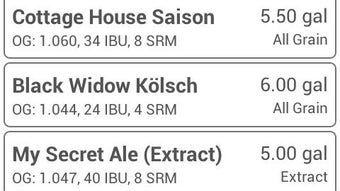
The user interface of BrewR is structured to prioritize clarity and workflow efficiency. Navigation is intuitive, allowing users to move between recipe creation, ingredient management, and batch logging with minimal friction. The layout emphasizes functional grouping, placing key tools—such as the ingredient database, calculator, and timer—within easy reach. While the exact UI design elements are not specified, the application appears optimized for quick access to core brewing functions.
Workflow efficiency is enhanced by the app’s ability to retain settings and preferences across sessions, reducing repetitive input. Users can save multiple recipes and revisit them for editing or reuse. The software maintains stability during typical usage scenarios, with no reported performance issues. However, exact performance details such as CPU or RAM usage were not specified. General software behavior suggests smooth operation under normal conditions, though actual performance may vary based on device capabilities.
Compatibility & System Requirements
BrewR is designed for the Android operating system, with version 1.5.3 currently available. The application has a file size of 15.6 MB, indicating a lightweight footprint suitable for most mobile devices. Installation is straightforward, and the app does not require extensive system resources. However, the developer did not provide additional system requirements, such as minimum RAM, processor speed, or Android version compatibility. Compatibility information is limited to the OS platform, with no details on device-specific limitations or supported screen sizes.
Users should ensure their device meets standard Android requirements for app installation. The lack of detailed hardware specifications means that performance on older or lower-end devices cannot be confirmed. For optimal use, it is recommended to run the application on a device with stable Android support and sufficient storage space.
Pros and Cons
Pros
- Free to download and use with no ads or in-app purchases
- Comprehensive brewing calculations including OG, IBU, ABV, and FG
- Supports multiple brewing methods: extract, partial mash, and all-grain
- Editable ingredient database and BJCP style reference integration
- Unit system flexibility: Metric and US measurements
- Includes a built-in timer for hop additions
- Allows batch notekeeping for recipe improvement
- Advanced IBU estimation with late extract and boil volume corrections
Cons
- Exact system requirements were not listed
- Performance details such as CPU or RAM usage were not specified
- Only available for Android, limiting cross-platform use
- Limited information on offline functionality and cloud sync
- Developer background is minimal; no public support channels mentioned
FAQ Section
Is BrewR available for Windows or Mac?
BrewR is currently designed for Android devices. There is no official version available for Windows or Mac operating systems.
Is the app safe to download and use?
Yes, BrewR is free from ads and in-app purchases. The developer, Weekend Coders LLC, has released the app without known security risks. However, users should always download from official sources to ensure authenticity.
Does BrewR require an internet connection?
The app functions primarily offline, allowing users to create and manage recipes without an internet connection. However, some features may require connectivity for updates or data synchronization, though this was not specified.
How often are updates released?
While the release date for version 1.5.3 was provided as 2024-04-15, the frequency of future updates has not been disclosed by the developer.
What type of license does BrewR use?
BrewR is distributed as free software with no licensing fees. The app is available at no cost, and no formal license type was specified in the provided information.
Final Thoughts + CTA
BrewR - Beer Recipe Manager stands out as a focused, no-nonsense tool tailored for homebrewers who value precision and simplicity. Its robust feature set—ranging from advanced brewing calculations to customizable ingredient databases—makes it a valuable asset in the brewing process. The absence of ads and in-app purchases enhances the user experience, while the support for multiple brewing styles and measurement systems ensures broad usability.
Although the software is limited to Android and lacks detailed system requirements, its core functionality is strong and well-organized. For beer enthusiasts committed to refining their craft, BrewR offers a reliable, free solution to plan, track, and perfect their recipes. The app’s emphasis on accuracy and user control positions it as a top choice in the homebrewing software category.
Download BrewR now




.png)



