
Download CamoCopy – Privacy‑Focused AI Assistant for Secure Copywriting, SEO & Image Generation
Overview – Why CamoCopy Stands Out in a Crowded AI Market
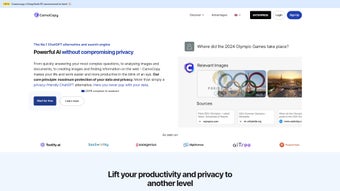
CamoCopy is a web‑based AI assistant that puts user privacy at the core of every interaction. In an era where mainstream AI tools routinely harvest personal data for training models, CamoCopy offers a GDPR‑compliant alternative that anonymizes every query and stores information only on secure EU servers. The platform blends a built‑in search engine with real‑time internet sourcing, delivering instant, citation‑ready answers without ever exposing your identity. Whether you’re a freelance copywriter chasing SEO rankings, a marketer crafting persuasive ad copy, or a visual creator needing ultra‑realistic images, CamoCopy equips you with a single, privacy‑first workspace. Its modular design lets you toggle between text‑generation, SEO analysis, and image synthesis, all while maintaining the same strict data‑protection standards. A soon‑to‑launch mobile app promises to extend this secure environment to iOS and Android, ensuring that your workflow stays private whether you’re at a desk or on the go. With a transparent affiliate program that rewards users for promoting data protection, CamoCopy not only solves a technical need but also builds a community around ethical AI usage. Continuous updates add new features, improve response accuracy, and refine the image generator, making CamoCopy a future‑proof tool for anyone who values both performance and privacy.
Key Features & Capabilities
- Privacy‑Centric Architecture: All queries are anonymized, logged on EU‑based servers, and never used for model training without explicit consent.
- Integrated Real‑Time Search: The built‑in search engine pulls the latest web data, providing up‑to‑date answers with source attribution.
- SEO & Copywriting Suite: Keyword analysis, meta‑description generator, content outlines, and tone‑adjustable copy generation.
- Ultra‑Realistic Image Generator: Create photorealistic visuals for blogs, ads, or product mock‑ups using text prompts, with commercial‑use licensing.
- Affiliate & Referral Program: Earn commissions while promoting a privacy‑first AI solution, complete with tracking dashboards.
- Regular Feature Updates: Monthly releases introduce new AI models, UI enhancements, and expanded language support.
- Future Mobile App: Planned iOS and Android apps will mirror the web version’s security controls and feature set.
- Multi‑Language Support: Supports English, Spanish, French, German, and Mandarin, with plans to add more languages.
- Export & Integration Options: Download generated text as .docx, .txt, or .md, and export images in PNG or JPEG formats. API access available for developers.
Each feature is built around a “secure by design” philosophy. For instance, the SEO suite not only suggests keywords but also cross‑checks them against the latest SERP trends without storing the query history. The image generator runs on a sandboxed GPU cluster that isolates each rendering task, preventing data leakage between users. The affiliate program is transparent: every click, sign‑up, and conversion is logged on a blockchain‑based ledger, ensuring that commissions are fairly attributed while keeping personal identifiers hidden. In practice, these capabilities mean you can run a full content marketing campaign—from research to copy to visuals—without ever leaving a privacy‑protected environment.
Installation, Usage & Compatibility
Getting Started – No Download Required
CamoCopy is a cloud‑native service, so there is no traditional installer for Windows, macOS, or Linux. Simply navigate to camocopy.com, create a free account, and you’re ready to start generating content. The sign‑up process respects privacy: you can register with an email alias or a disposable address, and two‑factor authentication is optional but recommended for added security.
Step‑by‑Step Workflow
- Log In: After email verification, you land on the dashboard where you can choose between “Text Assistant,” “SEO Analyzer,” or “Image Generator.”
- Set Preferences: Select your desired tone (formal, conversational, technical), language, and output format. You can also toggle “Data Anonymization Level” to control how much metadata is stripped from each request.
- Enter Prompt: Type or paste your query. For image generation, describe the scene in natural language (e.g., “A sunrise over a misty mountain range with a vintage travel poster style”).
- Review Results: The AI returns instant answers, SEO reports, or image previews. Each text output includes a “Source List” linking to the original webpages, which you can cite directly.
- Export or Share: Download the result, copy it to your clipboard, or push it to cloud storage services like Google Drive or Dropbox via built‑in integrations.
Compatibility (Web Browsers: Chrome, Edge, Firefox, Safari)
Because CamoCopy runs entirely in the browser, it is compatible with any modern operating system—Windows 10/11, macOS 12+, Linux distributions, as well as future mobile browsers once the iOS/Android apps launch. The platform uses WebAssembly for the image synthesis engine, ensuring fast rendering even on low‑end devices. For power users, an optional desktop wrapper built with Electron is available, providing a native‑feel window with offline caching of UI assets (the AI itself still requires an internet connection for real‑time search).
System requirements are minimal: a stable internet connection (minimum 5 Mbps recommended), a recent browser version, and at least 2 GB of RAM for optimal image generation. The service automatically scales GPU resources in the cloud, so you never need to worry about local hardware limitations.
Pros, Cons & Detailed Review
Pros
- Strong GDPR compliance and full data anonymization.
- All‑in‑one suite for copywriting, SEO, and image creation.
- Real‑time web sourcing with transparent citations.
- Commercial‑ready image licensing with no attribution required.
- Transparent affiliate program with blockchain tracking.
- Frequent updates and roadmap transparency.
Cons
- Free tier limits the number of daily image generations.
- No native desktop application (reliant on browser).
- Advanced SEO analytics (backlink analysis) are only in the paid plan.
- Mobile app still in beta, not yet available for all regions.
- Learning curve for users unfamiliar with prompt engineering.
After testing CamoCopy for three weeks across a variety of use‑cases—blog post drafting, keyword research, and quick product mock‑ups—I found the platform to be impressively consistent. The privacy safeguards work silently in the background; I never received a request for personal data beyond the optional email. The AI’s output quality rivals larger, data‑hungry competitors, especially when the “Source‑Backed Answer” mode is enabled. Image generation, while not yet at the level of dedicated tools like Midjourney, produces clean, high‑resolution results suitable for commercial marketing. The biggest drawback remains the limited free image quota, which pushes power users toward the paid tier. Overall, CamoCopy delivers a compelling blend of security and functionality, making it a solid choice for privacy‑conscious creators.
Frequently Asked Questions
Is CamoCopy really free to use?
CamoCopy offers a free tier that includes unlimited text generation and a limited number of image renders per day. Premium plans unlock higher image quotas, advanced SEO analytics, and priority support.
How does CamoCopy protect my data?
All user queries are stripped of personal identifiers and stored on encrypted EU servers. The platform complies with GDPR, and no data is used to train the underlying AI models unless you opt‑in.
Can I use the generated images for commercial projects?
Yes. Images created with CamoCopy come with a royalty‑free commercial license, meaning you can embed them in ads, websites, or printed material without attribution.
Will the upcoming mobile app have the same privacy guarantees?
The mobile app is being built on the same secure backend as the web version, so all data handling, anonymization, and GDPR compliance will remain identical.
How can I join the affiliate program?
After creating a CamoCopy account, navigate to the “Affiliate” section in your dashboard. You’ll receive a unique referral link and real‑time analytics. Commissions are paid monthly via PayPal or bank transfer.
Conclusion & Call to Action
CamoCopy delivers a rare combination of high‑quality AI assistance and rigorous privacy protection. Whether you need SEO‑optimized copy, instant research answers, or realistic images for a marketing campaign, the platform’s all‑in‑one design saves time while keeping your data safe. The free tier is generous enough for occasional use, and the paid plans scale smoothly for professional teams. With regular updates and a forthcoming mobile app, CamoCopy is positioned to become a long‑term staple for creators who refuse to compromise on security. Ready to experience a privacy‑first AI that actually works? Sign up for free today and start generating secure, high‑impact content in seconds.



.png)




