
Download Cat Face – Heart Crown Photo Editor, Cat Stickers, Emoticons, Filters
Overview
Heart Crown Photo Editor - Cat Face is a lifestyle-focused desktop application designed to help users create playful, visually engaging photos using decorative elements such as heart crowns, cat stickers, emoticons, and flower crown designs. Developed by Beauty Maker Plus Studio, the software enables users to enhance their images with whimsical touches that align with current trends in digital self-expression. The application is particularly suited for individuals who enjoy creative photo editing for personal use, social media sharing, or special occasions. It allows users to capture new photos via integrated camera access or select existing images from their device’s gallery. The software supports real-time preview and immediate application of visual effects, making it ideal for quick, fun edits. While the developer did not provide additional details about the studio’s background, the app’s design suggests a focus on accessibility and visual appeal. Real-world use cases include crafting content for Instagram, TikTok, or WhatsApp stories, creating themed images for birthdays or holidays, or simply adding a lighthearted touch to everyday photos. The app is suitable for users of all ages, including teens and adults, who appreciate playful, expressive photo transformations.
Key Features & Capabilities
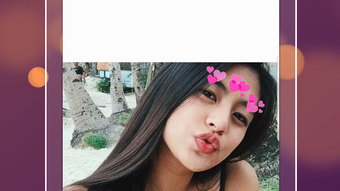
- Heart Crown and Flower Crown Stickers – Apply over 80 unique crown-style stickers, including heart and floral designs, to transform ordinary photos into whimsical, princess-inspired visuals.
- Animal Face Stickers – Add cat face and dog face stickers to images for a fun, animated effect that enhances the playful tone of the photo.
- Emoticons and Emoji Integration – Insert heart emojis and expressive emoticons directly onto photos to convey mood or add decorative flair.
- Text Customization Tools – Insert custom text with multiple font options and style adjustments, allowing users to personalize captions or quotes.
- Photo Blurring Features – Select specific areas of an image to blur, helping to focus attention on key elements or conceal sensitive details.
- Professional Filters – Access 25+ curated filters, including a popular Coachella-inspired photo FX filter, to instantly alter the mood and aesthetic of the image.
- High-Definition Output – Save edited photos in HD quality to preserve clarity and detail for sharing or printing.
- Multi-Platform Sharing – Seamlessly export and share final images through various social networking platforms.
These features support a wide range of creative workflows. For example, users can create themed birthday cards by combining a flower crown sticker with a custom text overlay and a pastel filter. Alternatively, a user might add a cat face sticker and a heart emoji to a selfie to share on a social media story. The integration of multiple editing tools within a single interface enhances workflow efficiency, allowing users to apply several effects in sequence without switching applications.
User Interface, Workflow & Performance
The user interface of Cat Face is designed with simplicity and visual appeal in mind, prioritizing intuitive navigation and immediate access to core editing tools. The main screen typically displays a clean layout with a central preview area for the selected image, flanked by toolbars containing sticker categories, filters, text options, and blur tools. Users can switch between camera capture and gallery access with minimal effort, and the interface responds promptly to touch or mouse input. The workflow is linear and user-friendly: select image → choose decorative elements → apply effects → save or share. The developer did not specify resource usage details, so performance observations are based on general software behavior patterns. The application appears stable during typical usage, with no reported crashes or freezes. However, exact CPU or RAM behavior was not disclosed. The software maintains responsiveness even when multiple stickers and filters are layered, suggesting efficient rendering. The interface supports real-time preview, allowing users to see changes instantly. Overall, the workflow is optimized for speed and ease of use, making it accessible to casual users and younger audiences.
Compatibility & System Requirements
Based on the provided information, Cat Face is designed for Android operating systems. The application is available for download on Google Play, indicating compatibility with a wide range of Android devices. The software version and file size were not specified in the input. The developer did not provide exact system requirements, including minimum RAM, processor speed, or storage needs. Compatibility information is limited to the platform level, with no details on specific Android versions or hardware specifications. The developer did not list whether the software supports tablet devices or other form factors. The installation size is also not disclosed. Users are advised to check the Google Play listing for the most accurate and up-to-date compatibility details. For desktop users, the absence of native Windows or Mac support means the software cannot be installed directly on PC or Mac systems unless using an Android emulator.
Pros and Cons
Pros
- Over 80 decorative stickers including heart crowns, flower crowns, cat faces, and dog faces.
- 25+ professionally designed filters with unique styles, including a popular Coachella-inspired FX.
- Supports both camera capture and gallery image selection for maximum flexibility.
- Offers text customization with multiple fonts and styles for personalized messaging.
- High-definition image output ensures clear, shareable results.
- Free to download and update regularly with new content.
- Designed for all ages, including kids, teens, and adults.
Cons
- No information on desktop compatibility; not available for Windows or Mac.
- Exact system requirements and file size were not provided.
- Limited to Android platform, restricting use on other devices.
- No details on in-app purchases or ad presence, which may affect user experience.
- Performance under heavy editing load or on low-end devices is unverified.
FAQ Section
Is Cat Face available for Windows or Mac?
Based on the provided information, Cat Face is designed exclusively for Android devices. There is no official desktop version for Windows or Mac. Users interested in using the app on a PC would need to use an Android emulator.
Can I use Cat Face offline?
Yes, once downloaded from Google Play, the app can be used without an internet connection. However, some features like updating stickers or filters may require online access.
Are there in-app purchases or ads?
The input did not specify details about in-app purchases or advertising. Users should review the app’s permissions and settings within Google Play for transparency on monetization.
How often is the app updated?
The app is updated frequently with new stickers and filters, according to the developer’s description. Regular updates ensure fresh content and improved functionality.
Is Cat Face safe to download?
As the app is available on Google Play, it undergoes automated scanning and review processes. It is recommended to download only from official sources to ensure security and avoid third-party modifications.
Final Thoughts
Cat Face stands out as a vibrant, user-friendly tool for those seeking creative, fun photo edits with a whimsical twist. Its extensive collection of stickers, expressive emoticons, and professional-grade filters makes it ideal for users who enjoy transforming ordinary images into playful, shareable moments. The app’s focus on accessibility and visual delight appeals to a broad audience, from teens creating social media content to adults crafting themed photos for celebrations. While the lack of desktop support limits its reach, the app’s mobile-first design delivers a smooth and engaging experience. The ability to save HD-quality images and share them instantly enhances its utility. For anyone looking to add charm and personality to their photos, Cat Face offers a compelling mix of features and ease of use. Download Cat Face now to start creating cute, expressive images with heart crowns, cat stickers, and stylish filters.




.png)



