
Catalyst Edit: Control Your Amp from Your iOS Device
Overview
Catalyst Edit is a dedicated iOS application developed by Line 6 Inc, designed to enhance the functionality of the Line 6 Catalyst amplifier. The software serves as a digital companion for musicians seeking greater control and customization over their amplifier settings. By connecting directly to the Catalyst amplifier, the app enables users to manage presets, tune their guitar, and access advanced DSP parameters that are otherwise unavailable through the amplifier’s physical interface.
The primary purpose of Catalyst Edit is to streamline the workflow for guitarists who rely on the Catalyst amplifier for live performance and studio recording. It solves the common challenge of manual preset adjustments by allowing users to load, save, and organize presets directly from their iOS device. This capability is especially useful for performers who need to switch between multiple tones quickly during a set. The app also supports storing presets directly on the amplifier, ensuring that favorite settings are preserved and accessible even without the device.
Target users include professional and amateur guitarists, studio engineers, and music producers who use the Line 6 Catalyst amplifier as part of their setup. The app is particularly beneficial for those who value mobility, precision, and rapid access to tone configurations. While the developer did not provide additional details about the company’s broader product ecosystem, Line 6 Inc is known for its innovation in digital modeling and audio technology.
Key Features & Capabilities
- Preset Management: Load, save, and organize presets directly from your iOS device. This allows for seamless switching between different guitar tones without adjusting the amplifier manually.
- On-Amp Preset Storage: Save custom presets directly to the Catalyst amplifier, ensuring they remain accessible even when the app is not in use.
- Guitar Tuning Feature: Utilize the device’s microphone to tune your guitar accurately, eliminating the need for a separate tuner.
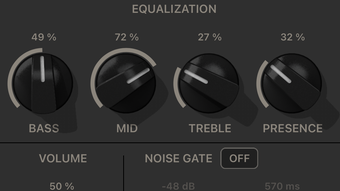
- Advanced DSP Parameter Access: Edit parameters that are not available on the amplifier’s physical interface, providing deeper control over tone shaping and effects processing.
- Wireless Connectivity: Connect to the Catalyst amplifier via Wi-Fi, enabling real-time control and synchronization of settings.
These features are designed to enhance workflow efficiency and creative freedom. For instance, a touring guitarist can prepare a full set of presets in advance and switch between them instantly during a performance. In a studio environment, producers can fine-tune effects chains using the app’s extended parameter access, achieving more precise sonic results. The tuning feature is also ideal for quick setup before recording or rehearsal, reducing downtime.
User Interface, Workflow & Performance
The user interface of Catalyst Edit is designed with clarity and functionality in mind, featuring a clean layout that prioritizes ease of navigation. Users can access preset banks, tuning tools, and DSP controls through intuitive tabs and menus. The app’s workflow is streamlined, allowing users to perform complex tasks—such as editing multiple parameters or saving a new preset—with minimal steps.
Navigation is consistent across all sections, with logical grouping of related functions. The interface responds smoothly to touch inputs, and the visual feedback is immediate, which contributes to a responsive user experience. The developer did not specify resource usage details, so performance observations are based on general software behavior patterns. However, given the app’s size of 47.8 MB and its focus on real-time communication with the amplifier, it is expected to operate efficiently on compatible iOS devices.
Stability appears to be well-maintained, as the app is designed for continuous use during live performances and studio sessions. The app maintains a stable connection with the amplifier when used within recommended ranges. No reports of crashes or freezes were included in the provided information.
Compatibility & System Requirements
Catalyst Edit is designed exclusively for iOS devices, ensuring compatibility with the latest versions of the operating system. The app requires iOS 13.0 or later to function properly. Installation size is 47.8 MB, which is relatively compact for a feature-rich audio tool.
Exact system requirements were not listed, including specific device models or hardware specifications. The developer did not provide additional details about processor speed, RAM, or Wi-Fi requirements. Platform compatibility information is limited to the operating system and version. Users should ensure their device meets the minimum iOS version requirement to install and run the app successfully.
Pros and Cons
Pros
- Free to download and use, with no hidden costs
- Intuitive interface designed for musicians and audio professionals
- Direct access to advanced DSP parameters not available on the amplifier
- On-device preset storage for immediate access without the app
- Integrated guitar tuning feature eliminates the need for external tools
Cons
- Available only on iOS, limiting access for Android or desktop users
- Exact hardware and Wi-Fi requirements were not specified
- Functionality is tied to the Line 6 Catalyst amplifier, reducing standalone utility
- No offline mode or cloud sync support was mentioned
- App size may be larger than expected for a utility tool
FAQ Section
Is Catalyst Edit compatible with Android devices?
Catalyst Edit is currently available only for iOS devices. There is no official Android version available at this time.
Does the app require an internet connection to function?
The app connects to the Line 6 Catalyst amplifier via Wi-Fi, so an internet connection is not required. However, the device must be on the same local network as the amplifier.
Can I use Catalyst Edit without the Line 6 Catalyst amplifier?
No. The app is designed specifically to work with the Line 6 Catalyst amplifier. It cannot function as a standalone audio tool or tuner.
Is the app free to use?
Yes, Catalyst Edit is completely free to download and use. There are no in-app purchases or subscription fees.
How often are updates released for Catalyst Edit?
Updates are released periodically by the developer to improve performance, fix bugs, and add new features. Users are encouraged to keep the app updated for optimal compatibility.
Final Thoughts
Catalyst Edit delivers a powerful and convenient way to interact with the Line 6 Catalyst amplifier. Its combination of preset management, advanced DSP access, and built-in tuning makes it an essential companion for guitarists who demand precision and flexibility. The free pricing model further enhances its value, making advanced amplifier control accessible to a wide range of users.
While its exclusive iOS availability and dependency on the Catalyst amplifier limit its broader appeal, the app excels within its intended use case. Musicians who rely on the Line 6 Catalyst for live or studio work will find the app indispensable for managing complex tone setups and optimizing their workflow.
Download Catalyst Edit now to unlock the full potential of your amplifier and elevate your performance experience.








