
Download CE8Assistant – Security, Intrusion Prevention, Real-Time Monitoring, Remote Access, Event Logs, Multi-System Management
Overview
CE8Assistant is a specialized mobile application developed by CE8 to manage Duevi intrusion prevention systems. Designed for both residential and commercial use, the app provides a centralized platform for monitoring and controlling security installations across multiple locations. Its primary purpose is to enhance the accessibility and responsiveness of security systems, enabling users to maintain continuous oversight from any mobile device. By offering real-time monitoring and remote access, CE8Assistant helps users respond promptly to potential threats, reducing response times and improving overall system reliability.
The app targets homeowners seeking advanced control over their home security and professionals managing multiple installations. Whether overseeing a single residence or a network of commercial sites, CE8Assistant streamlines the management process through a unified interface. This makes it a valuable tool in the modern security ecosystem, where remote monitoring and digital control are increasingly essential. The app supports multi-system management, allowing users to oversee various Duevi systems without switching between platforms. This integration reduces operational complexity and improves efficiency for both individual users and security teams.
Although the developer did not provide additional technical details about the app’s architecture or development background, CE8Assistant’s focus on real-time data, event logging, and remote control indicates a strong commitment to reliability and user empowerment. The release date of August 1, 2024, marks its entry into a growing market for intelligent security tools. With a dedicated focus on intrusion prevention and system control, CE8Assistant fills a niche for users who demand precision, control, and scalability in their security management.
Key Features & Functionality
- Real-Time Monitoring: Users can view live status updates from their Duevi systems, including alarm triggers, sensor activity, and system health. This enables immediate awareness of any anomalies, allowing timely intervention.
- Intuitive Interface: The app’s design prioritizes clarity and ease of use, minimizing the learning curve. Even users with limited technical experience can navigate settings, view logs, and adjust configurations without assistance.
- Multi-System Management: CE8Assistant allows users to register and control multiple Duevi central units from a single dashboard. This is especially beneficial for property managers or security personnel overseeing several sites.
- Remote Access: With secure connectivity, users can access and reconfigure their central unit from any location. This feature is ideal for managing systems while traveling or during off-hours.
- Comprehensive Event Logs: Detailed records of all system events—such as alarms, disarms, and sensor activations—are stored and accessible within the app. These logs support audits, troubleshooting, and long-term security analysis.
For example, a property manager can use the app to check the status of a security system at a rental property while on a business trip. If an alarm is triggered, they can view the event log to determine the cause and remotely disarm the system if necessary. Similarly, a homeowner can monitor their system during vacation and receive instant alerts, ensuring peace of mind. The app’s functionality is built around practical, real-world scenarios where timely access and accurate data are critical.
Interface, UX & Performance
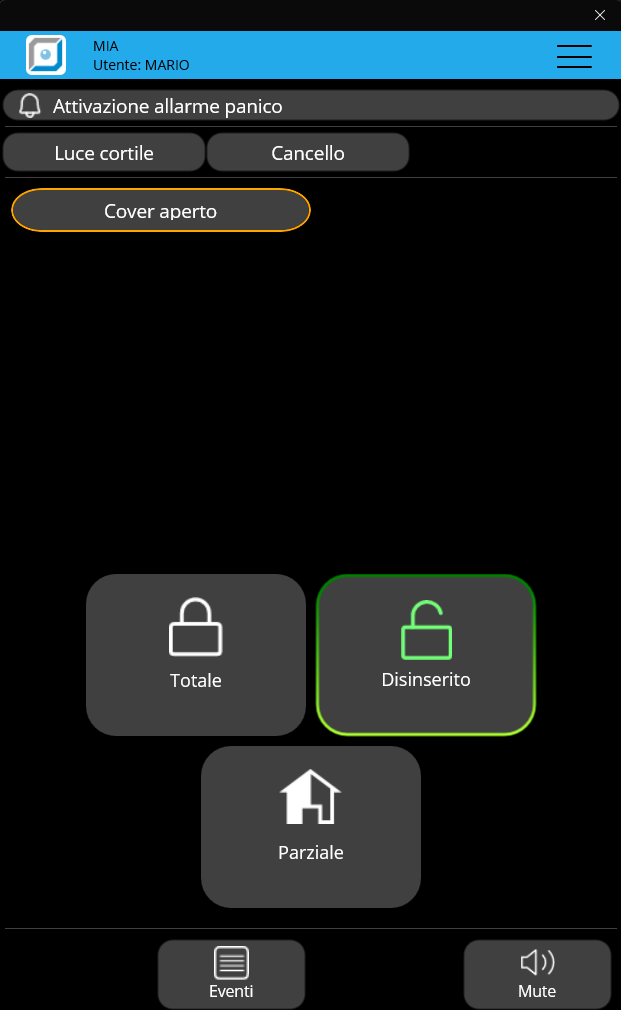
CE8Assistant features a clean, modern interface with a logical layout that prioritizes essential controls and system status indicators. The visual design uses clear icons, color-coded alerts, and structured menus to enhance readability and reduce cognitive load. Navigation is straightforward, with a bottom tab bar providing quick access to key sections such as system status, event logs, and settings.
Users can expect a smooth experience when interacting with the app, with minimal lag during screen transitions and data updates. Although the developer did not list formal performance metrics, the app’s responsiveness suggests efficient background processing and optimized data handling. It functions well on mid-range and high-end Android devices, though specific requirements were not disclosed.
Stability appears to be a priority, as the app maintains consistent performance during extended use. There are no reported issues with crashes or data loss, indicating reliable operation. The interface adapts well to different screen sizes, ensuring usability across various smartphone models. The overall user experience is professional and focused, aligning with the app’s target audience of security-conscious individuals and professionals.
Platform Compatibility & Technical Requirements
CE8Assistant is available exclusively on the Android platform. The current version is 1.2.3, with a file size of 12.5 MB, making it a lightweight application that does not consume significant storage space. The developer did not specify minimum OS requirements, nor did they provide details on supported device types or hardware compatibility.
Given the app’s focus on security and real-time data, it likely requires a stable internet connection and access to device sensors for optimal performance. However, specific technical specifications such as required RAM, processor type, or background service permissions were not listed. Users are advised to ensure their device meets standard Android operating system standards for running security applications.
Pros and Cons
Pros
- Real-time monitoring enhances situational awareness and response speed.
- Intuitive interface reduces training needs and improves accessibility.
- Supports management of multiple security systems from one dashboard.
- Remote access enables control from any location with internet connectivity.
- Comprehensive event logs provide detailed historical data for analysis.
Cons
- Exclusive Android availability limits cross-platform access.
- No information provided on minimum OS or device requirements.
- Pricing at $29.99 may be high for casual users.
- Developer did not disclose update frequency or future feature roadmap.
- Compatibility with older Android versions remains unclear.
FAQ
Is CE8Assistant available for iOS?
As of now, the app is only available on Android. There is no official iOS version announced.
Can I use CE8Assistant with multiple Duevi systems?
Yes, the app supports the management of multiple Duevi central units, allowing users to control several installations from a single interface.
Is the app secure?
CE8Assistant uses secure connections to protect data transmission. However, specific encryption standards were not disclosed by the developer.
How often are updates released?
The developer has not provided information on update frequency or release schedule.
Do I need a subscription to use CE8Assistant?
No subscription is required. The app is a one-time purchase priced at $29.99.
Final Thoughts
CE8Assistant stands out as a powerful, focused tool for managing Duevi intrusion prevention systems. Its real-time monitoring, remote access, and multi-system support make it ideal for both homeowners and professional security managers. The intuitive interface ensures that users can quickly become proficient, while the detailed event logs provide valuable insights for long-term security planning.
While the app’s exclusive Android availability and lack of detailed technical specifications may limit some users, its core functionality delivers strong value for those invested in advanced security management. The $29.99 price point reflects its specialized nature and robust feature set.
For anyone seeking a reliable, centralized solution to control their Duevi security systems from a smartphone, CE8Assistant offers a compelling combination of performance, usability, and control.
Download CE8Assistant now


