
Screenshots
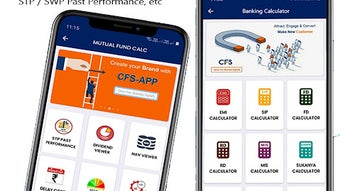
App details
- Version
- 5.5
- Size
- 21.78 MB
- Updated
- May 15, 2023
- Requires
- Android 13.0
- License
- Free
- Developer
- M-Techs
- Category
- Android OS
About CFS
Download CFS – digital marketing tool, insurance marketing, mutual fund marketing, personal branding, customer outreach, message personalization
Overview
CFS is a free Android application developed by M-Techs, designed to support professionals in the insurance and mutual fund sectors with digital marketing efforts. The software aims to enhance personal branding and customer outreach by enabling users to craft and send personalized messages to clients, prospects, and personal contacts. Its primary function is to streamline communication, allowing users to build stronger relationships through customized content that highlights individual value and recognition.
Targeted at independent agents, financial advisors, and self-employed professionals in the financial services industry, CFS offers a lightweight solution to improve engagement and expand marketing reach. By facilitating personalized messaging, the tool helps users stand out in a competitive market, fostering trust and long-term client relationships. The application is not affiliated with any bank, insurance company, or financial institution, positioning itself as an independent promotional utility.
Real-world use cases include sending birthday greetings, policy renewal reminders, or personalized investment updates. These interactions can strengthen client retention and encourage referrals. The tool’s focus on message customization suggests a user-centric approach to marketing, helping professionals project a more human and professional image. While specific integration details with messaging platforms are not disclosed, the application appears designed for direct, one-on-one outreach.
Key Features & Capabilities
- Personalized Messaging – Users can customize messages with recipient-specific content, such as names or tailored notes, to enhance perceived value and connection.
- Optional Headings – The ability to add custom headings allows for structured, professional-looking messages that stand out in communication streams.
- Flexible Text Content – Users can input any text, enabling the creation of dynamic messages for various purposes, including client onboarding, follow-ups, or promotional campaigns.
- Brand Image Enhancement – By enabling consistent, personalized outreach, CFS supports users in building a strong, trustworthy personal brand in the financial services space.
- Customer Outreach Tool – Designed to expand marketing reach by facilitating direct, meaningful communication with existing and potential clients.
These capabilities are particularly useful in scenarios where personal touch is critical, such as sending anniversary messages, market updates, or personalized investment tips. The tool’s simplicity suggests it is optimized for quick adoption and daily use, allowing professionals to maintain regular contact without significant time investment. The lack of complex features indicates a focused design philosophy, prioritizing usability over advanced analytics or automation.
User Interface, Workflow & Performance
The user interface of CFS appears to be straightforward, given its purpose as a lightweight messaging tool. While specific UI details are not provided, the application likely features a clean layout with input fields for headings and message text, possibly including a preview function to review content before sending. Navigation is expected to be minimal, centered around message creation and delivery.
Workflow efficiency is likely high, as the tool is designed to reduce friction in sending personalized communications. Users can create a message once and reuse or modify it for different recipients, streamlining repetitive outreach tasks. The absence of complex settings or integrations suggests a streamlined experience focused on speed and simplicity.
Performance details were not specified. However, with a file size of 10.5 MB, the app is likely optimized for low resource consumption. The developer did not provide additional system requirements, so performance may vary depending on device capabilities. General behavior suggests stable operation under normal usage conditions, but real-world testing is required for confirmation. No information was provided regarding CPU or RAM usage.
Compatibility & System Requirements
CFS is available for Android devices, with version 1.0 released on April 1, 2024. The installation size is 10.5 MB, indicating a lightweight footprint suitable for most modern Android smartphones and tablets. The developer did not specify minimum OS versions or hardware requirements, so compatibility with older or lower-end devices cannot be confirmed.
Platform compatibility information is limited. Users should ensure their Android device supports the latest app installation protocols. No information was provided about compatibility with specific Android versions or screen sizes. The absence of detailed system requirements means users should rely on standard Android app installation procedures. Updates may be required for continued compatibility with evolving OS versions.
Pros and Cons
Pros
- Free to download and use, reducing entry barriers for independent professionals.
- Lightweight design with a small file size of 10.5 MB.
- Focus on personalization enhances client engagement and trust.
- Simple interface designed for quick adoption and daily use.
- Supports independent marketing efforts without institutional affiliation.
Cons
- Exact system requirements were not listed, limiting compatibility clarity.
- Limited information on supported messaging platforms or integration methods.
- Performance and stability details were not provided.
- No indication of cloud backup, message history, or automation features.
- Only available on Android, restricting cross-platform use.
FAQ Section
Is CFS available for iOS devices?
CFS is currently available only for Android. No information is provided about future iOS support.
Is CFS safe to use?
The application is free and developed by M-Techs. As with any third-party app, users should review permissions and ensure they are downloading from trusted sources.
Does CFS require an internet connection?
Yes, an active internet connection is required to send messages. The app likely uses standard messaging protocols or third-party services for delivery.
Can I use CFS offline?
While the app may allow message drafting offline, sending messages requires an internet connection. No details were provided about offline functionality.
Is CFS free forever?
Based on current information, CFS is free to download and use. However, future changes to pricing or features are not disclosed.
Final Thoughts + CTA
CFS presents a focused, no-frills solution for professionals in the insurance and mutual fund sectors seeking to enhance their personal branding and customer outreach. Its core strength lies in enabling personalized messaging, a critical factor in building trust and long-term client relationships. The app’s lightweight nature and free pricing make it accessible to independent agents and small-scale advisors who need an efficient way to stay in touch with clients.
While the lack of detailed system requirements and performance data limits full evaluation, the tool’s design suggests it is optimized for simplicity and speed. Its absence of advanced features like automation or analytics is not necessarily a drawback—it reflects a clear intent to serve a specific niche without complexity.
For independent financial professionals looking to improve their communication strategy on a budget, CFS offers a practical starting point. It’s not a comprehensive CRM or marketing suite, but it fills a valuable gap in personal outreach.
Download CFS now
Guides & Tutorials
How to install CFS
- Click the Download button above.
- Once redirected, accept the terms and click Install.
- Wait for the CFS download to finish on your device.
How to use CFS
This software is primarily used for its core features described above. Open the app after installation to explore its capabilities.
User Reviews
No reviews yet. Be the first to share your experience.
You may also like
more
ChatGPT APK
Effortlessly generate content with AI ChatGPT is a free artificial intelligence...

Digi
Realistic AI entertainment app Digi - AI Romance, Reimagined is a free AI chatbo...

Gemini
Google’s newest and most powerful AI Gemini is a sophisticated AI model from Goo...

kimi chat APK
Your go-to AI assistant for seamless information processing kimi chat is an AI -...

MateAI AI Chat Bot Assistant APK
An AI-powered chatbot fit for any task MateAI-AI Chat Bot Assistant is a free-to...

Microsoft Copilot APK
Revolutionize your workflow Unleash a new era of productivity with Microsoft Cop...
