
Screenshots
App details
- Updated
- July 24, 2025
- Requires
- Chrome
- License
- Free
- Developer
- Rina Clark
- Category
- Web Apps
About Chat4Data
Download Chat4Data – AI‑Powered Chrome Extension for Easy Web Scraping
Introduction
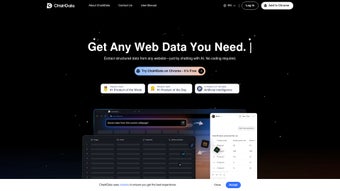
Chat4Data is a next‑generation, AI‑driven web‑scraping extension built exclusively for Google Chrome. It removes the technical barrier that traditionally separates developers from data extraction by letting users speak to a built‑in chatbot in plain English. Whether you need product titles, prices, images, emails, phone numbers, or hidden metadata, you simply describe the target data and the AI instantly identifies the relevant fields on the page. After you confirm the selections, the extension harvests the information and delivers a ready‑to‑use Excel file, eliminating the need for manual copy‑pasting or complex selector syntax. The tool is tailored for e‑commerce analysts, market researchers, lead‑generation specialists, and anyone who regularly pulls structured data from HTML‑based sites. Its lightweight design ensures that Chrome remains fast, while all processing occurs locally, guaranteeing privacy and security. In short, Chat4Data merges the convenience of a conversational interface with the power of automated extraction, providing a secure, fast, and completely code‑free solution for modern data‑driven workflows.
Key Features of Chat4Data
- Conversational Scraping Engine: Use natural‑language commands to tell the AI what data to collect, removing the need for CSS selectors or XPath queries.
- Auto‑Detect Fields: The extension scans the active page, highlights potential data points, and lets you adjust selections in real time.
- Multi‑Type Data Capture: Extract images, hyperlinks, emails, phone numbers, meta tags, and JSON‑LD blocks without extra configuration.
- Instant Excel Export: Scraped rows are compiled into a clean .xlsx file with appropriate column headings ready for analysis.
- No Coding Required: Ideal for marketers, researchers, and small business owners who lack programming expertise.
- Local Processing & Privacy: All data stays in the browser; no information is sent to external servers and no historic sessions are stored.
- Lightweight Chrome Extension: Minimal impact on browser performance, with a tidy UI that integrates seamlessly into the Chrome toolbar.
- HTML‑Focused Extraction: Optimized for static HTML pages and dynamic e‑commerce listings, ensuring reliable results on product catalogs and directories.
- Continuous AI Updates: Regular model improvements boost accuracy, expand supported patterns, and keep the tool future‑proof.
- Free Core Version: Core scraping functionality is free, with optional premium upgrades for batch processing, API access, and priority support.
Installation, Usage & Compatibility
Getting started with Chat4Data takes just a few minutes. Follow the steps below to install the extension, configure basic settings, and begin extracting data instantly.
Step‑by‑Step Installation
- Visit the Chrome Web Store and search for Chat4Data – AI Web Scraper or click the direct download link on the official website.
- Click Add to Chrome and confirm the permission request. The Chat4Data icon appears next to the address bar.
- Pin the icon for quick access by clicking the puzzle‑piece menu and selecting “Pin” next to Chat4Data.
How to Use the Conversational Interface
- Navigate to the webpage you wish to scrape (e.g., a product‑listing page on an e‑commerce site).
- Click the Chat4Data icon to open the chat window.
- Enter a simple request such as “Extract product name, price, and image URL from this page.”
- The AI highlights detected fields in a sidebar. Review the selections; you can add or remove columns by typing additional commands.
- Press Confirm. The scraper runs in the background and, upon completion, a download button appears for the Excel file.
Compatibility
Chat4Data runs exclusively on Google Chrome for desktop operating systems. It is compatible with Windows 10/11, macOS 10.15 (Catalina) and later, and Linux distributions that support Chrome. Mobile browsers are not currently supported, though an Android Chrome version is slated for future release. Because the tool works entirely within the browser, there are no additional system requirements beyond a stable internet connection and roughly 200 MB of free RAM to handle larger tables.
Troubleshooting Common Issues
- Extension not loading: Ensure Chrome is updated to version 115 or later and disable any conflicting extensions that modify the DOM.
- Missing or incomplete data: Verify that the page is fully loaded before starting the scrape. For infinite‑scroll pages, scroll to the bottom to load all items first.
- Blank Excel file: Confirm that you accepted the column selections in the chat window. Re‑phrase ambiguous commands if the AI misinterprets your request.
Pros, Cons, FAQ & Final Verdict
Pros
- Intuitive natural‑language interface eliminates the need for coding.
- Rapid, on‑the‑fly detection of relevant data fields.
- Instant Excel export with clean column headers.
- Zero‑cost core version suitable for freelancers and small teams.
- Local processing guarantees privacy and security.
Cons
- Limited to static HTML pages; heavily JavaScript‑rendered sites may require manual scrolling.
- No built‑in storage for past scraping sessions (manual saving required).
- Mobile Chrome browsers are currently unsupported.
- Batch processing and API access are reserved for the premium tier.
Frequently Asked Questions
Below are answers to the most common queries from users who are evaluating Chat4Data for their data‑extraction needs.
Is Chat4Data completely free?
The core scraping functionality is free to download and use. Advanced features such as batch jobs, API integration, and priority AI updates are offered under a premium subscription.
Can Chat4Data scrape data from password‑protected sites?
The extension works only on pages you can access in your browser. If you are logged into a site, Chat4Data can scrape the visible content, but it cannot bypass authentication mechanisms.
What file formats are supported for export?
Currently, the tool exports data exclusively in Microsoft Excel (.xlsx) format. Future updates may include CSV and Google Sheets integration.
Does the AI store any of my scraped data?
All processing occurs locally in the browser. No data is transmitted to external servers, and past scraping sessions are not saved after you close the extension.
Is there a limit to how many rows can be exported at once?
The free version can handle up to 5,000 rows per export without performance issues. Larger datasets may require the premium tier, which lifts this limitation.
Final Verdict & Call to Action
Chat4Data bridges the gap between powerful web scraping and everyday usability. Its AI‑driven, conversational approach makes data extraction accessible to anyone—from solo entrepreneurs gathering competitor pricing to analysts compiling market research—without the steep learning curve of traditional scrapers. While it shines on static HTML sites and offers a generous free tier, power users may eventually gravitate toward the premium add‑ons for bulk processing. If you’re ready to replace manual copy‑pasting with a smart, secure, and instant solution, click the button below to download Chat4Data now and start turning web pages into actionable spreadsheets.
Chat4Data delivers a remarkably smooth experience for non‑technical users who need reliable web data. The AI chat interface feels natural, and the instant Excel output cuts down hours of manual work. Minor drawbacks—such as limited mobile support and the absence of a built‑in session history—are outweighed by the security and ease‑of‑use that the extension provides.
Guides & Tutorials
How to install Chat4Data
- Click the Download button above.
- Once redirected, accept the terms and click Install.
- Wait for the Chat4Data download to finish on your device.
How to use Chat4Data
This software is primarily used for its core features described above. Open the app after installation to explore its capabilities.
User Reviews
No reviews yet. Be the first to share your experience.
You may also like
more
3D AI Studio
3D AI Studio Overview 3D AI Studio is a web-based AI-powered tool developed by S...

3D textures by Polycam
Generate Realistic 3D Textures Effortlessly 3D Textures by Polycam is an innovat...

3DAiLY
Customizable 3D Modeling Tool: 3DAiLY 3DAiLY is an online platform that harnesse...

3DFY
Revolutionizing 3D Model Creation: 3DFY Review 3DFY is an AI-powered service, de...

AI Dungeon
AI Dungeon: Deep Learning Text Adventure AI Dungeon is an artificial intelligenc...

Alpha3D
A subscription-based program for Web apps, by alpha3d. Alpha3D is a subscription...
