
Download ChatbotGen – AI‑Powered Chatbot Builder for Websites & WhatsApp
Overview
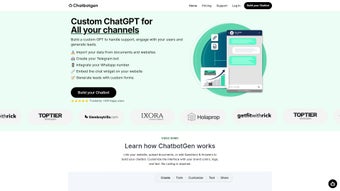
ChatbotGen is a web‑based AI chatbot builder that makes it possible for anyone—whether a small business owner, a marketing team, or a developer—to create a custom ChatGPT‑style assistant for a website or WhatsApp without writing a single line of code. The platform leverages OpenAI’s gpt‑3.5‑turbo model, delivering context‑aware, multilingual responses in up to 95 languages. Since its launch, more than 100,000 conversations have been powered by ChatbotGen, proving that the tool can handle real‑world traffic and diverse user queries.
What sets ChatbotGen apart is its blend of simplicity and depth. Users can link a website, upload PDFs, or feed the bot a curated FAQ list, and the AI instantly learns the relevant information. The dashboard supports team collaboration, allowing multiple members to edit the chatbot’s knowledge base, brand colors, and logo simultaneously. A free trial is available, so prospects can explore the full feature set before committing to a paid plan.
In an era where instant customer support is expected, ChatbotGen offers a secure, scalable, and cost‑effective solution. The cloud‑native architecture ensures updates roll out automatically, keeping the bot aligned with the latest language model improvements. Whether you need to automate support tickets, guide visitors through a product catalog, or collect leads on WhatsApp, ChatbotGen provides a ready‑to‑deploy, no‑coding environment that can be customized to match any brand identity.
Key Features
- Zero‑Code Bot Creation: Drag‑and‑drop interface that lets you build a fully functional chatbot in minutes.
- Multi‑Channel Deployment: Publish bots on websites via a simple embed code or on WhatsApp using the built‑in connector.
- Document & Website Integration: Upload PDFs, DOCX files, or link entire websites so the AI can reference up‑to‑date content.
- Custom FAQ Engine: Add, edit, or delete frequently asked questions; the bot learns the answers instantly.
- Brand Personalization: Choose brand colors, upload logos, and customize the chat widget’s appearance to match your visual identity.
- Team Collaboration Dashboard: Multiple users can collaborate on bot training, response editing, and performance analytics.
- Multilingual Support: Powered by gpt‑3.5‑turbo, the bot can converse in roughly 95 languages, making it ideal for global audiences.
- Analytics & Insights: Real‑time conversation metrics, sentiment analysis, and exportable reports help you refine the bot over time.
- Free Trial & Transparent Pricing: Test all premium features for 14 days without a credit card; paid plans are tiered by conversation volume.
- Secure Cloud Hosting: Data is encrypted at rest and in transit, complying with GDPR and CCPA standards.
Installation, Usage & Compatibility
Getting started with ChatbotGen is intentionally straightforward. Because the solution is entirely web‑based, there is no software to download or install on a local machine. All you need is a modern browser (Chrome, Edge, Firefox, or Safari) and an internet connection.
Step‑by‑Step Setup
- Create an Account: Visit the ChatbotGen homepage, click “Sign Up,” and enter your email address. A verification link will be sent to confirm your account.
- Start a New Bot: After logging in, select “Create Bot.” Choose a name, select the target channel (Website or WhatsApp), and pick a template if you want a quick start.
- Upload Knowledge Sources: Use the “Knowledge Base” tab to upload PDFs, link to your website, or manually add FAQs. The AI automatically indexes the content.
- Design the Widget: Navigate to “Appearance.” Upload your logo, set brand colors, and choose a welcome message. A live preview shows how the chat bubble will look on any device.
- Configure Team Access: Under “Team,” invite colleagues by email and assign roles (Admin, Editor, Viewer). Collaboration happens in real time.
- Deploy: For a website, copy the generated JavaScript snippet and paste it just before the closing tag. For WhatsApp, follow the QR‑code pairing process within the dashboard.
- Monitor & Optimize: Use the “Analytics” panel to review conversation volume, drop‑off points, and user sentiment. Edit responses or add new FAQs directly from this view.
Compatibility – ChatbotGen is a SaaS platform, meaning it runs on any operating system that can access a browser. This includes Windows 10/11, macOS Ventura and later, Linux distributions, as well as mobile browsers on Android 8+ and iOS 13+. The embedded widget is responsive and works seamlessly on desktop, tablet, and smartphone screens.
Because the service is cloud‑hosted, updates are applied automatically. Users never need to worry about patching or compatibility breaks; the backend infrastructure handles all security patches and model upgrades. This “set‑and‑forget” model is especially valuable for businesses that lack dedicated IT resources.
Pros & Cons
Pros
- Zero‑code development drastically reduces time‑to‑market.
- Multi‑channel support (website & WhatsApp) covers the most common customer touchpoints.
- Robust knowledge‑base integration (documents, website links, FAQs).
- Team collaboration tools streamline workflow for larger projects.
- Multilingual capabilities open doors to global audiences.
- Transparent pricing with a free trial removes entry barriers.
- Secure, GDPR‑compliant hosting protects user data.
- Real‑time analytics enable continuous improvement.
Cons
- Reliance on an internet connection; offline usage isn’t possible.
- Advanced customization (e.g., custom NLP pipelines) is limited to the built‑in features.
- Higher conversation‑volume plans can become costly for rapidly scaling businesses.
- No native mobile app for bot management; everything is web‑based.
- While 95 languages are supported, the quality of responses may vary for less common languages.
FAQ & Conclusion
Can I use ChatbotGen without any technical background?
Absolutely. The drag‑and‑drop builder, pre‑made templates, and guided setup are designed for non‑technical users. You only need basic familiarity with copying a snippet of code for website embedding.
How does the free trial work and are there any hidden fees?
The free trial grants full access to all premium features for 14 days. No credit card is required, and you can cancel at any time without incurring charges. After the trial, you’ll be prompted to select a paid plan based on your expected conversation volume.
Is the chatbot data stored securely?
Yes. All data, including uploaded documents and conversation logs, are encrypted both at rest and in transit. ChatbotGen complies with GDPR, CCPA, and other major privacy regulations.
Can I integrate the bot with existing CRM or ticketing systems?
ChatbotGen provides webhooks and API endpoints that allow you to push conversation data to popular CRMs like HubSpot, Salesforce, or Zendesk. While native integrations are in the roadmap, the webhook capability covers most integration scenarios.
What happens if I exceed the conversation limit of my plan?
If you exceed your allocated conversation quota, the bot will pause automatically and display a friendly “upgrade needed” message to visitors. You can instantly upgrade from the dashboard to avoid downtime.
In summary, ChatbotGen delivers a powerful, user‑friendly way to bring AI‑driven conversation to your digital channels. Its blend of zero‑code creation, extensive customization, and robust analytics makes it an attractive choice for businesses of all sizes. If you’re looking to reduce support costs, improve response times, and provide a 24/7 assistant that reflects your brand, download ChatbotGen today and start your free trial. The intuitive interface, multilingual capabilities, and secure cloud hosting ensure you’ll be up and running in minutes—no developers required.



.png)




