
Descripción
El contenido incrustado de sitios externos como YouTube o Twitter es cargado de inmediato cuando los visitantes acceden a tu sitio. Embed Privacy afronta este problema y previene la carga de estos contenidos hasta que el visitante decida permitir la carga de contenido externo.
Pero Embed Privacy no solo protege la privacidad de tus visitantes sino que también hace que tu sitio cargue más rápido.
Todos los incrustados serán reemplazados por marcadores de posición, listos para que los estilices como desees. Solamente con unas líneas de CSS.
Al hacer clic en el marcador de posición el respectivo contenido será recargado.
Note: This plugins requires the PHP extension “Document Object Model” (php-dom).
Capturas de pantalla
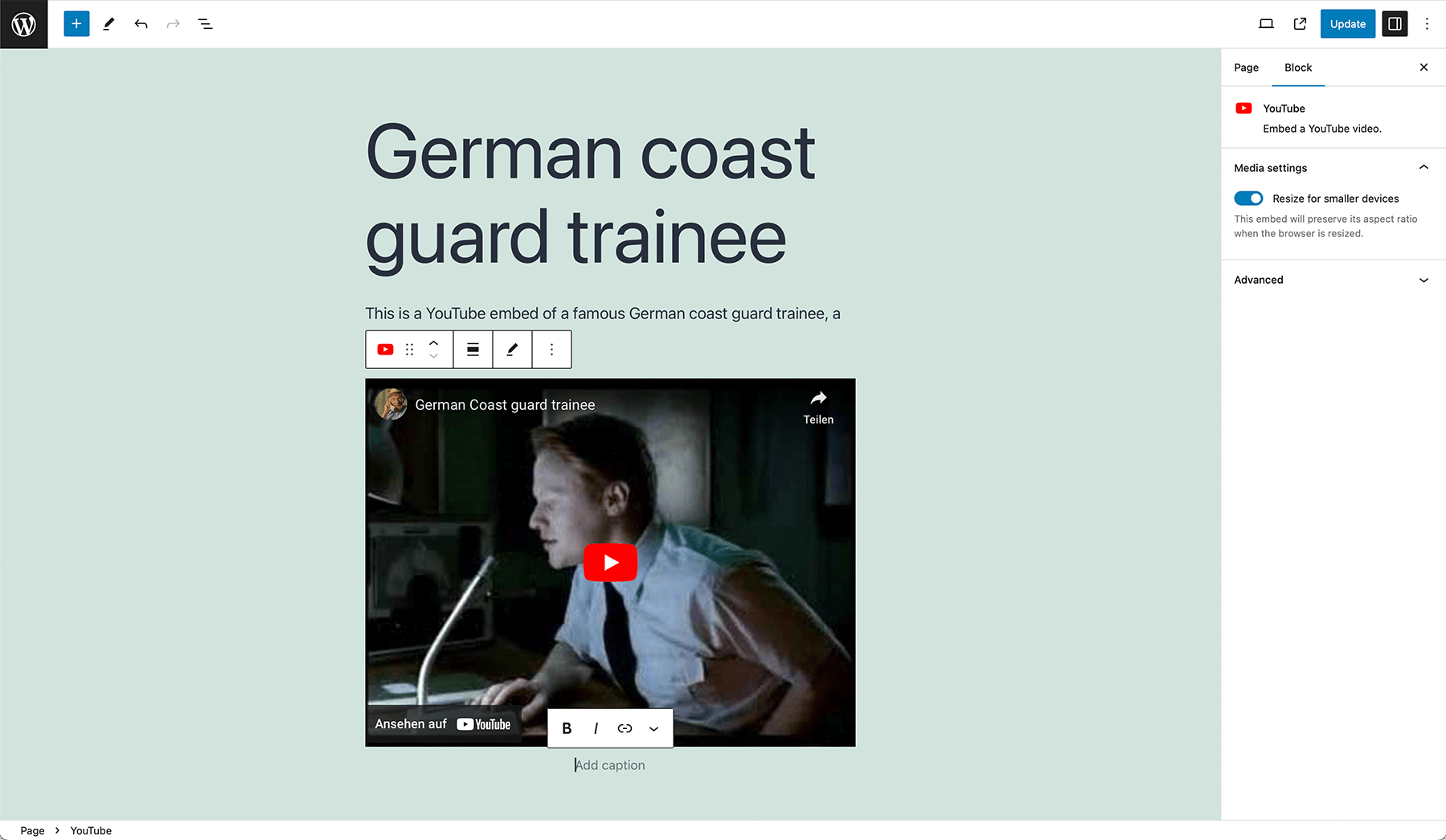
Agrega incrustados usando el editor clásico o los bloques incrustados del editor de bloques. 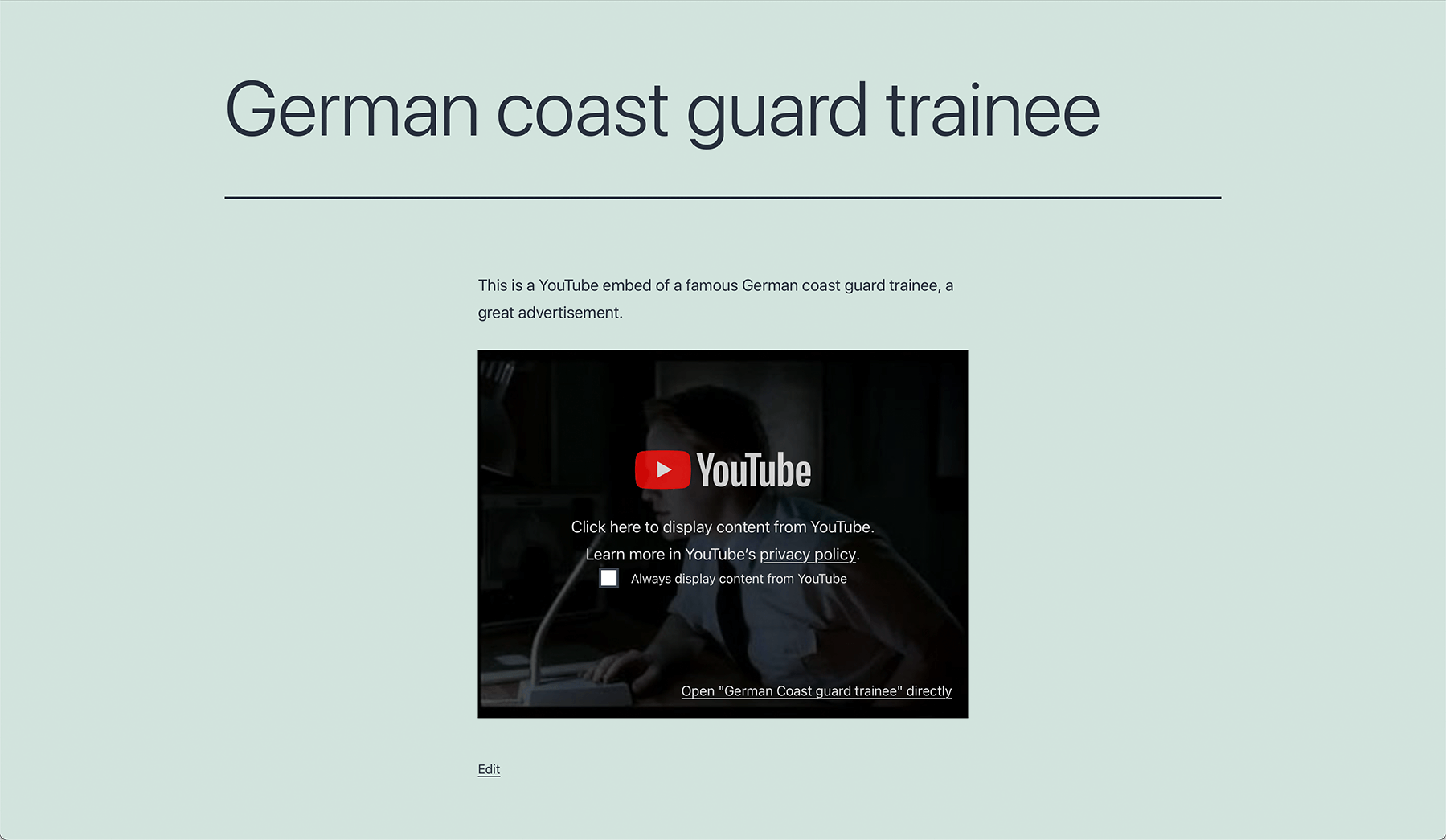
Embed Privacy agregará una superposición a los incrustados compatibles automáticamente. 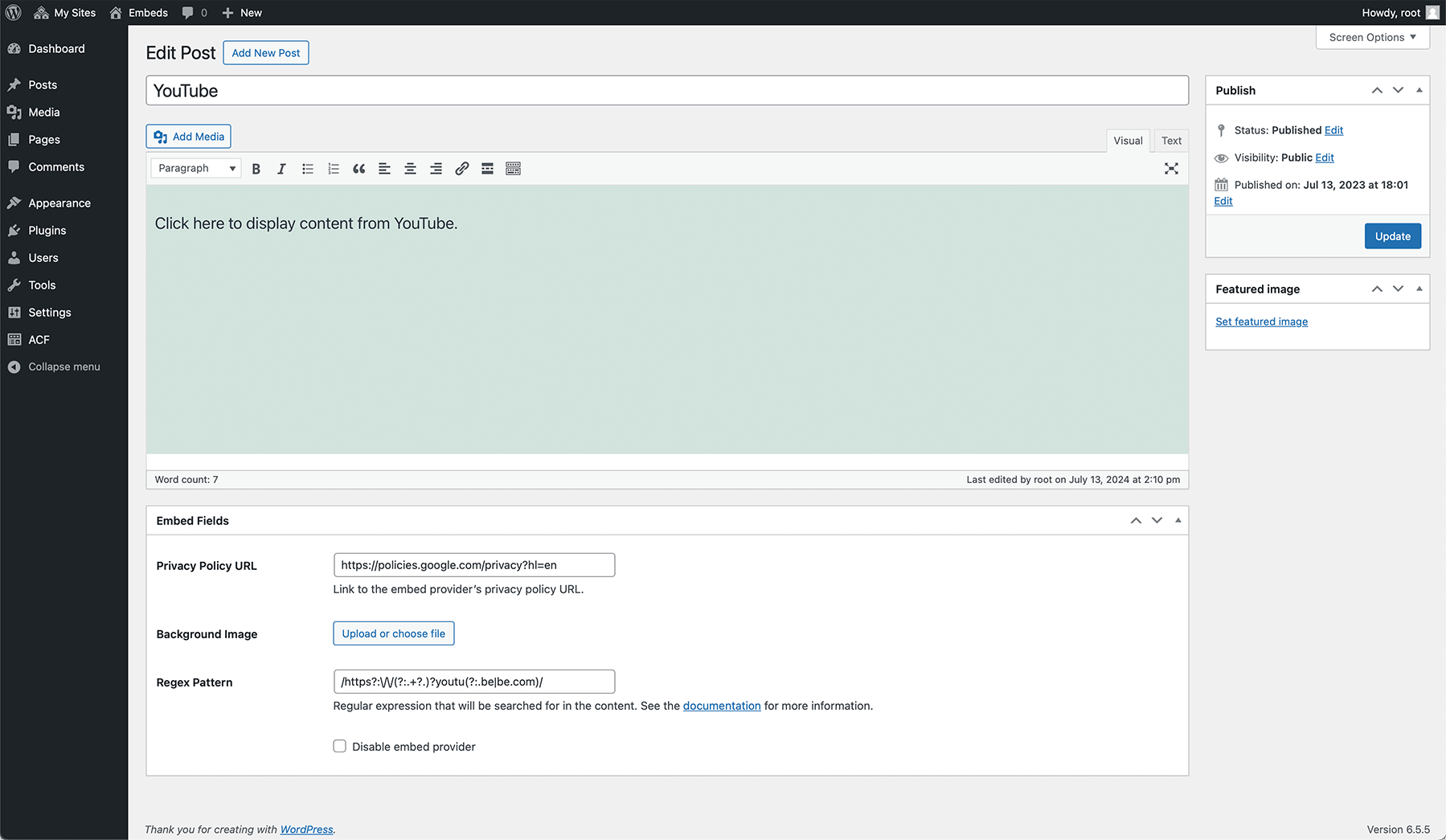
Puedes personalizar las superposiciones para cada servicio de forma individual. 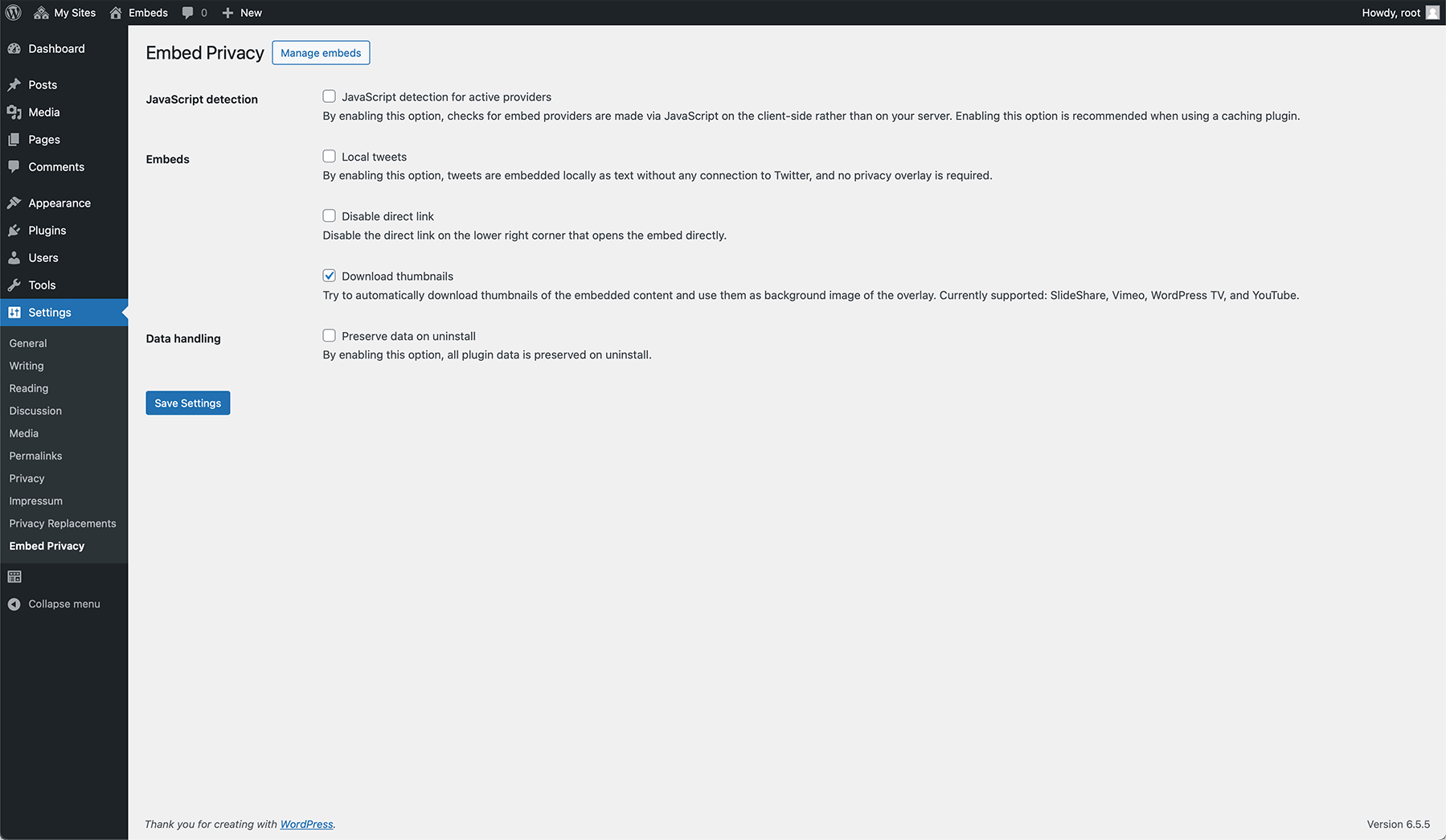
Different settings allow you to adjust the functionality of Embed Privacy according to your needs.


Instalación
- Sube los archivos del plugin al directorio
/wp-content/plugins/embed-privacy, o instala el plugin directamente desde la pantalla de plugins de WordPress. - Activa el plugin desde la pantalla de ‘Plugins’ en WordPress.
- El contenido incrustado será reemplazado automáticamente por un marcador de posición y podrá ser cargado a demanda por tus visitantes. No hay ajustes adicionales.
- Para permitir a los usuarios dejar de cargar los incrustados de proveedores a los que habían establecido como siempre activo, pon el shortcode
[embed_privacy_opt_out]en tu política de privacidad.
FAQ
-
¿Puede Embed Privacy prevenir que los servicios externos me rastreen a mí/mis visitantes?
-
Sí. Mientras que no decidas cargar contenido externo, tu/tus visitantes no pueden ser rastreados por estos servicios.
-
¿Hace Embed Privacy el incrustado de contenido amigable con la privacidad?
-
The embedding process itself will be privacy-friendly with Embed Privacy. That means, that no third-party embed provider can track users without their explicit consent by clicking on the overlay to allow the embed to be loaded. However, to make sure everything is fine you need to expand your privacy policy for each embed provider you’re using or you want to use because you need to specify, where data will be sent to and what happens to them.
-
If you use the opt-out functionality with the shortcode or the functionality to allow the user to always display content of certain embed providers, Embed Privacy creates a single cookie called
embed-privacywith an expiration of 1 year to store the user’s choice. -
¿Es compatible Embed Privacy con el editor de bloques?
-
¡Desde luego! Disfrumos usar el nuevo editor de WordPress y hemos desarrollado Embed Privacy teniendo en cuenta a Gutenberg, funcionando sin importar el editor que uses.
-
¿Qué incrustados son actualmente compatibles?
-
We currently support all oEmbed providers known to WordPress core by default. Want to know about them? Here you go:
- Amazon Kindle
- Anghami
- Animoto
- Bluesky
- Canva
- Cloudup
- Dailymotion
- Flickr
- Funny Or Die
- Imgur
- Issuu
- Kickstarter
- Meetup
- Mixcloud
- Photobucket
- Pocket Casts
- Polldaddy.com
- ReverbNation
- Scribd
- Sketchfab
- SlideShare
- SmugMug
- SoundCloud
- Speaker Deck
- Spotify
- TikTok
- TED
- Tumblr
- VideoPress
- Vimeo
- WordPress.org
- WordPress.tv
- YouTube
We also support Google Maps via iframe and Divi and the following plugins:
- BuddyPress activity stream
- Jetpack (Facebook posts)
- Maps Marker (Pro)
- Shortcodes Ultimate
- wpForo (with the plugin wpForo Embeds)
Additionally, we support the following custom content:
- Local Fediverse content
- Local X posts
- Facebook embed code (HTML)
- Instagram embed code (HTML)
Since version 1.2.0, you can also add custom embed providers by going to Settings > Embed Privacy > Manage embeds. Here you can also modify any existing embed provider, change its logo, add a background image, change the text displaying on the embed or disable the embed provider entirely.
-
Can Embed Privacy automatically download thumbnails of the embedded content?
-
Yes! Since version 1.5.0, Embed Privacy supports downloading and displaying thumbnails in posts for SlideShare, Vimeo and YouTube as background of Embed Privacy’s overlay.
-
¿Pueden los usuarios dejar de cargar proveedores de incrustados que habían decidido cargar siempre?
-
¡Sí! Puedes usar el shortcode
[embed_privacy_opt_out]para agregar una lista de proveedores de contenido donde quieras (recomendación: añádela a tu política de privacidad) para permitir a tus usuarios dejar de cargarlos. -
¿Qué parámetros pueden ser usados en el shortcode?
-
El shortcode
[embed_privacy_opt_out]puede usarse para permitir a los usuarios dejar de cargar proveedores de contenido que habían sido establecidos como siempre activo por el usuario. Puede tener los siguientes atributos:headline – Add a custom headline (default: Embed providers) [embed_privacy_opt_out headline="My custom headline"] subline – Add a custom subline (default: Enable or disable embed providers globally. By enabling a provider, its embedded content will be displayed directly on every page without asking you anymore.) [embed_privacy_opt_out subline="My custom subline"] show_all – Whether to show all available embed providers or just the ones the user opted in (default: false) [embed_privacy_opt_out show_all="1"]También puedes combinar todos estos atributos:
[embed_privacy_opt_out headline="My custom headline" subline="My custom subline" show_all="1"] -
Is this plugin compatible with my caching plugin?
-
If you’re using a caching plugin, make sure you enable the “JavaScript detection for active providers” in Settings > Embed Privacy > JavaScript detection. Then, the plugin is fully compatible with your caching plugin.
-
How can Embed Privacy be extended?
-
Check out our documentation: https://epiph.yt/en/embed-privacy/documentation/
-
¿Quiénes sois?
-
Somos Epiphyt, tu tienda de barrio amigable de plugins de WordPress del sur de Alemania.
-
¿Cómo puedo informar de fallos de seguridad?
-
You can report security bugs through the Patchstack Vulnerability Disclosure Program. The Patchstack team help validate, triage and handle any security vulnerabilities. Report a security vulnerability.
Reseñas


Colaboradores & Desarrolladores
“Embed Privacy” es software de código abierto. Las siguientes personas han contribuido a este plugin.
Colaboradores


“Embed Privacy” ha sido traducido en 6 idiomas. Gracias a los traductores por sus contribuciones.
Traduce “Embed Privacy” a tu idioma.
¿Interesado en el desarrollo?
Revisa el código, echa un vistazo al repositorio SVN, o suscríbete al registro de desarrollo por RSS .
Historial de cambios
1.12.3
- Fixed: Saving embed fields for embed providers was not successful
1.12.2
- Improved: Dynamic content is now handled more performant
- Fixed: The current focussed element is no more changed to the first active embed after page load
1.12.1
- Fixed: Fatal error during activation and saving embed providers
1.12.0
- Added: Allow handling dynamic content (in combination with the setting “Force script loading”)
- Improved: Performance for content with many blocks
- Improved: Overall performance through various caching mechanisms
- Changed: Renamed tweets to X posts
- Fixed: Default English descriptions are now automatically translated as soon as a translation is available, if it’s missing during installation
- Fixed: Handling multiple Instagram/Facebook posts within the same content
- Fixed: Fatal error in combination with Sugar Calendar Lite and Elementor
For the full changelog, please visit https://docs.epiph.yt/embed-privacy/changelog.html.
