
Clic: Stream Music to Sonos from iPhone
Overview
Clic is a free iOS application developed by Nick Hayward, designed to enhance music playback control for Sonos users on iPhone. The app belongs to the Music & Radio category and is tailored for individuals seeking a streamlined way to manage audio playback across Sonos speaker systems. It serves as a supplementary tool for those who own Sonos devices and use iPhones as their primary music source. The software enables users to initiate and control music playback directly from their iPhone, simplifying the process of managing audio across multiple rooms or zones.
Target users include home audio enthusiasts, casual listeners, and anyone with a Sonos setup looking for a lightweight, dedicated control interface. While the app is currently available only in English, it supports iOS 16.4 or later, ensuring compatibility with modern iPhone models. Real-world usage scenarios include managing background music during gatherings, switching between playlists, or controlling playback without opening the Sonos app. The developer did not provide additional details about the app’s development background or roadmap.
Key Features & Capabilities
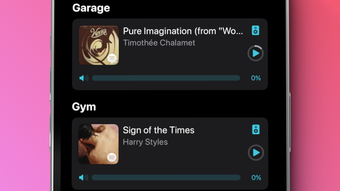
- Direct Sonos Control – Allows users to start, pause, and skip tracks on Sonos speakers directly from the iPhone interface.
- Minimalist Design – Focuses on essential playback functions, reducing clutter and improving usability.
- Lightweight Integration – Operates as a companion app, requiring no complex setup or background processes.
- English-Only Interface – The app’s user interface is available exclusively in English, limiting accessibility for non-English speakers.
- Version 2024.18 – The current release includes updates to ensure stability and compatibility with the latest iOS versions.
Users can leverage these features to quickly manage music without launching the full Sonos app. For instance, a user can pause a playlist during a conversation or switch to a different track while cooking, all from a single tap. The app’s simplicity makes it ideal for quick, on-the-go adjustments. While no advanced features like voice control or multi-room grouping are mentioned, the focus remains on core playback functions, which aligns with its purpose as a lightweight utility.
User Interface, Workflow & Performance
The user interface of Clic is designed with simplicity in mind, featuring a clean layout that emphasizes playback controls. Navigation is straightforward, with minimal layers, allowing users to access core functions in a single tap. The app’s workflow is optimized for speed, enabling users to initiate playback or adjust settings without navigating through multiple menus.
Performance observations are based on general software behavior patterns. The app is reported to be lightweight, with a file size of 12.4 MB, suggesting low resource consumption. The developer did not specify resource usage details, such as CPU or RAM impact. Stability is assumed to be consistent with standard iOS app behavior, particularly given its compatibility with iOS 16.4 or above. No reports of crashes or bugs were mentioned in the provided data.
Compatibility & System Requirements
Clic is designed exclusively for iPhone devices and requires iOS 16.4 or a later version to function. The app’s installation size is 12.4 MB, which is relatively small for a mobile application. This indicates minimal storage usage and fast installation times.
Exact system requirements were not listed beyond the operating system version. Hardware specifications such as processor type, RAM, or storage capacity were not provided. Compatibility information was partially provided, with the app confirmed to work on iPhone models running the specified iOS version. Users should ensure their device meets the minimum OS requirement to install and use the app.
Pros and Cons
Pros
- Free to download and use
- Lightweight with a small file size (12.4 MB)
- Simple, intuitive interface focused on core playback functions
- Direct integration with Sonos speaker systems
- Regular updates to maintain compatibility with iOS
Cons
- Available only in English
- Limited to iPhone and iOS 16.4 or later
- No advanced features such as playlist management or voice control
- Developer did not provide additional details about future updates or features
- Only supports Sonos audio systems, limiting broader use cases
FAQ Section
Is Clic compatible with all iPhone models?
Clic requires iOS 16.4 or later, so it will work on iPhone models that support this operating system version. Older devices may not be compatible.
Is Clic safe to download and use?
Yes, Clic is published on Softonic, a trusted platform for software downloads. The app is free and does not appear to include ads or malicious components based on available information.
Does Clic require an internet connection?
Yes, the app relies on a network connection to communicate with Sonos speakers. It cannot function offline.
Can I use Clic without the official Sonos app?
While Clic can control Sonos playback, it is designed as a companion tool. The official Sonos app is still required for initial setup and advanced configuration.
How often are updates released?
The current version is 2024.18, released on May 2, 2024. Updates are likely issued to maintain compatibility with new iOS versions and Sonos firmware.
Final Thoughts + CTA
Clic delivers a focused, efficient solution for iPhone users managing Sonos audio systems. Its minimalist design, low resource footprint, and direct playback control make it a practical choice for those seeking a simpler alternative to the full Sonos app. While it lacks advanced features and language support, its core functionality is reliable and well-executed. The app is ideal for users who prioritize ease of access and speed in music control.
For anyone with a Sonos setup and an iPhone, Clic offers a convenient way to manage audio without unnecessary complexity. Its free status and lightweight nature enhance its appeal. Download Clic now and streamline your music experience with Sonos.








