
Download ClipCMD – Clipboard Command Execution, PowerShell Scripting, Command Automation, Productivity Tool, Utility App
Overview
ClipCMD is a lightweight utility app designed to streamline command execution by integrating directly with the system clipboard. The application enables users to run scripts simply by copying a predefined command format, making it ideal for individuals seeking to automate repetitive tasks without leaving their current workflow. By leveraging PowerShell as its core scripting engine, ClipCMD delivers robust functionality within a minimal footprint, allowing advanced users and power users alike to execute complex operations with ease.
The app is particularly valuable for developers, system administrators, and technical professionals who frequently work with command-line tools. Real-world use cases include generating email addresses, formatting data, retrieving system information, or executing batch operations—all triggered through a simple copy-and-paste action. This seamless integration reduces manual input errors and accelerates task completion, enhancing overall productivity.
Although the developer did not provide additional background information, ClipCMD’s focus on efficiency and automation aligns with the growing demand for lightweight, no-frills tools that enhance daily computing tasks. Its presence in the productivity category reflects its role as a specialized utility within the broader ecosystem of system optimization and workflow automation tools.
Key Features & Functionality
- Clipboard Command Execution: Users can define custom command patterns that trigger script execution when copied to the clipboard. For example, copying a command like
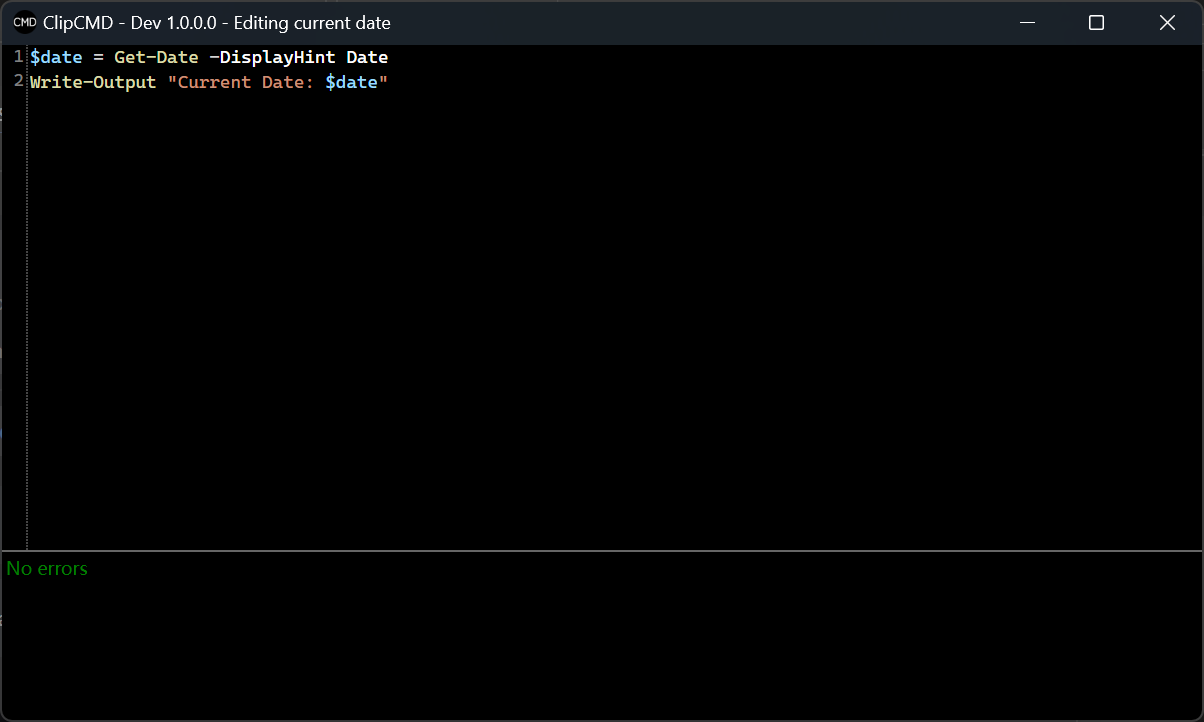
[GEN:EMAIL]automatically runs a predefined script and replaces the copied text with the output, such as a generated email address. - PowerShell Integration: The app uses PowerShell as its scripting language, offering full access to system-level commands, modules, and object manipulation. This enables users to build complex automation scripts with access to the full Windows PowerShell environment.
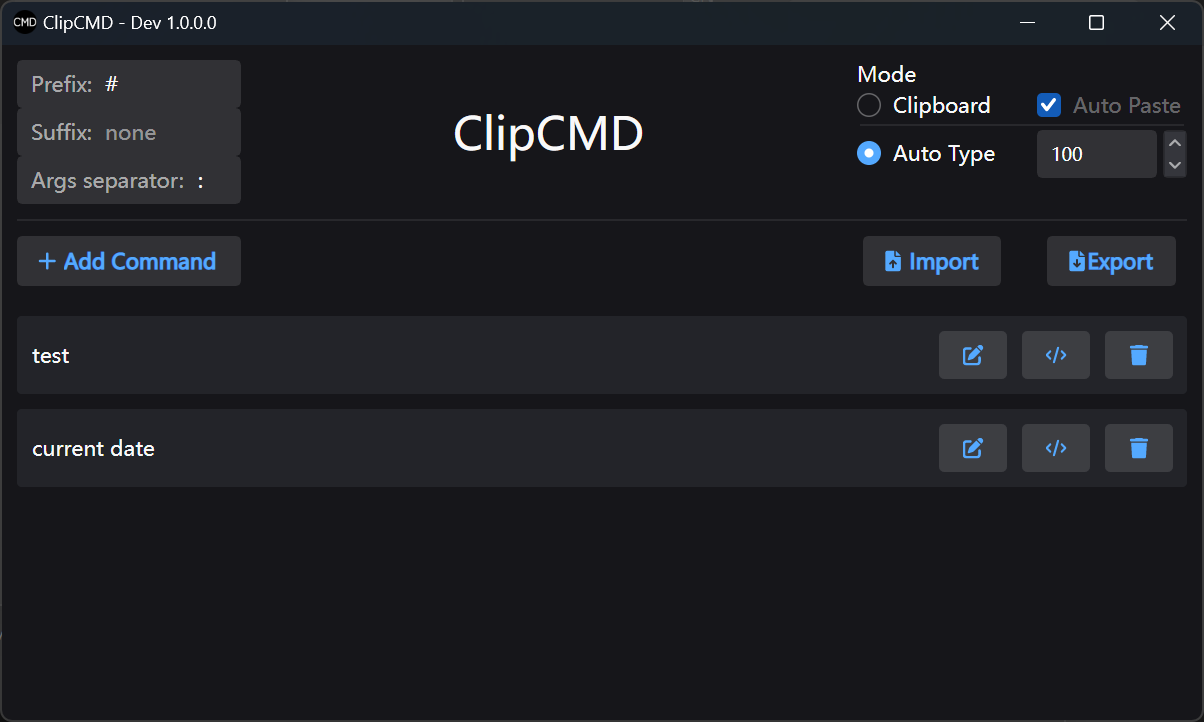
- Custom Command Setup: Users can define command prefixes, suffixes, and associated scripts based on their specific needs. This allows for tailored automation workflows, such as formatting dates, generating random strings, or querying system status.
- Startup Integration: ClipCMD can be configured to launch automatically at system startup by placing a shortcut in the shell:startup directory. This ensures the app is always active and ready to respond to clipboard commands without manual intervention.
- Automated Output Pasting: After script execution, the output is automatically copied to the clipboard, eliminating the need for manual copy-paste steps. This feature enhances efficiency, especially when integrating results into documents, emails, or other applications.
These features collectively reduce friction in command-based workflows, allowing users to maintain focus on their primary tasks while leveraging automation in the background.
Interface, UX & Performance
ClipCMD features a minimal, no-frills interface designed to operate in the background with minimal user interaction. The app runs silently in the system tray, with a simple settings window accessible through the icon. The layout is clean and functional, prioritizing usability over visual flair.
Navigating the app involves defining command patterns and linking them to PowerShell scripts through a straightforward configuration panel. Users can test scripts and verify outputs directly within the app, ensuring reliability before deployment. The overall navigation flow is intuitive, especially for users familiar with scripting environments.
Although the developer did not list formal performance metrics, the app’s small file size of 2.5 MB suggests a lightweight design optimized for efficiency. It is expected to run smoothly on most modern Windows systems without significant resource consumption. Responsiveness is maintained through background execution and asynchronous script handling, ensuring that clipboard monitoring does not interfere with other processes.
Stability appears to be a core focus, given the app’s ability to persist across reboots and maintain active monitoring. The absence of reported crashes or bugs in the provided information indicates a reliable operation under normal conditions.
Platform Compatibility & Technical Requirements
ClipCMD is designed exclusively for the Windows platform and requires a compatible version of Windows to function. The app is available in version 1.0.0 and has a file size of 2.5 MB, indicating a compact and efficient installation package.
Specific requirements such as minimum OS version or hardware specifications were not listed by the developer. As a result, compatibility with older or newer Windows editions cannot be confirmed. However, since the app leverages PowerShell—a built-in component of Windows—the likelihood of broad compatibility with Windows 7 and later systems is high.
Users should ensure that PowerShell is enabled and accessible on their system, as it is essential for script execution. The developer did not specify whether additional dependencies or runtime libraries are required.
Pros and Cons
Pros
- Lightweight and fast, with a small file size of 2.5 MB.
- Efficient clipboard integration for seamless command execution.
- PowerShell-based scripting offers high flexibility and power.
- Automated output pasting reduces manual steps and improves workflow speed.
- Startup integration ensures consistent availability without manual launch.
- Free to download and use, making it accessible to all users.
Cons
- Platform-specific to Windows; no support for macOS or Linux.
- Requires familiarity with PowerShell scripting for full customization.
- Developer did not provide detailed technical specifications or system requirements.
- Interface is minimal, which may limit usability for non-technical users.
- No built-in script editor or syntax highlighting within the app.
FAQ
Is ClipCMD safe to install and use?
Yes, ClipCMD is a legitimate utility app with no reported security issues. As it operates through PowerShell and clipboard monitoring, it does not install malware or track user data. However, users should only execute scripts they trust, especially when using custom commands.
Can I use ClipCMD on macOS or Linux?
Currently, ClipCMD is only available for Windows. The app relies on Windows-specific components like PowerShell and the Windows clipboard API, which are not natively available on other operating systems.
Do I need to know PowerShell to use ClipCMD?
While basic functionality can be used with pre-defined commands, full customization requires knowledge of PowerShell scripting. Users without scripting experience may find it challenging to create and debug their own commands.
How do I set ClipCMD to start automatically?
You can configure ClipCMD to launch at startup by placing a shortcut to the app in the shell:startup directory. This ensures the app runs in the background whenever the system boots.
Is there a free version of ClipCMD available?
Yes, ClipCMD is completely free to download and use. The app is available at no cost, with no in-app purchases or subscription models.
Final Thoughts
ClipCMD stands out as a focused, powerful utility for Windows users seeking to automate command-line tasks through simple copy-paste actions. Its integration with PowerShell provides a robust foundation for scripting, while its clipboard-centric design minimizes workflow disruption. The app is particularly well-suited for developers, IT professionals, and power users who value speed and precision in their daily tasks.
While its minimal interface and Windows-only availability may limit broader appeal, its efficiency and reliability make it a valuable addition to any technical workflow. For those looking to reduce repetitive typing and streamline automation, ClipCMD delivers tangible productivity gains.
Download ClipCMD now


