Search the Community
Showing results for tags 'admin tool'.
Found 15 results
-

Version 1.0.3
20 downloads
AdminWarn is intended for situations where players clearly exceed server rules or must be explicitly warned. It is not a lightweight or easily dismissible notification. The purpose is not to preserve gameplay flow, but to deliver a clear and serious warning. Warnings are delivered instantly and ignore conditions such as safe zones or PvP status. Stop guessing whether your warning messages in chat were actually noticed. Tired of sending important warnings as an admin via RCON or global chat and never being sure who actually read them? AdminWarn is built to give admins certainty. AdminWarn is designed for manual warning delivery. This is not an automated warning system. Every warning is intentionally sent by an admin using commands. At the same time, AdminWarn handles warnings smartly and automatically in the background. Warnings sent to offline players are stored and shown automatically when the player next joins, even days later. For individual online players, warnings remain stored until acknowledged, then are automatically cleared. All data is wipe-aware and cleaned up automatically on server wipes. Instead of relying on admin-sent chat warnings that can get lost, ignored, or missed while players are AFK, AdminWarn delivers a mandatory, player-specific GUI warning directly on the player’s screen. Each warning includes a configurable sound effect, using only built-in, local in-game sounds. No external or custom audio files are used. This is not an auto chat message. It is a visual warning that requires player acknowledgment. Even if the player closes the game without confirming it, the warning will reappear on the next login until acknowledged. No hard movement lock is applied. Warnings can be sent via RCON, server console, or in-game admin console (F1). In-game commands /warn and /warnall are used to manually send warnings. /warn can target individual players whether they are online or offline, while /warnall applies only to online players. Discord webhook logs clearly confirm when warnings are acknowledged. Global warnings apply only to online players and do not generate Discord logs, preventing spam and rate-limit issues. How It Works? 1) Admin sends warning (chat/RCON) → Message is delivered via GUI with sound 2) Player must acknowledge → Cannot play until clicking button (No movement lock, only a visual GUI barrier) 3) Offline player support → Warnings sent to offline players are saved and displayed via GUI when they join 4) Data management → Auto-clears on wipe Key Features - GUI warning that requires player confirmation - Works online/offline - Warnings save for offline players - Global warnings - Warn all online players at once - Discord logging - Track acknowledged warnings - Wipe detection - Auto-clear data on server wipe - Professional interface - Clean GUI with sound effects - UTC-based date display - All timestamps are shown in UTC (Coordinated Universal Time) Performance AdminWarn is built with an optimized and efficient code structure, making its presence virtually unnoticeable on the server. It runs smoothly during long uptimes and maintains stable hook memory and performance values under normal server conditions. Wipe Behavior - Restarts: Data preserved (approved warnings are auto-deleted for data optimization) - Server wipe: All warning data automatically cleared - No manual cleanup needed (Most of the time, it is not necessary) Commands ➤ Admin Chat Commands: /warn <player>|<steam64ID> <message> /warnall <message> ➤ Console/RCON Commands: warn <player>|<steam64ID> <message> warnall <message> Note: Player names are not unique and may include different alphabets or special characters. To avoid ambiguity, using Steam64ID is strongly recommended when sending warnings. Permissions Oxide/Carbon oxide.grant group admin adminwarn.admin c.grant group admin adminwarn.admin Discord Webhook Logging When enabled, sends acknowledgement logs to Discord: Player name Warning message Read status (online/after reconnect) Timestamp Does NOT log warning sending (only acknowledgements) Does NOT log global warning acknowledgements (due to DC rate limits) Configuration { "Clear data on wipe": true, "Discord Log Enabled": false, "Discord Webhook URL": "", "Show Date in GUI": true, "Warning sound": "assets/prefabs/building/wall.frame.shopfront/effects/metal_transaction_complete.prefab" } Lang/en { "NoPermission": "You don't have permission to use this command.", "WarnUsage": "Usage: /warn <player name or steamid> <message>", "PlayerNotFound": "Player not found. Use SteamID for offline players.", "DuplicateWarning": "Duplicate warning prevented for player {0}", "WarningSent": "Warning sent to {0}: {1}", "WarningSaved": "Warning saved for offline player {0}.", "WarnAllUsage": "Usage: /warnall <message>", "WarnAllSent": "Global warning sent to {0} online players: {1}", "ConsoleWarnUsage": "Usage: warn <player name or steamid> <message>", "ConsoleWarnAllUsage": "Usage: warnall <message>", "AcknowledgeThanks": "Thank you for acknowledging the warning.", "GuiTitle": "SERVER WARNING", "GuiButtonText": "✔ I ACKNOWLEDGE", "GuiDatePrefix": "Date", "GuiWarningFormat": "Hello {0}, you have received a warning." }$18.99- 3 comments
-
- 1
-

-
- #admin
- #admin tools
- (and 42 more)
-
Version 1.1.22
255 downloads
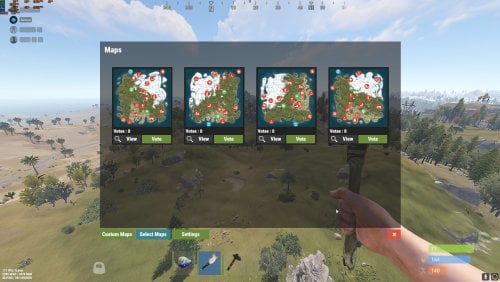
This plugin makes the admin’s life easier by automatically generating maps, initiating a vote that lets users choose which map they would like to play in during the next wipe. Depends on: Image Library Wipe Info API Discord extension UnZip for Windows NEW GUI: Features: Automatically generate maps and start the vote ,every first Thursday of the month. Automatically generate maps on wipe day using https://rustmaps.com/ & wipe-info-api and start the vote. Allows players to vote on maps through an in-game UI or Discord (if you use any plugin that links a player and a Discord user, enable "only authenticated users can vote” in the config file to avoid duplicate votes). Automatically checks if it’s wipe day using wipe-info-api and the plugin’s config. Configure the plugin through a GUI (not all settings are available on the GUI). Select maps from rustmaps.com through a GUI via a RustMaps share code. Note : This plugin does not include auto wipe script. if you wish to automatically restart and update the server and wipes it on forced wipe or on schedule check the other version of Map voter. Video How to add Custom maps : Permissions: MapVoter.use only allows an admin to generate maps and start a vote. MapVoter.Manager allows an admin to use all the features. Commands: /mvote : Opens the plugin’s main GUI. /startvote After selecting which maps will appear on the vote, starts the vote. MapVoter.generate <Number of maps to generate> <seed> <voting duration in minutes>. voteresult : Shows which map had won the vote. Mapvoter.reload reload the plugin. MapVoter.stopvoting : stops ongoing voting. Discord commands: !vote !generate <Number of maps to generate> <seed> <voting duration in minutes>. Configuration { "Commands": { "Open MapVoter UI": "mvote", "Generate Mpas": "MapVoter.generate", "vote result": "voteresult" }, "Options": { "Select random maps from rustmaps filter id instead of generating random maps on wipe day (true/false)": true, "How many pages the plugin looks up per search request(every page has 30 maps": 10, "Enable Discord bot (true/false)": true, "Only players with permission MapVoter.Vote can vote (true/false)": false, "Map size": 3500, "Disable UI": false, "RustMaps API key": "https://rustmaps.com/user/profile", "staging": false, "barren": false, "Stop voting after (minutes)": 60, "avatar url": "", "Discord footer": "", "filter Id": "Visit https://rustmaps.com/ and adjust your map requirements. In the red box above the settings hit the Share button,the string at the end of the URL is the filterId.Example URL: https://rustmaps.com/?share=gEU5W6BUuUG5FpPlyv2nhQ the string at the end in this case {gEU5W6BUuUG5FpPlyv2nhQ} is the filterId." }, "Discord Settings": { "Discord Webhook": "https://support.discordapp.com/hc/en-us/articles/228383668-Intro-to-Webhooks", "Discord Apikey": "BotToken", "Discord Command Prefix": "!", "Discord Channels": [ { "Discord Channel ID": "", "Commands": [ "generate", "vote", "mapwipe", "bpwipe", "cancelwipe", "stopvoting", "update", "cancelupdate" ] } ], "Discord Command Role Assignment (Empty = All roles can use command.)": { "generate": [ "DiscordRoleName", "DiscordRoleName2" ], "vote": [ "DiscordRoleName", "DiscordRoleName2" ], "mapwipe": [ "DiscordRoleName", "DiscordRoleName2" ], "bpwipe": [ "DiscordRoleName", "DiscordRoleName2" ], "cancelwipe": [ "DiscordRoleName", "DiscordRoleName2" ], "stopvoting": [ "DiscordRoleName", "DiscordRoleName2" ], "update": [ "DiscordRoleName", "DiscordRoleName2" ], "cancelupdate": [ "DiscordRoleName", "DiscordRoleName2" ] } }, "Auto Vote": { "Auto start vote": true, "Only Authenticated users can vote through discord": true, "Start voting at (HH:mm) 24-hour clock (UTC)": "17:00", "Number of maps to generate": 4 }, "Auto Wipe": { "Custom Map": { "Custom map": false, "Map URL": "" }, "Map Wipe schedule": [ 7, 14, 21, 28 ], "BP Wipe schedule": [ 0 ], "Enable Auto wipe": true, "Wipe BPs at forced wipe day": true, "Forced Wipe time (HH:mm) 24-hour clock (UTC)": "19:00", "Wipe time (HH:mm) 24-hour clock (UTC)": "19:00" } } Contact kaysharp#2008$15.00- 25 comments
- 2 reviews
-
- 3
-

-

-
- #plugin
- #admin tool
- (and 7 more)
-

Version 1.0.0
27 downloads
SkinFinder is an admin tool with which you can pull the SkinID of certain objects. The nice side effect is that the short name and the NetID are also displayed. More Free Plugins: If you are looking for more useful free plugins, please have a look at my Discord, you only have to choose the Flash role when you join. Support Discord Permission: To use the plugin, you need the .use permission. skinfinder.use load, run, enjoyFree -

Version 3.1.19
1,460 downloads
Installation Place the AdminToggle.cs file in /oxide/plugins/ Place the XLIB.dll Dependency in /RustDedicated_Data/Managed/ Grant yourself the default permission o.grant user YOURNAME admintoggle.master the .master permission selector needs to be adapted to what you called the permission setting for the mode Information AdminToggle Allows admins with permission to toggle between player & admin mode Reset Command Open f1 console & write at.fix - Reverts you to player mode (the hard way) (Permission, Priority, Toggle Commands) - Must be unique Core Mode Featues Unlimited custom modes Customizable permission name Priority system for modes Master mode Oxide group toggling Custom commands to toggle Restriction system to specfic steam ids a certan mode Mode Settings (admin) Require a reason to toggle Autorun commands on toggle Separated inventories Teleport back to toggle location upon exiting Revert auth to 0 on disconnect Blocked commands Custom outfit while in mode Notifications (global-chat notification, local-chat notification, popup notification, sound perfab notification & Discord embed Notification) Interface toggle button, pulsing panel, action menu Blocked actions Blocked plugins hooks Mode Settings (player) Autorun commands on revert Notifications (global-chat notification, local-chat notification, popup notification, sound perfab notification & Discord embed Notification) Blocked commands Blocked plugins hooks API Hooks void admintoggle_onAdmin (BasePlayer player) { /*Do something epic*/ } void admintoggle_onPlayer (BasePlayer player) { /*Do something epic*/ } API Methods bool IsAdmin(BasePlayer player); object[] GetMode(BasePlayer player, bool TrueMode = false); /* IF player.userID IS ASSIGNED ANY MODE RETURNS TRUE IF player.userID IS NOT ASSIGNED ANY MODE RETURNS FALSE */ bool isAdmin = AdminToggle.Call<bool>("IsAdmin", player.userID); /* IF player IS NOT ASSIGNED MODE RETURNS NULL IF bool IS SET FALSE RETURNS CURRENT MODE -- object[0] permission (string), object[1] priority (int), object[2] isMaster (bool) IF bool IS SET TRUE RETURNS HIGHEST MODE -- object[0] permission (string), object[1] priority (int), object[2] isMaster (bool) */ object[] getMode = AdminToggle.Call<object[]>("GetMode", player, false); Default Configuration (1 mode) Known incompatible plugins Server Armour (Compatible with v2.29.44 and above)$8.99- 146 comments
- 11 reviews
-
- 2
-
-
- #admin
- #admintool
- (and 31 more)
-
Version 1.0.9
4,870 downloads
UI spawn amount/time control for monument crates, keycards, barrels, etc. MonumentSpawnControl provides a UI per vanilla monument, listing each spawn group for that monument, with controls for spawn population, respawn timer, and max amount to respawn per cycle. Each group can be emptied, filled, enabled, or disabled, with one click. Respawn durations are in minutes. Where there are multiple monuments of the same name (e.g. Lighthouse), they are all controlled by the same settings. Notes Does not offer control over RustEdit created monument spawns. Does not govern spawners which are part of a puzzle, as these have their own reset criteria. Chat commands. /msc - Usable by admin, or with permission. Permissions. monumentspawncontrol.allowed Configuration. ButtonColour "0.7 0.32 0.17 1" ButtonColour2 "0.4 0.1 0.1 1" - Used for disabled / inactive. Config also stores an entry per monument with information per spawn group. There is no need to edit or view this - It’s all controllable by in-game UI. Useful tool for picking CUI colours - RGB Decimal.Free -
Version 2.0.3
524 downloads
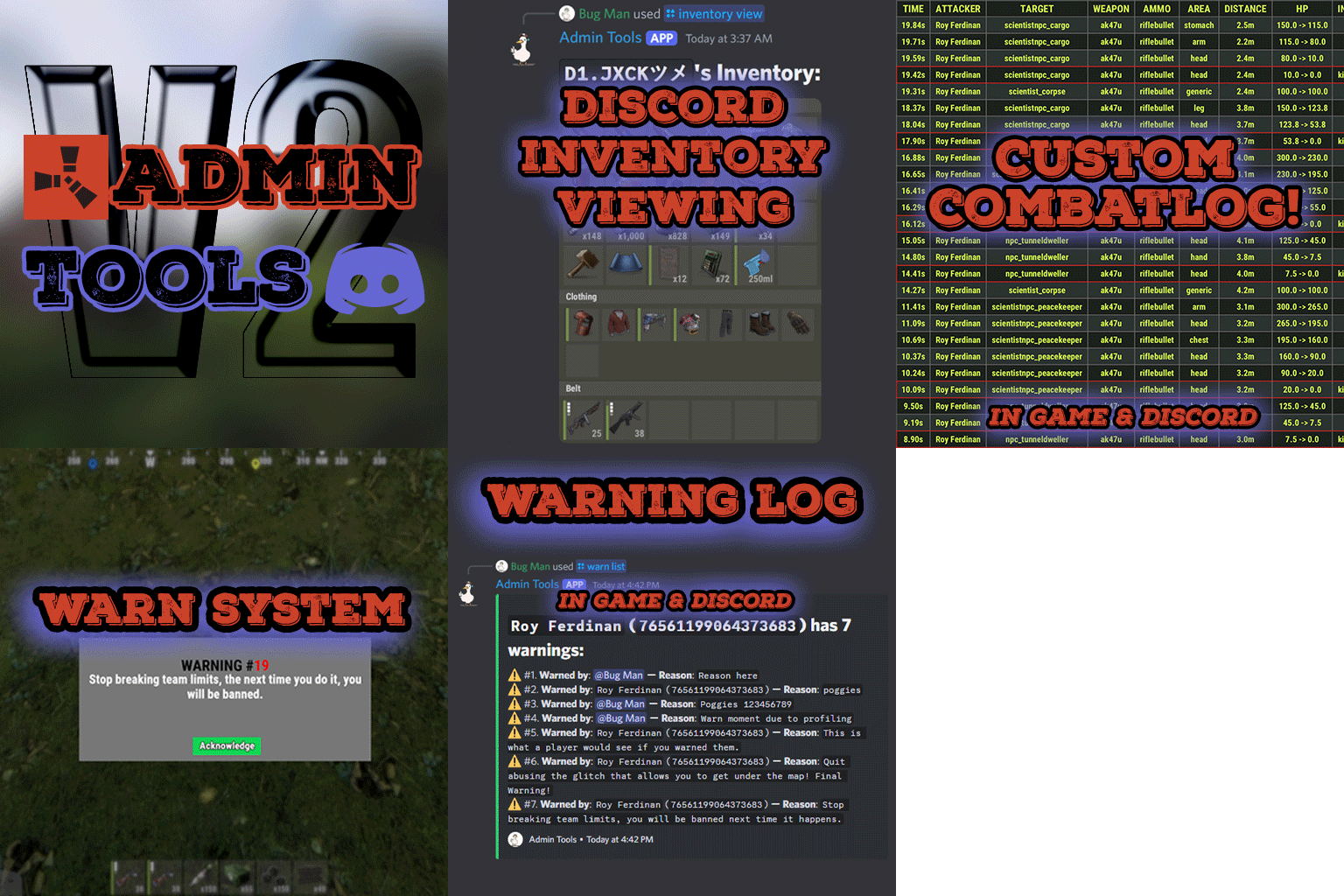
Admin Tools is an all-in-one plugin designed to make your job as a server owner/admin easier. This plugin has a wide range of features and commands that allow you to control your server easily, both in-game and via Discord. It also adds custom quality of life features exclusive to this plugin! ★ Inventory Viewing System - View an NPC or player's inventory in Discord and in-game ★ Multi-Server Support - Allows you to manage multiple Rust servers from a single bot ★ Custom Combatlog System - View a player's combatlog in Discord and in-game ★ Backpack Viewing System - View a player's backpack (uMod plugin) in Discord ★ Custom ID System - Get the ID of players on your server quick and easy, copy directly from chat ★ Warn System - Inform players of their wrongdoings and keep track of them (Warn Visuals: UI, Chat, Chat + Toast/Gametip) ★ Watchlist System - Lets you put suspicious players on a list for you to monitor, logs in-game and to discord ★ Server Command System - Reload/load/unload plugins and other console commands in Discord and in-game ★ F7 Report Logging System - Log F7 reports to discord with their combat log attached (if enabled) ★ and more! (Rest of features below) Please note, the Permissions UI Shown on screen towards the start of this video is FROM CARBON, NOT THE PLUGIN Please note, the Permissions UI Shown on screen towards the start of this video is FROM CARBON, NOT THE PLUGIN (Changed/Exclusive): * Timestamps for video in video's description - Make sure to up video quality if watching from this site. * Timestamps for video in video's description - Make sure to up video quality if watching from this site. ★ Permission System - Grant/revoke permissions to groups and players from Discord and in-game ★ Minecraft Creative System - While enabled, hold middle click to get the item you're looking at ★ Rename System - Rename the players who think they are funny (toggle in config) ★ Tempban System - Tempban players with no database required ★ Unique ID System - Find players even when they have the same or similar names -- Thanks to nivex ★ Kill, Wound, Revive & Respawn System - Kill, wound (down), revive and respawn players from Discord and in-game ★ Team Viewing System - View a player's team members from Discord and in-game Q: Does this plugin have a GUI or do its commands use GUI? A: No. The only UI in-game for this plugin is the warning screens. Please do not purchase this plugin thinking it has GUI for its commands, they are ALL commands entered into chat, Discord, or RCON. There are however, 'modals' for Discord, but nothing GUI based for within the game other than the warning screens displayed when '/warn'ing a user (which can be configured by the user). Q: How do I set up the bot? A: Set Up Instructions - If you miss any permissions, can always add them to the Admin Tools role in discord after you invite the bot. Q: Does this plugin link players to Rust? A: No. You can use the free plugin DiscordCore by MJSU if you would like to link your players. Q: Does this plugin log kills/PMs/F1 Spawn/chat? A: No. Admin Tools only logs the following if enabled: F7 Reports, Bans, commands from this plugin, and players who are watchlisted. You can always view a player's combatlog from discord though. You can use the free logging plugins DiscordLogger by MONoH or DiscordChat by MJSU depending on your goal. However, personally, I recommend against using logging functionality that would be occurring very frequently due to Discord's rate limiting. Though, DIscordLogger is made in a way that combines messages if possible to prevent limiting. Q: Can this log to multiple Discord servers? A: YES. All you need to put for logging to multiple servers is the channel ID you want to log to in the list of channel IDs in the config. Q: Does this plugin ONLY work with Discord Extension 3.0.0+? A: YES. You need to download the 3.0.0+ version from GitHub, it is linked at the top (and right here) as a required dependency. Any version prior to 3.0.0 will not work with this plugin, but any version 3.0.0 and later will. Q: Will this work on a shared hosting server? A: Yes, BUT you will not be able to take advantage of the threading done within the plugin. It should still work fine, but when you're on a shared host, you may only have access to a single core/thread (not positive on which) and as a result the threading I am doing in the plugin will just be ran on the main thread. As a result some of the discord functionality (ie: image generation) may affect the server as its now running on the main thread (what the server uses to run the game on) instead of a separate thread which would normally not affect the server. The image generation stuff (backpack and inventory) is normally pretty quick depending on number of items and pictures being used/sent, and can be between 100-250ms to generate on my server, however that was while no players were on. Q: How do I fix this error Response Code: Forbidden Discord Error Code: 50001 Discord Error: Missing Access ? A: All you need to fix this issue is MFA/2FA on the account used to create the bot. This issue is caused by Discord requiring your account to have either MFA or 2FA due to the bot being in a Community Discord server. After you add 2FA/MFA this error will go away. Q: Renaming isn't working, how do I fix this? A: The issue is likely that you don't have it enabled in the config, make sure to enable it in the config, its above the warning options and the discord API options. Q: My commands aren't appearing, how do I fix this? A: You can do the following in an attempt to try and force the bot to update its commands: Discord > Server Settings > Integrations > Admin Tools Bot > Toggle one of the checkboxes it shows in either Roles & Members or Channels > Save > Undo toggle > Save again. Q: Does this work with Rustcord? A: Yes, however you need this version here by MJSU as it has been updated to work with DiscordExtension 3.0.0+ versions. Q: How do I set up Multi-Server Support? A: Do as follows: Enable the bool (true/false) config option for multi-server system. Fill and keep the list of servers order the same if possible between configs (not required, but recommended). Use the /server command in discord to swap to the server you want to start listening to/sending commands to. On first use of command, it will error in all but one server console (tries to reply to a message more than once), that is expected and doesn't do that after that first command. It is used to set it up. If you want the activity information to change when swapping servers, make sure to enable that functionality in the config. Special thanks to Nivex for both creating and allowing me to use the method used to generate unique IDs for players. For support, please make a support ticket or join the Cobalt Studios Discord.$29.99 -

Version 1.0.8
398 downloads
This is a Simple plugin I made when I needed to determine a SkinID of an item, so I could search through a config file and Remove the Outdated Skin. The info also logs to Console for copying of case sensitive or quick view of case sensitive info. Now the log can also output to Discord for reference when not in game. I added the Name, Shortname, SkinID, ItemID & Text Field, to be sent to a Note for Debug or Development Purpose, or maybe there is a pesky custom item and you need to pinpoint its origin. Maybe it can be handy to you as well. Command - /check - Admin Only, Sends Note of Active Item Properties to your Inventory. If there is no Item, it will attempt to check your raycast for properties. Config { "Note SkinID": 3341490454, "Output Log to Discord?": false, "Discord URL": "" }Free -
Version 1.0.2
650 downloads
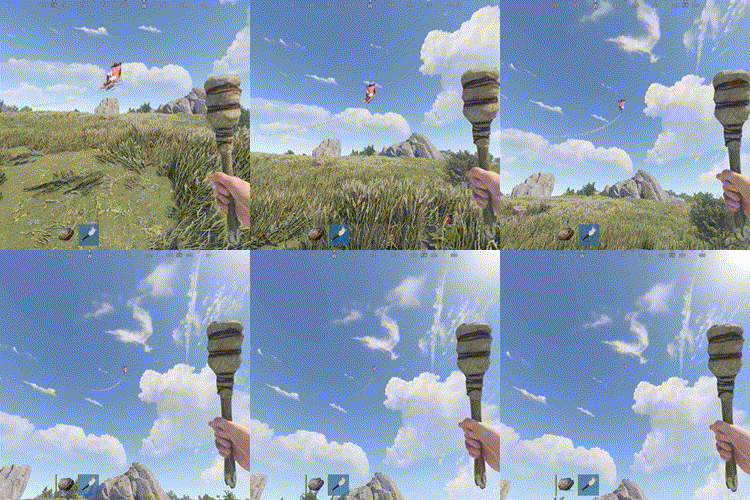
Troll those cheaters in style with the Rocket Man ! After exploding up in the sky their loot will drop all over the place, just like a Piñata. Use the chat command /troll.rocketman <player> or the rcon command troll.rocketman <player>. The player argument will accept a partial player name or a full Steam ID. All users with the Oxide "admin" role will get access to the command, but you may grant per user/group access using the permission oxidationtrollrocketman.use.$1.99- 17 comments
- 5 reviews
-
- 2
-
-
- #admin
- #admintool
- (and 5 more)
-
Version 2.0.4
45 downloads
Purpose of this plugin is to give players ability to give items to themselves and others using chat command. By default nothing is allowed to anyone, so you can load plugin safely and configure it afterwards. In default config there are multiple permissions. Think of them as different lists of items. You can add new or remove existing permissions as you prefer. If you grant giveto permission to player, he will be able to give items to other players. If player has this permission he will be able to click on the nickname at the top left of the UI and all players list will show up. Note: For a player to appear in the list, he must be alive ## Permissions giveitem.giveto -- Allows the player to give items to other players. giveitem.ignorelimit -- Allows the player to ignore limits. More permissions with limits are created in config file (see Configuration section below) ## Commands /giveitem - Shows a user interface with a list of items by category. ## Configuration Default avatar used if Image Library is not loaded or no avatar image found Default amount used when the user interface is first loaded. The amount can be changed by pressing the buttons at the bottom of the screen. Show admins on player select page show / hide admins from player selection list Check ownership of DLC items enable / disable Player DLC API plugin support Chat steamID icon used to set desired account icon in chat messages Log Level (Debug, Info, Warning, Off) used to set desired logging level Discord message enabled enable / disable sending messages to Discord (requires Discord Logger) Discord WebhookURL use this Webhook to send message in desired channel. Leave blank to send to default chanel. Exclude hidden items used to exclude items that have flag hidden (set by Facepunch). Should be used with caution since hidden items might be buggy/broken Items blacklist used to exclude items by shortname Commands list set desired chat command(s) Clear data on map change and Clear data on new save (wipe) are used for cleaning datafile with limits (cooldown) Note: If you'll set Limit reset interval (seconds) to 0 it will disable limits for this permission. You can remove unnecessary default permissions and also add as many permissions as you want. For cases where the player has more than one, the permission with the higher priority will be applied. ## Localization Plugins phrases are available on 3 languages out of the box: English, Russian and Ukrainian Plugin supports Rust Translation API which allows you to have item names in any language supported by Rust ## Developer Hooks ### OnPlayerGiveItem object OnPlayerGiveItem(BasePlayer player, BasePlayer playerTarget, Item item) Called when a player tries to give item to another player. If player is trying to give himself an item playerTarget will be the same as player. Returning a non-null value (default true) prevents item from being gaved.$25.00- 6 comments
- 1 review
-
- 1
-
-
- #items
- #admin tool
- (and 3 more)
-

Version 1.0.7
244 downloads
Grid based teleportation plugin with daily limits, cooldowns, and permissions. Also has useful admin features. Note - GridTP is accurate right to the lines in both axis. Permissions. gridtp.admin gridtp.clickmap gridtp.precisemap gridtp.tomiddle gridtp.tocorner gridtp.whereis gridtp.back gridtp.toplayer gridtp.vip (for VIP cooldowns and daily limits) With 'precise' perm, players can TP to the precise spot they clicked on the map, or the nearest safe spot. With 'middle' or 'corner' perms, players can use map right-click or chat commands to TP to a safe spot in the middle of the grid, or the top left corner of the grid. Config. Hour at which daily limits reset : 22 Log details of successful Tps : false Disable map use for regular players : true Disable map use for everybody : true Prevent TP into building-blocked : true* Prevent TP from within building-blocked : true* Prevent TP into monuments : true* Prevent TP from within monuments : true* Prevent TP from whilst swimming : true* Disable TP whilst mounted : true* Maintain admin height when TPing in noclip : true Player should be sleeping after TP : true* Custom Chat Command : "gridtp" Config also includes daily limits, (0 means disabled) and cooldown times for precise/middle/corner TPs Notes. Holders of admin permission are not subject to the options marked '*' Map right-click takes 'admins' precisely where they clicked when in noclip, and to the closest safe spot when not in noclip, regardless of other perms. Data. If logging is enabled, the data file stores steamID, username, time and TP type for each successful TP. Data file also stores a date for reference when resetting daily limits. Manual editing of the data file is never required. Chat Commands. /gridtp <letters> <numbers> - Attempt to TP to the specified grid. /gridtp back - Attempt to TP back to previous location (one use per TP) Admin or back permission required. /gridtp limits - Display your remaining daily Tps. /gridtp whereis <playername> - Displays player grid coordinates. Admin or whereis permission required. /nomap - Toggles right click map to TP. Admin perm only. /gridtp wipelogs - Wipes all data file TP logs. /gridtp toplayer <playername> - Tps close to specified player. /gridtp reveal <playername> - Publishes player grid coordinates to the server. /gridtp trackpublic <playername> - Toggles publishing player grid to the server every time it changes. /gridtp trackprivate <playername> - Toggles displaying player grid to you every time it changes.$10.00- 9 comments
- 5 reviews
-
- 3
-
-

-
- #admin tool
- #teleport
- (and 5 more)
-
Version 1.0.6
265 downloads
Admin and player UI for saving/recalling/deleting sign drawings. Gives players a 25 capacity image library so they can save, and restore, their artwork. Saved images exist even after the signs they're on are destroyed. Multi-layer support for animated signs allows save from and restore to each layer separately. Admin can view a 25 image history for any sign, with the SteamID of the painter shown. Clicking a SteamID shows a 25 image history for that player. UI delete allows for very easy moderation of unwanted images. Permissions SignManager.admin – Allows use of /sma command. SignManager.autosave – Allows auto-saving of paintings upon completion. SignManager.manualsave – Allows manual saving of paintings in UI menu. Chat commands Players. /sm – Opens SignManager UI. Player must be close to a sign Admin. /sma – Opens admin menu for closest sign. /sma <steamID> – Opens admin menu for closest sign /sma export – Exports all images/library data to file. These are auto imported on next server boot. Console commands sma export -Exports all images/library data to file. These are auto imported on next server boot. Configuration ButtonColour : "0.7 0.32 0.17 1” CommandAlias = "SignManager"; AdminCommandAlias = "SignManagerAdmin"; Note : SignManager uses Rust storage and, therefore, saved images will be wiped when the server is wiped. To avoid this, use the the `/sma export` chat command or `sma export` console command before shutdown and wipe.$10.00 -

Version 1.0.3
493 downloads
STFU is a simple player voice muting system (that doesn't interfere with game chat or running commands like some others do) STFU handles times as Seconds, Minutes, Hours, Days, or perm mutes. Optional output to discord via webhook (Requires DiscordMessages by Slut on uMod) Permissions STFU.user << required to use in-game commands In-Game Commands To mute: /STFU <target> <duration> "reason" Reasons for multiple words must be contained in quotations E.g. /STFU Death 2d "Shouting reeee continuously." for perm mutes, just use the word "perm." E.g /STFU Death Perm "Reee'd again." To Unmute: /UnShut <target> E.g /UnShut Death Console Commands same as above but without the slash To Mute: STFU <Target> <Duration> "reason" To Unmute: UnShut <Target> Console all so has the command. STFULookUp Which will print all current bans to console Configuration The configuration is only needed if you wish to output to discord via DiscordMessages { "Report to Discord": false, "Discord Webhook": "DiscordWebhook URL" }Free- 7 comments
-
- 3
-
-
- #admin tool
- #mute
- (and 8 more)
-

Version 1.0.0
179 downloads
Very simple marker teleport tool. You can use MTeleport as an admin or as a player with permission (mteleport.use). Here is the /mt command to turn MarkerTeleport on and off. command /mt on and off If you have any questions or problems, join my discord https://discord.gg/2ftdtaTQ6S The plugin was created by ☆☆☆ M&B Studios ☆☆☆Free -
Hide your anime houses. Floating Text plugin: In Development Stage: Requires testing under high player count
- 4 replies
-
- 6
-
-
-
- #floating text
- #roleplay tool
- (and 2 more)
-
Version 1.0.1
52 downloads
Facepunch generated loot containers change on spawn, sometimes it's a Military crate, sometimes elite, sometimes normal. RustEdit however does not. It will only spawn the crates/barrel you define. Heres where LootCreate comes in, Two simple commands to place either a crate or a barrel and away you go. Containers are selected randomly from a list in the config and a timer defines the respawn time. (default 2-8 mins) Containers are stored in the data file which is cleared on wipe. Permission LootCreate.admin << required to use commands Commands /PlaceCrate << will place a crate where the player is standing /RemoveCrate << Removes the crate you are looking at (best if you stand on the crate and look down at it) /PlaceBarrel << will place a barrel where the player is standing /RemoveBarrel << Removes the barrel you are looking at (best if you stand on the barrel and look down at it) Configuration { "Crate Prefab List": [ "assets/bundled/prefabs/radtown/crate_basic.prefab", "assets/bundled/prefabs/radtown/crate_elite.prefab", "assets/bundled/prefabs/radtown/crate_normal.prefab", "assets/bundled/prefabs/radtown/crate_normal_2.prefab", "assets/bundled/prefabs/radtown/crate_tools.prefab" ], "Barrel Prefab List": [ "assets/bundled/prefabs/autospawn/resource/loot/loot-barrel-1.prefab", "assets/bundled/prefabs/autospawn/resource/loot/loot-barrel-2.prefab", "assets/bundled/prefabs/radtown/oil_barrel.prefab", "assets/prefabs/resource/diesel barrel/diesel_barrel_world.prefab" ], "Respawn timer upper": 480.0, "Respawn timer lower": 120.0 } Pretty self explanatory, a list of Barrel Prefabs, a list of Crate Prefabs and two numbers that the timer is triggered between. Data The crate and barrel information are save in the LootCreate.json datafile. Deleting this file will clear all placed containers. This is triggered to wipe on new save. Meaning if you wipe the server save it will clear the data. *IF YOU SETUP THE LOOT AND THEN WIPE THE SERVER BEFORE GOING LIVE MAKE SURE YOU BACKUP THIS DATA FILE OR ALL YOUR HARD WORK WILL BE UNDONE* If you have any questions or problems, join my discord https://discord.gg/D2zTWCEnrN$5.00-
- 2
-
-
- #maps
- #mapmaking
- (and 6 more)