
Search the Community
Showing results for tags 'admins'.
Found 9 results
-

Version 1.0.3
20 downloads
AdminWarn is intended for situations where players clearly exceed server rules or must be explicitly warned. It is not a lightweight or easily dismissible notification. The purpose is not to preserve gameplay flow, but to deliver a clear and serious warning. Warnings are delivered instantly and ignore conditions such as safe zones or PvP status. Stop guessing whether your warning messages in chat were actually noticed. Tired of sending important warnings as an admin via RCON or global chat and never being sure who actually read them? AdminWarn is built to give admins certainty. AdminWarn is designed for manual warning delivery. This is not an automated warning system. Every warning is intentionally sent by an admin using commands. At the same time, AdminWarn handles warnings smartly and automatically in the background. Warnings sent to offline players are stored and shown automatically when the player next joins, even days later. For individual online players, warnings remain stored until acknowledged, then are automatically cleared. All data is wipe-aware and cleaned up automatically on server wipes. Instead of relying on admin-sent chat warnings that can get lost, ignored, or missed while players are AFK, AdminWarn delivers a mandatory, player-specific GUI warning directly on the player’s screen. Each warning includes a configurable sound effect, using only built-in, local in-game sounds. No external or custom audio files are used. This is not an auto chat message. It is a visual warning that requires player acknowledgment. Even if the player closes the game without confirming it, the warning will reappear on the next login until acknowledged. No hard movement lock is applied. Warnings can be sent via RCON, server console, or in-game admin console (F1). In-game commands /warn and /warnall are used to manually send warnings. /warn can target individual players whether they are online or offline, while /warnall applies only to online players. Discord webhook logs clearly confirm when warnings are acknowledged. Global warnings apply only to online players and do not generate Discord logs, preventing spam and rate-limit issues. How It Works? 1) Admin sends warning (chat/RCON) → Message is delivered via GUI with sound 2) Player must acknowledge → Cannot play until clicking button (No movement lock, only a visual GUI barrier) 3) Offline player support → Warnings sent to offline players are saved and displayed via GUI when they join 4) Data management → Auto-clears on wipe Key Features - GUI warning that requires player confirmation - Works online/offline - Warnings save for offline players - Global warnings - Warn all online players at once - Discord logging - Track acknowledged warnings - Wipe detection - Auto-clear data on server wipe - Professional interface - Clean GUI with sound effects - UTC-based date display - All timestamps are shown in UTC (Coordinated Universal Time) Performance AdminWarn is built with an optimized and efficient code structure, making its presence virtually unnoticeable on the server. It runs smoothly during long uptimes and maintains stable hook memory and performance values under normal server conditions. Wipe Behavior - Restarts: Data preserved (approved warnings are auto-deleted for data optimization) - Server wipe: All warning data automatically cleared - No manual cleanup needed (Most of the time, it is not necessary) Commands ➤ Admin Chat Commands: /warn <player>|<steam64ID> <message> /warnall <message> ➤ Console/RCON Commands: warn <player>|<steam64ID> <message> warnall <message> Note: Player names are not unique and may include different alphabets or special characters. To avoid ambiguity, using Steam64ID is strongly recommended when sending warnings. Permissions Oxide/Carbon oxide.grant group admin adminwarn.admin c.grant group admin adminwarn.admin Discord Webhook Logging When enabled, sends acknowledgement logs to Discord: Player name Warning message Read status (online/after reconnect) Timestamp Does NOT log warning sending (only acknowledgements) Does NOT log global warning acknowledgements (due to DC rate limits) Configuration { "Clear data on wipe": true, "Discord Log Enabled": false, "Discord Webhook URL": "", "Show Date in GUI": true, "Warning sound": "assets/prefabs/building/wall.frame.shopfront/effects/metal_transaction_complete.prefab" } Lang/en { "NoPermission": "You don't have permission to use this command.", "WarnUsage": "Usage: /warn <player name or steamid> <message>", "PlayerNotFound": "Player not found. Use SteamID for offline players.", "DuplicateWarning": "Duplicate warning prevented for player {0}", "WarningSent": "Warning sent to {0}: {1}", "WarningSaved": "Warning saved for offline player {0}.", "WarnAllUsage": "Usage: /warnall <message>", "WarnAllSent": "Global warning sent to {0} online players: {1}", "ConsoleWarnUsage": "Usage: warn <player name or steamid> <message>", "ConsoleWarnAllUsage": "Usage: warnall <message>", "AcknowledgeThanks": "Thank you for acknowledging the warning.", "GuiTitle": "SERVER WARNING", "GuiButtonText": "✔ I ACKNOWLEDGE", "GuiDatePrefix": "Date", "GuiWarningFormat": "Hello {0}, you have received a warning." }$18.99- 3 comments
-
- 1
-

-
- #admin
- #admin tools
- (and 42 more)
-

Version 1.0.4
128 downloads
Watchlist is a lightweight but powerful tool that alerts admins when specific players connect to the server. Whether you're online or offline, you'll get real-time in-game notifications and Discord alerts with fully configurable message templates and role pings. The built-in UI makes managing the watchlist easy, with support for sorting, filtering, teleporting, and note-taking. Players can be added or removed manually or straight from RustAdmin with custom commands. Very useful tool to keep you and your staff one step ahead. Configuration { "Discord Webhook URL": "https://discord.com/api/webhooks/your/webhook/url", (Your Webhook URL) "Ping Role": false, (Whether to ping a role when player comes online on discord, e.g: @Admin) "Role ID": 0, (Discord Roll Id to ping) "Purge Watchlist on Wipe": false, (whether to purge on wipe) "Purge Players List on Wipe": true, (performance, every player is stored in a file, it is recommended to clear this on wipe) "Enable UI": true, (plugin can be run entirely without UI if desired) "UI Color Scheme (Options: dark, light, rust)": "dark", ( UI styles ) "Custom Colors": { (customise the UI for your server) "PrimaryBackground": "0 0 0 0.95", "SecondaryBackground": "0.15 0.15 0.15 1", "HeaderBackground": "0.1 0.1 0.1 1", "ButtonPrimary": "0.2 0.7 0.2 0.9", "ButtonSecondary": "0.3 0.3 0.3 1", "ButtonDanger": "0.7 0.2 0.2 0.9", "TextPrimary": "1 1 1 1", "TextSecondary": "0.7 0.7 0.7 1", "OnlineIndicator": "0.2 0.8 0.2 1", "OfflineIndicator": "0.8 0.2 0.2 1", "RowEven": "0.12 0.12 0.12 0.95", "RowOdd": "0.15 0.15 0.15 0.95", "ActiveItem": "0.4 0.4 0.4 1", "AlertBackground": "0.8 0.2 0.2 0.95", "AlertText": "1 1 1 1" }, "UI Scale": 1.0, (scales the UI as desired) "Main UI Position": { "AnchorMin": "0.2 0.1", "AnchorMax": "0.8 0.9" }, "Font Size": { "Title": 20, "Header": 14, "Normal": 12, "Small": 10 }, "UI Animation": true, (enables ui animations) "Enable Sound Alert": true, (plays sound when watchlist player comes online) "Alert Sound": "assets/bundled/prefabs/fx/notice/item.select.fx.prefab", (choose which sound you want from rust prefab sounds) "Alert Duration (seconds)": 10.0, ( hlow long the alert is displayed in-game when a player comes online - only admins see this) "Show Visual Alert": true, (enable / disable the in-game alert) "Send Discord Add/Remove Notifications": true ( enable discord logging of adding/removing watchlist players) "Max Cached Players": 3000, (Performance, set this lower to reduce the memory used by the plugin this populates the player list with the last x number of players to join your server, ordered by latest) "Alert Cooldown Seconds": 120, (Prevents alert spam when players reconnect) "Startup Alert Grace Seconds": 60, (waits before firing watchlist alerts after server starts) "Auto Expire Days (0 = disabled)": 0, (auto expire watchlist players after number of days) "Send Prune Discord Notifications": true, (sent prune notification to discord) "Prune Report Max Per Embed": 10, (max players in prune message, prevents breaching discord embed count) "Prune Report Include Notes": false, "Enable Diagnostics": false (enable this for plugin performance stats and diagnostic information) } COMMANDS Chat: /watchlist Opens the Watchlist UI (requires permission) /wl <steamid> "<note>" Adds a player to the watchlist with a note (requires watchlist.admin permission) /wlr <steamid> Removes a player from the watchlist (requires watchlist.admin permission) /wlist Lists all watched players in chat (requires watchlist.admin permission) Console: watchlist.add <steamid> "<note>" Adds a player to the watchlist Example: watchlist.add 76561198000000000 "Suspected Cheater" watchlist.remove <steamid> Removes a player from the watchlist watchlist.list Lists all watched players in the server console wl <steamid> "<note>" Adds a player to the watchlist with a note (can be used via rcon) wlr <steamid> Removes a player from the watchlist (can be used via rcon) wlist Lists all watched players in the server console (can be used via rcon) purgewl Clears the entire watchlist (requires watchlist.admin permission) PERMISSIONS watchlist.admin Full access to all commands and features watchlistui.toggle Allows UI toggle via `/watchlist` command RUSTADMIN INTEGRATION You can integrate Watchlist directly with **RustAdmin** to add or remove players with a single click. Add to Watchlist Command to Execute: wl ${playerSteamid} "From RustAdmin" Tick "Show Command Output in a Dialog" (optional) Remove from Watchlist Command to Execute: wlr ${playerSteamid} Tick "Show Command Output in a Dialog" (optional)$4.99 -

Version 0.0.2
6 downloads
APAdminWH is a fully customizable wallhack tool with a sleek in-game UI. Designed for server administrators, it provides powerful visualization features to monitor player activity, including sleepers, with complete control over what and how information is displayed — all from a user-friendly menu. Key Features 1. Intuitive UI Floating button (WH) with support for custom icons (PNG) or simple text label. Full-featured admin menu — no need to type commands. 2. Real-Time Visual Options Toggle wallhack and sleeper visibility. 1. Customizable HUD elements: Player names + distance + health Eye direction lines 3D player boxes 2. Adjustable settings: Update interval: 0.1–15 seconds Visibility distance: 50–1000 meters Eye line length 3. Color Customization Separate colors for active players and sleepers. Built-in presets: White, Cyan, Yellow, Red, Green Admin Commands /aw — Toggle wallhack on/off /aws — Toggle sleeper tracking /awmenu — Open in-game UI menu Config: { "Colors": { "AccentColor": "0.2 0.6 0.8 1", "ButtonHoverColor": "0.2 0.2 0.2 0.95", "MainColor": "0.1 0.1 0.1 0.95", "PanelButtonColor": "0.15 0.15 0.15 0.95", "TextColor": "0.969 0.922 0.882 1" }, "OpenButton": { "AnchorMax": "1 0", "AnchorMin": "1 0", "Color": "0.969 0.922 0.882 0.03137255", "ImageName": "ICON_WH.png", "OffsetMax": "-209.73345 97.84776", "OffsetMin": "-235.733765 71.84754", "UseImage": true }, "Panel": { "AnchorMax": "0.97 0.85", "AnchorMin": "0.71 0.31", "ShowCursorWhenOpen": true }, "Version": { "Major": 0, "Minor": 0, "Patch": 1 } } Setup Instructions Place APAdminWH.cs into your oxide/plugins/ folder. Upload the desired icon image (e.g., ICON_WH.png) to oxide/data/APAdminWH/. Reload or start the server — the config and UI will be created automatically. Grant the permission: oxide.grant user <steamID> apadminwh.use$15.00 -

Version 1.2.0
80 downloads
Allows you to restrict certain commands and actions for admins, monitor their activities, and prevent admin abuse. Features Command Blocking: Prevents specified commands from being executed by certain admins. Action Blocking: Disables interactions like looting, building, or interacting with vehicles, cupboards, and more. Team Management: Manage the admins team and their permissions. Anti-Abuse: Detects abusive behavior with configurable actions such as kick or ban. Action Logging: Logs movements and interactions. Permissions adminrestrictions.limitactions - limit the admin actions. adminrestrictions.ignore - ignores a specific admin. Configuration Note: Anti-Abuse will disable damage and teleport the player back to his previous location upon detection.$19.99- 6 comments
-
- 2
-

-
- #admin
- #restrictions
- (and 14 more)
-

Version 1.4.4
1,063 downloads
Introducing Total Control – The Ultimate Rust Server Administration Tool Total Control is a powerful, full-GUI admin plugin designed to give Rust server owners and admins unprecedented control. Whether you’re running hardcore survival or a casual PvE playground, Total Control puts every system at your fingertips live, in-game. Dynamic Schedule System Plan and automate your server’s evolution with ease — no more manual toggling or config edits. The Schedule System lets you: Automate server changes over time – Adjust gather rates, stack sizes, smelting speeds, rewards, raid protection, or PvE/PvP status automatically. Create up to 6 configuration sets per feature (1 default + 5 extra) – Schedule different setups for each stage of your wipe. Scale your server naturally – Increase resource rates as wipes progress or gradually tweak settings to keep gameplay fresh. Fully integrated with the GUI – Configure all schedules directly in-game with the Total Control UI — no external files required. Run your server exactly how you want, exactly when you want — automatically. Core Server Settings Skip Night / Time Freeze – Automate day/night or let players vote, including custom voting percentages and skip limits. Day & Night Length – Configure how long the day lasts and how short nights are. Custom Vote Commands – Define your own chat commands beyond /day. PvE/PvP Modes & Raid Protection – Toggle instantly or schedule on timers, with player HUD indicators. Now includes an option to use in-game or local time. Economy & Progression StackSize Control – Set multipliers per item or entire categories. Gather Rate Control – Fine-tune every item’s resource yield. Easy Item Management – Add or remove items to the GatherRate and StackSize pages directly via chat commands using item shortnames. (Shortnames list: https://www.corrosionhour.com/rust-item-list) Smelting & Cooking – Adjust speeds, outputs, and fuel use. Rewards & Incentives Reward players for kills, gathering, mining, defeating Bradley/Patrol Heli, or emptying crates to encourage active gameplay. Choose between Economics, ServerRewards, scrap payouts or reward all three simultaneously. Configure loot-splitting for Bradley and Heli: split rewards based on damage dealt or grant the full amount to the player landing the final blow. Accessible In-Game Any admin with permission can open the Total Control UI with /tc and adjust settings live no server file access required. Whether your admins are across town or across the globe, they can fine-tune all settings directly in-game. Permissions & Commands Permission: TotalControl.OpenGui (access admin UI) Chat Commands: /tc To open TotalControl /addgather <shortname> Add item to GatherRates page. /removegather <shortname> Remove item to GatherRates page. /addstack <shortname> Add item to StackSize page. /removestack <shortname> Remove item to StackSize page. Join the Community Stay up to date, promote your server, report bugs, or get support: https://discord.gg/AkwHUs8Qma$29.99 -

Version 1.0.0
178 downloads
Countdown.cs Description : - This plugin allows you to send a beautiful countdown visible to all players on your server, with the option to execute a command at the end of the countdown. Settings : - HUD colors F1 Commands : - c.start <time> <command> Example : (c.start 20 say HELLO) - c.stop Permissions : - ownerid <steamID/user> WuyZar's Discord : https://discord.gg/NVwRcQwGwh Game interface :Free -

Version 1.3
26 downloads
Things coming. Auto Perms via a Rust Plugin Blacklist a user Discord bot (more info soon) Reworked profile to support store... Maybe App Track (Applications) App Track is a streamlined application management system designed to simplify the submission and review process for organizations and communities. It is built with user convenience and administrative efficiency in mind, offering secure authentication through the Steam API and a dedicated admin dashboard for effective application handling. Features: User-Friendly Submission: Easy-to-navigate interface for users submitting applications. Secure Authentication: Integrated Steam API ensures secure login functionality. Admin Controls: Comprehensive dashboard for reviewing, managing, and approving submissions. Purpose: This system is ideal for gaming communities, organizations, or any group needing an efficient way to handle online application submissions. Profile for users that have already applied where they can see the status of there app! Installing: There is a HowToInstall.html file that will tell you how to install this with out any issues. If you come across any issues please reach out and let me know and i will help you install this and get it up and running! - More cool features coming soon to the `profile` side!$35.99 -

Version 1.0.4
141 downloads
Designed for ease of use and efficiency, allowing you to check authorized players directly from in-game chat, the console, or RCON without any complicated setup. No configuration is needed—just upload the plugin, assign the necessary permissions, and you're ready to go. Checking who is authorized on a tugboat is now as simple as a quick command. Key Features: User-Friendly: Easy to use with no complicated setup—perfect for server admins of all experience levels. Versatile Access: Manage player authorizations from in-game chat, the console, or RCON. Permission-Based Control: Ensure that only authorized players have access to tugboats. No Configuration Required: Simply upload the plugin, add permissions, and you're all set. Quick Authorization Checks: Effortlessly check who is authorized on a tugboat with a simple command. Permission: tugauth.use Sample Commands: From ingame chat: /tugauth ^This scans the closest tugboat to your position From ingame console: tugauth ^This scans the closest tugboat to your position tugauth 1250 1 369 ^This scans for the closest tugboat at the provided coordinates From RCON: tugauth 1250 1 369 ^This scans for the closest tugboat at the provided coordinatesFree -
Version 1.0.0
281 downloads
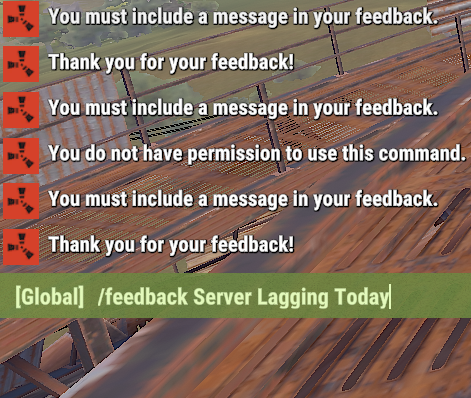
This plugin allows players to submit feedback to the server owners by using the /feedback command. The feedback is saved into a log file in the oxide logs folder. Permissions: feedback.use - Allows player to submit feedback Commands: /feedback "Feedback Here" - Submit feedback to the log file. Log File: The log file is located at "oxide/logs/feedback.log" on the server.Free









.thumb.jpg.4abde6ce06035db4993ba98aa473b214.jpg)
