Search the Community
Showing results for tags 'admintool'.
Found 18 results
-

Version 1.2.0
80 downloads
Allows you to restrict certain commands and actions for admins, monitor their activities, and prevent admin abuse. Features Command Blocking: Prevents specified commands from being executed by certain admins. Action Blocking: Disables interactions like looting, building, or interacting with vehicles, cupboards, and more. Team Management: Manage the admins team and their permissions. Anti-Abuse: Detects abusive behavior with configurable actions such as kick or ban. Action Logging: Logs movements and interactions. Permissions adminrestrictions.limitactions - limit the admin actions. adminrestrictions.ignore - ignores a specific admin. Configuration Note: Anti-Abuse will disable damage and teleport the player back to his previous location upon detection.$19.99- 6 comments
-
- 2
-

-
- #admin
- #restrictions
- (and 14 more)
-

Version 1.7.2
921 downloads
What is MapVoter? MapVoter is a comprehensive Rust server management plugin that automates the entire wipe cycle - from map generation and community voting to server restarts and updates. Let your players choose the next map while you enjoy fully automated server maintenance. Perfect for: - Community servers wanting player engagement - Server owners seeking automation - Admins tired of manual wipe management - Servers with regular wipe schedules Key Features Map Voting System - In-Game UI Voting - Interface for players to vote - Discord Integration - Vote directly from your Discord server - Multiple Map Sources - Generate random maps, use RustMaps.com filters, or create custom maps - Duplicate Vote Prevention - Optional Discord authentication to prevent vote manipulation Fully Automated Wipe Management - Scheduled Auto-Wipes - Set your wipe schedule (weekly, bi-weekly, monthly) - Forced Wipe Support - Automatically handles Rust's monthly forced wipes - Custom Wipe Cycles - Define your own map/BP wipe schedules - Countdown Timers - Players see exactly when the wipe occurs - Pre-Wipe Voting - Start votes X days before wipe for maximum participation Flexible Map Generation - Procedural Maps - Generate random maps with custom seeds - RustMaps.com Integration - Select from thousands of pre-made maps - Filter Support - Use RustMaps filter IDs to match your server style (staging, etc.) - Custom Map URLs** - Use your own map files or RustMaps premium maps - Auto-Generate Custom Maps - Subscribers can auto-generate maps every wipe UI Design - In-Game Interface - Clean voting and admin menus - Admin Dashboard - Settings GUI for easy configuration Fun Kit System - Pre-Wipe Events - Enable fun kits before wipe to keep players engaged - Automatic Activation - Triggers X minutes before wipe - Blueprint Lock - Prevents BP farming during fun kit period - Kits Plugin Integration - Works with your existing kit setups Discord Bot Integration - Vote Embeds- Discord embeds showing all map options - Command Support - Admin control from Discord - Role-Based Permissions - Restrict commands by Discord roles - Multi-Channel Support - Configure different channels for different commands - Embed Customization - Add your branding with custom avatars and footers Server Automation - Auto-Updates - Automatically updates server and Oxide - File Cleanup - Selectively delete plugin data on wipe - Server.cfg Management - Automatically updates map seed/size/URL Advanced Configuration - In-Game Settings Editor - Change settings without editing files - Granular Control - Configure every aspect of voting and wiping - Permission System - Control who can vote and manage - Debug Logging - Track auto-wipe progress for troubleshooting - Server Identity Support - Works with multi-server setups Required Plugins: - image-library - For displaying map thumbnails - Wipe Info API - For wipe schedule detection - Discord Extension - For Discord integration Server Requirements: - Windows Dedicated Server, Ubuntu, Pterodactyl Panel, or Open Game Panel - Administrator privileges for server management - Standard server structure with `server.cfg` in `/server/{identity}/cfg/` - Ability to edit server startup command Optional: - Kits Plugin - For fun kit feature - Server Rewards - For vote rewards - RustMaps Account - For premium map features Quick Start Guide 1. Installation 1. Upload MapVoter.cs to /oxide/plugins/ 2. Install required dependencies (Image Library, WipeInfoApi, Discord Extension) 3. Restart server to generate configuration file 2. Basic Configuration Configuration Guide 1. Set your wipe schedule in config (e.g., every 7, 14, 21, 28 days) 2. Configure Discord bot token and channel IDs 3. Set your RustMaps API key (optional) 4. Define your server identity in config 3. Server.cfg Setup Create/edit your `server.cfg` file in `/server/{identity}/cfg/`: server.port 28000 server.seed server.worldsize server.maxplayers 100 server.hostname "Your Server Name" server.level "Procedural Map" 4. Test Run 1. Type /mvote in-game to open the menu 2. Generate some test maps 3. Try voting and check results 4. Verify server.cfg updates correctly Commands Player Commands /mvote - Opens the main voting UI Permission: MapVoter.vote /voteresult - Shows current vote results Permission: MapVoter.vote Admin Commands (In-Game) /mvote - Opens admin dashboard Permission: MapVoter.Manager /startvote - Starts voting after selecting maps Permission: MapVoter.use MapVoter.generate <count> <seed> <duration> - Generate maps and start vote Permission: MapVoter.use MapVoter.mapwipe <delay> <size> - Wipe map with new size Permission: MapVoter.use MapVoter.mapwipe <delay> <url> - Wipe with custom map URL Permission: MapVoter.use MapVoter.bpwipe <delay> <size> - Wipe map and blueprints Permission: MapVoter.use MapVoter.bpwipe <delay> <url> - BP wipe with custom map Permission: MapVoter.use MapVoter.cancelwipe - Cancel ongoing wipe countdown Permission: MapVoter.use MapVoter.stopvoting - Stop current vote Permission: MapVoter.use MapVoter.update <delay> - Update server and Oxide Permission: MapVoter.use MapVoter.cancelupdate - Cancel update countdown Permission: MapVoter.use MapVoter.reload - Reload plugin configuration Permission: MapVoter.use Discord Commands !vote - Show current vote options !generate <count> <seed> <duration> - Generate and start vote !mapwipe <delay> <size> - Trigger map wipe !bpwipe <delay> <size> - Trigger BP wipe !cancelwipe - Cancel wipe !stopvoting - Stop voting !update <delay> - Update server !cancelupdate - Cancel update Permissions MapVoter.vote - Allows players to vote on maps MapVoter.use - Basic admin functions (generate, start vote) MapVoter.Manager - Full admin access to all features Configuration Overview Auto Vote System: • Enable/disable auto-voting • Set days before wipe to start vote • Define vote start time (24-hour format) • Number of maps to generate Auto Wipe System: • Enable/disable auto-wipe • Map wipe schedule (e.g., days 7, 14, 21, 28) • BP wipe schedule (e.g., day 0 = forced wipe) • Custom wipe times • Forced wipe handling RustMaps Integration: • API key configuration • Filter ID support • Staging/barren preferences • Search depth (pages per request) Discord Configuration: • Bot token • Channel IDs (voting, logs) • Command prefix • Role-based permissions • Avatar and footer customization Data Cleanup: • Plugin data files to delete on wipe • Separate lists for forced wipe and map wipe Common Use Cases Weekly Wipe Server "Map Wipe schedule": [7], "BP Wipe schedule": [0], "Start voting x days before wipe": 2 Maps wipe every 7 days, BPs wipe on forced wipe, voting starts 2 days early. Bi-Weekly with Community Choice "Map Wipe schedule": [14], "BP Wipe schedule": [0, 14], "Number of maps to generate": 6 Wipes every 14 days, BPs wipe twice (forced + bi-weekly), 6 map options. Monthly with RustMaps "Map Wipe schedule": [28], "Select random maps from rustmaps filter id": true, "filter Id": "your_filter_id" Monthly wipe using curated RustMaps with your preferred settings. Troubleshooting Vote Not Starting Automatically? • Check WipeInfoApi is loaded • Verify wipe schedule matches your server • Ensure "Auto start vote" is enabled • Check console for errors Server Not Wiping? • Verify server.cfg path in config • Check server identity matches • Enable debug mode for detailed logs • Test with manual wipe command first Discord Bot Not Working? • Verify bot token is correct • Check channel IDs are valid • Ensure bot has proper permissions • Verify Discord Extension is installed Maps Not Generating? • Check RustMaps API key (if using filters) • Verify Image Library is loaded • Test with procedural generation first • Check filter ID is valid Best Practices For Server Owners: 1. Test First - Run dry-run commands with no players online 2. Backup Regularly - Always backup before major wipes 3. Communicate - Use Discord to inform players of wipe schedule 4. Monitor Logs - Enable debug mode during first few wipes 5. Update Dependencies - Keep Image Library and WipeInfoApi current For Players: 1. Vote Early - Don't wait until the last minute 2. Check Discord - Vote announcements posted there 3. Review Maps - Look at thumbnails before voting 4. Follow Rules - One vote per person (if authentication enabled) Bonus Features Fun Kit System Keep players engaged before wipe with special kits: • Pre-wipe PvP events • Testing new builds • Practice raids • Community fun Server Rewards Integration Reward players for voting: • Give reward points per vote • Encourage participation • Build community engagement Multi-Server Support Run multiple servers with one plugin: • Server identity configuration • Independent wipe schedules • Shared Discord bot ━━━━━━━━━━━━━━━━━━━━━━━━━━━━━━━━━━━━━━━━━━━━━━━━━━━━━━━━━━━━━━━━━ Support & Updates Get Help: • Discord: kaysharp • Configuration Guide: https://kaysharp42.github.io/MapVoter/Config-Guide.html Resources: • Image Library: https://umod.org/plugins/image-library • WipeInfo API: https://codefling.com/plugins/wipeinfo • Discord Extension: https://umod.org/extensions/discord • RustMaps.com: https://rustmaps.com/ ━━━━━━━━━━━━━━━━━━━━━━━━━━━━━━━━━━━━━━━━━━━━━━━━━━━━━━━━━━━━━━━━━ Why Choose MapVoter? Save Time - Fully automated wipe management Engage Community - Let players choose their maps Professional - Modern, polished UI Reliable - Trusted by hundreds of servers Flexible - Highly customizable Supported - Active development and support ━━━━━━━━━━━━━━━━━━━━━━━━━━━━━━━━━━━━━━━━━━━━━━━━━━━━━━━━━━━━━━━━━ License & Terms This plugin is provided as-is for use on Rust servers. By purchasing and using this plugin, you agree to: • Not redistribute or resell the plugin • Not reverse engineer or decompile • Use on your own servers only • Provide credit to the original author$45.00- 59 comments
- 9 reviews
-
- 4
-

-
-
- #admin tools
- #admintool
- (and 10 more)
-
Version 2.00
5 downloads
Overview: The Ultimate automatic raid management system for Clan/Team raiding. Commands: These commands require RaidZones.Use /set - Sets the center of the Raid Zone/Detection Zone and Enables active listening for explosions. /removezone (ClanTag) - Removes the Raid Zone listener from clans base. Config: The default Config file : Bubble Duration - The amount of time that the Zone will be active for once an explosion is detected. Raid Bubble Radius - The size of the zone that Attackers/Defenders need to hold to win the raid, also the size of the visible bubble. Damage Detection Radius - The size of the zone that will listen for explosive damage to activate a raid zone. Defender Hold Time - The amount of time that the defenders need to maintain control of their base to win the raid. Attacker Hold Time - The amount of time that the raiders(attackers) need to maintain control of the zone to win the raid. Color of Zone - Sets the color of the Visible bubble currently available in Red, Blue, Gray, Green, and Purple. Announce raids to server - Determines if announcements should be sent on raid start and if raid winners should be displayed in chat. Entity Search Radius - The radius around the TC that will be checked to insure the assigned clan has building permission. *Defender Hold Time and Attacker Hold Time are on sperate timers, only needing their teams timer to complete to win. *Defending and Attacking timers change based on team members in the zone. If one team has more members than the other, their timer will progress while the opposing teams will not. Demonstration Video:$15.00 -

Version 1.0.0
5 downloads
Untarget is a premium Rust plugin that provides comprehensive protection for authorized players by preventing them from being targeted by turrets, attack helicopters, NPCs, and other automated threats. Perfect for server administrators who need to perform their duties without constant interruption from hostile entities. Key Features: Complete Protection System - Auto Turrets: Prevents targeting by player-built automatic turrets - Flame Turrets: Immunity from flame turret attacks - Attack Helicopters: Full protection from patrol helicopter targeting and attacks - Bradley APC: Prevents Bradley from targeting protected players - NPCs: Complete immunity from NPC player targeting and attacks - SAM Sites: Protection for players and their vehicles from SAM site targeting - Traps: Immunity from all trap triggers - Base Locks: Bypass all locked entities and doors Advanced Vehicle Protection - Protects vehicle drivers from SAM site targeting - Extends protection to all mounted passengers - Comprehensive vehicle-based threat immunity Performance Optimized - Permission Caching: Intelligent 30-second cache system reduces permission checks - Automatic Cleanup: Removes old cache entries during server saves - Memory Efficient: Minimal server resource usage - Zero Lag: Optimized hook implementation for maximum performance Support For support requests, please contact us through Discord.gg/EdAMQmHHdX - This plugin was built with the help of NS-AI Artificial Intelligence. ask us for detailed information.$14.99 -

Version 3.1.19
1,460 downloads
Installation Place the AdminToggle.cs file in /oxide/plugins/ Place the XLIB.dll Dependency in /RustDedicated_Data/Managed/ Grant yourself the default permission o.grant user YOURNAME admintoggle.master the .master permission selector needs to be adapted to what you called the permission setting for the mode Information AdminToggle Allows admins with permission to toggle between player & admin mode Reset Command Open f1 console & write at.fix - Reverts you to player mode (the hard way) (Permission, Priority, Toggle Commands) - Must be unique Core Mode Featues Unlimited custom modes Customizable permission name Priority system for modes Master mode Oxide group toggling Custom commands to toggle Restriction system to specfic steam ids a certan mode Mode Settings (admin) Require a reason to toggle Autorun commands on toggle Separated inventories Teleport back to toggle location upon exiting Revert auth to 0 on disconnect Blocked commands Custom outfit while in mode Notifications (global-chat notification, local-chat notification, popup notification, sound perfab notification & Discord embed Notification) Interface toggle button, pulsing panel, action menu Blocked actions Blocked plugins hooks Mode Settings (player) Autorun commands on revert Notifications (global-chat notification, local-chat notification, popup notification, sound perfab notification & Discord embed Notification) Blocked commands Blocked plugins hooks API Hooks void admintoggle_onAdmin (BasePlayer player) { /*Do something epic*/ } void admintoggle_onPlayer (BasePlayer player) { /*Do something epic*/ } API Methods bool IsAdmin(BasePlayer player); object[] GetMode(BasePlayer player, bool TrueMode = false); /* IF player.userID IS ASSIGNED ANY MODE RETURNS TRUE IF player.userID IS NOT ASSIGNED ANY MODE RETURNS FALSE */ bool isAdmin = AdminToggle.Call<bool>("IsAdmin", player.userID); /* IF player IS NOT ASSIGNED MODE RETURNS NULL IF bool IS SET FALSE RETURNS CURRENT MODE -- object[0] permission (string), object[1] priority (int), object[2] isMaster (bool) IF bool IS SET TRUE RETURNS HIGHEST MODE -- object[0] permission (string), object[1] priority (int), object[2] isMaster (bool) */ object[] getMode = AdminToggle.Call<object[]>("GetMode", player, false); Default Configuration (1 mode) Known incompatible plugins Server Armour (Compatible with v2.29.44 and above)$8.99- 146 comments
- 11 reviews
-
- 2
-
-
- #admin
- #admintool
- (and 31 more)
-

Version 1.0.0
132 downloads
THIS TOOL REQUIRES A BATTLEMETRICS RCON SUBSCRIPTION Overview The BattleMetrics Moderation Bot is designed to allow trial staff to submit mutes, kicks, bans, and lift bans without requiring full access to BattleMetrics or other moderation tools. How It Works: - Trial staff submit moderation actions through Discord forms. - Actions remain pending for approval until reviewed by verified staff. - Verified staff can accept, deny, or create a discussion thread for further review. - The bot integrates exclusively with BattleMetrics and requires a BattleMetrics RCON Subscription to function. Additional Features: - All bot actions are logged in a dedicated Logs folder for full transparency and record-keeping. - Uses BattleMetrics API to ensure secure and efficient moderation. If you need assistance, contact bxcas on Discord. --- Configuration Settings for BattleMetrics Moderation Bot This section explains each configuration setting in the config.json file, what it does, and where to find the necessary values. --- Discord Configuration The discord section contains the bot's authentication details, server settings, and channels for admin messages. "discord": { "clientId": "BOT CLIENT ID", "token": "BOT TOKEN", "guildId": "DISCORD SERVER ID", "channels": { "message": "ADMINS CHANNEL ID", "request": "TRIAL CHANNEL REQUEST ID" }, "roles": { "trialStaff": ["TRIAL STAFF ROLE ID 1", "TRIAL STAFF ROLE ID 2"], "seniorStaff": ["SENIOR STAFF ROLE ID 1", "SENIOR STAFF ROLE ID 2"] } } Where to Find These Values? --- BattleMetrics Configuration (battlemetrics) This section contains settings related to BattleMetrics, which is used for managing bans and tracking players. "battlemetrics": { "organizationId": "BATTLEMETRICS ORGANIZATION ID", "banListId": "BATTLEMETRICS BAN LIST ID", "apiToken": "BATTLEMETRICS API TOKEN" } Where to Find These Values? Server Configuration (servers) This section defines the Rust servers managed by the bot. "servers": [ { "name": "SERVER NAME", "id": "SERVER ID" } ] Where to Find These Values? --- Example Full Configuration { "discord": { "clientId": "123456789012345678", "token": "YOUR_DISCORD_BOT_TOKEN", "guildId": "987654321098765432", "channels": { "message": "123456789012345678", "request": "876543210987654321" }, "roles": { "trialStaff": ["123456789012345678", "234567890123456789"], "seniorStaff": ["345678901234567890", "456789012345678901"] } }, "battlemetrics": { "organizationId": "112233", "banListId": "445566", "apiToken": "your_battlemetrics_api_token" }, "servers": [ { "name": "Main Rust Server", "id": "999999" }, { "name": "Test Server", "id": "888888" } ] } --- Installation Guide - BattleMetrics Moderation Bot Requirements To run the bot, you need a machine with: - A server or hosting environment (e.g., a VPS, dedicated machine, or a Pterodactyl Egg). - Node.js installed (recommended: latest LTS version => 22). --- Installation Steps Ensure Node.js is installed on your machine. Place the bot files in your preferred directory. Open a terminal or command prompt in the bot’s directory. Run the following command to install dependencies: npm install Start the bot by running: node . The bot will now run without any issues. --- Logs A Logs folder will be created automatically. All bot activity and errors will be logged inside this folder. Support If you need assistance, contact `bxcas` on Discord.$9.99 -
Version 1.0.2
650 downloads
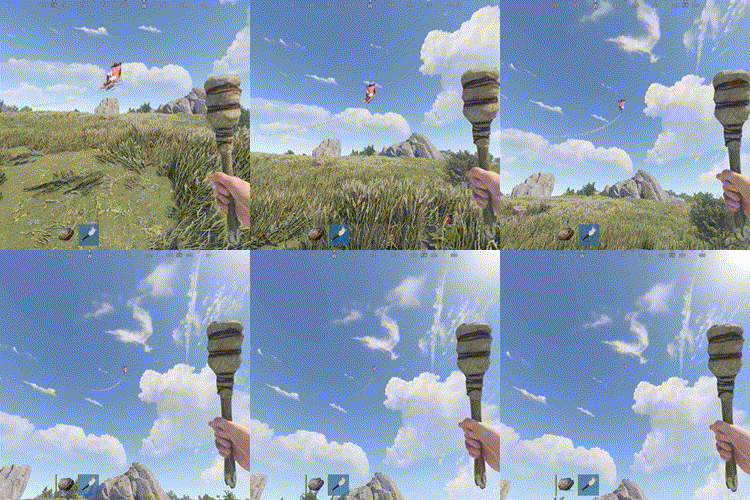
Troll those cheaters in style with the Rocket Man ! After exploding up in the sky their loot will drop all over the place, just like a Piñata. Use the chat command /troll.rocketman <player> or the rcon command troll.rocketman <player>. The player argument will accept a partial player name or a full Steam ID. All users with the Oxide "admin" role will get access to the command, but you may grant per user/group access using the permission oxidationtrollrocketman.use.$1.99- 17 comments
- 5 reviews
-
- 2
-
-
- #admin
- #admintool
- (and 5 more)
-
Version 1.0.1
28 downloads
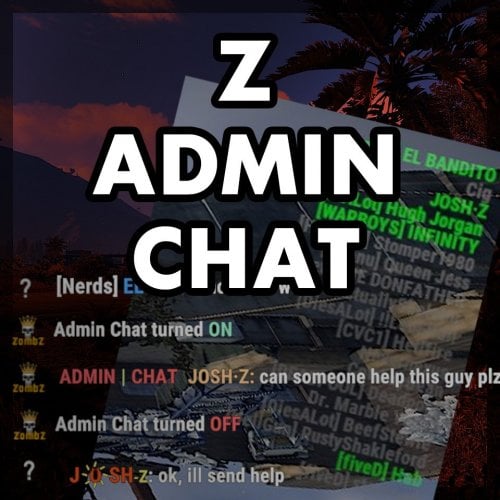
Z-Admin Chat adds a new chat functionality to the game which can be used by for example admins, moderators and chat mods. In most cases it is not preferred or possible to create a team for all staff and there are several reasons to think of why it's just not practical to join one team: The team would be to large, chat mods have their own team, the admin team talks about confident things and so on. On the other hand, the team chat and the team member list are super easy to use. Z-Admin Chat solves this dilemma by giving players with the right permission, access to the Admin Chat. Once activated, all chat messages will be only visible for other people in that group. To make life even better, Z-Admin Chat gives you the ability to show an additional list of members or the 'staff list' at the top right of your screen. It has the look and feel of the original team list and it shows you who of the staff is online. Features Extra chat channel, only visible for staff All players with permission will be shown in the staff list Find out who of your team is online in a split second Option to disable staff list Personal settings to style the staff list ( hide / show / font size / opacity ) Easy switching between normal chat and admin chat (chat command + console command) Full support for Better Chat plugin Chat style adjustable, your team won't miss your important chat messages Commands /ac -> toggle admin chat on/off Staff list: /ac show -> show staff list /ac hide -> hide staff list /ac update -> manually update staff list /ac opacity <number> -> (personal) change staff list opacity, value between 0 and 1 /ac fontsize <number> -> (personal) change staff list font size, value between 1 and 13 /ac update -> refresh staff list Console commands ac.toggle -> toggle admin chat on/off, for easy binding: bind h ac.toggle Permissions There's only one permission: zadminchat.use All players with this permission can use the admin chat and staff list when enabled. After giving the permission, the staff list shows up on connecting. It can also be forced to update, by using the command /ac update (by anyone) or /ac show (by the added player). Configuration The config file is as interesting as the permissions: { "UserListEnabled": true } At the moment, this is the only option available. When UserListEnabled is set to false, the UI part (staff list) of the plugin is totally disabled. Localization All chat messages sent by the plugin can be edited in the Language file. The Admin Chat prefix can also be changed here. The default tag may be ugly, but no staff member ever missed a chat!$5.00 -
Version 1.0.1
30 downloads
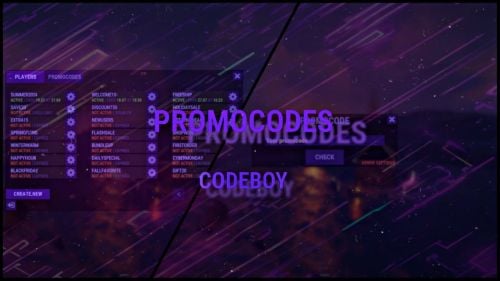
The promo code plugin for Rust game provides the ability to reward players for entering a code word. This plugin includes a variety of settings and functionality for easy management and configuration of promo codes in the admin panel. Main Features Creation and Configuration of Promo Codes: Promo Code: The administrator can create unique promo codes. Item Configuration: The administrator can determine which items will be given when the promo code is activated. Item Parameters Shortname: The code word for issuing a specific item. SkinID: The skin identifier of the item. DisplayName: The displayed name of the item. Amount: The number of items given by the promo code. Flexible Settings Promo Code Duration: Ability to set an end date until which the promo code will be active. Usage Limit: Setting a limit on the number of times the promo code can be used. Command Configuration Ability to replace item issuance with the execution of a specific server command when the promo code is activated. Example Usage Admin usage Give admin permission - promocodes.admin Open UI with command (can be changed in config, default: /p) Creating a Promo Code: Create the promo code "SUMMER21". Set its expiration date to July 31. Set a usage limit of 100 times. Player usage Open UI with command (can be changed in config, default: /p) Enter promocode Press CHECK button Item Configuration Add an item: shortname - "rifle.ak", skinid - "123456", displayname - "AK-47 Elite", amount - 1. Add an item: shortname - "ammo.rifle", skinid - "0", displayname - "Rifle Ammo", amount - 100. Command Replacement Set the command "give %STEAMID% some_reward" to be executed when the promo code is activated instead of issuing items. Configuration file { "Cooldown for promocode": 65, "Commands to open UI": [ "promocode", "promo", "code", "pc", "p" ] }$9.99 -

Version 1.0.5
2,974 downloads
This plugin modifies Rust's network system to use a more performant circular version. Using this on maximum settings with lower network distance offers an extreme performance boost over vanilla settings, and it has allowed huge server networks to push an extra 100 server pop on wipe with minimal lag. It's not a catch-all solution, but it works well for network lag with almost no downside. This also can marginally improve client FPS in some situations, as less entities are sent to clients. This method of optimization is being given out for free. If this helped your network reach higher pop, please consider supporting what I do on Patreon: https://www.patreon.com/vicerust This Plugin Uses Harmony This plugin uses Harmony patching which is a library built into Rust for modifying game functions. Since it is packaged as an Oxide plugin though, it needs Oxide's sandbox disabled to be able to do real modding. Oxide's sandbox tries to block certain functions to make it a bit harder to run malicious code, but it also blocks developers from doing any actual modding outside of Oxide. The sandbox is pointless as it isn't secure at all, which is why sites like CodeFling review plugins for security to make sure what you download isn't a virus. If you download a plugin from somewhere without moderation (CF, Lone, or uMod are all fine), it's not safe unless you verify it yourself---even with the sandbox on. You can read more on how to disable the sandbox here. How Does This Work? This quite literally just cuts the corners off the network distance grid. Vanilla Rust uses a square with radius 8 for "far" view distance, and 4 for "high priority" distance. This evens it out so that you will see the same distance in all directions, and cuts down 20% on networking costs at the same view distance. However, anecdotes from server owners show that nobody will notice if this is lower, so by default this plugin sets the far view distance to 6, which yields massive improvements over vanilla---around 52% lower networking costs.. Feel free to change the default Rust convars for network distance even lower, as this plugin will respect them: Net.visibilityRadiusFarOverride 5 Net.visibilityRadiusNearOverride 3 Defaults are 8 and 4 respectively. Unloading the plugin will disable the circular distance effect, but you will need to set the visibility radius back manually.Free- 49 comments
- 3 reviews
-
- 13
-
-
-
- #performance
- #admintool
- (and 3 more)
-
Version 1.0.0
1,861 downloads
Very basic admin tool. Set a location on the map (right click) and be instantly teleported. user will be teleported to ground level at location, so you may end up inside a base or monument. Command /tpm to enable or disable the function Permission Either player is admin or TPMarker.use to be able to use the functionFree- 8 comments
- 2 reviews
-
- 4
-
-
- #admintool
- #teleport
- (and 5 more)
-

Version 1.0.4
140 downloads
Designed for ease of use and efficiency, allowing you to check authorized players directly from in-game chat, the console, or RCON without any complicated setup. No configuration is needed—just upload the plugin, assign the necessary permissions, and you're ready to go. Checking who is authorized on a tugboat is now as simple as a quick command. Key Features: User-Friendly: Easy to use with no complicated setup—perfect for server admins of all experience levels. Versatile Access: Manage player authorizations from in-game chat, the console, or RCON. Permission-Based Control: Ensure that only authorized players have access to tugboats. No Configuration Required: Simply upload the plugin, add permissions, and you're all set. Quick Authorization Checks: Effortlessly check who is authorized on a tugboat with a simple command. Permission: tugauth.use Sample Commands: From ingame chat: /tugauth ^This scans the closest tugboat to your position From ingame console: tugauth ^This scans the closest tugboat to your position tugauth 1250 1 369 ^This scans for the closest tugboat at the provided coordinates From RCON: tugauth 1250 1 369 ^This scans for the closest tugboat at the provided coordinatesFree -

Version 1.0.9
327 downloads
permission for open UI - adminpanel.use Open UI - /admin FEATURES: Teleport player to you Teleporting you to play Ban and Kick Player Spawn all loot crate Spawn All Tree and Bush Spawn Animal Get Owner (get owner of the structure you're looking at) View inventory Spawn Vehicles P.s - (My Discord - tofurahie#4144)$9.99 -
Version 1.0.8
956 downloads
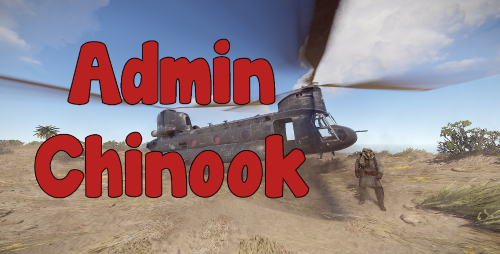
A lightweight plugin for admins to spawn a chinook helicopter. The helicopter will despawn after a set amount of time. Chat command to spawn chinook: /ch47 Permission: adminchinook.use Configuration: { "Time until heli despawn after last player dismounts (seconds)": 10.0, "Time until heli despawn after spawn if no player mounts (seconds)": 20.0, "Allow anyone to mount the heli": false }Free -
Version 1.0.0
608 downloads
Fancy a bit of Centralized Banning without paying for RustAdmin or similar. What is Centralized banning? Centralized banning is the ability to ban a player on one server and have that ban logged across all of your servers. If you have a web server that runs php and mysql you can easily set it up. This is literally a simplified version of the RustyBan Centralized banning system for use with the server end point system. Installation is easy: Setup a sql user, database and API table. (my sql rip is at the bottom) Edit the Database.php file in API/config folder with your Database name, User and password. Drop the API files into your webserver drop the CentralBan.cs plugin into all your servers. Set the API URL in the oxide config file and run the CentralFirstRun command in console. then set your server.bansserverendpoint as your check.php?steamId= address Done! confused? Watch my video SQL CREATE TABLE `API` ( `id` int(11) NOT NULL, `steamId` varchar(17) NOT NULL, `Reason` text NOT NULL, `expiryDate` timestamp NOT NULL DEFAULT current_timestamp() ON UPDATE current_timestamp() ) ENGINE=MyISAM DEFAULT CHARSET=latin1; ALTER TABLE `API` ADD PRIMARY KEY (`id`); ALTER TABLE `API` MODIFY `id` int(11) NOT NULL AUTO_INCREMENT; COMMIT;Free -

Version 1.0.0
270 downloads
OneForAll is another MikeHawke is camping and bored creation. Fire off multiple console commands from the config with one console command.. easy peasy Command OFA << Console command to fire off what is in the config Config Here is an example if i wanted the server to say 1 2 3. { "Command List": [ "say 1", "say 2", "say 3" ] } you can use any Rcon command. o.reload, o.unload. o.load. o.grant o.revoke o.CantThinkOfAnyMoreOfTheTopOfMyHead make sure each command is in quotations and broken up with commas like above.Free -
Version 1.0.2
633 downloads
The Dropbox Extension creates a backup of your Rust files and uploads them to your Dropbox account. Video Below Explaining Usage and setup Requires a Dropbox developer app to be made at http://dropbox.com/developer to get an OAuth2 Token and a directory in your Dropbox folder. File is contained in a zip. unzip the folder to find Oxide.Ext.DropBox.dll Power off your server, place the .dll in your RustDedicated_data/managed folder Please note some providers do not grant access to this folder you may need to open a support ticket with your host Powering on the server will create a file in the oxide/config folder. Configuration { "OAuth2Token": "Token here", "DropBoxDir": "DropBox_Directory", "BackupInterval": 3600, "BackupOxideConfig": true, "BackupOxideData": true, "BackupOxideLang": true, "BackupOxideLogs": true, "BackupOxidePlugins": true, "BackUpServer": true, "FileList": [] } V1.0.1 > BackUpServer value will save any files in your rust instance/server folder (maps, saves, etc) By default the extension will back up all of the oxide folder.. however if you only wish to backup specific files in the directory or say HurtWorld files set the values in FileList. E.g. "FileList": ["autosave_DiemensLand.plr", "autosave_DiemensLand.wld"] Once you have changed the settings a reboot will be required. VideoFree- 2 reviews
-
- 5
-
-
- #rust
- #hurtworld
- (and 5 more)
-

Version 1.0.1
52 downloads
Facepunch generated loot containers change on spawn, sometimes it's a Military crate, sometimes elite, sometimes normal. RustEdit however does not. It will only spawn the crates/barrel you define. Heres where LootCreate comes in, Two simple commands to place either a crate or a barrel and away you go. Containers are selected randomly from a list in the config and a timer defines the respawn time. (default 2-8 mins) Containers are stored in the data file which is cleared on wipe. Permission LootCreate.admin << required to use commands Commands /PlaceCrate << will place a crate where the player is standing /RemoveCrate << Removes the crate you are looking at (best if you stand on the crate and look down at it) /PlaceBarrel << will place a barrel where the player is standing /RemoveBarrel << Removes the barrel you are looking at (best if you stand on the barrel and look down at it) Configuration { "Crate Prefab List": [ "assets/bundled/prefabs/radtown/crate_basic.prefab", "assets/bundled/prefabs/radtown/crate_elite.prefab", "assets/bundled/prefabs/radtown/crate_normal.prefab", "assets/bundled/prefabs/radtown/crate_normal_2.prefab", "assets/bundled/prefabs/radtown/crate_tools.prefab" ], "Barrel Prefab List": [ "assets/bundled/prefabs/autospawn/resource/loot/loot-barrel-1.prefab", "assets/bundled/prefabs/autospawn/resource/loot/loot-barrel-2.prefab", "assets/bundled/prefabs/radtown/oil_barrel.prefab", "assets/prefabs/resource/diesel barrel/diesel_barrel_world.prefab" ], "Respawn timer upper": 480.0, "Respawn timer lower": 120.0 } Pretty self explanatory, a list of Barrel Prefabs, a list of Crate Prefabs and two numbers that the timer is triggered between. Data The crate and barrel information are save in the LootCreate.json datafile. Deleting this file will clear all placed containers. This is triggered to wipe on new save. Meaning if you wipe the server save it will clear the data. *IF YOU SETUP THE LOOT AND THEN WIPE THE SERVER BEFORE GOING LIVE MAKE SURE YOU BACKUP THIS DATA FILE OR ALL YOUR HARD WORK WILL BE UNDONE* If you have any questions or problems, join my discord https://discord.gg/D2zTWCEnrN$5.00-
- 2
-
-
- #maps
- #mapmaking
- (and 6 more)