Search the Community
Showing results for tags 'alert'.
Found 8 results
-
Version 1.0.1
30 downloads
DiscordRaidAlarm is a fully vanilla-friendly Rust plugin and Discord integration that alerts defenders when their base is under attack. It does not rely on Rust+ or any external "seismic sensors.” By detecting building damage in a standard Rust server (Oxide/uMod or Carbon), the system sends raid data to a PHP script with a MySQL database, and a Discord bot delivers real-time notifications to defenders via direct messages. You can either host your own single-tenant bot or register with our public multi-tenant bot (no hosting required). Once Steam-to-Discord mapping is in place, your players receive automated alerts about raids, even on completely vanilla Rust servers.If you need help configuring it, message me on Discord: CrypticRedhat. 1. Overview DiscordRaidAlarm notifies Rust players on Discord if their base is under attack. Its core components: Rust Plugin: Captures damage events and posts them to a PHP script. PHP Script + MySQL: Stores raid data in a raid_events table. Discord Bot: Reads the table and DMs defenders. You can either use: Our Public Multi-Tenant Bot (simplest; no hosting required), or A Self-Hosted Single-Tenant .exe (full control, optional). This guide focuses first on the public multi-tenant bot approach—especially how to invite the bot and use /registertenant. 2. Prerequisites Rust Server supporting Oxide/uMod or Carbon. A web host or cPanel environment for PHP + MySQL. A MySQL database (username, password, DB name, etc.). Token generated from it-tools.tech/token-generator (used across plugin & PHP script, and you’ll provide it to the multi-tenant bot). If you choose to self-host your own bot: A Windows machine and optionally a Discord Developer Portal application for a custom bot token. 3. Token Generation & Matching Go to it-tools.tech/token-generator → click generate. Use that random string for: Rust plugin config (API Auth Token), PHP script (API_TOKEN), And you’ll also provide it to the multi-tenant bot in /registertenant or your self-hosted bot config. All must match exactly or you’ll see 401/403 errors. 4. Rust Plugin Setup (Oxide/uMod or Carbon) Obtain DiscordRaidAlarm.cs. Place in your Rust server’s plugin folder: Oxide: oxide/plugins/ Carbon: Carbon/Plugins/ 3. Load the plugin: Oxide: oxide.reload DiscordRaidAlarm or restart. Carbon: c.reload DiscordRaidAlarm. 4. Config: Check oxide/config/DiscordRaidAlarm.json or similar. Set "API URL" to your DiscordRaidAlarm.php location, e.g. https://yourdomain.com/DiscordRaidAlarm.php. Set "API Auth Token" to the same token from Step 3. Verify no errors. Run oxide.plugins or carbon.plugins to confirm it’s loaded. 5. PHP API Setup Upload DiscordRaidAlarm.php to your web host. Edit lines like: define('DB_HOST', 'localhost'); define('DB_NAME', 'my_database'); define('DB_USER', 'my_db_user'); define('DB_PASS', 'my_db_pass'); define('API_TOKEN', 'YOUR_RANDOM_TOKEN'); Make sure API_TOKEN matches your plugin. Ensure you can reach DiscordRaidAlarm.php in a browser (it may show an error, that’s normal with no parameters). 6. Database Creation Create a MySQL DB or use an existing one. Import create_table.sql: mysql -u my_db_user -p my_database < create_table.sql 3. Check for raid_events: SHOW TABLES; If it’s there, you’re set. 7. Using the Public Multi-Tenant Bot If you don’t want to host a .exe, our public multi-tenant Discord bot can poll your raid_events for you. Below are the two main steps: inviting the bot, then registering your tenant via the /registertenant slash command. 7.1 Invite the Bot to Your Server Click this invite link: Invite It’s pre-configured with minimal but necessary permissions, including Send Messages (crucial for DM or channel posting) and other relevant scopes. Select your Discord server and authorize it. The bot will now appear in your server’s member list. If it can’t send messages or you want slash commands to work, ensure it has the right role/permission in the server. Typically "Send Messages,” "Embed Links,” "Read Messages History,” and "Use Application Commands” are enough. 7.2 Register Your Tenant with /registertenant Open a text channel (or any channel) in the same server where you invited the bot. Type /registertenant. You’ll see a form for: api_url (required) – The URL to your DiscordRaidAlarm.php. api_token (required) – The same token from your plugin + DiscordRaidAlarm.php. steamlink_url (required) – If you’re using a steam-to-discord link system. steamlink_secret (required) – Also for your steam link system. bypass_token (optional) – For some advanced steam link usage. poll_interval (optional) – How often the bot checks your raids, in seconds. Defaults to the global fallback if omitted. Fill out each field carefully: api_url: e.g., https://yourdomain.com/DiscordRaidAlarm.php api_token: your random token. steamlink_url / steamlink_secret: If you do not have a steam linking system, just enter placeholders. (Optional) bypass_token or poll_interval if needed. Press Enter. The bot will respond ephemerally with either "Tenant registered/updated successfully!” or an error message if something went wrong. If successful, the bot automatically logs your server info (guild_id + config) in its multi-tenant DB. From this point on, the bot polls your raid_events table. Done! Whenever your plugin logs a raid, the bot sees it and DMs the defenders (assuming you have steam-to-discord mapping set up). Important: You must run /registertenant from within the server that the bot is invited to. The bot automatically captures your guild_id from the slash command, linking that guild to the api_url + api_token you provided. 8. Self-Hosted Bot (Optional) If you prefer hosting your own single-tenant .exe, skip Section 7 and do this: Create a Discord bot in the Developer Portal. Invite it with permissions like Send Messages, etc. Edit appsettings.json or .config: { "BotSettings": { "BotToken": "YOUR_BOT_TOKEN", "RaidApiUrl": "https://yourdomain.com/DiscordRaidAlarm.php", "RaidApiToken": "YOUR_RANDOM_TOKEN", "PollIntervalSeconds": "10" } } Run DiscordRaidAlarmBot.exe. It polls your raid_events table, DMs defenders. 9. Testing & Verification Trigger a test from your Rust server plugin if it supports a test command (like /raidalarm.test). Otherwise, damage a building block. Check your MySQL raid_events table: SELECT * FROM raid_events; If a new row is added with processed=0, the bot should see it next poll cycle (every 10–30 seconds or your chosen interval). The bot (public multi-tenant or your own) sends direct messages to any defenders with known Discord IDs. If you see "Tenant registered/updated successfully!” from /registertenant but no raids are processed, check Troubleshooting. 10. Troubleshooting No DMs: Possibly defenders’ privacy settings block DMs from that server’s members. The user might not be in the same Discord server. Steam ID → Discord ID mapping is missing if you rely on external link systems. "Tenant registration failed” or 403/401 messages: Mismatched api_token between the Rust plugin, the DiscordRaidAlarm.php, or the data you entered in /registertenant. Typo in the api_url or server didn’t load the plugin. Bot Not Sending: For the public multi-tenant bot, confirm you typed /registertenant in the correct server, and it responded with success. For your self-hosted bot, ensure the .exe is running, the token is valid, and it’s in your server with Send Messages permission. Plugin Not Logging: Check the console logs for DiscordRaidAlarm.cs loading errors. Possibly it’s in the wrong folder for Oxide/Carbon, or you didn’t set "API Auth Token” in the plugin config.$29.99- 1 review
-
- 3
-

-

-
- #raid
- #raid alarm
- (and 5 more)
-
.thumb.gif.cc6c8fae2d3633a548d9d64d7acc5a2a.gif)
Version 2.0.4
489 downloads
Raid alert in # Game [UI] # Rust+ # Discord # VK.COM # Telegram Need mod: DiscordAPI (https://umod.org/extensions/discord) Attention, first you need to turn off the server, then install the mod Chat command /raid UI The menu is not distorted when changing the screen resolution Messages edit in oxide/lang Localization const bool fermensEN = true; // true - ENGLISH PLUGIN | false - RUSSIAN PLUGIN // 35 lines in .cs file SETTING UP ALERTS IN DISCORD How create bot: https://discordpy.readthedocs.io/en/latest/discord.html How copy ChannelID: https://support.discord.com/hc/en-us/articles/206346498-Where-can-I-find-my-User-Server-Message-ID- SETTING THE ALERTS IN VK.COM "API from the group" a short beginner's guide To get this key, go to the group, select the "Community Management" item in the menu, then the "Work with API" item and click the "Create Key" button, check the box "Allow the application to access community messages", click "Create". The resulting key is inserted into the plugin configuration file, the column "API". Fill in the columns! "Token (https://discordapp.com/developers/applications)" "Channel ID, where the player will take the code to confirm the profile" SETTING UP ALERTS IN TELEGRAM Add bot @botfather via telegram, press /start Write /newbot Come up with a name and write in response, as well as specify in the plugin config Write /mybots, select your bot and click API Token, copy it and specify it in the plugin config Reload plugin, done CONFIG { "Server name, will using for alerts": "HaxLite X10", "VK.com": { "Enable?": true, "API": "", "Cooldown for sending": 1200.0 }, "Rust+": { "Enable?": true, "Cooldown for sending": 600.0 }, "In game": { "Enable?": true, "Cooldown for sending": 60.0, "Send game effect when notification are received": "assets/prefabs/weapons/toolgun/effects/repairerror.prefab", "Time after the UI is destroyed": 4.0, "UI": "[{\"name\":\"UIA\",\"parent\":\"Overlay\",\"components\":[{\"type\":\"UnityEngine.UI.RawImage\",\"material\":\"assets/content/ui/uibackgroundblur.mat\", \"sprite\":\"assets/content/ui/ui.background.transparent.linearltr.tga\",\"color\":\"0 0 0 0.6279221\"},{\"type\":\"RectTransform\",\"anchormin\":\"1 0.5\",\"anchormax\":\"1 0.5\",\"offsetmin\":\"-250 -30\",\"offsetmax\":\"0 30\"}]},{\"name\":\"D\",\"parent\":\"UIA\",\"components\":[{\"type\":\"UnityEngine.UI.Image\",\"color\":\"1 0 0 0.392904\"},{\"type\":\"RectTransform\",\"anchormin\":\"0 0\",\"anchormax\":\"1 0\",\"offsetmin\":\"0 0\",\"offsetmax\":\"0 5\"}]},{\"name\":\"T\",\"parent\":\"UIA\",\"components\":[{\"type\":\"UnityEngine.UI.Text\",\"text\":\"{text}\",\"fontSize\":12,\"align\":\"MiddleLeft\",\"color\":\"1 1 1 0.8644356\"},{\"type\":\"RectTransform\",\"anchormin\":\"0 0\",\"anchormax\":\"1 1\",\"offsetmin\":\"5 0\",\"offsetmax\":\"-5 0\"}]},{\"name\":\"U\",\"parent\":\"UIA\",\"components\":[{\"type\":\"UnityEngine.UI.Image\",\"color\":\"1 0 0 0.3921569\"},{\"type\":\"RectTransform\",\"anchormin\":\"0 1\",\"anchormax\":\"1 1\",\"offsetmin\":\"0 -5\",\"offsetmax\":\"0 0\"}]}]" }, "Discord": { "Enable?": true, "Cooldown for sending": 600.0, "Token (https://discordapp.com/developers/applications)": "", "Channel ID, where the player will take the code to confirm the profile": "401360615521648663", "Info text": "Enter the received code in the integration menu for raid alerts.\nChat command /raid\nEnter it in the game itself, not in the discord!", "Info text - line color on the left": 14177041, "Text on button": "Get code", "Reply after button click": "Your code: {code}", "Don't touch this field": "938118623707430983" }, "Additional list": [ "wall.external.high", "wall.external.high.stone", "gates.external.high.wood", "gates.external.high.stone", "wall.window.bars.metal", "wall.window.bars.toptier", "wall.window.glass.reinforced", "wall.window.bars.wood" ], "Telegram": { "Enable?": true, "Cooldown for sending": 1200.0, "Bot tag": "@haxlite_bot", "Token": "" }, "Menu UI": { "Background color": "0.07843138 0.06666667 0.1098039 0.9490196", "Strip color": "0.8784314 0.9843137 1 0.5686275", "Rectangular container background color": "0.8901961 0.8901961 0.8901961 0.4156863", "Button text color": "1 1 1 0.9056942", "Text color": "1 1 1 1", "Green button color": "0.5450981 1 0.6941177 0.509804", "Red button color": "1 0.5450981 0.5450981 0.509804", "Gray button color": "0.8901961 0.8901961 0.8901961 0.4156863", "Header text color": "1 1 1 1", "Error text color": "1 0.5429931 0.5429931 0.787812", "Text color of <exit> and <back> buttons": "0.5938045 0.5789595 0.5789595 1", "Rectangular container text color": "1 1 1 0.7843137", "The color of the text with hints at the bottom of the screen": "1 1 1 0.6699298", "Abbreviations and their colors": { "Abbreviation for telegram": "TG", "Telegram icon color": "0.5479987 0.9459876 1 0.4156863", "Abbreviation for vk.com": "VK", "Vk.com icon color": "0.5803922 0.6627451 1 0.4156863", "Abbreviation for rust+": "R+", "Rust+ icon color": "1 0.5803921 0.6013725 0.4156863", "Abbreviation for discord": "DS", "Discord icon color": "0.6313726 0.5764706 1 0.4156863", "Abbreviation for in game": "UI", "In game icon color": "1 0.7843137 0.5764706 0.4156863" } } }$15.00 -
.thumb.gif.760590747e7fe0ee20f7379c315bbd33.gif)
Version 2.1.0
28 downloads
Crash Alert System is a vital tool designed for server administrators who need an efficient way to keep their players informed about server crashes. This plugin automatically sends notifications to Discord whenever a crash occurs, ensuring that both your staff and community stay updated in real-time. Additionally, it includes a unique feature to reward players who rejoin the server after a crash, helping to keep your community engaged and active. With its easy-to-use interface and extensive customization options, managing crash alerts and player rewards has never been simpler. Key Features: Real-time Alerts: Get instant notifications sent directly to your Discord server whenever a crash happens, keeping everyone in the loop. Player Rewards: Motivate players to return after a crash by offering configurable rewards for rejoining. Easy Setup: Customize the plugin quickly and easily to fit your server’s specific needs. Plugin Integration: Works seamlessly with your existing tools and plugins for effortless server management. Comprehensive UI: Manage all settings and rewards through a practical, user-friendly interface. Item Categorization: Choose rewards from detailed item categories, giving you precise control over what players receive. Advanced Discord Configuration: Tailor notification messages and embeds to match your server’s branding and style. Notification Options: Decide whether to enable or disable UI and chat notifications based on your preferences. Reset Categories: Reset item categories to their default settings with ease whenever needed. Permissions: crashalertsystem.notify.see: Players need this permission to view the crash notification UI (if it’s enabled in the configuration). crashalertsystem.admin: Admins require this permission to access the configuration settings and reward management interface. Chat Commands: /cas: Opens the main user interface. From here, you can configure crash notifications, manage player rewards, and adjust settings. Console Commands: cas.resetcategories: Resets the item categories to their default settings. This is handy if you need to restore the original item groupings for the reward system. Config { "Discord Settings": { "WebhookUrl": "", "MessageContent": "@everyone or @here or <@&role-id>", "BotName": "Crash Alert System", "BotAvatarUrl": "https://codefling.com/uploads/set_resources_13/cf0d9ad89a1246bdc528542aa98e2147_cf_logo_23_res.png", "Embed": { "AuthorName": "Crash Alert System or ServerName", "AuthorIconUrl": "https://codefling.com/uploads/set_resources_13/cf0d9ad89a1246bdc528542aa98e2147_cf_logo_23_res.png", "Title": "Server Crash Detected", "Description": "The server has suffered a crash.\nPlease allow 1 to 5 minutes for the server to come back online.", "ThumbnailUrl": "https://codefling.com/uploads/set_resources_13/cf0d9ad89a1246bdc528542aa98e2147_cf_logo_23_res.png", "FooterText": "Crash Alert System | {DateTime}", "FooterIconUrl": "https://codefling.com/uploads/set_resources_13/cf0d9ad89a1246bdc528542aa98e2147_cf_logo_23_res.png", "FieldTitle": "Estimated Data Loss", "FieldContent": "The server lost approximately {0} of data", "ColorHex": "#FF0000" } }, "Reward Settings": { "EnableRewards": true, "RewardTimeLimit": 3600, "RewardItems": [] }, "Notification Settings": { "Use Notify UI alerts": false, "Use chat alerts": true }, "UI Settings": { "CheckIcon": "✓", "CrossIcon": "✖", "CheckIconColor": "0.5568627 0.7764706 0.1843137 1", "CrossIconColor": "0.7764706 0.5137255 0.4196078 1", "BackgroundColorHex": "#5095C4" } } Lang { "NoPermission": "You don't have permission to see this notification.", "RewardReceived": "Thanks for joining the server after the crash! Check your inventory for compensation items!", "RewardAdded": "Added {0}x {1} to crash rewards.", "RewardRemoved": "Removed {0}x {1} from crash rewards.", "RewardUpdated": "Updated {0} quantity to {1}.", "InvalidItem": "Invalid item. Please try again.", "InvalidQuantity": "Please enter a valid quantity greater than 0.", "ManageRewards": "Crash Alert System - Reward Manager", "ItemSelector": "Crash Alert System - Item Selector", "NoRewards": "No rewards configured. Click the 'Add Reward' button to add some.", "EnterQuantity": "Enter quantity for {0}", "AddReward": "Add Reward", "RemoveAll": "Remove All", "Close": "Close", "Back": "Back", "ConfirmRemoveAll": "Are you sure you want to remove all rewards?", "Yes": "Yes", "No": "No", "ConfigTitle": "Crash Alert System Configuration", "DiscordSettings": "Discord Settings", "DiscordWebhookSettings": "Webhook Settings", "DiscordMessageSettings": "Message Settings", "DiscordEmbedSettings": "Embed Settings", "RewardSettings": "Reward Settings", "NotificationSettings": "Notification Settings", "Save": "Save", "Cancel": "Cancel", "Edit": "Edit", "AllCategories": "All Categories", "WebhookUrl": "Webhook URL", "MessageContent": "Message Content", "BotName": "Bot Name", "BotAvatar": "Bot Avatar URL", "AuthorName": "Author Name", "AuthorIcon": "Author Icon URL", "Title": "Title", "Description": "Description", "ThumbnailUrl": "Thumbnail URL", "FooterText": "Footer Text", "FooterIcon": "Footer Icon URL", "FieldTitle": "Field Title", "FieldContent": "Field Content", "ColorHex": "Color (Hex)", "SavedSuccessfully": "Configuration saved successfully!", "Search": "Search all items...", "CategoryAll": "All Categories", "CategoryWeapons": "Weapons", "CategoryTools": "Tools", "CategoryConstruction": "Construction", "CategoryItems": "Items", "CategoryResources": "Resources", "CategoryAttire": "Attire", "CategoryMedical": "Medical", "CategoryFood": "Food", "CategoryAmmo": "Ammunition", "CategoryTraps": "Traps", "CategoryMisc": "Miscellaneous", "CategoryComponents": "Components", "CategoryElectrical": "Electrical", "CategoryFun": "Fun", "CategoriesReset": "Item categories have been reset to default values." }$6.99 -

Version 1.5.0
174 downloads
Want to include raid schedules into your community server without blocking damages ? This is the perfect plugin for you ! Features - Set custom schedules for each day of the week, you can also set your timezone - Receive an alert on discord (using webhooks) each time a player is destroying another player entity out of the schedules - Run a custom command when a raid alert is triggered, commonly used to auto-ban raiders - Define which type of construction you want to protect - Ignore twig constructions if you want Permissions - tp2raider : Allow user to teleport on the latest raider detected by typing /tp2raider Dependencies None Language It supports different languages, EN by default, feel free to add your own translation. Support This plugin won't get you blacklisted from community by Facepunch. Join my discord if you need support or have any question => https://discord.gg/RZ8h7e2D6E Demo$15.00 -
Version 1.0.1
283 downloads
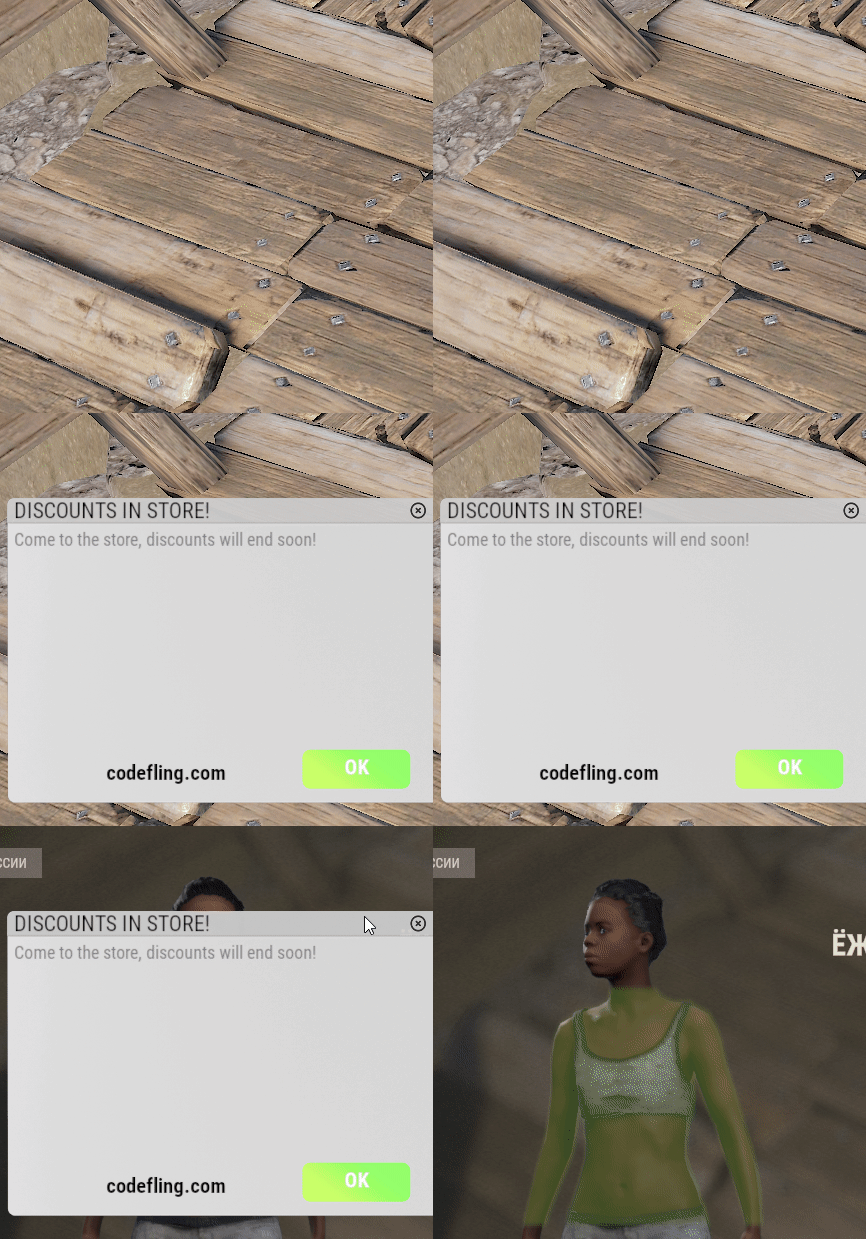
Interface notification for players. The fact that players may not notice some server functions that the administrator has kindly provided to them is a normal phenomenon. This plugin is called to solve this problem. Until the player presses the close button, the sign will hang. When you click on the OK button, the menu of the plug-in, the command of which you have registered, will open. You can choose your design in the config! Commands(console or f1): MgAlert SendPresetEveryone [presetname] - send a message to everyone from the presets in the config MgAlert SendPreset [nickname/id] [presetname] - send a message from presets to one player MgAlert SendEveryone [text] - Send everyone a normal message with text Mgalert Send [nickname/id] [text] - send messages to one player Permissons: MgAlerts.cansendmessage - allows you to send messages Config: { "List of auto-notifications": [ { "Title": "GRAFFITI", "Text": "If you text /graffiti, you can choose your spray pattern!\n Click <color=green>OK</color> and check it out!", "Command to be executed when the OK button is clicked": "chat.say /graffiti", "URL that can be copied (leave blank if not required)": "" }, { "Title": "SKIN", "Text": "Skins are available to everyone: /skin and a sea of skins is already in front of your eyes!\n Press <color=green>OK</color> and check it out!", "Command to be executed when the OK button is clicked": "chat.say /skin", "URL that can be copied (leave blank if not required)": "" } ], "List of alert presets": { "sale": { "Title": "DISCOUNTS IN STORE!", "Text": "Come to the store, discounts will end soon!", "Command to be executed when the OK button is clicked": "chat.say /store", "URL that can be copied (leave blank if not required)": "codefling.com" } }, "Interval between auto-messages in seconds": 600.0 }Free- 2 comments
-
- 1
-
-
- #interface
- #notification
- (and 1 more)
-
Version 2.0.1
202 downloads
Features: This bot runs api scans on each player that joins and displays a warning on discord if they might be breaking your rules. It searches for players with: EAC Banned alt accounts Battlemetrics banned alt accounts Low Battlemetrics hours and boosted steam hours Temp banned accounts Recently created steam or battlemetrics accounts Steam accounts that aren't set up Each alert is displayed only once (if used with Mysql or MongoDB (MongoDB can be hosted for free), so your channels won't be spammed with the same players over and over. You can set different channels for each category. Alt detection system: If someone connects from 10+ different IPs it will only mark other accounts as alt if they share more than one ip. It will only mark accounts as alts if 6 or less players connected from that ip. Support If you need help or If you have any issues or suggestions you can contact me by joining my discord server: https://discord.gg/efVKDG6z6F or by adding me on discord: Farkas#6006$19.90- 6 comments
- 2 reviews
-
- 1
-
-
- #eac
- #battlemetrics
- (and 18 more)
-
Version 1.0.0
213 downloads
Gametip Soundalert offers the Admin a small Plugin to Broadcast a Gametip to all Players.Every Player will also get a notification Sound. The Plugins plays the Effect "Team Invitation" when you send a Gametip. Can be used from your Server Console (works with Schedule/TImedEvents) or Ingame with Permission: effecttimer.use Timer Command effecttimer TipLength Tip Text to Send Example effecttimer 10 This is a Test Tip This will send a Tip for 10 Seconds and poke all Players with a Invitation Sound. No Config RequiredFree- 1 comment
-
- 2
-
-
-
- #gametip
- #notification
- (and 2 more)
-

Version 1.0.0
1,029 downloads
Automatic chat alerts at intervals easy to set up --------------------------------------------------------------------------- Config { "Message text": [ "<color=#ffff66>[HAXLITE]</color> There is an info menu on the server.\n<size=10><color=#ffff66>/info</color></size>", "<color=#ffff66>[HAXLITE]</color> Wipe every Friday at 15:00\n<size=10><color=#ffff66>/info</color></size>", "<color=#ffff66>[HAXLITE]</color> Join us on our discord channel to stay up to date with the latest changes on the server.\n<size=10><color=#ffff66>ds.haxlite.ru</color></size>", "<color=#ffff66>[HAXLITE]</color> There are daily free roulettes in our game store.\n<size=10><color=#ffff66>rust.haxlite.ru</color></size>" ], "Message sending interval": 300.0, "SteamId who sends [for avatar]": 1 }Free