Search the Community
Showing results for tags 'armor'.
Found 8 results
-
.thumb.png.dae6f99f5e11e84c837371ae0801a3a2.png)
Version 0.6.5
238 downloads
ABOUT UPGRADER : Allows players to upgrade various item categories, including weapons, armor, and tools, each with unique upgrade options. Extensive configuration options for server admins to adjust : What items will be upgradable (Only items what you chose to put in config will have upgrades ) What upgrades will item have ( you dont need to put all upgrades on item ,only what upgrades you chose for a item) Upgrade costs (you can put what ever custom/default item,and amount for cost) Levels (you can choose how much upgrade will have levels) Values of upgrades (you can choose value of each upgrade ,example "damage" Lv1 2% damage, Lv2 5%) There is a easy way to control your upgrades , all about items can be done in UI. Adding,removing items can be done by UI. You can modify items true UI : upgrade types, levels ,values ,cost . In chosing cost there is also custom category tab , you need to add those items in config at bottom of config file ! There is Inspection button where you can see stats of upgraded item in inventory. UPGRADES : Each category have their own upgrades : Wepons : Armor : Tools : Damage, Defense, GatherYield, MagazineSize, Durability, Durability, Durability, RadiationProtection, Deforestation, LifeSteal, ResurrectionChance InstantMine, CritChance, RestoreItems Smelting InstaReload Each category have RenameName of a item . HOW TO USE : Simple put Upgrader.cs to your plugin folder . Add/remove items from config or true UI . Chose upgrades for items (levels,cost,values) . In Game : Add permissions. When player put item in Repair Bench he will see Upgrade button . UI will open with upgrades. Inspection button is below belt inventory ,when player click on it it will open inspection mode ,so he will be able to see item upgrades in small UI. INFOPANEL : Admins can change text in config file for a ServerName and Info . For more explanations to player or what ever text you need . DIAMONDS : 4 custom items (diamonds) .They can be used for cost of upgrades. You can chose stacksize ,where they will spawn(lootboxes),chance to spawn in boxes ,and amount. You can change theirs DisplayName , SkinId . You can use them or not ,its a option . COMMANDS : Chat Command : /additem ( it opens Ui where you can modify upgrades ) Chat Command : /giveupgradeditem [playerID/name] <itemUID> ( when you upgrade item ,you can see his UID in DataFile ! ) Console Command : giveupgradeditem [playerID/name] <itemUID> Chat Command : /givediamond "name" "amount" Console Command - wipeupgradedata PERMISSION SYSTEM/COMMANDS : upgrader.button - allow to see button in repair bench for upgrade upgrader.weapon - allow weapon upgrades upgrader.armor - allow armor upgrades upgrader.tool - allow tool upgrades upgrader.bypasscost - free upgrades upgrader.diamondgive - allow to use command /givediamond "name" "amount" upgrader.additem - allow to use command /additem upgrader.giveitem - allow to use command /giveupgradeditem [playerID/name] <itemUID> console command - giveupgradeditem [playerID/name] <itemUID> CONFIG EXAMPLE : Upgrader.json DATA : There is data file what stores upgrades of items. You can delete data items with command in console . Console Command - wipeupgradedata API : [HookMethod("API_HasUpgrades")] public bool API_HasUpgrades(Item item) [HookMethod("API_GetUpgrades")] public Dictionary<string, int> API_GetUpgrades(Item item) [HookMethod("API_ApplyUpgrades")] public void API_ApplyUpgrades(Item item, Dictionary<string, int> upgrades)$20.00 -

Version 1.0.6
477 downloads
Item Perks: Legendary items is a plugin that allows you to create and fully customize legendary named items on your rust server. It uses the perk sets available from the Item Perks plugin, allowing for the creation of some very unique items in Rust. The fields for creating a new item are: Name: Give the item a unique name that captures it's essence Skin: Assign a skin that matches what the item does. Description/Story: Add some flavor to the item and write a short blurb or backstory for the item, which will display when the player mouses over the ownership banner, along with the buffs. Buffs: Add as many or as few ItemPerk buffs as you would like, with any amount of buff values. Restrict enhancement: Prevent or allow enhancement kits to affect each Legendary item. Global chat announcement: Announce in chat when a player finds a really rare or powerful item. Amour slots: Set the amount of armor slots the item spawns with (if applicable). There are a number of drop sources that can be selected for your legendary items to drop. Along with the source, you can specify which item/prefab shortname you want to restrict the drop to, or which shortnames you want it to exclude. The shortname will depend on the loot source. Loot sources with the type "Prefab" will need to use the prefab shortname, where as those with the "Item" type will need to use item shortnames. Type: Prefab Example: crate_normal_2, heli_crate, crate_elite. Type: Prefab Example: loot-barrel-2, loot-barrel-1 Type: Boss name Example: scarecrow the destroyer. Type: Event name Supports: Harbor Event: "Harbor" Junkyard Event: "Junkyard" Satellite Dish Event: "SatDish" Water Event: "Water" Air Event: "Air" Arctive Base Event: "Arctic" Gas Station Event: "GasStation" Sputnik Event: "Sputnik" Shipwreck Event: "Shipwreck" Triangulation Event: "Triangulation" Supermarket Event: "Supermarket" Caravan Event: "Caravan" Powerplant Event: "Powerplant" Armored Train Event: "ArmoredTrain" Convoy Event: "Convoy" Ferry Terminal Event: "FerryTerminal" SurvivalArena: "SurvivalArena" Type: Prefab Example: scientistnpc_arena, scientistnpc_heavy. Type: Prefab Example: npc_tunneldweller, npc_underwaterdweller. Type: Npc name Example: military defenders. Type: Prefab Example: oak_b, swamp_tree_a, pine_dead_snow_c. Type: Prefab Example: stone-ore, sulfur-ore, metal-ore. Type: Prefab Example: chicken.corpse, shark.corpse, player_corpse. Type: Prefab Example: hemp-collectable, berry-red-collectable, corn-collectable. Type: Prefab Example: hemp.entity, pumpkin.entity, wheat.entity. Type: Item Example: rifle.ak, axe.salvaged, icepick.salvaged.$11.99 -
Version 2.1.12
610 downloads
This is a powerful tool that allows you to customize the protection of wearable items in the game. With this plugin, admins can create their own items with their own protection values and customize the protection of existing items. This means that players can adjust the protection to their playing style, which gives them an advantage in combat. One of the distinguishing features of the plugin is its ability to allow players to take damage from NPCs on PVE servers depending on the equipment worn. This adds a new level of realism to the game, as players must carefully consider their defense when interacting with NPCs. It also encourages players to invest time and resources into building better gear, as better gear means better protection. The ability to customize protection values, create custom items, and enable NPC damage on PVE servers makes it an indispensable tool for any Rust server. Features Appearance of item protection for players on PVE servers from NPC damage Detailed adjustment of protection for any wearable item Item setup files are all separately in their own file and folder, making it easy to customize items Setting up a defense for a player without everything The ability to create your own items, with their own protection, name and skinid Permissions customizableprotection.give for give command customizableprotection.icon.show customizableprotection.icon.hide Console Commands cp.give <custom item name> - Give yourself a custom item cp.give <steamid> <custom item name> - Give the player a custom item cp.create - Add a custom item based on the image of another item cp.reload - Quick reloading of items File hierarhy: • CustomizableProtection ↳ • Custom ↳ example1.json ↳ example1.json ↳ • Default ↳ attire.banditguard.json ↳ attire.bunny.onesie.json ↳ attire.bunnyears.json ↳ attire.egg.suit.json ↳ attire.hide.boots.json ↳ attire.hide.helterneck.json ↳ attire.hide.pants.json ↳ attire.hide.poncho.json ↳ attire.hide.skirt.json ↳ ... etc. Custom item settings: { "Shortname": "partyhat", "Unique SkinId": 111, "Name": "Cap of Fortune", "Description": "Even though it looks silly, it can save!", "UI Settings": { "Name Color (or use <color></color> in name)": "1 1 1 1", "Frame Color": "0.94 0.75 0.15 1" }, "Protection": { "Hunger": 0.0, "Thirst": 0.0, "Cold": 0.0, "Drowned": 100.0, "Heat": 0.0, "Bleeding": 0.0, "Poison": 0.0, "Suicide": 0.0, "Bullet": 0.0, "Slash": 0.0, "Blunt": 0.0, "Fall": 100.0, "Radiation": 0.0, "Bite": 0.0, "Stab": 0.0, "Explosion": 0.0, "RadiationExposure": 100.0, "ColdExposure": 100.0, "ElectricShock": 0.0, "Arrow": 0.0, "OxygenExposure": 100.0 } } Default item settings: { "Hunger": 0.0, "Thirst": 0.0, "Cold": 0.0, "Drowned": 0.0, "Heat": 0.0, "Bleeding": 0.0, "Poison": 0.0, "Suicide": 0.0, "Bullet": 10.0, "Slash": 15.0, "Blunt": 15.0, "Fall": 0.0, "Radiation": 0.0, "Bite": 45.0, "Stab": 10.0, "Explosion": 0.0, "RadiationExposure": 2.0, "ColdExposure": 25.0, "ElectricShock": 0.0, "Arrow": 10.0, "OxygenExposure": 0.0 } Default Config: { "Icon Position (0 - Off | -1 - left by 1 slot, 1 - right by 1 slot | ..)": -1, "Lock values at normal values": true, "Protection Multipliers": { "Common": 1.0, "Types": { "Hunger": 1.0, "Thirst": 1.0, "Cold": 1.0, "Drowned": 1.0, "Heat": 1.0, "Bleeding": 1.0, "Poison": 1.0, "Suicide": 1.0, "Bullet": 1.0, "Slash": 1.0, "Blunt": 1.0, "Fall": 1.0, "Radiation": 1.0, "Bite": 1.0, "Stab": 1.0, "Explosion": 1.0, "RadiationExposure": 1.0, "ColdExposure": 1.0, "ElectricShock": 1.0, "Arrow": 1.0, "OxygenExposure": 1.0 } }, "Default Protection": { "Hunger": 0.0, "Thirst": 0.0, "Cold": 0.0, "Drowned": 0.0, "Heat": 0.0, "Bleeding": 0.0, "Poison": 0.0, "Suicide": 0.0, "Bullet": 0.0, "Slash": 0.0, "Blunt": 0.0, "Fall": 0.0, "Radiation": 0.0, "Bite": 0.0, "Stab": 0.0, "Explosion": 0.0, "RadiationExposure": 0.0, "ColdExposure": 0.0, "ElectricShock": 0.0, "Arrow": 0.0, "OxygenExposure": 0.0 } }$20.00- 37 comments
- 3 reviews
-
- 6
-

-

-
- #custom
- #protection
- (and 6 more)
-
Version 1.0.2
206 downloads
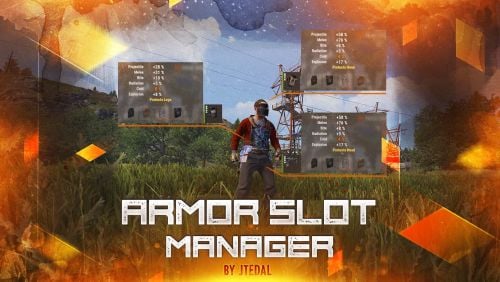
This plugin allows you to manage additional armor slots on clothing. It provides the ability to customize the chances of slots appearing when items are spawned, as well as when they are created (crafting), with the ability to customize privileges for different groups of players. The main features of the plugin: Setting the chance of slots appearing when crafting or spawning an item Adds the possibility of 4 slots for armor Allows you to adjust the chance of each slot appearing Allows you to adjust the odds for different groups/users Plugin Config config As of March 10, the standard configuration already includes all items that can have slots configured. If you are a user of the plugin for instant craft, then you may need minor improvements that will allow you to track the fact that the player has created an item. Check out more of my work here JTedal's library. Come see our whole teams work Mad Mapper Library. Come by the Mad Mapper Discord for support, feedback, or suggestions!$11.99- 11 comments
- 1 review
-
- 4
-

-
-
- #jtedal
- #mad mappers
- (and 12 more)
-
Version 1.1.0
32 downloads
About Prime Prime is a plugin that allows the players to accumilate coins and then spend them at the dedicated vending machine at Outpost for items,weapons & armour. Coins gathered depends on a Risk VS Reward setup with Prime items providing BUFFS as the player progresses and buys bigger/better gear. Includes a lottery system,gambling, powerful Stones to collect & upgrade and all fully configurable! Hardcore Mode Activation When hardcore is active a Prime Vending Machine will spawn at Out Post allowing players access to Items to earn Prime Coins and Buffs ranging from increase in coins, incoming damage reduction, output damage increase. Players will only be able to progress thier Prime accounts by using items purchased from this vending machine, however if hardcore is NOT active.. players are free to use normal items and weapons to progress accounts and still have lottery active. With hardcore set to 'false' there is no vending machine, no items and no HOF.. you will also not be able to aquire stones. Stones: Requires Green Berries With each tier increase the stones provide a buff in coin yield starting at a base rate of 5% and maxing out at 75%, along with this in the later tiers the stones also provide the user with a increase in damage output.. however the stone needs to be in your inventory.. so it can be taken from you or lost. GREEN -[ Emerald I (5%) , Emerald II (10%), Emerald III (15%), Emerald IV (20%), Emerald V (25%) ] - Hidden Perks = Metabolism & Environment Buffs PURPLE - [ Mystic I (30%) , Mystic II (35%) , Mystic III (40%), Mystic IV (45%), Mystic V (50%) ] - Hidden Perks = Increase in Lottery Chance RED/BLACK - [ Unstable I (55%), Unstable II (60%), Unstable III (65%), Unstable IV (70%), Unstable V (75%) ] - Hidden Perks = Increase in Outgoing Damage by X% Fusion : In order to create the next type of stone youll need x2 Tier 5 Stones The higher the type and tier of the stone the more likely of a failure will occur in ther proccess resulting in the stones exploding..and you losing them..having to restart the process again. Config : Setting up Vending costs & Reward System The config file covers everything from: - Prime item costs at the vending maching - Coins rewarded for each individual task from smashing a barrel to killing an NPC - Coins rewarded for looting - Stone Drop Chance - Amount of Berries required to polish stones - Personal ID for chat (set to server icon) - Lottery chance % Plus much more Discord - Nferno#7163$14.99 -
Version 1.0.2
105 downloads
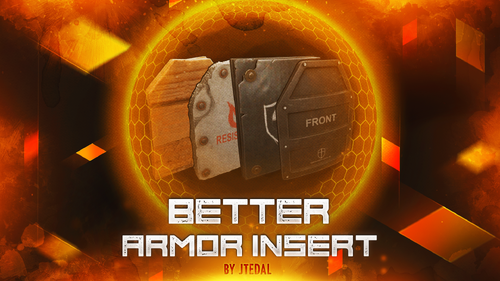
This plugin allows you to add and customize custom Armor Inserts to clothing items. Each such insert has its own parameters that give an additional percentage of protection from different types of damage to the standard indicators of the plate, and can also be configured to fall out of different boxes with a given probability. The plugin is easily managed through the configuration file, where you can set the damage and chance of failure for each insert. The main features of the plugin: You can create an unlimited number of custom armor insert variations. For each custom item, you can set the percentage of protection for absolutely any damage (more on this below) You can customize the dropout of each custom item in the crates or add them to the preset of the custom interface for crafting items that cannot be done through the standard menu. How does it work? The values specified in the configuration file DO NOT REPLACE the standard percentage of damage protection, but only add their own value to it. That is, if the armor insert indicates that it provides 2% protection against bullets, and in the config you have, for example, the entry "Bullet": 2.0, this means that this armor insert will have 4% protection. Everything is very easy, the standard percentage of protection + the one that you specify in the config Plugin Config config How to configure the plugin correctly To set up a custom item correctly, you must specify the type of damage and the percentage of protection against it in the "Damage type and scale (0-100) for it". Keep in mind that you should not focus on the description that we see in the game, because you can see one line of the record, and in fact it means the percentage of protection for several types of damage at once. Therefore, I strongly recommend that you use the plaque that I will provide below with all the damage types that you could customize. Types of damage and their description: "Hunger" : "Hunger damage" "Thirst" : "Water shortage damage" "Cold" : "Cold damage" "Drowned" : "Suffocation damage" "Heat" : "Heat damage" "Bleeding" : "Bleeding damage" "Poison" : "Poison damage" "Bullet" : "Bullet damage" "Slash" : "Melee weapon damage" "Blunt" : "Melee weapon damage" "Fall" : "Fall damage" "Radiation" : "Radiation damage" "Bite" : "Animal bite damage" "Stab" : "Melee damage from NPCs" "Explosion" : "Explosion damage" "RadiationExposure" : "Radiation exposure damage" "ColdExposure" : "" "ElectricShock" : "Electric shock damage" "Arrow" : "Arrow damage" "AntiVehicle" : "Transport damage" "BeeSting" : "Bee damage" Console Command (RCON only) giveinsert <StemID|Player name> (wooden|asbestos|lead|metal) <SkinID> <Amount> - gives the player a custom armor insert For each custom item in the config, there is a table in the format [Damage type] = [Additional percentage of protection] Check out more of my work here JTedal's library. Come see our whole teams work Mad Mapper Library. Come by the Mad Mapper Discord for support, feedback, or suggestions!$11.99- 6 comments
- 1 review
-
- 2
-
-
- #jtedal
- #mad mappers
- (and 11 more)
-
Version 1.2.0
46 downloads
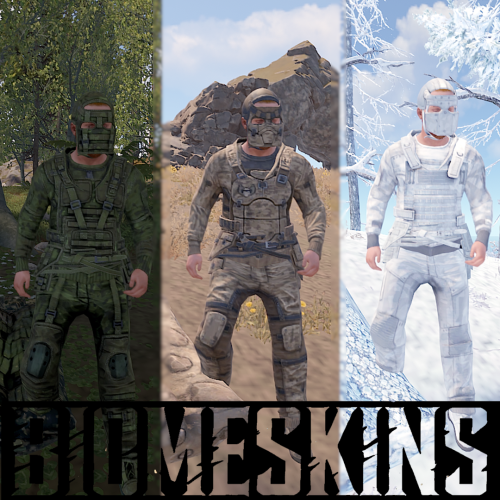
BiomeSkins is a Rust server plugin that dynamically customizes player clothing, armor, and sleeping bag skins based on the biome and topology of their location. By matching gear and sleeping bags to the surrounding environment, it enhances player immersion and camouflaging. Players can easily activate and control reskinning functions through simple chat commands, including options for key bindings and toggling automatic reskinning. Installation Download the BiomeSkins.cs plugin file. Place the plugin file into your server’s plugins directory. Usage/Commands /biomeskin Reskins the player’s clothing and armor to match their current biome. /biomeskin [<a|w|b|m>] Reskin player all and/or wear and/or belt and/or main inventory items (w - wear, b - belt, m - main, a - all). Example - /biomeskin wb will reskin items in wear and belt inventories. Not specifying an inventory parameter defaults to wear/armor items. /biomeskin skin <player> [q|a|w|b|m] Reskins the target player's target inventory items (see command above). Intended for admins and other plugins. /biomeskin bind <key> Displays the command for binding the /biomeskin command to a specified key, allowing players to quickly activate biome-based reskinning. /biomeskin bag <on|off> Toggles automatic reskinning for sleeping bags based on the biome and topology where they are placed. /biomeskin <wear|belt|main|> <on|off> Sets automatic reskinning for wear/belt/main inventory items based on the biome of the player's location. /biomeskin toggle <wear|belt|main|all> Toggles automatic reskinning for wear/belt/main inventory items based on the biome of the player's location. Permissions biomeskins.reskin.bag - Allows for sleeping bag reskinning on placement and access to the /biomeskin bag <on|off> command. biomeskins.reskin.equipment - Allows for inventory item reskinning via the /biomeskin base command. biomeskins.reskin.equipment.other - Allows for inventory item reskinning of other players via the /biomeskin skin <player> [q|a|w|b|m] command. biomeskins.reskin.equipment.auto - Allows for player automatic inventory item reskinning when crossing between biomes as well as the /biomeskin <wear|belt|main|> <on|off> command. Configuration The plugin offers customizable options in the configuration file, enabling admins to tailor the reskinning behavior: { "Version (DO NOT EDIT)": 3, "Command aliases": [ "biomeskin" ], "Sleeping bag skins": { "Forest": 2131151567, "Arctic": 2162368881, "Desert": 2922792064, "Tundra": 3080447496, "Rock": 3144409492 }, "Equipment skins": { "Temperate": { "mask.metal.item": 2551475709, "metal_plate_torso.item": 2551474093, "pants.roadsign.item": 2570237224, "hoodie.red.item": 2563940111, "pants.cargo.item": 2563935722, "shoes.boots.brown.item": 2575506021, "gloves.roadsign.item": 2575539874, "hat.coffeecan.item": 2570227850, "roadsign_armor.item": 2570233552, "jacket.vagabond.item": 2582710266, "largebackpack": 3360828867 }, "Tundra": { "mask.metal.item": 2551475709, "metal_plate_torso.item": 2551474093, "pants.roadsign.item": 2570237224, "hoodie.red.item": 2563940111, "pants.cargo.item": 2563935722, "shoes.boots.brown.item": 2575506021, "gloves.roadsign.item": 2575539874, "hat.coffeecan.item": 2570227850, "roadsign_armor.item": 2570233552, "jacket.vagabond.item": 2582710266, "largebackpack": 3377499512 }, "Arctic": { "mask.metal.item": 2432948498, "metal_plate_torso.item": 2432947351, "pants.roadsign.item": 2469019097, "hoodie.red.item": 2416648557, "pants.cargo.item": 2416647256, "shoes.boots.brown.item": 2752873720, "gloves.roadsign.item": 2469031994, "hat.coffeecan.item": 2503956851, "roadsign_armor.item": 2503955663, "rifle.ak.item": 2525948777, "burlap.shirt.item": 2911362787, "mask.bandana.item": 10062, "attire.hide.boots.item": 2408298830, "attire.hide.poncho.item": 2856159140, "riot.helmet.item": 801095823, "burlap.trousers.item": 2911361380, "burlap.gloves.item": 10128, "largebackpack.item": 3361128718, "jacket.vagabond.item": 2496913595 }, "Arid": { "mask.metal.item": 2475428991, "metal_plate_torso.item": 2475407123, "pants.roadsign.item": 2496523983, "hoodie.red.item": 2503910428, "pants.cargo.item": 2503903214, "shoes.boots.brown.item": 2510093391, "gloves.roadsign.item": 2510097681, "hat.coffeecan.item": 2496517898, "roadsign_armor.item": 2496520042, "jacket.vagabond.item": 2865011686, "largebackpack": 3362212704 } }, "Reskin items in wear inventory": true, "Reskin items in belt inventory": false, "Reskin items in main inventory": false, "Automatic equipment reskinning": { "Enabled": false, "Enabled by default for players with permission?": false, "Time interval between player biome checks": 5.0, "Reskin items moved into wear inventory": true, "Reskin items moved into belt inventory": false, "Reskin items moved into main inventory": false }, "Hooks": { "OnBiomeSkin": true } } Developer API // Reskin player items in corresponding inventories (wear/belt/main) with the skins specified in the plugin config bool API_SkinPlayerItems(BasePlayer player, bool skinWear = true, bool skinBelt = true, bool skinMain = true) // Reskin player items in corresponding inventories (wear/belt/main) with the skins specified in the "skins" parameter (item name -> skinID) bool API_SkinPlayerItems(BasePlayer player, Dictionary<string, ulong> skins, bool skinWear = true, bool skinBelt = true, bool skinMain = true) // Returns true if target player has sleeping bag biome-based reskinning enabled bool API_IsSleepingBagReskinEnabled(BasePlayer player) // Enables/disables target player sleeping bag biome-based reskinning void API_SetEnabledAutoSleepingBagReskin(BasePlayer player, bool enabled) // Returns true if target player has automatic biome-based inventory item reskinning enabled bool API_IsAutoEquipmentReskinEnabled(BasePlayer player) // Enables/disables target player automatic biome-based inventory item reskinning void API_SetAutoEquipmentReskinEnabled(BasePlayer player, bool wear, bool belt, bool main) // Hooks // Invoked when a player's inventory items are about to be reskinned by the plugin // First argument - BasePlayer - Target player // Second argument - Action source // 0 = Command, 1 = Automatic (player crossing biomes), 2 = Third party plugin or console command // Returning bool 'true' will cancel the action OnBiomeSkin(BasePlayer, int)$5.99 -
Version 1.1.4
84 downloads
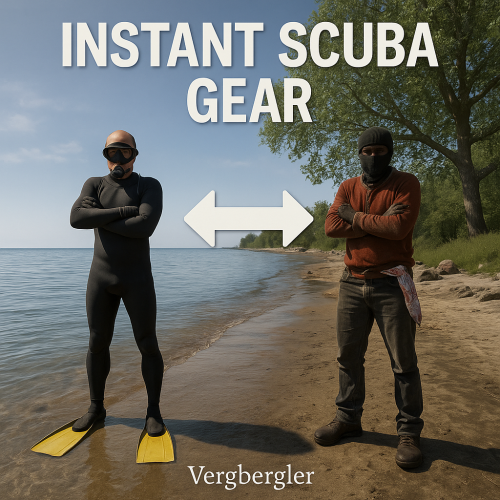
Instant Scuba Diver instantly equips full scuba gear when swimming, then puts back on your original armor when you go back to walking. Scuba gear does not need to be in inventory, just instantly equips when needed. Makes going in and out of the water a breeze and effortless. Great for diving, emergency jumps out of a boat, or quick escapes! Your out-of-water armor is safely stored in memory until you get back out of the water. Used scuba gear is deleted from attire slots and inventory. FAQs: Q) What happens to my armor if I die underwater? A) Your armor is returned to your body just as you die. Return to your body to get it back. Q) Can players save the scuba gear for profit? A) No matter where the player moves the scuba gear (inventory, backpack, recycler, boxes, or TC) it will be deleted automatically. Q) I have a plugin that allows players to recycle anywhere. How can I stop them from recycling the scuba gear? A) Even if players can open a virtual recycler, the items will be deleted instantly before they can recycle it. Configuration: This plugin does not contain a configuration file! Permissions: InstantScubaDiver.diving_fins - Allows any player to equip diving fins automatically InstantScubaDiver.diving_mask - Allows any player to equip diving mask automatically InstantScubaDiver.diving_suit - Allows any player to equip diving suit automatically InstantScubaDiver.diving_tank - Allows any player to equip diving tank automatically InstantScubaDiver.use - Allows any player to use the plugin Chat Commands: This plugin does not have chat commands! Console Commands: This plugin does not have console commands!$5.99

.thumb.png.ccf8a947948c9eb1445ad21a7931247b.png)