Search the Community
Showing results for tags 'boost'.
Found 8 results
-

Version 1.0.0
31 downloads
The Ultimate Expansion for Skill Tree Progression Skill Tree Items: Pro is a powerful DLC plugin for the Skill Tree system that breathes new life into your server's loot tables. Instead of players just earning XP through grinding, they can now discover unique, consumable items that boost their progression, provide instant rewards, or grant temporary buffs directly from Skill Tree. Whether it’s a rare XP injection found on a Scientist or a biome-specific gathering boost hidden in an Arctic crate, this plugin adds a layer of excitement and strategy to every lootable object on your map. Advanced Consumable Types This plugin introduces four distinct item categories, each fully customizable to fit your server's economy: XP Boosters: Provide temporary XP multipliers. Go granular with filters for specific gather types, time-of-day restrictions (e.g., "Night Owl" boosts), or biome-specific requirements. XP Injections: Instant gratification. Set up various "vials" or "manuals" that grant a flat or randomized range of XP upon consumption. SP Injections: Extremely rare rewards that grant Skill Points directly, bypass the grind, and give players a reason to hunt for high-tier loot. Temporary Buffs: Grant any buff from the Skill Tree—including Ultimates—for a limited time. These stack with existing skills, allowing players to feel the power of high-level perks early on. Dynamic Loot Distribution The core of Skill Tree Items: Pro is its highly sophisticated loot engine. You aren't limited to just crates and barrels; you can inject these items into almost every interaction in Rust. See a comprehensive list of supported LootSources below. Granular Configuration For the power users, the LootProfile system allows for surgical precision. You don't just set "Crates"; you can target specific prefab names, specific NPC profiles, or even the tier of a Raidable Base. Key Profile Features: Identifier System: Target specific entities (e.g., only "Elite" crates or a specific Boss from BossMonster). Skin ID Filtering: Require specific skin IDs for the source to trigger. Blacklisting: Exclude specific items or entities from dropping loot. Modifier Integration: Toggle whether player "ItemPerk" modifiers should influence the drop rates. Weight-Based Tables: Use a weighted dictionary system to determine exactly which items drop and how often. Command: stip.give <target> <profile> Tyoe: Console Permission required: skilltreeitemspro.admin Action: Gives the target player the specified item. Command: stip.giveall Tyoe: Chat Permission required: skilltreeitemspro.admin Action: Gives the user all items in the config. Command: stip.moveicon Tyoe: Chat Permission required: skilltreeitemspro.admin Action: Moves the active boost icon for all players. This is a comprehensive list of loot sources that can be used to setup loot profiles. Crate: Triggered when a player opens a crate for the first time. Barrel: Triggered when a player breaks a barrel. BossMonster: Triggered when a boss monster is killed by a player. Event: Triggered when an event is completed (Convoy, SurvivalArena, Armored train, Powerplant etc). ScientistNPC: Triggered when a scientist NPC is killed. HumanNPC: Triggered when a human npc, such as a tunner dweller, is killed. BetterNPC: Triggered when a NpcSpawn npc is killed. Woodcutting: Triggered when a tree is fully cut down. Mining: Triggered when a node is fully mined out. Skinning: Triggered when an animal is fully skinned. Foraging: Triggered when the player collects a map collectible (hemp, pumpkins, diesel barrels etc). Farming: Triggered when the player collects a player-grown collectible. Fishing: Triggered when the player catches a fish. Crafting: Triggered when an item is successfully crated. BotReSpawn: Triggered when an BotReSpawn npc is killed. NpcRaider: Triggered when an npc from NpcRaider is killed. RaidableBase: Triggered when a Raidable Base is spawned. The effect types dictate how the item will behave. You can have any number of effect types attached to an item. For example, you can create an item that gives the player 1000xp with the XPInjection type, gives them a temporary boost with the XPBoost type, and gives them access to the Raiding Ultimate from Skill Tree with the TemporaryBuff type. XPInjection: Provides the player with an injection of xp when consumed. SPInjection: Provides the player with an injection of skill points when consumed. TemporaryBuff: Provides the player with temporary access to any Skill Tree buff (including ultimates). XPBoost: Provides the player with a temporary xp boost when consumed. XP Source can be set so only the specified xp source provides the bonus. Timeframe can be set, so the player can only get xp during the specified time of day (ie 6pm to 6pm etc). Multiple Biomes can be added to restrict the xp bonus to sources inside of those biome types (ie a player can only gain xp while in the Arctic or Jungle). Biomes: Any, Arid, Temperate, Tundra, Arctic, Jungle. Here is a list of Skill Tree XP Sources that can be used with the XPBoost effect. All NodeHit NodeHitFinal TreeHit TreeHitFinal SkinHit SkinHitFinal CollectWildPlant CollectGrownPlant BuildingBlockDeployed FishCaught CatchOrangeRoughy CatchSalmon CatchSmallShark CatchSmallTrout CatchYellowPerch CatchAnchovy CatchHerring CatchSardine CatchTrash Crafting ScientistNormal TunnelDweller UnderwaterDweller ScientistHeavy SmallAnimal MediumAnimal LargeAnimal RoadSign Barrel Scarecrow Mission BradleyAPC LootHackedCrate LootHeliCrate LootBradleyCrate CookingMealXP RaidableBaseCompletion_Easy RaidableBaseCompletion_Medium RaidableBaseCompletion_Hard RaidableBaseCompletion_Expert RaidableBaseCompletion_Nightmare Win_HungerGames Win_ScubaArena Win_Skirmish Gut_Fish default_botrespawn crate_basic crate_elite crate_mine crate_normal crate_normal_2 crate_normal_2_food crate_normal_2_medical crate_tools crate_underwater_advanced crate_underwater_basic crate_ammunition crate_food_1 crate_food_2 crate_fuel crate_medical supply_drop detect_diggable Harbor_Event_Winner Junkyard_Event_Winner PowerPlant_Event_Winner Satellite_Event_Winner Water_Event_Winner Air_Event_Winner Armored_Train_Winner Convoy_Winner SurvivalArena_Winner swipe_card_level_1 swipe_card_level_2 swipe_card_level_3 boss_monster Zombie Raider JetPilot ArcticBaseEvent_Winner GasStationEvent_Winner SputnikEvent_Winner ShipWreckEvent_Winner Triangulation_Winner Caravan_Winner SupermarketEvent_Winner GingerbreadNPC PVP AutoTurret You can get a list of Skill Tree Buffs from the Skill Tree plugin page.$11.99 -

Version 1.0.3
25 downloads
xAutoPurge - Automatically purges all entities owned by players which are inactive for X days. - Configurable parameters for: InactiveDays - Defines when a players gets purged if not online for X days. (Default: 7 days) CheckIntervalSeconds - Defines how often it should be checked for inactive players. (Default: 1 hour) LogToConsole - Defines if purging activities are getting logged to the console. (Default: true) ExcludedSteamIDs - Defines an exception list for specific SteamIDs, entered SteamIDs doesn't get purged. (Default: none) ResetDataOnWipe - Resets data on wipe automatically, so it doesn't happen that someone gets purged after wipe. (Default: true) Console Commands purge.run [Triggers the purging immediately with its configurations] purge.player PLAYERNAME/STEAMID [Purges a specific player immediately (ignoring configuration) - Example usage: purge.player xNullPointer95]$6.00 -

Version 1.0.2
7 downloads
xBannedPlayersEntityCleaner xBannedPlayersEntityCleaner is a an efficient Rust plugin designed to automatically clean up all entities owned by players when they are banned. This helps maintain server performance and prevents clutter caused by banned users’ structures, deployables, and other entities. It also includes a manual cleanup command that allows admins with proper permission to trigger entity removal for specific players when needed. Features Automatically removes entities owned by banned players. Optional manual cleanup command with permission control. Adjustable cleanup speed and batch size to minimize lag. Silent or visible destruction modes. Efficient entity queue system for large-scale cleanups. Console Command xbannedplayersentitycleaner.clean <steamid64 or playername> - Manually trigger cleanup for a specific player. Permission xbannedplayersentitycleaner.use - Allows a user to manually trigger the cleanup command. Config { "SilentMode": true, "EntitiesPerCleanupInterval": 100, "CleanupInterval": 0.2, "LogToConsole": true } SilentMode → If enabled (true), entities are destroyed quietly without gibs or visual effects. EntitiesPerCleanupInterval → Number of entities processed per cleanup cycle (CleanupInterval) CleanupInterval → Time in seconds between each cleanup batch execution. LogToConsole → Enables or disables console logging for cleanup events and summaries.$4.99 -

Version 2.0.17
3,338 downloads
This plugin allows players to gather weed from hemp plants and craft joints using a mixing table. There are different types of weed where each type can be found in a different biome. Joints can be crafted at a mixing table and will give the player configurable buffs and healing with each tier having different effects. Features: Fully customizable Different types of weed Configurable effects for each type Custom crafting UI integrates in the mixing table UI Configurable recipes for mixing table Yield amount and chance configurable for each type Ideal for Roleplay Servers New in v2.0.15: Advanced modifiers Advanced modifiers allow you to use any tea/pie modifier that's currently in the game. I did not test all of them so there is a chance that some modifiers might not work as expected. List of modifiers: Wood_Yield, Ore_Yield, Radiation_Resistance, Radiation_Exposure_Resistance, Max_Health, Scrap_Yield, MoveSpeed, ObscureVision, Warming, Cooling, CoreTemperatureMinAdjustment, CoreTemperatureMaxAdjustment, Crafting_Quality, VisionCare, MetabolismBooster, Harvesting, DigestionBoost, FishingBoost, Collectible_DoubleYield, Farming_BetterGenes, HorseGallopSpeed, HorseDungProductionBoost, Comfort, Clotting, HunterVision, Radiation, Configuration Example: "Advanced modifiers (only works for joints)": [ { "Name (case sensitive! see plugin description for all modifiers)": "Warming", "Duration (seconds)": 60.0, "Value": 10.0 } ] New in v2.0.10: Give command Server owners can use this command to give weed or joints to themselves or a certain player. The identifier has to be specified in the config file for every type of weed or joint. ganja.give <weed|joint> <identifier> <amount> <player?> Permission: ganja.give - Required to use ganja.give command New in v2.0.0: Fully configurable crafting: With Version 2.0.0 the crafting system has been integrated in the mixing table. Joints can now be crafted by using the right ingredients in the right slot. The crafting recipes are fully configurable. New recipes can also be added. New in v1.0.8: Loot Table integration: This plugin now supports the custom item api of Loot Table and Stack Size GUI, so you can easily add weed to the loot table. When both plugins are installed on the server, the weed items will show up in the custom items tab of Loottable (right image): Different tiers: Depending on the biome, you will receive different tiers of weed, the biomes can also be changed in the config. By default, tier2 weed can be gathered in the snow biome, tier1 in the desert and tier0 everywhere else. Names, droprates, and boosts can also be configured individually for each tier. Controls: With a joint selected in the hot bar: Right click to ignite / extinguish a joint When joint is bruning: left click to use a joint Permissions: Permissions can be disabled in the config, making gathering and crafting accessible to everyone regardless of permissions. ganja.craft - Required to craft joints ganja.gather - Required to obtain weed Biome masks: The biome mask is a simple 4-bit number that determines where a certain tier of weed can be found. Each biome has its own number; add these numbers together to select multiple biomes. The numbers for each biome are as follows: 1 - Arid 2 - Temperate 4 - Tundra 8 - Arctic 16 - Jungle For example: Low Quality Weed has the biome mask 6 by default (see configuration below). That means it can be found in the Temperate and the Tundra biome. Configuration: { "Weed configuration": [ { "Drop chance when harvesting (1 = 100%)": 0.4, "Drop amount when harvesting": { "min": 1, "max": 3 }, "Biome mask (see description for details)": 6, "Gene configuration": { "h": { "Minimum amount for a chance to yield": 1, "Minimum amount for guaranteed yield": 3, "Maximum amount (-1 = no limit, set to 0 to disable gathering from plants with that gene)": -1 } }, "Disable gathering from collectable hemp": false, "Disable gathering from growable hemp": false, "Item identifier (used with ganja.give command)": "low_quality", "Custom item name (null = default name)": "Low Quality Weed", "Item short name": "sticks", "Item skin id": 2661029427 }, { "Drop chance when harvesting (1 = 100%)": 0.3, "Drop amount when harvesting": { "min": 1, "max": 3 }, "Biome mask (see description for details)": 1, "Gene configuration": { "h": { "Minimum amount for a chance to yield": 1, "Minimum amount for guaranteed yield": 3, "Maximum amount (-1 = no limit, set to 0 to disable gathering from plants with that gene)": -1 } }, "Disable gathering from collectable hemp": false, "Disable gathering from growable hemp": false, "Item identifier (used with ganja.give command)": "med_quality", "Custom item name (null = default name)": "Medium Quality Weed", "Item short name": "sticks", "Item skin id": 2661031542 }, { "Drop chance when harvesting (1 = 100%)": 0.1, "Drop amount when harvesting": { "min": 1, "max": 2 }, "Biome mask (see description for details)": 8, "Gene configuration": { "h": { "Minimum amount for a chance to yield": 1, "Minimum amount for guaranteed yield": 3, "Maximum amount (-1 = no limit, set to 0 to disable gathering from plants with that gene)": -1 } }, "Disable gathering from collectable hemp": false, "Disable gathering from growable hemp": false, "Item identifier (used with ganja.give command)": "high_quality", "Custom item name (null = default name)": "High Quality Weed", "Item short name": "sticks", "Item skin id": 2660588149 } ], "Crafting Recipes": [ { "Ingredient Slots": { "0": { "Amount": 1, "Item short name": "note", "Item skin id": 0 }, "1": { "Amount": 1, "Item short name": "sticks", "Item skin id": 2661029427 }, "2": { "Amount": 1, "Item short name": "sticks", "Item skin id": 2661029427 } }, "Produced Item": { "Amount": 1, "Custom item name (null = default name)": "Low Quality Joint", "Item short name": "horse.shoes.basic", "Item skin id": 2894101592 }, "Identifier (used with ganja.give command)": "low_quality", "Is joint": true, "Boosts (only works for joints)": { "Wood boost percentage (1 = 100%)": 0.4, "Wood boost duration (seconds)": 20.0, "Ore boost percentage (1 = 100%)": 0.0, "Ore boost duration (seconds)": 0.0, "Scrap boost percentage (1 = 100%)": 0.0, "Scrap boost duration (seconds)": 0.0, "Max Health percentage (1 = 100%)": 0.0, "Max Health duration (seconds)": 0.0, "Healing per use": 1.0, "Health regeneration per use": 0.0, "Poisoning per use(a negative value will decrease poisoning)": 0.0, "Radiation poisoning per use (a negative value will decrease radiation)": 0.0, "Bleeding per use (a negative value will decrease bleeding)": 0.0, "Calories per use (a negative value will decrease calories)": 0.0, "Hydration per use (a negative value will decrease hydration)": 0.0, "Joint durability (seconds)": 120.0, "Joint durability loss per hit (seconds)": 10.0 }, "Advanced modifiers (only works for joints)": [ { "Name (case sensitive! see plugin description for all modifiers)": "Warming", "Duration (seconds)": 60.0, "Value": 10.0 } ] }, { "Ingredient Slots": { "0": { "Amount": 1, "Item short name": "note", "Item skin id": 0 }, "1": { "Amount": 1, "Item short name": "sticks", "Item skin id": 2661031542 }, "2": { "Amount": 1, "Item short name": "sticks", "Item skin id": 2661031542 } }, "Produced Item": { "Amount": 1, "Custom item name (null = default name)": "Medium Quality Joint", "Item short name": "horse.shoes.basic", "Item skin id": 2894101290 }, "Identifier (used with ganja.give command)": "med_quality", "Is joint": true, "Boosts (only works for joints)": { "Wood boost percentage (1 = 100%)": 0.0, "Wood boost duration (seconds)": 0.0, "Ore boost percentage (1 = 100%)": 0.8, "Ore boost duration (seconds)": 20.0, "Scrap boost percentage (1 = 100%)": 0.0, "Scrap boost duration (seconds)": 0.0, "Max Health percentage (1 = 100%)": 0.0, "Max Health duration (seconds)": 0.0, "Healing per use": 4.0, "Health regeneration per use": 0.0, "Poisoning per use(a negative value will decrease poisoning)": 0.0, "Radiation poisoning per use (a negative value will decrease radiation)": 0.0, "Bleeding per use (a negative value will decrease bleeding)": 0.0, "Calories per use (a negative value will decrease calories)": 0.0, "Hydration per use (a negative value will decrease hydration)": 0.0, "Joint durability (seconds)": 120.0, "Joint durability loss per hit (seconds)": 10.0 }, "Advanced modifiers (only works for joints)": [ { "Name (case sensitive! see plugin description for all modifiers)": "Warming", "Duration (seconds)": 60.0, "Value": 20.0 } ] }, { "Ingredient Slots": { "0": { "Amount": 1, "Item short name": "note", "Item skin id": 0 }, "1": { "Amount": 1, "Item short name": "sticks", "Item skin id": 2660588149 }, "2": { "Amount": 1, "Item short name": "sticks", "Item skin id": 2660588149 } }, "Produced Item": { "Amount": 1, "Custom item name (null = default name)": "High Quality Joint", "Item short name": "horse.shoes.basic", "Item skin id": 2893700325 }, "Identifier (used with ganja.give command)": "high_quality", "Is joint": true, "Boosts (only works for joints)": { "Wood boost percentage (1 = 100%)": 0.0, "Wood boost duration (seconds)": 0.0, "Ore boost percentage (1 = 100%)": 0.0, "Ore boost duration (seconds)": 0.0, "Scrap boost percentage (1 = 100%)": 1.0, "Scrap boost duration (seconds)": 30.0, "Max Health percentage (1 = 100%)": 0.3, "Max Health duration (seconds)": 30.0, "Healing per use": 8.0, "Health regeneration per use": 0.0, "Poisoning per use(a negative value will decrease poisoning)": 0.0, "Radiation poisoning per use (a negative value will decrease radiation)": 0.0, "Bleeding per use (a negative value will decrease bleeding)": 0.0, "Calories per use (a negative value will decrease calories)": 0.0, "Hydration per use (a negative value will decrease hydration)": 0.0, "Joint durability (seconds)": 120.0, "Joint durability loss per hit (seconds)": 10.0 }, "Advanced modifiers (only works for joints)": [ { "Name (case sensitive! see plugin description for all modifiers)": "Cooling", "Duration (seconds)": 60.0, "Value": 10.0 } ] } ], "Require permission for crafting": true, "Require permission for gathering": true, "Disable built-in stack fix (set to true if you have problems with item stacking/splitting)": false, "Automatically extinguish joint when unequiping it": true }$21.00 -
Version 1.1.3
30 downloads
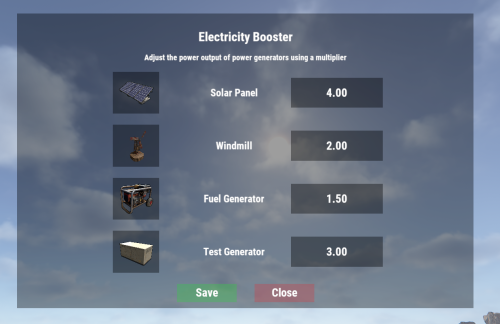
Electricity Booster Increase the output of power-generating electrical components Features Set a configurable boosted multiplier for solar panels, windmills, fuel generators, and test generators. GUI menu for easy configuration. Chat Commands /eb - Open the configuration GUI for admins. Requires permission `electricitybooster.admin`. Permissions electricitybooster.admin - Required to open configuration GUI. Configuration { "Solar Panel Power Output Multiplier (Default=1.0)": 1.0, "Windmill Power Output Multiplier (Default=1.0)": 1.0, "Fuel Generator Power Output Multiplier (Default=1.0)": 1.0, "Test Generator Power Output Multiplier (Default=1.0)": 1.0 } Support Discord Click here for Discord support Dependencies This plugin requires ImageLibrary (free)$4.99- 7 comments
-
- 1
-

-
- #electrical
- #electricity
- (and 5 more)
-

Version 1.0.2
8 downloads
What is DiscordLink? DiscordLink is a Discord bot designed for Rust gaming communities. It securely links Discord users to their Steam accounts, automates in-game reward distribution, and manages special perks for linked players and server boosters. The bot integrates with Rust servers via RCON and supports multiple servers. Key Features - Steam Account Linking: Users can link their Discord and Steam accounts for in-game rewards. - Booster Perks: Automatically grants and removes special in-game perks for Discord server boosters. - Role Management: Assigns a custom Discord role to users who link their Steam account. - Multi-Server Support: Works with multiple Rust servers at once. - Automated Reminders: Notifies boosters who haven't linked their Steam account. - Admin Tools: Commands for checking, resetting, and auditing links and perks. - Secure & Auditable: All actions are logged for transparency and troubleshooting. How It Works 1. User Links Account: - Users type /link <steam_id> in the designated Discord channel. - The bot validates the Steam ID and links it to the user's Discord account. - The user receives in-game rewards on all connected Rust servers. 2. Booster Perks: - If a user is a Discord server booster, the bot automatically grants them special in-game perks (e.g., Nitro group) on all servers. - If a booster stops boosting, perks are removed automatically. 3. Reminders: - Boosters who haven't linked their Steam account receive periodic reminders (can be disabled). 4. Admin Controls: - Admins can check, reset, or audit user links and booster perks with slash commands. Main Commands - /link <steam_id> – Link your Discord and Steam accounts for rewards. - /checklink – See your current link and booster status. - /reminders <on|off> – Enable or disable booster reminders. - /status – (Admin) Show server and user stats. - /reset <user> – (Admin) Reset a user's links, perks and cooldowns for changing the SteamID associated with the discord user. - /checklinks <user> – (Admin) Check a user's linked Steam IDs and booster status. Configuration For Server Admins - Set up the bot using the .env file and follow the install guide. - Make sure the bot has the right permissions and intents in your Discord server. - Use admin commands to manage and audit user links and perks. Environment Variables The bot uses a .env file for configuration. This file contains sensitive information like API keys and server credentials, so it should never be committed to version control. Why .env files? - Security: Keeps sensitive data separate from code - Flexibility: Easy to configure different settings for development and production - Standard Practice: Widely used in Python applications and deployment platforms Configuration Options: - RCON Timeouts: Configure WebSocket timeouts via `RCON_CONNECTION_TIMEOUT`, `RCON_OPERATION_TIMEOUT`, and `RCON_USERGROUP_TIMEOUT` - Server Settings: Add multiple Rust servers with `SERVER1_NAME`, `SERVER1_HOST`, etc. - Discord Settings: Configure roles, channels, and permissions - Steam Integration: Steam API key for SteamID validation For Users - Use /link <steam_id> in the correct channel to get in-game rewards. - If you boost the server, your perks are managed automatically. - Use /checklink to see your status or /reminders off to stop reminders. Support - For help, check `bot.log` or contact me.$4.99 -

Version 1.0.1
6 downloads
{ "maxCorpses": 4 <- Limit } https://umod.org/plugins/no-backpacks add despawn 0s$10.00 -
Version 1.0.0
87 downloads
Limit the installation of prefabs that you want! Delete the oldest prefab Tested with 200+ people online without causing drawdowns Very unloads massive PVP zones without interfering with the construction of the base Building zone detection function Players in the closet area can bet at least as much$18.00