Search the Community
Showing results for tags 'clan'.
Found 22 results
-
Version 2.0.0
5 downloads
Overview Clan Warfare is a clan tracking and leaderboard system for Rust servers that transforms clan warfare into a competitive, point-based experience. The plugin tracks kills, deaths, and TC raids across all clans, featuring a registration system where clans protect their Tool Cupboards, a dynamic GUI leaderboard, and an engaging points economy that rewards PvP dominance and successful raids. When a clan's registered TC is destroyed, they lose all points, and the raiding clan claims those points plus a raid bonus. This creates high-stakes territorial warfare where every TC matters and every raid can dramatically shift the leaderboard rankings. Key Features TC Registration System: Each clan can register one Tool Cupboard as their "core" - their most valuable asset Comprehensive Stat Tracking: Automatically tracks kills, deaths, and successful TC raids for every clan Dynamic Points Economy: Earn points for kills (configurable, default: 100 points) Earn points for destroying key prefabs (configurable, e.g., helicopters: 2000 points) Earn massive points for raids (configurable base: 1000 points + all points from raided clan) Lose ALL points when your registered TC is destroyed Place map markers on registered TCs for easy identification Beautiful GUI Leaderboard: Interactive in-game leaderboard with real-time updates, color-coded rankings, and TC registration indicators Smart Caching System: High-performance caching for leaderboards and clan lookups reduces server load Discord Integration: Optional webhook notifications for major events (kills, raids) with rich embeds Admin Tools: Comprehensive admin commands for managing clans, points, and TC registrations Auto-Save: Configurable auto-save system with dirty flag tracking ensures data integrity Clan Detection: Full integration with the Clans plugin for automatic clan identification Config Example PointsPerKill: Points awarded for killing enemy clan members PointsPerRaid: Points awarded for successfully raiding an enemy clan's base PointsPerDestroyedPrefab: Points awarded for destroying specific prefabs (e.g., helicopters, barrels) HelicopterUseLastHit: If true, points for helicopter kills are awarded to the last player who damaged it AwardPointsOnPlayerKill: Toggle to enable/disable points for player kills LoseAllPointsOnRaid: Toggle to enable/disable losing all points upon being raided LeaderboardMaxEntries: Maximum number of entries to display on the leaderboard LeaderboardCacheTimeMinutes: Duration in minutes to cache the leaderboard data AutoSaveIntervalMinutes: Interval in minutes for auto-saving clan data TCDetectionRadius: Radius around tool cupboards to detect raids EnableDebugLogging: Toggle to enable/disable debug logging NotifyPlayersOnKills: Toggle to notify players when they earn points from kills NotifyPlayersOnRaids: Toggle to notify players when they earn points from raids EnableTCMapMarkers: Toggle to enable/disable map markers for registered tool-cupboards UseDiscordWebhooks: Toggle to enable/disable Discord webhook notifications DiscordWebhookURL: URL for the Discord webhook to send notifications to { "HelicopterUseLastHit": true, "PointsPerKill": 100, "PointsPerRaid": 1000, "PointsPerDestroyedPrefab": { "patrolhelicopter": 2000, "bradleyapc": 3000, "loot_barrel_2": 3, "loot_barrel_1": 2, "oil_barrel": 1 }, "AwardPointsOnPlayerKill": true, "LoseAllPointsOnRaid": true, "LeaderboardMaxEntries": 15, "LeaderboardCacheTimeMinutes": 5, "AutoSaveIntervalMinutes": 10.0, "TCDetectionRadius": 10.0, "EnableDebugLogging": false, "NotifyPlayersOnKills": true, "NotifyPlayersOnRaids": true, "EnableTCMapMarkers": true, "UseDiscordWebhooks": false, "DiscordWebhookURL": "WEBHOOK_URL_HERE" } Commands Player Commands /cw - Display help and available commands /cw register - Register the TC you're looking at (must be authorized) /cw stats [clan] - View detailed stats for your clan or specified clan /cw top - View top 5 clans in chat /cw leaderboard - Open the interactive GUI leaderboard Admin Commands (Requires clancores.admin permission) /cwadmin save - Force save all data immediately /cwadmin reload - Reload configuration from file /cwadmin resetcache - Clear leaderboard and clan caches /cwadmin resetclan <clan> - Completely reset a clan's stats and TC registration /cwadmin addpoints <clan> <amount> - Add or remove points from a clan /cwadmin removetc <clan> - Remove a clan's TC registration Requirements Clans Plugin: Required for clan detection and integration Rust Server: with Oxide/uMod framework Permissions clanwarfare.use - Allows players to use basic commands (granted by default) clanwarfare.admin - Required for admin commands and data management Support & Customization For support, feature requests, custom modifications, or help with advanced setup, feel free to contact me via private message.$20.00 -
Version 1.1.55
5,725 downloads
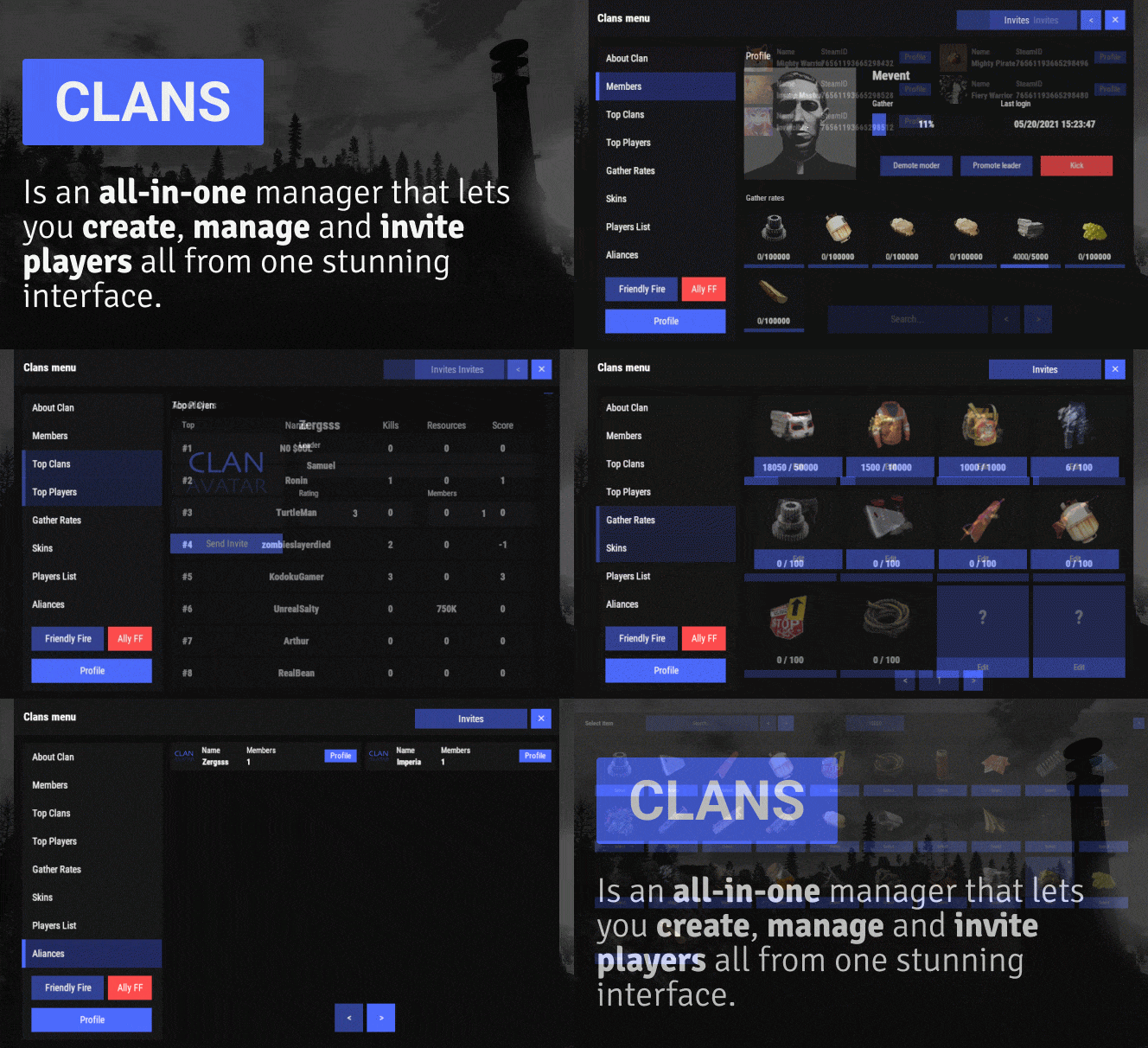
Clans is an all-in-one manager that lets you create, manage and invite players all from one stunning interface. Toggle friendly fire, view clan, and player leaderboards, create and break alliances, modify gather rates for clan members and set clan skins to identify clan members abroad easily. Features Beautiful user interface Performance Allied clans Gather rate for players (allows you to set how much each clan member must collect resources. For example: each member of the clan must collect 10 thousand sulfur, so that later it can be used to craft explosives and attack another clan) Clan skins (allows you to set common skins for all clan players. All the clothes on the players of the same clan will be the same, which allows you to distinguish your own from the enemies during the battle) The clan TAG min- and max-length can be defined in the config The clan overview shows offline member names Clan members can toggle friendly-fire protection for clan mates and allies Clan creation can check TAG’s against a blocked word list Clan tagging can be optionally disabled Old (not updated since x days) clans can be automatically purged Clans rating Players rating Setting a personal avatar for your clan Autowipe with wipe (optional) Commands clans (display clan menu) clans help (get information about commands) clan create (create a clan) clan leave (leave from your clan) clan join (open UI with invitations) clan ff (toggle friendlyfire status) clan allyff (toggle friendlyfire status for allies) clan invite <name/steamid> (invite a player) clan withdraw <name/steamid> (cancel an invite) clan kick <name/steamid> (kick a member) clan allyinvite <clanTag> (invite a clan to ally) clan allywithdraw <clanTag> (cancel the offer of an alliance) clan allyaccept <clanTag> (accept the offer of an alliance) clan allycancel <clanTag> (cancen the offer of an alliance) clan promote <name/steamid> (promote a member) clan demote <name/steamid> (demote a member) clan disband (disband your clan) clans.loadavatars (download avatars of all players) clans.manage list - lists all clans, their owners and their member-count clans.manage listex - lists all clans, their owners/members and their on-line status clans.manage show [name/userId] - lists the chosen clan (or clan by user) and the members with status clans.manage msg [clanTag] [message] - sends a clan message clans.manage create [name/userId] [clanTag] - creates a clan clans.manage rename [oldTag] [newTag] - renames a clan clans.manage disband [clanTag] - disbands a clan clans.manage invite [clanTag] [name/userId] - sends clan invitation to a player clans.manage join [clanTag] [name/userId] - joins a player into a clan clans.manage kick [clanTag] [name/userId] - kicks a member from a clan clans.manage owner [clanTag] [name/userId] - sets a new owner clans.manage promote [clanTag] [name/userId] - promotes a member clans.manage demote [clanTag] [name/userId] - demotes a member clans.reborn.convert (convert data from Clans Reborn plugin) clans.umod.convert (convert data from uMod Clans (v0.2.2+) plugin) clans.convert.olddata (convert data from old data) clans.convert.old.stats – used to update player data when upgrading from older versions of the game to 1.1.31 and above. Permissions clans.cancreate (permission to create a clan) clans.canjoin (permission to join a clan) clans.canleave (permission to leave a clan) clans.candisband (permission to disband a clan) clans.cankick (permission to kick a clan member) clans.admin (permission to use command 'clans.manage') Loot Types None – used for disabled loot Gather – used for gathering loot LootCrate – used for a loot crate Look – used to look at loot Kill – used to kill entities Craft – used for crafting items HackCrate – used for hacking a loot crate FAQ Q: Where can I see an example of a config? A: Config Q: Does the Clans plugin support other plugins? A: Yes, this Clans plugin has an API similar to other popular clans plugins. If the plugin works with Clans - it works with this plugin too. Q: How do I enable the display of clan ratings on the screen? A: You need to install the Clans Top plugin Q: Does the Clans plugin work with other Rust plugins? A: The Clans plugin is designed to work with a wide range of other Rust plugins, but compatibility may vary depending on the specific plugins you are using.$45.95 -
Version 0.1.2
209 downloads
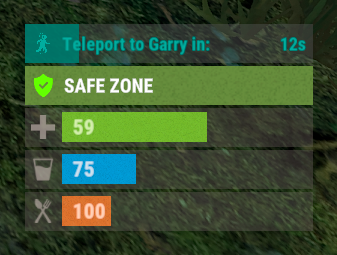
A useful plugin that displays the time until teleportation with the ability to automatically generate hooks. Depends on AdvancedStatus plugin. The ability to display status bars until teleportation; The ability to automatically generate code for teleport hooks; The ability to automatically generate language files for different languages(filled in English); The ability to customize the status bar for each teleport hook; The ability to choose between bar types(TimeCounter and TimeProgressCounter); The ability to specify the order of the bar; The ability to change the height of the bar; The abillity to customize the color and transparency of the background; The ability to set a material for the background; The ability to switch between CuiRawImageComponent and CuiImageComponent for the image; The ability to get images from the local folder(*SERVER*\oxide\data\AdvancedStatus\Images); The abillity to set own image and customize the color and transparency of the image; The abillity to set sprite instead of the image; The ability to customize the color, size, font and outline of the text. { "Is it worth generating teleport hooks? 0 - disabled, 1 - one-time activation, 2 - always enabled": 2, "List of language keys for creating language files": [ "en" ], "List of 'cancel' teleport commands": [ "tpc" ], "Limits the length of the displayed teleport name. A value of 0 disables the limitation": 10, "List of hooks for generation. Leave empty or null to recreate the default list": [ { "IsEnabled": true, "Hook method name": "OnTeleportAccepted", "Language key for the text": "BarTeleportToPlayer", "Specify the status bar Id used for this hook": "ToPlayer", "Is it worth sending the status bar for the target player?": true, "Language key for the text for the target player": "BarTeleportFromPlayer", "Specify the status bar Id used for the target player": "FromPlayer", "Specify all hook arguments(type and name) in order, separated by commas. Example: BasePlayer target, BasePlayer player, int countdown": "BasePlayer target, BasePlayer player, int countdown", "Indicates whether this hook represents a teleport cancelation event(e.g. OnTeleportInterrupted). Only InitiatorIndex is required": false, "Specify the index of the argument that contains the initiator": 1, "Specify the index of the argument that contains the target": 0, "Specify the argument index that contains the teleport countdown. Note: this index must not overlap with others, only int type is supported": 2 }, { "IsEnabled": true, "Hook method name": "OnHomeAccepted", "Language key for the text": "BarTeleportToHome", "Specify the status bar Id used for this hook": "Home", "Is it worth sending the status bar for the target player?": false, "Language key for the text for the target player": null, "Specify the status bar Id used for the target player": null, "Specify all hook arguments(type and name) in order, separated by commas. Example: BasePlayer target, BasePlayer player, int countdown": "BasePlayer player, string home, int countdown", "Indicates whether this hook represents a teleport cancelation event(e.g. OnTeleportInterrupted). Only InitiatorIndex is required": false, "Specify the index of the argument that contains the initiator": 0, "Specify the index of the argument that contains the target": 1, "Specify the argument index that contains the teleport countdown. Note: this index must not overlap with others, only int type is supported": 2 }, { "IsEnabled": true, "Hook method name": "OnHomeAccepted", "Language key for the text": "BarTeleportToHome", "Specify the status bar Id used for this hook": "Home", "Is it worth sending the status bar for the target player?": false, "Language key for the text for the target player": null, "Specify the status bar Id used for the target player": null, "Specify all hook arguments(type and name) in order, separated by commas. Example: BasePlayer target, BasePlayer player, int countdown": "BasePlayer player, string home, Vector3 pos, int countdown", "Indicates whether this hook represents a teleport cancelation event(e.g. OnTeleportInterrupted). Only InitiatorIndex is required": false, "Specify the index of the argument that contains the initiator": 0, "Specify the index of the argument that contains the target": 1, "Specify the argument index that contains the teleport countdown. Note: this index must not overlap with others, only int type is supported": 3 }, { "IsEnabled": true, "Hook method name": "OnTownAccepted", "Language key for the text": "BarTeleportToTown", "Specify the status bar Id used for this hook": "Town", "Is it worth sending the status bar for the target player?": false, "Language key for the text for the target player": null, "Specify the status bar Id used for the target player": null, "Specify all hook arguments(type and name) in order, separated by commas. Example: BasePlayer target, BasePlayer player, int countdown": "BasePlayer player, string name, int countdown", "Indicates whether this hook represents a teleport cancelation event(e.g. OnTeleportInterrupted). Only InitiatorIndex is required": false, "Specify the index of the argument that contains the initiator": 0, "Specify the index of the argument that contains the target": 1, "Specify the argument index that contains the teleport countdown. Note: this index must not overlap with others, only int type is supported": 2 }, { "IsEnabled": true, "Hook method name": "OnTeleportBackAccepted", "Language key for the text": "BarTeleportToBack", "Specify the status bar Id used for this hook": "Back", "Is it worth sending the status bar for the target player?": false, "Language key for the text for the target player": null, "Specify the status bar Id used for the target player": null, "Specify all hook arguments(type and name) in order, separated by commas. Example: BasePlayer target, BasePlayer player, int countdown": "BasePlayer player, Vector3 location, int countdown", "Indicates whether this hook represents a teleport cancelation event(e.g. OnTeleportInterrupted). Only InitiatorIndex is required": false, "Specify the index of the argument that contains the initiator": 0, "Specify the index of the argument that contains the target": 1, "Specify the argument index that contains the teleport countdown. Note: this index must not overlap with others, only int type is supported": 2 }, { "IsEnabled": true, "Hook method name": "OnWarpAccepted", "Language key for the text": "BarTeleportToWarp", "Specify the status bar Id used for this hook": "Warp", "Is it worth sending the status bar for the target player?": false, "Language key for the text for the target player": null, "Specify the status bar Id used for the target player": null, "Specify all hook arguments(type and name) in order, separated by commas. Example: BasePlayer target, BasePlayer player, int countdown": "BasePlayer player, Vector3 warpPosition, int countdown", "Indicates whether this hook represents a teleport cancelation event(e.g. OnTeleportInterrupted). Only InitiatorIndex is required": false, "Specify the index of the argument that contains the initiator": 0, "Specify the index of the argument that contains the target": 1, "Specify the argument index that contains the teleport countdown. Note: this index must not overlap with others, only int type is supported": 2 }, { "IsEnabled": true, "Hook method name": "OnTeleportInterrupted", "Language key for the text": "", "Specify the status bar Id used for this hook": "", "Is it worth sending the status bar for the target player?": false, "Language key for the text for the target player": null, "Specify the status bar Id used for the target player": null, "Specify all hook arguments(type and name) in order, separated by commas. Example: BasePlayer target, BasePlayer player, int countdown": "BasePlayer player", "Indicates whether this hook represents a teleport cancelation event(e.g. OnTeleportInterrupted). Only InitiatorIndex is required": true, "Specify the index of the argument that contains the initiator": 0, "Specify the index of the argument that contains the target": -1, "Specify the argument index that contains the teleport countdown. Note: this index must not overlap with others, only int type is supported": -1 } ], "List of status bar settings. The keys of these settings can be used for generated hooks. Leave empty or null to recreate the default list": { "ToPlayer": { "BarType(TimeProgressCounter or TimeCounter)": "TimeProgressCounter", "Order": 21, "Height": 26, "Main_Color(Hex or RGBA)": "#FFFFFF", "Main_Transparency": 0.15, "Main_Material(empty to disable)": "", "Image_Url": "https://i.imgur.com/NuAl6T5.png", "Image_Local(Leave empty to use Image_Url)": "TeleportStatus_Player", "Image_Sprite(Leave empty to use Image_Local or Image_Url)": "", "Image_IsRawImage": false, "Image_Color(Hex or RGBA)": "#15AC9D", "Image_Transparency": 1.0, "Is it worth enabling an outline for the image?": false, "Image_Outline_Color(Hex or RGBA)": "0.1 0.3 0.8 0.9", "Image_Outline_Transparency": 1.0, "Image_Outline_Distance": "0.75 0.75", "Text_Size": 12, "Text_Color(Hex or RGBA)": "#15AC9D", "Text_Font(https://umod.org/guides/rust/basic-concepts-of-gui#fonts)": "RobotoCondensed-Bold.ttf", "Text_Offset_Horizontal": 0, "Is it worth enabling an outline for the text?": false, "Text_Outline_Color(Hex or RGBA)": "#000000", "Text_Outline_Transparency": 1.0, "Text_Outline_Distance": "0.75 0.75", "SubText_Size": 12, "SubText_Color(Hex or RGBA)": "#15AC9D", "SubText_Font": "RobotoCondensed-Bold.ttf", "Is it worth enabling an outline for the sub text?": false, "SubText_Outline_Color(Hex or RGBA)": "0.5 0.6 0.7 0.5", "SubText_Outline_Transparency": 1.0, "SubText_Outline_Distance": "0.75 0.75", "Progress_Reverse": false, "Progress_Color(Hex or RGBA)": "#009688", "Progress_Transparency": 0.7, "Progress_OffsetMin": "0 0", "Progress_OffsetMax": "0 0" }, "FromPlayer": { "BarType(TimeProgressCounter or TimeCounter)": "TimeProgressCounter", "Order": 22, "Height": 26, "Main_Color(Hex or RGBA)": "#FFFFFF", "Main_Transparency": 0.15, "Main_Material(empty to disable)": "", "Image_Url": "https://i.imgur.com/G3TrHoc.png", "Image_Local(Leave empty to use Image_Url)": "TeleportStatus_FromPlayer", "Image_Sprite(Leave empty to use Image_Local or Image_Url)": "", "Image_IsRawImage": false, "Image_Color(Hex or RGBA)": "#E2DBD6", "Image_Transparency": 0.55, "Is it worth enabling an outline for the image?": false, "Image_Outline_Color(Hex or RGBA)": "0.1 0.3 0.8 0.9", "Image_Outline_Transparency": 1.0, "Image_Outline_Distance": "0.75 0.75", "Text_Size": 12, "Text_Color(Hex or RGBA)": "#15AC9D", "Text_Font(https://umod.org/guides/rust/basic-concepts-of-gui#fonts)": "RobotoCondensed-Bold.ttf", "Text_Offset_Horizontal": 2, "Is it worth enabling an outline for the text?": false, "Text_Outline_Color(Hex or RGBA)": "#000000", "Text_Outline_Transparency": 1.0, "Text_Outline_Distance": "0.75 0.75", "SubText_Size": 12, "SubText_Color(Hex or RGBA)": "#15AC9D", "SubText_Font": "RobotoCondensed-Bold.ttf", "Is it worth enabling an outline for the sub text?": false, "SubText_Outline_Color(Hex or RGBA)": "0.5 0.6 0.7 0.5", "SubText_Outline_Transparency": 1.0, "SubText_Outline_Distance": "0.75 0.75", "Progress_Reverse": false, "Progress_Color(Hex or RGBA)": "#009688", "Progress_Transparency": 0.7, "Progress_OffsetMin": "25 0", "Progress_OffsetMax": "0 0" }, "Home": { "BarType(TimeProgressCounter or TimeCounter)": "TimeProgressCounter", "Order": 23, "Height": 26, "Main_Color(Hex or RGBA)": "#FFFFFF", "Main_Transparency": 0.15, "Main_Material(empty to disable)": "", "Image_Url": "https://i.imgur.com/3xQmCKv.png", "Image_Local(Leave empty to use Image_Url)": "TeleportStatus_Home", "Image_Sprite(Leave empty to use Image_Local or Image_Url)": "", "Image_IsRawImage": false, "Image_Color(Hex or RGBA)": "#E2DBD6", "Image_Transparency": 0.55, "Is it worth enabling an outline for the image?": false, "Image_Outline_Color(Hex or RGBA)": "0.1 0.3 0.8 0.9", "Image_Outline_Transparency": 1.0, "Image_Outline_Distance": "0.75 0.75", "Text_Size": 12, "Text_Color(Hex or RGBA)": "#E2DBD6", "Text_Font(https://umod.org/guides/rust/basic-concepts-of-gui#fonts)": "RobotoCondensed-Bold.ttf", "Text_Offset_Horizontal": 2, "Is it worth enabling an outline for the text?": false, "Text_Outline_Color(Hex or RGBA)": "#000000", "Text_Outline_Transparency": 1.0, "Text_Outline_Distance": "0.75 0.75", "SubText_Size": 12, "SubText_Color(Hex or RGBA)": "#E2DBD6", "SubText_Font": "RobotoCondensed-Bold.ttf", "Is it worth enabling an outline for the sub text?": false, "SubText_Outline_Color(Hex or RGBA)": "0.5 0.6 0.7 0.5", "SubText_Outline_Transparency": 1.0, "SubText_Outline_Distance": "0.75 0.75", "Progress_Reverse": false, "Progress_Color(Hex or RGBA)": "#009688", "Progress_Transparency": 0.7, "Progress_OffsetMin": "25 2.5", "Progress_OffsetMax": "-3.5 -3.5" }, "Town": { "BarType(TimeProgressCounter or TimeCounter)": "TimeProgressCounter", "Order": 24, "Height": 26, "Main_Color(Hex or RGBA)": "#FFFFFF", "Main_Transparency": 0.15, "Main_Material(empty to disable)": "", "Image_Url": "https://i.imgur.com/FswyqvJ.png", "Image_Local(Leave empty to use Image_Url)": "TeleportStatus_Town", "Image_Sprite(Leave empty to use Image_Local or Image_Url)": "", "Image_IsRawImage": false, "Image_Color(Hex or RGBA)": "#E2DBD6", "Image_Transparency": 0.55, "Is it worth enabling an outline for the image?": false, "Image_Outline_Color(Hex or RGBA)": "0.1 0.3 0.8 0.9", "Image_Outline_Transparency": 1.0, "Image_Outline_Distance": "0.75 0.75", "Text_Size": 12, "Text_Color(Hex or RGBA)": "#E2DBD6", "Text_Font(https://umod.org/guides/rust/basic-concepts-of-gui#fonts)": "RobotoCondensed-Bold.ttf", "Text_Offset_Horizontal": 0, "Is it worth enabling an outline for the text?": false, "Text_Outline_Color(Hex or RGBA)": "#000000", "Text_Outline_Transparency": 1.0, "Text_Outline_Distance": "0.75 0.75", "SubText_Size": 12, "SubText_Color(Hex or RGBA)": "#E2DBD6", "SubText_Font": "RobotoCondensed-Bold.ttf", "Is it worth enabling an outline for the sub text?": false, "SubText_Outline_Color(Hex or RGBA)": "0.5 0.6 0.7 0.5", "SubText_Outline_Transparency": 1.0, "SubText_Outline_Distance": "0.75 0.75", "Progress_Reverse": false, "Progress_Color(Hex or RGBA)": "#009688", "Progress_Transparency": 0.7, "Progress_OffsetMin": "0 0", "Progress_OffsetMax": "0 0" }, "Back": { "BarType(TimeProgressCounter or TimeCounter)": "TimeProgressCounter", "Order": 25, "Height": 26, "Main_Color(Hex or RGBA)": "#FFFFFF", "Main_Transparency": 0.15, "Main_Material(empty to disable)": "", "Image_Url": "https://i.imgur.com/I9B2joa.png", "Image_Local(Leave empty to use Image_Url)": "TeleportStatus_Back", "Image_Sprite(Leave empty to use Image_Local or Image_Url)": "", "Image_IsRawImage": false, "Image_Color(Hex or RGBA)": "#E2DBD6", "Image_Transparency": 0.55, "Is it worth enabling an outline for the image?": false, "Image_Outline_Color(Hex or RGBA)": "0.1 0.3 0.8 0.9", "Image_Outline_Transparency": 1.0, "Image_Outline_Distance": "0.75 0.75", "Text_Size": 12, "Text_Color(Hex or RGBA)": "#E2DBD6", "Text_Font(https://umod.org/guides/rust/basic-concepts-of-gui#fonts)": "RobotoCondensed-Bold.ttf", "Text_Offset_Horizontal": 2, "Is it worth enabling an outline for the text?": false, "Text_Outline_Color(Hex or RGBA)": "#000000", "Text_Outline_Transparency": 1.0, "Text_Outline_Distance": "0.75 0.75", "SubText_Size": 12, "SubText_Color(Hex or RGBA)": "#E2DBD6", "SubText_Font": "RobotoCondensed-Bold.ttf", "Is it worth enabling an outline for the sub text?": false, "SubText_Outline_Color(Hex or RGBA)": "0.5 0.6 0.7 0.5", "SubText_Outline_Transparency": 1.0, "SubText_Outline_Distance": "0.75 0.75", "Progress_Reverse": false, "Progress_Color(Hex or RGBA)": "#009688", "Progress_Transparency": 0.7, "Progress_OffsetMin": "25 0", "Progress_OffsetMax": "0 0" }, "Warp": { "BarType(TimeProgressCounter or TimeCounter)": "TimeProgressCounter", "Order": 26, "Height": 26, "Main_Color(Hex or RGBA)": "#FFFFFF", "Main_Transparency": 0.15, "Main_Material(empty to disable)": "", "Image_Url": "https://i.imgur.com/sczcAdC.png", "Image_Local(Leave empty to use Image_Url)": "TeleportStatus_Warp", "Image_Sprite(Leave empty to use Image_Local or Image_Url)": "", "Image_IsRawImage": false, "Image_Color(Hex or RGBA)": "#E2DBD6", "Image_Transparency": 0.55, "Is it worth enabling an outline for the image?": false, "Image_Outline_Color(Hex or RGBA)": "0.1 0.3 0.8 0.9", "Image_Outline_Transparency": 1.0, "Image_Outline_Distance": "0.75 0.75", "Text_Size": 12, "Text_Color(Hex or RGBA)": "#E2DBD6", "Text_Font(https://umod.org/guides/rust/basic-concepts-of-gui#fonts)": "RobotoCondensed-Bold.ttf", "Text_Offset_Horizontal": 0, "Is it worth enabling an outline for the text?": false, "Text_Outline_Color(Hex or RGBA)": "#000000", "Text_Outline_Transparency": 1.0, "Text_Outline_Distance": "0.75 0.75", "SubText_Size": 12, "SubText_Color(Hex or RGBA)": "#E2DBD6", "SubText_Font": "RobotoCondensed-Bold.ttf", "Is it worth enabling an outline for the sub text?": false, "SubText_Outline_Color(Hex or RGBA)": "0.5 0.6 0.7 0.5", "SubText_Outline_Transparency": 1.0, "SubText_Outline_Distance": "0.75 0.75", "Progress_Reverse": false, "Progress_Color(Hex or RGBA)": "#009688", "Progress_Transparency": 0.7, "Progress_OffsetMin": "0 0", "Progress_OffsetMax": "0 0" } }, "Version": { "Major": 0, "Minor": 1, "Patch": 2 } } EN: { "BarTeleportToPlayer": "Teleport to {0} in:", "BarTeleportFromPlayer": "{0} will be at you in:", "BarTeleportToHome": "Teleport to {0} in:", "BarTeleportToTown": "Teleport to {0} in:", "BarTeleportToBack": "Teleport to {0} in:", "BarTeleportToWarp": "Teleport to {0} in:" } RU: { "BarTeleportToPlayer": "Телепорт к {0} через:", "BarTeleportFromPlayer": "{0} будет у вас через:", "BarTeleportToHome": "Телепорт в {0} через:", "BarTeleportToTown": "Телепорт в {0} через:", "BarTeleportToBack": "Телепорт в {0} через:", "BarTeleportToWarp": "Телепорт в {0} через:" }$3.99 -
Version 0.1.8
92 downloads
GUI and sound announcements for online teammates. Announcements about teammates who have connected, disconnected, been wounded or killed while sleeping. Additionally, announcements from the team leader, in Team chat channel using "!" as a first char. { "Chat command": "teama", "Is it worth enabling GameTips for messages?": true, "Is it worth enabling leader's group announcements?": true, "Is it worth enabling sound announcements?": true, "Radius within which a wounded ally notification is received": 100.0, "Radius within which a sound effect is triggered when an ally is wounded": 50.0, "Sound effect triggered when an ally is wounded": "assets/bundled/prefabs/fx/player/beartrap_scream.prefab", "Notification settings for each type": [ { "Notification type. Do not touch this parameter": "Connected", "Language_Key": "MsgPlayerConnected", "Duration": 6.0, "Main_Color": "#4F6133", "Main_Transparency": 0.8, "Main_Material": "", "Image_URL": "https://i.imgur.com/5Q9rxNO.png", "Image_Sprite": "", "Image_IsRawImage": false, "Image_Color": "#8CBA42", "Image_Transparency": 1.0, "Text_Size": 16, "Text_Color": "#8CBA42", "Text_Font": "RobotoCondensed-Bold.ttf", "Sound_Effect": "assets/prefabs/npc/scientist/sound/chatter.prefab" }, { "Notification type. Do not touch this parameter": "Disconnected", "Language_Key": "MsgPlayerDisconnected", "Duration": 6.0, "Main_Color": "#BF3B26", "Main_Transparency": 0.8, "Main_Material": "", "Image_URL": "https://i.imgur.com/5Q9rxNO.png", "Image_Sprite": "", "Image_IsRawImage": false, "Image_Color": "#FFD173", "Image_Transparency": 1.0, "Text_Size": 16, "Text_Color": "#FFD173", "Text_Font": "RobotoCondensed-Bold.ttf", "Sound_Effect": "assets/prefabs/npc/scientist/sound/death.prefab" }, { "Notification type. Do not touch this parameter": "LeaderAnnounce", "Language_Key": "", "Duration": 6.0, "Main_Color": "#216699", "Main_Transparency": 0.8, "Main_Material": "", "Image_URL": "https://i.imgur.com/RSaRsp0.png", "Image_Sprite": "", "Image_IsRawImage": false, "Image_Color": "#82C7F5", "Image_Transparency": 1.0, "Text_Size": 16, "Text_Color": "#82C7F5", "Text_Font": "RobotoCondensed-Bold.ttf", "Sound_Effect": "assets/prefabs/npc/scientist/sound/aggro.prefab" }, { "Notification type. Do not touch this parameter": "WoundedDistance", "Language_Key": "MsgPlayerWoundedDistance", "Duration": 6.0, "Main_Color": "#FFC21A", "Main_Transparency": 0.8, "Main_Material": "", "Image_URL": "https://i.imgur.com/jMAs33v.png", "Image_Sprite": "", "Image_IsRawImage": false, "Image_Color": "#FFF54C", "Image_Transparency": 1.0, "Text_Size": 16, "Text_Color": "#FFF54C", "Text_Font": "RobotoCondensed-Bold.ttf", "Sound_Effect": "assets/prefabs/npc/scientist/sound/takecover.prefab" }, { "Notification type. Do not touch this parameter": "WoundedGrid", "Language_Key": "MsgPlayerWoundedGrid", "Duration": 6.0, "Main_Color": "#FFC21A", "Main_Transparency": 0.8, "Main_Material": "", "Image_URL": "https://i.imgur.com/jMAs33v.png", "Image_Sprite": "", "Image_IsRawImage": false, "Image_Color": "#FFF54C", "Image_Transparency": 1.0, "Text_Size": 16, "Text_Color": "#FFF54C", "Text_Font": "RobotoCondensed-Bold.ttf", "Sound_Effect": "assets/prefabs/npc/scientist/sound/takecover.prefab" }, { "Notification type. Do not touch this parameter": "DeadWhileSleeping", "Language_Key": "MsgPlayerDeadWhileSleeping", "Duration": 6.0, "Main_Color": "#FFC21A", "Main_Transparency": 0.8, "Main_Material": "", "Image_URL": "https://i.imgur.com/gwk73Tk.png", "Image_Sprite": "", "Image_IsRawImage": false, "Image_Color": "#FFF54C", "Image_Transparency": 1.0, "Text_Size": 16, "Text_Color": "#FFF54C", "Text_Font": "RobotoCondensed-Bold.ttf", "Sound_Effect": "assets/prefabs/npc/scientist/sound/responddeath.prefab" }, { "Notification type. Do not touch this parameter": "Banned", "Language_Key": "MsgPlayerBanned", "Duration": 6.0, "Main_Color": "#BF3B26", "Main_Transparency": 0.8, "Main_Material": "", "Image_URL": "https://i.imgur.com/8WsmOMo.png", "Image_Sprite": "", "Image_IsRawImage": false, "Image_Color": "#FFD173", "Image_Transparency": 1.0, "Text_Size": 16, "Text_Color": "#FFD173", "Text_Font": "RobotoCondensed-Bold.ttf", "Sound_Effect": "assets/prefabs/missions/effects/mission_failed.prefab" } ], "Version": { "Major": 0, "Minor": 1, "Patch": 8 } } EN: { "MsgPlayerConnected": "Your teammate {0} has been connected!", "MsgPlayerDisconnected": "Your teammate {0} has been disconnected!", "MsgPlayerWoundedDistance": "Your teammate {0} was wounded by {1}!\nHe is {2} meters away from you.", "MsgPlayerWoundedGrid": "Your teammate {0} was wounded by {1} at {2}!", "MsgPlayerDeadWhileSleeping": "Your teammate {0} was killed by {1} while he was sleeping at {2}!", "MsgPlayerBanned": "Your teammate {0} has been banned!\nReason: {1}.", "MsgEmptyTeam": "There is only you in your team!", "MsgNotLeader": "Only the team leader can send announcements!", "MsgOfflineMates": "All your teammates are offline!", "MsgEnableSound": "Sound notifications are enabled!", "MsgDisableSound": "Sound notifications are disabled!", "MsgEnableConnected": "Team mates connection notifications are enabled!", "MsgDisableConnected": "Team mates connection notifications are disabled!", "MsgEnableDisconnected": "Team mates disconnection notifications are enabled!", "MsgDisableDisconnected": "Team mates disconnection notifications are disabled!", "MsgEnableWounded": "Team mates wounded notifications are enabled!", "MsgDisableWounded": "Team mates wounded notifications are disabled!", "MsgEnableDeath": "Team mates sleeping kill notifications are enabled!", "MsgDisableDeath": "Team mates sleeping kill notifications are disabled!", "MsgEnableAll": "All team mates notifications are enabled!", "MsgDisableAll": "All team mates notifications are disabled!", "MsgKillerUnknown": "Unknown", "bear": "Bear", "polarbear": "PolarBear", "wolf": "Wolf", "stag": "Stag", "boar": "Boar", "chicken": "Chicken", "horse": "Horse", "simpleshark": "Shark", "patrolhelicopter": "Patrol Heli", "bradleyapc": "Bradley APC", "scientistnpc_arena": "Scientist", "scientistnpc_cargo": "Cargo Scientist", "scientistnpc_cargo_turret_any": "Cargo Scientist", "scientistnpc_cargo_turret_lr300": "Cargo Scientist", "scientistnpc_ch47_gunner": "Chinook Scientist", "scientistnpc_excavator": "Excavator Scientist", "scientistnpc_full_any": "Scientist", "scientistnpc_full_lr300": "Scientist", "scientistnpc_full_mp5": "Scientist", "scientistnpc_full_pistol": "Scientist", "scientistnpc_full_shotgun": "Scientist", "scientistnpc_heavy": "Heavy Scientist", "scientistnpc_junkpile_pistol": "Road Scientist", "scientistnpc_oilrig": "Oilrig Scientist", "scientistnpc_patrol": "Patrol Scientist", "scientistnpc_peacekeeper": "Peacekeeper Scientist", "scientistnpc_roam": "Roam Scientist", "scientistnpc_roam_nvg_variant": "Roam NVG Scientist", "scientistnpc_roamtethered": "Roam Scientist" } RU: { "MsgPlayerConnected": "Ваш союзник {0} подключился!", "MsgPlayerDisconnected": "Ваш союзник {0} отключился!", "MsgPlayerWoundedDistance": "Вашего союзника {0} серьёзно ранил {1}!\nОн в {2} метрах от вас.", "MsgPlayerWoundedGrid": "Вашего союзника {0} серьёзно ранил {1} в {2}!", "MsgPlayerDeadWhileSleeping": "Вашего союзника {0} убил {1}, пока тот спал в {2}!", "MsgPlayerBanned": "Ваш союзник {0} был заблокирован!\nПричина: {1}.", "MsgEmptyTeam": "У тебя нет союзников!", "MsgNotLeader": "Только лидер группы может отправлять объявления!", "MsgOfflineMates": "Все ваши союзники не в сети!", "MsgEnableSound": "Звуковые уведомления включены!", "MsgDisableSound": "Звуковые уведомления выключены!", "MsgEnableConnected": "Оповещение о подключении союзников включено!", "MsgDisableConnected": "Оповещение о подключении союзников выключено!", "MsgEnableDisconnected": "Оповещение об отключении союзников включено!", "MsgDisableDisconnected": "Оповещение об отключении союзников выключено!", "MsgEnableWounded": "Оповещение о ранении союзников включено!", "MsgDisableWounded": "Оповещение о ранении союзников выключено!", "MsgEnableDeath": "Оповещение о смерти во сне союзников включено!", "MsgDisableDeath": "Оповещение о смерти во сне союзников выключено!", "MsgEnableAll": "Все оповещения о состоянии союзников включены!", "MsgDisableAll": "Все оповещения о состоянии союзников выключены!", "MsgKillerUnknown": "Неизвестный", "bear": "Медведь", "polarbear": "Полярный медведь", "wolf": "Волк", "stag": "Олень", "boar": "Кабан", "chicken": "Курица", "horse": "Лошадь", "simpleshark": "Акула", "patrolhelicopter": "Патрульный вертолет", "bradleyapc": "Танк", "scientistnpc_arena": "Ученый", "scientistnpc_cargo": "Защитник карго", "scientistnpc_cargo_turret_any": "Защитник карго", "scientistnpc_cargo_turret_lr300": "Защитник карго", "scientistnpc_ch47_gunner": "Защитник чинука", "scientistnpc_excavator": "Защитник экскаватора", "scientistnpc_full_any": "Ученый", "scientistnpc_full_lr300": "Ученый", "scientistnpc_full_mp5": "Ученый", "scientistnpc_full_pistol": "Ученый", "scientistnpc_full_shotgun": "Ученый", "scientistnpc_heavy": "Heavy Scientist", "scientistnpc_junkpile_pistol": "Road Scientist", "scientistnpc_oilrig": "Oilrig Scientist", "scientistnpc_patrol": "Patrol Scientist", "scientistnpc_peacekeeper": "Peacekeeper Scientist", "scientistnpc_roam": "Roam Scientist", "scientistnpc_roam_nvg_variant": "Roam NVG Scientist", "scientistnpc_roamtethered": "Roam Scientist" } con - Personal enabling/disabling connected announcement; dis - Personal enabling/disabling disconnected announcement; wound - Personal enabling/disabling wounded announcement; death - Personal enabling/disabling sleeper's death announcement; sound - Personal enabling/disabling sound effects; all - Personal enabling all announcements; clear - Personal disabling all announcements(except leader and ban announces). Example: /teama con$3.99 -
Version 2.1.5
518 downloads
Clans for discord Recently, some of the top servers have been making clan bots for their Discord which can drive a thriving Discord community which is one of the most important things for a Rust server. Having a thriving Discord community means you are able to hold onto those players for your servers. Users can make a clan, invite their friends, promote and demote their friends within the clan, and even if they wanted to disband the clan they can. You can set the bot to make a clan text chat, displaying clans separately from online members, give the leader a special role, ETC* The non admin commands are: - clan create - clan invite - clan promote - clan demote - clan info - clan kick - clan leave - clan disband The admin commands are: - clan edit - clan force disband - clan force kick member - clan force invite member All clans and everything are stored in a database that you provide, so the clan data cannot messed up VIA roles and what not. All the commands are slash commands for ease of use as seen in the attached photos. All commands are protected by user checks. So people cannot do actions for clans that they are not in unless they are given an admin role that is defined in the bot config. The bot is very simple to install The file also includes a readme.md file which includes the info that you need to know. Need support or want updates about what is coming to the bot? Join the support discord here https://discord.gg/RVePam7pd7$19.99 -
Version 1.0.0
27 downloads
This is a Rust discord bot, that i have developed myself. It can do alot of things. Installation You legit just have to run install.bat and change token in the Src/Credentials/Config.js Clan system General Commands: /clan create <name> - Create a clan. /clan help - Show this message. /clan leave- Leaves your clan. Clan Admin Commands: /clan kick <user> - Kick a user from your clan. /clan invite <user> - Invite a user to your clan. - https://imgur.com/a/Wxjk0zf /clan color <color> - Set the color of your clan. Clan Owner Commands: /clan transfer <user> - Transfer the ownership of your clan to another user. /clan promote <user> - Promote a user to admin. /clan disband- Disband your clan. Admin Commands /ban <user> <reason> - Bans the given user from the discord + logging and private message to the banned user /warn <user> <reason> - Warns the given user + logging /check <user> - Sends some information on the user(wanrs, timeouts, bans, messages and jointime) /timeout <user> <reason> <time(10s, 10m, 10d, 10w) - Timeouts a user, + privatemessage and logging /kick <user> <reason> - Kicks a user, + privatemessage and logging Suggestion System /suggest <suggestion> - Sends a suggestion in the channel, so other users can up/downvote - Admins can decline or accept it - All Pictures: https://imgur.com/a/fyVrnEs Ticket System /ticket - Sends the ticket panel in the current channel Creating ticket when clicling "Create Ticket" Closing ticket when clicking close - Transcript that will be sent to your logchannel Giveaway System /giveaway <duration> <winners> <prize> <channel it should be sent in> - Starts a giveaway in the given channel - Join message: https://imgur.com/a/ehKqzcQ /reroll <giveaway messageid> - Rerolls the given giveaway /end <giveaway messageid> - Ends the given giveaway /list - Gives a list of the current ongoing giveaways Other Systems /rules - Sends the rule embed in the current channel /verify - Sends the verify panel in the current channel /rank - Displays ur current rank and xp - Works on messages /rstats <steam64> - Displays official stats on rust users. Rust Player bot - The rust queue and players will be shown as the bot Status$24.99 -
Version 2.00
5 downloads
Overview: The Ultimate automatic raid management system for Clan/Team raiding. Commands: These commands require RaidZones.Use /set - Sets the center of the Raid Zone/Detection Zone and Enables active listening for explosions. /removezone (ClanTag) - Removes the Raid Zone listener from clans base. Config: The default Config file : Bubble Duration - The amount of time that the Zone will be active for once an explosion is detected. Raid Bubble Radius - The size of the zone that Attackers/Defenders need to hold to win the raid, also the size of the visible bubble. Damage Detection Radius - The size of the zone that will listen for explosive damage to activate a raid zone. Defender Hold Time - The amount of time that the defenders need to maintain control of their base to win the raid. Attacker Hold Time - The amount of time that the raiders(attackers) need to maintain control of the zone to win the raid. Color of Zone - Sets the color of the Visible bubble currently available in Red, Blue, Gray, Green, and Purple. Announce raids to server - Determines if announcements should be sent on raid start and if raid winners should be displayed in chat. Entity Search Radius - The radius around the TC that will be checked to insure the assigned clan has building permission. *Defender Hold Time and Attacker Hold Time are on sperate timers, only needing their teams timer to complete to win. *Defending and Attacking timers change based on team members in the zone. If one team has more members than the other, their timer will progress while the opposing teams will not. Demonstration Video:$15.00 -
Version 1.1.5
695 downloads
Team Tracker is your is the best admin tool for monitoring player associations and enforce team size rules. Whether you need to ban an entire team or track players abusing the system, Team Tracker has you covered. It offers live logging, team queries, and auto-banning—all in one customizable and performant package. Dynamic identification of player teams Live discord logging Query a player team at any time Automatic custom ban system Battlemetrics integration High Performance clearplayerdata - deletes a players team data/history teamcheck - Sends a discord embed with a report of group data, warnings and current team players to discord. Note: All chat commands are universal meaning they can be used via the console, rcon(for import commands) and can be customized via the configuration. teamtracker.whitelist - Whitelists a player from being included in any team alerts (Admins and Developers are automatically whitelisted) teamtracker.admin - allows the use of the checkteam and whitelist commands Proximity - configurable distance between players Sleeping bag placement - bags given or placed within building Codelock authorization - authorized players on a codelock Turret authorization - authorized players on a turret Toolcupboard authorization - authorized players on a toolcupboard Healing - healing and reviving of other players Vehicle mounting - mounting of the same vehicle at the same time Team-members - history of team members PVP - players breaking team limits when pvping/roaming Raiding - players raiding together Looting - looting other players together Alerts: All alert types can be customized via the plugin config. Options include: Enable - this toggles any usage of the alert type to enable or disable the alert type Log to discord - Enables discord logs Warn Players - Sends an ingame warning to a player up to 30 seconds after the offense Weighting - configures how important the alert type is. This contributes to the ban by association score value. Warnings: Warnings are logged as a type of violation. This provides discord logs and the optional in game warning display to the violator. Display Warnings to Players - option to disable in game warnings Length of time to display warning - optional length of time to display warnings Warning Text - customizable warning text Bans: Team-Tracker allows for customizable automatic bans of players, who go over the group limits. Enable Bans - allows toggeling of the ban system Ban text - text to display as the reason for a player ban Log Bans to Discord - optionally log bans to discord. Logging Only Mode: Set Enable Bans & Log Bans to Discord to true and set Local Bans and Battlemetrics Bans to False Enable Ban by Max Association - enables banning a player or a team by summing all association values to create a total weighting. Example: if the team limit is 5 players and the Max Association Weighting is 10, if a player has more than 5 players with an association weighting of more than 10 this will apply a ban. Max Association Weighting - set the max association weighting per player in a group Ban Duration - length of time to ban for Ban Team - ban all team members of a banned player Ban Associations - bans all players over Max Association Weighting in relation to a banned player Local Bans - apply bans locally An API token for your battlemetrics org is required to use the battlemetrics ban features. A token can be acquired by visiting: https://www.battlemetrics.com/developers Server ID - set the BM server ID Go to https://www.battlemetrics.com/rcon, click into the select server. Check the address bar in your browser, the address will be ending with the Server Id, for example: https://www.battlemetrics.com/rcon/servers/123456 means 123456 is the Server Id. Org ID - set an organisation ID Go to https://www.battlemetrics.com/rcon/orgs, click into the org. Check the address bar in your browser, the address will be ending with the Organization Id, for example: https://www.battlemetrics.com/rcon/orgs/edit/123456 means 123456 is the Organization Id. BanList ID - adds a ban to a specific ban list Go to https://www.battlemetrics.com/rcon/ban-lists, click "View Bans". Check the address bar in your browser, the address will be ending with the Banlist Id, for example: https://www.battlemetrics.com/rcon/bans/?filter[banList]=abcdef-123456-example-banlist-example91011 means abcdef-123456-example-banlist-example91011 is the Banlist Id. Org Wide Ban - true if the ban should be applied to all servers in your organization Auto Add - true if the ban should automatically ban new identifiers after kicking a matching player. Native Enabled - true if native bans should be issued for this ban$24.99- 16 comments
- 5 reviews
-
- 4
-

-

-
- #teamalerts
- #team
- (and 28 more)
-
Version 1.0.9
82 downloads
Clan Homes allows your players to set one or more clan homes for their clan! This plugin was designed for configurability, with this permission and config system you and your players can control every aspect. Note: this plugin requires a Clan plugin to function. ★ Optional Multi-Home System - Allow players to set a single clan home or multiple ★ Cooldown System - Fully configurable cooldowns based on permissions you create in the config ★ Teleport Configuration System - Configure what is and isn't allowed when teleporting to the clan home(s) ★ Easy Cancel System - Easily cancel your teleport home by typing /ch c or /tpc (works with NTeleportation) ★ Notify System - Notify your clan mates where the new clan base is (if enabled by clan leader) ★ and more! (Rest of features below) ★ Custom Permission System - Allow your clan leaders to choose what roles in the clan can set the clan home(s) ★ Blacklist System - Prevent setting clan homes on a configurable list prefabs ★ Home Limit System - Limit the number clan homes, number of times a clan home can be teleported to, and or the number of home teleports each permission has ★ Clan Member Threshold - Prevent the ability to set clan home if the clan does not meet the configurable number of members required Q: Does this work with X clan plugin? A: Most likely yes. If your plugin is compatible with K1llY0u's clan plugin, it will be compatible with this plugin. If its not listed in the "Works With " section, feel free to ask in the Discussions section and @ me with the message so I get a notification. For support, please make a support ticket and include any pertinent info (like how to recreate/what you were doing at the time) and any errors that occur.$11.99 -
Version 1.0.5
12 downloads
Are you tired of manually placing trap sets and deployables every time you build your base? Introducing our groundbreaking Automatic Trap Spawning feature, boost your productivity today! Premium TrapsDeployable Pack Include: 25 Deployable Traps with traps include own skin id's to add easy to your shop/kits/rewards etc. Much more will be added soon! Config setting: Change Skin Id Enable Auto Light Amount of items spawn when use command Use Permissons and Spawn all Traps Permissions Commands: /givetraps More will be added soon { "Autoload Handmade Shells to Shotgun Traps?": true, "Amount of Handmade Shells Per Trap (If Autoloading is Enabled)": 5, "Enable Random AutoTurret Weapon Equipping?": true, "Weapons that will equip to spawned AutoTurrets? (Won't work with AutoTurrets as the base Trap item.)": [ "smg.2", "smg.mp5", "rifle.ak", "rifle.ak.ice", "rifle.ak.diver" ], "Skins For Large Wood Box": [ 3089535231, 2862225402, 3073574332 ], "Skins For Wood Storage Boxes": [ 2968107939, 2814554242, 3140274442 ], "Skins For Locker": [ 2827174228, 3045135608, 2192426772 ], "Skins For Sandbag Barricade": [ 809144507, 883540119, 2875673223 ], "Skins For Concrete Barricade": [ 791070521, 2979413501, 3048748658 ], "Skins For Sleeping Bag": [ 890544230, 1846072235, 3138426426 ], "Skins For Garage Door": [ 3141844850, 3122757150, 3041397918 ], "Skins For Reactive Target": [ 824001540, 1559278854, 867566835 ], "Amount of Each Trap that will be Spawned Upon Command": 5, "Auto Ignite Lanterns?": true } Displayname - Shortname - skinid Deathbed - bed- 3142209738 Deathwish - Throne -chair.icethrone - 3142209392 SWEEPER-S1 - autoturret - 3141114360 Bedroll Trap - sleepingbag - 3141151356 Elite Worker - EH1 workbench3 - 3141143055 Bench X-5 - box.repair.bench - 3141187587 Lockdown Locker - locker - 3141146704 JACK3D TURRET - autoturret - 3141190617 DISCOV3RY BENCH - research.table - 3141193852 Working Man Trap - box.wooden.large - 3141243339 Garage Trap wall.frame.garagedoor - 3141262381 Trapboxx box.wooden.large - 3141262270 T-3000 Lantern - electric.teslacoil - 3141260773 T-3000 Siren ectric.sirenlight - 3141469034 Cozy Sofa -sofa - 3141251865 SnapTrap - storage_barrel_c - 3141252178 SnapTrap - cupboard.tool - 3141641822 TrapRack - shelves - 3141645233 StackTrap - box.wooden - 3141642954 Quick Deploy - barricade.concrete - 3141643596 Oldtimer - rockingchair - 3142210610 Search Trap - searchlight - 3142210215 Triple Barrel - electric.pressurepad 3141263818 Reactive Trap - target.reactive - 3142605567 New Wall Turret - spinner.wheel 3147202210 Barrel with Dual Shotguns and Front Bear Trap Description Behold the Barrel of Doom, innocently resting before you, concealing an unforgiving surprise within. Two Shotguns lurk inside, primed and ready to launch a hail of destruction, while a cruel Bear Trap guards the barrel’s entrance, ensnaring any unsuspecting intruders in a swift and painful embrace. Sofa with Teddy Bear and Middle Trap Shotgun Description Lounge in comfort while your enemies sow their own demise on the Sofa, accompanied by an innocent Teddy Bear. Concealed within, a Middle Trap Shotgun activates with every unsuspecting visitor, turning relaxation into a horrifying spectacle of carnage. Stack of Four Small Boxes with Side Traps and Lanterns Description Ascend the tower of danger with the Stack of Four Small Boxes, each harboring insidious Side Traps and illuminated by sturdy lanterns. Ascend with caution, for each treacherous step holds the potential for entrapment, rendering even the most intrepid adventurers helpless before your ingenuity. Sentry Turret with Shotguns on Both Sides Description Establish an impenetrable fortress with the Sentry Turret, complemented by Shotguns on both sides. This stalwart defender relentlessly watches over your stronghold, ensuring that any trespasser foolish enough to test your defenses will meet a swift and explosive demise. Locker with Small Box, Lamp, and Dual Shotgun Traps Description The Locker exudes an air of mystery, concealing a Small Box, crowned by a vigilant lamp. Silent sentinels flank its sides, with Dual Shotgun Traps poised to unleash a symphony of destruction upon unsuspecting foes who dare to peer inside. Workbench with Side Traps, Lamp, and Storage Description Harness the power of strategic craftsmanship with the Workbench fortified by Side Traps, illuminated by a steadfast lamp, and boasting concealed storage beneath. Craft your deadliest weapons under the watchful gaze of its protective mechanisms, offering both practicality and lethal defense. Research Table with Large Box and Side Traps Description: The Research Table assumes a dual role as both a fountain of knowledge and an impregnable fortress, complete with a concealed Large Box, Side Traps lying in wait, and Hidden Shotguns ready to defend your valuable research with lethal precision. Lantern with Tesla Coil [T 3000-lantaren] Description: The Lantern becomes an instrument of both illumination and unrelenting electrical defense with the installation of a Tesla Coil. Cast a luminous glow upon your surroundings while simultaneously ensuring that any who dare disturb the peace are met with a shocking, electrifying welcome. Orange Alarm Light with Tesla Coil Description: The Orange Alarm Light stands as a beacon of warning, paired with the pulsating power of a Tesla Coil. Its vivid hue serves as a visual testament to the imminent danger that lies in wait for any who dare to challenge your stronghold, delivering a relentless surge of electricity as a reminder of your unyielding power. Pumpkin on a Sentry Turret Description Amidst the haunting darkness, a foreboding Pumpkin sits atop a Sentry Turret, serving as an ominous warning to all who approach. Beware, for this Jack-o-Lantern harbors within it the formidable power of defense, ready to incinerate all who dare to challenge it. Tool Cupboard with Side Shotgun Traps Description Safeguard your territory with the Tool Cupboard fortified by Side Shotgun Traps, a testament to your commitment of absolute control and ruthless defense. This impenetrable bastion ensures that any who challenge your claim will face a relentless barrage of projectiles, quickly reducing them to naught but ashes. Sleeping Bag with Bear Trap Description Unleash a truly sinister surprise with the Sleeping Bag harboring a hidden Bear Trap beneath its seemingly innocent exterior. Like a predator in wait, this unassuming trap conceals its razor-sharp teeth, striking fear into the hearts of those who dare disturb your slumber. Large Box with Shotgun Trap Description The Large Box, shrouded in secrecy, conceals the promise of grand treasures. However, lurking beneath lies a Shotgun Trap, ready to thwart the greed of unscrupulous pilferers with a powerful blast that shatters illusions of easy plunder. Repair Bench with Box, and Hidden Shotgun on both side Description The Repair Bench assumes a dual role as both a sanctuary for mending and a formidable stronghold, featuring a concealed Box, Side Traps lying in wait, and a Hidden Shotgun ready to defend your valuable tools and supplies with lethal precision. Garage Door with Upside Down Shotgun Trap Description As the Garage Door opens, an Upside Down Shotgun Trap awaits, striking fear into the hearts of those foolish enough to breach your fortress. This deadly contraption inverts expectations, ensnaring intruders with an onslaught of piercing lead from above. Concrete Wall with Dual Turrets, Sandbags for Cover Description Construct an impregnable barrier with the Concrete Wall, its surface bristling with Dual Turrets installed with ruthless precision on either side. Offering an additional layer of protection, sandbags provide cover from incoming fire, turning this structure into an impenetrable fortress that strikes fear into the hearts of any who dare challenge it. (bewerkt) Ice Throne with Shotguns on Both Sides Description Rule the frozen wasteland from the Ice Throne, bedecked with Shotguns on both sides. Commanding awe and fear, this icy seat promises a chilling demise to any who dare challenge your supremacy, as they unwittingly succumb to the deadly embrace of its icy guardians. Pressure pad of Traps with Lamp: Description Enter the ominous territory guarded by a menacing Cluster of Traps. Three traps stand united, poised to ensnare intruders, as a foreboding lamp casts an eerie glow upon their malevolent presence. Tread carefully or face their merciless consequences. Searchlight with Twin Turrets Description Illuminate the battlefield and assert your dominance with the Searchlight equipped with Twin Turrets. This ingenious creation combines light and firepower, providing a watchful eye on both sides, ensuring no enemy goes unnoticed or unchallenged. Bed with Shotguns on Each Side Description Rest in the embrace of security with the Bed fortified by Shotguns on each side. Intruders will find themselves caught between a rock and a hard place, as they unknowingly enter your domain, only to be greeted by a hail of bullets from both ends. Swinging Chair with Shotgun on Each Side Description Sit back and witness the carnage unfold from the Swinging Chair, armed with a Shotgun on each side. Deceptively innocuous, this chair leaves its victims no chance for escape, delivering a symphony of destruction upon those who underestimate its deadly intent. Shotgun Trap Behind Reactive Target Description Harness the element of surprise with the Shotgun Trap cunningly concealed behind a reactive target. Set the stage for chaos as the target responds to the touch of an intruder, triggering the hidden shotgun to unleash a relentless barrage of destruction. None shall evade its lethal embrace once the trap is sprung. Box with Flamethrower Turrets on Each Side and Weapon Rack: - Description: Unleash a symphony of devastation with the Box crowned by Flamethrower Turrets on either side. Accompanied by a Weapon Rack, spawning instruments of destruction, this display of firepower raises the stakes and leaves assailants trapped in a relentless inferno of chaos. .Rack with Double Large Boxes and Side Shotgun Traps: - Description: Bask in the glory of organization and fortification with the Rack adorned with Double Large Boxes, flanked on both sides by deadly Shotgun Traps. This display of lethal efficiency combines storage capacity with a deadly defense, ensuring that any would-be thieves are met with a barrage of shotgun shells from every angle. New WAll Turret! Made By @Wrecks & TrapBox Dor info or faster help join our discord ! Discord:TrapBox https://discord.gg/RSuXWDsEVc$35.00 -
Version 1.0.0
15 downloads
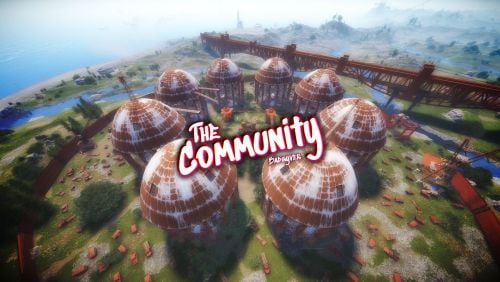
Now you will have a Rust style space for your clan, group or game team. The community is a circular space with several construction zones for your base or house. Surrounded by a large wall which offers a defense for your team. The community offers a decorative space for your Rust server, junkyard style.$12.90-
- 1
-
-
- #thecommunity
- #community
- (and 59 more)
-
Version 1.0.0
8 downloads
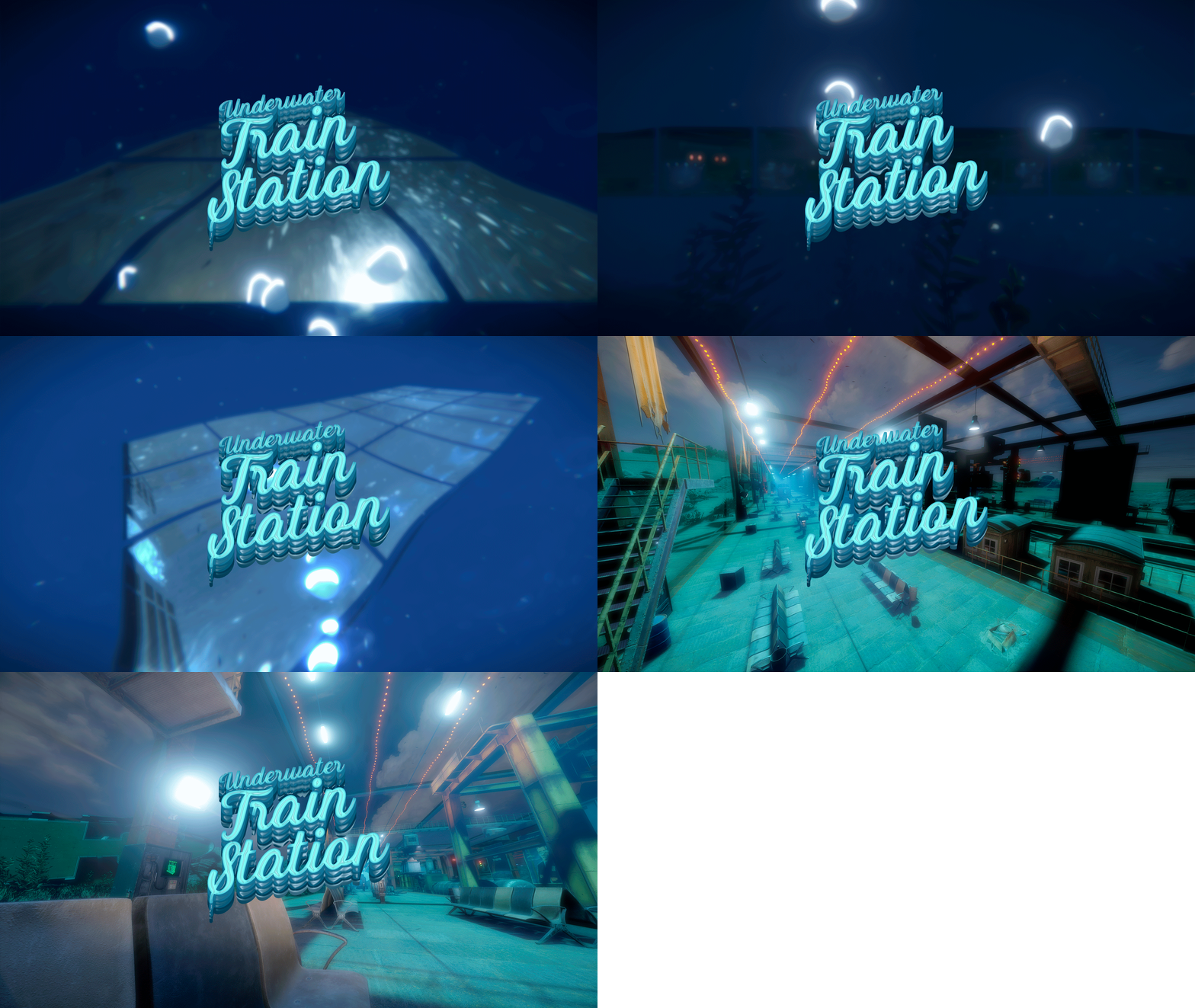
Fear of the deep sea? Now you can overcome it with this wonderful window to the ocean. Stand out on your server with Underwater Train Station, an underwater train station with access to the subway tunnel. - Contains: NPCS, Loot, Puzzles and a nice decoration. - Tip: You can remove the train tracks and put your own custom ones (Existing tracks can serve as a guide, or if you prefer you can keep them as they are fully functional).$12.90-
- 1
-
-
- #underwatertrainstation
- #trainstation
- (and 39 more)
-
Version 1.3.8
33 downloads
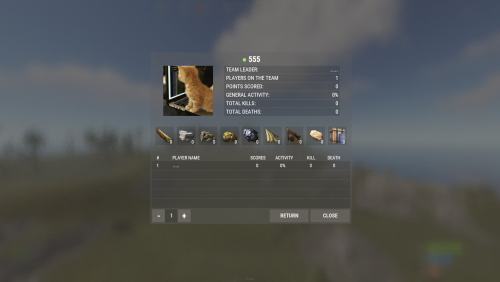
FClan is a clan system with multiple functions Features Automatic authorization in cabinets, locks, turrets, pvo Support in-game friend system GameStores rewards are available Top clans Config : { "Main plugin command": [ "clan", "clans" ], "Use the clan tag in the player's name": true, "Create greens automatically ?": true, "Prohibit the creation of a green without a clan ?": true, "Change the builder to clan leader ?": true, "Customizing prizes for wipe": { "Use the issuance of awards ?": true, "Share the prize for the whole team or give the prize from the configuration ? (true - share prize | false - static prize)": false, "Store ID in the service": "", "Server ID in the service": "", "Secret key (do not distribute it)": "", "Minimum number of points to receive an award": 1000, "Minimum number of points to receive an award (Player's)": 100, "Place in the top and the balance given to the player": { "1": 350, "2": 200, "3": 150 } }, "Limit settings": { "Clan membership limit": 8, "Moderator limit": 2, "Maximum quantity for billing rate ( Resource - maximum quantity )": { "wood": 1000000, "stones": 1000000, "metal.ore": 1000000, "sulfur.ore": 1000000, "hq.metal.ore": 250000, "cloth": 100000, "leather": 100000, "fat.animal": 100000, "loot-barrel": 100000 } }, "Points Settings. [ShortName] - Number of points": { "wood": 2, "stones": 5, "metal.ore": 5, "hq.metal.ore": 5, "sulfur.ore": 5, "loot-barrel": 2, "PatrolHelicopter": 1500, "BradleyAPC": 750, "Death": 50, "Suicide": 50, "Kill": 50, "WallTier2": 3, "WallTier3": 5, "WallTier4": 7 }, "Clan tag settings": { "Banned clan tags": [ "Admin", "Aдмины" ], "Minimum number of characters of the clan tag": 2, "Maximum number of characters of a clan tag": 6 }, "Version": { "Major": 1, "Minor": 1, "Patch": 9 } }$30.00 -

Version 1.0.0
389 downloads
Description: You can find a player's teammates trough discord. You can ban cheater's teammates without having to log in. It shows the team leader with a crown emoji next to his name. Usage: !team <steamid> (the prefix can be changed in server/oxide/discord.config.json) Setup Guide: Add Oxide.Ext.Discord.dll to yourserver/RustDedicated_Data/Managed https://umod.org/extensions/discord Go to https://discord.com/developers/applications and create a new application. Choose your desired picture and name for the bot. Go to the bot section and click add bot. Copy the bot token and add it to the config file. Very important! Turn on the privileged gateway intents. Go to the OAuth2 tab and click on URL Generator. Select bot from the scopes then select Send Messages and Read Messages from the permissions. Invite the bot with the link that can be found at the bottom of the page Set the channel's id in the config file where the bot can be used. Reload the plugin. If you want to try the plugin before buying or you have some questions about this plugin feel free to join my discord server. I can also help you to set everything up or add a custom feature for you. https://discord.gg/7SwN28bnycFree -
I need a plugin that will display the player’s Clan Tag exactly as it is implemented on the Rustinity servers, need to connect the plugin with these clans - https://codefling.com/plugins/clans

-

Version 1.0.0
20 downloads
Allow your players to combine their resources and scrap into a shared balance for teamwork and growth, while protecting their assets from raids! FEATURES Effortless balance sharing with deposit and withdrawal features. Supports multiple currencies, including Scrap and Economics! Team Leaders can control access with a simple button press. Beautiful and streamlined UI for seamless player management! CONFIGURATION { "AnchorMax": ".15 .5", "AnchorMin": ".15 .5", "Background Color": ".2 .2 .2 .8", "CheckedUrl": "https://cdn.mrddd.xyz/img/GreenYES.png", "Commands": [ "bank", "teambank" ], "Page1Url": "https://i.imgur.com/PQt4jYn.png", "Page2Url": "https://i.imgur.com/AkcYvtw.png", "Currency (0 = Economics, 1 = ServerRewards)": 1, "UncheckedUrl": "https://cdn.mrddd.xyz/img/RedNO.png" } USAGE Players must have TeamEconomics.use to use the features. Use /bank to access the UI. Team Leaders can press the Red X or the Green Tick to allow or disallow withdrawal from other team members, RED X = Can't withdraw, APPRECIATION Thank you @LagginDragon for the original creation of this plugin. Thank you @shady14u for the latest updates for player experience.$4.99 -
Version 1.0.2
30 downloads
Every pvp in Rust tends to be caotic, with many players giving confusing calls to their team mates like "Under the rock" or "Over there". With this plugin your players will spend less time trying to figure out where the enemy is and more time focusing on the pvp. This plugin is a tool for clans to give better calls by placing a ping with a click of a button where the player is looking at. This ping can be seen only by the player who placed it and the members of his team. Players can choose from a different variation of ping types and colors, as well as the showing time. When a player is pointing with a weapon towards the plugin direction, it will fade to ensure it doesnt disturb the player while he is shooting. Players can place a ping by pressing the FIRE_THIRD button. Players can open the customization menu by using the command /ping or by holding the FIRE_THIRD button. This plugin works with any clan plugin or team plugin. Permissions: advancedclanpings.use - Will allow the use of this plugin. Configuration: { "Plugin Settings": { "Maximum ping distance:": 300, "Maximum ping time (Change message in Lang folder):": 60 }, "Menu Settings": { "Menu Header Text:": "<color=#ff9b12>MENU</color>", "Marker Type text:": "Marker Type:", "Color Text:": "Color:", "Enable Ping Text:": "Enable Ping:", "Ping Time Text:": "Ping Time:", "Enable Button Text:": "ENABLE", "Disable Button Text:": "DISABLE", "Close Button Text:": "CLOSE" } } Players can also change their own ping within the menu:$9.99 -
A handful of players have requested a "Clan Core" plugin. Need a highly skilled dev to create this plugin for me. Must be capable to create a flawless UI for the forefront of it, on top of the other required features to make it work. This will be an extensive project, which ensue will have a good payout. Please DM me for more details either through CF or through Discord : majydo
-
Version 1.1.3
3 downloads
SimpleClanBot SimpleClanBot is an easy to setup and use discord bot. Designed for game servers to engage their community with a built in clan system. Many customization features coming soon! Comprehensive and easy to follow installation guide right here! For help or bug reporting please message me here! Dev Log: 10/21/23 - Fixed bugs and added new features Hosting: Could hosting recommendation: Google Cloud - https://cloud.google.com/blog/topics/developers-practitioners/build-and-run-discord-bot-top-google-cloud Local hosting: This essentially boils down to running the bot's code on your machine Setup and Installation: Setup your servers bot Create a new application: https://discord.com/developers/docs/getting-started Assign your bots name (Changeable later) In General Information upload an icon and give your bot a name and description (Please include "SimpleClanBot by staticDev" in your description) Go to Bot and assign a username and icon (if it does not carry over) Scroll down to Privileged Gateway Intents and toggle on the 3 options (Presence, Server Member, Message Content) Scroll back up in Bot and reset your bot token, copy the new token (store it for later) Go to OAuth2 -> URL Generator. In Scopes select bot and applications.commands, under Permissions select Administrator Use the link at the bottom of URL Generator to invite the bot to your server (it will be offline) Configure the SimpleClanBot.py file Open the file in a text editor of your choice, if you do not have one here is a good online option: https://www.online-python.com/ On lines 19 & 20 place your discord user id -> owner_id and your servers id -> guild_id (these should remain ints) Set clawn_owner_role_name to whatever you want the clan owner role to be Scroll to the bottom of the file and paste your bot's token in bot.run('YOUR TOKEN HERE') Save the file or export the new edited file for your server. Upload and Run the bot Whether local or cloud hosting you should have a Console to work in. Install the latest version of Python3 on your hosting platform: https://www.geeksforgeeks.org/download-and-install-python-3-latest-version/ Use the package manager pip to install the needed packages. (https://pip.pypa.io/en/stable/) pip install discord pip install discord-ext-bot pip install discord-ui pip install discord.py Once the packages are installed upload your edited SimpleClanBot.py file Use the command python3 SimpleClanBot.py to run the bot Setup in Discord Confirm that the bot is now appearing online in your server Go to your server roles and drag the SimpleClanBot role to the top (Must be done) In a text channel type the command /clan sync to sync the / commands which prompt users for certain commands inputs Enable 'applications.commands' permission to your members who you want to have access to the bot Wait up to 2 minutes for you to type / and see the new bot in the command UI Commands: /clan sync : Syncs the bots command tree to show the clan commands to users when they type / (Only server owner) /clan ownercolor {hexcode} - Changes color of team owner role (Only Server Owner) /clan-create {name} : Creates a channel Clan Category, inside all new text channels and roles are placed, assigns role to the clan creator /clan-invite {user} : PM's user with Accept/Reject buttons, will assign the user the clan role in the server (invited user must be in the server already) /clan-kick {user} : Automatically removes the users clan role (they can no longer see the text channel) /clan-leave : Removes the users clan role (they can no longer see the text channel) /clan-disband {name} : Deletes the clan channel and role from the server (enables clan owner to create a new clan) /clan-color {hexcode} - Changes the color of your clans role (Only Clan Owner) License NOT FOR RESALE OR DISTRIBUTION AFTER PURCHASE UNDER ANY CONDITION$5.00 -
Version 2.0.2
28 downloads
ClanStats by staticDev ClanStats is GUI and text based stat tracker for clans and individual players. Depends on the Clans by k1lly0u Permissions: No permissions needed. Drag and drop to begin using. Commands: Finished: /stats : Brings up a GUI with an option to view player or clan leaderboards will also displays the current players stats and their clan stats /kdr : Player gets their clan and personal stats (text based) /top : Displays the top 3 clans and their stats (text based) /myclan : Brings up the current players clan position and kills (text based) WIP: /ckdr : Brings up the current players clan stats if they are in one (text based) /pkdr : Brings up the current players stats (text based) /helpclanstats : Brings up a list of available stats for ClanStats Dev Log: Fixed variable definition due to scope issue. Bug regarding existing Clan data has been squashed Passed all test cases! Config: A config file has not been introduced yet. License: Not for resale or redistribution after purchase under any condition! Shoutouts: UI Classes and UI development made possible by LaserHydra KDRGui source code by Ankawi - usable under the MIT license$10.00 -
.thumb.png.b792c0b51f017bf377b95b2695811c98.png)
Version 1.0.5
39 downloads
WARNING!!! THIS IS TO HOUSE THE AMAZING MAZE EVENT PLUGIN, THIS DOES NOT INCLUDE THE MAZE OR PLUGIN. FOR THE MAZE PLUGIN PLEASE REFER TO THE LINK IN THE DESC... THANK YOU!!! Introducing the impeccably crafted "Square Maze Prefab" - a bespoke masterpiece boasting sophisticated glass windows, and refined exterior embellishments. Tailor-made to cater to the discerning tastes of server owners and adept plugin makers, this remarkable prefab delivers an enchanting maze arena that promises to elevate your server's gaming experience. One of the notable features that sets the Square Maze Prefab apart is its seamless compatibility with the renowned "Amazing Maze Event" plugin by Richard Hertz, available on Codefling.com. This powerful synergy ensures a harmonious integration of functionalities, allowing you to orchestrate captivating and dynamic maze events that will leave your players enthralled. With a strong emphasis on excellence and adaptability, the Square Maze Prefab arrives without pre-installed maze walls or any predefined code, granting you limitless creative freedom for personalization. Embrace the opportunity to fashion and configure the maze according to your distinct vision, seamlessly harmonizing it with your server's overarching theme and objectives. Unleash the potential of your virtual realm with this extraordinary Square Maze Prefab - a fusion of artistry and ingenuity, poised to enrapture your audience and offer them hours of immersive and exhilarating gameplay. Elevate your server's reputation within the gaming community by securing this exceptional prefab today, bolstered by its unrivaled compatibility with the "Amazing Maze Event" plugin by Richard Hertz.$7.50 -
.thumb.png.3b7420fd5919b8cc32c7dc6f592e4036.png)
Version 1.0.0
951 downloads
About Skin Button This plugin adds two more buttons to the lockers: "Save" and "Skin", a perfect QoL feature to put behind VIP passes. With the save button you allow players to save the current skinned "kit" to their preferences, next time they press "Skin" the plugin will skin the items in that locker to the saved skins. This is a very loved plugin among clans and larger groups that prefer to roam in their team color. Permissions skinbutton.use Everybody with this permission will be able to use the plugin. Configuration The config file allows you to change the colors of the buttons. { "Button: Save": { "Color": "0.3 0.7 1 0.5", "Text Color": "0.6 0.8 1 1" }, "Button: Skin": { "Color": "1 0.7 0.3 0.5", "Text Color": "1 0.8 0.3 1" } } Language file To change the button text, simply edit your language files. { "SkinButton": "Skin", "SaveButton": "Save" } Support I'm available on CodeFling and on Discord as "Malmø#0001".Free