Search the Community
Showing results for tags 'config'.
-
Version 1.0.0
1 download
PREMIUM CUSTOM LOOT & STACKSIZE CONFIG — DOMINATE YOUR SERVER Tired of trash loot, boring progression, and unbalanced configs? This premium custom Loot Table & StackSize configuration is built to hook players, boost activity, and keep your server alive. Designed for owners who want results, not experiments. WHAT MAKES THIS CONFIG DIFFERENT? NO JUNK. ZERO TRASH. Completely removed useless items from barrels and crates Every loot drop matters No fake RNG — honest, controlled drop chances FAST PROGRESSION — NO BORING GRIND Increased resource gathering rates Players progress faster without destroying PvP balance Perfect for x3 vanilla / modded / semi-classic servers SMART STACKSIZE SYSTEM Weapons & building materials: x1 (clean, fair, raid-balanced) Resources: massively increased stacks Fully editable — adjust stack sizes exactly how you want INSTANT SMELTING & PROCESSING Boosted smelting speed for: Furnaces Electric furnaces BBQ Oil refinery Campfires & more Less waiting. More action. FAST AIRDROPS Airdrops fall faster, scaled to server rates No wasted time watching the sky — straight to PvP FULLY CUSTOM LOOT SYSTEM Hand-crafted loot tables Balanced progression from early → mid → late game Keeps players farming, roaming, raiding WHY THIS CONFIG SELLS YOUR SERVER ✔ More active players ✔ Faster wipes feel exciting, not empty ✔ No trash loot complaints ✔ Easy to modify and expand ✔ Clean configs — no spaghetti settings This is not a copy-paste config. This is a server foundation. PERFECT FOR: x3 vanilla / semi-classic servers Modded PvP servers Servers that want retention & fast action Owners who want a ready-to-launch solution IMPORTANT Stack sizes and rates can be fine-tuned to your exact vision. You get a powerful base — customize it and make it yours. My discord - bachfreidrech$5.99 -
Version 1.0.0
1 download
PREMIUM CUSTOM LOOT & STACKSIZE CONFIG — DOMINATE YOUR SERVER Tired of trash loot, boring progression, and unbalanced configs? This premium custom Loot Table & StackSize configuration is built to hook players, boost activity, and keep your server alive. Designed for owners who want results, not experiments. WHAT MAKES THIS CONFIG DIFFERENT? NO JUNK. ZERO TRASH. Completely removed useless items from barrels and crates Every loot drop matters No fake RNG — honest, controlled drop chances FAST PROGRESSION — NO BORING GRIND Increased resource gathering rates Players progress faster without destroying PvP balance Perfect for x5 modded / semi-classic servers SMART STACKSIZE SYSTEM Weapons & building materials: x1 (clean, fair, raid-balanced) Resources: massively increased stacks Fully editable — adjust stack sizes exactly how you want INSTANT SMELTING & PROCESSING Boosted smelting speed for: Furnaces Electric furnaces BBQ Oil refinery Campfires & more Less waiting. More action. FAST AIRDROPS Airdrops fall faster, scaled to server rates No wasted time watching the sky — straight to PvP FULLY CUSTOM LOOT SYSTEM Hand-crafted loot tables Balanced progression from early → mid → late game Keeps players farming, roaming, raiding WHY THIS CONFIG SELLS YOUR SERVER ✔ More active players ✔ Faster wipes feel exciting, not empty ✔ No trash loot complaints ✔ Easy to modify and expand ✔ Clean configs — no spaghetti settings This is not a copy-paste config. This is a server foundation. PERFECT FOR: x5 semi-classic servers Modded PvP servers Servers that want retention & fast action Owners who want a ready-to-launch solution IMPORTANT Stack sizes and rates can be fine-tuned to your exact vision. You get a powerful base — customize it and make it yours. My discord - bachfreidrech$5.99 -
Version 1.0.0
1 download
PREMIUM CUSTOM LOOT & STACKSIZE CONFIG — DOMINATE YOUR SERVER Tired of trash loot, boring progression, and unbalanced configs? This premium custom Loot Table & StackSize configuration is built to hook players, boost activity, and keep your server alive. Designed for owners who want results, not experiments. WHAT MAKES THIS CONFIG DIFFERENT? NO JUNK. ZERO TRASH. Completely removed useless items from barrels and crates Every loot drop matters No fake RNG — honest, controlled drop chances FAST PROGRESSION — NO BORING GRIND Increased resource gathering rates Players progress faster without destroying PvP balance Perfect for x10 modded SMART STACKSIZE SYSTEM Weapons & building materials: x1 (clean, fair, raid-balanced) Resources: massively increased stacks Fully editable — adjust stack sizes exactly how you want INSTANT SMELTING & PROCESSING Boosted smelting speed for: Furnaces Electric furnaces BBQ Oil refinery Campfires & more Less waiting. More action. FAST AIRDROPS Airdrops fall faster, scaled to server rates No wasted time watching the sky — straight to PvP FULLY CUSTOM LOOT SYSTEM Hand-crafted loot tables Balanced progression from early → mid → late game Keeps players farming, roaming, raiding WHY THIS CONFIG SELLS YOUR SERVER ✔ More active players ✔ Faster wipes feel exciting, not empty ✔ No trash loot complaints ✔ Easy to modify and expand ✔ Clean configs — no spaghetti settings This is not a copy-paste config. This is a server foundation. PERFECT FOR: Modded PvP servers Servers that want retention & fast action Owners who want a ready-to-launch solution IMPORTANT Stack sizes and rates can be fine-tuned to your exact vision. You get a powerful base — customize it and make it yours. My discord - bachfreidrech$5.99 -
Version 1.0.0
1 download
PREMIUM CUSTOM LOOT & STACKSIZE CONFIG — DOMINATE YOUR SERVER Tired of trash loot, boring progression, and unbalanced configs? This premium custom Loot Table & StackSize configuration is built to hook players, boost activity, and keep your server alive. Designed for owners who want results, not experiments. Completely removed useless items from barrels and crates Every loot drop matters No fake RNG — honest, controlled drop chances FAST PROGRESSION — NO BORING GRIND Increased resource gathering rates Players progress faster without destroying PvP balance Perfect for x20 - x1000 modded servers SMART STACKSIZE SYSTEM Weapons & building materials: x1 (clean, fair, raid-balanced) Resources: massively increased stacks Fully editable — adjust stack sizes exactly how you want INSTANT SMELTING & PROCESSING Boosted smelting speed for: Furnaces Electric furnaces BBQ Oil refinery Campfires & more Less waiting. More action. FAST AIRDROPS Airdrops fall faster, scaled to server rates No wasted time watching the sky — straight to PvP FULLY CUSTOM LOOT SYSTEM Hand-crafted loot tables Balanced progression from early → mid → late game Keeps players farming, roaming, raiding WHY THIS CONFIG SELLS YOUR SERVER ✔ More active players ✔ Faster wipes feel exciting, not empty ✔ No trash loot complaints ✔ Easy to modify and expand ✔ Clean configs — no spaghetti settings This is not a copy-paste config. This is a server foundation. PERFECT FOR: Modded PvP servers Servers that want retention & fast action Owners who want a ready-to-launch solution IMPORTANT Stack sizes and rates can be fine-tuned to your exact vision. You get a powerful base — customize it and make it yours. My discord - bachfreidrech$5.99 -
Version 1.0.0
1 download
Better Loot x10 — Balanced & Rewarding Gameplay Looking for a perfectly balanced x10 loot configuration that makes your Rust server more fun without breaking the core gameplay? Better Loot x10 is designed to enhance the vanilla experience while keeping progression fair, rewarding, and competitive. What makes this config special? Carefully balanced x10 loot rates No trash, no useless items — only meaningful drops Smooth early, mid, and late-game progression Ideal for solo, duo, trio, and small group servers Fully optimized for performance and stability Why players love it Faster progression without losing the survival feel Less grind, more action Fair PvP economy with controlled item flow Loot feels exciting, not random 🛠 Perfect for server owners Easy to install and customize Tested in real gameplay scenarios Clean logic based on player experience, not random multipliers If you want your server to feel rewarding, fair, and addictive, Better Loot x10 is exactly what you’re looking for. Upgrade your loot. Upgrade your server. My discord - bachfreidrech$5.99-
- 4
-

-

-
- #better loot
- #config
- (and 1 more)
-
Version 1.0.0
1 download
Better Loot x5 — Balanced & Rewarding Gameplay Looking for a perfectly balanced x5 loot configuration that makes your Rust server more fun without breaking the core gameplay? Better Loot x5 is designed to enhance the vanilla experience while keeping progression fair, rewarding, and competitive. What makes this config special? Carefully balanced x5 loot rates No trash, no useless items — only meaningful drops Smooth early, mid, and late-game progression Ideal for solo, duo, trio, and small group servers Fully optimized for performance and stability Why players love it Faster progression without losing the survival feel Less grind, more action Fair PvP economy with controlled item flow Loot feels exciting, not random 🛠 Perfect for server owners Easy to install and customize Tested in real gameplay scenarios Clean logic based on player experience, not random multipliers If you want your server to feel rewarding, fair, and addictive, Better Loot x5 is exactly what you’re looking for. Upgrade your loot. Upgrade your server. My discord - bachfreidrech$5.99 -
Version 1.0.0
1 download
Better Loot x3 — Balanced & Rewarding Gameplay Looking for a perfectly balanced x3 loot configuration that makes your Rust server more fun without breaking the core gameplay? Better Loot x3 is designed to enhance the vanilla experience while keeping progression fair, rewarding, and competitive. What makes this config special? Carefully balanced x3 loot rates No trash, no useless items — only meaningful drops Smooth early, mid, and late-game progression Ideal for solo, duo, trio, and small group servers Fully optimized for performance and stability Why players love it Faster progression without losing the survival feel Less grind, more action Fair PvP economy with controlled item flow Loot feels exciting, not random 🛠 Perfect for server owners Easy to install and customize Tested in real gameplay scenarios Clean logic based on player experience, not random multipliers If you want your server to feel rewarding, fair, and addictive, Better Loot x3 is exactly what you’re looking for. Upgrade your loot. Upgrade your server. My discord - bachfreidrech$5.99-
- 3
-
-
-
- #config
- #better loot
- (and 1 more)
-
Version 1.0.0
2 downloads
PREMIUM CUSTOM LOOT & STACKSIZE CONFIG — DOMINATE YOUR SERVER Tired of trash loot, boring progression, and unbalanced configs? This premium custom Loot Table & StackSize configuration is built to hook players, boost activity, and keep your server alive. Designed for owners who want results, not experiments. WHAT MAKES THIS CONFIG DIFFERENT? NO JUNK. ZERO TRASH. Completely removed useless items from barrels and crates Every loot drop matters No fake RNG — honest, controlled drop chances FAST PROGRESSION — NO BORING GRIND Increased resource gathering rates Players progress faster without destroying PvP balance Perfect for x2 vanilla / modded / semi-classic servers SMART STACKSIZE SYSTEM Weapons & building materials: x1 (clean, fair, raid-balanced) Resources: massively increased stacks Fully editable — adjust stack sizes exactly how you want INSTANT SMELTING & PROCESSING Boosted smelting speed for: Furnaces Electric furnaces BBQ Oil refinery Campfires & more Less waiting. More action. FAST AIRDROPS Airdrops fall faster, scaled to server rates No wasted time watching the sky — straight to PvP FULLY CUSTOM LOOT SYSTEM Hand-crafted loot tables Balanced progression from early → mid → late game Keeps players farming, roaming, raiding WHY THIS CONFIG SELLS YOUR SERVER ✔ More active players ✔ Faster wipes feel exciting, not empty ✔ No trash loot complaints ✔ Easy to modify and expand ✔ Clean configs — no spaghetti settings This is not a copy-paste config. This is a server foundation. PERFECT FOR: x2 vanilla / semi-classic servers Modded PvP servers Servers that want retention & fast action Owners who want a ready-to-launch solution IMPORTANT Stack sizes and rates can be fine-tuned to your exact vision. You get a powerful base — customize it and make it yours. My discord - bachfreidrech$5.99 -
Version 1.0.0
4 downloads
NoEscape – Custom RAIDBLOCK Configuration by SLAYERS.GG A fully-optimized NoEscape config designed to deliver fair, fast, and abuse-proof raiding. Built and perfected on the SLAYERS.GG network for high-pop, high-intensity Rust servers. What This Config Delivers Balanced RaidBlock & Combat Timers Tuned for smooth PvP flow without letting players cheat the system. Anti-Escape Protections Blocks TP, /home, vehicles, logging out, and all common raid-dodging exploits. Clean, Professional Messages Polished alerts that fit Rust’s style and make RaidBlock states easy to understand. Compatible with NoEscape Plugin from Umod: https://umod.org/plugins/no-escape Perfect For Servers That Want: Fair, competitive raiding Zero escape abuse Clear, simple raid rules A polished system trusted by thousands Includes: Full NoEscape JSON config Upgraded notifications Easy-to-edit formatting$4.99 -
.thumb.png.5493908087e3da6457421ab30f541dac.png)
Version 2.3.6
484 downloads
Warning: To use this config file, you need to purchase the Shop plugin developed by Mevent: https://codefling.com/plugins/shop We prioritize keeping this configuration updated to deliver a smooth and enjoyable experience. In this optimized configuration, item prices have been manually adjusted to offer balanced gameplay. This Shop Config file is versatile and can be applied to any server, whether it's 1x, 2x, 3x, 5x, 10x, or even 100x gather rates. Simply align the RP rewards provided by the Playtimereward plugin to suit your server's rate. For example, we use a 20 RP reward for every 30 minutes on our 3x servers, which works well with this configuration. Features: - Manually Adjusted Prices: A large number of items with carefully set RP values. Note: Due to the new TOS rules, items such as skins, DLC content, and other cosmetic elements are no longer included. - Extensive Testing: Successfully used and positively received by players across +100 servers. - Versatile Application: Compatible with any gather rate, from 1x to 100x. - Continuous Updates: We strive to keep this configuration up-to-date to ensure the best experience. - Positive Player Feedback: Excellent reception and feedback from players. - Enjoy using this optimized setup! Installation Instructions: 1) Extract the RAR file you downloaded. There will be three folders: lang, data, and config. 2) Drag and drop these folders into the specified directory: /home/rustserver/serverfiles/oxide. 3) After that, upload the latest version of the Shop plugin to the plugins folder. If the Shop plugin is already installed, restart the server or use the following command in the RCON admin console to reload the plugin: o.reload Shop This will ensure the plugin is restarted properly.$10.00 -

Version 3.2.5
512 downloads
Warning: To use this config, you need to purchase the paid Alphaloot plugin if you do not already own it: https://chaoscode.io/resources/alphaloot.13/ Our latest configuration overhaul features extensive updates across more than 40 loot crate types. Each crate, from Roadsign and ammo crates to food crates and variants like elite, basic, and normal, has undergone meticulous fine-tuning. We've significantly cleaned up redundant items while maintaining a balance between vanilla and 2x gameplay dynamics. To enhance variety, we've customized certain items to introduce medium-tier loot and expand diversity according to player preferences. WARNING: Some items that we believe should be in the loot table might seem unnecessary to you. Please understand that we cannot build a separate loot table for each individual. Due to the core dynamics of the game, our loot tables may include many essential items that players need—such as basic clothing, weapons, and similar items. Please make your purchase with this understanding. In addition, we've introduced exclusive chances, such as a 1% or 2% drop rate for high-quality vehicle parts in crates and premium food items in food crates. Special event loot crates, like those for Halloween, Easter, or Christmas, have also been aligned to complement the 2x experience. Moreover, we've revamped and optimized NPC drops, ensuring that even the most detailed configurations are now tailored to fit seamlessly with the 2x server settings. From Gingerbread NPCs to Scarecrows, Scientist NPCs to Scientist NPC Cargos, and critical NPCs like Scientist NPC Heavies, each has been meticulously restructured. If you're seeking a professionally crafted loot table that ensures a seamless and enriched gaming experience, look no further. Installation Guide: Inside the downloaded zip file, locate the 'config' folder. Copy the 'AlphaLoot.json' file from this folder to the following directory: /home/rustserver/serverfiles/oxide/config If Rust is installed in a different directory, adjust accordingly. Next, within the downloaded zip file, find the 'data' folder. Inside, you'll find three files: 'fullwipedbradley', 'fullwipedheli', and 'fullwipedmain'. Copy these three files to the following directory: /home/rustserver/serverfiles/oxide/data/AlphaLoot/LootProfiles Adjust the path if your Rust installation differs. Final Steps: Once all files are successfully uploaded, restart your previously purchased AlphaLoot plugin. If needed, you can acquire the plugin or updates from the official vendor: https://chaoscode.io/resources/alphaloot.13/ If you've already made the purchase, proceed with file uploads and restart the plugin by typing o.reload AlphaLoot into RCON. Congratulations! Your 2x server now boasts a highly customized and well-prepared loot table. Customizing Your Config: If you need to modify the current config or adjust any settings, you can download the AlphaLoot Profile Editor from the following link: https://chaoscode.io/resources/alphaloot-profile-editor.183/ Editing the config may require some experience, but you can easily make simple adjustments. Feel free to use this tool to tailor your config to your preferences. Thank you for choosing us. Support: FULLWIPED DISCORD$12.99- 21 comments
- 3 reviews
-
- 5
-

-
-
-

-
- #alpha
- #alphaloot
- (and 45 more)
-
Version 1.0.1
11 downloads
Stack Size Controller – Balanced Configuration Packs Includes 4 different configs. Pick one to use, or use different configs on multiple servers. Some stack values are based on the gather rate; however, overall, resources and similar items are set higher based on player experience and community feedback. Server Compatibility - Suitable for 3x, 5x, 10x and PvE servers - If higher stack sizes are desired, the 3x preset can safely be used on 2x servers without causing major balance issues or technical problems Professionally Designed & Tested All configurations are manually created from scratch and are not auto-generated or simple default edits. Each configuration has been: - Actively tested on live servers for over 2 years - Used on long-running, active servers - Adjusted based on real player behavior and feedback - Balanced with economic flow and recycler outputs in mind The goal is to improve quality of life without breaking progression or server economy. Balanced Design Philosophy Not every item is meant to be stacked. Below are the core principles behind how these configurations are designed. Durability & Skin Safety Weapons, clothing, doors, and certain electrical items are intentionally excluded from stacking. These items rely on durability (condition) mechanics and often support skins. Stacking them may cause condition conflicts, incorrect durability behavior, skin desynchronization, and inventory-related bugs. To maintain server stability and predictable gameplay, these item types are deliberately kept unstacked. Explosives & Economy Control F1 Grenades, Smoke Grenades, and similar explosive items are intentionally excluded from stacking or only increased by reasonable amounts. This approach helps prevent gunpowder inflation, balance abuse, and uncontrolled progression. Stackable Item Categories - Resources (Some resources have been stacked above the normal limits in line with strong player demand, especially wood and stone, among others.) - Components (Excessive stacking has not been applied in order to maintain recycling balance; it has been kept at a controlled and balanced level.) - Food items - Medical items - Ammunition Easy Installation 1. Choose one of the 4 configuration presets 2. Copy StackSizeController.json into your config folder 3. Oxide.reload StackSizeController OR c.reload StackSizeController Required Plugin This configuration pack requires the Stack Size Controller plugin. You can download it for free from uMod: https://umod.org/plugins/stack-size-controller$12.99-
- 1
-
-
- #stack size controller
- #stacks
- (and 25 more)
-
Version 1.0.3
34 downloads
This template still requires permissions to be set up! The package does not contain any plugins! Description: This package contains a configured PVE Rust server, tailored for optimal performance and gameplay experience. The Rust server within this package is meticulously set up to offer seamless gameplay, whether you're a seasoned player or new to the game. With carefully configured settings, plugins, and mods, this server package ensures an immersive and enjoyable Rust gaming environment. Preconfigured permissions and groups (VIP, VIP+, VIP++, VIP+++) Pre-established permissions and groups are configured for your convenience, allowing for easier modifications. All features you get with this server template Faster Airdrops Faster Recycler Speed Magic Loot Tables Automatic Authorization Backpacks Better Chat Better Chat Filters Clans Home system/Teleportation 60 Minute Day / 5 Minute Night Skinbox Higher Stack Sizes Timed Permissions Welcome Panel SignsMonitor Bradley Control RP System (Server Rewards) (you can install other shops, just don't delete the serverrewards plugin) Rust Rewards Prevent Looting Loot Defender Loot Bouncer Prevent Looting Reboot Scheduler Time Of Day Vehicle Licence 5 sec vending machine cooldown Welcome panel Wipe Countdown Welcome Panel Addons True PVE Signs Monitor$19.99 -
Version 4.3.43
74 downloads
Please place the downloaded config in the following directory: /home/rustserver/serverfiles/oxide/config (If your Rust server is installed in a different directory, please place it there.) To use the RemoverTool config, you need to download the free plugin from Umod: Download the plugin from here: https://umod.org/plugins/remover-tool The RemoverTool config allows your players to use this tool in a balanced way. In the classic version of the Remover Tool, anyone can freely remove any structure, which is not desirable. This is a major nightmare for players and server owners who want a balanced gaming experience. With this config, players will need to pay certain in-game costs like metal, stone, or wood when demolishing the walls of their bases in Rust. For example, they will need to pay a certain amount of stone resources when removing stone walls. The same applies to wood walls. This small pricing system brings a good balance to the game and the Remover Tool plugin. Additionally, the config prevents the removal of the cupboard with the Remover Tool. Doors can be removed for free. Removing items like metal barricades will require metal resources as a fee. Support: FULLWIPED DISCORD$3.99 -
![More information about "RemoverTool | Config [Right-Side HUD]"](https://codefling.com/uploads/monthly_2025_11/2.thumb.gif.4e13adff424ff0ce3ffb22f5f2573b43.gif)
Version 1.0.0
45 downloads
RemoverTool – Minimalist UI Configuration [Right-Side HUD] This configuration file is designed for the RemoverTool plugin to provide a clean and minimalist user interface, positioned on the right side of the screen. The goal is to offer a clear and unobtrusive UI that doesn’t clutter the player’s view. Key Features: Minimalist, clean, and practical interface. Positioned on the right side of the screen. Easy to install,simply replace or add the configuration file. Users are free to use their own settings for the rest of the plugin. This file is mainly intended to provide a simple and aesthetic interface, feel free to adjust the rest of the configuration to your preferences.Free -

Version 1.4.0
319 downloads
Discover our carefully crafted loot config for RaidableBases, striking the perfect balance between fair loot and non-overpowered (OP) rewards. This config is specifically designed to improve the gaming experience by removing unnecessary or outdated items from active gameplay. The config includes the following adjustments: Removal of all obsolete items no longer needed in active gameplay. Significant reduction of the frequency of OP items such as Autoturrets, C4, and Sulfur, maintaining game balance. Excellent addition to existing RaidableBases addons, like the complete packages from NIVEX, for adjusting loot and optimizing the player experience. Please note that this offer only includes the Loot Data Files and not the entire config of RaidableBases. Installation Instructions: Download the archive and extract its contents. Turn off the RaidableBases plugin on your server. Copy the contents of the extracted archive into the "/oxide/data/RaidableBases" folder. When prompted to overwrite existing files, confirm the action. Turn the RaidableBases plugin back on. By integrating this config into your existing setup, you'll achieve a fair and balanced loot system that maintains challenge and enjoyment without dominating gameplay. We hope you enjoy using this optimized loot config and experience an improved and fair gaming experience on Rust Server! Wishing you lots of fun, Doldak ------------------------------------------------------------------------------------ Deutsch: Beschreibung: Entdecken Sie unsere sorgfältig gestaltete Config für die Loot-Tabelle von RaidableBases, die ein ausgewogenes Verhältnis zwischen fairem Loot und nicht übermächtigem (OP) Loot bietet. Diese Config wurde speziell entwickelt, um das Spielerlebnis zu verbessern und unnötige oder veraltete Items aus dem aktiven Spiel zu entfernen. Die Config enthält folgende Anpassungen: Entfernung aller obsoleten Items, die im aktiven Spiel nicht mehr benötigt werden. Erhebliche Reduzierung der Häufigkeit von OP Gegenständen wie Autoturrets, C4 und Sulfur, um die Spielbalance zu wahren. Perfekte Ergänzung für bestehende RaidableBases Addons, wie die fertigen Pakete von NIVEX, um den Loot anzupassen und das Spielerlebnis zu optimieren. Bitte beachten Sie, dass es sich bei diesem Angebot lediglich um die Loot Data Files handelt und nicht um die gesamte Config von RaidableBases. Installationsanleitung: Laden Sie das Archiv herunter und entpacken Sie es. Schalten Sie das RaidableBases Plugin auf Ihrem Server aus. Kopieren Sie den Inhalt des entpackten Archivs in den Ordner "/oxide/data/RaidableBases". Wenn Sie dazu aufgefordert werden, ob vorhandene Dateien überschrieben werden sollen, bestätigen Sie dies. Schalten Sie das RaidableBases Plugin wieder ein. Durch die Integration dieser Config in Ihr bestehendes Setup erhalten Sie ein faires und ausgewogenes Loot-System, das die Herausforderung und den Spielspab aufrecht erhält, ohne das Gameplay zu dominieren. Ich hoffe, dass Sie mit dieser optimierten Loot-Config viel Spab haben und ein verbessertes sowie faires Spielerlebnis auf Ihren Server erleben! Viel Spab wünscht Ihnen, Doldak$7.50 -
.thumb.png.52a789c6734d0a18be9297cee0e5458d.png)
Version 1.0.0
161 downloads
This file provides instant setup for "ServerRewards" plugin. This configuration is for the free shop plugin on uMod saving yourself time, money, and the hassle of adding every item manually. Requirements: https://umod.org/plugins/server-rewards How to install: 1. Install Server Rewards from umod. 2. Place Server Rewards in plugin folder. 3. Load Server Rewards in your server. "o.reload ServerRewards" 4. Delete current data file. "Rewards_Data" (Oxide>Data>ServerRewards). 5. Unzip and place new file in its place. 6. Reload plugin, "O.reload ServerRewards".$5.00 -
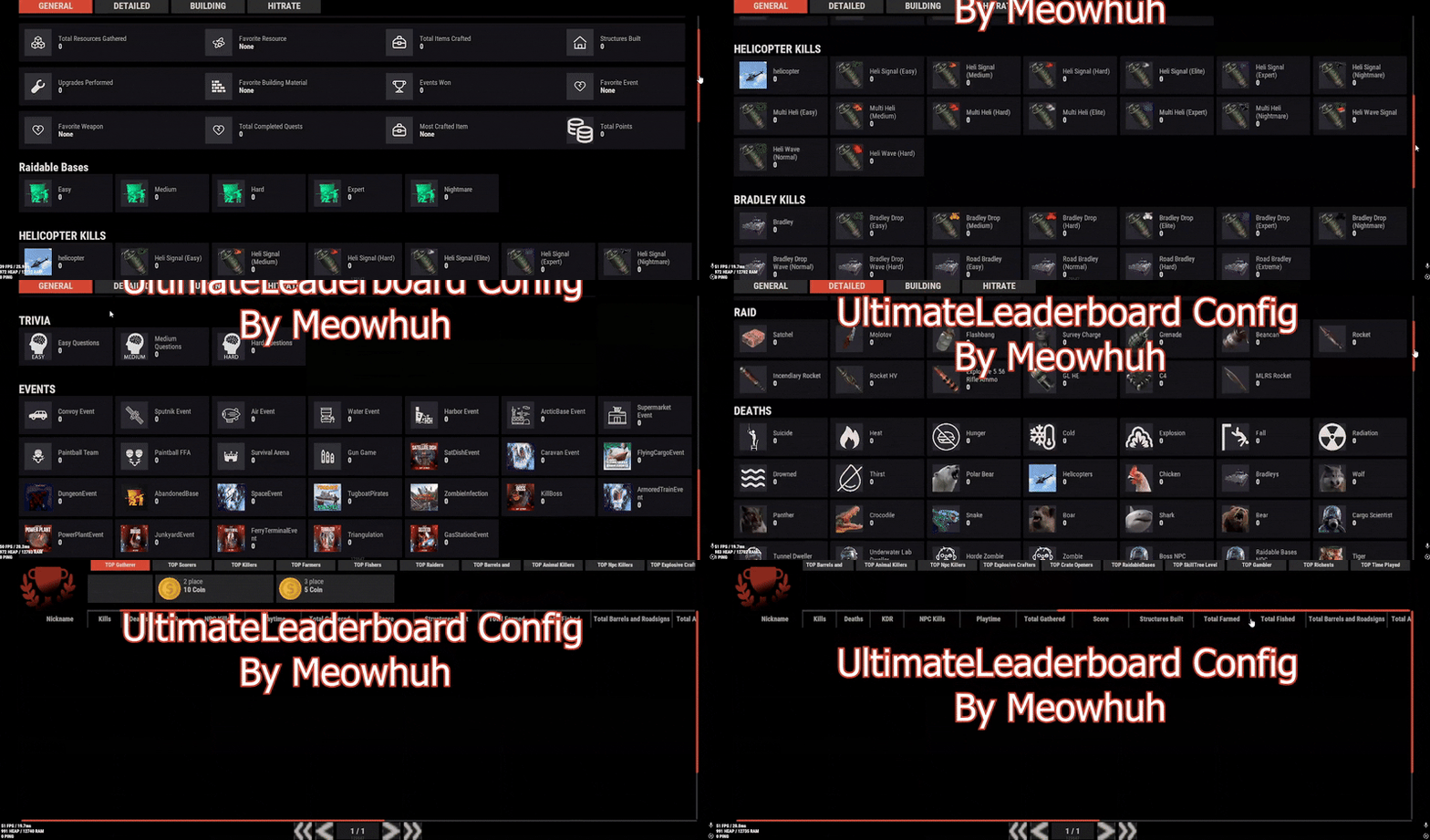
Version 1.0.6
28 downloads
Warning: To use this configuration, you must own the Ultimate Leaderboard plugin by Mevent. We’ve designed this configuration to provide players with an engaging, competitive experience while keeping it fully optimized and up-to-date. This Ultimate Leaderboard Config is packed with event tracking, PvP and PvE statistics, resource gathering metrics, and more — all fine-tuned for performance and clarity. Whether your server is PvP-focused, PvE-friendly, or mixed, this setup offers a polished leaderboard that motivates players to participate in every aspect of gameplay. Features: Extensive Stat Tracking: Player kills, deaths, resource gathering, events, raids, NPC kills, and more. Event Integration: Includes popular events like Convoy, Sat Dish, Tugboat Pirates, Armored Train, and many others, each with custom icons. PvE & PvP Ready: Works perfectly on both styles of servers, tracking everything from animal kills to boss fights. Custom Images & Icons: Visually appealing design using unique, high-quality images for every stat. Continuous Updates: We actively maintain the configuration to stay compatible with plugin updates. Installation Instructions: Download Config file. Upload Config file to your server’s directory: Oxide/config/UltimateLeaderboard | Carbon/config/UltimateLeaderboard Insure you using last version of the plugin. Restart your server or run this in Console to reload plugin: o.reload UltimateLeaderboard | c.reload UltimateLeaderboard Your leaderboard will now be active with the included optimized configuration. Enjoy a competitive, feature-rich environment for your players with Ultimate Leaderboard Config! If you saw any problem or have suggestion or anything like that tell me and i will do/fix it :))$10.99-
- 1
-
-
- #config
- #configuration
- (and 1 more)
-
.thumb.png.a524568eca061e4bd433e7cea2aa7882.png)
Version 1.0.0
38 downloads
5x BetterLoot Loot Table The 5x BetterLoot config is designed for servers that want fast progression and nonstop action, but still keep a touch of Rust’s survival challenge. Loot is boosted across the board — not excessive, just right for PvP-focused or active raid servers. Key Features 5x Scaled Loot – Resources, components, and gear are multiplied to match a 5x environment. No Trash Items – Containers are cleaned up for more valuable drops and less clutter. Balanced Variety – You’ll find everything from mid-tier weapons to endgame gear without making everything instant. New Items Included – Supports Minigun, Military Flamethrower, and Backpack with moderate drop rates. Ideal for Raiding & PvP – Keeps players equipped and active while preserving progression. Note: Built specifically for the BetterLoot plugin. Does not include AlphaLoot features, RNG tweaks, or custom drop-rate mechanics. Setup Drop the configuration file into your BetterLoot config folder, restart your server — and you’re good to go.$3.98 -
Version 1.0.0
1 download
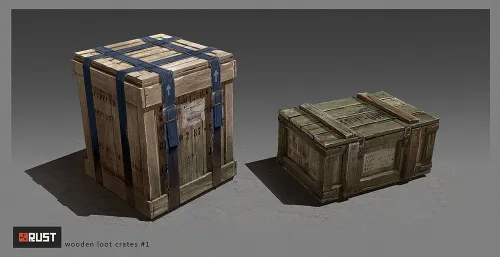
This 2x config file includes a balanced loot-table which is compatible with BetterLoot V4. Further individual support such as customization after purchase is not available.$6.00-
- 1
-
-
- #2x
- #loot table 2x
- (and 16 more)
-
Version 1.2.9
1,324 downloads
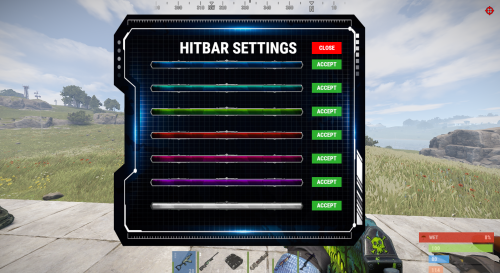
Advanced Hit Bar will show the players the health information of the player or certain entities the player is shooting. This plugins comes with a nice UI and the ability to customize it. Important: This plugin depends on Image Library It also works with other plugins that modifies players health like Better Metabolism. Permissions: advancedhitbar.use - Players with this permission will be able to see the Hitbar when shooting (If perms are enabled from config). advancedhitbar.edit - Players with this permission will be able to edit the Hitbar color (If perms are enabled from config). Commands: /hitbar - Opens the Hitbar color config. /hitbar on/off - Enables/Disables the hitbar. /hitbar help - Show brief information on chat. Configuration: { "Plugin Settings": { "- Only users with perms can see the alert": false, "- Time alert will be displayed (Seconds)": 3.0, "- UI Anchor Min": "0.356 0.117", "- UI Anchor Max": "0.63 0.158", "- Config Text": "HITBAR SETTINGS", "- Config Color": "#ffffff", "Copter - Enable health bar": true, "Bradley - Enable health bar": true, "Players - Enable health bar": true, "NPC - Enable health bar (Animals, Scientists, Scarecrows, etc.)": true, "Minicopter - Enable health bar": true, "ScrapCopter - Enable health bar": true, "Deployables - Enable health bar": true, "Building Blocks - Enable health bar": true, "All Entities - Enable health bar": false, "Show hitbar when damage type is fire (Not Recommended)": false, "- Accept button text": "ACCEPT", "- Close button text": "CLOSE", "- Config Chat command": "hitbar", "- Config Custom Players Health (ONLY CHANGE THIS IF YOU CHANGED THE DEFAULT PLAYERS HEALTH)": 100, "- Config Custom Players Health (Assign the perm to the the players that have different health)": { // Only assign this perms to the players if you changed their max health (Example: Better Metabolism) "advancedhitbar.vip": 150, "advancedhitbar.vip1": 200 } } }$9.99 -
.thumb.png.08df58ec7dc59509ce742d52d7480064.png)
Version 1.0.0
36 downloads
About 1000x Loot Table Config 1000x Better Loot Config Removed all Junk from barrels and creates. In case you have some suggestions or ideas what to add/improve don't hesitate to contact me in discord or here. Get the plugin here https://umod.org/plugins/better-loot DM me for more info in discord cursedee$4.99 -

RepairAll Permissions and Configuration options explained.
Corvus posted A Tutorial in Documentation
Permissions repairall.use Permission required for players to use RepairAll. All repairs are subject to an additional resource cost specified by Additional Cost % in the configuration. repairall.no.add.cost Exempts player from additional resource cost specified by Additional Cost %. repairall.use.item Players with this permission can repair individual items. Disabling this feature can reduce server resources used by RepairAll. repairall.use.roam Allows players to repair outside of TC auth range. Using any container (a small box, or throw your backpack on the ground) players can repair all items outside of their own TC range. This ability has an additional cost of resources Additional Roaming Repair Cost % which stacks on top of Additional Cost %. repairall.no.roam.cost Waives additional resource cost specified by Additional Roaming Repair Cost % while outside of TC Auth range. repairall.no.dura.loss This permission allows players to repair items without taking additional durability loss to the item. repairall.no.resources Allows players to make repairs without consuming resources. (This integrates with SkillTree's Free Repairs skill.) repairall.no.blueprints Allows players to repair items without having that item's blueprint unlocked. repairall.full.condition Repair items to full condition and durability. (This integrates with SkillTree's Max Repair skill.) Configuration Options Plugin Settings Default Cost % This is Rust's default resource cost for repairs which, by default, is 20% of the resources . Additional Cost % Set the additional resource cost for repair. Default is 10% repairall.no.add.cost Groups this permission are assigned to will not be charged an additional cost to use RepairAll. Additional Roaming Repair Cost % defaults 25% Durability Loss % Set the default loss to durability on repair. Plugin Integration Settings SortButton Use Permission: default: "sortbutton.use". Backpacks Use Permission: default: "backpacks.use". Backpacks Retrieve Permission: default: "backpacks.retrieve". Backpacks Gather Permission: default: "backpacks.gather". -
Configuration Example Configuration { "Total possible numbers to roll (Default=100)": 100, "Minimum number to win (inclusive) (Default=55)": 55, "Payout multiplier for win (Default=2.0)": 2.0, "Cooldown between bets in seconds (Default=1.0)": 1.0, "Use TC Bank for payout": false, "Use Economics for payout": false, "Use ServerRewards for payout": false, "GUI panel background color (RGBA 0-1)": "0.1 0.1 0.1 0.8", "Show dice rolling numbers instead of rolling instantly": false, "Slow roll speed per number in seconds (Default=0.1)": 0.1 }
-
Configuration Example Configuration { "AmountToGiveOnFirstSpawn": 20, "AmountToGiveOnTimer": 10, "TimerInSeconds": 1800, "SendMessageToPlayer": true, "CurrencySymbol": "$", "CurrencySymbolPlacement": "left", "UseTCBankSupport": true, "UseEconomicsSupport": false, "UseServerRewardsSupport": false } Configuration Properties AmountToGiveOnFirstSpawn (int) Amount of currency to give players the first time they spawn. Default: `20`. AmountToGiveOnTimer (int) Amount of currency to gve players when the timer is reached. Default: `10`. TimerInSeconds (int) Duration of timer in seconds. Default: `1800`. SendMessageToPlayer (bool) Enable or disable players receiving a chat message when they get free rewards. Default: `true`. CurrencySymbol (string) Symbol to use to for currency in messages. Default: `"$"`. CurrencySymbolPlacement (string) Placement for currency symbol. Can be `"left"` or `"right"`. Default = `"left"`. UseTCBankSupport (bool) Enables paying out players using TC Bank plugin. Default = true. UseEconomicsSupport (bool) Enables paying out players using Economics plugin. Default = false. UseServerRewardsSupport (bool) Enables paying out players using ServerRewards plugin. Default = false.