Search the Community
Showing results for tags 'crash'.
Found 7 results
-

Version 1.6.1
10,550 downloads
Adds a cargo plane crash event to your server. The crash site is guarded by NPCs that patrol the area and can chase players. You can also set up custom loot using the "SimpleLootTable" plugin. Features: Support for third-party plugins Great customization options in the config Console commands: callcargoplane - force the event to start callcargoplane {steamID/name} - the event will be reserved for one player crashcargoplane - force a cargo plane to crash cpc_stop - force the event to end Chat commands(need admin privileges): showcrashzone - displays the crash area setcrashzonecenter - set the center of the crash zone to where the player is callcargoplane - force the event to start callcargoplane {steamID/name} - the event will be reserved for one player crashcargoplane - force a cargo plane to crash cpc_calltome - force an event to start (the cargo plane will go to the player's coordinates) cpc_stop - force the event to end cpc_add_crashzone - adds a new zone at the location where the player is, can be used if you use multiple zones(you can set the name and radius - /cpc_add_crashzone "name" "radius") Hooks: void CargoPlaneCrashStarted() // called when the event starts void CargoPlaneCrashCrashed() // called when a cargo plane crashes void CargoPlaneCrashEnded() // called when the event ends void CargoPlaneCrashEventWinner(BasePlayer player) // called when a player loots any crate first CargoPlaneCrash config: { "PVE mode (crates can only be looted by the player who first dealt damage to the NPC)": false, "Give event ownership to the owner's teammates if he is no longer the owner. Only if teammates are within the event radius (for PVE mode)": true, "Radius for event(for PVE mode)": 380, "Create a dome for PVE mode": false, "Dome transparency (the higher the value, the darker the dome, recommended 4)": 4, "Time after which the owner of the event will be deleted if he left the dome or left the server (for PVE mode)": 300, "Message when a player enters the event dome(only for PVE mode if there is a dome)": "You have entered the Cargo Plane Crash Event", "Message when the event owner leaves the event dome (only for PVE mode if there is a dome)": "Return to the event dome, otherwise after 300 seconds you will no longer be the owner of this event", "Do not allow other players into the event(only for PVE mode if there is a dome) Be careful, if the crash site is near the player's base and the player is not the owner of the event, he will be ejected from his base outside the dome": false, "Message when a player is ejected from the event dome(only for PVE mode if there is a dome)": "You cannot be here, you are not the owner of this event", "Allow admin to be in event dome (only for PVE mode if there is a dome)": true, "Triggering an event by timer (disable if you want to trigger the event only manually)": true, "Time to event start(in seconds)": 3600.0, "Random time to event start": false, "Minimum time to event start(in seconds)": 600, "Maximum time to event start(in seconds)": 10800, "CargoPlane speed(recommended 4 to 6)": 5.0, "Minimum amount of online players to trigger the event": 1, "Minimum crates amount(spawn after crash)": 1, "Maximum crates amount(spawn after crash)": 1, "Crate simple loot table name(plugin SimpleLootTable is required)": "", "Minimum number of items in a crate(plugin SimpleLootTable is required)": 0, "Maximum number of items in a crate(plugin SimpleLootTable is required)": 0, "Crates lifetime(in seconds). The crate will not be destroyed if it has been activated": 3600, "Crates timer(in seconds)": 900, "Remove crates after being looted by a player(in seconds)": 300, "Minimum airdrops amount(spawn after crash)": 1, "Maximum airdrops amount(spawn after crash)": 1, "Airdrop simple loot table name(plugin SimpleLootTable is required)": "", "Minimum number of items in an airdrop(plugin SimpleLootTable is required)": 0, "Maximum number of items in an airdrop(plugin SimpleLootTable is required)": 0, "Airdrops lifetime(in seconds)": 3600, "Fireballs amount(spawn after crash)": 5, "Passengers amount(spawn after crash)": 2, "Explosion marker on the map(spawn after crash)": true, "Explosion marker lifetime(in seconds)": 300, "Enable signal smoke(spawn after crash)": true, "Signal smoke lifetime(in seconds, max 214)": 214, "Map size(crash zone size), you can see the zone, use the chat command /showcrashzone": 4500.0, "Starting altitude, defaults to map size, can be increased if cargo plane hits high ground(no more than 10000 recommended)": 4500.0, "Crash zone center. Use chat command /setcrashzonecenter to set to player position. You can check crash zone center, use the chat command /showcrashzone": { "x": 0.0, "y": 0.0, "z": 0.0 }, "Use multiple zones": false, "Select a zone from the list sequentially(if false, then the crash zone will be chosen randomly)": false, "Zones list": [ { "name": "0", "radius": 300, "center": { "x": -300.0, "y": 0.0, "z": 0.0 } }, { "name": "1", "radius": 200, "center": { "x": 100.0, "y": 0.0, "z": 0.0 } } ], "Event message(if empty, no message will be displayed)": "CargoPlane event started", "Crash message(if empty, no message will be displayed)": "Cargo plane crashed", "Event end message(if empty, no message will be displayed)": "CargoPlaneCrash event ended", "Message about coordinates(will display the coordinates of the crash site. If empty, no message will be displayed)": "", "Kit name(you can use kits for passengers if you have Kits plugin)": "", "Passenger name": "Mister bot", "Use NPC prefab for passengers": false, "Minimum NPCs amount(spawn after crash)": 2, "Maximum NPCs amount(spawn after crash)": 2, "NPCs lifetime(in seconds)": 3600, "NPCs type(NPCs prefab, experimental setting, it is not known how the NPCs will behave) 0 - tunneldweller; 1 - underwaterdweller; 2 - excavator; 3 - full_any; 4 - lr300; 5 - mp5; 6 - pistol; 7 - shotgun; 8 - heavy; 9 - junkpile_pistol; 10 - oilrig; 11 - patrol; 12 - peacekeeper; 13 - roam; 14 - roamtethered; 15 - bandit_guard; 16 - cargo; 17 - cargo_turret_any; 18 - cargo_turret_lr300; 19 - ch47_gunner": 8, "NPCs health(0 - default)": 0, "NPCs damage multiplier": 1.0, "NPCs accuracy(the lower the value, the more accurate, 0 - maximum accuracy)": 2.0, "NPCs attack range": 75.0, "Radius of chasing the player(NPCs will chase the player as soon as he comes closer than the specified radius, must be no greater than the attack range)": 60.0, "Minimum distance to NPC damage": 75.0, "Message if the player attacks far away NPCs": "NPC is too far away, he doesn't take damage", "Kit for NPCs. The NPC will use the weapon that is in the first slot of the belt(requires Kits plugin)": "", "Default displayName for NPC(for SimpleKillFeed/DeathNotes plugin)": "Crashsite NPC", "List of displayNames for each NPC(for SimpleKillFeed/DeathNotes plugin)": [ "Crashsite NPC1", "Crashsite NPC2", "Crashsite NPC3" ], "Will NPCs attack zombies": true, "Remove NPC corpses": false, "Prohibit building near the crash site": false, "Building prohibition radius": 20.0, "How long construction is prohibited near the crash site(in seconds)": 1800, "Event marker on the map(spawn an event marker at the crash site)": false, "Display approximate end time of event on marker": false, "Event marker name": "Cargo plane crash site", "Event marker lifetime(in seconds)": 3600, "Event marker transparency(0-1)": 0.75, "Event marker radius": 0.5, "Event marker color.R(0-1)": 1.0, "Event marker color.G(0-1)": 0.0, "Event marker color.B(0-1)": 0.0, "Do not spawn crates and NPCs when a cargo plane falls under water (if the water depth is greater than)": 0.5, "Do not choose a crash site near monuments": false, "If possible, the crash site will not be chosen near player bases": true, "SteamID for chat message icon": 0, "Complete the event if all crates were destroyed after looting": false, "Use Notify plugin for messages": false, "Notify message type": 0 }$19.99- 264 comments
- 22 reviews
-
- 18
-

-

-

-
- #event
- #cargoplane
- (and 18 more)
-

Version 1.2.2
1,047 downloads
Heli Crash Event is a configurable plugin that allows for a new type of random event. Randomly a malfunctioning heli will spawn and crash somewhere on the map after a short period of time. Notifications will broadcast in chat giving players a heads-up that it’s malfunctioning and might crash after a period of time. Once the heli crashes, players can race to the loot and secure the crash site until the flames go out. Npcs can optionally be spawned at the crash site to guard the loot. This is a great PVP event for servers that have set PVP areas or can simply be a new type of event to add to your server. EASY OPTIONAL SETUP - NO SETUP REQUIRED You can simple drop the plugin in as-is and it will start the random event every 30min to 90min OR you can modify the config to change how often it should occur and/or how long until the heli crashes. Admin Only Commands: /HeliCrashStart - Will manually start the event regardless of minimum of player threshold. /HeliCrashStop - Will despawn the heli for the current event. (If it's crashed already it will not despawn loot crates) Configuration Options: "Maximum time between events(minutes):": 90, "Minimum time between events(minutes):": 30 "How long until Heli should crash after first notification(minutes):": 1, "Minimum number of players to start event:": 4, --- added in version 1.0.1 Support Discord: cahnu$9.99 -

Version 2.0.0
14 downloads
LotteryUI is a comprehensive lottery system plugin that provides an immersive gambling experience with a fully customized user interface. Players can test their luck daily through an interactive 9-slot lottery system, winning various rewards ranging from common resources to ultra-rare items and exclusive permissions. Main Features Interactive Lottery Interface: Features a beautifully designed custom UI with 9 clickable slots, each containing randomized rewards with different rarity levels and drop chances. Multi-Tier Reward System: Supports 5 rarity tiers (Common, Rare, Epic, Legendary, Ultra Rare) with configurable drop chances from 80% down to 5%, ensuring balanced gameplay. Personal Inventory System: Players collect winnings in a personal lottery inventory with pagination support, allowing them to claim rewards when convenient. Advanced Cooldown Management: Implements both general usage cooldowns and individual slot cooldowns to prevent abuse, with different timers for VIP tiers and administrators. VIP Tier System: Configurable VIP levels with custom permissions, reduced cooldowns, increased daily limits, and priority-based benefits. Daily Usage Limits: Prevents excessive gambling with configurable daily limits per user tier, promoting healthy gameplay balance. Post-Wipe Protection: Optional lockdown period after server wipes to maintain economy balance during fresh start periods. Immersive Sound System: Customizable sound effects for wins, losses, claims, and interactions to enhance player experience. Command Rewards: Supports special rewards that execute console commands, perfect for granting permissions, currencies, or triggering other plugin actions. Smooth Animations: Features animated button selections and visual feedback for an engaging user experience. Permissions lotteryui.admin: Grants administrative access to reset lottery data and bypass most restrictions. Chat Commands /lottery: Opens the main lottery interface where players can view rewards and make selections. /lottery.reset confirm: (Admin only) Completely resets all lottery data including inventories, cooldowns, and statistics. Console Commands lottery.resetdata confirm: (Admin/Console) Resets all lottery data with confirmation required. Config { "Data Management": { "Clear Data On Wipe": true, "Auto Save Interval (seconds)": 300.0, "Save On Player Disconnect": true }, "Rarity System": { "Common Drop Chance (%)": 80.0, "Rare Drop Chance (%)": 60.0, "Epic Drop Chance (%)": 40.0, "Legendary Drop Chance (%)": 20.0, "Ultra Rare Drop Chance (%)": 5.0 }, "Cooldown Settings": { "Enable Post-Wipe Cooldown": true, "Post-Wipe Cooldown Hours": 24.0, "General Usage Cooldown Seconds": 3600.0, "Per-Slot Cooldown Seconds": 300.0, "Admin General Cooldown Seconds": 1800.0, "Admin Per-Slot Cooldown Seconds": 150.0 }, "Usage Limits": { "Enable Usage Limits": true, "Default User Daily Limit": 3, "Admin Daily Limit": -1, "Admin Permission": "lotteryui.admin", "VIP Tiers": [ { "Tier Name": "VIP", "Permission": "lotteryui.vip", "Daily Limit": 10, "Priority": 1, "General Cooldown Seconds": 2700.0, "Per-Slot Cooldown Seconds": 240.0 }, { "Tier Name": "VIP+", "Permission": "lotteryui.vip.plus", "Daily Limit": 15, "Priority": 2, "General Cooldown Seconds": 2400.0, "Per-Slot Cooldown Seconds": 210.0 }, { "Tier Name": "VIP++", "Permission": "lotteryui.vip.premium", "Daily Limit": 25, "Priority": 3, "General Cooldown Seconds": 2100.0, "Per-Slot Cooldown Seconds": 180.0 }, { "Tier Name": "MVIP", "Permission": "lotteryui.mvip", "Daily Limit": 50, "Priority": 4, "General Cooldown Seconds": 1800.0, "Per-Slot Cooldown Seconds": 150.0 } ] }, "Sound Settings": { "Enable Sounds": true, "Claim Item Sound": "assets/bundled/prefabs/fx/invite_notice.prefab", "Win Reward Sound": "assets/bundled/prefabs/fx/item_unlock.prefab", "Lose Sound": "assets/prefabs/locks/keypad/effects/lock.code.denied.prefab", "Click Sound": "assets/bundled/prefabs/fx/notice/item.select.fx.prefab", "Success Sound": "assets/bundled/prefabs/fx/gestures/thumbsup.prefab" }, "Lottery Rewards": [ { "Item ID": -151838493, "Amount": 1000, "Skin ID": 0, "Rarity Color (RGBA)": "0.7 0.7 0.7 1", "Rarity Type": "Common", "Drop Chance (%)": 80.0, "Is Command Reward": false, "Console Commands": [], "Custom Image URL": "", "Display Name": "", "Description": "" }, { "Item ID": -2099697608, "Amount": 500, "Skin ID": 0, "Rarity Color (RGBA)": "0.7 0.7 0.7 1", "Rarity Type": "Common", "Drop Chance (%)": 80.0, "Is Command Reward": false, "Console Commands": [], "Custom Image URL": "", "Display Name": "", "Description": "" }, { "Item ID": 69511070, "Amount": 300, "Skin ID": 0, "Rarity Color (RGBA)": "0.7 0.7 0.7 1", "Rarity Type": "Common", "Drop Chance (%)": 80.0, "Is Command Reward": false, "Console Commands": [], "Custom Image URL": "", "Display Name": "", "Description": "" }, { "Item ID": -804769727, "Amount": 200, "Skin ID": 0, "Rarity Color (RGBA)": "0.7 0.7 0.7 1", "Rarity Type": "Common", "Drop Chance (%)": 80.0, "Is Command Reward": false, "Console Commands": [], "Custom Image URL": "", "Display Name": "", "Description": "" }, { "Item ID": 1719978075, "Amount": 100, "Skin ID": 0, "Rarity Color (RGBA)": "0.7 0.7 0.7 1", "Rarity Type": "Common", "Drop Chance (%)": 80.0, "Is Command Reward": false, "Console Commands": [], "Custom Image URL": "", "Display Name": "", "Description": "" }, { "Item ID": 1545779598, "Amount": 1, "Skin ID": 0, "Rarity Color (RGBA)": "0.2 0.6 1 1", "Rarity Type": "Rare", "Drop Chance (%)": 60.0, "Is Command Reward": false, "Console Commands": [], "Custom Image URL": "", "Display Name": "", "Description": "" }, { "Item ID": 1588298435, "Amount": 1, "Skin ID": 0, "Rarity Color (RGBA)": "0.2 0.6 1 1", "Rarity Type": "Rare", "Drop Chance (%)": 60.0, "Is Command Reward": false, "Console Commands": [], "Custom Image URL": "", "Display Name": "", "Description": "" }, { "Item ID": 818877484, "Amount": 1, "Skin ID": 0, "Rarity Color (RGBA)": "0.2 0.6 1 1", "Rarity Type": "Rare", "Drop Chance (%)": 60.0, "Is Command Reward": false, "Console Commands": [], "Custom Image URL": "", "Display Name": "", "Description": "" }, { "Item ID": -592016202, "Amount": 10, "Skin ID": 0, "Rarity Color (RGBA)": "0.2 0.6 1 1", "Rarity Type": "Rare", "Drop Chance (%)": 60.0, "Is Command Reward": false, "Console Commands": [], "Custom Image URL": "", "Display Name": "", "Description": "" }, { "Item ID": -1211166256, "Amount": 128, "Skin ID": 0, "Rarity Color (RGBA)": "0.2 0.6 1 1", "Rarity Type": "Rare", "Drop Chance (%)": 60.0, "Is Command Reward": false, "Console Commands": [], "Custom Image URL": "", "Display Name": "", "Description": "" }, { "Item ID": 442886268, "Amount": 1, "Skin ID": 0, "Rarity Color (RGBA)": "0.7 0.3 1 1", "Rarity Type": "Epic", "Drop Chance (%)": 40.0, "Is Command Reward": false, "Console Commands": [], "Custom Image URL": "", "Display Name": "", "Description": "" }, { "Item ID": -1812555177, "Amount": 1, "Skin ID": 0, "Rarity Color (RGBA)": "0.7 0.3 1 1", "Rarity Type": "Epic", "Drop Chance (%)": 40.0, "Is Command Reward": false, "Console Commands": [], "Custom Image URL": "", "Display Name": "", "Description": "" }, { "Item ID": -2069578888, "Amount": 1, "Skin ID": 0, "Rarity Color (RGBA)": "0.7 0.3 1 1", "Rarity Type": "Epic", "Drop Chance (%)": 40.0, "Is Command Reward": false, "Console Commands": [], "Custom Image URL": "", "Display Name": "", "Description": "" }, { "Item ID": -932201673, "Amount": 1000, "Skin ID": 0, "Rarity Color (RGBA)": "0.7 0.3 1 1", "Rarity Type": "Epic", "Drop Chance (%)": 40.0, "Is Command Reward": false, "Console Commands": [], "Custom Image URL": "", "Display Name": "", "Description": "" }, { "Item ID": 1318558775, "Amount": 1, "Skin ID": 0, "Rarity Color (RGBA)": "0.7 0.3 1 1", "Rarity Type": "Epic", "Drop Chance (%)": 40.0, "Is Command Reward": false, "Console Commands": [], "Custom Image URL": "", "Display Name": "", "Description": "" }, { "Item ID": 1110385766, "Amount": 1, "Skin ID": 0, "Rarity Color (RGBA)": "1 0.8 0 1", "Rarity Type": "Legendary", "Drop Chance (%)": 20.0, "Is Command Reward": false, "Console Commands": [], "Custom Image URL": "", "Display Name": "", "Description": "" }, { "Item ID": -194953424, "Amount": 1, "Skin ID": 0, "Rarity Color (RGBA)": "1 0.8 0 1", "Rarity Type": "Legendary", "Drop Chance (%)": 20.0, "Is Command Reward": false, "Console Commands": [], "Custom Image URL": "", "Display Name": "", "Description": "" }, { "Item ID": 1248356124, "Amount": 3, "Skin ID": 0, "Rarity Color (RGBA)": "1 0.8 0 1", "Rarity Type": "Legendary", "Drop Chance (%)": 20.0, "Is Command Reward": false, "Console Commands": [], "Custom Image URL": "", "Display Name": "", "Description": "" }, { "Item ID": 317398316, "Amount": 200, "Skin ID": 0, "Rarity Color (RGBA)": "1 0.8 0 1", "Rarity Type": "Legendary", "Drop Chance (%)": 20.0, "Is Command Reward": false, "Console Commands": [], "Custom Image URL": "", "Display Name": "", "Description": "" }, { "Item ID": -1581843485, "Amount": 1000, "Skin ID": 0, "Rarity Color (RGBA)": "1 0.8 0 1", "Rarity Type": "Legendary", "Drop Chance (%)": 20.0, "Is Command Reward": false, "Console Commands": [], "Custom Image URL": "", "Display Name": "", "Description": "" }, { "Item ID": 1545779598, "Amount": 1, "Skin ID": 1309470544, "Rarity Color (RGBA)": "1 0.2 0.2 1", "Rarity Type": "UltraRare", "Drop Chance (%)": 5.0, "Is Command Reward": false, "Console Commands": [], "Custom Image URL": "", "Display Name": "", "Description": "" }, { "Item ID": 442886268, "Amount": 1, "Skin ID": 1926503780, "Rarity Color (RGBA)": "1 0.2 0.2 1", "Rarity Type": "UltraRare", "Drop Chance (%)": 5.0, "Is Command Reward": false, "Console Commands": [], "Custom Image URL": "", "Display Name": "", "Description": "" }, { "Item ID": -932201673, "Amount": 5000, "Skin ID": 0, "Rarity Color (RGBA)": "1 0.2 0.2 1", "Rarity Type": "UltraRare", "Drop Chance (%)": 5.0, "Is Command Reward": false, "Console Commands": [], "Custom Image URL": "", "Display Name": "", "Description": "" }, { "Item ID": 0, "Amount": 1, "Skin ID": 0, "Rarity Color (RGBA)": "1 0.8 0 1", "Rarity Type": "Legendary", "Drop Chance (%)": 15.0, "Is Command Reward": true, "Console Commands": [ "grant user {steamid} lotteryui.vip", "note.add {steamid} \"¡Congratulations! You won VIP on the LotteryUI\"" ], "Custom Image URL": "https://i.ibb.co/vip-icon.png", "Display Name": "VIP Access", "Description": "Permanent VIP Access" }, { "Item ID": 0, "Amount": 1, "Skin ID": 0, "Rarity Color (RGBA)": "1 0.2 0.2 1", "Rarity Type": "UltraRare", "Drop Chance (%)": 3.0, "Is Command Reward": true, "Console Commands": [ "inventory.giveto {steamid} scrap 1000", "say {username} won 1000 scrap from the LotteryUI!" ], "Custom Image URL": "https://i.ibb.co/money-icon.png", "Display Name": "1000 Scrap", "Description": "Instant scrap reward" } ] } Lang { "UI.Title": "LOTTERY", "UI.Subtitle": "Open the lottery daily to win amazing rewards!", "UI.PossibleRewards": "POSSIBLE REWARDS", "UI.ButtonInventory": "INVENTORY", "UI.ButtonInformation": "INFORMATION", "UI.ButtonClose": "CLOSE", "UI.ButtonClaimAll": "CLAIM ALL", "UI.ButtonLottery": "LOTTERY", "UI.InventoryTitle": "INVENTORY", "UI.InventorySubtitle": "Your lottery winnings collection", "UI.YourWinnings": "YOUR WINNINGS", "UI.LotteryStatus": "LOTTERY STATUS", "Status.Locked": "<size=11><color=#ff6b6b>LOCKED</color></size>\n<size=9><color=#DBE2E9>{0}h {1}m left</color></size>", "Status.Cooldown": "<size=11><color=#ffd43b>COOLDOWN</color></size>\n<size=9><color=#DBE2E9>{0}</color></size>", "Status.Ready": "<size=12><color=#4ade80>READY!</color></size>\n<size=8><color=#9AA297>Click to play</color></size>", "Status.DailyUses": "<size=11><color=#74c0fc>DAILY USES</color></size>\n<size=10><color=#DBE2E9>{0}</color><color=#9AA297>/</color><color=#4ade80>{1}</color></size>", "Status.DailyUsesUnlimited": "<size=11><color=#4ade80>DAILY USES</color></size>\n<size=9><color=#DBE2E9>Unlimited</color></size>", "Status.DailyUsesNoLimits": "<size=11><color=#4ade80>DAILY USES</color></size>\n<size=9><color=#DBE2E9>No Limits</color></size>", "Status.AdminTier": "<size=11><color=#ff6b6b>ADMIN</color></size>\n<size=8><color=#F3E7B3>{0}</color><color=#9AA297>/</color><color=#F3E7B3>{1}</color></size>", "Status.VipTier": "<size=11><color={0}>{1}</color></size>\n<size=8><color=#F3E7B3>{2}</color><color=#9AA297>/</color><color=#F3E7B3>{3}</color></size>", "Status.NormalTier": "<size=11><color=#74c0fc>NORMAL</color></size>\n<size=8><color=#F3E7B3>{0}</color><color=#9AA297>/</color><color=#F3E7B3>{1}</color></size>", "Chat.NoItemsToClaim": "<size=14><color=#fbbf24>LOTTERY INVENTORY</color></size>\n<size=12><color=#DBE2E9>No items available to claim at this time</color></size>\n<size=10><color=#9AA297>Visit the lottery to win rewards first!</color></size>", "Chat.AllItemsClaimed": "<size=14><color=#4ade80>REWARDS CLAIMED</color></size>\n<size=12><color=#DBE2E9>Successfully claimed all lottery rewards!</color></size>\n<size=10><color=#9AA297>Total items received: </color><color=#4ade80>{0}</color></size>", "Chat.ItemClaimed": "<size=13><color=#4ade80>ITEM CLAIMED</color></size>\n<size=11><color=#F3E7B3>Received: </color><color=#DBE2E9>{0}x {1}</color></size>", "Chat.SlotAlreadySelected": "<size=13><color=#fbbf24>SLOT UNAVAILABLE</color></size>\n<size=11><color=#DBE2E9>You have already selected this lottery slot</color></size>\n<size=9><color=#9AA297>Choose a different number to continue</color></size>", "Chat.BetterLuckNextTime": "<size=14><color=#ef4444>NO LUCK THIS TIME</color></size>\n<size=12><color=#DBE2E9>Better luck next time! The odds weren't in your favor</color></size>\n<size=10><color=#9AA297>Try another slot or come back later</color></size>", "Chat.Congratulations": "<size=16><color=#FFD700>JACKPOT WINNER!</color></size>\n<size=13><color=#4ade80>Congratulations on your lottery win!</color></size>\n<size=12><color=#F3E7B3>Prize: </color><color=#DBE2E9>{0}x {1}</color></size>\n<size=10><color=#9AA297>Check your inventory to claim this reward</color></size>", "Chat.LotteryReset": "<size=13><color=#74c0fc>LOTTERY RESET</color></size>\n<size=11><color=#DBE2E9>Your lottery session has been reset successfully</color></size>\n<size=9><color=#9AA297>Reopen the lottery to get fresh rewards</color></size>", "Chat.WipeCooldown": "<size=14><color=#ff6b6b>POST-WIPE LOCKDOWN</color></size>\n<size=12><color=#DBE2E9>Lottery is temporarily locked after server wipe</color></size>\n<size=11><color=#F3E7B3>Time remaining: </color><color=#ff6b6b>{0}h {1}m</color></size>\n<size=9><color=#9AA297>Please wait for the cooldown to expire</color></size>", "Chat.GeneralCooldown": "<size=13><color=#ffd43b>LOTTERY COOLDOWN</color></size>\n<size=11><color=#DBE2E9>You must wait before using the lottery again</color></size>\n<size=10><color=#F3E7B3>Time remaining: </color><color=#ffd43b>{0}</color></size>", "Chat.DailyLimitReached": "<size=14><color=#ff6b6b>DAILY LIMIT REACHED</color></size>\n<size=12><color=#DBE2E9>You've used all your daily lottery attempts</color></size>\n<size=11><color=#F3E7B3>Daily limit: </color><color=#ff6b6b>{0} uses</color></size>\n<size=9><color=#9AA297>Come back tomorrow for more chances!</color></size>", "Chat.SlotCooldown": "<size=13><color=#ffd43b>SLOT COOLDOWN</color></size>\n<size=11><color=#DBE2E9>This lottery slot is temporarily unavailable</color></size>\n<size=10><color=#F3E7B3>Available in: </color><color=#ffd43b>{0}</color></size>\n<size=9><color=#9AA297>Try a different slot or wait</color></size>", "Chat.LotteryInfo": "<size=16><color=#FFD700>LOTTERY SYSTEM INFORMATION</color></size>\n<size=7><color=#9AA297>\n</color></size><size=11>\n</size><size=14><color=#4ade80>HOW IT WORKS </color><color=#9AA297>· </color><color=#DBE2E9>GAMEPLAY GUIDE</color></size>\n<size=12>· <color=#F3E7B3>Select a slot: </color><color=#DBE2E9>Choose from 9 available positions</color></size>\n<size=12>· <color=#F3E7B3>Win rewards: </color><color=#DBE2E9>Each slot has different rarities & drop chances</color></size>\n<size=12>· <color=#F3E7B3>Claim prizes: </color><color=#DBE2E9>Visit inventory to collect your winnings</color></size>\n\n<size=14><color=#4ade80>YOUR STATUS </color><color=#9AA297>· </color><color=#DBE2E9>CURRENT INFORMATION</color></size>\n<size=12>· <color=#F3E7B3>Daily uses: </color><color=#E45858>{0}/{1}</color> <color=#9AA297>| </color><color=#F3E7B3>Tier: </color><color=#DBE2E9>{2}</color></size>\n<size=12>· <color=#F3E7B3>Status: </color><color=#E45858>{3}</color> <color=#9AA297>| </color><color=#F3E7B3>Inventory: </color><color=#DBE2E9>{4} items</color></size>\n\n<size=14><color=#4ade80>RARITY SYSTEM </color><color=#9AA297>· </color><color=#DBE2E9>DROP CHANCES</color></size>\n<size=12>· <color=#9AA297>Common: </color><color=#DBE2E9>80%</color> <color=#9AA297>| </color><color=#4ade80>Rare: </color><color=#DBE2E9>60%</color> <color=#9AA297>| </color><color=#e599f7>Epic: </color><color=#DBE2E9>40%</color></size>\n<size=12>· <color=#FFD700>Legendary: </color><color=#DBE2E9>20%</color> <color=#9AA297>| </color><color=#ff6b6b>Ultra Rare: </color><color=#DBE2E9>5%</color></size>\n<size=7><color=#9AA297>\n</color></size><size=11><color=#DBE2E9>Try your luck with </color><color=#FFD700>/lottery</color><color=#DBE2E9> command!</color></size>", "Chat.CommandClaimed": "<size=13><color=#4ade80>REWARD CLAIMED</color></size>\n<size=11><color=#F3E7B3>Executed: </color><color=#DBE2E9>{0}</color></size>", "Chat.CommandExecuted": "<size=16><color=#FFD700>COMMAND REWARD!</color></size>\n<size=13><color=#4ade80>Congratulations! Your reward has been processed!</color></size>\n<size=12><color=#F3E7B3>Reward: </color><color=#DBE2E9>{0}</color></size>\n<size=10><color=#9AA297>Commands executed automatically</color></size>", "Generic.UnknownItem": "Unknown Item" }$12.99 -
.thumb.gif.760590747e7fe0ee20f7379c315bbd33.gif)
Version 2.1.0
28 downloads
Crash Alert System is a vital tool designed for server administrators who need an efficient way to keep their players informed about server crashes. This plugin automatically sends notifications to Discord whenever a crash occurs, ensuring that both your staff and community stay updated in real-time. Additionally, it includes a unique feature to reward players who rejoin the server after a crash, helping to keep your community engaged and active. With its easy-to-use interface and extensive customization options, managing crash alerts and player rewards has never been simpler. Key Features: Real-time Alerts: Get instant notifications sent directly to your Discord server whenever a crash happens, keeping everyone in the loop. Player Rewards: Motivate players to return after a crash by offering configurable rewards for rejoining. Easy Setup: Customize the plugin quickly and easily to fit your server’s specific needs. Plugin Integration: Works seamlessly with your existing tools and plugins for effortless server management. Comprehensive UI: Manage all settings and rewards through a practical, user-friendly interface. Item Categorization: Choose rewards from detailed item categories, giving you precise control over what players receive. Advanced Discord Configuration: Tailor notification messages and embeds to match your server’s branding and style. Notification Options: Decide whether to enable or disable UI and chat notifications based on your preferences. Reset Categories: Reset item categories to their default settings with ease whenever needed. Permissions: crashalertsystem.notify.see: Players need this permission to view the crash notification UI (if it’s enabled in the configuration). crashalertsystem.admin: Admins require this permission to access the configuration settings and reward management interface. Chat Commands: /cas: Opens the main user interface. From here, you can configure crash notifications, manage player rewards, and adjust settings. Console Commands: cas.resetcategories: Resets the item categories to their default settings. This is handy if you need to restore the original item groupings for the reward system. Config { "Discord Settings": { "WebhookUrl": "", "MessageContent": "@everyone or @here or <@&role-id>", "BotName": "Crash Alert System", "BotAvatarUrl": "https://codefling.com/uploads/set_resources_13/cf0d9ad89a1246bdc528542aa98e2147_cf_logo_23_res.png", "Embed": { "AuthorName": "Crash Alert System or ServerName", "AuthorIconUrl": "https://codefling.com/uploads/set_resources_13/cf0d9ad89a1246bdc528542aa98e2147_cf_logo_23_res.png", "Title": "Server Crash Detected", "Description": "The server has suffered a crash.\nPlease allow 1 to 5 minutes for the server to come back online.", "ThumbnailUrl": "https://codefling.com/uploads/set_resources_13/cf0d9ad89a1246bdc528542aa98e2147_cf_logo_23_res.png", "FooterText": "Crash Alert System | {DateTime}", "FooterIconUrl": "https://codefling.com/uploads/set_resources_13/cf0d9ad89a1246bdc528542aa98e2147_cf_logo_23_res.png", "FieldTitle": "Estimated Data Loss", "FieldContent": "The server lost approximately {0} of data", "ColorHex": "#FF0000" } }, "Reward Settings": { "EnableRewards": true, "RewardTimeLimit": 3600, "RewardItems": [] }, "Notification Settings": { "Use Notify UI alerts": false, "Use chat alerts": true }, "UI Settings": { "CheckIcon": "✓", "CrossIcon": "✖", "CheckIconColor": "0.5568627 0.7764706 0.1843137 1", "CrossIconColor": "0.7764706 0.5137255 0.4196078 1", "BackgroundColorHex": "#5095C4" } } Lang { "NoPermission": "You don't have permission to see this notification.", "RewardReceived": "Thanks for joining the server after the crash! Check your inventory for compensation items!", "RewardAdded": "Added {0}x {1} to crash rewards.", "RewardRemoved": "Removed {0}x {1} from crash rewards.", "RewardUpdated": "Updated {0} quantity to {1}.", "InvalidItem": "Invalid item. Please try again.", "InvalidQuantity": "Please enter a valid quantity greater than 0.", "ManageRewards": "Crash Alert System - Reward Manager", "ItemSelector": "Crash Alert System - Item Selector", "NoRewards": "No rewards configured. Click the 'Add Reward' button to add some.", "EnterQuantity": "Enter quantity for {0}", "AddReward": "Add Reward", "RemoveAll": "Remove All", "Close": "Close", "Back": "Back", "ConfirmRemoveAll": "Are you sure you want to remove all rewards?", "Yes": "Yes", "No": "No", "ConfigTitle": "Crash Alert System Configuration", "DiscordSettings": "Discord Settings", "DiscordWebhookSettings": "Webhook Settings", "DiscordMessageSettings": "Message Settings", "DiscordEmbedSettings": "Embed Settings", "RewardSettings": "Reward Settings", "NotificationSettings": "Notification Settings", "Save": "Save", "Cancel": "Cancel", "Edit": "Edit", "AllCategories": "All Categories", "WebhookUrl": "Webhook URL", "MessageContent": "Message Content", "BotName": "Bot Name", "BotAvatar": "Bot Avatar URL", "AuthorName": "Author Name", "AuthorIcon": "Author Icon URL", "Title": "Title", "Description": "Description", "ThumbnailUrl": "Thumbnail URL", "FooterText": "Footer Text", "FooterIcon": "Footer Icon URL", "FieldTitle": "Field Title", "FieldContent": "Field Content", "ColorHex": "Color (Hex)", "SavedSuccessfully": "Configuration saved successfully!", "Search": "Search all items...", "CategoryAll": "All Categories", "CategoryWeapons": "Weapons", "CategoryTools": "Tools", "CategoryConstruction": "Construction", "CategoryItems": "Items", "CategoryResources": "Resources", "CategoryAttire": "Attire", "CategoryMedical": "Medical", "CategoryFood": "Food", "CategoryAmmo": "Ammunition", "CategoryTraps": "Traps", "CategoryMisc": "Miscellaneous", "CategoryComponents": "Components", "CategoryElectrical": "Electrical", "CategoryFun": "Fun", "CategoriesReset": "Item categories have been reset to default values." }$6.99 -
.thumb.png.83d8696d18d1b53f057800209b62c5fb.png)
Version 1.0.5
73 downloads
About Limit FPS LimitFPS is a plugin with almost no performance impact meant for administration (and maybe trolling). It has 2 very powerful features You can limit the FPS of other players You can see the FPS and RAM usage of other players Demo Requirement LimitFPS uses Harmony so you need to disable the Oxide sandbox [see how to do it] Permissions There are 2 oxide permissions that LimitFPS uses limitfps.limit.use - Allows the use of /limitfps command limitfps.fps.use - Allows the use of /playerfps command Add the permissions with the console command: oxide.grant <group|user> <name|id> <permission> Commands There are 2 commands that LimitFPS has /limitfps <playername or steamid> <target fps> - Limit the FPS of a player, set target fps to 0 to remove the limit /playerfps <playername or steamid> - See the player's FPS and RAM usage All of these 2 commands can be used from the server console (or RCON) and they work exactly the same just without the forward slash. If you are an admin in the server you can use them from the Rust console too. Config FPS Query interval - How often will the plugin check the player's FPS in order to adjust it PD Controller P value - How fast to jump to the target FPS, if this is too high it can overshoot PD Controller D value - How much to respect the error difference from the FPS measurement, if higher it can overshoot the target FPS Non linear control - If set to true it will be more responsive (reaching target FPS faster) at low FPS values (30 and below) FPS Limit dampening - If set to true it will stop adjusting the player's FPS once it reaches the target, if this is false, when the player presses ESCAPE or ALT+TAB's and then come back their FPS will be way lower/higher than the target FPS Limit dampening range - When the FPS is within this value to the target FPS it will stop adjusting the FPS I recommend leaving everything to default except maybe FPS Query interval, if you want to get the user's FPS faster/slower. For developers LimitFPS exposes everything you need to control other player's performance with hooks & API calls I strongly recommend if you want to use the API or the Hooks see the demo plugin that uses all of them, its extremely detailed and everything is within 1 file, you can find it here: Hooks: object OnFPSQueryStart(BasePlayer command_initiatior, BasePlayer target, int request_id) { return null; // allow the query } void OnFPSQueryTimeout(BasePlayer command_initiatior, BasePlayer target, int request_id) { } void OnFPSQueryFinished(BasePlayer command_initiatior, BasePlayer target, ClientPerformanceReport report) { } object OnLimitFPSStart(BasePlayer command_initiatior, BasePlayer target, float targetFps) { return null; // allow the limitting } object OnLimitFPSTick(BasePlayer command_initiatior, BasePlayer target, float targetFps, ClientPerformanceReport report) { return null; // allow the tick } API: Interface.Oxide.CallHook("API_PlayerFPSCommand", ulong_steamid); Interface.Oxide.CallHook("API_LimitFPSCommand", ulong_steamid, float_targetFps); Contact If you have any suggestions, want to report a bug or need help, you can contact me on Discord: turner#7777$12.69 -
Version 1.0.0
13 downloads
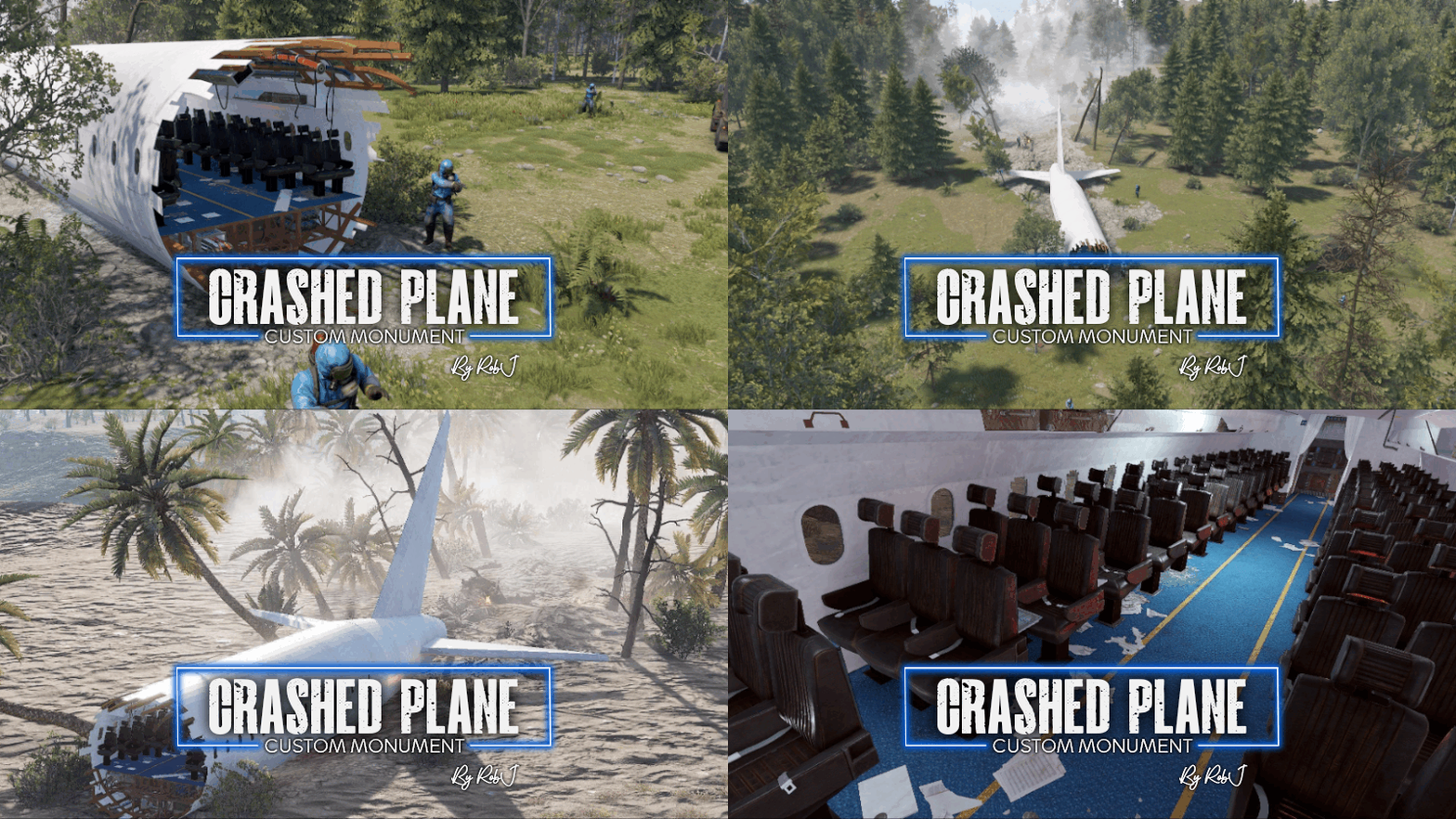
Welcome to the Plane Crash Rear Monument. Here, you will find the rear segment of an airliner, ripped apart and crashed, surrounded by trees that are either burnt to a crisp or knocked over. Upon arriving at the site, you will discover that a Cobalt team has beaten you to it. You must eliminate them before you can search the wreckage. Inside, you will find loot, including a locked blue card door that grants access to the cargo compartment, where even more loot await. This monument is loosely based on a plane crash from The Forest. NPC’s This monument has built-in NPC’s powered by an included plug-in. If you do not wish to use the built-in bots simply do not install the plug-in and add your own bots at your leisure. Impact Zone Available in both temperate and arid climates. Quick Start Extract the zip file into your RustEdit install folder. Start Rust Edit. Click on Prefabs at the top & open up your Prefab List. Under the Custom category, you will now find RobJs Premium Prefabs. Double-click on the prefab file, which will spawn it into the map for you. Drag it to the general area you want to place it Apply the Height Mask, Topology Mask, and Splat Mask. Contact And Help If you need to contact me discord is best: RobJ2210#2553 For help/support my discord group is best: Join RobJ Maps Discord$19.99 -

Version 1.0.0
60 downloads
Sends a discord message when booting the server after a crash, letting everyone know what happened Configuration: { "Discord Configuration": { "Webhook Url": "https://support.discordapp.com/hc/en-us/articles/228383668-Intro-to-Webhooks", "Message Text": "@everyone", "Bot Name": "Bot Name", "Bot Image": "https://yt3.ggpht.com/ytc/AKedOLQc1OCf9gztVmcVnmI_41uN9axrRP8wd4a-GflFRQ=s900-c-k-c0x00ffffff-no-rj", "Author Name": "Author Name", "Author Image": "https://yt3.ggpht.com/ytc/AKedOLQc1OCf9gztVmcVnmI_41uN9axrRP8wd4a-GflFRQ=s900-c-k-c0x00ffffff-no-rj", "Title Text": "Server Name", "Description Text": "Description Text", "Field Title Text": "Field Title Text", "Field Text": "The server lost {0} of data", "Footer Text": "Footer Text", "Footer Image": "https://yt3.ggpht.com/ytc/AKedOLQc1OCf9gztVmcVnmI_41uN9axrRP8wd4a-GflFRQ=s900-c-k-c0x00ffffff-no-rj", "Thumbnail": "https://yt3.ggpht.com/ytc/AKedOLQc1OCf9gztVmcVnmI_41uN9axrRP8wd4a-GflFRQ=s900-c-k-c0x00ffffff-no-rj", "Embed Color": "#ce422b" }$5.00



.thumb.gif.b68fcc45abe70ab7d7235dffc8a0c770.gif)