Search the Community
Showing results for tags 'death'.
-
Version 1.4.10
246 downloads
Still using those old Restore Upon Death & Metabolism plugins? Well with death modifier you won't need those! For a price $ players can auto revive right where they left off inventory an all! Included with unlimited permissions, blacklist system, container limits, currency support & more! NOTE: This plugin as of 1.2.0 now supports carbon. NOTE: Does not work while in vanish. NOTE: Toggling god mode on while at death screen will break the plugin for you. Features * Black List & Black list chat command for ban / unban of items. * Permission support ( requires a perm to use ). * Specified Containers via perms. * Charge Economics & Economics debt or Server-Rewards RP. * Respawns player at same location they died at. * Ability to control Metabolism on respawn. * Ability to allow players to set there own bed/bag spawn points. * If you don't have a permission it doesn't apply to you. * Currency response msg to player if it fails. * Help/info command. * If multiple permissions assigned it will default to first one in the config list they have. * You can create as many permissions as you want simply copy / paste the examples in the config to make more & edit. * Toggle on/off modes for players. * Capable of saving everything, including backpacks etc. Commands Note: Running these commands bans & unbans everything in your whole inventory ( wear, belt, main ) /bl ban perm perm2 etc ( Specify which perms are allowed to bypass the item ban ) Admin Perm Needed. ( deathmodifier.admin ) /bl unban ( Removes all banned items in your inventory ) Admin Perm Needed. ( deathmodifier.admin ) /di ( Shows the players what their current permission settings are in chat ) /dt ( allows players to toggle off or on the auto revive system ) Note: This will reset to being on when you re-connect back to the server or reload the plugin or do a reboot. Config { "Sets black-list command": [ "dmbl", "bl" ], "Sets help-info command": [ "deathinfo", "di" ], "Sets toggle command": [ "deathtoggle", "dt" ], "Kill Corpse when player uses a Death Modifier Respawn Option": true, "Sets how long until player's corpse De-Spawns, Default 300f (5-min), this affects how long they can AFK at death screen to use there respawn options.": 300.0, "Permissions": { "vip": { "Respawn Settings": { "Random Respawn or Spawn at Death Location, true = random": false, "Seconds for how long after respawn until you can take damage, 0 = disabled": 0, "Sets Respawn with death modifier cooldown in seconds, 0 = disabled": 0 }, "Sets allowed containers, Main = 0 | Belt = 1 | Wear = 2 | All = 3": [ 3 ], "Currency Settings": { "Sets default currency, 0 = disabled, 1 = Economics, 2 = ServerRewards": 0, "Sets price": 15.0, "Sets Increment penalty to apply only when they purchase a revive instead of adding for each death.": false, "Sets Increment penalty for quick repeated use, 0 = disabled": 5.0, "Resets Cost Increment after x seconds, 0 = disabled": 1800 }, "Sets Respawned Metabolism Level's": { "Enable Metabolism Modifications": true, "Sets Current Health: 0 = Random Health Level": 0.0, "Sets Max Health Level": 100.0, "Sets Current Water Hydration Level": 250.0, "Sets Max Water Hydration Level": 250.0, "Sets Current Hunger Level": 500.0, "Sets Max Hunger Level": 500.0 }, "Sets Allowed Respawn Options": { "SleepingBag": true, "Bed": false, "BeachTowel": false, "Camper": true }, "No Respawn Cool Downs": { "SleepingBag": true, "Bed": false, "BeachTowel": false, "Camper": false } }, "basic": { "Respawn Settings": { "Random Respawn or Spawn at Death Location, true = random": false, "Seconds for how long after respawn until you can take damage, 0 = disabled": 0, "Sets Respawn with death modifier cooldown in seconds, 0 = disabled": 0 }, "Sets allowed containers, Main = 0 | Belt = 1 | Wear = 2 | All = 3": [ 0, 2 ], "Currency Settings": { "Sets default currency, 0 = disabled, 1 = Economics, 2 = ServerRewards": 0, "Sets price": 15.0, "Sets Increment penalty to apply only when they purchase a revive instead of adding for each death.": false, "Sets Increment penalty for quick repeated use, 0 = disabled": 5.0, "Resets Cost Increment after x seconds, 0 = disabled": 1800 }, "Sets Respawned Metabolism Level's": { "Enable Metabolism Modifications": true, "Sets Current Health: 0 = Random Health Level": 0.0, "Sets Max Health Level": 100.0, "Sets Current Water Hydration Level": 250.0, "Sets Max Water Hydration Level": 250.0, "Sets Current Hunger Level": 500.0, "Sets Max Hunger Level": 500.0 }, "Sets Allowed Respawn Options": { "SleepingBag": false, "Bed": false, "BeachTowel": false, "Camper": false }, "No Respawn Cool Downs": { "SleepingBag": false, "Bed": false, "BeachTowel": false, "Camper": false } } }, "Black Listed Items with Skins and Permission bypass, use Commands to setup & update": {} }$24.99 -
Version 0.1.9
163 downloads
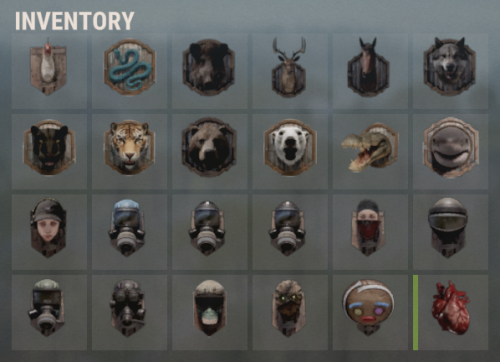
Useful multifunctional plugin related to trophy harvesting. The ability to automatically add a player's skull to their inventory without the need to harvest it; The ability to replace a player's skull upon harvesting; The ability to set the chance of harvesting a player's heart; The ability to harvest head bags without a special knife; The ability to customize head bags by type and separately for players; The ability to set icons for head bags; The ability to customize the name of head bags by type; The ability to add custom head bags for entities that don't have them by default; The ability to prevent harvesting one's own head bag if the corresponding permission is present. skulltrophy.vip - Allows players to save their clothing or copy someone else's saved clothing for display on a hunting trophy. skulltrophy.ignore - A player with this permission is protected from custom drop of skull and heart. skulltrophy.admin - Grants the same privileges as skulltrophy.vip. Additionally, it allows saving, modifying, and resetting saves for anyone, including by types. { "Chat command": "strophy", "Is it worth enabling GameTips for messages?": true, "List of language keys for creating language files": [ "en" ], "Is it worth ignoring Facepunch's rules regarding skins and DLCs?": false, "Is it worth creating a player's skull in their inventory upon suicide?": false, "Is it worth creating skulls for NPCs? 0 - disabled, 1 - enabled for all, 2 - enabled only for NPCs with a skinID from the list": 2, "List of NPC skinIDs for skull creation": [ 14922524, 8675309 ], "Is it worth allowing the Head Bag to be harvested without a special knife?": true, "Text format when harvesting the Head Bag": "<color=#FFFFFF>{0}</color>", "List of skin IDs for Head Bag icons": { "Chicken": 3075281761, "Snake": 3470214843, "Boar": 3074393967, "Stag": 3074394545, "Horse": 3074392217, "Wolf": 3074393525, "Panther": 3470215653, "Tiger": 3470216364, "Bear": 3074392575, "Polarbear": 3470216633, "Crocodile": 3470217480, "SimpleShark": 3252067977, "BasePlayer": 3074297551, "ScientistNPC": 3075282198, "UnderwaterDweller": 3075283082, "TunnelDweller": 3075283387, "BanditGuard": 3075283702, "ScientistHeavy": 3075283936, "ScientistPeacekeeper": 3075284145, "ScientistNVG": 3075284355, "ScientistOutbreak": 3470232890, "NPCShopKeeper": 3534310675, "ScarecrowNPC": 3075284618, "GingerbreadNPC": 3075284816 }, "List of displayed names by type for the Head Bag": { "Chicken": "Chicken", "Snake": "Snake", "Boar": "Boar", "Stag": "Stag", "Horse": "Horse", "Wolf": "Wolf", "Panther": "Panther", "Tiger": "Tiger", "Bear": "Bear", "Polarbear": "Polar Bear", "Crocodile": "Crocodile", "SimpleShark": "Shark", "ScientistNPC": "Scientist", "UnderwaterDweller": "Underwater Dweller", "TunnelDweller": "Tunnel Dweller", "BanditGuard": "Bandit Guard", "ScientistHeavy": "Scientist Heavy", "ScientistPeacekeeper": "Peacekeeper", "ScientistNVG": "Scientist NVG", "ScientistOutbreak": "Scientist Outbreak", "NPCShopKeeper": "Shop Keeper", "ScarecrowNPC": "Scarecrow", "GingerbreadNPC": "Gingerbread" }, "Chance of harvesting the Heart(0-100)": 50, "Shortname of the source item for the Heart": "chicken.cooked", "Skin ID of the icon for the Heart": 3075285011, "Name of the effect when eating the Heart. An empty string disables the effect": "assets/prefabs/misc/xmas/snowball/effects/strike_screenshake.prefab", "Temperature applied when eating the Heart. A negative value adds cold, a positive value adds heat": 30.0, "Text format when harvesting the Heart": "<color=#FFFFFF>{0}</color>", "Is it worth replacing the Skull(vanilla) when it's harvested?": true, "The shortname of the item that replaces the Skull when it's harvested. An empty string removes the item": "skull.trophy", "Text format when harvesting Trophies": "<color=#FFFFFF>{0}</color>", "List of random shortname Trophies upon harvesting": [ "trophy", "skull.trophy", "skull.trophy.table", "skull.trophy.jar", "skull.trophy.jar2", "huntingtrophylarge", "huntingtrophysmall", "fishtrophy" ], "Version": { "Major": 0, "Minor": 1, "Patch": 9 } } EN: { "CmdMainAdmin": "Available admin commands:\n\n<color=#D1CBCB>/strophy</color> <color=#D1AB9A>clear</color> <color=#D1CBCB>all/types/players/*nameOrId*</color>(optional) - Clear saved data for the hunting trophy\n<color=#D1CBCB>/strophy</color> <color=#D1AB9A>save</color> <color=#D1CBCB>*type*/*nameOrId*</color>(optional) - Save outfit for the hunting trophy\n<color=#D1CBCB>/strophy</color> <color=#D1AB9A>copy</color> <color=#D1CBCB>*nameOrId*</color> - Copy outfit for the hunting trophy from the specified player\n<color=#D1CBCB>/strophy</color> <color=#D1AB9A>add</color> <color=#D1CBCB>*type*</color> - Add an entity type for the hunting trophy\n<color=#D1CBCB>/strophy</color> <color=#D1AB9A>remove</color> <color=#D1CBCB>*type*</color> - Remove an entity type from the hunting trophy\n\n--------------------------------------------------", "CmdMain": "Available commands:\n\n<color=#D1CBCB>/strophy</color> <color=#D1AB9A>clear</color> - Clear saved data for the hunting trophy\n<color=#D1CBCB>/strophy</color> <color=#D1AB9A>save</color> - Save outfit for the hunting trophy\n<color=#D1CBCB>/strophy</color> <color=#D1AB9A>copy</color> <color=#D1CBCB>*nameOrId*</color> - Copy outfit for the hunting trophy from the specified player\n\n--------------------------------------------------", "CmdNotAllowed": "You do not have permissions to use this command!", "CmdPlayerNotFound": "Player '{0}' not found! You must provide the player's name or ID.", "CmdMultiplePlayers": "Multiple players found for '{0}': {1}", "CmdClearAll": "The saved clothing of all players and NPCs has been reset!", "CmdClearAllTypes": "The saved clothing by types has been reset!", "CmdClearAllPlayers": "The saved clothing of all players has been reset!", "CmdClearPlayer": "{0}'s saved clothing has been reset!", "CmdClearMyself": "Your saved clothing has been reset!", "CmdWearSavedForType": "Clothing for type '{0}' has been saved!", "CmdWearSavedFor": "Clothing for player '{0}' has been saved!", "CmdWearSaved": "Your clothing has been saved!", "CmdWearCopied": "{0}'s clothing has been successfully copied!", "CmdPlayerNoSavedWear": "The player did not save their clothing!", "CmdTypeAdded": "A new type of '{0}' has been created! It used your clothing.", "CmdTypeRemoved": "Type '{0}' has been successfully deleted!" } RU: { "CmdMainAdmin": "Доступные админ команды:\n\n<color=#D1CBCB>/strophy</color> <color=#D1AB9A>clear</color> <color=#D1CBCB>all/types/players/*имяИлиАйди*</color>(опционально) - Очистка сохранённых данных для трофейного панно\n<color=#D1CBCB>/strophy</color> <color=#D1AB9A>save</color> <color=#D1CBCB>*тип*/*имяИлиАйди*</color>(опционально) - Сохранение одежды для трофейного панно\n<color=#D1CBCB>/strophy</color> <color=#D1AB9A>copy</color> <color=#D1CBCB>*имяИлиАйди*</color> - Копирование одежды для трофейного панно с указанного игрока\n<color=#D1CBCB>/strophy</color> <color=#D1AB9A>add</color> <color=#D1CBCB>*тип*</color> - Добавить тип сущности для трофейного панно\n<color=#D1CBCB>/strophy</color> <color=#D1AB9A>remove</color> <color=#D1CBCB>*тип*</color> - Удалить тип сущности для трофейного панно\n\n--------------------------------------------------", "CmdMain": "Доступные команды:\n\n<color=#D1CBCB>/strophy</color> <color=#D1AB9A>clear</color> - Очистка сохранённых данных для трофейного панно\n<color=#D1CBCB>/strophy</color> <color=#D1AB9A>save</color> - Сохранение одежды для трофейного панно\n<color=#D1CBCB>/strophy</color> <color=#D1AB9A>copy</color> <color=#D1CBCB>*имяИлиАйди*</color> - Копирование одежды для трофейного панно с указанного игрока\n\n--------------------------------------------------", "CmdNotAllowed": "У вас недостаточно прав для использования этой команды!", "CmdPlayerNotFound": "Игрок '{0}' не найден! Вы должны указать имя или ID игрока.", "CmdMultiplePlayers": "По значению '{0}' найдено несколько игроков: {1}", "CmdClearAll": "Сохраненная одежда всех игроков и NPC была обнулена!", "CmdClearAllTypes": "Сохраненная одежда по типам была обнулена!", "CmdClearAllPlayers": "Сохраненная одежда всех игроков была обнулена!", "CmdClearPlayer": "Сохраненная одежда игрока '{0}' была обнулена!", "CmdClearMyself": "Ваша сохраненная одежда была обнулена!", "CmdWearSavedForType": "Одежда для типа '{0}' была сохранена!", "CmdWearSavedFor": "Одежда для игрока '{0}' была сохранена!", "CmdWearSaved": "Ваша одежда была сохранена!", "CmdWearCopied": "Одежда игрока '{0}' была успешно скопирована!", "CmdPlayerNoSavedWear": "Игрок не сохранял свою одежду!", "CmdTypeAdded": "Новый тип '{0}' был создан! Использовалась ваша одежда.", "CmdTypeRemoved": "Тип '{0}' был успешно удален!" } Admin commands: clear all/types/players/*nameOrId*(optional) - Clear saved data for the hunting trophy; save *type*/*nameOrId*(optional) - Save outfit for the hunting trophy; copy *nameOrId* - Copy outfit for the hunting trophy from the specified player; add *type* - Add an entity type for the hunting trophy; remove *type* - Remove an entity type from the hunting trophy. Players commands: clear - Clear saved data for the hunting trophy; save - Save outfit for the hunting trophy; copy *nameOrId* - Copy outfit for the hunting trophy from the specified player. Example: /strophy clear all /strophy copy iiiaka$4.99 -

Version 1.0.0
24 downloads
This plugin is a simple cosmetic plugin that plays a game over animation on death. Transform monotonous death screens into movie-like dramatic game over presentations. Players experience stronger impact and immersion when they die. Game Over Screen Features Automatic game over screen display on player death Smooth fade-in and fade-out animations Customizable background and overlay images Cinematic zoom effects for dramatic impact Config { "BackgroundImageUrl": "https://i.imgur.com/RY3DrU6.jpeg", // Background image URL "OverlayImageUrl": "https://i.imgur.com/RHw6pie.png", // Overlay image URL "OverlayScaleFactor": 1.2, // Overlay imageZoom multiplier "AnimationFPS": 60, // FPS "SoundEnabled": true // Enable/disable sound effects } It will work in Carbon, but it is not optimized and will flicker; animations may rely on network PNG. Contact VOID / NINJA WORKS X : @QB_WHITE MADE IN JAPAN$3.00 -

Version 1.0.2
38 downloads
English: Add a spectacular display to your Rust server with the RocketDeath plugin! This unique plugin brings an explosive touch to your server by triggering an impressive firework rockets show when a player dies. Features: Automatic Rocket Show: When a player with the "rocketdeath.use" permission dies, the plugin automatically triggers a firework rocket show starting at the location of the death. Customizable Number of Rockets: The number of rockets fired upon a death can be easily changed through the configuration file. By default, it's set to 3 rockets per death. Simple Permission Management: Use the "rocketdeath.use" permission to control which players can trigger the rocket show upon their death. Flares for Visual Effects: In addition to rockets, flares are also deployed at the location of the death, creating a more vibrant and captivating light show. Give your server a unique touch with the RocketDeath plugin and provide your players with an unforgettable gaming experience! Get the RocketDeath plugin today and light up the sky! -------------------------- Deutsch: Verleihen Sie Ihrem Rust-Server mit dem RocketDeath-Plugin eine spektakuläre Darstellung! Dieses einzigartige Plugin verleiht Ihrem Server eine explosive Note, indem es beim Tod eines Spielers eine beeindruckende Feuerwerk-Raketen-Show auslöst. Funktionen: Automatische Raketen-Show: Wenn ein Spieler mit der Berechtigung "rocketdeath.use" stirbt, löst das Plugin automatisch eine Feuerwerk-Raketen-Show an der Stelle des Todes aus. Anpassbare Anzahl von Raketen: Die Anzahl der beim Tod abgefeuerten Raketen kann leicht über die Konfigurationsdatei geändert werden. Standardmäbig sind es 3 Raketen pro Tod. Einfaches Berechtigungsmanagement: Verwenden Sie die Berechtigung "rocketdeath.use", um zu kontrollieren, welche Spieler die Raketen-Show bei ihrem Tod auslösen können. Leuchtkörper für visuelle Effekte: Zusätzlich zu Raketen werden auch Leuchtkörper an der Stelle des Todes eingesetzt, um eine lebendigere und fesselnde Lichtshow zu erzeugen. Verleihen Sie Ihrem Server mit dem RocketDeath-Plugin eine einzigartige Note und bieten Sie Ihren Spielern ein unvergessliches Spielerlebnis! Holen Sie sich noch heute das RocketDeath-Plugin und lassen Sie den Himmel erleuchten!$6.50 -
Version 1.0.5
331 downloads
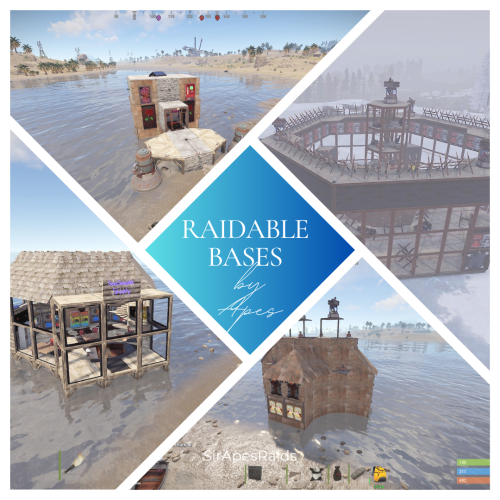
About Raidable Bases By Apes (200+ Pack) All Tiers! DUE TO THE NEW TOS: please remove the ability for your players to pick up deployables in your raids! This pack uses several DLC content and skins to hide traps! Torture your players with these Raidable Bases that have death around every corner! Tons of sneaky traps and layouts guaranteed to make your players hate you! Hand crafted by the great SirApesALot these bases will leave your players running back naked over and over again, definitely not beginner friendly raids. Bring your skills (and grenades)! Because you will need every raiding trick in the book to conquer these. In the "Bases" Folder you will find over 200 raidable bases (I try to add regularly, so the number goes up) that you can add to your servers Raidable Bases by Nivex. All levels are included (60+ easy, 50+ medium, 25+ hard, 25+ expert and 25+ nightmare) including Christmas and Halloween packs! Everyone of these torture chambers was created by me for my vanilla gather rate weekly server. These are best suited for servers that are more balanced loot wise, and a more advanced player base with experience raiding (beginners WILL rage quit). None of these are walk throughs, I have no mercy on my players....do you? I recommend giving more satchels and C4 in the lower tier raids to increase the effectiveness of traps (rockets ruin everything lol) and players are more likely to blow themselves up with satchels which is always entertaining. These are not simple raids for beginners, if they don't understand how to use twig and ladders to work around traps, or pay attention for eco raidable walls they will struggle. They also may never trust rugs or spiral stairs ever again! Understanding when to take your time, and when to jam a med stick in your arm and push past a trap is necessary! But, they will laugh and feel a sense of accomplishment after completing a raid! Raids in this pack marked with an s in the file to remember to turn stability to "true" on that base if you have it false. they have collapsing floor mechanics that requires it. Near everything is skinned, some just to look pretty, some themed. Traps are everywhere, containers already placed for loot If upgrading or replacing doors be sure to check if a door controller is attached. Loot Tables: As said on Raidable Bases plugin you need your own loot tables. Additional 40+ raids are included in case there is a few you are not happy with and want to remove (10+ easy, 10+ medium, 5+ hard, 5+ expert and 5+ nightmare). Otherwise they are just an added value! So 190+ raids in total in this pack! All raids are tested on Planet of the Apes PvE. It is recommended you have NPC's inside and configured to "spawn on bags" --- Easy - 1, Medium - 2, Hard - 3, Expert - 4, Nightmare - 5 Check out the other configuration and data settings below to get the most out of these bases. With Tesla coils, swinging doors, collapsing structures along with features like automatic lights, sprinklers and music to help distract the raider a lot can be done with these bases. If you have any questions feel free to stop in our discord (https://discord.gg/M228N2F79m), or if you would like to test our raids that can be arranged If you previously purchased any of the following, you will be purchasing duplicate bases: Easy Bases by Apes Pack 1 (25 pack) Easy Bases by Apes Pack 2 (25 pack) Medium Bases by Apes Pack 1 (25 pack) Medium Bases by Apes Pack 2 (25 pack) Hard Bases by Apes Pack 1 (25 pack) Expert Bases by Apes Pack 1 (25 pack) Nightmare Bases by Apes Pack 1 (20 pack) Halloween Bases by Apes (30 pack) Christmas Bases by Apes (15 Pack) Helpful Configuration and Data Settings: The following settings will help you get the most from these bases Configuration: "Entities Allowed To Drop Loot": { "Auto Turrets": true, "Flame Turret": true, "Fog Machine": false, "Gun Trap": true, "SAM Site": true "Allow Players To Loot Traps": false, "Allow Npcs To Target Other Npcs": false, "Turn Lights On At Night": false, "Turn Lights On Indefinitely": false, "Skins": { "Boxes": { "Preset Skins": [], "Ignore If Skinned Already": false, "Use Identical Skins": false, "Use Random Skin": false, "Use Workshop Skins": false, "Use Imported Workshop Skins File": true, "Use Approved Workshop Skins Only": false }, "Npcs": { "Use Identical Skins": true, "Use Random Skin": true, "Use Workshop Skins": true, "Use Imported Workshop Skins File": true, "Use Approved Workshop Skins Only": false }, "Deployables": { "Partial Names": [ "door", "barricade", "chair", "fridge", "furnace", "locker", "reactivetarget", "rug", "sleepingbag", "table", "vendingmachine", "waterpurifier", "skullspikes", "skulltrophy", "summer_dlc", "sled" ], "Preset Door Skins": [], "Skin Everything": false, "Ignore If Skinned Already": false, "Use Identical Skins": false, "Use Random Skin": false, "Use Workshop Skins": false, "Use Imported Workshop Skins File": true, "Use Approved Workshop Skins Only": false } "Weapons": { "Infinite Ammo": { "AutoTurret": false, "FlameTurret": false, "FogMachine": false, "GunTrap": false, "SamSite": false }, "Ammo": { "AutoTurret": 90, "FlameTurret": 40, "FogMachine": 50, "GunTrap": 32, "SamSite": 24 }, "Fog Machine Allows Motion Toggle": true, "Fog Machine Requires A Power Source": true, "Spooky Speakers Requires Power Source": false, "Test Generator Power": 100.0, "SamSite Repairs Every X Minutes (0.0 = disabled)": 5.0, "SamSite Range (350.0 = Rust default)": 100.0, "SamSite Requires Power Source": false }, Profiles (Raidable Bases Data Folder): This needs to be done for all 5 levels "Entities Not Allowed To Be Picked Up": [ "generator.small", "generator.static", "autoturret_deployed" ], "NPC Levels": { "Level 2 - Final Death": true }, "Spawn Inside Bases": { "Spawn On Floors": false, "Spawn On Beds": true, "Spawn On Rugs": false, "Spawn On Rugs With Skin Only": 1, "Bed Health Multiplier": 1.0, "Rug Health Multiplier": 1.0, "Spawn Murderers Outside": true, "Spawn Scientists Outside": true, "Minimum Inside (-1 = ignore)": 1, "Maximum Inside (-1 = ignore)": 1 }, "Event Traps And Turrets Ignore Npcs": true, "Auto Turrets": { "Aim Cone": 5.0, "Wait To Power On Until Event Starts": false, "Start Health": 1000.0, "Sight Range": 30.0, "Double Sight Range When Shot": false, "Set Hostile (False = Do Not Set Any Mode)": true, "Requires Power Source": false, "Sam Site": { "Repairs Every X Minutes (0.0 = disabled)": 5.0, "Range (350.0 = Rust default)": 100.0, "Requires Power Source": false, "Minimum Health": 1000.0, "Maximum Health": 1000.0 }, "Tesla Coil": { "Requires A Power Source": true, "Max Discharge Self Damage Seconds (0 = None, 120 = Rust default)": 0.0, "Max Damage Output": 35.0, "Health": 250.0 }, "Add Code Lock To Unlocked Or KeyLocked Doors": true, "Add Key Lock To Unlocked Or CodeLocked Doors": false, "Add Code Lock To Tool Cupboards": true, "Add Key Lock To Tool Cupboards": false, "Add Code Lock To Boxes": false, "Add Key Lock To Boxes": false, "Add Code Lock To Lockers": true, "Add Key Lock To Lockers": false, "Close Open Doors With No Door Controller Installed": true, "Allow Duplicate Items": false, "Allow Players To Pickup Deployables": true, "Allow Players To Deploy A Cupboard": true, "Allow Players To Deploy Barricades": true, "Divide Loot Into All Containers": true, "Empty All Containers Before Spawning Loot": true,$34.99 -

Version 1.0.3
177 downloads
Death tracker is an administration tool that allows server admins to restore player items via rcon or in-game, in the event a player dies for reasons beyond their control. The plugin will detail: The location of the death (grid + coordinate). The damage type that the player took. Whether they were connected to the server or not. Who killed them (along with the userid). The date and time of the death. The players inventory, item backpack contents, and their backpack plugin contents (if they dropped). Admins can select items from the UI to see more details about the item such as the items condition, amount, ammo, armor slots and other parameters (such as buffs from ItemPerks). You can also toggle whether the item will be restored from this menu, allowing you to exclude certain items from being restored if required. In order to use the following commands in game, you must have the deathtracker.admin permission. Command: dt Use: Access the DeathTracker restore menu in-game. Command: dt.,rcon deaths <userid> Use: Returns information for each death stored for the specified player. Command: dt.rcon query <userid> <index> Use: Returns detailed information about the specified death for the player at the specified index (item lists etc). Command: dt.rcon restore <userid> <index> Use: Restores the items to the specified player from the specified index.$14.99 -
Version 1.0.0
56 downloads
PlayerStats.cs Description : - This plugin offers a complete PvP stat tracking system for your Rust server, with real-time display of kills, deaths, and K/D ratio for each player. It includes a persistent interface displaying personal stats, a floating 3D leaderboard visible in the world showcasing the top 10 players, and a detailed interactive menu for this leaderboard. All player stats are automatically tracked and updated in real time. Settings : - HUD colors - Count suicide (true/false) - Show small KDR (next to the equipment bar) - Show floating leaderboard (true/false) - Floating leaderboard position (x, y, z) - Floating leaderboard view distance Chat Commands : - /stats (to open the leaderboard) WuyZar's Discord : https://discord.gg/NVwRcQwGwh Game interface :$6.50-
- 1
-

-
- #stats
- #leaderboard
- (and 16 more)
-
Version 1.2.0
20 downloads
CorpseBoomer is a simple plugin that will spawn a boomer/firework at player positions when they are killed. Join my Discord for support and updates: https://discord.gg/teSffnDQ7N Permissions corpseboomer.firework Default Config { "Enable Console Messages": true, "Prevent Firework when killed by Suicide": false, "Prevent Firework when killed by Teammate": true, "Prevent Firework when killed by NPC": true, "Version": { "Major": 1, "Minor": 2, "Patch": 0 } }$3.99 -
Version 2.0.0
150 downloads
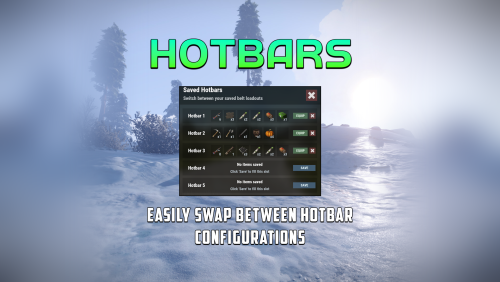
Hotbars is a Rust plugin that lets users create multiple MMO-style hotbars they can switch between on the fly either with chat commands, key binds or a GUI interface. Users can configure up to 5 bars to switch between. If the items are lost, the items are removed from the hobar when the user switches or recalls the hotbar. Permissions hotbars.use - Required for use. hotbars.(1-5) - Limits the amount of hotbars a player/group can have. Example: hotbars.3 Commands /hotbar - Will print a list of availible commands. /hotbar list - Alternative method to open GUI interface. /hotbar close - Alternative method to close GUI interface. /hotbar save - Alternative method to save a hotbar. /hotbar delete 1-5 - Alternative method to delete a saved hotbar. /hotbar 1-5 - Alternative method to switch between hotbars. Config OnlyUsableItems (Default: true) - Prevents un-usable items from being saved into a hotbar, like resources, etc.. RestoreHotbarOnDeath (Default: false) - Restores the hotbar on respawn after a player dies. ToggleButtonContainerBounds - Configure the placement of the GUI hotbar button. ToggleButtonImageBounds - Configure the placement of the GUI hotbar button icon. ToggleButtonBounds - Configure the placement of the GUI hotbar button texture layer. ToggleButtonColor - Configure the color of the GUI hotbar button. ToggleButtonBackgroundColor - Configure the background color of the GUI hotbar button. ToggleButtonOpacity - Configure the opacity of the GUI hotbar button. ToggleButtonBackgroundOpacity - Configure the background opacity of the GUI hotbar button. HotbarContainerBounds - Configure the placement of the hotbar menu. Preview$20.00 -
Version 1.0.4
37 downloads
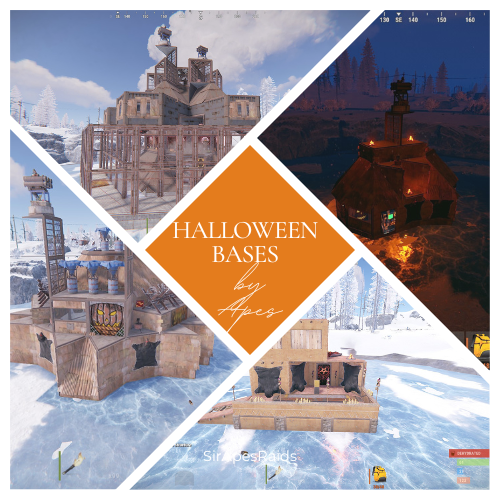
About Halloween Bases By Apes (30+ Pack) All Tiers! Due to the new TOS: Please remove the ability for your players to pick up deployables in your raids! This pack uses several DLC content and skins to hide traps! Give your players the gift of many deaths this Halloween! Torture your players with these Halloween Bases that have death around every corner! Tons of sneaky traps and layouts guaranteed to make your players hate you! Hand crafted by the great SirApesALot these bases will leave your players running back naked over and over again, definitely not beginner friendly raids. Bring your skills (and grenades)! Because you will need every raiding trick in the book to conquer these. In the "Bases" Folder you will find 30+ raidable bases that you can add to your servers Raidable Bases by Nivex. All levels are included Everyone of these torture chambers was created by me for my vanilla gather rate weekly server. These are best suited for servers that are more balanced loot wise, and a more advanced player base with experience raiding (beginners WILL rage quit). None of these are walk throughs, I have no mercy on my players....do you? I recommend giving more satchels and C4 in the lower tier raids to increase the effectiveness of traps (rockets ruin everything lol) and players are more likely to blow themselves up with satchels which is always entertaining. These are not simple raids for beginners, if they don't understand how to use twig and ladders to work around traps, or pay attention for eco raidable walls they will struggle. They also may never trust rugs or spiral stairs ever again! Understanding when to take your time, and when to jam a med stick in your arm and push past a trap is necessary! But, they will laugh and feel a sense of accomplishment after completing a raid! Raids in this pack marked with an s in the file to remember to turn stability to "true" on that base if you have it false. they have collapsing floor mechanics that requires it. (hmedium1s, hexpert2s, and hnightmare2s) Make sure to have your config set so autoturrets and sam sites do not require power. It is recommended you have NPC's spawn inside and configured to "spawn on bags" --- Easy - 1, Medium - 2, Hard - 3, Expert - 4, Nightmare - 5 Two bases (hhard2 and hexpert2) have a trap that requires npcs, their death triggers a trap door. So you need npcs in each raid and the raidable bases data file set to npcs spawn on bag. Raid works without the npcs, but noone expects that trigger lol. Near everything is skinned for Halloween, with sound effects and more traps than you can shake a stick at! Traps are everywhere, containers already placed for loot If upgrading or replacing doors be sure to check if a door controller is attached. Loot Tables: As said on Raidable Bases plugin you need your own loot tables. All raids are tested on Planet of the Apes PvE. If you have any questions feel free to stop in our discord (https://discord.gg/M228N2F79m), or if you would like to test our raids that can be arranged ------------------------------------------------------------------------------------------------------------------------------------------------------------------------------------------------------------------------------------------------------------------------------- Helpful Configuration and Data Settings: The following settings will help you get the most from these bases Configuration: "Entities Allowed To Drop Loot": { "Auto Turrets": true, "Flame Turret": true, "Fog Machine": false, "Gun Trap": true, "SAM Site": true "Allow Players To Loot Traps": false, "Allow Npcs To Target Other Npcs": false, "Turn Lights On At Night": false, "Turn Lights On Indefinitely": false, "Skins": { "Boxes": { "Preset Skins": [], "Ignore If Skinned Already": false, "Use Identical Skins": false, "Use Random Skin": false, "Use Workshop Skins": false, "Use Imported Workshop Skins File": true, "Use Approved Workshop Skins Only": false }, "Npcs": { "Use Identical Skins": true, "Use Random Skin": true, "Use Workshop Skins": true, "Use Imported Workshop Skins File": true, "Use Approved Workshop Skins Only": false }, "Deployables": { "Partial Names": [ "door", "barricade", "chair", "fridge", "furnace", "locker", "reactivetarget", "rug", "sleepingbag", "table", "vendingmachine", "waterpurifier", "skullspikes", "skulltrophy", "summer_dlc", "sled" ], "Preset Door Skins": [], "Skin Everything": false, "Ignore If Skinned Already": false, "Use Identical Skins": false, "Use Random Skin": false, "Use Workshop Skins": false, "Use Imported Workshop Skins File": true, "Use Approved Workshop Skins Only": false } "Weapons": { "Infinite Ammo": { "AutoTurret": false, "FlameTurret": false, "FogMachine": false, "GunTrap": false, "SamSite": false }, "Ammo": { "AutoTurret": 90, "FlameTurret": 40, "FogMachine": 50, "GunTrap": 32, "SamSite": 24 }, "Fog Machine Allows Motion Toggle": true, "Fog Machine Requires A Power Source": true, "Spooky Speakers Requires Power Source": false, "Test Generator Power": 100.0, "SamSite Repairs Every X Minutes (0.0 = disabled)": 5.0, "SamSite Range (350.0 = Rust default)": 100.0, "SamSite Requires Power Source": false }, Profiles (Raidable Bases Data Folder): This needs to be done for all 5 levels "Entities Not Allowed To Be Picked Up": [ "generator.small", "generator.static", "autoturret_deployed" ], "NPC Levels": { "Level 2 - Final Death": true }, "Spawn Inside Bases": { "Spawn On Floors": false, "Spawn On Beds": true, "Spawn On Rugs": false, "Spawn On Rugs With Skin Only": 1, "Bed Health Multiplier": 1.0, "Rug Health Multiplier": 1.0, "Spawn Murderers Outside": true, "Spawn Scientists Outside": true, "Minimum Inside (-1 = ignore)": 1, "Maximum Inside (-1 = ignore)": 1 }, "Event Traps And Turrets Ignore Npcs": true, "Auto Turrets": { "Aim Cone": 5.0, "Wait To Power On Until Event Starts": false, "Start Health": 1000.0, "Sight Range": 30.0, "Double Sight Range When Shot": false, "Set Hostile (False = Do Not Set Any Mode)": true, "Requires Power Source": false, "Sam Site": { "Repairs Every X Minutes (0.0 = disabled)": 5.0, "Range (350.0 = Rust default)": 100.0, "Requires Power Source": false, "Minimum Health": 1000.0, "Maximum Health": 1000.0 }, "Tesla Coil": { "Requires A Power Source": true, "Max Discharge Self Damage Seconds (0 = None, 120 = Rust default)": 0.0, "Max Damage Output": 35.0, "Health": 250.0 }, "Add Code Lock To Unlocked Or KeyLocked Doors": true, "Add Key Lock To Unlocked Or CodeLocked Doors": false, "Add Code Lock To Tool Cupboards": true, "Add Key Lock To Tool Cupboards": false, "Add Code Lock To Boxes": false, "Add Key Lock To Boxes": false, "Add Code Lock To Lockers": true, "Add Key Lock To Lockers": false, "Close Open Doors With No Door Controller Installed": true, "Allow Duplicate Items": false, "Allow Players To Pickup Deployables": true, "Allow Players To Deploy A Cupboard": true, "Allow Players To Deploy Barricades": true, "Divide Loot Into All Containers": true, "Empty All Containers Before Spawning Loot": true,$6.00-
- 1
-

-
- #trap
- #trap base
- (and 14 more)
-
(2).thumb.gif.bf8b957408e199e190cc70259ad89b7c.gif)
Version 1.0.8
221 downloads
Death effects is a plugin that adds different effects when a player, npc or animal dies. The effects are customizable and it is easy to add your own via the configuration. The plugin comes with 99 unique death effects! There is no permissions or commands required, simply add it to your server, configure the trigger entities and the effects that you would like enabled/disabled! Players with the deatheffects.select permission can now select the effects that they want to trigger when they kill something. A random effect from their chosen effects will be selected each time. Only effects that are enabled in the config can be selected. Command: /deatheffects Chat command deatheffects - brings up the ui. detoggle - toggles effects on/off detoggleclient - toggles the effects to be server-side/client-side Permission deatheffects.select - allows the player to use the UI. deatheffects.use - required to trigger a death effect Effects table 0: EffectSpawn, 1: EffectStack, 2: EffectCircle, 3: EffectSpiral, 4: PrefabSpawn, 5: PrefabStack, 6: PrefabCircle, 7: PrefabElectrical, 8: ItemStack Default effects spiral underwater explosion spiral dig spiral gold egg open spiral gold bag open spiral egg explode spiral splash spiral tree bonus spiral tree marking spiral codelock fail spiral bradley shell explosion spiral reskin effect spiral plug effect spiral blood effect spiral landmine circle underwater explosion circle dig circle gold egg open circle gold bag open circle egg explode circle splash circle tree bonus circle mlrs explosion circle kayak splash circle tree marking circle crossbreed blue circle crossbreed yellow circle 40mm explosion circle code lock fail circle bradley shell explosion circle sam launch circle reskin effect circle blood effect circle landmine stacked underwater explosion stacked dig stacked car collision stacked underwater fireball stacked tree impact stacked tree marking stacked train barricade stacked splash stacked mrls backfire stacked mrls explosion stacked 40mm explosion stacked codelock fail stacked gold egg open stacked gold bag open stacked egg explode stacked ore finished stacked bradley shell explosion stacked reskin effect stacked blood effect stacked landmine single underwater explosion single dig single car collision single crossbreed blue single crossbreed yellow single underwater fireball single tree impact single train barricade single splash single debris single airburst single mrls backfire single mrls explosion single 40mm explosion single gold egg open single gold bag open single egg explode single junk despawn single bradley explosion single bradley shell explosion single heli rocket explosion single heli rocket explosion 2 single sam launch single c4 launch single reskin effect single grenade explosion single scream single landmine single stone gravestone single wood gravestone single chicken single skull spike candle single skull spike pumpkin single skull spike skulls single fireball single beach parasol single firecrackers stacked chicken stacked firecrackers circle skull spike candle circle skull spike skulls discoball teslacoil siren light siren light orange item stack skulls Config example: https://pastebin.com/BPUV9PvA$9.99 -
Version 1.1.2
829 downloads
Easy to use Death Message ! Less CPU, Less memory ! No redundant code, No redundant permissions, No redundant settings, Easy to use! Automatically identify the name of an NPC whose name has been changed by the plugins Automatically identify the name of the weapon whose name has been changed by the plugins Each player can change their display mode Anything that can be killed can be individually set to display death messages Mode message display mode : FloatUI The default setting is that the message will disappear after 10 seconds About Permissions: deathmessage.admin (Used to open the FloatUI parameter setting panel ) Chat Command: /dm - Switch to display death message to FloatiUI or ChatBox /dm diy - Open the FloatUI parameter setting panel (Permission : deathmessage.admin) Other : When the FloatUI blocks other buttons, the death message will temporarily switch to the chat box after clicking (Time depends on config setting) Config : DeathMessage.json { "Version": { "Major": 1, "Minor": 0, "Patch": 8 }, "⯊ Global Messages settings": { "Enable About Animal": true, "Enable About Entitys": true, "Enable About NPC": true, "Enable Player Deaths": true }, "⯊ Discord settings": { "Webhook URL": "https://discordapp.com/api/webhooks/1112615109920047144/C2BvSMtWQiSM-9pEpsjbzwzSgFaUZpilYvlSWG_qqc4mllgZL6Jh4QUHItRwwDTj7Wud", "Bot Name": "Death Messages Bot", "Bot Avatar Link": "https://avatarfiles.alphacoders.com/128/128573.png", "Enable Animal Deaths": true, "Enable Entities Deaths": true, "Enable NPC Deaths": true, "Enable Player Deaths": true }, "⯊ Display name modification and activation": { "⯀ Animal name": { "bear": { "Enable": true, "Display name": "bear" }, "boar": { "Enable": true, "Display name": "boar" }, "chicken": { "Enable": true, "Display name": "chicken" }, "horse": { "Enable": true, "Display name": "horse" }, "polarbear": { "Enable": true, "Display name": "polarbear" }, "stag": { "Enable": true, "Display name": "stag" }, "testridablehorse": { "Enable": true, "Display name": "testridablehorse" }, "wolf": { "Enable": true, "Display name": "wolf" }, "zombie": { "Enable": true, "Display name": "zombie" } }, "⯁ NPC name": { "bandit_conversationalist": { "Enable": true, "Display name": "bandit_conversationalist" }, "bandit_shopkeeper": { "Enable": true, "Display name": "bandit_shopkeeper" }, "boat_shopkeeper": { "Enable": true, "Display name": "boat_shopkeeper" }, "missionprovider_bandit_a": { "Enable": true, "Display name": "missionprovider_bandit_a" }, "missionprovider_bandit_b": { "Enable": true, "Display name": "missionprovider_bandit_b" }, "missionprovider_fishing_a": { "Enable": true, "Display name": "missionprovider_fishing_a" }, "missionprovider_fishing_b": { "Enable": true, "Display name": "missionprovider_fishing_b" }, "missionprovider_outpost_a": { "Enable": true, "Display name": "missionprovider_outpost_a" }, "missionprovider_outpost_b": { "Enable": true, "Display name": "missionprovider_outpost_b" }, "missionprovider_stables_a": { "Enable": true, "Display name": "missionprovider_stables_a" }, "missionprovider_stables_b": { "Enable": true, "Display name": "missionprovider_stables_b" }, "npc_bandit_guard": { "Enable": true, "Display name": "npc_bandit_guard" }, "npc_tunneldweller": { "Enable": true, "Display name": "npc_tunneldweller" }, "npc_underwaterdweller": { "Enable": true, "Display name": "npc_underwaterdweller" }, "player": { "Enable": true, "Display name": "player" }, "scarecrow": { "Enable": true, "Display name": "scarecrow" }, "scientistnpc_patrol": { "Enable": true, "Display name": "scientistnpc_patrol" }, "scientistnpc_peacekeeper": { "Enable": true, "Display name": "scientistnpc_peacekeeper" }, "scientistnpc_roam": { "Enable": true, "Display name": "scientistnpc_roam" }, "scientistnpc_roamtethered": { "Enable": true, "Display name": "scientistnpc_roamtethered" }, "stables_shopkeeper": { "Enable": true, "Display name": "stables_shopkeeper" } }, "⯂ Entity name": { "autoturret_deployed": { "Enable": true, "Display name": "autoturret_deployed" }, "beartrap": { "Enable": false, "Display name": "beartrap" }, "bradleyapc": { "Enable": true, "Display name": "bradleyapc" }, "flameturret.deployed": { "Enable": false, "Display name": "flameturret.deployed" }, "guntrap.deployed": { "Enable": false, "Display name": "guntrap.deployed" }, "landmine": { "Enable": false, "Display name": "landmine" }, "patrolhelicopter": { "Enable": true, "Display name": "patrolhelicopter" }, "sam_site_turret_deployed": { "Enable": false, "Display name": "sam_site_turret_deployed" }, "sentry.scientist.static": { "Enable": false, "Display name": "sentry.scientist.static" } }, "⯃ Weapon name": { "Assault Rifle": "Assault Rifle", "Bolt Action Rifle": "Bolt Action Rifle", "Bone Club": "Bone Club", "Bone Knife": "Bone Knife", "Butcher Knife": "Butcher Knife", "Candy Cane Club": "Candy Cane Club", "Chainsaw": "Chainsaw", "Combat Knife": "Combat Knife", "Compound Bow": "Compound Bow", "Crossbow": "Crossbow", "Custom SMG": "Custom SMG", "Double Barrel Shotgun": "Double Barrel Shotgun", "Eoka Pistol": "Eoka Pistol", "explosive": "explosive", "Flame Thrower": "Flame Thrower", "Flashlight": "Flashlight", "grenade": "grenade", "Hatchet": "Hatchet", "heat": "heat", "Hunting Bow": "Hunting Bow", "Jackhammer": "Jackhammer", "L96 Rifle": "L96 Rifle", "Longsword": "Longsword", "LR-300 Assault Rifle": "LR-300 Assault Rifle", "M249": "M249", "M39 Rifle": "M39 Rifle", "M92 Pistol": "M92 Pistol", "Mace": "Mace", "MP5A4": "MP5A4", "Multiple Grenade Launcher": "Multiple Grenade Launcher", "Nailgun": "Nailgun", "Pickaxe": "Pickaxe", "Pump Shotgun": "Pump Shotgun", "Python Revolver": "Python Revolver", "Revolver": "Revolver", "Rock": "Rock", "Rocket Launcher": "Rocket Launcher", "Salvaged Axe": "Salvaged Axe", "Salvaged Cleaver": "Salvaged Cleaver", "Salvaged Hammer": "Salvaged Hammer", "Salvaged Icepick": "Salvaged Icepick", "Salvaged Sword": "Salvaged Sword", "Semi-Automatic Pistol": "Semi-Automatic Pistol", "Semi-Automatic Rifle": "Semi-Automatic Rifle", "Spas-12 Shotgun": "Spas-12 Shotgun", "Stone Hatchet": "Stone Hatchet", "Stone Pickaxe": "Stone Pickaxe", "Stone Spear": "Stone Spear", "Thompson": "Thompson", "Torch": "Torch", "Waterpipe Shotgun": "Waterpipe Shotgun", "Wooden Spear": "Wooden Spear" }, "⯄ Body part name": { "Arm": "Arm", "Body": "Body", "Chest": "Chest", "Foot": "Foot", "Hand": "Hand", "Head": "Head", "Leg": "Leg", "Stomach": "Stomach" } }, "⯌ Other settings": { "Default command": "dm", "Chat Icon Id": "0", "Default display(true = FloatUI , false = Chat box)": true, "FloatUI message closing time second": 10, "Click on FloatUI switch to the chat box in seconds": 10 }, "⯍ Lang settings": { "AnimalKillPlayer": "<color=#66FF00>{0}</color> Kill <color=#FFFF00>{1}</color> <color=#FF9900>{2}</color> m", "BradleyapcKillPlayer": "<color=#66FF00>{0}</color> Kill <color=#FFFF00>{1}</color> <color=#FF9900>{2}</color> m", "ButtonSwitch": "Auto switch death message to <color=#FFFF00>ChatBox</color> <color=#FF0000>{0}</color> seconds", "ChatTitle": "", "DisplayNumber": "Display number", "DIY": "DIY control panel", "EntityKillPlayer": "<color=#66FF00>{0}</color> Kill <color=#FFFF00>{1}</color> <color=#FF9900>{2}</color> m", "FloatUILocation": "UI Location", "FontPosition": "Font position", "FontSize": "Font size", "IntervalStretch": "Interval stretch", "LengthWidth": "Length Width", "MessageTochat": "Toggle death message to <color=#FFFF00>ChatBox</color>", "MessageToFloatUI": "Toggle death message to <color=#66FF00>FloatUI</color>", "NoPermission": "Not have permission !", "NPCKillPlayer": "<color=#66FF00>{0}</color> <color=#66FFFF>{1}</color> Kill <color=#FFFF00>{2}</color> <color=#FF9900>{3}</color> m", "PatrolHelicopterKillPlayer": "<color=#66FF00>{0}</color> Kill <color=#FFFF00>{1}</color> <color=#FF9900>{2}</color> m", "PlayerKillAnimal": "<color=#66FF00>{0}</color> <color=#66FFFF>{1}</color> Kill <color=#FFFF00>{2}</color> <color=#FF9900>{3}</color> m", "PlayerKillBradleyapc": "<color=#66FF00>{0}</color> <color=#66FFFF>{1}</color> Kill <color=#FFFF00>{2}</color> <color=#FF9900>{3}</color> m", "PlayerKillEntity": "<color=#66FF00>{0}</color> <color=#66FFFF>{1}</color> Kill <color=#FFFF00>{2}</color> <color=#FF9900>{3}</color> m", "PlayerKillNPC": "<color=#66FF00>{0}</color> <color=#66FFFF>{1}</color> Kill <color=#FFFF00>{2}</color> <color=#6699FF>{3}</color> <color=#FF9900>{4}</color> m", "PlayerKillPatrolHelicopter": "<color=#66FF00>{0}</color> <color=#66FFFF>{1}</color> Kill <color=#FFFF00>{2}</color> <color=#FF9900>{3}</color> m", "PlayerKillPlayer": "<color=#66FF00>{0}</color> <color=#66FFFF>{1}</color> Kill <color=#FFFF00>{2}</color> <color=#6699FF>{3}</color> <color=#FF9900>{4}</color> m", "PlayerSuicide": "<color=#FFFF00>{0}</color> suicide", "Reset": "Reset" } } If you have any questions or problems, join my discord https://discord.gg/D2zTWCEnrN$15.00- 82 comments
- 7 reviews
-
- 3
-
-
-
- #death tips
- #death notice
- (and 8 more)
-
Version 1.1.6
11 downloads
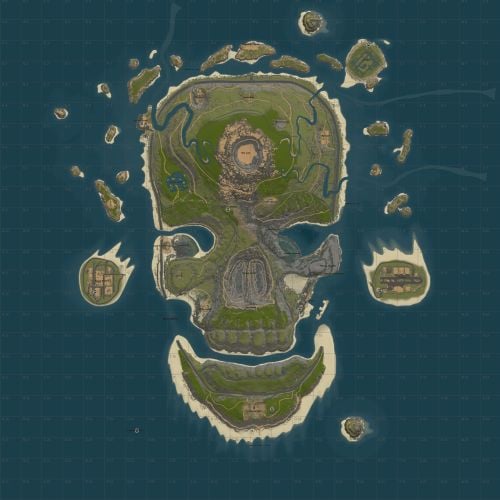
Delve deep into the heart of Death Island, where Halloween lives! Set off along the chilling shores of the island, this map immerses players into a realm where the very essence of death and desolation reign supreme. Navigate through treacherous terrains, battle menacing threats, and uncover long-lost secrets buried by time. Crafted with precision and passion, Death Island isn't just a map—it's an artistic horror piece with chilling character. My test players were captivated, in awe of their Rustober experience. Dare to step foot on Death Island, and let the haunting journey begin! Features: Prefabs: 46к Size: 3500 It looks like a real Skull! Several Custom Monuments Dangerous Lava and Magma Themes Supports BankHeist, and BetterNpc 6 Island Caves 3 Rivers Custom Monuments: Evil Lair - Uses Bank Heist for the Secret Lair Vault - Has a secret entrance from the bottom - red/blue keycards *Lava Falls - Loot trapped in the lava can be found here The Crypts - Multilevel Crypt with a race against the clock to escape, red card monument *Cooling Obsidian Buried Harbor *Magma Mines - Great place for ore farming, and sniping farmers *Melted Freeway - Freeway destroyed by magma, cars and loot are protruding from the ground *Melted Supermarket Bradley Bridge - Destroyed bridge, Bradley Patrols up and down the lanes Abandoned Asylum - Blue and green doors leading to red, environment is spooky and destroyed Abandoned Lighthouse X3 - My extended tall lighthouse build Jaw Bridge X2 - Two very tall bridges extending over the jaw and cargo's pathing Coaling Tower - A place to unload carts Facepunch Monuments: Radtown Satellite Dish Dome Oxum's Gas Station Large Oil Rig Bandit Camp Large Fishing VillageX2 Small Fishing Village Ranch X2 Outpost Ferry Terminal Sulfur Quarry HQM Quarry Stone Quarry Water Well X5$20.00 -
Version 0.0.2
519 downloads
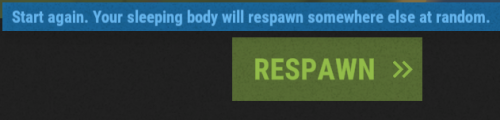
Skips the death screen if the player doesn't have an available bag to spawn. No configuration file.Free -
Version 1.0.1
27 downloads
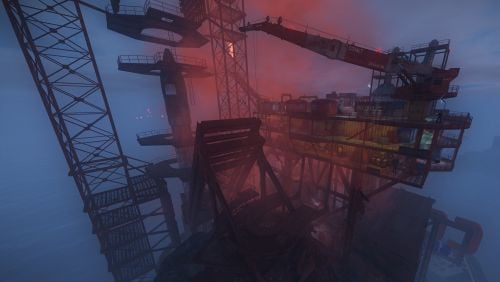
Give your professional players another reason to excel with this volcano. - To access the volcano you will have to overcome the oil ring to get to the main box, activate the elevator with a button that will give you access to the elevator door. - As you go down to the volcano via the elevator, you can equip yourself and take some anti-radiation pills, you will need them. - Inside the volcano you will have to choose wisely the way to activate the door using a fuse and a red card, be careful, the access to this mechanism is dangerous, remember you are in a volcano, the ground is lava!!!!$12.90 -
Version 1.0.1
16 downloads
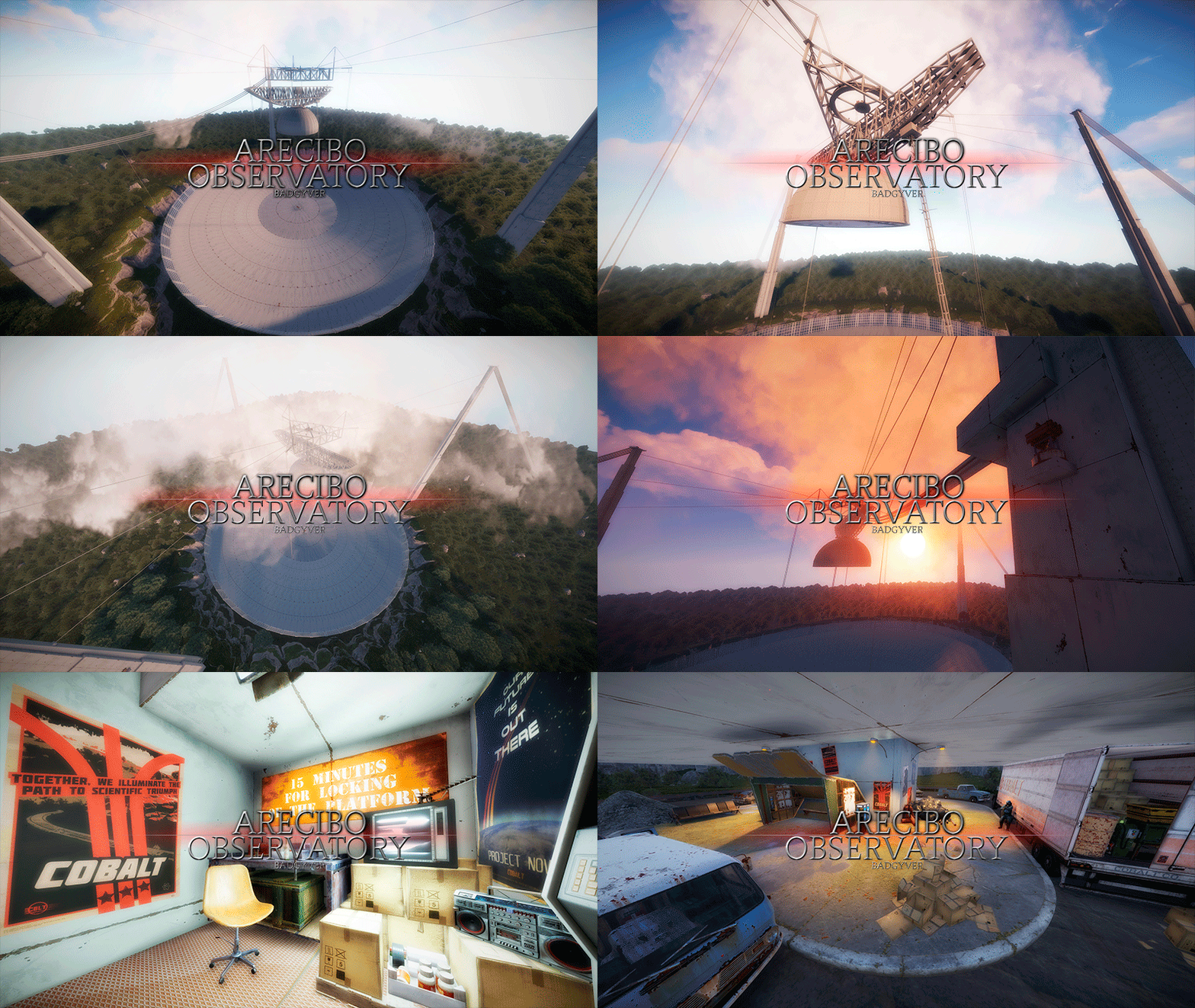
The Arecibo Observatory, also known as the National Astronomy and Ionosphere Center (NAIC) and formerly known as the Arecibo Ionosphere Observatory, is an observatory in Barrio Esperanza, Arecibo, Puerto Rico owned by the US National Science Foundation (NSF). IT CONTAINS: Great variety of Parkour, Puzzles, NPCs, Loot, Hackable Crates and a nice decoration. RECOMMENDATION: This monument has a high difficulty to complete, it is recommended for two players, although with higher difficulty one player can also complete this monument.$12.90- 2 comments
-
- 1
-
-
- #arecibo
- #observatory
- (and 85 more)
-
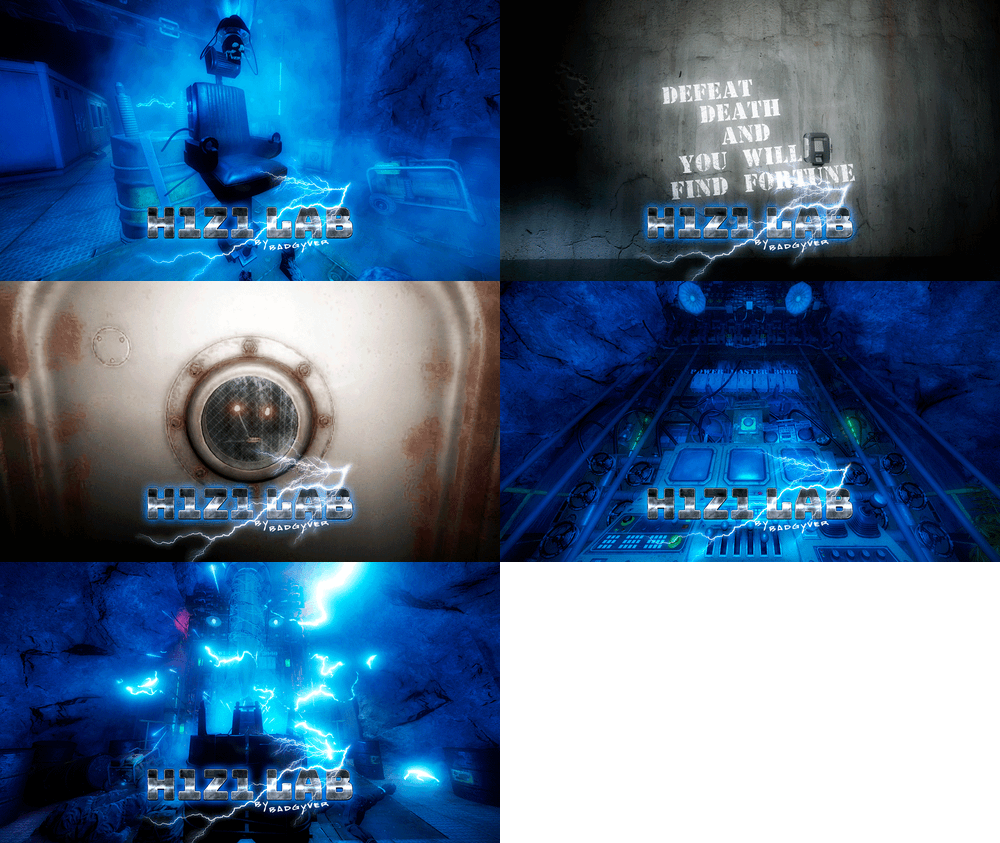
Version 1.0.1
37 downloads
Will you be willing to give your life to find fortune? IT CONTAINS: H1Z1 Lab is an experimental laboratory with various puzzles to solve. It contains Zombies, NPC, traps, puzzles and an original crystal box in which you will get two hackable oil rig crates, plus extra loot of elite crates. VIDEO DEMO:$12.90 -
Welcome to the FAQ and Support Guide for the Death Modifier plugin. This document is here to help you troubleshoot common issues, understand proper setup practices, and get support or suggest new features. Common Issues & Troubleshooting Permissions Bug - If a player is granted more than one permission, the plugin will not work correctly for them. Fix: - Only grant one permission per player. This ensures the plugin functions as intended. - Granting multiple permissions will cause conflicts and unexpected behavior. Example: oxide.grant user player1 deathmodifier.vip # Do NOT also grant: oxide.grant user player1 deathmodifier.vip2 We are aware of this bug and are working on a solution for a future release. Getting Support If you are experiencing issues with the plugin or have a question not covered in this guide: - Navigate to the Support section of the plugin page. - Open a support ticket. - Please include the following in your ticket: - A clear description of the issue - Any errors shown in the console - Plugin version - Steps to reproduce (if possible) This will help us assist you faster and more effectively. Feature Requests & Discussions If you have an idea for a new feature, improvement, or change you'd like to see: - Use the Discussion section of the plugin page. - Be descriptive in your suggestion, including the use-case or motivation. We welcome your ideas and will review them for possible inclusion in future updates! Best Practices Summary - Only assign one permission per player. - Use the Support tab for help with issues. - Use the Discussion tab for feature requests and general feedback. Thank you for using Death Modifier! Your feedback helps make this plugin even better. — Khan
-

Version 2.4.1
57 downloads
Tired of dying from "bots-cheaters" shots? Can't handle Bradley / Heli? Use life support to stay alive! If enabled and player has needed amount of currency - life support will heal player to maximum health instead of being dead. The most valuable thing is you keep your items and don't need to go and find your dead body. Also it can be very handy in the battle with very hard opponents (like bot-boss, Higher tier Bradley/Heli etc.) This plugin supports both Economics and ServerRewards plugins. You may set price for both of them or just any you like. If both prices are set - plugin will try to use RP's first and if there will be not enough - it will check for Coins. After you set everything up in your config file and give all permissions to all players/groups plugin will track for changes automatically, so if some player will be added to VIP for example or upgraded to Elite plugin will apply changes automatically without need to reload plugin. If you will edit config file you still will need to reload plugin. By default, life support is allowed on the entire map. If you want to restrict the use of life support, you must enable the desired options in the config file. Using cupboard so as ZoneManager zones are supported in 2 different modes: Include mode will only allow players to use life support inside specific zones/cupboard range. Exclude mode will prevent players from using life support inside specific zones/cupboard range. When cupboard range is checked, team / friend / clan members are checked automatically if enabled in config file and the required plugin is installed. It means members of team / friend / clan cupboard = players cupboard. This is handy if you want to strict players to use life support only inside cupboard range or you want to allow use it everywhere except cupboard owned by other players. ## Permissions lifesupport.blocked -- Prevents player from using plugin (Has the highest priority among other permissions) More permissions with costs and cooldown are created in config file (see Configuration section below) ## Commands This plugin provides both chat and console commands using the same syntax. When using a command in chat, prefix it with a forward slash: `/` /ls | /lifesupport - Toggle using of life support ## Configuration You can remove unnecessary default permissions and also add as many permissions as you want. For cases where the player has more than one, the permission with the higher priority will be applied. Enable / disable notifications / logging Set SteamIDIcon steamid to set desired account icon in chat messages Set commands list (default are "ls", "lifesupport") Enable / disable modes/plugins support ## Localization Plugins phrases are available on 3 languages out of the box: English, Russian and Ukrainian { "Error.NoPermission": "You do not have permission to use this command!", "Format.Coins": "Coins", "Format.Disabled": "<color=#B22222>Disabled</color>", "Format.Enabled": "<color=#228B22>Enabled</color>", "Format.Free": "free", "Format.Prefix": "<color=#00FF00>[LifeSupport]</color>: ", "Format.RP": "RP", "Info.LifeSaved": "Your life saved. Cost = <color=#FFA500>{0} {1}</color>", "Info.LifeSupport": "LifeSupport is now {0}" } ## API ### Developer Hooks CanUseLifeSupport Called when a player is about to die (or get into wounded state if enabled in options). Returning a non-null value (true is default) will prevent life support activation object CanUseLifeSupport(BasePlayer player) Example of hook usage to prevent player from life saving private object CanUseLifeSupport(BasePlayer player) { if (playerList.ContainsKey(player.userID)) { return true; } return null; } There is a free version on uMod, why do you even need this plugin? First of all, this plugin was designed to be efficient and performant. It uses unique caching system that should not consume no additional server resources Much more options and plugins native support Any plugin support will be added if requested$15.00 -
Version 2.0.3
888 downloads
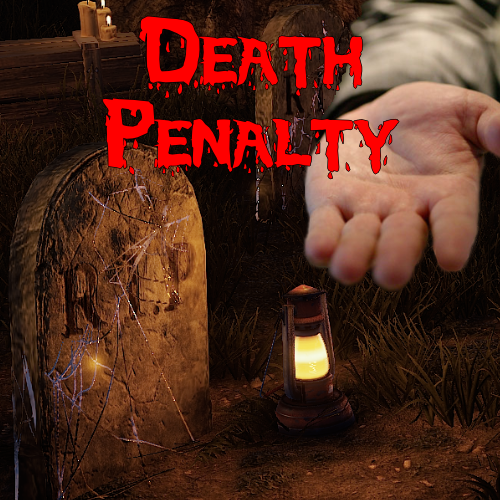
Penalise players if they die. Supports Server Rewards, Economics, XPerience or scrap. Stops taking once the player has zero or less balance to avoid griefing new players. Uses permission to determine if a player will be penalised: death_penalty.active There is a new flag to toggle behaviour of the permission: Penalty on active or inactive If set to active and the player had the permission, they get penalised. If it is set to inactive, and they have the permission, they do not get penalised. If set to active, and they do not have the permission, they do not get penalised. If set to inactive, and they do not have the permission, they get penalised. Here is a quick chart that hopefully makes this clearer: Default Config: { "Penalty Type (amount or percent)": "amount", "Penalty Amount": -100.0, "Use Economics": false, "Use ServerRewards": false, "Use XPerience": false, "Use Scrap": true, "Maximum Amount": 1000.0, "Penalty on active or inactive": "active" }Free- 23 comments
- 1 review
-
- 6
-
-
- #rust
- #mechanics
- (and 5 more)
-

Version 1.0.0
25 downloads
Death Messages is a very simple plugin that provides a customisable message on player death, as well as notifying the player's team of their death and who they were killed by. Messages can be changed via a configuration file & currently deaths caused by player, NPC and suicide are supported with support for other causes coming in the near future. Config: { "PlayerCausedMessages": [ "{player}, you were killed by {killer}. Better luck next time!", "{player}, you were outsmarted by {killer}. Time for revenge!" ], "NPCCausedMessages": [ "{player}, you were taken down by an NPC. Watch out next time!", "{player}, the NPCs got the better of you. You died." ], "SuicideMessages": [ "{player}, you died by your own hand. Ouch!", "{player}, it seems you made a mistake. You died.", "{player}, you met an unknown fate. You died.", "{player}, your death is shrouded in mystery." ] }$2.49 -
Version 1.6.3
107 downloads
FEATURES Automated trivia games Admin called trivia game More than 24 categories Easy. Medium and Hard difficulty Multiple & True/False choice answers Reward system, including ServerRewards Punish system Announce actions to console Wins, Losses and Typos are stored SUPPORT If you have questions, requests or you're stuck you can get support via my Discord Server or the Support Tab. Most of the time I'm available on Discord. You can find answers there to previous questions and get discounts. Invite link to Discord Server DOCUMENTATION You can find the documentation here. SHOWCASE COMMANDS trivia_help Displays and explains trivia commands trivia_version Displays the loaded plugin's version trivia_admin [open] [rounds] [frequency] 1) With the permission trivia.admin a user can start a trivia game with X>0 rounds Y>0 minutes between them. 2) Only one game can be called at once. 3) If Automated Games are enabled in the config file, even with permission, trivia games can't be called! rounds = X frequency = Y trivia_admin [close] Using trivia_admin close will stop the current game. trivia [number] When a trivia game starts, players can choose a number between 1-4 or 1-2, depending on the game type PERMISSIONS trivia.admin With this permission, users can call in trivia games. trivia.dontkick With this automated permission, players won't be kicked for flyhack-violation when punished. (currently unused)$7.99 -
.thumb.jpg.7a2bf57e1f409170e10dd394db68942e.jpg)
Version 1.0.6
321 downloads
About This plugin kills animals or npc instantly when attacked by a player. Permissions you will be able to assign the player the authority to kill the animal you want quickly, or you will be able to have the player you want kill all the animals / npc quickly. instantanimalkill.bear - Permission for bear instantanimalkill.wolf- Permission for wolf instantanimalkill.horse- Permission for horse instantanimalkill.chicken- Permission for chicken instantanimalkill.all- Permission for all animals Configuration you can set the values to be added per kill from the configuration file EnableMessages: This setting determines whether messages are enabled for the killed animal. If set to true, the player receives a message every time they kill an animal. If set to false, the player will not receive any messages. KilledAnimalMessage: This setting determines the message that the player receives. In the message, "%animal%" will be replaced with the name of the killed animal. { "EnableMessages": true, "KilledAnimalMessage": "You killed %animal%!" }Free- 3 comments
-
- 1
-
-
- #animal
- #animal death
- (and 2 more)
-
Version 1.3
517 downloads
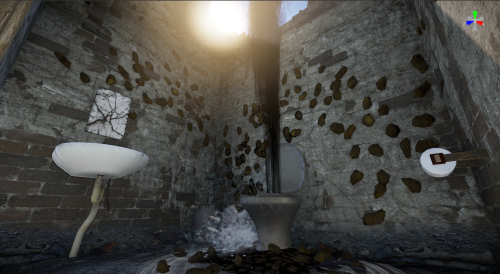
This is a stand alone prefab! An outdoor bathroom, with a very broken toilet creating a sewage geyser! Shit covered walls and ceiling with a hole blasted through! Complete with shit covered roof, and toilet paper dispenser!Free -
Version 1.0.22
27 downloads
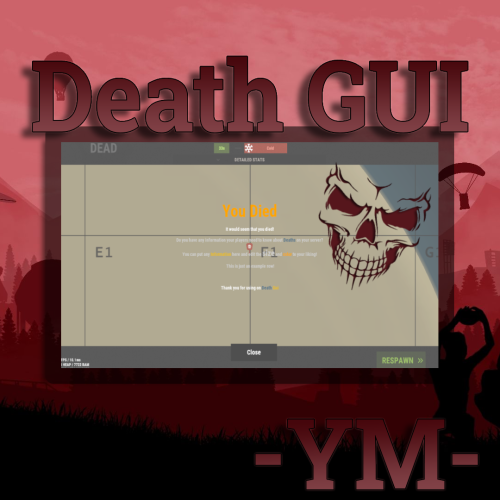
When it dies, the UI is displayed. Toggle Command - /deathtoggle If the toggle button is disabled, Command, data, toggle button UI is deprecated. Config: { "Defualt Config": { "SteamID": 0, "Prefix": "<b><size=18><color=#4F728D>Death</color> <color=#ECBD16>Gui</color></size></b> ", "Command": "deathtoggle", "Background Color (rgb - use this site https://daviddev1337.github.io/Rust-Color-Picker/)": "1 1 1 0.3" }, "Logo Image Config": { "Enable": true, "Png": "https://i.imgur.com/RJfgKXp.png", "Color": "1 1 1 1", "Sprite": "assets/content/textures/generic/fulltransparent.tga", "AnchorMin": "0.429 0.729", "AnchorMax": "0.573 0.986" }, "Close Button Config": { "Text": "Close", "FontSize": 20, "btnColor": "0.31 0.31 0.31 1", "textColor": "1 1 1 1", "Align": 4, "AnchorMin": "0.452 0.057", "AnchorMax": "0.569 0.126" }, "Toggle Button Config": { "Enable": false, "Text": "Show/Hide", "FontSize": 20, "btnColor": "0.31 0.31 0.31 1", "textColor": "1 1 1 1", "Align": 4, "AnchorMin": "0.851 0.056", "AnchorMax": "0.968 0.125" }, "Text Config": { "Text": "\n\n<size=50><color=orange>You Died</color></size>\n\nIt would seem that you died!\n\n<color=#D0D0D0>Do you have any information your players need to know about <color=#4F728D>Deaths</color> on your server?</color>\n\n<color=#D0D0D0>You can put any <color=#ECBD16>Information</color> here and edit the <size=25>size</size> and <color=orange>color</color> to your liking!</color>\n\n <color=#D0D0D0>This is just an example row!</color>\n\n\n\nThank you for using on <color=#4F728D>Death</color> <color=#ECBD16>Gui</color>", "FontSize": 14, "Align": 4 }, "Version": { "Major": 1, "Minor": 0, "Patch": 2 } } Lang: { "ToggleShow": "<color=#00ffff>Show</color>", "ToggleHide": "<color=red>Hide</color>" }$3.00
















.thumb.jpg.7a35071bd372a1c2c6329cfd476cab3f.jpg)