Search the Community
Showing results for tags 'display'.
Found 9 results
-
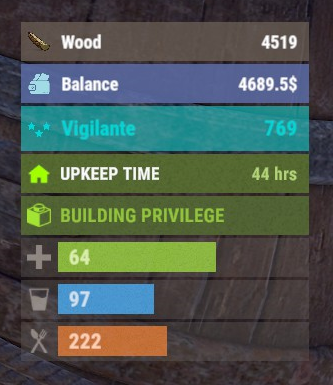
Version 0.1.8
290 downloads
The plugin displays the player's balance in the status bar. Depends on AdvancedStatus plugin. The ability to add and modify any economic plugins; The ability to automatically generate code for balance update hooks; The ability to automatically generate language files for different languages(filled in English); The ability to display the status bar to everyone or only based on permissions; The ability to display the status bar always or only in safe zones and building privileges; The ability to display the status bar via a command for a short period if permanent display is disabled; The ability to display the status bar when the balance is non-zero; The ability to display all or part of the bars simultaneously; The ability to customize the bar for each plugin; The ability to specify the currency symbol; The ability to specify the display side of the currency symbol; The ability to display text if the balance exceeds a specified value(useful for very large balances); The ability to specify the order of the bar; The ability to change the height of the bar; The abillity to customize the color and transparency of the background; The ability to set a material for the background; The ability to switch between CuiRawImageComponent and CuiImageComponent for the image; The ability to get images from the local folder(*SERVER*\oxide\data\AdvancedStatus\Images); The abillity to set own image and customize the color, transparency and outline of the image; The abillity to set sprite instead of the image; The ability to customize the color, size, font and outline of the text. balancebar.use - Grants the right to display the status bar if display is enabled only for permissions. { "Chat command": "balances", "Is it worth enabling GameTips for messages?": true, "Is it worth generating update hooks? 0 - disabled, 1 - one-time activation, 2 - always enabled": 2, "Is it worth displaying the status bar only when players are in the safe zone or have building privilege?": true, "Is it worth displaying the status bar at a 0 balance?": true, "Is it worth displaying the status bar without permission?": true, "Value after which text will be displayed instead of balance": 1000000000.0, "List of language keys for creating language files": [ "en" ], "The list of economy plugins for displaying the balance bar. Note: After modifying hooks, do not forget to toggle hook generation": [ { "Plugin's name": "Economics", "Is it worth enabling the plugin for display?": true, "Language key for the main text": "BarEconomics", "Balance format": "${0}", "Language key for the subtext when the balance is high": "BarEconomicsOverLimit", "API method for retrieving the balance": "Balance", "Hook that triggers on balance update": "OnEconomicsBalanceUpdated", "List of argument types in the hook in order": [ "string", "double" ], "BarSettings": { "Order": 20, "Height": 26, "BackgroundColor(HEX or RGBA)": "#6375B3", "BackgroundTransparency": 0.8, "BackgroundMaterial(leave empty to disable)": "", "ImageUrl": "https://i.imgur.com/jKeUqSD.png", "ImageLocal(leave empty to use URL)": "BalanceBar_Default", "ImageSprite(leave empty to use local or URL)": "", "IsRawImage": false, "ImageColor": "#A1DBE6", "ImageTransparency": 1.0, "ImageOutlineColor": "0.1 0.3 0.8 0.9", "ImageOutlineTransparency": 1.0, "ImageOutlineDistance(leave empty to disable). Example '0.75 0.75'": "", "TextSize": 12, "TextColor": "#FFFFFF", "TextTransparency": 1.0, "TextFont(https://umod.org/guides/rust/basic-concepts-of-gui#fonts)": "RobotoCondensed-Bold.ttf", "TextOffsetHorizontal": 0, "TextOutlineColor": "#000000", "TextOutlineTransparency": 1.0, "TextOutlineDistance": "", "SubTextSize": 12, "SubTextColor": "#FFFFFF", "SubTextTransparency": 1.0, "SubTextFont": "RobotoCondensed-Bold.ttf", "SubTextOutlineColor": "0.5 0.6 0.7 0.5", "SubTextOutlineTransparency": 1.0, "SubTextOutlineDistance": "" } }, { "Plugin's name": "ServerRewards", "Is it worth enabling the plugin for display?": true, "Language key for the main text": "BarServerRewards", "Balance format": "{0} RP", "Language key for the subtext when the balance is high": "BarServerRewardsOverLimit", "API method for retrieving the balance": "CheckPoints", "Hook that triggers on balance update": "OnPointsUpdated", "List of argument types in the hook in order": [ "ulong", "int" ], "BarSettings": { "Order": 20, "Height": 26, "BackgroundColor(HEX or RGBA)": "#6375B3", "BackgroundTransparency": 0.8, "BackgroundMaterial(leave empty to disable)": "", "ImageUrl": "https://i.imgur.com/jKeUqSD.png", "ImageLocal(leave empty to use URL)": "BalanceBar_Default", "ImageSprite(leave empty to use local or URL)": "", "IsRawImage": false, "ImageColor": "#A1DBE6", "ImageTransparency": 1.0, "ImageOutlineColor": "0.1 0.3 0.8 0.9", "ImageOutlineTransparency": 1.0, "ImageOutlineDistance(leave empty to disable). Example '0.75 0.75'": "", "TextSize": 12, "TextColor": "#FFFFFF", "TextTransparency": 1.0, "TextFont(https://umod.org/guides/rust/basic-concepts-of-gui#fonts)": "RobotoCondensed-Bold.ttf", "TextOffsetHorizontal": 0, "TextOutlineColor": "#000000", "TextOutlineTransparency": 1.0, "TextOutlineDistance": "", "SubTextSize": 12, "SubTextColor": "#FFFFFF", "SubTextTransparency": 1.0, "SubTextFont": "RobotoCondensed-Bold.ttf", "SubTextOutlineColor": "0.5 0.6 0.7 0.5", "SubTextOutlineTransparency": 1.0, "SubTextOutlineDistance": "" } }, { "Plugin's name": "BankSystem", "Is it worth enabling the plugin for display?": true, "Language key for the main text": "BarBankSystem", "Balance format": "${0}", "Language key for the subtext when the balance is high": "BarBankSystemOverLimit", "API method for retrieving the balance": "Balance", "Hook that triggers on balance update": "OnBalanceChanged", "List of argument types in the hook in order": [ "ulong", "int" ], "BarSettings": { "Order": 20, "Height": 26, "BackgroundColor(HEX or RGBA)": "#6375B3", "BackgroundTransparency": 0.8, "BackgroundMaterial(leave empty to disable)": "", "ImageUrl": "https://i.imgur.com/jKeUqSD.png", "ImageLocal(leave empty to use URL)": "BalanceBar_Default", "ImageSprite(leave empty to use local or URL)": "", "IsRawImage": false, "ImageColor": "#A1DBE6", "ImageTransparency": 1.0, "ImageOutlineColor": "0.1 0.3 0.8 0.9", "ImageOutlineTransparency": 1.0, "ImageOutlineDistance(leave empty to disable). Example '0.75 0.75'": "", "TextSize": 12, "TextColor": "#FFFFFF", "TextTransparency": 1.0, "TextFont(https://umod.org/guides/rust/basic-concepts-of-gui#fonts)": "RobotoCondensed-Bold.ttf", "TextOffsetHorizontal": 0, "TextOutlineColor": "#000000", "TextOutlineTransparency": 1.0, "TextOutlineDistance": "", "SubTextSize": 12, "SubTextColor": "#FFFFFF", "SubTextTransparency": 1.0, "SubTextFont": "RobotoCondensed-Bold.ttf", "SubTextOutlineColor": "0.5 0.6 0.7 0.5", "SubTextOutlineTransparency": 1.0, "SubTextOutlineDistance": "" } }, { "Plugin's name": "IQEconomic", "Is it worth enabling the plugin for display?": true, "Language key for the main text": "BarIQEconomic", "Balance format": "${0}", "Language key for the subtext when the balance is high": "BarIQEconomicOverLimit", "API method for retrieving the balance": "API_GET_BALANCE", "Hook that triggers on balance update": "OnBalanceUpdated", "List of argument types in the hook in order": [ "BasePlayer", "int" ], "BarSettings": { "Order": 20, "Height": 26, "BackgroundColor(HEX or RGBA)": "#6375B3", "BackgroundTransparency": 0.8, "BackgroundMaterial(leave empty to disable)": "", "ImageUrl": "https://i.imgur.com/jKeUqSD.png", "ImageLocal(leave empty to use URL)": "BalanceBar_Default", "ImageSprite(leave empty to use local or URL)": "", "IsRawImage": false, "ImageColor": "#A1DBE6", "ImageTransparency": 1.0, "ImageOutlineColor": "0.1 0.3 0.8 0.9", "ImageOutlineTransparency": 1.0, "ImageOutlineDistance(leave empty to disable). Example '0.75 0.75'": "", "TextSize": 12, "TextColor": "#FFFFFF", "TextTransparency": 1.0, "TextFont(https://umod.org/guides/rust/basic-concepts-of-gui#fonts)": "RobotoCondensed-Bold.ttf", "TextOffsetHorizontal": 0, "TextOutlineColor": "#000000", "TextOutlineTransparency": 1.0, "TextOutlineDistance": "", "SubTextSize": 12, "SubTextColor": "#FFFFFF", "SubTextTransparency": 1.0, "SubTextFont": "RobotoCondensed-Bold.ttf", "SubTextOutlineColor": "0.5 0.6 0.7 0.5", "SubTextOutlineTransparency": 1.0, "SubTextOutlineDistance": "" } } ], "Version": { "Major": 0, "Minor": 1, "Patch": 8 } } EN: { "CmdMain": "Available commands:\n\n<color=#D1CBCB>/balances</color> <color=#D1AB9A>show *seconds*(optional)</color> - Temporarily display the balance bar with an optional duration(1-10 seconds)\n<color=#D1CBCB>/balances</color> <color=#D1AB9A>toggle</color> - Toggle the balance bar display\n<color=#D1CBCB>/balances</color> <color=#D1AB9A>ignore</color> - Toggle ignoring balance bar display zones\n\n--------------------------------------------------", "CmdDisplayEnabled": "Balance bar display enabled!", "CmdDisplayDisabled": "Balance bar display disabled!", "CmdIgnoreZonesEnabled": "Ignoring balance bar display zones enabled!", "CmdIgnoreZonesDisabled": "Ignoring balance bar display zones disabled!", "BarEconomics": "Balance", "BarEconomicsOverLimit": "> $1kkk", "BarServerRewards": "Points", "BarServerRewardsOverLimit": "> 1kkk RP", "BarBankSystem": "Balance", "BarBankSystemOverLimit": "> $1kkk", "BarIQEconomic": "Balance", "BarIQEconomicOverLimit": "> $1kkk" } RU: { "CmdMain": "Доступные команды:\n\n<color=#D1CBCB>/balances</color> <color=#D1AB9A>show *секунды*(опционально)</color> - Временно отобразить баланс бар с возможностью указать время отображения(1-10 секунд)\n<color=#D1CBCB>/balances</color> <color=#D1AB9A>toggle</color> - Переключить отображение баланс бара\n<color=#D1CBCB>/balances</color> <color=#D1AB9A>ignore</color> - Переключить игнорирование зон отображения баланс бара\n\n--------------------------------------------------", "CmdDisplayEnabled": "Отображение баланс бара включено!", "CmdDisplayDisabled": "Отображение баланс бара выключено!", "CmdIgnoreZonesEnabled": "Игнорирование зон отображения баланс бара включено!", "CmdIgnoreZonesDisabled": "Игнорирование зон отображения баланс бара выключено!", "BarEconomics": "Баланс", "BarEconomicsOverLimit": "> $1 млрд", "BarServerRewards": "Очки", "BarServerRewardsOverLimit": "> 1 млрд RP", "BarBankSystem": "Баланс", "BarBankSystemOverLimit": "> $1 млрд", "BarIQEconomic": "Баланс", "BarIQEconomicOverLimit": "> $1 млрд" } show *seconds*(optional) - Temporarily display the balance bar with an optional duration(1-10 seconds) ; toggle - Toggle the balance bar display; ignore - Toggle ignoring balance bar display zones. Example: /balances show 5 /balances toggle /balances ignore$3.99 -
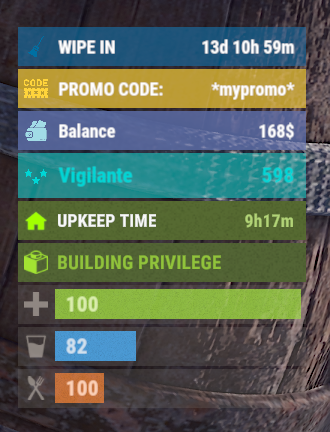
Version 0.1.4
60 downloads
The plugin allows displaying promo codes in the status bar. Depends on AdvancedStatus plugin. The ability to display promo codes in the status bar; The ability to automatically generate language files for different languages(filled in English); The ability to individually toggle the display of status bars; The ability to customize the status bar for each promo; The ability to specify the order of the bar; The ability to change the height of the bar; The abillity to customize the color and transparency of the background; The ability to set a material for the background; The ability to switch between CuiRawImageComponent and CuiImageComponent for the image; The ability to get images from the local folder(*SERVER*\oxide\data\AdvancedStatus\Images); The abillity to set own image and customize the color and transparency of the image; The abillity to set sprite instead of the image; The ability to customize the color, size, font and outline of the text. promostatus.admin - Provides the ability to admin commands. { "Chat command": "promo", "Is it worth enabling GameTips for messages?": true, "List of language keys for creating language files": [ "en" ], "Default time in seconds for displaying the promo code in the status bar. A value of 0 will keep the bar visible until the promo code expires": 600.0, "List of promo codes": [], "List of status bar settings. Leave empty or null to recreate the default list": { "_default": { "Order": 20, "Height": 26, "Main_Color(Hex or RGBA)": "#FFD33A", "Main_Transparency": 0.7, "Main_Material(empty to disable)": "", "Image_Url": "https://i.imgur.com/q15Cmu5.png", "Image_Local(Leave empty to use Image_Url)": "PromoStatus_Default", "Image_Sprite(Leave empty to use Image_Local or Image_Url)": "", "Image_IsRawImage": false, "Image_Color(Hex or RGBA)": "#FFD33A", "Image_Transparency": 1.0, "Is it worth enabling an outline for the image?": false, "Image_Outline_Color(Hex or RGBA)": "0.1 0.3 0.8 0.9", "Image_Outline_Transparency": 1.0, "Image_Outline_Distance": "0.75 0.75", "Text_Key": "BarDefault", "Text_Size": 12, "Text_Color(Hex or RGBA)": "#FFFFFF", "Text_Font(https://umod.org/guides/rust/basic-concepts-of-gui#fonts)": "RobotoCondensed-Bold.ttf", "Text_Offset_Horizontal": 0, "Is it worth enabling an outline for the text?": false, "Text_Outline_Color(Hex or RGBA)": "#000000", "Text_Outline_Transparency": 1.0, "Text_Outline_Distance": "0.75 0.75", "SubText_Size": 12, "SubText_Color(Hex or RGBA)": "#FFFFFF", "SubText_Font": "RobotoCondensed-Bold.ttf", "Is it worth enabling an outline for the sub text?": false, "SubText_Outline_Color(Hex or RGBA)": "0.5 0.6 0.7 0.5", "SubText_Outline_Transparency": 1.0, "SubText_Outline_Distance": "0.75 0.75" } }, "Version": { "Major": 0, "Minor": 1, "Patch": 4 } } EN: { "BarDefault": "PROMO CODE:", "CmdNotAllowed": "You do not have permissions to use this command!", "CmdWrongCommand": "You entered an incorrect command!\nExample: /{0} toggle", "CmdWrongArguments": "You have not provided enough arguments for this command!", "CmdPromoNotFound": "Promo code '{0}' not found!", "CmdAddFailed": "Failed to add promo code. Invalid format or expiration date is earlier than the current date.\nExample: /{1} add \"{0}\" \"{2}\" \"{3}\"(optional)", "CmdPromoAdded": "Promo code '{0}' has been successfully added. Valid until '{1}'.", "CmdPromoUpdated": "Promo code '{0}' has been successfully updated. Valid until '{1}'.", "CmdPromoRemoved": "Promo code '{0}' has been successfully removed!", "CmdDisplayFailed": "Failed to update promo code display time.\nExample: /{1} display \"{0}\" 600", "CmdDisplayUpdated": "A new display time({1} sec) has been set in the status bar for promo code '{0}'.", "CmdBarEnabled": "Displaying the promo bar is enabled!", "CmdBarDisabled": "Displaying the promo bar is disabled!", "CmdPromoEmpty": "No available promo codes!", "CmdPromoList": "List of available promo codes(UTC):\n{0}" } RU: { "BarDefault": "ПРОМОКОД:", "CmdNotAllowed": "У вас недостаточно прав для использования этой команды!", "CmdWrongCommand": "Вы ввели не правильную команду!\nПример: /{0} toggle", "CmdWrongArguments": "Вы ввели не достаточно аргументов для этой команды!", "CmdPromoNotFound": "Промокод '{0}' не найден!", "CmdAddFailed": "Не удалось добавить промокод. Не верный формат, либо дата истечения меньше текущей даты.\nПример: /{1} add \"{0}\" \"{2}\" \"{3}\"(опционально)", "CmdPromoAdded": "Промокод '{0}' был успешно добавлен. Действителен до '{1}'.", "CmdPromoUpdated": "Промокод '{0}' был успешно обновлен. Действителен до '{1}'.", "CmdPromoRemoved": "Промокод '{0}' был успешно удален!", "CmdDisplayFailed": "Не удалось обновить время отображения промокода.\nПример: /{1} display \"{0}\" 600", "CmdDisplayUpdated": "Установлено новое время({1} сек) отображения в статус баре для промокода '{0}'.", "CmdBarEnabled": "Отображение промо баров включено!", "CmdBarDisabled": "Отображение промо баров выключено!", "CmdPromoEmpty": "Нет доступных промокодов!", "CmdPromoList": "Список доступных промокодов(UTC):\n{0}" } bar - personal toggle for displaying promo status bars; list - displays a list of all active promo codes in the chat; list_admin - displays a list of all active promo codes in the chat, include inactive ones. Permission "promostatus.admin" required; add *code* *expireDate* *startDate*(optional) - adds a new promo code. Permission "promostatus.admin" required; remove *code* - removes a promo code. Permission "promostatus.admin" required; display *code* *seconds* - changes the display time(in seconds) of the promo code for each player. Permission "promostatus.admin" required. Example: /promo bar /promo list /promo add "test" "2024-12-23 14:06" /promo display "test" 360 There are 2 hooks that the plugin is subscribed to: OnPromoCodeAdded OnPromoCodeRemoved OnPromoCodeAdded: Used to add a new promo code. To call the OnPromoCodeAdded hook, you need to pass 3 parameters, 1 of which is optional: <string>promoCode - The promo code; <DateTime>expireDate - The expiration date; <DateTime>startDate - Optional. The start date of validity; <string>barCfgId - Optional. The key for the status bar settings. Interface.CallHook("OnPromoCodeAdded", "*Your promo*", expireDate, startDate, "_default");//Calling the OnPromoCodeAdded hook to add a new promo code. OnPromoCodeRemoved: Used to remove a promo code. To call the OnPromoCodeRemoved hook, you need to pass 1 parameter: <string>promoCode - The promo code. Interface.CallHook("OnPromoCodeRemoved", "*Your promo*");//Calling the OnPromoCodeRemoved hook to remove a promo code.$3.99 -
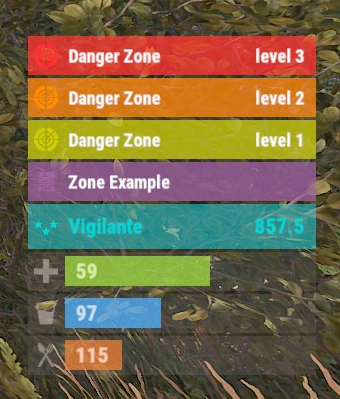
Version 0.1.8
355 downloads
The plugin displays the current zone or monument to the player in the status bar. Depends on ZoneManager, MonumentsWatcher and AdvancedStatus plugins. P.S. The settings for each zone or monument are located in the "*SERVER*\oxide\data\ZoneStatus\" folder. The ability to display the player's current monument; The ability to automatically change monuments names when the player switches languages; The ability to display the player's current zone; The ability to enable or disable visibility for each of the zones; The ability to customize the style for each of the zones(in the data file); The ability to specify the order of the bar; The ability to change the height of the bar; The abillity to customize the color and transparency of the background; The ability to set a material for the background; The ability to switch between CuiRawImageComponent and CuiImageComponent for the image; The ability to get images from the local folder(*SERVER*\oxide\data\AdvancedStatus\Images); The abillity to set own image and customize the color and transparency of the image; The abillity to set sprite instead of the image; The ability to customize the color, size, font and outline of the text. { "Is it worth deleting all saved Bar configs upon detecting a Wipe?": false, "Is it worth deleting all saved Monument configs upon detecting a Wipe?": false, "Is it worth deleting all saved Zone configs upon detecting a Wipe?": false, "Is it worth deleting all unused Monuments during initialization?": false, "Is it worth deleting all unused Zones during initialization?": false, "The name of the zone which has no name": "No name zone", "Is it worth enabling the bar display for new monuments?": true, "Is it worth enabling the bar display for new zones?": true, "List of prefix IDs that will share the same settings. Leave null to recreate the default list": [ "cargoship", "deepsea_floatingcity", "deepsea_island_tropical", "ghostship", "desert_military_base_", "gas_station_1", "lighthouse", "station-", "supermarket_1", "swamp_", "underwater_lab_", "warehouse", "entrance_bunker_", "ice_lake_", "power_sub_small_", "power_sub_big_", "jungle_ruins_", "water_well_" ], "Wipe ID": null, "Version": { "Major": 0, "Minor": 1, "Patch": 8 } } P.S. The default status bar configuration can be adjusted in *SERVER*\oxide\data\BarsConfig.json under the key "_default". [PluginReference] private Plugin ZoneStatus; There is 1 method: UpdateZoneSettings UpdateZoneSettings: Used to change bar settings for zones from ZoneManager. To call the UpdateZoneSettings method, you need to pass 3 parameters, 1 of which is optional: <string>zoneID - The Id of the zone; <object[]>args - Array of objects to update; <bool>redraw - Optional. Is it worth redrawing the status bars for players? Defaults to true. Note: It is not necessary to pass all parameters, but the indices are strictly tied to the parameters. object[] args = new object[] { true, //0. Display - Is it worth displaying the status bar for this zone? "#A064A0", //1. Background_Color - Primary HEX color of the status bar. 0.8f, //2. Background_Transparency - Opacity of the primary status bar color. "https://i.imgur.com/mn8reWg.png", //3. Image_Url - Url of the status bar icon. "ZoneStatus_Default", //4. Image_Local - Name of the local image for the status bar. Note: The image must exist.(Leave empty to use Image_Url). false, //5. Image_IsRawImage - True for multicolored images, false for monochromatic images. "#A064A0", //6. Image_Color - Color of the status bar icon. For Image_IsRawImage = false. 1f, //7. Image_Transparency - Opacity of the status bar icon. For Image_IsRawImage = false. "#FFFFFF", //8. Text_Color - Primary text color. "#FFFFFF" //9. SubText_Color - Subtext color. }; ZoneStatus?.Call("UpdateZoneSettings", zoneID, args, true); //Call the API method UpdateZoneSettings with all necessary arguments for updating. Example with incomplete parameters: object[] args = new object[] { null, //0. Display - Skip index 0, as it is reserved for Display. "#A064A0", //1. Background_Color - Primary HEX color of the status bar. 0.8f, //2. Background_Transparency - Opacity of the primary status bar color. null, //3. Image_Url - Skip index 3, as it is reserved for Image_Url. null, //4. Image_Local - Skip index 4, as it is reserved for Image_Local. false, //5. Image_IsRawImage - True for multicolored images, false for monochromatic images. "#A064A0", //6. Image_Color - Color of the status bar icon. For Image_IsRawImage = false. 1f //7. Image_Transparency - Opacity of the status bar icon. For Image_IsRawImage = false. }; ZoneStatus?.Call("UpdateZoneSettings", zoneID, args, true); //Call the API method UpdateZoneSettings with all necessary arguments for updating.$3.99 -
Version 3.2.5
234 downloads
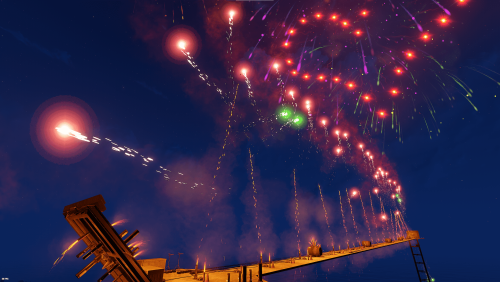
Are you tired of the boring single firework shows? Look no further. This pack contains 21 unique firework shows. Many of the shows have multiple stages, just like a real firework show should be! Some shows have delays with the use of timers. Your players will love them! Setup guide You ignite the shows with the use of RF Transmitters that's already provided with each show. To set these shows up, all you have to do is: Find a place for your show, paste it with stability false using CopyPaste plugin. Shows that use timers: Same procedure as the other shows, but you also have to turn on switches next to the setups to turn them on. Monument shows: (fwshow19-fwshow20-fwshow21) have switches that needs to be turned on. Check README Note: Monument shows will be fixed if they break as long as they do not require a complete rebuild. (Should be fine unless Facepunch makes changes) CopyPaste command example: "/paste fwshow6 stability false" If you paste the shows without using stability false, most of them will collapse. It is recommended to use this command before using these shows: basefirework.maxactivefireworks 250 (This command will allow the amount of fireworks set off at the same time. Lighting a lot of fireworks at once can cause lag/FPS drops on both high and lower end pc's) When done, you can revert to: basefirework.maxactivefireworks 25 (Default setting) Now you are ready to light up the sky with a big bang! Do you like the shows? Please leave a review! It is highly appreciated.$14.99- 8 comments
- 4 reviews
-
- 3
-

-

-
- #fireworks
- #firework
- (and 7 more)
-
Version 1.0.0
528 downloads
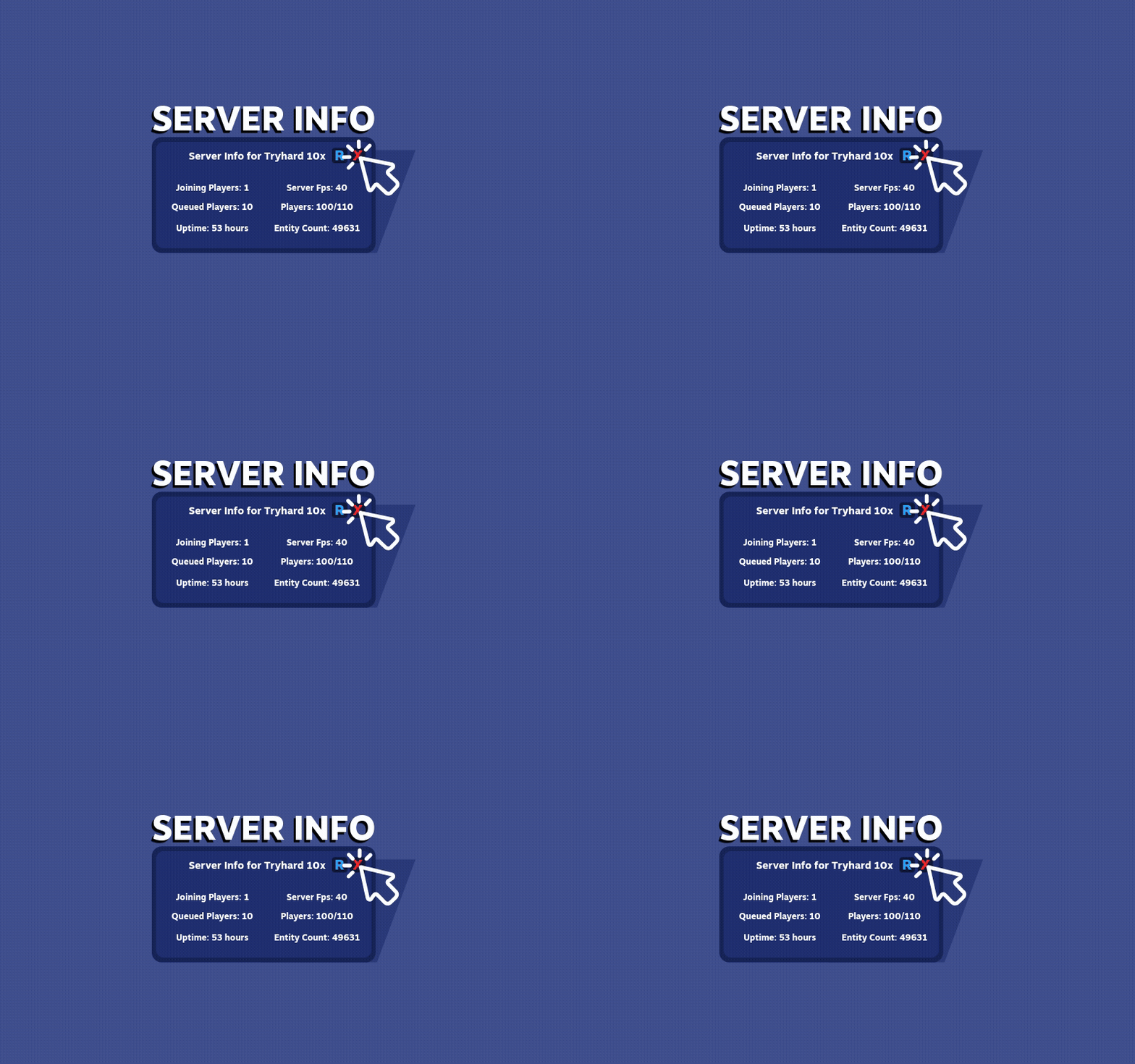
Server Info UI - Rust Plugin A plugin for Rust that shows the following stats on command: * Player Count * Joining Players * Queued players * Entity Count * Server Uptime * Server FPS Button "R" refreshes the stats and button "X" closes the UI Command: /serverinfo Use permission: ServerInfoUI.allowFree -
.thumb.png.13e23c07e2cdd468c136dd39825bd539.png)
Version 1.6.3
73 downloads
Allows your players to personalize their horses by naming them and displaying these names by sitting on the horse or using a command. This plugin fosters a deeper connection between players and their horses. Players often already get quite attached and like to call there horses names so this adds a nice little touch. Tired of players not knowing whos horse is who's? Do you want to know if that's really the stolen horse your looking for? This is the solution. Permissions nameyourhorse.use – allow naming a horse nameyourhorse.rename – allow renaming an already-named horse nameyourhorse.brush – allow using the brush (left-click or /brush) nameyourhorse.givebrush – allow /givebrush Commands /namehorse <name> – name the horse you’re looking at /checkname – show the horse’s current name and who named it /givebrush – give yourself the brush item /brush – use the brush (you can also left-click while holding it) Console (optional): nameyourhorse.givebrush <playerNameOrId> Features Name & identify: UI panel shows the name when you name or mount a horse. Brush item: Uses Advanced Horseshoes (skin 3247570947). Left-click (LMB) or /brush while looking at a horse (≈4m). Sets max stamina to full on use. Durability: consumes 25% item condition per use (breaks at 0). Quality of life: /givebrush tries main inventory, then belt, then drops at feet. How It Works Look at a horse → /namehorse Shadowfrax → name is set and shown. Hold the brush → left-click (or /brush) → max stamina set to full; brush loses 25% condition. Release Video$6.99 -
Hello everyone, I am looking for a clean killfeed. At the moment I am using the SimpleKillFeed from uMod. Unfortunately, I don't like the display at all. Do you know a better plugin, or can you help me to change the display from the current one? The formatting should be like this: [Player][Weapon] killed [Player][Head][5M] This is how it looks at the moment: [img]https://i.imgur.com/ZrajIIO.png[/img] Code: { "Show Traps and Entitys in Kill Feed": true, "Show Animals kills (default true)": false, "Show Npcs kills (Default true)": false, "Show suicides (Default: true)": true, "Show Deaths by Animals (Default: true)": false, "Show Deaths by Cold (Default: true)": false, "Show deaths by Drowning (Default: true)": true, "Show Deaths by Fall (Default: true)": true, "Show Deaths by Hunger (Default: true)": true, "Show Deaths by Electricution (Default: true)": true, "Show Deaths by Radiation (Default: true)": true, "Chat Icon Id (Steam profile ID)": 76561197960839785, "Max messages in feed (Default: 5)": 5, "Max player name length in feed (Default: 18)": 18, "Feed message TTL in seconds (Default: 7)": 7, "Allow kill messages in chat along with kill feed": true, "Log PvP Kill events": false, "Height ident (space between messages). Default: 0.0185": 0.0185, "Feed Position - Anchor Max. (Default: 0.995 0.986": "0.995 0.986", "Feed Position - Anchor Min. (Default: 0.723 0.964": "0.723 0.964", "Font size of kill feed (Default: 12)": 12, "Outline Text Size (Default: 0.5 0.5)": "0.5 0.5", "Default color for distance (if too far from any from the list). Default: #FF8000": "#FF8000", "Distance Colors List (Certain color will apply if distance is <= than specified)": [ { "DistanceThreshold": 50, "Color": "#FFFFFF" }, { "DistanceThreshold": 100, "Color": "#91D6FF" }, { "DistanceThreshold": 150, "Color": "#FFFF00" } ], "Custom Entity Names, you can remove or add more!": { "autoturret_deployed": "Auto Turret", "flameturret.deployed": "Flame Turret", "guntrap.deployed": "Gun Trap", "landmine": "Landmine", "beartrap": "Bear Trap", "sam_site_turret_deployed": "Sam Site Turret", "patrolhelicopter": "Helicopter", "bradleyapc": "Bradley APC" }, "Custom Animal Names, you can remove or add more!": { "bear": "Bear", "polarbear": "PolarBear", "wolf": "Wolf", "stag": "Stag", "boar": "Boar", "chicken": "Chicken", "horse": "Horse", "simpleshark": "Shark" }, "Custom Weapon Names, you can add more!": { "Assault Rifle": "Ak-47", "LR-300 Assault Rifle": "LR-300", "L96 Rifle": "L96", "Bolt Action Rifle": "Bolt", "Semi-Automatic Rifle": "Semi-AR", "Semi-Automatic Pistol": "Semi-AP", "Spas-12 Shotgun": "Spas-12", "M92 Pistol": "M92" }, "Custom Npc Names, you can add more!": { "scientist": "Scientist Npc" } }
-
Version 1.0.0
403 downloads
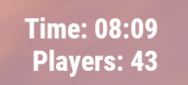
This plugin adds an extremely simple (non-invasive) ingame hud to the top right of your screen. /showhud - enable/disable the ingame hud (client-side, will only affect player that runs the command) I plan on updating and adding to this over time so feel free to make suggestions!Free -
Version 1.5.2
203 downloads
Conveyors lagging your server? Disable them with this. Comes with multiple language support and a permission to allow admins to control who can place them. Can add more languages if requested, currently supports French, German, Spanish, Chinese, Russian and Dutch. Not including the default English support. If any languages are incorrect, please do let me know. New languages added are Finnish, Swedish, Danish, Norwegian, Portuguese and Japanese.Free