Search the Community
Showing results for tags 'fishing'.
Found 19 results
-

Version 0.0.4
9 downloads
APCustomFish - allows you to catch custom fish with unique skins, names, and loot when using a fishing rod or a fish trap. This plugin supports complete customization of fish types, spawn chances, visual/audio effects, and gutting rewards. Features: Catch custom fish using fishing rods or traps Define fish names, skins, and spawn chances Bonus chances during night and rain Custom loot from gutting fish and trap creatures Optional sound/visual effects on catch Requires permission (optional) Multilingual config (EN, RU, UA) Commands: /fishlist – Display all configured custom fish (admin only) /gaf – Give all custom fish (admin only) /gaft – Give all custom trap creatures (admin only) Permissions: apcustomfish.use – Allows using plugin features apcustomfish.admin – Admin access to commands Important information about the config file: Option №1 "wood": [ 0, 70 ], 0 - skin ID 70 - quantity Option №2 "pistol.revolver": [ 1901240954, 1 ], 1901240954 - skin ID 1 - quantity Option №3 "stones": [ 60 ] 60 - quantity Option №4 "rifle.ak.bp": [ 0, 1 ], 0 - skin ID 1 - quantity .bp This means that it is a blueprint. rifle.ak.bp - blueprint rifle.ak - item weapon Example fragment: "Loot items on gutting": { "wood": [ 0, 70 ], "pistol.revolver": [ 1901240954, 1 ], "pistol.revolver.bp": [ 0, 1 ], "rifle.ak.bp": [ 0, 1 ], "stones": [ 60 ] } Config: { "Custom fish can be caught with a rod": true, "Custom fish can be caught with a trap": true, "Require permission to use plugin features": true, "Fish list": [ { "ShortName": "fish.anchovy", "Display name (empty - default)": "Gold Anchovy", "SkinID (0 - default)": 3476967485, "Fish spawn chance [0-100]": 30.0, "Loot items on gutting": { "wood": [ 0, 70 ], "stones": [ 0, 60 ] } }, { "ShortName": "fish.orangeroughy", "Display name (empty - default)": "Gold Orangeroughy", "SkinID (0 - default)": 3476975088, "Fish spawn chance [0-100]": 30.0, "Loot items on gutting": { "wood": [ 0, 70 ], "stones": [ 0, 60 ] } }, { "ShortName": "fish.yellowperch", "Display name (empty - default)": "Gold Yellow Perch", "SkinID (0 - default)": 3476976702, "Fish spawn chance [0-100]": 30.0, "Loot items on gutting": { "wood": [ 0, 70 ], "stones": [ 0, 60 ] } }, { "ShortName": "fish.salmon", "Display name (empty - default)": "Gold Salmon", "SkinID (0 - default)": 3476975367, "Fish spawn chance [0-100]": 30.0, "Loot items on gutting": { "wood": [ 0, 70 ], "stones": [ 0, 60 ] } }, { "ShortName": "fish.troutsmall", "Display name (empty - default)": "Gold Trout Small", "SkinID (0 - default)": 3476976486, "Fish spawn chance [0-100]": 30.0, "Loot items on gutting": { "wood": [ 0, 70 ], "stones": [ 0, 60 ] } }, { "ShortName": "fish.smallshark", "Display name (empty - default)": "Gold Small Shark", "SkinID (0 - default)": 3476975684, "Fish spawn chance [0-100]": 30.0, "Loot items on gutting": { "wood": [ 0, 70 ], "stones": [ 0, 60 ] } }, { "ShortName": "fish.minnows", "Display name (empty - default)": "Gold Minnows", "SkinID (0 - default)": 3476974844, "Fish spawn chance [0-100]": 30.0, "Loot items on gutting": { "wood": [ 0, 70 ], "stones": [ 0, 60 ] } }, { "ShortName": "fish.catfish", "Display name (empty - default)": "Gold Catfish", "SkinID (0 - default)": 3476973951, "Fish spawn chance [0-100]": 30.0, "Loot items on gutting": { "wood": [ 0, 70 ], "stones": [ 0, 60 ] } }, { "ShortName": "fish.herring", "Display name (empty - default)": "Gold Herring", "SkinID (0 - default)": 3476974715, "Fish spawn chance [0-100]": 30.0, "Loot items on gutting": { "wood": [ 0, 60 ], "stones": [ 0, 50 ] } }, { "ShortName": "fish.sardine", "Display name (empty - default)": "Gold Sardine", "SkinID (0 - default)": 3476975534, "Fish spawn chance [0-100]": 30.0, "Loot items on gutting": { "wood": [ 0, 30 ], "stones": [ 0, 10 ] } } ], "Custom fish trap chance": 30.0, "Custom trap creatures list": [ { "ShortName": "fish.anchovy", "Display name (empty - default)": "Green Crab", "SkinID (0 - default)": 3476967863, "Loot items on gutting": { "wood": [ 0, 70 ], "pistol.revolver": [ 1901240954, 1 ], "pistol.revolver.bp": [ 0, 1 ], "rifle.ak.bp": [ 0, 1 ], "stones": [ 60 ] } }, { "ShortName": "fish.salmon", "Display name (empty - default)": "Red Crab", "SkinID (0 - default)": 3476968123, "Loot items on gutting": { "wood": [ 0, 70 ], "rifle.ak": [ 3318155799, 1 ], "stones": [ 0, 60 ] } }, { "ShortName": "fish.troutsmall", "Display name (empty - default)": "Crayfish Green", "SkinID (0 - default)": 3476974388, "Loot items on gutting": { "wood": [ 0, 70 ], "stones": [ 0, 60 ] } }, { "ShortName": "fish.minnows", "Display name (empty - default)": "Shrimp", "SkinID (0 - default)": 3476972627, "Loot items on gutting": { "wood": [ 0, 70 ], "stones": [ 0, 60 ] } }, { "ShortName": "fish.herring", "Display name (empty - default)": "Crayfish Gold", "SkinID (0 - default)": 3476974565, "Loot items on gutting": { "wood": [ 0, 50 ], "stones": [ 0, 40 ] } }, { "ShortName": "fish.sardine", "Display name (empty - default)": "Gold Crab", "SkinID (0 - default)": 3476968515, "Loot items on gutting": { "wood": [ 0, 20 ], "stones": [ 0, 10 ] } } ], "Night bonus chance (multiplier)": 1.5, "Rain bonus chance (multiplier)": 1.2, "Catch message delay (seconds)": 0.1, "Enable sound effects": true, "Enable visual effects": true }$10.00 -
Version 0.1.0
14 downloads
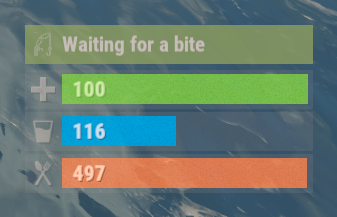
The plugin displays the fishing rod strain level in the status bar. Depends on AdvancedStatus plugin. The ability to display the strain level of the fishing rod in the status bar; The ability to notify when a high strain level is reached; The ability to set a color for each strain percentage; The ability to automatically generate language files for different languages(filled in English); The ability to specify the order of the bar; The ability to change the height of the bar; The ability to customize the color and transparency of the background; The ability to set a material for the background; The ability to switch between CuiRawImageComponent and CuiImageComponent for the image; The ability to get images from the local folder (*SERVER*\oxide\data\AdvancedStatus\Images); The ability to set own image and customize the color and transparency of the image; The ability to set sprite instead of the image; The ability to customize the color, size, font and outline of the text. { "Interval in seconds to update the rod strain state": 0.3, "Strain percentage(0.0 to 1.0) threshold for player notification. A value of 0 disables this": 0.7, "The effect that will be triggered upon a warning(Choose the effect carefully). An empty string disables the effect call": "assets/prefabs/locks/keypad/effects/lock.code.denied.prefab", "List of language keys for creating language files": [ "en" ], "Status. Bar - Height": 26, "Status. Bar - Order": 2, "Status. Background - Color(Hex or RGBA)": "#FFFFFF", "Status. Background - Transparency": 0.15, "Status. Background - Material(empty to disable)": "", "Status. Image - Url": "https://i.ibb.co/HDt2pD6G/Fishing-Status-Strain.png", "Status. Image - Local(Leave empty to use Image_Url)": "FishingStatus_Strain", "Status. Image - Sprite(Leave empty to use Image_Local or Image_Url)": "", "Status. Image - Is raw image": false, "Status. Image - Color(Hex or RGBA)": "#E2DBD6", "Status. Image - Transparency": 0.55, "Status. Image Outline - Is it worth enabling an outline for the image?": false, "Status. Image Outline - Color(Hex or RGBA)": "0.1 0.3 0.8 0.9", "Status. Image Outline - Transparency": 1.0, "Status. Image Outline - Distance": "0.75 0.75", "Status. Text - Size": 14, "Status. Text - Color(Hex or RGBA)": "#E2DBD6", "Status. Text - Font(https://umod.org/guides/rust/basic-concepts-of-gui#fonts)": "RobotoCondensed-Bold.ttf", "Status. Text - Offset Horizontal": 0, "Status. Text Outline - Is it worth enabling an outline for the text?": false, "Status. Text Outline - Color(Hex or RGBA)": "#000000", "Status. Text Outline - Transparency": 1.0, "Status. Text Outline - Distance": "0.75 0.75", "Status. SubText - Size": 14, "Status. SubText - Color(Hex or RGBA)": "#E2DBD6", "Status. SubText - Font": "RobotoCondensed-Bold.ttf", "Status. SubText Outline - Is it worth enabling an outline for the sub text?": false, "Status. SubText Outline - Color(Hex or RGBA)": "0.5 0.6 0.7 0.5", "Status. SubText Outline - Transparency": 1.0, "Status. SubText Outline - Distance": "0.75 0.75", "Status. Progress - Transparency": 0.8, "Status. Progress - OffsetMin": "0 0", "Status. Progress - OffsetMax": "0 0", "List of colors for strain levels": [ { "MinRange": 0.0, "MaxRange": 0.4, "Color(Hex or RGBA)": "#B1C06E" }, { "MinRange": 0.4, "MaxRange": 0.7, "Color(Hex or RGBA)": "#F7BB00" }, { "MinRange": 0.7, "MaxRange": 1.0, "Color(Hex or RGBA)": "#F70000" } ], "Version": { "Major": 0, "Minor": 1, "Patch": 0 } } The values of MaxRange and MinRange set the range of values over which the color applies. The values for MaxRange and MinRange must be between 0.0 and 1.0 (inclusive), where 0.0 equals 0%, and 1.0 equals 100%. The value of MaxRange must be equal to the value of MinRange of the previous. EN: { "BarWaiting": "Waiting for a bite", "BarStrain": "Strain level" } RU: { "BarWaiting": "Ожидание поклёвки", "BarStrain": "Натяжение лески" }$3.99 -
Version 1.0.7
50 downloads
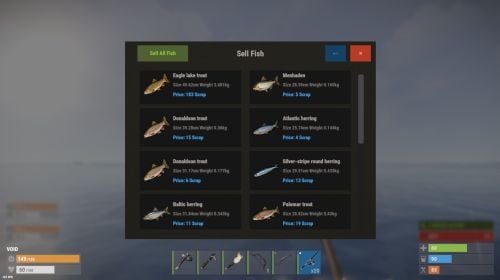
ExtraFishing is a feature-rich fishing enhancement plugin for Rust. It introduces custom fish species, dynamic UI displays, rod quality effects, economy integration, and fishing record systems—all fully configurable and optimized for performance. Extra Fishing Features Custom Fish System Easily define new fish via JSON including size range, rarity, biome, and growth curves. You can increase the number of fish species by adding the included 60 Fish Data.json fish data to your configuration. More fish species will be added as add-ons in the future. Dynamic UI Display Uses ImageLibrary to show results, records, and fish selling screens with optional background images. Rod Quality & Bonus Fishing rods with different skins can have bonus catch chances, making equipment progression meaningful. Economy Support Fully supports Scrap or Economics or ServerRewards or CustomItem to allow players to sell fish for currency. Fishing Records & Ranking Automatically tracks each player’s biggest catch, with optional server-wide leaderboards. Multilingual Support Built-in English , Japanese , Russian localization. Permission extrafishing.records - Control use of commands "/fish" extrafishing.sell - Controls permission to sell fish Chat Commands /fish – Open your personal fishing records. If you have fish, open the fish selling UI. /rod - Get all custom fishing rods. (Admin only) ServerConsole Commands clearfishdata - Delete all fishing records fishbuff - Adds a fishing boost to players. Usage : fishbuff "SteamID" "amount" "Time(Minutes)" Example(Fish Boost 130%, 10 Minutes for 76561198100000000) fishbuff 76561198100000000 130 10 giverod- Adds a custom fishing rod to players. Usage : giverod "SteamID" "Rod skinID" Example( 3157356052 for 76561198100000000) giverod 76561198100000000 3157356052 Config You can easily add fish and change settings with the included ExtraFishing_editor (Web UI) tool. You can increase the number of fish species by adding the included 60 Fish Data.json fish data to your configuration. More fish species will be added as add-ons in the future. { "EnableUIDisplay": true, // Show fishing result UI when catching fish "EnableSoundEffects": true, // Play sound effects for fishing actions "ShowMessages": false, // Display chat messages for catches/breaks "EnableBiomeCheck": true, // Restrict fish spawning by biome "EnableUIAnimation": true, // Enable smooth UI Animation "CaloriesPerFishing": 1, // Calories consumed per fishing attempt "CaloriesPerTensionBreak": 3, // Calories consumed when line breaks "SizeInterval": 20.0, // Get items by size. "TrapFishSizeMultiplier": 0.5, // Size reduction for trap-caught fish // === UI CONFIGURATION === "UI": { "DisplayDuration": 8.0, "Result": { "AnchorMin": "0.35 0.75", "AnchorMax": "0.65 0.9", "BackgroundColor": "0.1 0.1 0.1 0.9", "TitleColor": "0.678 0.643 0.616 1.0", "FishNameColor": "0.678 0.643 0.616 1.0", "FishNameFontSize": 16, "DetailsColor": "0.447 0.427 0.404 1.0", "DetailsFontSize": 14, "BackgroundImage": "https://i.imgur.com/C30zzZ5.png", "UseBackgroundImage": true }, // Fish Records UI (opened with /fish command) "Record": { "AnchorMin": "0.25 0.15", "AnchorMax": "0.75 0.85", "BackgroundColor": "0.086 0.086 0.086 1.0", "TitleColor": "0.678 0.643 0.616 1.0", "TitleFontSize": 20, "FishButtonColor": "0.086 0.086 0.086 1.0", "FishNameColor": "0.678 0.643 0.616 1.0", "FishNameFontSize": 14, "FishDetailColor": "0.678 0.643 0.616 1.0", "FishDetailFontSize": 16, "SectionTitleColor": "0.678 0.643 0.616 1.0", "SectionTitleFontSize": 18, "DetailsColor": "0.447 0.427 0.404 1.0", "DetailsFontSize": 14, "HighlightColor": "0.447 0.427 0.404 1.0", "NavButtonColor": "0.090 0.263 0.400 1.0", "NavTextColor": "0.259 0.620 0.875 1.0", "NavFontSize": 14, "CloseButtonColor": "0.722 0.227 0.149 1.0", "CloseTextColor": "0.792 0.643 0.608 1.0", "CloseFontSize": 18, "DescriptionColor": "0.447 0.427 0.404 1.0", "DescriptionFontSize": 14, "BackgroundImage": "https://i.imgur.com/IhEjX5Q.png", "UseBackgroundImage": true }, // Fish Selling UI (opened with /fish) "Sell": { "AnchorMin": "0.25 0.15", "AnchorMax": "0.75 0.85", "BackgroundColor": "0.086 0.086 0.086 1.0", "TitleColor": "0.678 0.643 0.616 1.0", "TitleFontSize": 20, "FishButtonColor": "0.086 0.086 0.086 1.0", "FishNameColor": "0.678 0.643 0.616 1.0", "FishNameFontSize": 14, "DetailColor": "0.447 0.427 0.404 1.0", "DetailFontSize": 12, "PriceColor": "0.259 0.620 0.875 1.0", "PriceFontSize": 13, "BalanceTextColor": "0.678 0.643 0.616 1.0", "BalanceFontSize": 14, "SellButtonColor": "0.3 0.6 0.3 1", "NavButtonColor": "0.090 0.263 0.400 1.0", "NavTextColor": "0.259 0.620 0.875 1.0", "NavFontSize": 14, "CloseButtonColor": "0.722 0.227 0.149 1.0", "CloseTextColor": "0.792 0.643 0.608 1.0", "CloseFontSize": 18, "SellAllButtonColor": "0.314 0.380 0.200 1.0", "SellAllTextColor": "0.569 0.765 0.231 1.0", "SellAllFontSize": 14, "BackgroundImage": "https://i.imgur.com/IhEjX5Q.png", "UseBackgroundImage": true } }, // === TIME-BASED FISHING BONUSES === "ChanceTime": { "MorningStart": 4.0, // Morning golden hour start (4:00 AM) "MorningEnd": 8.0, // Morning golden hour end (8:00 AM) "EveningStart": 16.0, // Evening golden hour start (4:00 PM) "EveningEnd": 20.0, // Evening golden hour end (8:00 PM) "PeakTimeChanceBonus": 15 // Extra 15% chance for rare fish during golden hours }, // === FISHING ROD QUALITY SYSTEM === "FishingRods": { "0": { // Default fishing rod (no skin) "Name": "Low Quality Rod", "ChanceBonus": 0 // No bonus chance }, "3157356052": { // Workshop skin ID for mid-tier rod "Name": "Mid Quality Rod", "ChanceBonus": 5 // +5% catch chance }, "3157356205": { // Workshop skin ID for high-tier rod "Name": "High Quality Rod", "ChanceBonus": 10 // +10% catch chance } }, // === FISH RARITY CHANCES === "RarityChances": { "1": 70, // Common fish: 70% base chance "2": 15, // Uncommon fish: 15% base chance "3": 10, // Rare fish: 10% base chance "4": 5, // Epic fish: 5% base chance "5": 1 // Legendary fish: 1% base chance }, // === ECONOMY SYSTEM === "Economy": { "PreferredEconomy": "Scrap", // Currency type: "Scrap","Economics","ServerRewards","Custom" "RarityMultipliers": { // Price multipliers for each rarity level "1": 1.0, // Common: 100% base price "2": 1.2, // Uncommon: 120% base price "3": 1.3, // Rare: 130% base price "4": 1.5, // Epic: 150% base price "5": 1.8 // Legendary: 180% base price }, "BasePriceMultiplier": 1.0 // Global price adjustment (1.0 = normal, 2.0 = double) "CustomItem": { // Must be set if PreferredEconomy is Custom. "ItemShortName": "sulfur", "ItemSkinId": 0, "DisplayName": null } }, // === FISH STACKING SYSTEM === "EnableFishStackLimit": true, // If you set this to false, you can stack fish, but the size and weight of the item will not be saved. When selling, the value will be calculated as "FishBaseValuesForDisableFishStackLimit" × "RarityMultipliers". changed to this setting require a server restart. // Base scrap values when stacking is DISABLED (EnableFishStackLimit = false) "FishBaseValuesForDisableFishStackLimit": { "fish.anchovy": 2, // Anchovy worth 2 scrap each "fish.catfish": 32, // Catfish worth 32 scrap each "fish.herring": 4, // Herring worth 4 scrap each "fish.orangeroughy": 37, // Orange Roughy worth 37 scrap each "fish.salmon": 27, // Salmon worth 27 scrap each "fish.sardine": 2, // Sardine worth 2 scrap each "fish.smallshark": 45, // Small Shark worth 45 scrap each "fish.troutsmall": 6, // Small Trout worth 6 scrap each "fish.yellowperch": 10 // Yellow Perch worth 10 scrap each }, // === FISH SPECIES DEFINITIONS === "Fish": [ { "ItemShortName": "fish.anchovy", // Rust's internal item name "SkinId": 0, // Skin ID (0 = default, custom number = workshop skin) "Name": "Anchovy", // Display name in UI "MaxSize": 24.0, // Maximum size in centimeters "MinSize": 15.0, // Minimum size in centimeters "Growth_A": 0.0051, // Weight calculation parameter A "Growth_B": 3.27, // Weight calculation parameter B // Formula: Weight = Growth_A × (Size ^ Growth_B) ÷ 1000 "Biome": "All", // Where fish can be caught: "All", "Arid", "Temperate", "Tundra", "Arctic", "Jungle" "Rarity": 1, // Rarity level 1-5 (1=common, 5=legendary) "ProcessedItemShortName": "fish.raw", // Item given when fish is processed "ProcessedItemSkinId": 0, // Skin for processed item "DisplayName": null, // Custom name for processed item (null = default) "ProcessedItemAmount": 1, // How many processed items to give "Description": "Widely known for its role in the seafood industry and seasonal migrations." }, { "ItemShortName": "fish.catfish", "SkinId": 0, "Name": "Catfish", "MaxSize": 62.0, "MinSize": 30.0, "Growth_A": 0.0052, "Growth_B": 3.22, "Biome": "All", "Rarity": 1, "ProcessedItemShortName": "fish.raw", "ProcessedItemSkinId": 0, "DisplayName": null, "ProcessedItemAmount": 1, "Description": "A bottom-dwelling freshwater fish native to North America, recognizable by its long whisker-like barbels and nocturnal habits." }, { "ItemShortName": "fish.herring", "SkinId": 0, "Name": "Herring", "MaxSize": 45.0, "MinSize": 30.0, "Growth_A": 0.007, "Growth_B": 3.12, "Biome": "All", "Rarity": 1, "ProcessedItemShortName": "fish.raw", "ProcessedItemSkinId": 0, "DisplayName": null, "ProcessedItemAmount": 1, "Description": "A key commercial fish found in the North Atlantic, famous for its massive schools and historical importance in global fisheries." }, { "ItemShortName": "fish.orangeroughy", "SkinId": 0, "Name": "Orange Roughy", "MaxSize": 75.0, "MinSize": 45.0, "Growth_A": 0.00014, "Growth_B": 2.66, "Biome": "All", "Rarity": 1, "ProcessedItemShortName": "fish.raw", "ProcessedItemSkinId": 0, "DisplayName": null, "ProcessedItemAmount": 1, "Description": "A deep-sea fish known for its striking orange color, longevity, and tough scales, often caught at great ocean depths." }, { "ItemShortName": "fish.salmon", "SkinId": 0, "Name": "Salmon", "MaxSize": 70.0, "MinSize": 30.0, "Growth_A": 0.0075, "Growth_B": 3.02, "Biome": "All", "Rarity": 1, "ProcessedItemShortName": "fish.raw", "ProcessedItemSkinId": 0, "DisplayName": null, "ProcessedItemAmount": 1, "Description": "An anadromous fish that migrates between rivers and the ocean, revered for its powerful upstream spawning journeys." }, { "ItemShortName": "fish.sardine", "SkinId": 0, "Name": "Sardine", "MaxSize": 24.99, "MinSize": 20.0, "Growth_A": 0.005, "Growth_B": 3.26, "Biome": "All", "Rarity": 1, "ProcessedItemShortName": "fish.raw", "ProcessedItemSkinId": 0, "DisplayName": null, "ProcessedItemAmount": 1, "Description": "Widely known for its role in the seafood industry and seasonal migrations." }, { "ItemShortName": "fish.smallshark", "SkinId": 0, "Name": "Small Shark", "MaxSize": 60.0, "MinSize": 30.0, "Growth_A": 0.012, "Growth_B": 3.13, "Biome": "All", "Rarity": 1, "ProcessedItemShortName": "fish.raw", "ProcessedItemSkinId": 0, "DisplayName": null, "ProcessedItemAmount": 1, "Description": "A small-bodied shark species typically found in coastal or deep waters, known for their slender shape, bottom-dwelling habits, and relatively harmless nature." }, { "ItemShortName": "fish.troutsmall", "SkinId": 0, "Name": "Small Trout", "MaxSize": 40.0, "MinSize": 20.0, "Growth_A": 0.0053, "Growth_B": 3.26, "Biome": "All", "Rarity": 1, "ProcessedItemShortName": "fish.raw", "ProcessedItemSkinId": 0, "DisplayName": null, "ProcessedItemAmount": 1, "Description": "A popular freshwater fish native to North America, with some individuals developing into ocean-going steelhead trout." }, { "ItemShortName": "fish.yellowperch", "SkinId": 0, "Name": "Yellow Perch", "MaxSize": 50.0, "MinSize": 25.0, "Growth_A": 0.0135, "Growth_B": 2.97, "Biome": "All", "Rarity": 1, "ProcessedItemShortName": "fish.raw", "ProcessedItemSkinId": 0, "DisplayName": null, "ProcessedItemAmount": 1, "Description": "A widely distributed North American freshwater species, easily identified by its golden body and vertical black bars." } ] } Contact VOID / NINJA WORKS X : @QB_WHITE MADE IN JAPAN$20.00 -
.thumb.png.1bb8ab5b2dfaaed80f98f633dd4dbf2f.png)
Version 2.0.7
394 downloads
Buried beneath the deep blue oceans of rust lay a trove of lost treasures. This plugin introduces a casket system for fishing that your players will absolutely love! FishingTreasure is a plugin that uses the newly introduced fishing mechanic in Rust, to provide your players with the chance to obtain a casket. When opened, the casket will roll on the loot table 3 times, rewarding the players with 3 random items of varying rarity. Fully customisable loot system that automatically adds all new items to the game (configurable). Items can also be manually added via the config or a chat command in game. Supports custom items with unique DisplayNames and skins. Includes 3 tiers of rarity – common, rare and elite. Each can have its drop chance configured to the desired rarity. Hotspot system that allows for areas to be added as a "hot spot", which increases the drop chance of a casket by a multiplier (configurable). fishingtreasure.admin – allows users to spawn caskets, add items, force an update of items and remove items. { "General Settings": { "Base chance of obtaining a casket when catching a fish [%]": 3.0, "Permission based chance modifiers [1.0 = 100% increase to the base chance value]": {}, "Loot rolls per casket": 3, "Casket info": { "shortname": "halloween.lootbag.medium", "skin": 2560835553, "displayName": "casket" }, "Sounds when opened": { "Common": "assets/prefabs/misc/halloween/lootbag/effects/bronze_open.prefab", "Rare": "assets/prefabs/misc/halloween/lootbag/effects/silver_open.prefab", "Epic": "assets/prefabs/misc/halloween/lootbag/effects/gold_open.prefab" }, "Should this plugin handle the item splitting for caskets? [set to false if using a stacks plugin]": false }, "Hotspot Settings": { "Enable fishing treasure hotspots": false, "Name the hotspot shows when it appears on the map": "Fishing Treasure Hotspot", "Sphere darkness": 6, "Hotspot size": 50.0, "Minimum time a hotspot can be alive for [seconds]": 1600.0, "Maximum time a hotspot can be alive for [seconds]": 2000.0, "Delay between hotspot deployments [seconds]": 3600.0, "Minimum modifier that will be applied to a hotspot": 1.0, "Maximum modifier that will be applied to a hotspot": 4.0, "Should the hotspot check to see if players have entered/left the zone and notify them?": true, "If monitoring for players, how often should we check for players in the hotspot?": 1.0 }, "SkillTree settings": { "Set to true if you want to add the FishingTreasure buff to the skill tree": true, "Maximum level for the modifier buff": 5, "Chance increase per level for finding caskets [0.2 = 20%]": 0.2 }, "Loot Table": { "Common": { "enabled": true, "tableWeight": 100, "loot": [ // Loot here ] }, "Rare": { "enabled": true, "tableWeight": 25, "loot": [ // Loot here ] }, "Epic": { "enabled": true, "tableWeight": 10, "loot": [ // Loot here ] } } } /casket - spawns a casket in the users inventory API object OnCalculateFishingTreasureChance(BasePlayer, float highestMod) - Used to override the default casket chance.$14.99 -

Version 1.0.9
267 downloads
Fishing contest is a an event plugin that spawns an arena in the ocean for players to compete at. Players must catch the most of a certain type of fish that the contest randomly selects to win. The arena is spawned using the CopyPaste plugin. You can create your own arena, but there are requirements (see the video). The plugin is highly configurable, allowing you to select if players keep what they catch, adjust drop rates for caskets for participants, modify the fishing rod tensile strength, and what fish the competition requires the players to catch. EpicLoot - Integrates a list of enhanced fishing attire into the rewards list. NightVision - Locks the players time to day while at the event. FishingTreasure - Allows for the drop rates of fishing caskets to be changed for players at the event. fishingcontest.admin - required to manually start and stop the event. joinfc - Joins the fishing contest. leavefc - Leaves the fishing contest. startfc - Manually starts the fishing contest. endfc - Manually ends the fishing contest.$15.00- 52 comments
- 3 reviews
-
- 3
-

-

-
- #competition
- #event
- (and 6 more)
-
Version 1.0.11
265 downloads
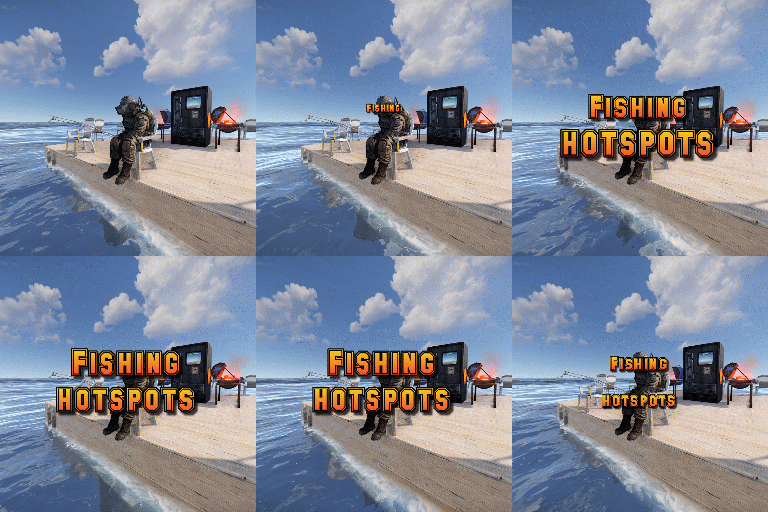
Fishing Hot-spots is a plugin that creates hot-spots in random parts of the ocean. These hot-spots have a number of different modifiers to make fishing fast, easier and more enjoyable. When the hot-spot spawns, it has 5 attributes it will roll: Fishing yield = Increases how many fish the player catches. Catch time - Decreases the time it takes to hook a fish onto the lure. Rod tension - Increases the strength of the line, lowing the chance for your rod snapping. XP gain modifier - Increases the amount of XP you gain while fishing in the hot-spot [Requires SkillTree]. Casket modifier - Increases the chance of obtaining a fishing casket [Requires FishingTreasure]. These hot-spots have the option to create a platform in their center for players to fish off of. The default platform comes standard with 2 vending machines (the same ones that Fishing Village has), and 2 bbq's that do not require wood. The plugin is full configurable, allowing the higher and lower values for each attribute to be set or disabled. It also supports the application of a safe zone at the location, provided you have ZoneManager on your server. Command (console): spawnhotspot Description: Spawns a hot-spot randomly around the map. fishinghotspots.admin fishinghotspots.use$14.99 -
Version 1.0.0
42 downloads
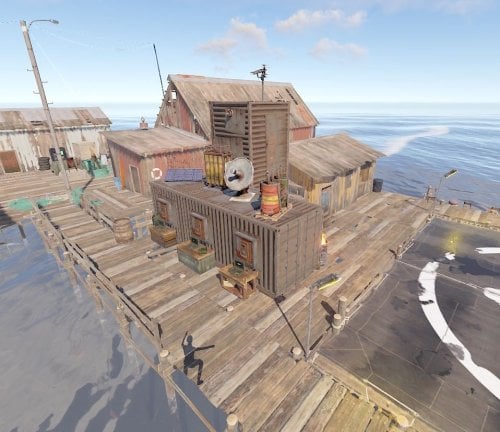
This is a new generation of Fishing Village ! - Recylers x2 - Small Oil Refinery - Airwolf with Helipad (Scrap Heli & Mini) - Drône station - BBQ A little bridge where you can sit and fishing safe without to be pushed !$3.99- 1 comment
-
- 1
-
-
- #fishingvillage
- #mergedfishing
- (and 1 more)
-
Version 1.2.5
83 downloads
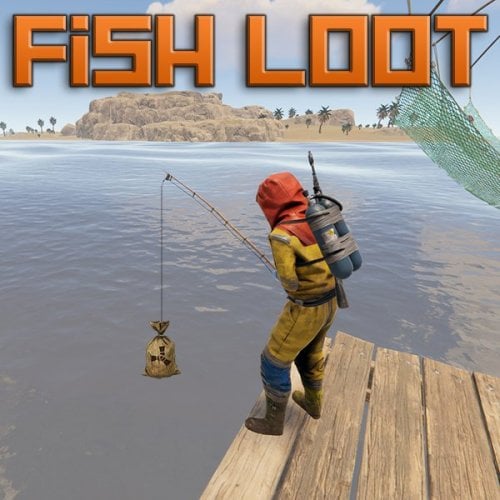
Fish Loot allows players to catch custom loot items instead of fish by chance. Create a custom loot table, with configurable rarity and drop chance per item. You can also specify the required bait value per item, so players will need to use that bait to get the best items! NOTE: If you enable the config option to allow fish traps to continue trapping after a successful catch, you will also probably need to give players the no trap damage permission, otherwise while the player is away, if the trap catches many times, it will break and the player will lose their trap and loot. Players can also get the same chance to get a custom loot items when gutting selected fish if enabled in the config. Very simple to set up with a small example loot table as default. Then just edit the loot table to suit your needs and add as many custom items as you like. All options you could possibly need in the config file. Permissions: fishloot.condition (players rod doesn't lose condition) fishloot.nofail (player can reel in fish without losing) fishloot.instacatch (hook a fish as soon as you cast) fishloot.gutluck (player has chance of item when gutting) fishloot.fishtraps (player has chance of item from fish traps) fishloot.notrapdamage (players fish traps do not lose health after catch) There are also chance multiplier permissions which can be created and set in the config. Players with these permissions will have a higher chance of getting a bonus item. Default Config:$12.99 -
Version 2.0.7
208 downloads
Purchase a License, Fish, Sell, Profit. Works with Kits & Marker Manager. Requires Economics or Server Rewards to handle sales. With "The Angler” you open yet another lane of Economic gameplay for your server. Set a License fee in order to be able to catch fish with bonus customizable items, for players to sell for monetary gain. Set drop rates per fish type, and setup unique loot tables for each, Sell to the Angler with Economics or Server Rewards. Output all Sales to Discord to track your Economy and make Adjustments as needed to The Angler NPCS "Bonus Buy” & "Discount Buy” as needed to suit your taste. Now has a Leaderboard feature for extra competition. Commands /gaw – Requires Admin Permission – Will spawn your custom Angler items into your inventory, Good for testing sale rates. /spawnangler – Requires Admin Permission – Will spawn an Angler NPC in your Position. /removeangler– Requires Admin Permission – Will remove the Angler NPC you are looking at. /BuyAL – With Sufficient funds, the player can purchase an Angler License /anglerleaderboard - Requires Admin - Broadcasts standings to chat /anglerstats - Allows Players to see own standings Config { "Leaderboard Options": { "Enable Fish Weight Leaderboard": true, "Clear on Wipe?": true, "Leaderboard Update Announcement Interval in Minutes - 0 = Disabled": 78, "Top x Players to Display in Announcement": 5, "Minimum Fish Weight": 0.1, "Maximum Fish Weight": 50, "Weight Threshold to Announce to Chat on Catch": 30 }, "Console Command to Purchase an Angler License? (For GUI Shops)": "buyal", "Chat Command to Purchase an Angler License?": "buyal", "Discord Webhook URL": "", "Chat Icon": 0, "NPC Kit Enabled?": false, "NPC Kit Name?": "", "Angler license Fee?": 10000, "Remove license on Death?": true, "Sales to NPC Enabled?": true, "Dynamic (Fishing Village) Spawn Of The NPC Enabled?": true, "Spawn the NPC at every Fishing Village Monument Possible?": true, "Map Markers Enabled via Marker Manager Plugin?": true, "Maximum Amount of Items Sold at a Time": 3, "NPC Interaction Cooldown In Seconds": 3, "Economy Plugin - 1 Economics - 2 Server Rewards": 1, "Amount of each Item to spawn via Command?": 5, "NPC Clothing Options": [ { "Shortname": "burlap.trousers", "Skin": 2365579502 }, { "Shortname": "burlap.shirt", "Skin": 2365505183 }, { "Shortname": "burlap.shoes", "Skin": 2215057317 }, { "Shortname": "burlap.headwrap", "Skin": 2359491836 }, { "Shortname": "burlap.gloves", "Skin": 2372084042 } ], "Fish Loot Tables": { "fish.catfish": [ { "Item Shortname": "fishing.tackle", "Item Name": "Silver Scale", "Skin ID": 3151770645, "Total Amount": 1, "Is Marketable?": true, "Sale Price?": 40, "Max Discount Buy Variation in %? (Negative Values) (To Simulate Supply & Demand)": -10, "Maximum Bonus Variation in %? (Positive Values) (To Simulate Supply & Demand)": 5, "Chance out of 100% to Spawn on Catch?": 16 } ], "fish.herring": [ { "Item Shortname": "fishing.tackle", "Item Name": "Gold Scale", "Skin ID": 3151771073, "Total Amount": 1, "Is Marketable?": true, "Sale Price?": 100, "Max Discount Buy Variation in %? (Negative Values) (To Simulate Supply & Demand)": -10, "Maximum Bonus Variation in %? (Positive Values) (To Simulate Supply & Demand)": 5, "Chance out of 100% to Spawn on Catch?": 8 } ], "fish.minnows": [ { "Item Shortname": "fishing.tackle", "Item Name": "Rainbow Scale", "Skin ID": 3151771508, "Total Amount": 1, "Is Marketable?": true, "Sale Price?": 250, "Max Discount Buy Variation in %? (Negative Values) (To Simulate Supply & Demand)": -10, "Maximum Bonus Variation in %? (Positive Values) (To Simulate Supply & Demand)": 5, "Chance out of 100% to Spawn on Catch?": 2 } ], "fish.salmon": [ { "Item Shortname": "fishing.tackle", "Item Name": "Magic Conch", "Skin ID": 3151772594, "Total Amount": 1, "Is Marketable?": true, "Sale Price?": 20, "Max Discount Buy Variation in %? (Negative Values) (To Simulate Supply & Demand)": -10, "Maximum Bonus Variation in %? (Positive Values) (To Simulate Supply & Demand)": 5, "Chance out of 100% to Spawn on Catch?": 20 } ] } } Language { "NoPerms": "[<color=#009dc4>The Angler</color>] You do not have permission to run this <color=red>Command</color>!", "NoWares": "[<color=#009dc4>The Angler</color>] :nervous: You have no <color=yellow>Items</color> on you that I am in the Market for. \nSwing by when you do, though! \n\n:happy:", "WaresSpawned": "[<color=#009dc4>The Angler</color>] :wave: <color=green>All</color> <color=#009dc4>Angler Wares</color> have been deposited to your Inventory.", "AnglerCooldownMessage": "[<color=#009dc4>The Angler</color>] :wave: Hold on, give me <color=green>{0}</color> second(s), I'm filleting this catch...", "EconomicsMessage": "[<color=#009dc4>The Angler</color>] :eyes: \n\n Best I can part with is <color=#85bb65>$</color><color=yellow>{0}</color> for your <color=orange>{1}x</color> <color=green>{2}</color>(s).", "SrMessage": "[<color=#009dc4>The Angler</color>] :eyes: \n\n Best I can part with is <color=orange>{0}</color> <color=#cd5c5c>RP</color> for your <color=yellow>{1}x</color> <color=green>{2}</color>(s).", "SaleDisabled": "[<color=#009dc4>The Angler</color>] <color=orange>Sales</color> are Disabled in the Config, Enable and Try again.", "NoAnglerLicense": "[<color=#009dc4>The Angler</color>] You don't have a valid <color=orange>Angler License</color>. \nUse <color=orange>/BuyAL</color> to purchase one if you have the cash.", "AlreadyHasLicense": "[<color=#009dc4>The Angler</color>] You already have an <color=orange>Angler License</color>.", "BuyAnglerLicenseSuccess": "[<color=#009dc4>The Angler</color>] Angler License Obtained. \nYou were charged {0}<color=#3e9c35>{1}</color> Happy Fishing <color=#009dc4>{2}</color>!", "InsufficientFunds": "[<color=#009dc4>The Angler</color>] You don't have enough funds to purchase The Angler License. \nIt costs <color=orange>{0}</color><color=green>{1}</color>.", "ItemObtained": "[<color=#009dc4>The Angler</color>] You found a <color=green>{0}</color> tangled in the line.", "BigFishMessage": "[<color=#009dc4>The Angler</color>] \n\n <color=orange>Big Catch Alert</color> \n\n <color=green>{0}</color> has caught a <color=orange>{1}</color> weighing in at <color=green>{2} pound(s)</color>.", "RegularCatchMessage": "[<color=#009dc4>The Angler</color>] You caught a <color=orange>{0}</color> weighing in at <color=green>{1} pound(s)</color>.", "LeaderboardBanner": "[<color=#009dc4>The Angler Leaderboard</color>]", "LeaderboardAppend": "<color=blue>{0}</color>. <color=green>{1}</color> with a total of <color=blue>{2}</color> pound(s) of fish caught.", "AnglerStats": "[<color=#009dc4>The Angler</color>] You have caught a total of <color=blue>{0}</color> pound(s) of fish." }$15.00 -
Version 1.1.0
32 downloads
About Prime Prime is a plugin that allows the players to accumilate coins and then spend them at the dedicated vending machine at Outpost for items,weapons & armour. Coins gathered depends on a Risk VS Reward setup with Prime items providing BUFFS as the player progresses and buys bigger/better gear. Includes a lottery system,gambling, powerful Stones to collect & upgrade and all fully configurable! Hardcore Mode Activation When hardcore is active a Prime Vending Machine will spawn at Out Post allowing players access to Items to earn Prime Coins and Buffs ranging from increase in coins, incoming damage reduction, output damage increase. Players will only be able to progress thier Prime accounts by using items purchased from this vending machine, however if hardcore is NOT active.. players are free to use normal items and weapons to progress accounts and still have lottery active. With hardcore set to 'false' there is no vending machine, no items and no HOF.. you will also not be able to aquire stones. Stones: Requires Green Berries With each tier increase the stones provide a buff in coin yield starting at a base rate of 5% and maxing out at 75%, along with this in the later tiers the stones also provide the user with a increase in damage output.. however the stone needs to be in your inventory.. so it can be taken from you or lost. GREEN -[ Emerald I (5%) , Emerald II (10%), Emerald III (15%), Emerald IV (20%), Emerald V (25%) ] - Hidden Perks = Metabolism & Environment Buffs PURPLE - [ Mystic I (30%) , Mystic II (35%) , Mystic III (40%), Mystic IV (45%), Mystic V (50%) ] - Hidden Perks = Increase in Lottery Chance RED/BLACK - [ Unstable I (55%), Unstable II (60%), Unstable III (65%), Unstable IV (70%), Unstable V (75%) ] - Hidden Perks = Increase in Outgoing Damage by X% Fusion : In order to create the next type of stone youll need x2 Tier 5 Stones The higher the type and tier of the stone the more likely of a failure will occur in ther proccess resulting in the stones exploding..and you losing them..having to restart the process again. Config : Setting up Vending costs & Reward System The config file covers everything from: - Prime item costs at the vending maching - Coins rewarded for each individual task from smashing a barrel to killing an NPC - Coins rewarded for looting - Stone Drop Chance - Amount of Berries required to polish stones - Personal ID for chat (set to server icon) - Lottery chance % Plus much more Discord - Nferno#7163$14.99 -
Version 1.13.11
298 downloads
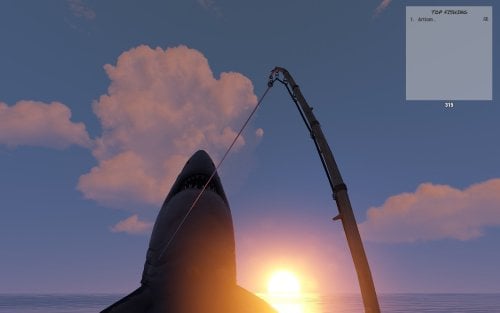
Event which idea was taken from halloween's and easter's hunting. As in original game we collect candies or eggs, that in this case we are catching fishes for which we are getting points. Amount of points are dependent on the type of fish or item we catch. It depens exacly on number of "Bait" that every type of fish has e.g. Sardine has Bait 3 so we get 3 points. Permission To assign a permission, use 'oxide.grant <user or group> <name or steam id>' fishingevent.admin - Allow to using commands. Commands This plugin provides both chat and console commands using the same syntax. When using a command in chat, prefix it with a forward slash: `/`. startfe - starts the countdown to the start of the fishing event. stopfe - Ends the event immediately, without giving away any prizes. finishfe - Ends the event immediately, with giving away any prizes. configfe - Opens the configuration UI panel Configuration Language Default English FIle { "noOneStart": "Wow, no one played so no one won.", "bestPlayer": "{0} is the top fisherman who has caught {1} fish and {2} points collected.", "playerStats": "You placed {0} of {1} with caught {2} fish and {3} points collected.", "rewardMessage": "You received {0}x {1} as an award!", "timeMessageToEvent": "<color=#326de3>Fishing Event</color>: The fishing event starts in {0} minutes." } Hooks void OnFishingEventStartCountdown() - Call when starts counting down to the start of the fishing event. void OnFishingEventStarted() - Call when the fishing event begins. void OnFishingEventEnded() - Call when the fishing event is over. void OnFishingEventUIClosed() - Call when UI disappears from players screen.(Five seconds after fishing event is over) Credits @STIVI Plugin tester and release help. @Flammable Plugin originator and tester. @Billy Joe Thanks for your UI Tool(I hate it but i love it)$15.00 -
Version 1.3.1
73 downloads
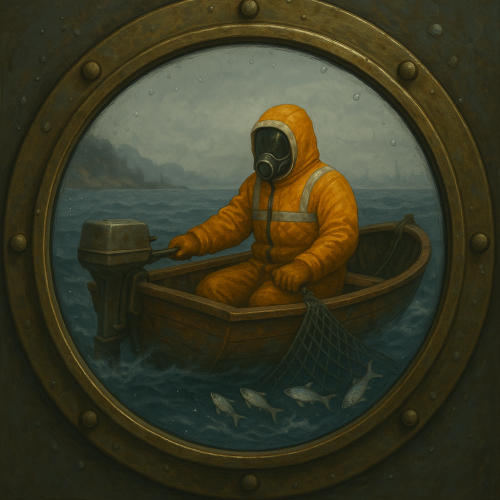
Trawling is a plugin that aims to add a new way to catch fish. Slap a net into the boats storage and trawl away. This plugin has a huge array of configurable features This is a quality of life plugin, as such it just works - there are no perms, there are no commands. Simply when a player adds a net to the storage of either the Rowboat or RHIB, it will automatically spawn a net at the rear of the boat (this is just for looks, but it adds 1000% more fun to the plugin). As the player drives the boat it will automatically catch fish (which fish can be caught is also in the configs). This plugin takes into account the depth of the boat when it picks which fish you caught (meaning you can set sharks to only be catchable in the deep water [as an example]). POTENTIAL ISSUE: I have been informed by one of my plugin purchasers that my plugin in combination with another can increase the chance of boats bugging out a bit (you can no longer interact with the boats engine). I have yet to be able to replicate the issue, but I am investigating it. So please take that into account when purchasing this plugin. None yet, if you think of anything neat or if you feel this plugin is lacking anything please contact me and I will seriously think about updating the plugin with your suggestions. None, this plugin is designed to be for all to enjoy. There are a few config fields that need a little more explanation SecondsPerTick - This is how many seconds will pass per tick. A tick will entail running through all active trawling sessions, and processing their catches since last tick etc. default is that the plugin with process the boats once ever second (no impact on my development server) UseCaptainsInventory - All catches are automatically put into the storage of the boat, unless the flag is set to false or it is full, in which case the fish will be added to the captains inventory. If that fails then the fish will be thrown overboard (catch and release). DeepWaterMinDepth - This value is checked when determining a catch, it uses Facepunch's terrain data and your position to check how far out you are. If you are in "deep water", then the catch will be taken from the [DeepWeights] data. CatchMinSpeed / CatchMaxSpeed - This was added to make trawling a little more interesting/difficult. There is a sweet spot in terms of speed you need to hit to be able to catch anything. DurabilityLossPerCatch - Fairly straight forward, every catch you get the net(s) in the storage will lose durability. When you run out of nets the players trawling session is over. DistancePerCatch - This is how far a boat has to have travelled in order to be able to catch a fish - the default is very short, meaning you can catch a lot of fish quickly, increase this to make this plugin less OP. Distance is in (approx.) meters. Shallow / Deep - These are your pools of fish that can be caught at what depths and in what distribution (again approx.) FishCatchFX - this is played whenever a fish is caught, the default is the mushroom picking sound. but you can try out others as well [https://www.corrosionhour.com/rust-prefab-list]. or contact me for some other ones that are decent (I tried several before picking the mushie sound) - leaving it as an empty string will stop any effect from playing. BoatSpeedIndicatorIcon - IMPORTANT: this plugin will not load any non Rust images, you can only use images from within rust itself. The default is the fishing tackle icon, but another good one is the fallback [assets/icons/triangle.png] image. Below is a copy of Version 1's config file. { "Version": 2, "SecondsPerTick": 0.4, "UseBoatStorage": true, "UseCaptainsInventory": true, "AllowRHIB": true, "AllowRowboat": true, "DeepWaterMinDepth": 6.0, "CatchMinSpeed": 3.5, "CatchMaxSpeed": 15.5, "DistancePerCatch": 15.0, "CatchAttemptsPerCatch": 2, "DurabilityLossPerCatch": 2.0, "ChatPrefix": "<color=#baf>[Trawler]</color> ", "Shallow": [ { "shortname": "fish.troutsmall", "skinId": 0, "weight": 50, "min": 1, "max": 2 }, { "shortname": "fish.herring", "skinId": 0, "weight": 40, "min": 1, "max": 3 }, { "shortname": "fish.minnows", "skinId": 0, "weight": 40, "min": 2, "max": 4 }, { "shortname": "fish.sardine", "skinId": 0, "weight": 35, "min": 1, "max": 3 }, { "shortname": "fish.yellowperch", "skinId": 0, "weight": 20, "min": 1, "max": 2 }, { "shortname": "fish.troutsmall", "skinId": 0, "weight": 50, "min": 1, "max": 2 }, { "shortname": "fish.herring", "skinId": 0, "weight": 40, "min": 1, "max": 3 }, { "shortname": "fish.minnows", "skinId": 0, "weight": 40, "min": 2, "max": 4 }, { "shortname": "fish.sardine", "skinId": 0, "weight": 35, "min": 1, "max": 3 }, { "shortname": "fish.yellowperch", "skinId": 0, "weight": 20, "min": 1, "max": 2 }, { "shortname": "fish.troutsmall", "skinId": 0, "weight": 50, "min": 1, "max": 2 }, { "shortname": "fish.herring", "skinId": 0, "weight": 40, "min": 1, "max": 3 }, { "shortname": "fish.minnows", "skinId": 0, "weight": 40, "min": 2, "max": 4 }, { "shortname": "fish.sardine", "skinId": 0, "weight": 35, "min": 1, "max": 3 }, { "shortname": "fish.yellowperch", "skinId": 0, "weight": 20, "min": 1, "max": 2 } ], "Deep": [ { "shortname": "fish.salmon", "skinId": 0, "weight": 40, "min": 1, "max": 2 }, { "shortname": "fish.anchovy", "skinId": 0, "weight": 30, "min": 1, "max": 3 }, { "shortname": "fish.herring", "skinId": 0, "weight": 30, "min": 1, "max": 3 }, { "shortname": "fish.orangeroughy", "skinId": 0, "weight": 10, "min": 1, "max": 1 }, { "shortname": "fish.smallshark", "skinId": 0, "weight": 5, "min": 1, "max": 1 }, { "shortname": "fish.salmon", "skinId": 0, "weight": 40, "min": 1, "max": 2 }, { "shortname": "fish.anchovy", "skinId": 0, "weight": 30, "min": 1, "max": 3 }, { "shortname": "fish.herring", "skinId": 0, "weight": 30, "min": 1, "max": 3 }, { "shortname": "fish.orangeroughy", "skinId": 0, "weight": 10, "min": 1, "max": 1 }, { "shortname": "fish.smallshark", "skinId": 0, "weight": 5, "min": 1, "max": 1 }, { "shortname": "fish.salmon", "skinId": 0, "weight": 40, "min": 1, "max": 2 }, { "shortname": "fish.anchovy", "skinId": 0, "weight": 30, "min": 1, "max": 3 }, { "shortname": "fish.herring", "skinId": 0, "weight": 30, "min": 1, "max": 3 }, { "shortname": "fish.orangeroughy", "skinId": 0, "weight": 10, "min": 1, "max": 1 }, { "shortname": "fish.smallshark", "skinId": 0, "weight": 5, "min": 1, "max": 1 }, { "shortname": "skull.human", "skinId": 0, "weight": 10, "min": 2, "max": 2, "customName": "Ancient Skull" } ], "ShallowWeights": null, "DeepWeights": null, "CatchValues": null, "Rowboat": { "position": [ 0.0, -0.1, -1.8 ], "rotation": [ 0.0, -90.0, 110.0 ] }, "RHIB": { "position": [ 0.0, 0.1, -3.0 ], "rotation": [ 0.0, -90.0, 110.0 ] }, "FishCatchFX": "assets/prefabs/deployable/survivalfishtrap/effects/fish_caught.prefab", "BoatSpeedIndicatorIcon": "assets/prefabs/missions/items/fishing.tackle.icon.png" }$10.00 -
Version 1.0.7
4,411 downloads
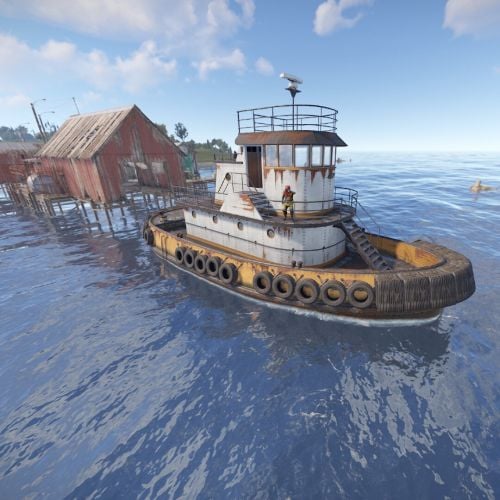
This plugin adds an option to purchase Tugboats from Fishing Village. The cost can be configured to include any vanilla item, as well as skinned items. Permission buyabletugboats.admin - Required to use commands. buyabletugboats.free - Bypasses requirement for materials. buyabletugboats.use - Required to see the menu from the boat seller. Commands btshowspawnpoints - Visually shows the spawn locations of tugboats around the fishing village. btaddspawnpoint - Adds a spawn point for the fishing village type, using the local position of the player to the village. Configuration { "How long should the tugboat be unmountable by other players for? [This will also repossess the tugboat if the player has not claimed it]": 30.0, "Should the boat be removed if the player does not claim it within the safe time?": true, "How much fuel should the tugboar spawn with?": 100, "Draw on the players hud after puchasing the boat, to show its spawn location?": true, "Items required to purchase the tugboat": [ { "shortname": "scrap", "skin": 0, "amount": 1000 }, { "shortname": "wood", "skin": 0, "amount": 10000 }, { "shortname": "metal.fragments", "skin": 0, "amount": 1000 }, { "shortname": "metal.refined", "skin": 0, "amount": 100 } ], "Local spawn positions": { "LargeFishingVillage": [ { "x": 17.8, "y": 1.9, "z": 33.4 }, { "x": -6.1, "y": 1.9, "z": 38.8 }, { "x": -44.6, "y": 1.9, "z": 20.5 }, { "x": 34.42638, "y": 1.51616859, "z": 31.5051727 }, { "x": 50.7044449, "y": 1.560014, "z": 11.11216 }, { "x": 52.35355, "y": 0.770243049, "z": -6.283246 }, { "x": -28.84793, "y": 0.919689536, "z": 40.055378 }, { "x": -50.8738022, "y": 0.6562301, "z": 3.206874 } ], "SmallFishingVillage": [ { "x": -12.6, "y": 1.9, "z": 40.9 }, { "x": 6.9, "y": 1.9, "z": 51.2 }, { "x": 26.8, "y": 1.9, "z": 25.3 }, { "x": -37.8010559, "y": 1.0653609, "z": -6.68541336 }, { "x": -39.1526642, "y": 0.354010642, "z": 25.42265 }, { "x": 35.0974236, "y": 0.229006067, "z": -1.37241554 } ] } }Free -
Version 1.0.0
6 downloads
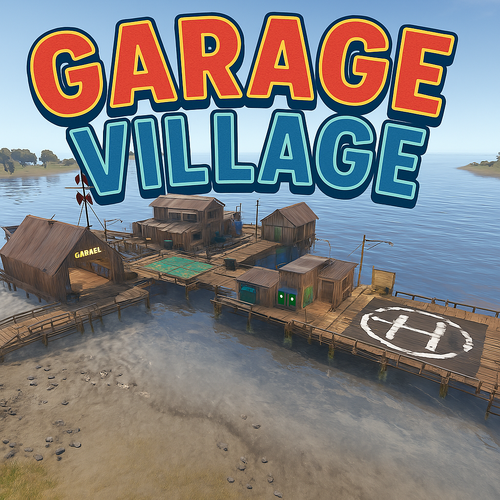
Garage Village – The Customization Haven in Rust Discover Garage Village, a custom Rust fishing prefab that offers a unique space for customization and commerce. With a heliport, a garage for modifying cars, vending machines, and the option to buy via drones, this prefab is designed for players looking for a peaceful spot to enhance their vehicles and access resources without the chaos of constant action. What does Garage Village offer? Helipad: Quick access by air, perfect for those who prefer to travel without risks and in comfort. Car modification garage: Customize and upgrade your car with different options, optimizing your vehicle for your needs. Vending machines: Purchase essential products and resources in a safe and convenient environment. Drone purchases: The option to buy products via drones, without having to leave the area or face any dangers. Additional Features: Perfect for PvE servers, where customization and commerce are key. A peaceful, non-conflict zone, ideal for players looking to improve their gear without the pressure of action. Compatible with most custom maps. Built by the RustyCry Team, optimized for exploration, commerce, and customization. Add Garage Village to your Rust world and provide players with a haven where customization and commerce are the priority. Join our community on Discord to stay updated: https://discord.gg/mGm6wznwhR$4.99-
- 1
-
-
- #fishing
- #fishing village
- (and 6 more)
-
Version 1.0.1
7 downloads
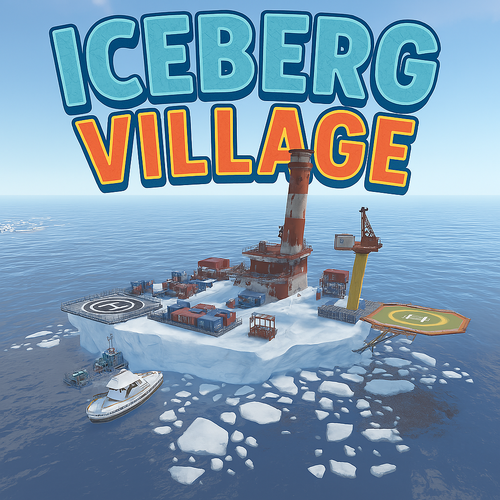
IceVillage – Frozen Fishing Village Step into IceVillage, a one-of-a-kind fishing village set in a frozen landscape. Carefully designed for an immersive experience, this prefab is the perfect addition to any Rust server. What does IceVillage offer? Fishing area – Perfect for players looking to gather resources in icy waters. Helipad – A strategic landing zone for aerial mobility. Harbor lighthouse – A realistic port lighthouse to guide ships and add to the immersive coastal atmosphere. Arctic environment – A detailed design for full immersion in a cold, rugged setting. Great for both PvE and PvP servers. Optimized for smooth performance. Compatible with most custom maps. Built by RustyCry Team, designed to enhance exploration and realism in Rust. Make IceVillage a part of your Rust world today! Join our community on Discord to stay updated: https://discord.gg/mGm6wznwhR$4.99 -
Version 1.0.1
16 downloads
The Fish Weight Contest plugin is designed to enhance your gaming experience by adding an exciting and competitive fishing event to your server. With a variety of customizable features, this plugin allows you to create engaging tournaments that keep players hooked! Features: 1. Customizable Units: - Choose between kilograms and pounds for measuring fish weight, catering to your server's preferred measurement system. 2. Tournament Duration: - Set the duration of each tournament. Once a tournament ends, a new one will automatically begin, ensuring continuous fun and competition. 3. Rewards System: - Award RP Points to the overall winner of the tournament. - Grant additional RP Points to the angler who catches the **largest fish**, adding an extra layer of competition. 4. Discord Notifications: - Keep your community informed with Discord notifications. Players will receive updates about tournament start times, winners, and other important events. 5. Unique Fishing Methods: - Spice up the fishing experience by allowing players to catch fish using spear throwing or bow shooting. This adds a unique twist to traditional fishing mechanics. Commands: /fishcontest - will show you top 5 fishermen and how much time left Discord message example Example of plugin config My Discord Profile$13.99 -
Version 3.1.1
743 downloads
Custom Gather allows you to have dynamic gather rates on your server! This allows you to assign different gather rates for as many groups of players as you would like. What this plugin offers that other gather rate plugins don't: Create custom gather rates based on oxide permission groups Example: Have a global 2x gather rate, but have VIPs gather at 4x, and Elite VIPs gather at 8x. Modify resources in Unloadable Train Wagons Set separate custom rates for Public and Private quarries Modify Fishing Rate Gather rate modifier includes grubs/worms picked from plants Configuring JSON Files This plugin creates two JSON files, one is located in Oxide/Config/CustomGather.json, and the other is in Oxide/Data/CustomGather.json. The config file is used to set the global on/off switches, unloadable train wagon settings, the blacklists and the global override list. The data file is used to create and specify custom groups to be assigned via oxide permissions. The 'default' group makes a permission named customgather.default and automatically assigns it to the default oxide group All other groups generate permissions titled customgather.{groupname} that then must be assigned to an oxide group or player. Do NOT delete the data json file during server wipe. It will reset all your custom group settings and need to be reconfigured. Tutorial Blacklists & Global Override List The Blacklists reverts an item's gather rate to 1x for the specified method of gathering that it is listed under. The Global Override List is similar, but you specify a custom gather rate for specific items that is then applied globally, regardless of permission groups or gather method. Items need to be entered in with their short names. Use this reference to find any item's short name. Insert items by their short names inside quotations and separated by commas. Chat Commands /cg info -- Displays each custom group and their gather rates Config JSON - Example { "Global On/Off Switches. Only set these to false if you use a separate plugin to control specific gather rates.": { "Modify rates for items picked off the terrain (ex: plants, tree stumps, small ore nodes)": true, "Modify rates for items grown in planters": true, "Modify rates for fishing": true, "Modify rates for PUBLIC Quarries and Pumpjacks": true, "Modify rates for PRIVATE Quarries and Pumpjacks": true, "Modify rates for the Giant Excavator": true, "Modify rates for Dispensers (ex: ore nodes, trees, animal corpses)": true, "Modify rates for Resource Train Wagons": true }, "Unloadable Train Wagon Settings": { "Multiplication Rate": 20, "Single Stack of Resources?": true }, "Blacklists (items to gather at vanilla rates)": { "Harvested Items": [ "human.skull", "skull.wolf" ], "Pickup Items": [ "cloth" ], "Planter Box Items": [ "clone.hemp" ], "Fishing": [ "fish.anchovy" ], "Quarries & Pumpjacks": [ "stones" ], "Excavator": [ "stones" ], "Train Resource Wagons": [ "metal.ore" ] }, "Global Override List": { "pumpkin": 20, "hq.metal.ore": 10 } } Data JSON - Example { "Custom Permission Group Settings": { "default": { "Gather Rate": 1, "PUBLIC Quarries & Pumpjacks Rate": 1, "PRIVATE Quarries & Pumpjacks Rate": 1, "Giant Excavator Rate": 1, "Fishing Rate": 1 }, "vip": { "Gather Rate": 2, "PUBLIC Quarries & Pumpjacks Rate": 2, "PRIVATE Quarries & Pumpjacks Rate": 2, "Giant Excavator Rate": 2, "Fishing Rate": 2 }, "Elite": { "Gather Rate": 3, "PUBLIC Quarries & Pumpjacks Rate": 3, "PRIVATE Quarries & Pumpjacks Rate": 3, "Giant Excavator Rate": 3, "Fishing Rate": 3 }, "SuperElite": { "Gather Rate": 4, "PUBLIC Quarries & Pumpjacks Rate": 4, "PRIVATE Quarries & Pumpjacks Rate": 4, "Giant Excavator Rate": 4, "Fishing Rate": 4 }, "MegaElite": { "Gather Rate": 5, "PUBLIC Quarries & Pumpjacks Rate": 5, "PRIVATE Quarries & Pumpjacks Rate": 5, "Giant Excavator Rate": 5, "Fishing Rate": 5 } } }$5.00- 25 comments
- 3 reviews
-
- 1
-
-
- #gathering
- #gather rates
- (and 11 more)
-
.thumb.gif.f64a62b3caa37d22c85904ebd23d4e9a.gif)
Version 1.0.3
66 downloads
This plugin and prefab combo adds a functional fishing competition event into your server. Players can type the chat command in to join the event when it starts, teleporting them to the platform to compete in the competition. Setup is very easy and requires little to no RustEdit experience, as the tutorial video covers the placement and setup on your server. This submission features a prefab and plugin combination. The download includes everything required to add this to your map and run the game on your server. Some of the highlights include: Completely automated event handling - the plugin handles the joining and running of the game. Join from anywhere - players can join the minigame from anywhere on the map by typing the join command. This will strip the players items from them and place them in the lobby for when the game begins. Items are returned to the player and they are redeployed where they joined from after the game ends. Includes a custom "professional" rod item that the players fish with. This allows you to set the tensile strength of the rod so it won't snap as often. Customizable prizes - can also include custom items from other plugins. The option for players to keep the fish that they catch during the event. Support for FishingTreasure - can add a temporary hotspot to the event, increasing the chances of obtaining a casket while participating. There is also an option to let players keep the caskets that they fish. Fish specific competition options - the competition can allow any fish to give the player a point, or require the player to try and catch a specific fish type. Chat command: startfc <optional: time override> Description: Forces the game to start. Time override will dictate how long until the game begins. Chat command: endfc Description: Ends the current competition and returns players to their start locations. Chat command: gofish Description: Joins any active events that haven't started yet. Chat command: leavefc Description: Leaves the current event. Chat command: fcprize Description: Rolls and gives the player a prize if they have outstanding prizes from winning. fishingcompetition.admin - Allows you to use the startfc and endfc commands.$15.00-
- 3
-
-
-
- #fishing
- #competition
- (and 5 more)
-
Version 1.0.0
8 downloads
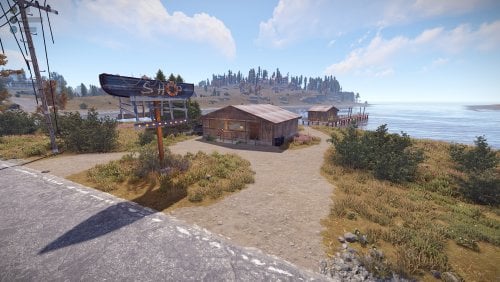
This is the bait shop set consisting of the main shop building, sign and fishing pier and all together its 880 in prefabs No loot in buildings and you will need your own shop keepers. This is just the building prefabs. Feel free to message me i will do my best to get back with you. Has been tested on a server. s$3.00-
- 3
-
-
- #bait
- #bait shop
- (and 2 more)